AJAX
비동기 통신을 처리한다.
일반적인 HTTP 요청
HTTP
- Request
- Response
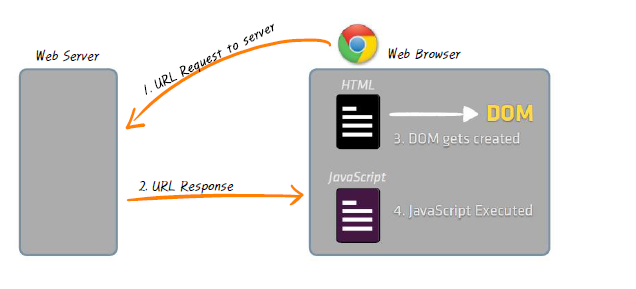
브라우저가 서버로 url request를 하는데 계속 뻗어버려서 나온게 ajax
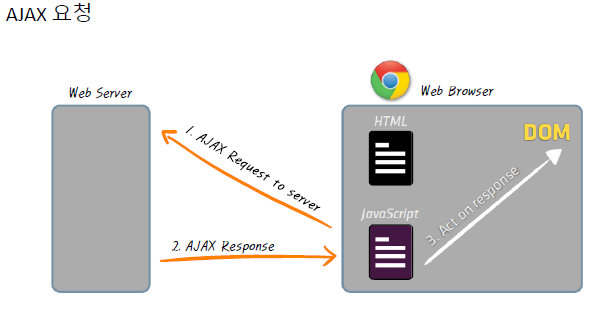
브라우저가 서버로 요청하는건 동기(순차대로 흘러가는거)요청
Javascript 비동기요청
Ajax 요청 - git
<!DOCTYPE html>
<html lang="en">
<head>
    <meta charset="UTF-8">
    <meta name="viewport" content="width=device-width, initial-scale=1.0">
    <title>Ajax 요청 - Naver</title>
    <script src="./jquery-3.7.1.js"></script>
    <script type="text/javascript">
        $().ready(function(){
            $("button").click(function(){
                $.ajax("http://api.github.com",{
                    success:function(response){
                        console.log(response)
                        // JSON 객체를 문자열로 만들어준다
                        var responseText=JSON.stringify(response)
                        $(".ajax_response_naver").text(responseText)
                    }
                })
            })
        })
    </script>
</head>
<body>
    <h1>Github API 응답</h1>
    <button>Github API 불러오기</button>
    <div class="ajax_response_naver"></div>
</body>
</html>
HTTP 4가지
POST(create), PUT(update), GET(read), DELETE(delete)
더 많이 사용하는 방법
  <title>Ajax 요청 - Naver</title>
    <script src="./jquery-3.7.1.js"></script>
    <script type="text/javascript">
        $().ready(function(){
            $("button").click(function(){
                $.ajax({
                    url:"http://api.github.com",
                    method:"get",
                    success:function(response){
                        console.log(response)
                    }
                })
            })
        })
    </script>
</head>
<body>
    <h1>Github API 응답</h1>
    <button>Github API 불러오기</button>
    <div class="ajax_response_naver"></div>
</body>
HTTP는 request(URL)가 있으면 response(HTML)가 무조건 있다.
AJAX는 HTML을 보내주지 않는다. JSON을 보내준다 (거의 국제표준) => 분석/분해 해서 직접 HTML로 바꿔줘야한다. 그래야 원하는 형태로 볼 수 있다.(이게 번거로움)
Ajax (Json to HTML)
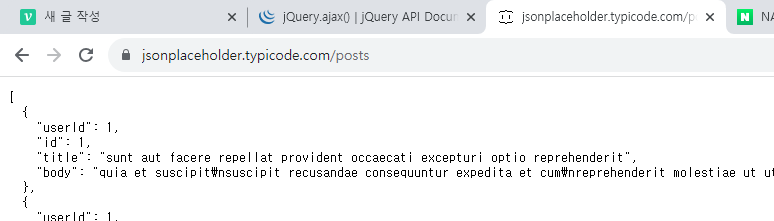
주소 복사
<script src="./jquery-3.7.1.js"></script>
    <script type="text/javascript">
        $().ready(function(){
            var postURL = "https://jsonplaceholder.typicode.com/posts"

            $.ajax({
                url:postURL,
                metod:"get",
                success:function(response){
                    console.log(response)
                }
            })
        })
        </script>
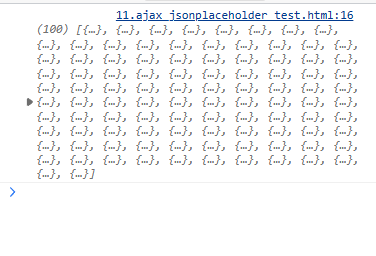
- 여기에 있는 배열을 테이블에 집어넣는다
  // console.log(response)
                    for(var i in response){ // response의 인덱스만 넘겨줌
                        console.log(i,response[i])
                    }
                }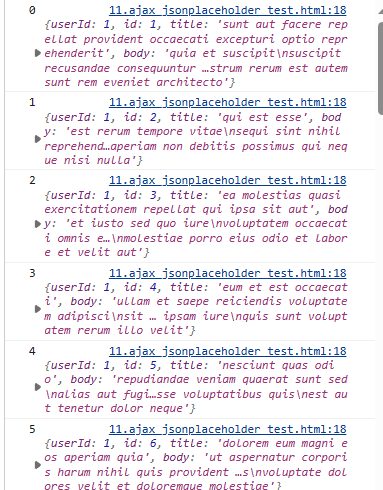
- response안에 값을 보여준다
값들을 테이블 안에 넣기
<title>Ajax (Json to HTML)</title>
    <script src="./jquery-3.7.1.js"></script>
    <script type="text/javascript">
        $().ready(function(){
            var postURL = "https://jsonplaceholder.typicode.com/posts"

            $.ajax({
                url:postURL,
                metod:"get",
                success:function(response){
                    // console.log(response)
                    var tableTBody=$("table").children("tbody")
                    for(var i in response){ // response의 인덱스만 넘겨줌
                        // console.log(i,response[i])
                        var idTd=$("<td></td>")
                        idTd.text(response[i].id)

                        var userIdTd=$("<td></td>")
                        userIdTd.text(response[i].userId)

                        var titleTd=$("<td></td>")
                        titleTd.text(response[i].title)

                        var tableRow=$("<tr></tr>")
                        tableRow.append(idTd)
                        tableRow.append(userIdTd)
                        tableRow.append(titleTd)
                        tableTBody.append(tableRow)
                    }
                }
            })
        })
        </script>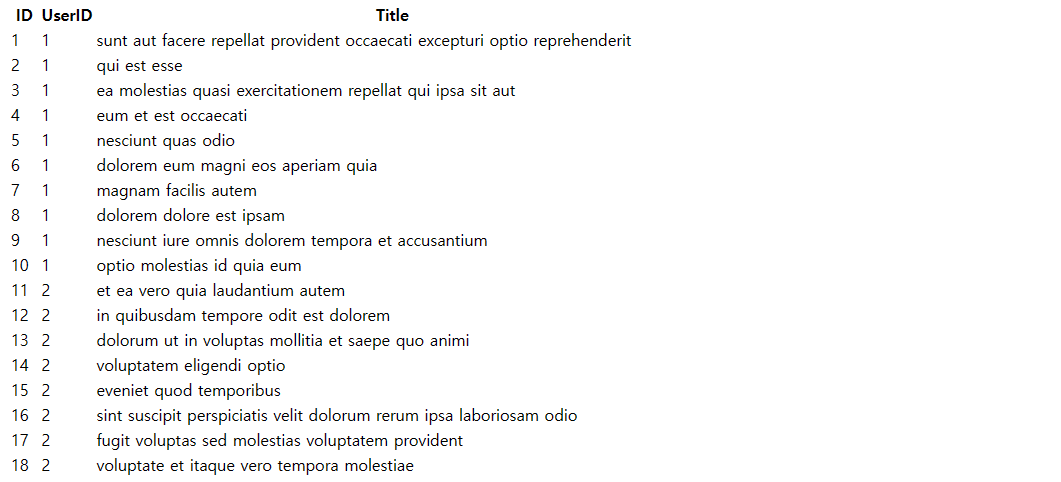
ajax 테이블에 이미지 넣기1
https://jsonplaceholder.typicode.com/photos
<!DOCTYPE html>
<html lang="en">
<head>
    <meta charset="UTF-8">
    <meta name="viewport" content="width=device-width, initial-scale=1.0">
    <title>Document</title>
     <script src="./jquery-3.7.1.js"></script>
    <script type="text/javascript">
        $().ready(function(){
            var postURL="https://jsonplaceholder.typicode.com/photos"
            $.ajax({
                url:postURL,
                method:"get",
                success:function(response){
                    var tableTBody=$("table").children("tbody")
                    for(var i in response){

                        var a=$("<a href='"+response[i].url+"'></a>")
                        a.text(response[i].title)
                        var titleTd=$("<td></td>")
                        titleTd.append(a)

                        var img=$("<img src='"+response[i].thumbnailUrl+"'/>")
                        var thumnailTd=$("<td></td>")
                        thumnailTd.append(img)

                        var tableRow=$("<tr></tr>")
                        tableRow.append(titleTd)
                        tableRow.append(thumnailTd)
                        tableTBody.append(tableRow)
                    }

                }
            })
        })
    </script>
</head>
<body>
    <table>
    <thead>

        <tr>
            <th>title</th>
            <th>thumnail</th>
        </tr>
    </thead>
    <tbody></tbody>
    </table>
</body>
</html>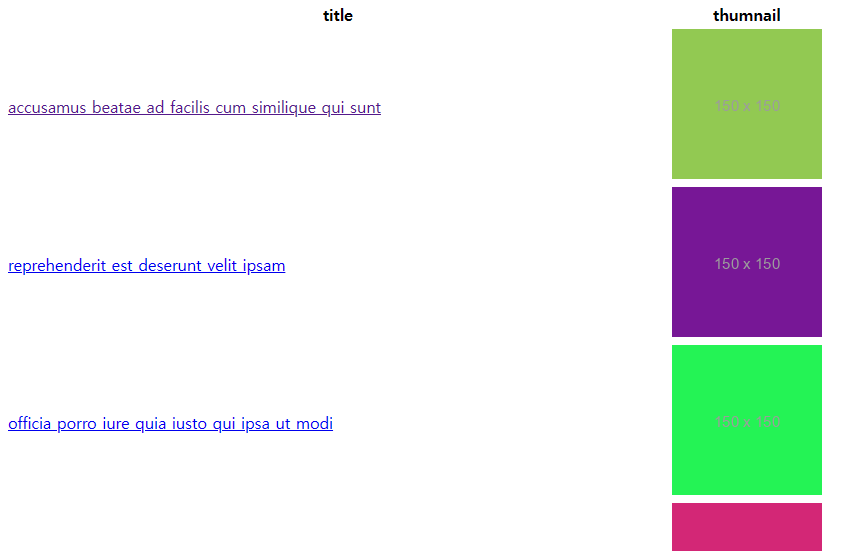
ajax 테이블에 이미지 넣기2
<!DOCTYPE html>
<html lang="en">
<head>
    <meta charset="UTF-8">
    <meta name="viewport" content="width=device-width, initial-scale=1.0">
    <title>Document</title>
     <script src="./jquery-3.7.1.js"></script>
    <script type="text/javascript">
        $().ready(function(){
            var postURL="https://api.github.com/users"
            $.ajax({
                url:postURL,
                method:"get",
                success:function(response){
                    var tableTBody=$("table").children("tbody")
                    for(var i in response){

                        var a=$("<a href='"+response[i].url+"'></a>")
                        a.text(response[i].login)
                        var titleTd=$("<td></td>")
                        titleTd.append(a)

                        var img=$("<img src='"+response[i].avatar_url+"'/>")
                        img.css({
                            width:"80px",
                            height:"80px",
                            "border-radius":"40px"
                        })
                        var thumnailTd=$("<td></td>")
                        thumnailTd.append(img)

                        var tableRow=$("<tr></tr>")
                        tableRow.append(titleTd)
                        tableRow.append(thumnailTd)
                        tableTBody.append(tableRow)
                    }

                }
            })
        })
    </script>
</head>
<body>
    <table>
    <thead>

        <tr>
            <th>title</th>
            <th>thumnail</th>
        </tr>
    </thead>
    <tbody></tbody>
    </table>
</body>
</html>