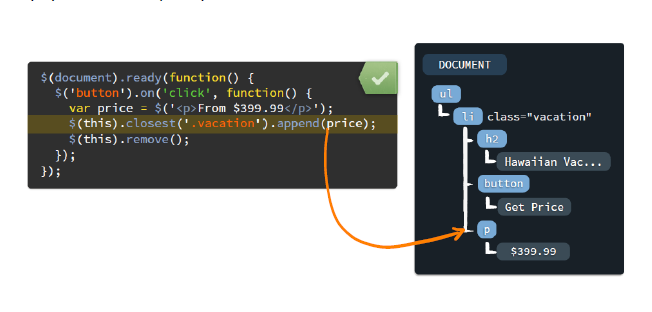
클릭한 애만 지우고 싶으면 $(this)를 사용
$("button.big-button").click(function(){
                var newP=$("<p>From $.399.99</p>")
                $("div.plan").append(newP)
                console.log(this)
                console.log($(this))
                $(this).remove()
            })
여기서 this란 click을 콜한 function이 button.big button이여서 this가 button이 된다.
내가 클릭한 버튼 밑에 이벤트를줄떄
<script type="text/javascript">
        $().ready(function(){
            $("button.big-button").click(function(){
                var newP=$("<p>From $.399.99</p>")
                $(this).after(newP) // 내가 클릭한 버튼 아래에 newP를 만들어라

                $(this).remove()
            })
        })

    </script>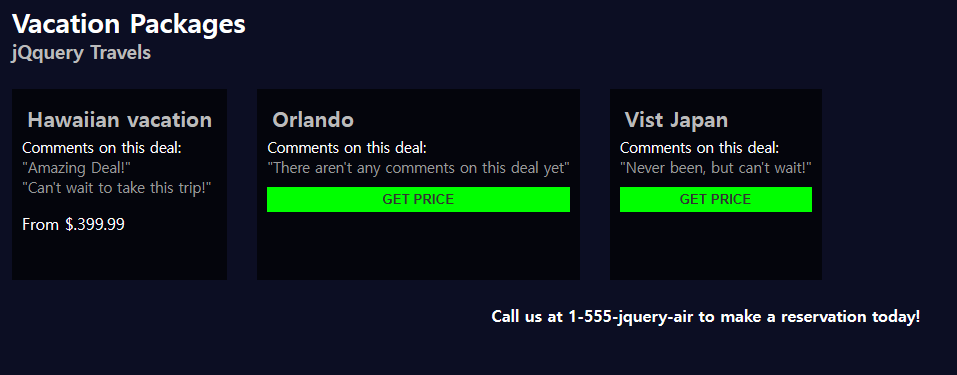
closest
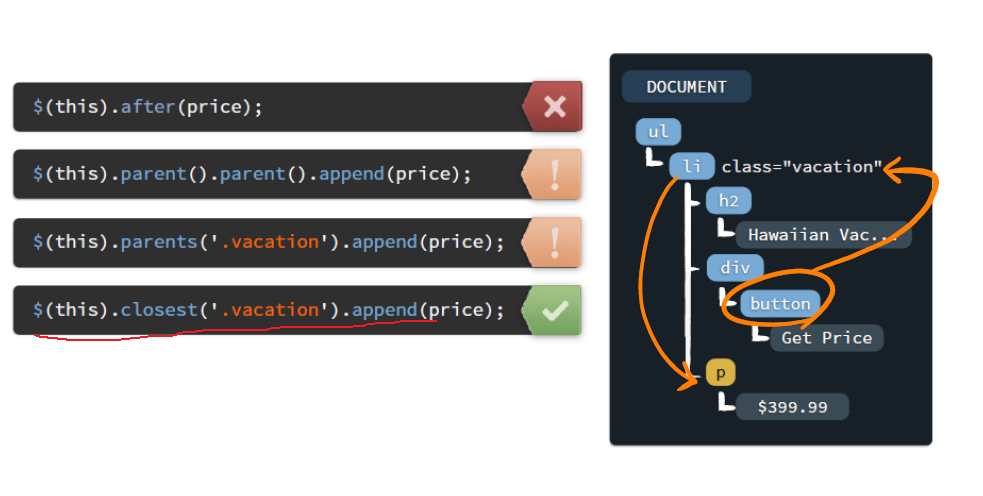
- 나의 가장 인접한 부모를 찾아와라
<script type="text/javascript">
        $().ready(function(){
            $("button.big-button").click(function(){
                var newP=$("<p>From $.399.99</p>")

                $(this).closest(".plan").append(newP)
                $(this).remove()
            })
        })
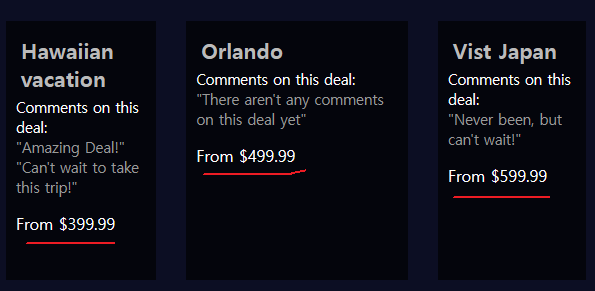
각각 다른값을 주고 싶을때??
 <div class="flex-box">
        <div class="plan" data-price="399.99">

        <div class="plan" data-price="499.99">
        <div class="plan" data-price="599.99">
각각 div에 data-price 값을 준다.
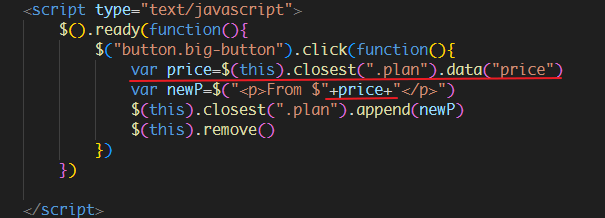
전체코드
<!DOCTYPE html>
<html lang="en">
<head>
    <meta charset="UTF-8">
    <meta name="viewport" content="width=device-width, initial-scale=1.0">
    <title>Dom handling</title>
    <style type="text/css">
        body{
            background-color: #0c0e23;
            color: white;
            padding: 20px;
        }
        h1{
            margin: 0px;
            font-size: 20pt;
        }
        h3{
            margin: 0px;
            color:#BBB;
            font-weight: 12pt;
        }
        .flex-box{
            display: flex;
            flex-direction: row;
            margin:25px 0px;
        }
        .flex-box h2.plan-title{
            font-size: 16pt;
            color: #BBB;
            margin: 5px;
        }
        .flex-box p.comments-title{
            padding: 0px;
            margin: 0px;
            font-size: 11pt
        }
        .flex-box ul.comments{
            padding: 0px;
            margin: 0px;
            color: #999;
            font-size: 11pt;
        }
        .flex-box ul.comments>li{
            list-style: none;
        }
        .flex-box .big-button{
            width: 100%;
            padding: 5px;
            background-color: #0F0;
            color: #333;
            font-weight: bold;
            border: 0px;
            margin-top: 10px;
        }
        .flex-box > .plan{
            background-color: #000A;
            padding: 10px 10px 30px 10px;
            margin-right: 30px;
        }

        .contact{
            text-align: center;
            font-weight: bold;
        }
    </style>
    <script src="./jquery-3.7.1.js"></script>
    <script type="text/javascript">
        $().ready(function(){
            $("button.big-button").click(function(){
                var price=$(this).closest(".plan").data("price")
                var newP=$("<p>From $"+price+"</p>")
                $(this).closest(".plan").append(newP)
                $(this).remove()
            })
        })

    </script>
</head>
<body>
    <h1>Vacation Packages</h1>
    <h3>jQquery Travels</h3>
    <div class="flex-box">
        <div class="plan" data-price="399.99">
            <h2 class="plan-title">Hawaiian vacation</h2>
            <p class="comments-title">Comments on this deal:</p>
            <ul class="comments">
                <li>"Amazing Deal!"</li>
                <li>"Can't wait to take this trip!"</li>
            </ul>
            <button class="big-button">GET PRICE</button>
        </div>
        <div class="plan" data-price="499.99">
            <h2 class="plan-title">Orlando</h2>
            <p class="comments-title">Comments on this deal:</p>
            <ul class="comments">
                <li>"There aren't any comments on this deal yet"</li>
            </ul>
            <div>
            <button class="big-button">GET PRICE</button>
        </div>
        </div>
        <div class="plan" data-price="599.99">
            <h2 class="plan-title">Vist Japan</h2>
            <p class="comments-title">Comments on this deal:</p>
            <ul class="comments">
                <li>"Never been, but can't wait!"</li>
            </ul>
        <div>
            <div>
            <button class="big-button">GET PRICE</button>
            </div>
        </div>
        </div>
    </div>
    <div class="contact">Call us at 1-555-jquery-air to make a reservation today!</div>
</body>
</html>
중복코드 처리하기
<script type="text/javascript">
        $().ready(function(){
            $("button.big-button").click(function(){
                var price=$(this).closest(".plan").data("price")
                var newP=$("<p>From $"+price+"</p>")
                $(this).closest(".plan").append(newP)
                $(this).remove()
            })
        })

    </script>
이코드를

 <script type="text/javascript">
        $().ready(function(){
            $("button.big-button").click(function(){
                var plan = $(this).closest(".plan")

                var price=plan.data("price")
                var newP=$("<p>From $"+price+"</p>")

                plan.append(newP)
                $(this).remove()
            })
        })
이렇게 바꾼다.
Event가 적용되는 대상
jquery는 동적으로 추가된 p,button등 var로 새롭게 추가된 Element들에 대해서는 event가 할당할 수 없다.
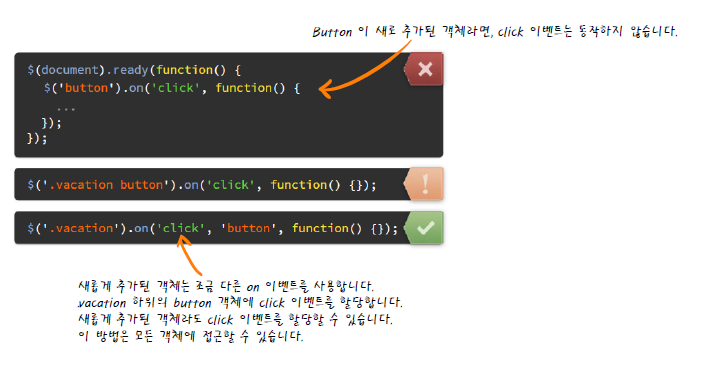
방법1
// Shadow DOM에 이벤트를 할당한다.
// shadow DOM을 감싸고 있는 DOM 에게 이벤트를 할당하고
//이벤트의 대상이 되는 Shadow DOM을 명시해준다
//불편함
$(".plan").on("click", "p", function(){
                alert("p태그를 클릭했습니다.")
            })
방법2
// 새롭게 정의한 Shadow DOM
                var newP=$("<p>From $"+price+"</p>")
                //정의를 하고 나서 곧바로 이벤트를 할당
                newP.click(function(){
                    alert("Shadow P를 클릭했습니다.")
                })