Preface
이번 글은 Google의 NotebookLM이 작성해준 초안을 기반으로 작성되었습니다.
새로운 LLM 관련 기술들이 쏟아지는 지금, 그 스포트라이트를 받는 주체는 과장 없이 주마다 혹은 날마다 바뀝니다. 이 글을 쓰는 시점에는 Google의 NotebookLM 이 그 주인공인 것 같습니다. NotebookLM은 사용자가 올린 소스를 기반으로 수준 높은 요약, 질의 등을 제공해주는 학습 비서입니다. 이번 글에서 다루는 RAG의 정수라는 것이죠. 요즘 NotebookLM이 난리인 이유는 바로 소스 기반으로 여러 명의 사람이 대화를 나누는 팟캐스트 기능인데요. 이번 블로그 글을 기반으로 생성한 팟캐스트는 아래의 링크에 들으실 수 있습니다. (정말 놀랍습니다...🫨)
https://drive.google.com/file/d/1BMKod15WF4luWtYmMrCKLtf4SOltGZS4/view?usp=sharing
첫 번째 RAG 글에서 언급했듯이 이 글들은 제가 개인적으로 공부한 학습 내용을 블로그화(?)한 결과물인데요. 그러면 저는 NotebookLM을 통해서 공부하고 정리했던 내용들을 토대로 손쉽게 글을 쓰면 되는 게 아닐까? 하였고 해당 내용들을 바탕으로 이전 RAG를 참고하여 블로그 글을 작성하도록 시켰습니다. 결과는 역시나 훌륭했습니다. 이제는 블로그글을 쓰기 위해 시간과 공을 많이 들일 필요가 없겠네요...(안그래도 수준 낮은 글쓰기 능력은 퇴화하겠지만) 아래는 그 결과입니다.
안녕하세요! RAG 시리즈 세 번째 글입니다. 지난 글에서는 사용자의 쿼리를 Retrieval에 더 적합하게 변환하는 Query Translation 기법들에 대해 알아보았습니다. Query Translation이 질문 자체를 개선하는 기법이었다면, 이번 글에서는 Retrieval 과정 자체를 더욱 효과적으로 만드는 다양한 Advanced 기법들에 대해 다뤄보겠습니다.
RAG의 핵심은 역시 Retrieval이죠. Retrieval의 성능을 높이기 위한 기법들은 크게 문서의 임베딩 방식을 개선하거나, 검색 대상을 좁히거나, 문서 구조를 최적화하는 방향으로 발전하고 있습니다. 오늘 살펴볼 기법들은 다음과 같습니다.
- Routing
- Query Structuring
- Multi-representation Indexing
- RAPTOR (Recursive Abstractive Processing for Tree-Organized Retrieval)
- ColBERT
1. Routing
RAG에서 Retrieval의 효율성을 높이는 방법은 처음부터 관련성이 높은 정확한 소스를 찾는 것입니다. 사용자의 질문이 들어왔을 때, 관련된 데이터 베이스나 프롬프트를 선택하는 과정을 라우팅(Routing)이라고 합니다. 전자를 Logical Routing, 후자를 Semantic Routing 이라고 합니다.
Logical routing은 LLM에게 우리가 가진 여러 데이터 소스에 대한 정보를 알려주고, 들어온 질문에 대해 LLM이 해당 질문에 어떤 소스가 맞는지를 근거와 함께 찾도록 하는 방식입니다.
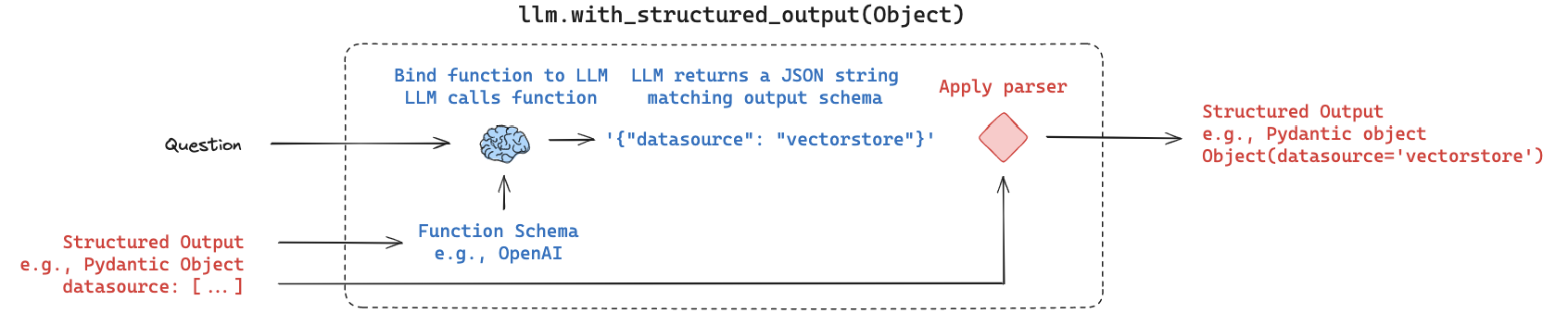
Langchain의 structured_output 기능과 같은 도구를 활용하여 LLM이 미리 정의된 pydantic Model과 같은 형태로 출력을 생성하도록 유도할 수 있습니다. 이를 통해 LLM이 어떤 소스를 선택했는지 파싱하여 실제 Retrieval을 수행할 때 해당 소스로 분기 처리할 수 있게 됩니다.
# Data model
class RouteQuery(BaseModel):
    """Route a user query to the most relevant datasource."""
    datasource: Literal["python_docs", "js_docs", "golang_docs"] = Field(
        ...,
        description="Given a user question choose which datasource would be most relevant for answering their question",
    )

# LLM with function call
llm = ChatOpenAI(model="gpt-3.5-turbo-0125", temperature=0)
structured_llm = llm.with_structured_output(RouteQuery)

# Prompt
system = """You are an expert at routing a user question to the appropriate data source.
Based on the programming language the question is referring to, route it to the relevant data source."""
prompt = ChatPromptTemplate.from_messages(
    [
        ("system", system),
        ("human", "{question}"),
    ]
)

# Define router
router = prompt | structured_llm
위 코드처럼 데이터 소스 선택에 대한 Schema를 정의하고, 시스템 프롬프트로 LLM에게 라우팅 역할을 부여한 뒤, with_structured_output으로 출력을 구조화하여 라우팅 결과를 얻습니다.
Semantic routing 은 질문에 맞는 정확한 프롬프트를 찾는 방식입니다. LLM에게는 상황에 따라 다른 PromptTemplate이 필요할 수 있습니다. 미리 준비된 여러 유형의 검증된 프롬프트들을 임베딩해두고, 사용자의 질문이 들어오면 질문을 임베딩한 뒤 프롬프트 임베딩들과 유사도 검색을 수행합니다. 가장 유사도가 높은 프롬프트를 선택하여 LLM 에게 입력으로 넣어주는 방식으로 작동합니다.
# Two prompts
physics_template = """You are a very smart physics professor. \
You are great at answering questions about physics in a concise and easy to understand manner. \
When you don't know the answer to a question you admit that you don't know.
Here is a question:
{query}"""

math_template = """You are a very good mathematician. You are great at answering math questions. \
You are so good because you are able to break down hard problems into their component parts, \
answer the component parts, and then put them together to answer the broader question.
Here is a question:
{query}"""

# Embed prompts
embeddings = OpenAIEmbeddings()
prompt_templates = [physics_template, math_template]
prompt_embeddings = embeddings.embed_documents(prompt_templates)

# Route question to prompt
def prompt_router(input):
    # Embed question
    query_embedding = embeddings.embed_query(input["query"])
    # Compute similarity
    similarity = cosine_similarity([query_embedding], prompt_embeddings)
    most_similar = prompt_templates[similarity.argmax()]
    # Chosen prompt
    print("Using MATH" if most_similar == math_template else "Using PHYSICS")
    return PromptTemplate.from_template(most_similar)
위 예시에서는 수학과 물리학 두 가지 주제의 프롬프트를 임베딩하고, 질문 임베딩과 유사도(cosine_similarity)를 계산하여 가장 적절한 프롬프트를 선택하는 코드를 보여줍니다
2. Query Structuring
다음으로 살펴볼 기법은 사용자의 자연어 질문을 Structured Query로 변환하고, 이를 Vectorstore에 저장된 벡터들의 메타데이터를 필터링하는 데 활용하는 것입니다.
벡터 저장소의 벡터에도 문서 자체에 대한 정보인 메타데이터가 존재합니다. 메타데이터 필터링을 활용하면 유사도 검색을 수행하는 대상 범위를 크게 줄일 수 있어 검색의 효율성과 정확도를 동시에 높일 수 있습니다. 특히 어떤 조건부적인 정보를 묻는 질문의 경우, 단순히 벡터 간 유사도 비교만으로는 정확도에 한계가 있을 수 있으므로 메타데이터 필터링이 매우 효과적입니다.
LLM에게 필터링을 위한 Schema(예: pydantic Model) 정보를 제공하면, LLM은 질문의 내용을 파악하여 이 Schema의 값들을 채워 넣어 올바른 Function(structured query)을 생성할 수 있게 됩니다. 이 생성된 structured query를 이용하여 Vectorstore의 메타데이터를 필터링한 뒤 유사도 검색을 수행합니다.
검색 필터링을 위한 Schema를 pydantic Model로 정의합니다.
class TutorialSearch(BaseModel):
    """Search over a database of tutorial videos about a software library."""
    content_search: str = Field(
        ...,
        description="Similarity search query applied to video transcripts.",
    )
    title_search: str = Field(
        ...,
        description=(
            "Alternate version of the content search query to apply to video titles. "
            "Should be succinct and only include key words that could be in a video "
            "title."
        ),
    )
    min_view_count: Optional[int] = Field(
        None,
        description="Minimum view count filter, inclusive. Only use if explicitly specified.",
    )
    max_view_count: Optional[int] = Field(
        None,
        description="Maximum view count filter, exclusive. Only use if explicitly specified.",
    )
    earliest_publish_date: Optional[datetime.date] = Field(
        None,
        description="Earliest publish date filter, inclusive. Only use if explicitly specified.",
    )
    latest_publish_date: Optional[datetime.date] = Field(
        None,
        description="Latest publish date filter, exclusive. Only use if explicitly specified.",
    )
    min_length_sec: Optional[int] = Field(
        None,
        description="Minimum video length in seconds, inclusive. Only use if explicitly specified.",
    )
    max_length_sec: Optional[int] = Field(
        None,
        description="Maximum video length in seconds, exclusive. Only use if explicitly specified.",
    )

    def pretty_print(self) -> None:
        for field in self.__fields__:
            if getattr(self, field) is not None and getattr(self, field) != getattr(
                self.__fields__[field], "default", None
            ):
                print(f"{field}: {getattr(self, field)}")
정의된 Schema를 바탕으로 LLM이 structured Query를 생성하도록 with_structured_output을 설정합니다. 시스템 프롬프트에서 LLM에게 데이터베이스 쿼리 생성 전문가 역할을 부여하는 것을 볼 수 있습니다.
system = """You are an expert at converting user questions into database queries. \
You have access to a database of tutorial videos about a software library for building LLM-powered applications. \
Given a question, return a database query optimized to retrieve the most relevant results.
If there are acronyms or words you are not familiar with, do not try to rephrase them."""

prompt = ChatPromptTemplate.from_messages(
    [
        ("system", system),
        ("human", "{question}"),
    ]
)

llm = ChatOpenAI(model="gpt-3.5-turbo-0125", temperature=0)
structured_llm = llm.with_structured_output(TutorialSearch)
query_analyzer = prompt | structured_llm
이 query_analyzer에 질문을 입력하면 다음과 같이 structured Query가 생성됩니다.
query_analyzer.invoke(
    {"question": "videos on chat langchain published in 2023"}
).pretty_print()
content_search: chat langchain
title_search: 2023
earliest_publish_date: 2023-01-01
latest_publish_date: 2024-01-01
생성된 structured Query를 활용하여 벡터 검색 시 메타데이터 필터링을 적용함으로써 더욱 정확하고 효율적인 Retrieval이 가능해집니다
3. Multi-representation Indexing
일반적인 RAG에서는 문서를 여러 chunk 단위로 나누고 이를 임베딩하여 Vectorstore에 저장합니다. 그러나 chunk의 사이즈와 수는 결정하기 어려운 매개변수이며, 문서를 쪼개면 문서 전체의 문맥이 작아져 Context로서의 의미가 줄어들 수 있습니다.
다중 표현 색인화 기법(Multi-representation Indexing), 또는 Proposition Indexing은 이러한 문제를 해결합니다. 이 기법은 문서를 바로 임베딩하는 대신, LLM을 통해 문서(또는 chunk)를 먼저 요약합니다. 마치 소금물을 증류하여 소금이 나오는 것처럼 핵심적인 내용만 남도록 Distillation하는 것입니다. 이 요약된 내용을 임베딩하여 Vectorstore에 저장하고 Retrieval에 활용합니다.
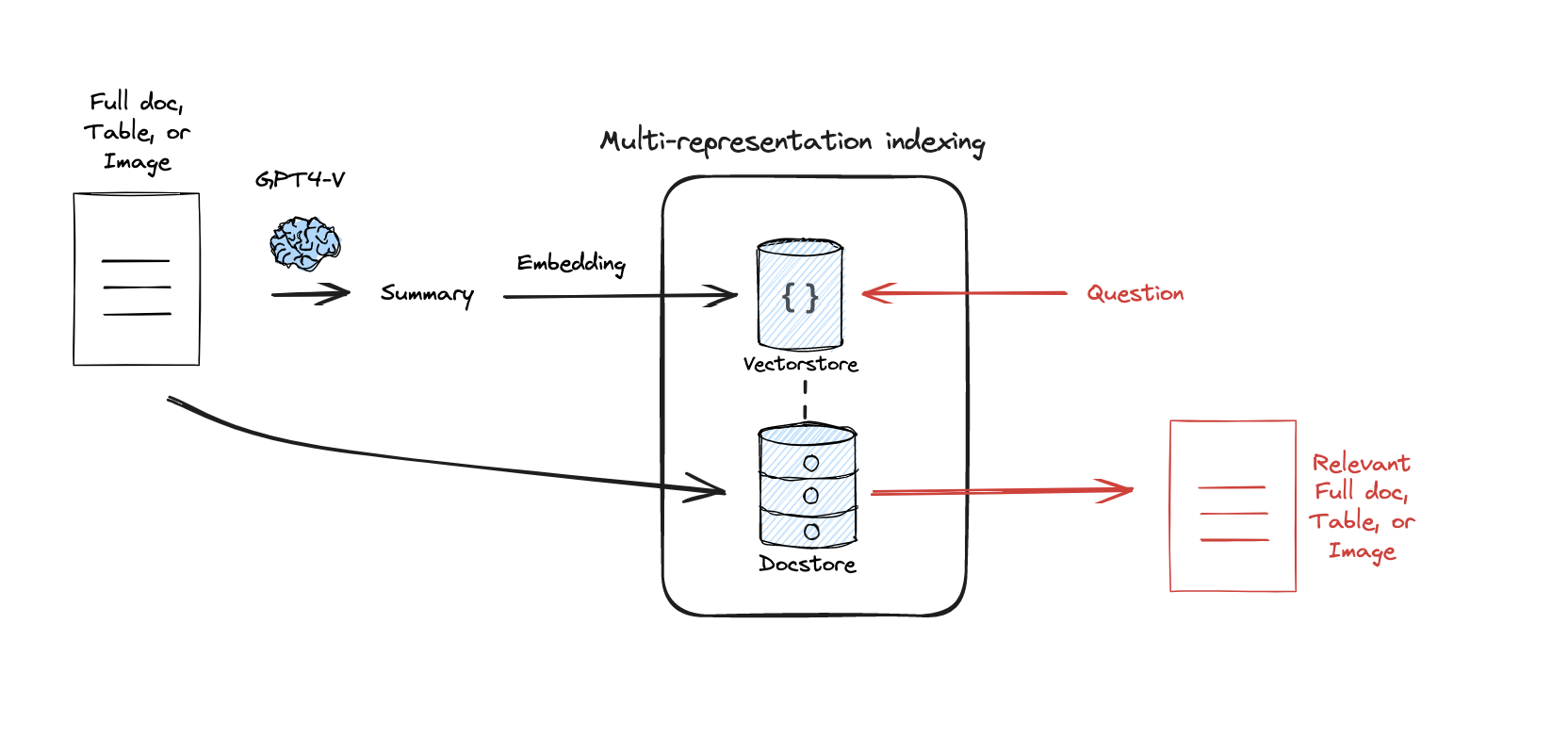
여기서 중요한 점은 Vectorstore에 저장된 것은 요약이지만, Retrieval시 해당 요약이 검색되면 실제로 LLM에게 Context로 제공되는 것은 별도로 저장된 원본 문서 자체라는 것입니다. 요약은 그저 vector search를 위해서 생성한 것이죠. 이 방식을 통해 chunk 크기 및 수 결정의 어려움과 문서 전체 문맥 손실 문제를 해결할 수 있습니다. 검색은 효율적인 요약 임베딩으로 수행하고, Context는 풍부한 원본 문서로 제공받게 되는 것입니다.
Langchain의 MultiVectorRetriever를 사용하면 이러한 구조를 쉽게 구현할 수 있습니다. MultiVectorRetriever는 Vectorstore (요약 저장)와 문서 저장소 (docstore, 원본 문서 저장)를 함께 관리하여, 검색된 요약에 연결된 원본 문서를 가져오게 해줍니다.
먼저 문서를 요약합니다.
chain = (
    {"doc": lambda x: x.page_content}
    | ChatPromptTemplate.from_template("Summarize the following document:\n\n{doc}")
    | ChatOpenAI(model="gpt-3.5-turbo",max_retries=0)
    | StrOutputParser()
)

summaries = chain.batch(docs, {"max_concurrency": 5})
그 다음 MultiVectorRetriever를 설정하고 요약 및 원본 문서를 저장합니다
# The vectorstore to use to index the child chunks
vectorstore = Chroma(collection_name="summaries",
                     embedding_function=OpenAIEmbeddings())

# The storage layer for the parent documents
store = InMemoryByteStore()

id_key = "doc_id"

# The retriever
retriever = MultiVectorRetriever(
    vectorstore=vectorstore,
    byte_store=store,
    id_key=id_key,
)

doc_ids = [str(uuid.uuid4()) for _ in docs]

# Docs linked to summaries
summary_docs = [
    Document(page_content=s, metadata={id_key: doc_ids[i]})
    for i, s in enumerate(summaries)
]

# Add
retriever.vectorstore.add_documents(summary_docs)
retriever.docstore.mset(list(zip(doc_ids, docs)))
이렇게 설정된 retriever를 사용하면 내부적으로 요약을 검색하고 해당 요약의 doc_id를 이용해 원본 문서를 가져와 Context로 사용하게 됩니다. 🤗
4. RAPTOR
어떤 질문은 문서의 특정 디테일한 내용만을 요구하는 반면, 어떤 질문은 문서의 전반적인 내용을 필요로 할 수 있습니다. 기본적인 Retrieval 방식(예: KNN)에서는 k 값을 고정해야 하는데, 만약 질문에 필요한 청크가 5개인데 k를 3으로 설정하면 필요한 정보를 놓칠 수 있습니다. 이러한 문제를 해결하기 위한 기법이 바로 RAPTOR (Recursive Abstractive Processing for Tree-Organized Retrieval) 입니다.
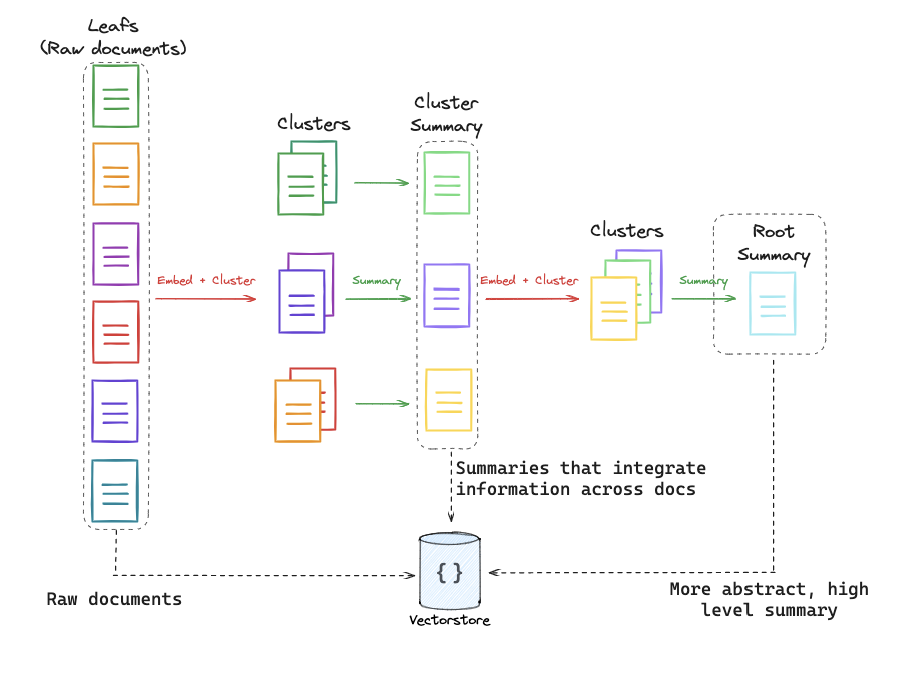
RAPTOR는 문서와 그 요약을 트리 형태의 계층적인 구조로 만듭니다. 먼저 원본 문서를 여러 chunk로 나눈 뒤, 비슷한 chunk들을 클러스터링하고 이를 다시 요약합니다. 이 요약된 내용은 기존 여러 chunk의 내용을 담으면서도 하나의 chunk 크기 정도가 됩니다. 이 과정을 클러스터가 하나가 될 때까지, 즉 가장 high-level의 요약인 Root Summary가 나올 때까지 재귀적으로 반복합니다.
이렇게 생성된 다양한 추상화 수준의 문서들을 Vectorstore에 저장하여 Pool을 만들면, 질문의 요구 수준에 맞는 추상화 단계의 문서들을 Retrieval에 활용하기 용이해집니다. 이는 Semantic Coverage를 높인다고 표현할 수 있습니다. 결과적으로 KNN의 k 값 설정 문제로 필요한 정보를 놓치는 것을 방지하는 데 도움이 됩니다.
코드는 아래에서 확인할 수 있습니다. (다른 항목들에 비해 코드가 길어 부득이하게 링크로 첨부합니다.)
https://github.com/langchain-ai/langchain/blob/master/cookbook/RAPTOR.ipynb
5. ColBERT
기존의 RAG 시스템에서는 문서를 하나의 고정된 길이 벡터로 표현하는 방식이 일반적입니다. 하지만 이 방식은 문서 전체의 의미적 뉘앙스를 모두 담기 어렵다는 한계가 있습니다. 특히, 문서 내에 관련 없는 반복적인 내용이 포함되어 있다면 이러한 내용이 임베딩을 저해하여 사용성을 떨어뜨릴 수 있습니다.
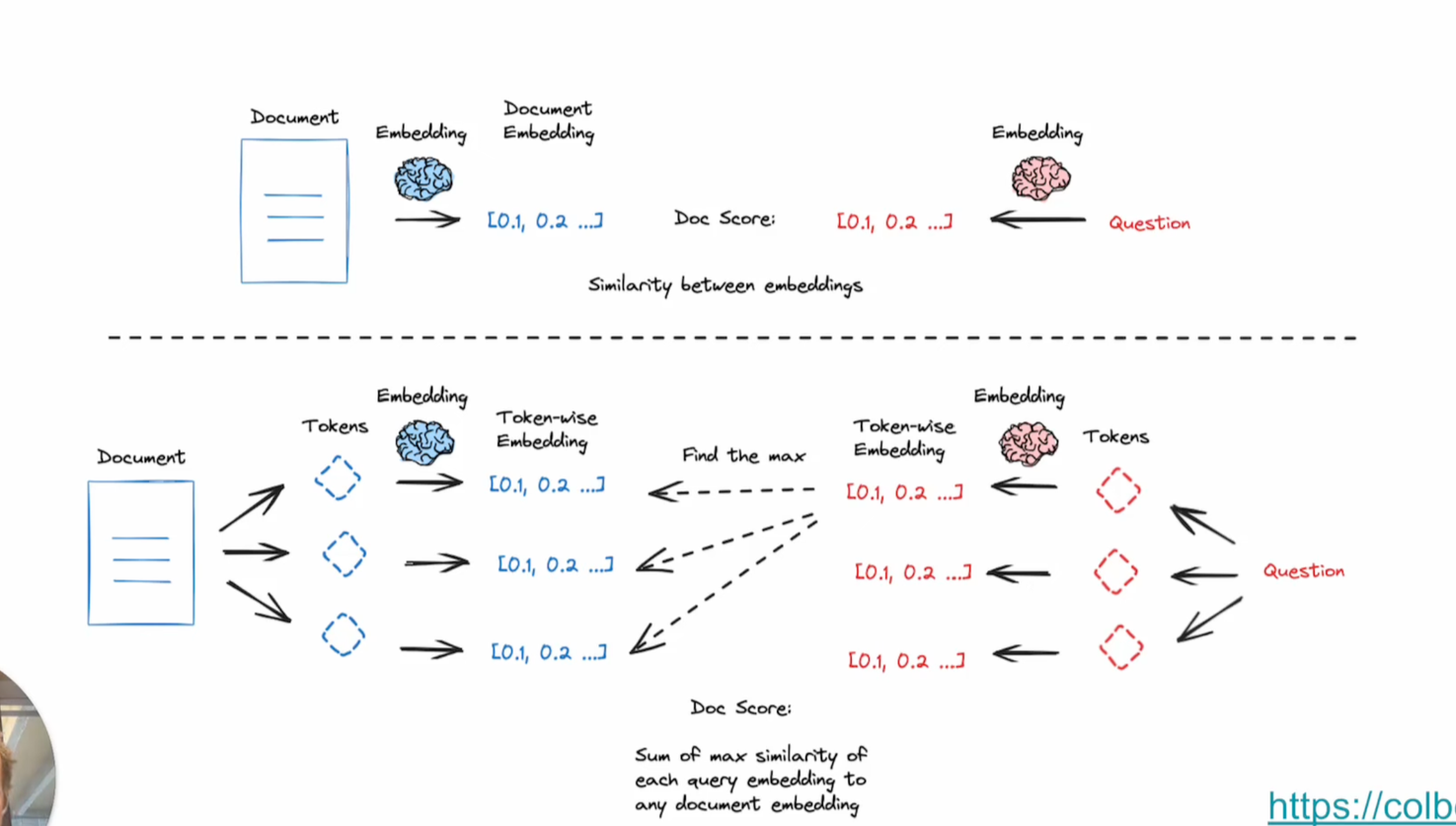
이를 개선하기 위해 등장한 ColBERT는 문서와 질문을 모두 여러 토큰으로 나눕니다. 그리고 이 토큰들 각각에 대해 임베딩을 수행한 뒤, 가능한 모든 토큰 조합에 대해 유사도 검색을 진행합니다. 이러한 방식은 딥러닝 NLP 모델이 토큰 별로 처리하는 방식과 유사한 생김새를 가집니다. 결과적으로 이러한 접근 방식은 실제 검색 퍼포먼스를 크게 향상시킨다고 합니다.
ColBERT의 실제 구현체는 Stanford에서 제공하지만, 우리는 ragatouille이라는 라이브러리를 통해 ColBERT를 편리하게 사용할 수 있습니다. 아래는 그 예시입니다.
from ragatouille import RAGPretrainedModel
RAG = RAGPretrainedModel.from_pretrained("colbert-ir/colbertv2.0")

RAG.index(
    collection=[full_document],
    index_name="Miyazaki-123",
    max_document_length=180,
    split_documents=True,
)

results = RAG.search(query="What animation studio did Miyazaki found?", k=3)
이번 글에서는 RAG의 핵심인 Retrieval 성능을 극대화하기 위한 다양한 Advanced 기법들을 살펴보았습니다. 라우팅을 통한 소스/프롬프트 선택, 그리고 쿼리 구조화를 통한 메타데이터 필터링, 다중 표현 색인 기법을 통한 요약 기반 검색 및 원본 문서 활용, RAPTOR를 이용한 계층적 문서 구조화, ColBERT를 활용한 미세 단위 유사도 검색이 있었습니다.
이러한 기법들은 기본적인 RAG의 한계를 극복하고 사용자의 질문에 더욱 정확하고 관련성 높은 정보를 효율적으로 제공하는 데 기여합니다. RAG 시스템을 구축하거나 개선할 때 이러한 Advanced 기법들을 적절히 조합하여 적용한다면 더 나은 성능을 기대할 수 있을 것입니다!