삼항연산자를 이용한 기본 Lighting을 Toon Style로 변형
Light Vector를 활용해 카툰 스타일의 라이팅을 만들 수 있다. 이에 대한 기초적인 라이팅을 구현해본다.
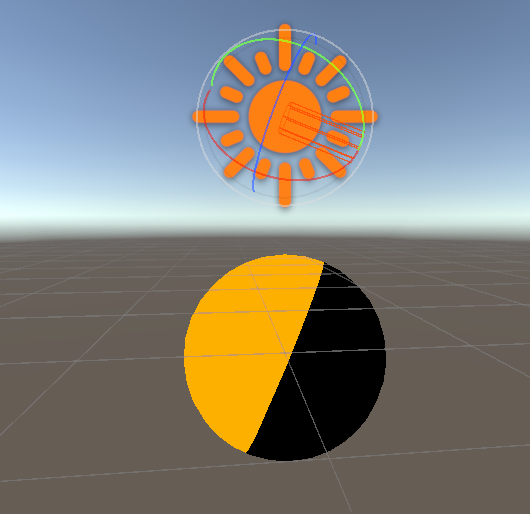
삼항 연산자를 이용해서 노멀과 라이트의 내적값(NdotL)이 1이상일때 라이트 컬러를 적용.
half4 frag(VertexOutput i) : SV_TARGET
{
	float3 LightColor = _MainLightColor.rgb;
	float3 Light = _MainLightPosition.xyz;

	float NdotL = saturate(dot(Light, i.normal));
	float4 color = float4(1, 1, 1, 1);
	float3 toonLight = NdotL > 0 ? _MainLightColor : 0;

	color.rgb *= toonLight;
	return color;
}
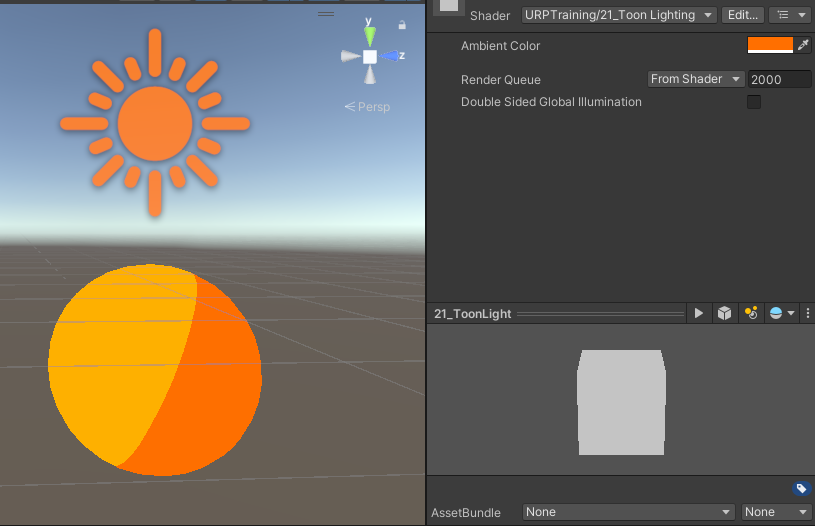
Ambient 영역 설정
half4 frag(VertexOutput i) : SV_TARGET
{
	float3 LightColor = _MainLightColor.rgb;
	float3 Light = _MainLightPosition.xyz;

	float NdotL = saturate(dot(Light, i.normal));
	float4 color = float4(1, 1, 1, 1);
	float3 toonLight = NdotL > 0 ?  LightColor : _AmbientColor.rgb;

	color.rgb *= toonLight;
	return color;
}
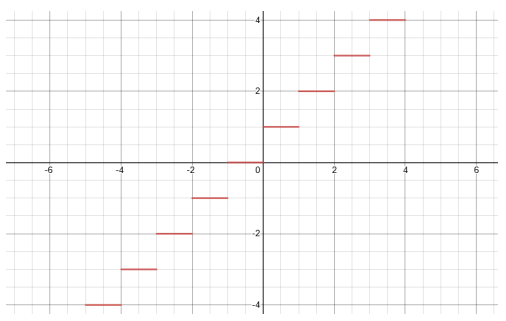
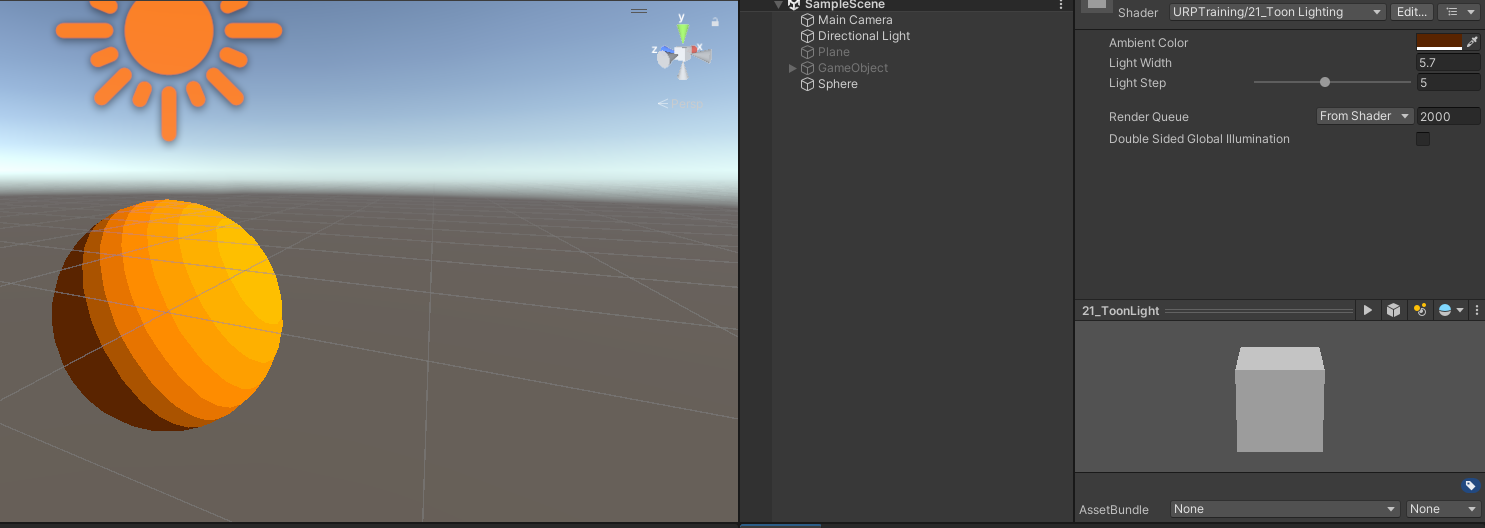
ceil함수를 사용해서 라이트를 받는 영역을 계단화해서 표현
| 함수 | 설명 |
|---|---|
| ceil(x) | x의 올림한 정수만을 Return |
| floor(x) | x의 내림한 정수만을 Return |
| round(x) | x의 반올림한 정수만을 Return |
Ceil(x)
half4 frag(VertexOutput i) : SV_TARGET
{
	float3 LightColor = _MainLightColor.rgb;
	float3 Light = _MainLightPosition.xyz;

	float NdotL = saturate(dot(Light, i.normal));
	float4 color = float4(1, 1, 1, 1);

	//float3 toonLight = NdotL > 0 ?  LightColor : 0;
	//float3 toonLight = NdotL > 0 ?  LightColor : _AmbientColor.rgb;
	float3 toonLight = ceil((NdotL) * _Lightwidth) / _LightStep * LightColor;
	float3 ambient = NdotL > 0 ? 0 : _AmbientColor.rgb;

	color.rgb *= toonLight + ambient;
	return color;
}
ToonRamp Texture를 활용한 Toon Shading
앞에서 계산한 라이팅과 노멀의 내적값을 UV 좌표로 활용해 Ramp Texture로 사용한다.
Properties와 내부 변수 선언에 RampTexture를 선언하고(_RampTex) Pixel Shader에서 다음과 같이 계산함.
half4 frag(VertexOutput i) : SV_TARGET
{
	float3 Light = _MainLightPosition.xyz;

	float NdotL = dot(i.normal, Light);
	float halfNdotL = NdotL * 0.5 + 0.5;

	float4 color = _MainTex.Sample(sampler_MainTex, i.uv);
	float3 ambient = SampleSH(i.normal);
	float3 ramp = _RampTex.Sample(sampler_MainTex, float2(halfNdotL, 0));

	color.rgb = color.rgb * ramp + ambient;

	return color;
}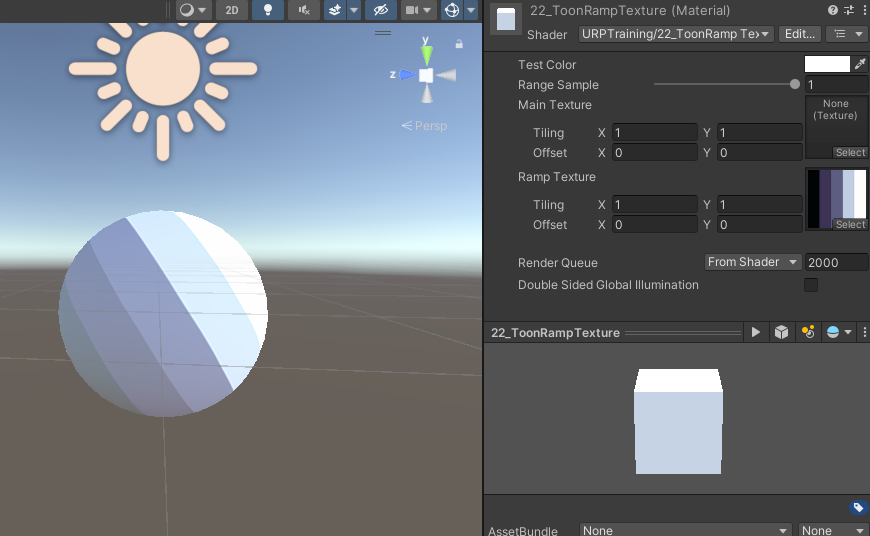
Light Vector와 Normal Vector를 내적한 값은 [-1~1]을 가지게 되는데, 이를 [-0.5~0.5]로 반으로 줄인 다음 0.5를 더해 [0~1]사이의 값으로 변환한다.
이를 Ramp Texture의 UV좌표의 U값으로 사용한다.
이 방식은 Ramp texture에 따하 다양한 Toon lighting을 표현할 수 있다는 장점이 있으나 라이트의 방향만을 사용하기 떄문에 Scene에 따라 라이트의 느낌을 바꾸기 힘들다.
Ambient Color및 Light Probe Color의 적용
Ambient Color 및 Light Probe 적용은 구면조화함수(Spherical Hamonics)를 사용해 적용하게 된다.
함수의 적용 과정
URP의 구면조화함는 Lighting.hlsl에 다음과 같이 정의되어 있음
// Samples SH L0, L1 and L2 terms
half3 SampleSH(half3 normalWS)
{
	//LPPV is not supported in LightWeight Pipeline
    real4 SHCoefficients[7];
    SHCoefficients[0] = unity_SHAr;
    SHCoefficients[1] = unity_SHAg;
    SHCoefficients[2] = unity_SHAb;
    SHCoefficients[3] = unity_SHBr;
    SHCoefficients[4] = unity_SHBg;
    SHCoefficients[5] = unity_SHBb;
    SHCoefficients[6] = unity_SHC;
    //
    return max(half3(0, 0, 0), SampleSH9(SHCoefficients, normalWS));
}
//
// SH Vertex Evaluation. Depending on target SH sampling might be done completely per vertex or mixed with L2 term per vertex and L0, L1 per pixel. See SampleSHPixel
// SH 버텍스 결과값. 대상에 따라 SH샘플링은 버텍스별로 완전히 수행되거나 버텍스별로 L2 term및 픽셀별로 L0, L1과 혼합 될 수 있습니다. SampleSHPixel을 참조하십시오.
half3 SampleSHVertex(half3 normalWS)
{
	#if defined(EVALUATE_SH_VERTEX)
    	return SampleSH(normalWS);
	#elif defined(EVALUATE_SH_MIXED
    // no max since this is only L2 contribution(L2에만 적용되므로 최대치가 없음)
		return SHEvalLinearL2(normalWS, unity_SHBr, unity_SHBg, unity_SHBb, unity_SHC);
	#endif
    //
	// Fully per-pixel. Nothing to compute.
		return half3(0.0, 0.0, 0.0);
}
//
// SH Pixel Evaluation. Depending on target SH sampling might be done mixed or fully in pixel. See
// SampleSHVertex. SH 픽셀 평가. 타겟 SH 샘플링에 따라 혼합 또는 전체 픽셀로 수행 될 수 있습니다. SampleSHVertex를 참조하십시오.
half3 SampleSHPixel(half3 L2Term, half3 normalWS)
{
	#if defined(EVALUATE_SH_VERTEX)
		return L2Term;
	#elif defined(EVALUATE_SH_MIXED)
		half3 L0L1Term = SHEvalLinearL0L1(normalWS, unity_SHAr, unity_SHAg, unity_SHAb);
		half3 res = L2Term + L0L1Term;
	#ifdef UNITY_COLORSPACE_GAMMA
		res = LinearToSRGB(res);
	#endif
		return max(half3(0, 0, 0), res);
	#endif
	// Default: Evaluate SH fully per-pixel
		return SampleSH(normalWS);
}
기본 라이팅 모델에 SH를 적용한 결과를 구해본다. Pixel Shader에서 다음과 같이 사용할 수 있다.
half4 frag(VertexOutput i) : SV_TARGET
{
	float3 Light = _MainLightPosition.xyz;
	float4 color = float4(1, 1, 1, 1);

	half3 ambient = SampleSH(i.normal);

	color.rgb *= saturate(dot(i.normal, Light)) * _MainLightColor.rgb + ambient;

	return color;
}
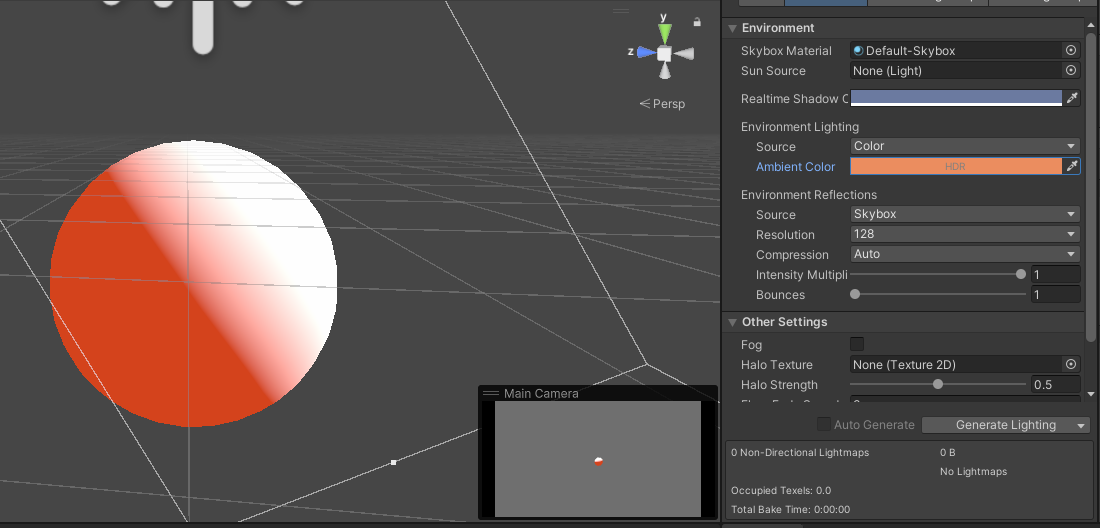
Ambient Color는 Window > Rendering > Lighting > Enviroment Lighting에서 Ambient Color를 적용받는다.