부제 : 공식문서로 Flow를 학습해보자
오늘의 목표
- hot vs cold 구분하기
- flow 개념 학습하기
- sharedFlow와 stateFlow
참고 자료
Hot Stream vs Cold Stream
Flow를 학습하기에 앞서 stream에 대한 개념을 다잡아보자.
난 hot과 cold에 대한 개념이 잘 안잡혀있었는데 대장 멧돼지 덕분에 개념을 확립할 수 있었다.
구분 기준은 다음 3가지로 가져볼 수 있다.
- 데이터의 생성 위치
- receiver 수
- 초기화 시점
| Cold | Hot | |
|---|---|---|
| 데이터의 생성 위치 | stream 내부 | stream 외부 |
| receiver 수 | uniCast | multicast |
| 초기화 시점 | lazy | not lazy |
Cold와 Hot을 구분할 줄 알겠다면 이제 Flow 공식문서를 읽어보자.
Flow
단일 값을 반환하는 suspend function들과 달리 여러 값을 순차적으로 방출할 수 있는 유형
개념적으로 비동기적으로 계산 가능한 data stream
flow는 suspend function을 이용하여 값을 비동기적으로 생산 및 사용한다.
data stream에는 3가지 entity가 관련되어 있다.
이 아래 3개만 이해하면 된다.
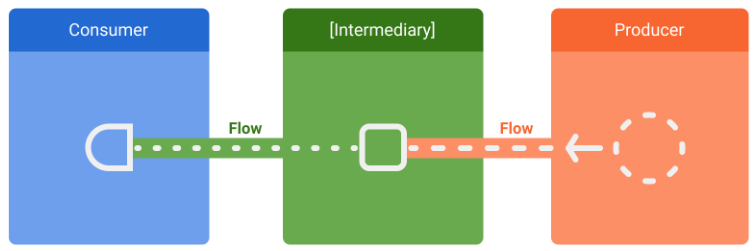
- producer : data를 생성하고 stream에 add한다.
- intermediary
- consumer : stream에서 값을 소비한다.
Creating Flow
flow builder는 코루틴 내에서 실행된다.
그래서 비동기 API들과 같은 이점을 같지만 다음 두가지 차이점이 있다.
- Flow는 순차적(sequential)이다.
producer가 코루틴 내에 있기 때문에, suspend function을 호출하면 호출한 suspend function의 응답이 올 때까지 일시 중단된다. - flow builder 내 에서 producer는 다른 CoroutineContext에서 값을 방출(
emit만 해당)하지 못한다.
새로운 코루틴이나withContext를 사용하여emit하지 말자.
이렇게 하고 싶다면callabackFlow와 같은 것을 사용해야한다.
callbackFlow에 대해서는 나중에 차차 알아보겠다..
Collecting from a flow
flow를 collect하는 행위는 producer가 값을 방출하도록 trigger가 된다. (번역체 뭔대...)
flow collection은 다음과 같은 상황에서 stop될 수 있다.
- 수집하는 코루틴이 취소되었을 때. producer도 같이 stop된다.
- The producer 가 아이템 방출을 완료할 때.
이 경우에는, stream이 닫히고,collect를 호출한 코루틴이 실행을 재개한다.
Flow는 다른 중간 연산자를 낑겨넣지 않는 한 cold and lazy이다.
(당연한 말... 흠냐)
Catching unexpected exceptions
producer의 구현체가 thrid party library일 수도 있다.
이건, producer가 예상치 못한 exception을 throw할 수 있다는 의미이다.
-> 이때 catch 중간 사용자(intermediate operator)를 사용해보자
exception이 발행하면 collect 람다가 호출되지 않고, 새로운 item을 받아올 수 없다.
catch는 flow에 item을 방출할 수 있다.
아래 예시는 catch를 통해 캐쉬된 value를 방출한다.
class NewsRepository(...) {
    val favoriteLatestNews: Flow<List<ArticleHeadline>> =
        newsRemoteDataSource.latestNews
            .map { news -> news.filter { userData.isFavoriteTopic(it) } }
            .onEach { news -> saveInCache(news) }
            // If an error happens, emit the last cached values
            .catch { exception -> emit(lastCachedNews()) }
}
Executing in a different CoroutineContext
기본적으로 flow builder의 producer는 collect하는 코루틴의 코루틴 컨텍스트에서 실행되며, 앞서 언급했듯이 다른 코루틴 컨텍스트에서 값을 방출할 수 없다.
flow의 coroutine context를 바꾸기 위해서는 intermediate operator인 flowOn을 사용해야 한다.
아래의 예시코드는 map과 onEach연산자는 defaultDispatcher를 사용하고, catch 연산자와 consumer는 viewModelScope에서 사용하는 Dispatcher.Main에서 실행된다.
class NewsRepository(
    private val newsRemoteDataSource: NewsRemoteDataSource,
    private val userData: UserData,
    private val defaultDispatcher: CoroutineDispatcher
) {
    val favoriteLatestNews: Flow<List<ArticleHeadline>> =
        newsRemoteDataSource.latestNews
            .map { news -> // Executes on the default dispatcher
                news.filter { userData.isFavoriteTopic(it) }
            }
            .onEach { news -> // Executes on the default dispatcher
                saveInCache(news)
            }
            // flowOn affects the upstream flow ↑
            .flowOn(defaultDispatcher)
            // the downstream flow ↓ is not affected
            .catch { exception -> // Executes in the consumer's context
                emit(lastCachedNews())
            }
}
StateFlow
StateFlow는 state-holder observable flow이다.
StateFlow는 read-only이고, state를 update하고 flow에 보내기 위해서는 MutableStateFlow를 사용해야 한다.
안드로이드에서는, StateFlow는 observable한 변경가능한 state를 관리하기 위한 최적의 class라고 한다. (흐음..)
StateFlow는 단순한 flow와 달리 hot이다.
여기서 hot이라 함은, stateFlow에서 collecting하는 행위는 producer를 trigger하지 않음을 말한다.
stateFlow는 언제나 활성화되어있고, 메모리에 올라왔있다.
-> 참조가 없는 경우 gc의 대상이 된다.
어떤 flow를 stateFlow로 변환시키고 싶다면 stateIn을 사용해야한다.
StateFlow vs LiveData
StateFlow와 LiveData는 매우 유사하다. (난 진짜.. LiveData에서 StateFlow로 바꾸는 과정은 큰 이점이 있는지 모르겠다. 안드로이드 의존성을 떼어낸다는 것이 큰 이점으로 아직 안다가와서 그럴지도..ㅜㅜ) 둘다 observable data holder 클래스이고, 아키텍처에서 비슷한 패턴 형태를 띈다.
차이점 한줄 요약 : stateFlow는 초기값 있어야함. stateFlow는 자동으로 stop안함
StateFlow는 생성자로 초기 state가 필요하다.LiveData.observe()는 view가STOPPED상태가 되면 consumer를 자동으로 unregister한다. 반면에StateFlow를 포함한 다른 flow들은 자동으로 collecting을 멈추지 않는다.
liveData와 같이 생명주기를 타게 하고 싶다면Lifecycle.repeatOnLifecycle블럭 내에서 flow를 collect 해야한다.
Making cold Flows using shareIn
StateFlow는 hot flow이다.
hot-flow라 함은, flow가 콜렉팅되는 동안이나 gc root에 참조가 있는동안은 메모리에 남아있음을 뜻한다.
shareIn operator을 통해 cold flow를 hot flow로 변경가능하다.
각각의 collector가 새로운 flow를 만들어내게 하는 방법 대신callbackFlow를 사용하는 방법도 있다.
class NewsRemoteDataSource(...,
    private val externalScope: CoroutineScope,
) {
    val latestNews: Flow<List<ArticleHeadline>> = flow {
        ...
    }.shareIn(
				// flow를 공유하는데 사용되는 코루틴 스코프.
				// 이 범위는 어떤 consumer보다 오래 지속되어야 한다.
        externalScope,
				// The number of items to replay to each new collector.
        replay = 1,
				// 시작 동작 정책
        started = SharingStarted.WhileSubscribed()
    )
}
SharedFlow
shareIn은 SharedFlow를 반환한다.
SharedFlow는 hot flow이며, 이 flow에서 collect하는 모든 대상에게 값을 방출한다. SharedFlow 는 highly-configurable generalization(고도로 구성 가능한 일반화)된 StateFlow이다.
그냥 단순히 차이점은 replay를 지정할 수 있는 것인것 같다. (맞나..?)
마지막으로 멧돼지가 준 글을 첨부한다.
위 내용을 다 이해했다면 술술 읽힐 듯 (아마..?)
단계별로 진화하는 과정이 꽤나 흥미롭다.
오랜만에 블로그 글 작성 끗.
너무 바빠서 블로그를 쓸 시간이 없었는데 퀄리티가 좀 떨어지더라도 꾸준히 블로그를 써야겠다. ...... (눈물)
다음 글은 아마 Flow 심화 (callbackFlow라던가..) 및 적용기가 되지 않을까..?