Styled Components - GlobalStyles, Sass 소개, css reset
[학습 목표]
1. Styled Component 중 GlobalStyles가 왜 필요한지에 대해, 그리고 사용방법에 대해 알 수 있어요.
2. Sass가 무엇인지 알 수 있어요.
3. css reset 기법의 필요성을 인지하고, 간단한 실습을 완료하게 돼요.
GlobalStyles(전역 스타일링)
전역 스타일링이란?
프로젝트를 아우르는, 공통적으로 들어가야 할 스타일을 적용해야 할 경우 ‘전역적으로(globally)’ 스타일을 지정하는 것 이다.
컴포넌트 단위 스타일링
App.jsx에 TestPage.jsx를 컴포넌트 단위로 스타일링 한다.
- TestPage.jsx
import React from "react";
import styled from "styled-components";


function TestPage(props) {
  return (
    <Wrapper>
      <Title>{props.title}</Title>
      <Contents>{props.contents}</Contents>
    </Wrapper>
  );
}

const Title = styled.h1`
  /* font-family: "Helvetica", "Arial", sans-serif;
  line-height: 1.5; */
  font-size: 1.5rem;
  margin: 0;
  margin-bottom: 8px;
`;

const Contents = styled.p`
  margin: 0;
  /* font-family: "Helvetica", "Arial", sans-serif;
  line-height: 1.5; */
  font-size: 1rem;
`;

const Wrapper = styled.div`
  border: 1px solid black;
  border-radius: 8px;
  padding: 20px;
  margin: 16px auto;
  max-width: 400px;
`;

export default TestPage;- App.jsx
import "./App.css";
import styled from "styled-components";
import TestPage from "./components/TestPage";
import GlobalStyle from "./GlobalStyle";

const StContainer = styled.div`
  display: flex;
`;

const StBox = styled.div`
  width: 100px;
  height: 100px;
  border: 1px solid ${function (props) {
      return props.borderColor;
    }}; // 화살표 함수 ${(props) => props.borderColor};
  margin: 20px;
  /* background-color: ${(props) => {
    return props.backgroundColor;
  }}; */
`;

// 박스의 색

const boxList = ["red", "blue", "green", "black"];

// 색을 넣으면, 이름을 반환

const getBoxName = (color) => {
  switch (color) {
    case "red":
      return "빨간 박스";
    case "green":
      return "초록 박스";
    case "blue":
      return "파란 박스";
    default:
      return "검정 박스";
  }
};

function App() {
  return (
    // <StContainer>
    //   {/* <StBox borderColor="red">빨간박스</StBox> */}
    //   {boxList.map((box) => {
    //     return <StBox borderColor={box}>{getBoxName(box)}</StBox>;
    //   })}
    // </StContainer>
    <>
    <TestPage title="제목입니다." contents="내용입니다." />
    </>
  );
}

export default App;
GlobalStyles 적용
App.jsx에 GlobalStyles.jsx를 적용한다.
- GlobalStyle.jsx
import { createGlobalStyle } from "styled-components";


const GlobalStyle = createGlobalStyle`
    body {
        font-family: "Helvetica", "Arial", sans-serif;
        line-height: 1.5;
    }
`

export default GlobalStyle;- App.jsx
function App() {
  return (
    // <StContainer>
    //   {/* <StBox borderColor="red">빨간박스</StBox> */}
    //   {boxList.map((box) => {
    //     return <StBox borderColor={box}>{getBoxName(box)}</StBox>;
    //   })}
    // </StContainer>
    <>
    <TestPage title="제목입니다." contents="내용입니다." />
    <GlobalStyle />
    </>
  );
}

export default App;
Sass 소개, Nesting
Sass(Syntactically Awesome Style Sheets)란?
CSS를 전통적인 방법보다 효율적으로 사용하기 위해 만들어진 언어입니다.
코드의 재사용성을 높이고, 가독성 또한 향상시켜줄 수 있는 방법이 바로 Sass입니다.
Sass 특징 및 예시 소개
- 변수를 사용할 수 있어요.
$color: #4287f5;
$borderRadius: 10rem;

div {
	background: $color;
	border-radius: $borderRadius;
}- 중첩할 수 있어요.(Nesting)
label {
      padding: 3% 0px;
      width: 100%;
      cursor: pointer;
      color: $colorPoint;

      &:hover {
        color: white;
        background-color: $color;
      }
}- 다른 style 파일을 import 할 수 있어요.
common.scss
// colors
$color1: #ed5b46;
$color2: #f26671;
$color3: #f28585;
$color4: #feac97;
style.scss
//style.scss
@import "common.scss";

.box {
	background-color: $color3;
}
css reset
css reset이란?
다양한 웹브라우저들은 저마다 조금씩은 다른 default style을 제공하고 있기 때문에 이를 초기화하고 우리가 정하는대로만 표현하기 위해 사용하는 것 입니다.
CSS 초기화하기
- reset.css
html, body, div, span, applet, object, iframe,
h1, h2, h3, h4, h5, h6, p, blockquote, pre,
a, abbr, acronym, address, big, cite, code,
del, dfn, em, img, ins, kbd, q, s, samp,
small, strike, strong, sub, sup, tt, var,
b, u, i, center,
dl, dt, dd, ol, ul, li,
fieldset, form, label, legend,
table, caption, tbody, tfoot, thead, tr, th, td,
article, aside, canvas, details, embed,
figure, figcaption, footer, header, hgroup,
menu, nav, output, ruby, section, summary,
time, mark, audio, video {
	margin: 0;
	padding: 0;
	border: 0;
	font-size: 100%;
	font: inherit;
	vertical-align: baseline;
}
/* HTML5 display-role reset for older browsers */
article, aside, details, figcaption, figure,
footer, header, hgroup, menu, nav, section {
	display: block;
}
body {
	line-height: 1;
}
ol, ul {
	list-style: none;
}
blockquote, q {
	quotes: none;
}
blockquote:before, blockquote:after,
q:before, q:after {
	content: '';
	content: none;
}
table {
	border-collapse: collapse;
	border-spacing: 0;
}- index.html
<!DOCTYPE html>
<html lang="en">
  <head>
    <meta charset="UTF-8" />
    <meta http-equiv="X-UA-Compatible" content="IE=edge" />
    <meta name="viewport" content="width=device-width, initial-scale=1.0" />
    <title>Document</title>
    <link rel="stylesheet" href="./reset.css" />
  </head>
  <body>
    <span>Default Style을 테스트 해 봅니다.</span>
    <h1>이건 h1 태그에요</h1>
    <p>이건 p 태그에요</p>
  </body>
</html>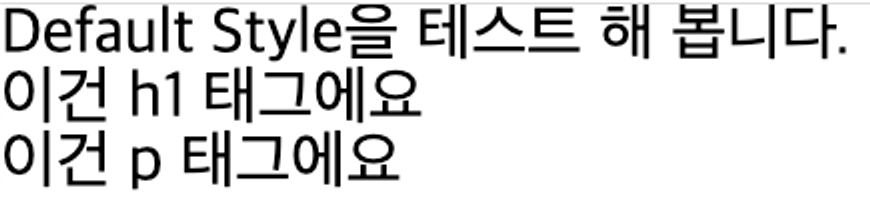

나는 사람들을 치료해주는 '약'과 같은 존재가 되고 싶다.