ECS를 이용하여 WebService 구축(CI/CD,Monitoring)(Iac:Terraform)
🚩 프로젝트
AWS ECS를 이용하여 WebService를 구축하고 CI/CD,Motioring이 가능하도록 하자.
📁 깃허브 주소
💆 프로젝트 목표
- 기본 네트워크 구축
- ECS 클러스터를 이용한 컨테이너 방식 사용
- Code Pipeline을 통한 CI/CD 구축
- Cloud Watch를 이용한 모니터링
- SNS를 이용한 경보 전달
- 테라폼 모듈화를 통해 좀 더 간편하고 쉽게 사용할 수 있도록 하자.
- 목적: 개발자가 컨테이너 기반의 애플리케이션을 쉽게 배포하고 운영 및 확장할 수 있도록 하
고 그에 따른 실시간 모니터링 방식으로 완벽한 인프라 구축에 목적을 두고 있음
🏄 총 프로젝트 기간: 12.26 ~ 1.01
12.26 ~ 12.27
- 기본 네트워크 구축
12.20 ~ 12.22
- Code Pipeline을 통한 CI/CD구축
- ECS 클러스터를 이용한 컨테이너 방식 구축
12.26 ~ 1.01
- 모듈화를 통한 간편화
- Cloud Watch를 이용한 모니터링
- SNS을 이용한 경보 전달
🤓 프로젝트 아쉬웠던 점
서비스에 대한 IAM정책을 하나하나 찾느라 시간이 많이 걸렸다.
📌 프포젝트 AWS 체계 구성도
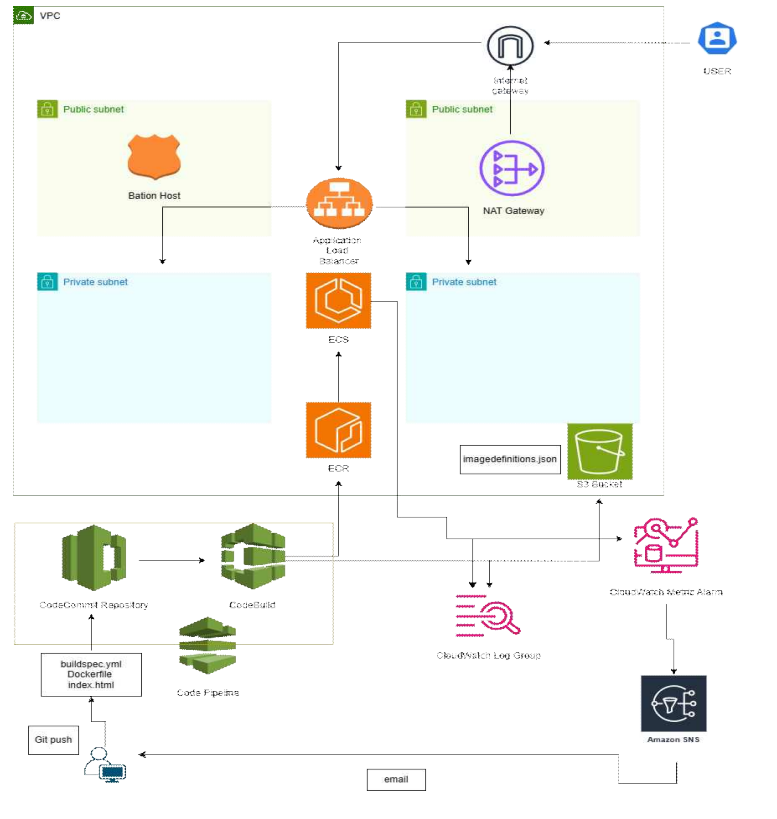
🤼 프로젝트 환경 구성
- AWS
> Network
Region : us-east-2
VPC :10.16.0.0/16
Subnet
 Public_Subnet : 10.16.1.0/24, 10.16.2.0/24
 Private_Subnet : 10.16.3.0/24, 10.16.4.0/24
Internet Gateway
NAT Gateway,EIP
EC2 - Instance

> Cluster
ECS(Cluseter,Service,Task Defintion
ALB
ECR

> CI/CD
Code-Build
Code-Commit
Code-pipeline
S3

> Monitoring
CloudWatch
SNS- 테스트 파일
Dockerfile(web-service용도)
Dockerfile(stress용도)
buildspec.yml
index.html
🚣 ECS란?
관리형 컨테이너 오케스트레이션 서비스
- ECS 사용 이유
1. Aws 통합 및 간편함
-> 다른 서비스와 높은 통합성을  제공하여 다양한 aws서비스와 연동가능

2. 보안성
-> 애플리케이션을 실행하는 컨테이너는 격리되어 독립적이며 보안이 강화됩니다.

3. 유연성
-> 다양한 애플리케이션 타입과 언어를 지원하여 개발자들에게 유연한 환경을 제공합니다.
- ECS 주요 구성 요소
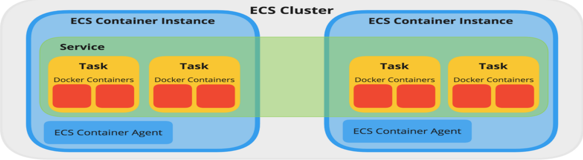
1. CLUSTER
-> Task가 배포되는 환경들이 논리적으로 그룹화되는 단위를 의미한다.
2. Service
-> 클러스터에 Task를 몇 개 배포할 것인지 결정하고 ELB 또는 AutoScailng을 설정한다.
3. Task
-> TASK Definition에 의해 배포된 컨테이너 Set입니다.
4. Task Definition
-> 태스크 정의는 컨테이너에서 실행할 작업의 정보를 정의합니다.
💆 Terraform 폴더 구조
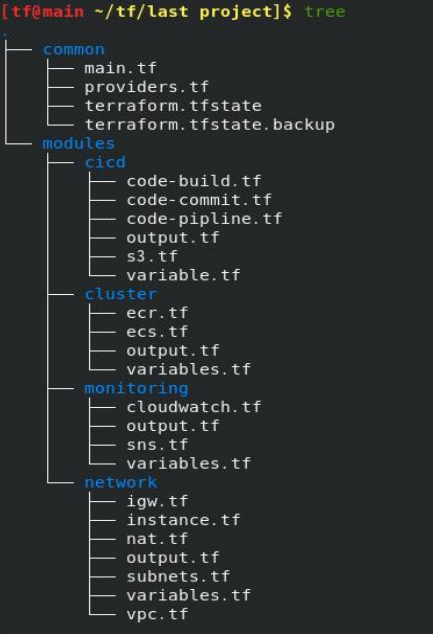
🌐 Terraform Code (module)
1. Network Code
vpc.tf
#### VPC 생성 ####
resource "aws_vpc" "my_vpc" {
 cidr_block = var.vpc_cidr
 instance_tenancy = var.instance_tenancy
 tags = var.vpc_tag
}
igw.tf
### Internet gateway 생성 ###
resource "aws_internet_gateway" "my_igw" {
 vpc_id = var.vpc-id
 tags = var.igw-tags
}
nat.tf
### Elastic Ip 생성 ###
resource "aws_eip" "NAT-eip" {
 domain = "vpc"
}
### NAT gateway 생성 ###
resource "aws_nat_gateway" "myNAT" {
 allocation_id = var.myeip-id
 subnet_id = var.pub-sub2-id
 tags = var.nat-tags
}
subnets.tf
### Subnet 생성 ###
### Public Subnet 생성 ###
resource "aws_subnet" "pub_sub1" {
 vpc_id = aws_vpc.my_vpc.id
 cidr_block = var.pub-sub1-cidr
 map_public_ip_on_launch = true
 availability_zone = var.zone_1
 tags = var.pub-sub1-tags
}

resource "aws_subnet" "pub_sub2" {
 vpc_id = aws_vpc.my_vpc.id
 cidr_block = var.pub-sub2-cidr
 map_public_ip_on_launch = true
 availability_zone = var.zone_2
 tags = var.pub-sub2-tags
}

### Public-Route 생성-연결 ###
resource "aws_route_table" "pub_rt" {
 vpc_id = var.vpc-id
 tags = var.pub-rt-tags
}

resource "aws_route" "pub_route" {
 route_table_id = var.pub-rt-id
 destination_cidr_block = var.destination_cidr_block
 gateway_id = var.myigw-id
}

resource "aws_route_table_association" "pub_assoc1" {
 subnet_id = var.pub-sub1-id
 route_table_id = var.pub-rt-id
}

resource "aws_route_table_association" "pub_assoc2" {
 subnet_id = var.pub-sub2-id
 route_table_id = var.pub-rt-id
}

### Private-Route 생성 1,2 ###
### Private-Subnet 생성 ###
resource "aws_subnet" "pri_sub1" {
 vpc_id = var.vpc-id
 cidr_block = var.pri-sub1-cidr
 availability_zone = var.zone_1
 tags = var.pri-sub1-tags
}

resource "aws_subnet" "pri_sub2" {
 vpc_id = var.vpc-id
 cidr_block = var.pri-sub2-cidr
 availability_zone = var.zone_2
 tags = var.pri-sub2-tags
}

### Private-Route 생성-연결 ###
resource "aws_route_table" "pri_rt" {
 vpc_id = var.vpc-id
 tags = var.pri-rt-tags
}

resource "aws_route" "pri_route" {
 route_table_id = var.pri-rt-id
 destination_cidr_block = var.destination_cidr_block
 nat_gateway_id = var.mynat-id
}

resource "aws_route_table_association" "private_assoc1" {
 subnet_id = var.pri-sub1-id
 route_table_id = var.pri-rt-id
}

resource "aws_route_table_association" "private_assoc2" {
 subnet_id = var.pri-sub2-id
 route_table_id = var.pri-rt-id
}
instance.tf
### keypair ###
resource "aws_key_pair" "testkey" {
  key_name   = "testkey"
  public_key = file("~/.ssh/testkey.pub")
}

### 보안그룹 - instance ###
resource "aws_security_group" "SG_instance" {
  name = "SG_instance"
  description = "Allow HTTP(80/tcp, 8080/tcp), ssh(22/tcp)"
  vpc_id = var.vpc-id

  ingress {
  description = "Allow HTTP(80)"
  from_port = 80
  to_port = 80
  protocol = "tcp"
  cidr_blocks = ["0.0.0.0/0"]
  }

  ingress {
  description = "Allow HTTPs(8080)"
  from_port = 8080
  to_port = 8080
  protocol = "tcp"
  cidr_blocks = ["0.0.0.0/0"]
  }

  ingress {
  description = "Allow ssh(22)"
  from_port = 22
  to_port = 22
  protocol = "tcp"
  cidr_blocks = ["0.0.0.0/0"]
  }

  egress {
  from_port = 0
  to_port = 0
  protocol = "-1"
  cidr_blocks = ["0.0.0.0/0"]
  }

  tags = {
  Name = "SG_instance"
  }
}

### EC2 역할 & 정책 ###
### EC2 정책 ###
data "aws_iam_policy_document" "ec2_role" {
  statement {
    effect = "Allow"
    actions = ["sts:AssumeRole"]

    principals {
      type = "Service"
      identifiers = ["ec2.amazonaws.com"]
    }
  }
}
### EC2 역할 ###
resource "aws_iam_role" "ec2-role" {
  name = "ecr-role"
  assume_role_policy = data.aws_iam_policy_document.ec2_role.json
### Policy
}
resource "aws_iam_role_policy_attachment" "AdministratorAccess" {
 role = aws_iam_role.ec2-role.name
 policy_arn = "arn:aws:iam::aws:policy/AdministratorAccess"
}
resource "aws_iam_instance_profile" "test_profile" {
 name = "test_profile"
 role = aws_iam_role.ec2-role.name
}
### bastion-Instance 생성 ###
resource "aws_instance" "bastion-host" {
  ami = "ami-011ab7c70f5b5170a"
  instance_type = "t2.micro"
  iam_instance_profile = aws_iam_instance_profile.test_profile.name
  vpc_security_group_ids = [aws_security_group.SG_instance.id]
  subnet_id = var.pub-sub1-id
  user_data = <<-EOF
  #!/bin/bash
  sudo -i sed -i 's/^PasswordAuthentication no/PasswordAuthentication yes/' /etc/ssh/sshd_config
  sed -i 's/^#PermitRootLogin prohibit-password/PermitRootLogin yes/' /etc/ssh/sshd_config
  systemctl restart sshd
  echo 'qwe123' | passwd --stdin root
  yum install -y docker

  EOF

  root_block_device {
    volume_size = 10
  }

  tags = var.ec2-tags
}
variables.tf
##### VPC 생성 #####
variable "vpc_cidr" {
description = "VPC"
  type = string
  default = "10.16.0.0/16"
}
variable "instance_tenancy" {
  description = "Instance Tenancy"
  type = string
  default = "default"
}
variable "vpc_tag" {
  description = "VPC tags"
  type = map(string)
  default = {
  Name = "my_vpc"
  }
}
variable "vpc-id" {
  description = "VPC ID"
  type = string
}
### Subnet ###
### public subnet ###
variable "pub-sub1-cidr" {
  description = "Pub_Sub1 CIDR Block"
  type = string
  default = "10.16.1.0/24"
}
variable "pub-sub2-cidr" {
 description = "Pub_Sub2 CIDR Block"
 type = string
 default = "10.16.2.0/24"
}
variable "pub-sub1-tags" {
 description = "Pub_Sub1 tags"
 type = map(string)
 default = { Name = "pub_sub1" }
}
variable "pub-sub2-tags" {
 description = "Pub_Sub2 tags"
 type = map(string)
 default = { Name = "pub_sub2" }
}
### zone ###
variable "zone_1" {
 description = "value"
 type = string
 default = "us-east-2a"
}
variable "zone_2" {
 description = "value"
 type = string
 default = "us-east-2b"
}
### private-subnet ###
variable "pri-sub1-cidr" {
 description = "Pri_Sub1 CIDR Block"
 type = string
 default = "10.16.3.0/24"
}
variable "pri-sub2-cidr" {
 description = "Pri_Sub2 CIDR Block"
 type = string
 default = "10.16.4.0/24"
}
variable "pri-sub1-tags" {
 description = "Pri_Sub1 tags"
 type = map(string)
 default = { Name = "pri_sub1" }
}
variable "pri-sub2-tags" {
 description = "Pri_Sub2 tags"
 type = map(string)
 default = { Name = "pri_sub2" }
}
### route_table ###
variable "pub-rt-id" {
 description = "Pub_RT_ID"
 type = string
}
variable "pub-rt-tags" {
 description = "Pub_RT tags"
 type = map(string)
 default = { Name = "pub_rt_table" }
}
variable "myigw-id" {
 description = "Internet Gateway ID"
 type = string
}
variable "pub-sub1-id" {
 description = "Pub_Sub1 ID"
 type = string
}
variable "pub-sub2-id" {
 description = "Pub_Sub_2 ID"
 type = string
}
variable "pri-rt-id" {
 description = "Pri_RT ID"
 type = string
}
variable "pri-rt-tags" {
  description = "Pri_RT tags"
  type = map(string)
  default = { Name = "pri_rt_table" }
}
variable "pri-sub1-id" {
 description = "Pri_Sub1 ID"
 type = string
}
variable "pri-sub2-id" {
 description = "Pri_Sub2 ID"
 type = string
}

variable "destination_cidr_block" {
  description = "Destination_cidr_block"
  type = string
  default = "0.0.0.0/0"
}
### internet gateway ###
variable "igw-tags" {
  description = "Internet Gateway tags"
  type = map(string)
  default = { Name = "my_igw" }
}
### NAT gateway ###
variable "myeip-id" {
 description = "Eip ID"
 type = string
}
variable "mynat-id" {
 description = "NAT Gateway ID"
 type = string
}
variable "nat-tags" {
  description = "Internet Gateway tags"
  type = map(string)
  default = { Name = "my_nat" }
}
### bation host ###
variable "ec2-tags" {
  description = "Internet Gateway tags"
  type = map(string)
  default = { Name = "bastion-host" }
}
output.tf
output "vpc_id" {
  description = "VPC ID"
  value = aws_vpc.my_vpc.id
}
output "pub_sub1_id" {
  description = "PUBLIC SUBNET1"
  value = aws_subnet.pub_sub1.id
}
output "pub_sub2_id" {
  description = "PUBLIC SUBNET2"
  value = aws_subnet.pub_sub2.id
}
output "pri_sub1_id" {
  description = "PRIVATE SUBNET1"
  value = aws_subnet.pri_sub1.id
}
output "pri_sub2_id" {
  description = "PRIVATE SUBNET2"
  value = aws_subnet.pri_sub2.id
}
output "pub_rt_id" {
 description = "ROUTING TABLE ID"
 value = aws_route_table.pub_rt.id
}
output "pri_rt_id" {
 description = "ROUTING TABLE ID"
 value = aws_route_table.pri_rt.id
}
output "eip_id" {
 description = "VALUE"
 value = aws_eip.NAT-eip.id
}
output "igw_id" {
 description = "IGW ID"
 value = aws_internet_gateway.my_igw.id
}
output "nat_id" {
 description = "VALUE"
 value = aws_nat_gateway.myNAT.id
}
2. Cluster Code
ecs.tf
### ECS 역할 정책 ###
### 정책-task ###
data "aws_iam_policy_document" "ecs_role" {
  statement {
    effect = "Allow"
    actions = ["sts:AssumeRole"]

    principals {
      type = "Service"
      identifiers = ["ecs-tasks.amazonaws.com"]
    }
  }
}
### 역할-task ###
resource "aws_iam_role" "ecs_role" {
  name = "ecs-role"
  assume_role_policy = data.aws_iam_policy_document.ecs_role.json
}
### Policy-ECS ###
resource "aws_iam_role_policy_attachment" "AmazonECS_FullAccess" {
  role = aws_iam_role.ecs_role.name
  policy_arn = "arn:aws:iam::aws:policy/AmazonECS_FullAccess"
}
### Policy-ECS-Task ###
resource "aws_iam_role_policy_attachment" "AmazonECSTaskExecutionRolePolicy" {
  role = aws_iam_role.ecs_role.name
  policy_arn = "arn:aws:iam::aws:policy/service-role/AmazonECSTaskExecutionRolePolicy"
}
### Policy-S3 ###
resource "aws_iam_role_policy_attachment" "AmazonS3FullAccess" {
  role = aws_iam_role.ecs_role.name
  policy_arn = "arn:aws:iam::aws:policy/AmazonS3FullAccess"
}
### Policy - cloudwatch_logs ###
resource "aws_iam_role_policy_attachment" "CloudWatchLogsFullAccess" {
  role = aws_iam_role.ecs_role.name
  policy_arn = "arn:aws:iam::aws:policy/CloudWatchLogsFullAccess"
}
resource "aws_iam_role_policy_attachment" "CloudWatchReadOnlyAccess" {
  role = aws_iam_role.ecs_role.name
  policy_arn = "arn:aws:iam::aws:policy/CloudWatchReadOnlyAccess"
}
resource "aws_iam_role_policy_attachment" "AmazonAPIGatewayPushToCloudWatchLogs" {
  role = aws_iam_role.ecs_role.name
  policy_arn = "arn:aws:iam::aws:policy/service-role/AmazonAPIGatewayPushToCloudWatchLogs"
}

### ECS 생성 ###
### ECS_Task_Definition ###
resource "aws_ecs_task_definition" "service" {
  family = "service"
  network_mode = "awsvpc"
  execution_role_arn = aws_iam_role.ecs_role.arn
  cpu = 256
  memory = 512
  requires_compatibilities = ["FARGATE"]
  task_role_arn = aws_iam_role.ecs_role.arn
  container_definitions = jsonencode([
      {
      "name": "service",
      "image": "${var.ecr-url}",

      "cpu": 256,
      "memory": 512,
      "essential": true,
      "portMappings": [
        {
          "name": "serivce-80-tcp",
          "containerPort": 80,
          "hostPort": 80,
          "appProtocol": "http"
        }
      ],
      "logconfiguration" : {
          "logdriver" : "awslogs",
          "options"    : {
            "awslogs-group"         : "${var.log-group}",
            "awslogs-region"        : "us-east-2",
            "awslogs-stream-prefix" : "${var.log-stream}",
        }
      }
    }
  ])
  runtime_platform {
  operating_system_family = "LINUX"
  cpu_architecture = "X86_64"
 }
}
### ECS Cluster ###
resource "aws_ecs_cluster" "ECS_Cluster" {
  name = "my_cluster"

    setting {
    name  = "containerInsights"

    value = "enabled"
  }
}
### ECS service ###
resource "aws_ecs_service" "ECS-Service" {
  name = "service"
  cluster = aws_ecs_cluster.ECS_Cluster.id
  task_definition = aws_ecs_task_definition.service.arn
  launch_type = "FARGATE"
  desired_count = 1

  network_configuration {
  security_groups = [aws_security_group.SG_alb.id]
  subnets = [
  var.pri-sub1-id,
  var.pri-sub2-id
  ]
  assign_public_ip = true
  }

  load_balancer {
  target_group_arn = aws_lb_target_group.ALB-TG.arn
  container_name = aws_ecs_task_definition.service.family
  container_port = 80
  }
}
### LB 구성 ####
### 보안그룹 - ALB ###
resource "aws_security_group" "SG_alb" {
  name = "WEBSG"
  description = "Allow HTTP(80/tcp, 8080/tcp)"
  vpc_id = var.vpc-id
  ingress {
  description = "Allow HTTP(80)"
  from_port = 80
  to_port = 80
  protocol = "tcp"
  cidr_blocks = ["0.0.0.0/0"]
  }

  ingress {
  description = "Allow HTTPs(8080)"
  from_port = 8080
  to_port = 8080
  protocol = "tcp"
  cidr_blocks = ["0.0.0.0/0"]
  }
  egress {
  from_port = 0
  to_port = 0
  protocol = "-1"
  cidr_blocks = ["0.0.0.0/0"]
  }
  tags = {
  Name = "SG_alb"
  }
}
### ALB 생성 ###
resource "aws_lb" "ALB" {
  name = "myALB"
  load_balancer_type = "application"
  subnets = [
  var.pub-sub1-id,
  var.pub-sub2-id
  ]
 security_groups = [aws_security_group.SG_alb.id]
}
### ALB Listner 생성 ###
resource "aws_lb_listener" "ALB-Listener" {
  load_balancer_arn = aws_lb.ALB.arn
  port = 80
  protocol = "HTTP"
  default_action {
  type = "forward"
  target_group_arn = aws_lb_target_group.ALB-TG.arn
  }
}
### Tagret Group 생성 ###
resource "aws_lb_target_group" "ALB-TG" {
  name = "myALB-TG"
  port = 80
  protocol = "HTTP"
  target_type = "ip"
  vpc_id = var.vpc-id
}
ecr.tf
###ECR 생성 ###
resource "aws_ecr_repository" "my_ecr" {
  name = "my_ecr"
  image_tag_mutability = "MUTABLE"

  image_scanning_configuration {
    scan_on_push = true
  }
  tags = var.ecr-tags
}


resource "aws_ecr_lifecycle_policy" "ecr_policy" {
  repository = aws_ecr_repository.my_ecr.name

  policy = <<EOF
{
    "rules": [
        {
            "rulePriority": 1,
            "description": "Keep last 30 images",
            "selection": {
                "tagStatus": "tagged",
                "tagPrefixList": ["v"],
                "countType": "imageCountMoreThan",
                "countNumber": 30
            },
            "action": {
                "type": "expire"
            }
        }
    ]
}
EOF
}
variable.tf
variable "ecr-url" {
  description = "ECR-URL"
  type = string
}
variable "pri-sub1-id" {
  description = "Pri-Sub1 ID"
  type = string
}
variable "pri-sub2-id" {
  description = "Pri-Sub2 ID"
  type = string
}
variable "pub-sub1-id" {
  description = "Pub-Sub1 ID"
  type = string
}
variable "pub-sub2-id" {
  description = "Pri-Sub2 ID"
  type = string
}
variable "vpc-id" {
  description = "VPC ID"
  type = string
}
variable "ecr-tags" {
  description = "ECR tags"
  type = map(string)
  default = { Name = "ecr" }
}
variable "log-group" {
  description = "cloudwatch log group ID"
  type = string
}
variable "log-stream" {
  description = "cloudwatch log stream ID"
  type = string
}
output.tf
output "dns_name" {
  description = "ALB DNS Name"
  value = aws_lb.ALB.dns_name
}
output "ecr_name" {
  description = "ECR NAME"
  value = aws_ecr_repository.my_ecr.name
}
output "ecr_url" {
  description = "ECR NAME"
  value = aws_ecr_repository.my_ecr.repository_url
}
output "ecs-cluster-name" {
  description = "ECS CLUSTER NAME"
  value = aws_ecs_cluster.ECS_Cluster.name
}
output "ecs-service-name" {
  description = "ECS SERVICE NAME"
  value = aws_ecs_service.ECS-Service.name
}
3. CI/CD Code
CodeBuild.tf
data "aws_security_group" "default" {
  name = "default"
  vpc_id = var.vpc-id
}
### Codebuild ###
### 역할- Codebuild ###
resource "aws_iam_role" "codebuild_role" {
  name = "build-role"
  assume_role_policy = data.aws_iam_policy_document.codebuild_role.json
}
### 정책-codebuild ###
data "aws_iam_policy_document" "codebuild_role" {
  statement {
    effect = "Allow"
    actions = ["sts:AssumeRole"]
    principals {
      type = "Service"
      identifiers = ["codebuild.amazonaws.com"]
    }
  }
}
# policy-build
resource "aws_iam_role_policy_attachment" "role_policy_attachment" {
  role = aws_iam_role.codebuild_role.name
  policy_arn = "arn:aws:iam::aws:policy/AWSCodeBuildAdminAccess"
}

resource "aws_iam_role_policy_attachment" "AdministratorAccess" {
  role = aws_iam_role.codebuild_role.name
  policy_arn = "arn:aws:iam::aws:policy/AdministratorAccess"
}

# policy-ecr
resource "aws_iam_role_policy_attachment" "role_policy_attachment2" {
  role = aws_iam_role.codebuild_role.name
  policy_arn = "arn:aws:iam::aws:policy/AmazonEC2ContainerRegistryFullAccess"
}
# policy-s3
resource "aws_iam_role_policy_attachment" "role_policy_attachment3" {
  role = aws_iam_role.codebuild_role.name
  policy_arn = "arn:aws:iam::aws:policy/AmazonS3FullAccess"
}
# codecommnit
resource "aws_iam_role_policy_attachment" "CodeCommitFullAccess" {
  role = aws_iam_role.codebuild_role.name
  policy_arn = "arn:aws:iam::aws:policy/AWSCodeCommitFullAccess"
}
# codepipeline
resource "aws_iam_role_policy_attachment" "CodePipeline_FullAccess" {
  role = aws_iam_role.codebuild_role.name
  policy_arn = "arn:aws:iam::aws:policy/AWSCodePipeline_FullAccess"
}
# policy-ecs
resource "aws_iam_role_policy_attachment" "AmazonECS_FullAccess" {
  role = aws_iam_role.codebuild_role.name
  policy_arn = "arn:aws:iam::aws:policy/AmazonECS_FullAccess"
}
# policy-ecs-task
resource "aws_iam_role_policy_attachment" "AmazonECSTaskExecutionRolePolicy" {
  role = aws_iam_role.codebuild_role.name
  policy_arn = "arn:aws:iam::aws:policy/service-role/AmazonECSTaskExecutionRolePolicy"
}
### codebuildproject ###
resource "aws_codebuild_project" "MyBuildProject" {
  name = "MyBuildProject"
  description = "code-build-project"
  service_role = aws_iam_role.codebuild_role.arn

  artifacts {
    type = "S3"
    name = var.s3-id
    location = var.s3-bucket
    path = "/"
    packaging = "ZIP"
  }

  cache {
    type  = "LOCAL"
    modes = ["LOCAL_DOCKER_LAYER_CACHE", "LOCAL_SOURCE_CACHE"]
  }

  environment {
    compute_type                = "BUILD_GENERAL1_SMALL"
    image                       = "aws/codebuild/amazonlinux2-x86_64-standard:4.0"
    type                        = "LINUX_CONTAINER"
    image_pull_credentials_type = "CODEBUILD"
    privileged_mode = true
  }

  vpc_config {
    vpc_id = var.vpc-id

    subnets = [
      var.pri-sub1-id,
      var.pri-sub2-id
    ]
    security_group_ids = [
      data.aws_security_group.default.id
    ]
  }

  source {
    type = "CODECOMMIT"
    location = var.code-repo-url
    buildspec = "buildspec.yml"
  }

  logs_config {
    cloudwatch_logs {
      group_name  = "Build-log-group"
      status = "ENABLED"
    }
  }
}
CodeCommit.tf
### Codecommit ###
### Codecommit-repository ###
resource "aws_codecommit_repository" "MyCommitRepository" {
  repository_name = "MyCommitRepository"
  description = "Repository for CodeCommit"
}
Code-Pipeline.tf
# 역할-pipe
resource "aws_iam_role" "pipe_role" {
  name = "pipe-role"
  assume_role_policy = data.aws_iam_policy_document.pipe_role.json
}
# 정책 - pipe
data "aws_iam_policy_document" "pipe_role" {
  statement {
    effect = "Allow"
    actions = ["sts:AssumeRole"]

    principals {
      type = "Service"
      identifiers = ["codepipeline.amazonaws.com"]
    }
  }
}
# policy-pipeline
resource "aws_iam_role_policy_attachment" "AWSCodePipeline_FullAccess" {
  role = aws_iam_role.pipe_role.name
  policy_arn = "arn:aws:iam::aws:policy/AWSCodePipeline_FullAccess"
}
# policy-s3
resource "aws_iam_role_policy_attachment" "AmazonS3FullAccess" {
  role = aws_iam_role.pipe_role.name
  policy_arn = "arn:aws:iam::aws:policy/AmazonS3FullAccess"
}
# policy-commit
resource "aws_iam_role_policy_attachment" "AWSCodeCommitFullAccess" {
  role = aws_iam_role.pipe_role.name
  policy_arn = "arn:aws:iam::aws:policy/AWSCodeCommitFullAccess"
}

resource "aws_iam_role_policy_attachment" "AWSCodeCommitReadOnly" {
  role = aws_iam_role.pipe_role.name
  policy_arn = "arn:aws:iam::aws:policy/AWSCodeCommitReadOnly"
}
# policy-build
resource "aws_iam_role_policy_attachment" "AWSCodeBuildAdminAccess" {
  role = aws_iam_role.pipe_role.name
  policy_arn = "arn:aws:iam::aws:policy/AWSCodeBuildAdminAccess"
}
# policy - CodeBuildReadOnlyAcces
resource "aws_iam_role_policy_attachment" "AWSCodeBuildReadOnlyAccess" {
  role = aws_iam_role.pipe_role.name
  policy_arn = "arn:aws:iam::aws:policy/AWSCodeBuildReadOnlyAccess"
}
# policy-ecs-task
resource "aws_iam_role_policy_attachment" "AmazonECSTaskExecutionRolePolicy1" {
  role = aws_iam_role.pipe_role.name
  policy_arn = "arn:aws:iam::aws:policy/service-role/AmazonECSTaskExecutionRolePolicy"
}
# policy-ecs-ecs
resource "aws_iam_role_policy_attachment" "AmazonECS_FullAccess1" {
  role = aws_iam_role.pipe_role.name
  policy_arn = "arn:aws:iam::aws:policy/AmazonECS_FullAccess"
}
# policy-ecs-deploy
resource "aws_iam_role_policy_attachment" "AWSCodeDeployRoleForECS" {
  role = aws_iam_role.pipe_role.name
  policy_arn = "arn:aws:iam::aws:policy/AWSCodeDeployRoleForECS"
}
### pipeline ###
resource "aws_codepipeline" "codepipeline" {
  name     = "test-pipeline"
  role_arn = aws_iam_role.pipe_role.arn

  artifact_store {
    location = var.s3-bucket
    type = "S3"
  }

  stage {
    name = "Source"

    action {
      name = "Source"
      category = "Source"
      owner = "AWS"
      provider = "CodeCommit"
      version = "1"
      output_artifacts = ["source_output"]

      configuration = {
        RepositoryName = "MyCommitRepository"
        BranchName = "master"
      }
    }
  }

  stage {
    name = "Build"

    action {
      name             = "Build"
      category         = "Build"
      owner            = "AWS"
      provider         = "CodeBuild"
      input_artifacts  = ["source_output"]
      output_artifacts = ["build_output"]
      version          = "1"

      configuration = {
        ProjectName = "MyBuildProject"
      }
    }
  }

  stage {
    name = "Deploy"

    action {
      name            = "Deploy"
      category        = "Deploy"
      owner           = "AWS"
      provider        = "ECS"
      input_artifacts = ["build_output"]
      version         = "1"

      configuration = {
        ClusterName = "my_cluster"
        ServiceName = "service"
        FileName = "imagedefinitions.json"
      }
    }
  }
}
S3.tf
### S3 역할 & 정책###
### S3 역할 ###
resource "aws_iam_role" "s3-role" {
  name = "s3-role"
  assume_role_policy = data.aws_iam_policy_document.s3-role.json
}
### S3 정책 ###
data "aws_iam_policy_document" "s3-role" {
  statement {
    effect = "Allow"
    actions = ["sts:AssumeRole"]

    principals {
      type = "Service"
      identifiers = ["s3.amazonaws.com"]
    }
  }
}
### Policy-S3 ###
resource "aws_iam_role_policy_attachment" "AmazonS3FullAccess2" {
  role = aws_iam_role.s3-role.name
  policy_arn = "arn:aws:iam::aws:policy/AmazonS3FullAccess"
}
### S3 생성 ###
resource "aws_s3_bucket" "Mys3" {
  bucket = "mys3-8596"
}
variable.tf
variable "vpc-id" {
  description = "VPC ID"
  type = string
}
variable "s3-id" {
  description = "S3 NAME"
  type = string
}
variable "s3-bucket" {
  description = "S3 BUCKET"
  type = string
}
variable "pri-sub1-id" {
  description = "Pri-Sub1 ID"
  type = string
}
variable "pri-sub2-id" {
  description = "Pri-Sub2 ID"
  type = string
}
variable "code-repo-url" {
  description = "Code Commit Repository URL"
  type = string
}
/*
variable "code-build-id" {
  description = "code-build-project ID"
  type = string
}
/*
variable "commit-repository-id" {
  description = "Repository for CodeCommit"
  type = string
}
*/
#####
output.tf
output "s3_url" {
  description = "s3-url"
  value = aws_s3_bucket.Mys3.arn
}
output "s3_id" {
  description = "s3-name"
  value = aws_s3_bucket.Mys3.id
}
output "s3_bucket" {
  description = "s3 bucket"
  value = aws_s3_bucket.Mys3.bucket
}
output "code_repo_url" {
  description = "Code Commit Repository URL"
  value = aws_codecommit_repository.MyCommitRepository.clone_url_http
}
output "code_build_id" {
  description = "Code Build Project Name"
  value = aws_codebuild_project.MyBuildProject
}
/*
output "log_group_id" {
  description = "cloudwatch_log_group Name"
  value = aws_cloudwatch_log_group.log-group.name
}
*/
4. Monitoring Code
cloudwatch.tf
### CloudWatch Dashboard ###
resource "aws_cloudwatch_dashboard" "ecs_dashboard" {
  dashboard_name = "ecs-dashboard"
  dashboard_body = jsonencode({
    widgets = [
      {
        type   = "metric",
        x      = 0,
        y      = 0,
        width  = 12,
        height = 6,
        properties = {
          metrics = [
            ["AWS/ECS", "CPUUtilization", "ServiceName", var.ecs-service-name, "ClusterName", var.ecs-cluster-name, {stat = "Average"}],
            [".", "MemoryUtilization", ".", ".", ".", ".", {stat = "Average"}]
          ],
        region = "us-east-2"
        annotations = {
          horizontal = [
          {
            color = "#ff9896",
            label = "100% CPU",
            value = 100
          },
          {
            color = "#9edae5",
            label = "100% Memory",
            value = 100,
            yAxis = "right"
          },
        ]
      }
      yAxis = {
        left = {
          min = 0
        }
        right = {
          min = 0
        }
      }
          period = 300,
          title  = "ECS Service Metrics",
        },
      },
    ],
  })
}
### CloudWatch Log-group & log-stream
resource "aws_cloudwatch_log_group" "log-group" {
  name              = "task-log-group"
  retention_in_days = "14"
}
resource "aws_cloudwatch_log_stream" "log-stream" {
  name           = "log-stream"
  log_group_name = aws_cloudwatch_log_group.log-group.name
}
### ECS CloudAlarm metric - CPU ###
resource "aws_cloudwatch_metric_alarm" "ecs_service_cpu_alarm" {
  alarm_name          = "ecs-service-cpu-alarm"
  comparison_operator = "GreaterThanOrEqualToThreshold"
  evaluation_periods  = 2
  metric_name         = "CPUUtilization"
  namespace           = "AWS/ECS"
  period              = 300
  statistic           = "Average"
  threshold           = 40
  actions_enabled     = true
  alarm_description   = "This will alarm if ECS service CPU utilization is greater than or equal to 80%"

  dimensions = {
    ServiceName = var.ecs-service-name
    ClusterName = var.ecs-cluster-name
  }
  alarm_actions = [var.sns-topic-arn]
}
### ECS CloudAlarm metric - Memory ###
resource "aws_cloudwatch_metric_alarm" "ecs_service_memory_alarm" {
  alarm_name          = "ecs-service-memory-alarm"
  comparison_operator = "GreaterThanOrEqualToThreshold"
  evaluation_periods  = 2
  metric_name         = "MemoryUtilization"
  namespace           = "AWS/ECS"
  period              = 300
  statistic           = "Average"
  threshold           = 40
  actions_enabled     = true
  alarm_description   = "This will alarm if ECS service memory utilization is greater than or equal to 80%"

  dimensions = {
    ServiceName = var.ecs-service-name
    ClusterName = var.ecs-cluster-name
  }
  alarm_actions = [var.sns-topic-arn]
}
SNS tf
### SNS Topic 생성 ###
resource "aws_sns_topic" "sns_topic" {
  name = "sns-topic"
  display_name = "SNS Topic"
}
### SNS 구독 생성 ###
resource "aws_sns_topic_subscription" "example_subscription" {
  topic_arn = var.sns-topic-arn
  protocol  = "email"
  endpoint  = "dongju08@naver.com"  # 이메일 주소로 변경
}
variable.tf
variable "ecs-service-name" {
  description = "ecs-service-name"
  type = string
}
variable "ecs-cluster-name" {
  description = "ecs-cluster-name"
  type = string
}
variable "sns-topic-arn" {
  description = "sns-topic-arn"
  type = string
}
output.tf
output "cloudwatch-log-name" {
  description = "cloudwatch-log-name"
  value = aws_cloudwatch_log_group.log-group.name
}
output "cloudwatch-log-stream-name" {
  description = "cloudwatch-log-steram"
  value = aws_cloudwatch_log_stream.log-stream.name
}
output "sns-topic-arn" {
  description = "cloudwatch-log-steram"
  value = aws_sns_topic.sns_topic.arn
}
🤗 AWS 자원생성 테스트
- VPC 환경 구축 확인
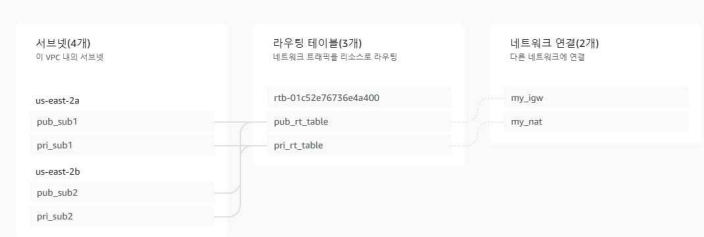
- S3 버킷 생성 확인

- ECR 저장소 생성 확인

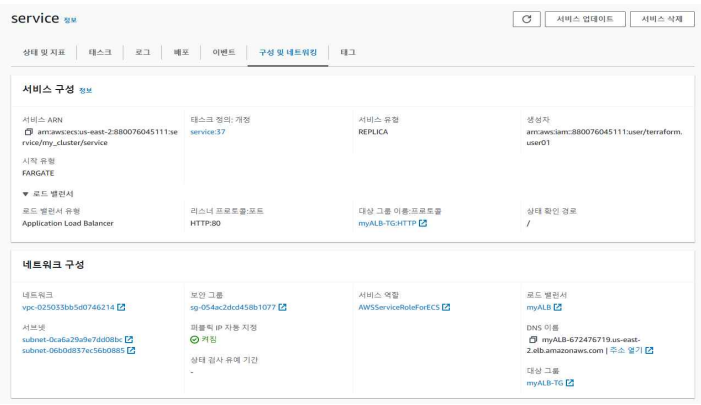
- ECS 생성 확인
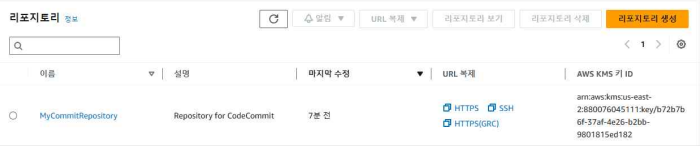
- CODE COMMIT REPOSITORY 생성 확인
- CODE BUILD 생성 확인

- CODEPIPELINE 생성 확인

- Cloudwatch dashboard 생성 확인

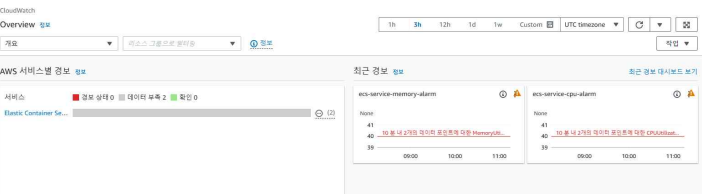
- Cloudwatch metric alarm 생성 확인
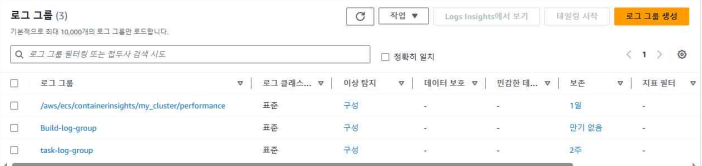
- Cloudwatch 로그 그룹 생성 확인
- SNS 주제 구독 생성 확인
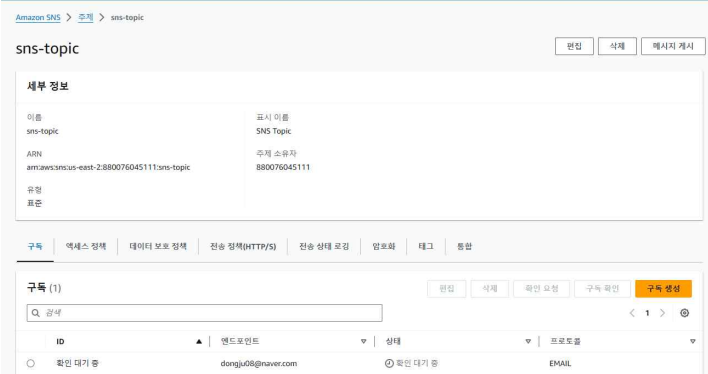
현재까지 구축환경의 그림대로 잘 생성되었다. 이제 본격적으로 테스트를 진행해보겠다. <먼저 미리 만들어놨던 Bationhost와 linux 로컬 두 곳 에서 테스트를 다 진행해보았다.>
🧗 Codepipeline을 통한 Web배포 CI/CD 구축 테스트
1. 먼저 commit repositroy에 파일(Dockerfile, index.html, buildspec.yml등)을 Push 해야하므로 다음 설명대로 생성된 commit repository를 가져온다.
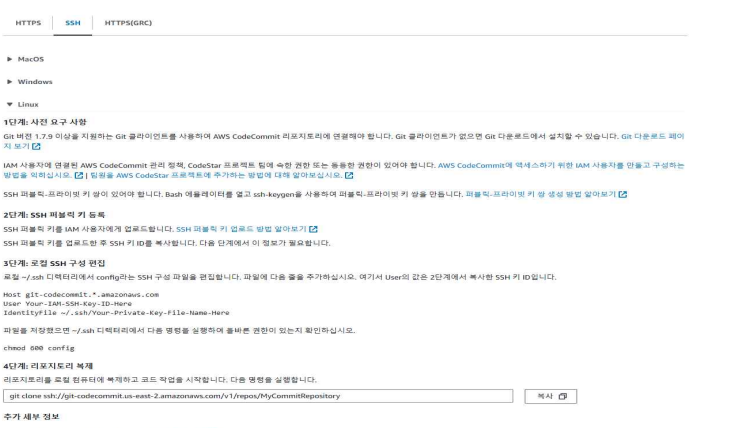
2. 그 후 MycommitRepository로 이동한 후 다음 파일들을 생성해준다.
- Dockerfile
FROM tgagor/centos-stream
MAINTAINER dongju
RUN yum -y install httpd
COPY index.html /var/www/html/
CMD ["/usr/sbin/httpd", "-D", "FOREGROUND"]
EXPOSE 80
- Docker 컨테이너 이미지를 빌드하기 위한 지시사항을 포함하고 있는 파일이다. ECS는
Docker 기반의 컨테이너 오케스트레이션 서비스 이므로 Dockerfile을 필수이다.
- buildspec.yml
version: 0.2
phases:
  pre_build:
    commands:
      - echo Logging in to Amazon ECR...
      - $(aws ecr get-login --no-include-email --region $AWS_DEFAULT_REGION)
  build:
    commands:
      - echo Build started on `date`
      - echo Building the Docker image...
      - docker build -t service:1 .
      - docker tag service:1 880076045111.dkr.ecr.us-east-2.amazonaws.com/my_ecr:latest
  post_build:
    commands:
      - echo Build completed on `date`
      - echo Pushing the Docker image...
      - docker push 880076045111.dkr.ecr.us-east-2.amazonaws.com/my_ecr:latest
      - printf '[{"name":"service","imageUri":"%s"}]' 880076045111.dkr.ecr.us-east-2.amazonaws.com/my_ecr:latest > imagedefinitions.json
artifacts:
  files: imagedefinitions.json
사용 유무:
codebuild.yml은 AWS CodeBuild에서 빌드 프로젝트를 정의하는 설정 파일이다.
이 파일은AWS CodeBuild가 빌드 프로젝트를 실행할 때 참조되어 빌드 환경과 빌드 단계를 지정한다.
단계별 설명:
- pre_build 단계: ‘aws ecr get-login’ 명렁어를 통해 Amazon ECR에 로그인한다. 이 명령어는 Docker 클라이언트가 ECR에 푸시 및 풀할 수 있도록 인증 토큰을 생성한다.
- build단계: 도커 이미지를 빌드하고 lates 및 Git 커밋 ID로 이미지에 태그를 지정한다. - post_build 단계: ECR 리포지토리에 두 태그와 함께 이미지를 푸시한다. Amazon ECS 서
비스의 컨테이너 이름과 이미지 및 태그를 포함하는 ‘imagedefinitions.json 파일을 빌드
루트로 사용한다. 이 파일은 ECS Task Definition에 사용할 이미지 정보를 담고 있다. 생
성된 JSON 형식은 [{"name":"service","imageUri":"<ECR 리포지토리 URI>:latest"}]로 구성된다.- artifacts 단계: ‘imagedefinitions.json’ 파일을 CodeBuild 빌드 프로젝트의 Artifacts에저장한다.
정리:
이 스크립트는 주로 CI/CD 파이프라인에서 사용되며, Docker 이미지를 빌드하고 ECR에 푸
시한 뒤, ECS Task Definition을 업데이트하는데 필요한 정보‘imagedefintions.json’ 파일에
저장한다. 그 후 이 파일을 배포 파이프라인 단계에서 사용한다.
- index.html
<!DOCTYPE html>
<html>
<head>
  <meta http-equiv="Content-Type" content="text/html; charset=UTF-8">
  <title>Dongju Last Project!</title>
  <style>
    /* 스타일 시트 */
    html {
      height: 100%;
    }
    body {
      background: #2196F3;
      overflow: hidden;
      height: 100%;
      color: #FBFBFF;
    }
    .centered {
      display: flex;
      align-items: center;
      justify-content: center;
      width: 100%;
      height: 100%;
    }
    div#shadow {
      /* 그림자 효과를 주기 위한 스타일 */
      -moz-transform: translateZ(0);
      -ms-transform: translateZ(0);
      -webkit-transform: translateZ(0);
      transform: translateZ(0);
      text-shadow: 3px 3px 0px rgba(11, 79, 108, 0.1);
      -moz-transition: text-shadow 20ms;
      -o-transition: text-shadow 20ms;
      -webkit-transition: text-shadow 20ms;
      transition: text-shadow 20ms;
      -webkit-text-stroke: 1px rgba(13, 71, 161, 0.5);
    }
    div#shadow .shadow {
      font-size: 5rem;
      font-weight: bolder;
    }
    a {
      color: #FBFBFF;
    }
    a:hover {
      text-decoration: none;
    }
  </style>
</head>
<body>
  <!-- 페이지 내용 -->
  <div class="centered">
    <div id='shadow'>
      <div class='shadow'>
        Dongju Last Project!
        -> repository
      </div>
    </div>
  </div>
  <!-- JavaScript 및 jQuery 코드 -->
  <script src="https://code.jquery.com/jquery-3.3.1.slim.js"></script>
  <script>
    // JavaScript 코드
    // ...
  </script>
</body>
</html>
- index.html을 파일은 github에서 가져온 후 수정하였다.
3. git push를 통해 codecommit repository에 파일을 올려준다.
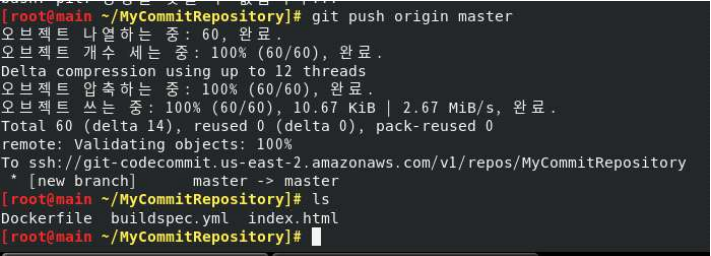
- git push 명령어
$ git init
$ git add.
$ git commit –m test
$ git push origin master
-> repository
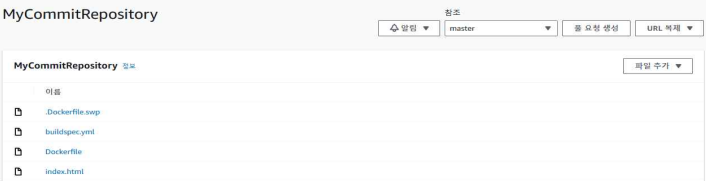
4. Codepipeline이 정상적으로 구축되었다면 codecommit repository에서 git push를 할 시 성공 표시가 뜰 것이다.
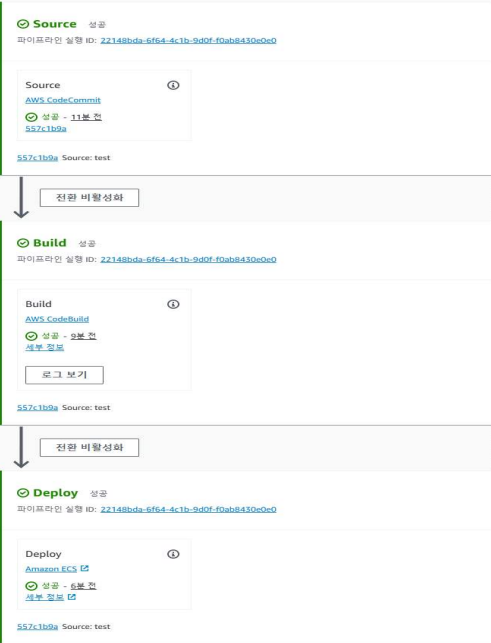
CodePipeline 원리
- 소스 단계 -> codecommit
Codecommitrepository에서 코드를 가져와지고 구성 변경이 감지됩니다.- 빌드 단계 -> codebuild
Codebuild를 이용하여 도커이미지를 ECR 저장소에 Push합니다.- 배포 단계 -> ECS
빌드된 애플리케이션이 ECS에 테스트 및 배포됩니다.
5. index.html 파일을 통해 배포된 웹 페이지를 확인
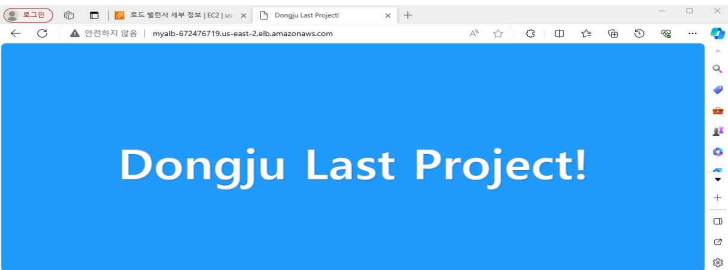
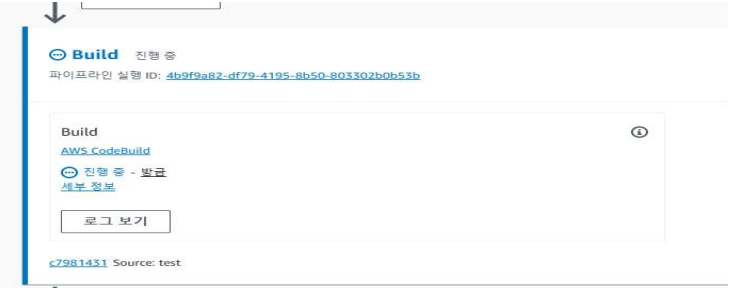
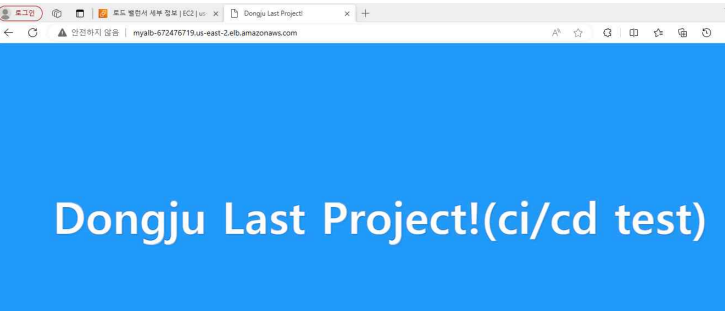
index.html 파일을 고쳐 ci/cd가 잘 적용되는지 확인 테스트를 해보겠다.
- 변경후 다시 배포하였더니 다시 빌드 하고 있는 모습
- 문구가 변경되는 것으로 보아 cl/cd 구축이 성공적이다.
🧞 CloudWatch 모니터링 테스트(지표화, 로그그룹)
1. cpu에 부하를 줄 수 있는 stress Dockerfile을 이용하여 부하 테스트를 진행
테라폼코드로 ECS의 CPU, Memory를 Cloud Watch dashboard를 이용하여 지표화, cloudwatch metric alarm 설정을 통해 어느 적정선이 넘으면 경보 알람을 울리도록 설정했다. 그리고 알람이 SNS를 통해 Email로 전송된다. -> 새로운 dockerfile을 작성한후 배포 시킨다.
- Dockerfile(Stress)
FROM ubuntu:latest
RUN apt-get update && apt-get install –y stress-ng
CMD ["stress-ng", "--cpu", "2"]-
Cloudwatch Dahboard
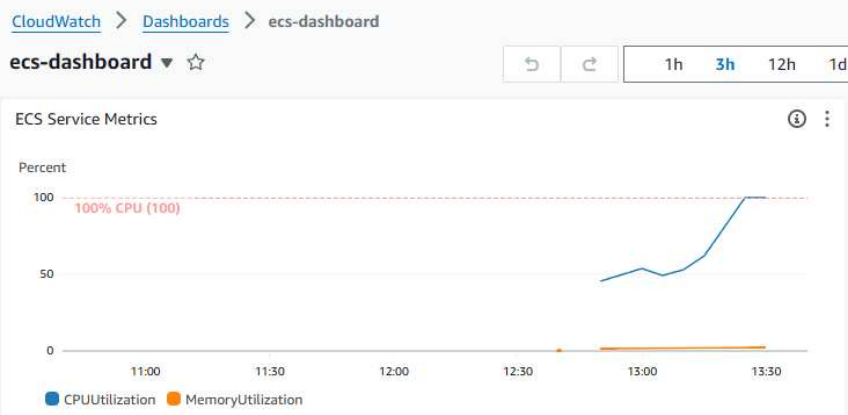
cloudwatch dashboard를 확인해보니 cpu가 급격하게 올라간 것을 확인할 수 있다.
-
Cloudwatch metric alarm
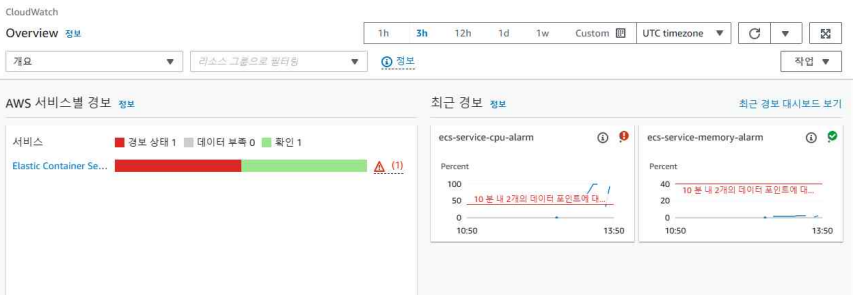
metric alarm을 통해 또한 경보 발생도 확인하였다. cpu에만 부하를 주었기 떄문에
memory는 알람이 울리지 않았다.
2. Email을 통한 SNS 경보 알람확인
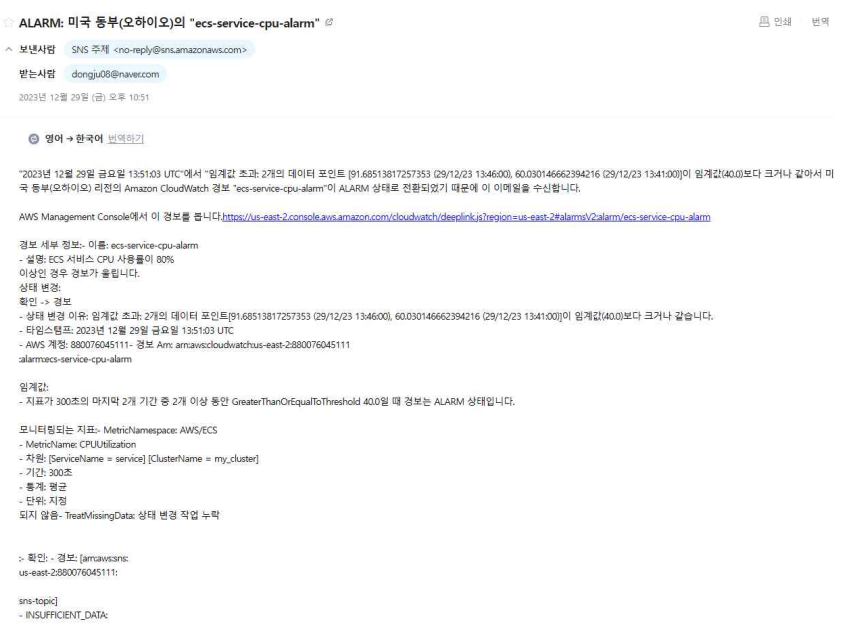
SNS를 통한 Email 발송 성공
3. 로그 그룹을 통한 모니터링 확인
- LogConfiguration을 통한 로그 그룹 생성
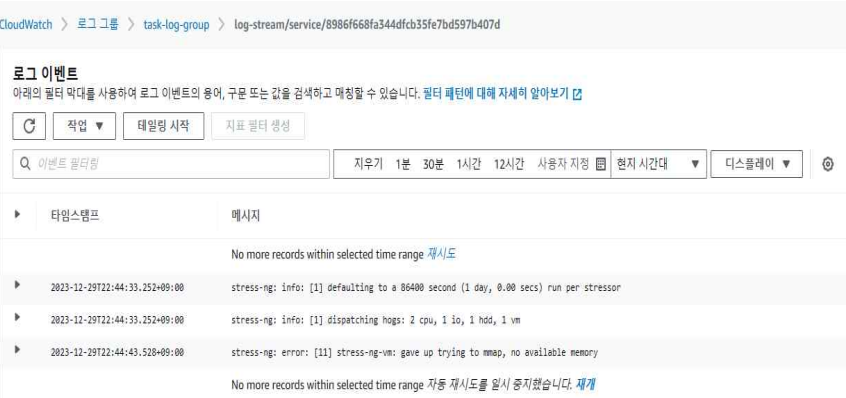
- Task definition에서 로그를 구성하는 설정을 지정하는 부분으로 테라폼에서 jasoncode를 지정하며, 생성한 로그를 어디에 저장할지, 어떤 형식으로 저장할지를 정의한다.
- 미리 생성해둔 cloudwatch 로그 그룹과 스트립에 연동시켰다.
- 해당 컨테이너에서 실행중인 어플리케이션이나 서비스가 생성하는 메시지를 출력한다.
- Containerinsights을 통한 로그 그룹 생성
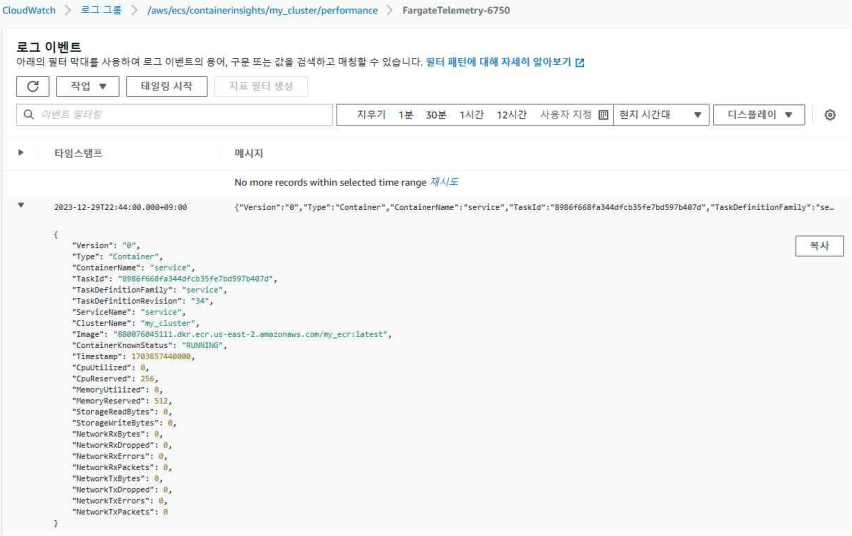
- ECS Cluster 또는 Kubernetes 클러스터에서 사용되며 클러스터 및 컨테이너 수준에서
성능을 모니터링하고 디버깅한다. 주로 cpu사용률, 메모리 사용률,네트워크 I/O 등 컨테이너의 성능 지표를 수집한다.- 테라폼 코드를 통해 ECS Cluster를 만드는 부분에서 Cloudwatch와 연동시켰다.
- CodeBuild에서의 로그 그룹 생성
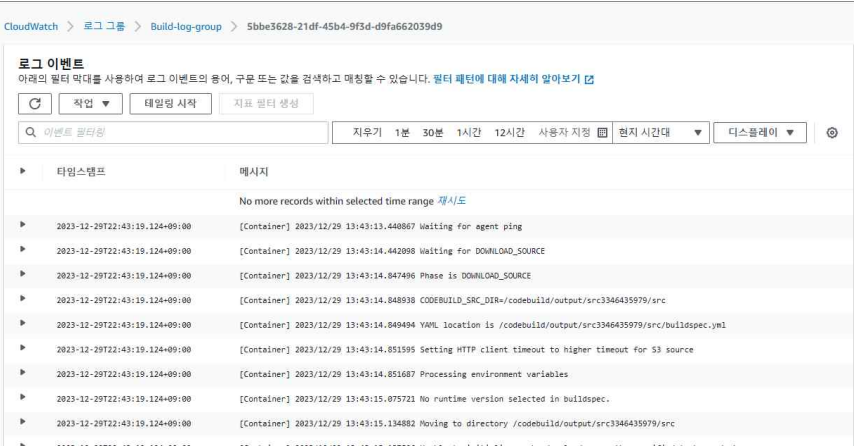
- CodeBuild에서 Build하는 과정을 CloudWatch와 연동시켜 Build내용을 모니터링할 수 있다.
- 테라폼에서 CodeBuild를 구성할 때 설정해준다.
