Google Sheets에서 Gemini API 쓰는 방법 (Apps Script 활용)

Google Sheets에서 api사용하여 자동 글생성 기능을 구현해보고자 Gemini API를 선택했다
이유? 일단 무료로 가능한게 가장 큰 장점
그리고 시트에서도 바로 함수처럼 사용이 가능
✅ 준비사항
- Google 계정 → Google Sheets와 Apps Script 사용
- Gemini API 키 → Google AI Studio에서 발급
💡Gemini API 키 발급 방법
- Google AI Studio 접속
- 로그인 후, 상단 메뉴에서 API Keys 클릭
- Create API Key 버튼 누르기
- 발급된 API 키 복사 (나중에 코드에 넣을 것)
💡Google Sheets 설정
- 구글 시트 열기
- 상단 메뉴 → 확장 프로그램 → 앱스 스크립트 클릭
- 새 프로젝트가 열리면 이름을 Gemini API로 변경
✏️Apps Script 코드 작성
const GEMINI_API_KEY =  PropertiesService.getScriptProperties().getProperty('GEMINI_API_KEY');//설정에 셋팅
const GEMINI_MODEL = 'gemini-1.5-flash'; // 무료 모델
const DEFAULT_PROMPT = `
원하는 프롬프트 작성
`;

/**
 * Google Gemini API 호출 함수
 */
function callGeminiAPI(prompt) {
  const url = `https://generativelanguage.googleapis.com/v1beta/models/${GEMINI_MODEL}:generateContent?key=${GEMINI_API_KEY}`;

  const payload = {
    contents: [{
      parts: [{ text: prompt }]
    }]
  };

  const options = {
    method: 'post',
    contentType: 'application/json',
    payload: JSON.stringify(payload),
    muteHttpExceptions: true
  };

  const response = UrlFetchApp.fetch(url, options);
  const code = response.getResponseCode();
  const text = response.getContentText();

  if (code !== 200) {
    return `Error ${code}: ${text}`;
  }

  const data = JSON.parse(text);
  return data.candidates && data.candidates.length > 0
    ? data.candidates[0].content.parts[0].text
    : 'No response from Gemini';
}


/**
 * 시트에서 쓸 함수
 * =GEMINI("여기에 질문 또는 프롬프트")
 */
function GEMINI(keyword) {
  const prompt = DEFAULT_PROMPT + `\n\n[실제 생성]\n키워드: ${keyword}`;
  return callGeminiAPI(prompt);
}
👍시트에서 사용
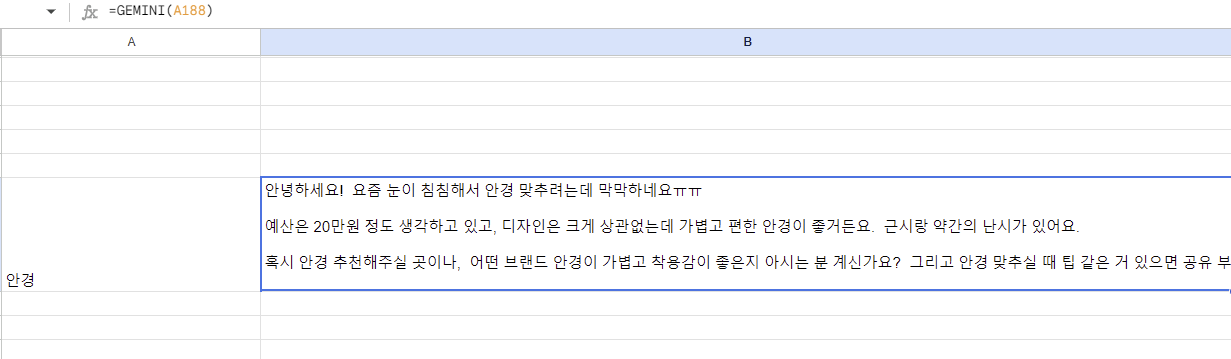
- =GEMINI(셀선택) 수식 입력
- 결과물 생성
📌주의 사항
- API 사용량에 따라 쿼터 제한 있음
- 개인정보는 API에 직접 전송하지 ❌
- 무료 키는 속도나 호출 횟수 제한이 있을 수 있음
테스트 결과 데이터는 잘 나오는데 대량으로 할 경우엔 확실이 더디거나 오류가 난다
문서작업이 많을경우 혹은 데이터를 이용하여 결과를 도출함에 있어서는 도움이 될것같다
이 글에서는 Gemini API를 활용해 Google Sheets에서 글을 자동으로 생성하는 방법을 소개합니다.
- 시트에 입력된 데이터를 기반으로 원하는 형태의 글을 손쉽게 생성
이 글과 코드를 보시고 개선할 부분이나 궁금한 점이 있으면 편하게 댓글이나 메시지로 알려주세요.💪
여러분의 피드백 덕분에 더 나은 콘텐츠를 만들 수 있습니다.
함께 성장해 나가요!

개발은모르겠고일단기록