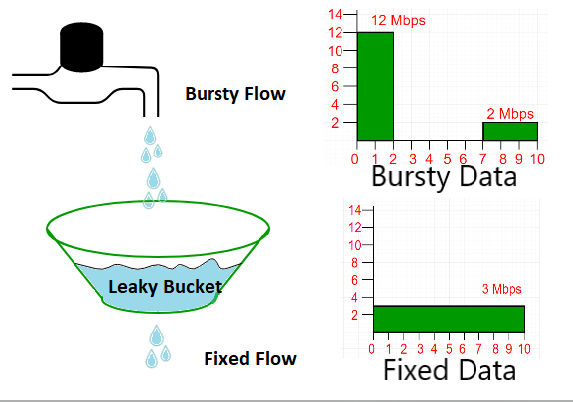
Rate Limiter를 공부하면서 Leaky Bucket을 훑어봤지만, 스터디에서 해당 주제가 나왔을 때 제대로 답변하지 못했다. 이번 글에서는 Leaky Bucket과 Token Bucket의 차이점, 그리고 Leaky Bucket의 두 가지 구현 방식에 대해 상세히 설명하겠다.
Token Bucket은 Bucket 안에 Token이 있으면 해당 Token이 허용하는 한도 내에서 순간적으로 Burst해서 사용이 가능하다. 하지만 Leaky Bucket은 정해진 속도만큼 일정하게 유량이 제어되고 순간적인 Burst가 불가능해야 한다. Leaky Bucket에는 Queue 방식과 Meter 방식이라는 두 가지 구현 방식이 존재한다.
Queue 방식 Leaky Bucket
첫 번째 구현 방식인 Queue 방식은 Scheduler를 활용해서 일정한 유량을 제어하는 방식이다. 내가 생각하기엔 이게 가장 정석적인 Leaky Bucket 구현 방식이라고 생각한다. 아래 코드를 살펴보자.
import java.util.concurrent.Executors;
import java.util.concurrent.ScheduledExecutorService;
import java.util.concurrent.TimeUnit;
import java.util.concurrent.LinkedBlockingQueue;

public class LeakyBucketRateLimiter {
    private final int bucketCapacity;  // Maximum capacity of bucket
    private final int leakRatePerSecond; // Rate at which requests are processed
    private final LinkedBlockingQueue<Long> bucket; // Queue to hold requests

    public LeakyBucketRateLimiter(int bucketCapacity, int leakRatePerSecond) {
        this.bucketCapacity = bucketCapacity;
        this.leakRatePerSecond = leakRatePerSecond;
        this.bucket = new LinkedBlockingQueue<>(bucketCapacity);

        // Leak requests at a constant rate
        ScheduledExecutorService scheduler = Executors.newScheduledThreadPool(1);
        scheduler.scheduleAtFixedRate(this::leakRequest, 0, 1000 / leakRatePerSecond, TimeUnit.MILLISECONDS);
    }

    public static void main(String[] args) throws InterruptedException {
        LeakyBucketRateLimiter rateLimiter = new LeakyBucketRateLimiter(5, 2); // 5 max requests, 2 processed/sec

        // Simulate burst traffic: 7 requests arrive in quick succession
        for (int i = 0; i < 7; i++) {
            rateLimiter.allowRequest();
            Thread.sleep(100); // Requests arrive at short intervals
        }

        // Wait a bit and send more requests to see smooth processing
        Thread.sleep(3000);
        System.out.println("New Requests after some time:");

        for (int i = 0; i < 3; i++) {
            rateLimiter.allowRequest();
            Thread.sleep(500);
        }
    }

    // Process a request at a fixed rate
    private void leakRequest() {
        if (!bucket.isEmpty()) {
            bucket.poll(); // Remove the oldest request (process it)
            System.out.println("Processed a request ✅, Bucket size: " + bucket.size());
        }
    }

    // Incoming request
    public void allowRequest() {
        if (bucket.remainingCapacity() > 0) {
            bucket.offer(System.currentTimeMillis()); // Add request timestamp
            System.out.println("Request added ✅, Bucket size: " + bucket.size());
        } else {
            System.out.println("Request dropped ❌, Bucket is full!");
        }
    }
}
출처: https://medium.com/@anil.goyal0057/rate-limiter-using-leaky-bucket-algorithm-ea22b17bace6
Meter 방식 Leaky Bucket
두 번째 구현 방식인 Meter 방식에 대해 알아보자. Wikipedia(https://en.wikipedia.org/wiki/Leaky_bucket)에서는 Leaky Bucket의 Meter 구현 방식이 Token Bucket 알고리즘과 동일하다고 설명한다.
"The leaky bucket as a meter is exactly equivalent to (a mirror image of) the token bucket algorithm"
아래 코드는 Token Bucket처럼 요청이 들어올 때마다 Time diff를 계산해서 스케줄링을 한다. 주목해야 할 부분은 bucket.leak(); 부분이다. 사용자의 요청이 들어올 때 사용하지 않은 token을 일정 비율만큼 빼준다. 이후 bucket.processed();를 통해서 사용자의 요청에 대한 사용량을 빼준다.
import java.time.Clock;
import java.time.Duration;
import java.util.HashMap;
import java.util.Map;

public class LeakyBucketRateLimiter {

  private final int capacity;
  private final Duration period;
  private final int leaksPerPeriod;
  private final Clock clock;
  private final Map<String, LeakyBucket> userLeakyBucket = new HashMap<>();

  public LeakyBucketRateLimiter(int capacity, Duration period, int leaksPerPeriod, Clock clock) {
    this.capacity = capacity;
    this.period = period;
    this.leaksPerPeriod = leaksPerPeriod;
    this.clock = clock;
  }

  public boolean allowed(String userId) {
    LeakyBucket bucket = userLeakyBucket.computeIfAbsent(userId,
        k -> new LeakyBucket(clock.millis(), 0));

    bucket.leak();

    return bucket.processed();
  }

  private class LeakyBucket {
    private long leakTimestamp; // Timestamp of the last leak.
    private long waterLevel; // Current water level represents the number of pending requests.

    LeakyBucket(long leakTimestamp, long waterLevel) {
      this.leakTimestamp = leakTimestamp;
      this.waterLevel = waterLevel;
    }

    /**
     * Simulates the leaking of requests over time. This method adjusts the water level
     * based on the elapsed time since the last leak, applying the defined leak rate.
     */
    void leak() {
      long now = clock.millis();
      long elapsedTime = now - leakTimestamp;
      long elapsedPeriods = elapsedTime / period.toMillis();
      long leaks = elapsedPeriods * leaksPerPeriod;

      if (leaks > 0) {
        waterLevel = Math.max(0, waterLevel - leaks);
        leakTimestamp = now;
      }
    }

    /**
     * Attempts to process a request by incrementing the water level if under capacity.
     *
     * @return true if the request is processed (under capacity), false if the bucket is full.
     */
    boolean processed() {
      if (waterLevel < capacity) {
        ++waterLevel;
        return true;
      } else {
        return false;
      }
    }
  }
}
출처: https://rdiachenko.com/posts/arch/rate-limiting/leaky-bucket-algorithm/
이제 두 알고리즘의 차이를 구체적인 수치로 비교해보자. 30초에 30개 요청이 가능한 (rate = 1 req/sec, capacity = 30) Token Bucket과 Leaky Bucket이 있다고 가정하자.
1~20초 구간에 아무런 요청을 하지 않았다면 Token Bucket은 30개의 토큰이 쌓여서 30개의 요청이 가능한 반면, Leaky Bucket as a Meter은 요청이 발생하지 않은 구간에서도 leak을 해주었기 때문에 10개의 요청만이 가능하다.
따라서 어느 정도 일정한 처리율을 보장할 수 있는 셈인거다.
스터디 과제
스터디 과제로 Leaky Bucket의 구현 목표는 다음과 같다.

그래서 나는 Token Bucket 구현자분께 받은 코드를 토대로 Redis에서 사용하기 위한 Leaky Bucket Lua Script 코드를 아래와 같이 작성했다.
-- KEYS[1]: 버킷 키 (예: "leaky_bucket:{userId}")
-- ARGV[1]: capacity (최대 버킷 크기 - 대기 가능한 요청 수)
-- ARGV[2]: leak_rate_per_sec (초당 처리되는 요청 수 - 고정 처리율)
-- ARGV[3]: cost (요청당 추가되는 양, 기본 1)
-- 반환: { allowed(1 or 0), space_left, wait_time_ms }

local key = KEYS[1]
local capacity = tonumber(ARGV[1])
local leak_rate = tonumber(ARGV[2])
local cost = tonumber(ARGV[3]) or 1

-- Redis 서버 시간 사용 (클러스터 시계 차이 방지)
local t = redis.call('TIME')
local now_ms = t[1] * 1000 + math.floor(t[2] / 1000)

-- 현재 상태 읽기
local tokens = tonumber(redis.call('HGET', key, 'tokens'))
local last_leak = tonumber(redis.call('HGET', key, 'last_leak'))

-- 초기값 처리 (최초 요청 시)
-- ★ Token Bucket과 차이점 1: 버킷이 비어있는 상태(0)로 시작
if not tokens then tokens = 0 end
if not last_leak then last_leak = now_ms end

-- 게으른 계산: 경과 시간만큼 버킷에서 요청이 "새어나감" (처리됨)
local elapsed_ms = math.max(0, now_ms - last_leak)
local leak = (elapsed_ms / 1000.0) * leak_rate
-- ★ Token Bucket과 차이점 2: + → - (물이 새어나가므로 감소)
tokens = math.max(0, tokens - leak)

-- 요청 처리
local allowed = 0
local wait_time_ms = 0

-- ★ Token Bucket과 차이점 3: 로직 반전 (요청이 버킷에 들어갈 수 있는지)
if tokens + cost <= capacity then
    -- ★ Token Bucket과 차이점 4: - → + (요청을 버킷에 추가)
    tokens = tokens + cost
    allowed = 1
else
    -- 버킷이 가득 차서 공간 부족: 다음 leak까지 대기 시간 계산
    local overflow = (tokens + cost) - capacity
    wait_time_ms = math.ceil((overflow / leak_rate) * 1000)
end

-- Redis에 상태 저장 (원자적으로)
redis.call('HSET', key, 'tokens', tokens, 'last_leak', now_ms)
-- TTL 설정: 버킷이 완전히 비워지고 2배 시간 지나면 자동 삭제
local ttl = math.ceil((capacity / leak_rate) * 2)
redis.call('EXPIRE', key, ttl)

-- 반환값: {허용여부, 남은공간, 대기시간(ms)}
-- ★ Token Bucket과 차이점 5: tokens → capacity - tokens (남은 "공간"을 표현)
return {allowed, capacity - tokens, wait_time_ms}