모델 돌려보기
jonathandinu/페이스파싱 · 포옹하는 얼굴 (huggingface.co)
import torch
from torch import nn
from transformers import SegformerImageProcessor, SegformerForSemanticSegmentation

from PIL import Image
import matplotlib.pyplot as plt
import requests

# convenience expression for automatically determining device
device = (
    "cuda"
    # Device for NVIDIA or AMD GPUs
    if torch.cuda.is_available()
    else "mps"
    # Device for Apple Silicon (Metal Performance Shaders)
    if torch.backends.mps.is_available()
    else "cpu"
)

# load models
image_processor = SegformerImageProcessor.from_pretrained("jonathandinu/face-parsing")
model = SegformerForSemanticSegmentation.from_pretrained("jonathandinu/face-parsing")
model.to(device)

# expects a PIL.Image or torch.Tensor
url = "https://images.unsplash.com/photo-1539571696357-5a69c17a67c6"
image = Image.open(requests.get(url, stream=True).raw)

# run inference on image
inputs = image_processor(images=image, return_tensors="pt").to(device)
outputs = model(**inputs)
logits = outputs.logits  # shape (batch_size, num_labels, ~height/4, ~width/4)

# resize output to match input image dimensions
upsampled_logits = nn.functional.interpolate(logits,
                size=image.size[::-1], # H x W
                mode='bilinear',
                align_corners=False)

# get label masks
labels = upsampled_logits.argmax(dim=1)[0]

# move to CPU to visualize in matplotlib
labels_viz = labels.cpu().numpy()
plt.imshow(labels_viz)
plt.show()
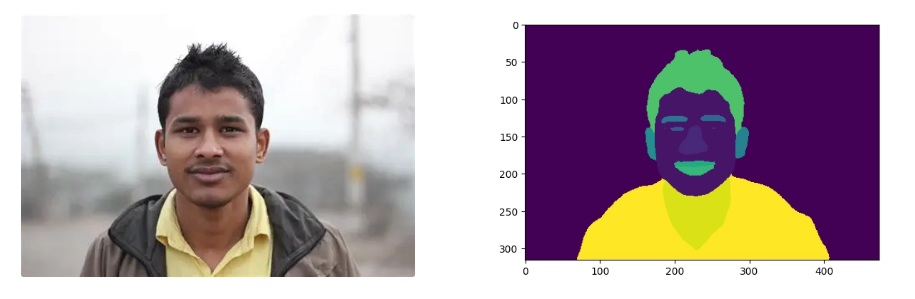
Image Segmentation - Hugging Face Community Computer Vision Course
[CV] Image Segmentation (이미지 분할) (tistory.com)
Yolo26
yolo26n-seg를 사용해 보았다.
from torch.serialization import save
import cv2

model = YOLO("yolo26n-seg.pt")

results = model(img_path, save = True)

for result in results:
    p = result.plot()

    img_rgb = cv2.cvtColor(p, cv2.COLOR_BGR2RGB)
    plt.imshow(img_rgb)
    plt.show()

    masks = result.masks  # SegMask objects
    boxes = result.boxes  # Boxes objects
    print(f"Detected {len(boxes)} objects.")

print(type(results))
print(results)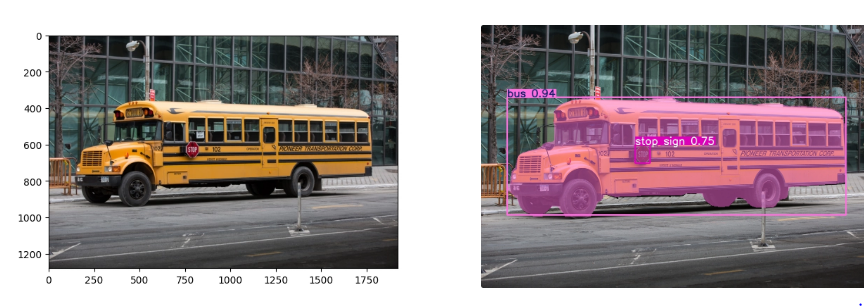
Ultraltice에서 제공하는 개발자 문서를 토대로 새로운 데이터 셋을 학습시켰다.
yolo26의 모델별 성능
| Model | size(pixels) | mAPbox50-95(e2e) | mAPmask50-95(e2e) | SpeedCPU ONNX(ms) | SpeedT4 TensorRT10(ms) | params(M) | FLOPs(B) |
|---|---|---|---|---|---|---|---|
| YOLO26n-seg | 640 | 39.6 | 33.9 | 53.3 ± 0.5 | 2.1 ± 0.0 | 2.7 | 9.1 |
| YOLO26s-seg | 640 | 47.3 | 40.0 | 118.4 ± 0.9 | 3.3 ± 0.0 | 10.4 | 34.2 |
| YOLO26m-seg | 640 | 52.5 | 44.1 | 328.2 ± 2.4 | 6.7 ± 0.1 | 23.6 | 121.5 |
| YOLO26l-seg | 640 | 54.4 | 45.5 | 387.0 ± 3.7 | 8.0 ± 0.1 | 28.0 | 139.8 |
| YOLO26x-seg | 640 | 56.5 | 47.0 | 787.0 ± 6.8 | 16.4 ± 0.1 | 62.8 | 313.5 |
Train
from ultralytics import YOLO

# Load a model
model = YOLO("yolo26n-seg.yaml")  # build a new model from YAML
model = YOLO("yolo26n-seg.pt")  # load a pretrained model (recommended for training)
model = YOLO("yolo26n-seg.yaml").load("yolo26n.pt")  # build from YAML and transfer weights

# Train the model
results = model.train(data="coco8-seg.yaml", epochs=100, imgsz=640)
모델을 가져오는 방법은 3가지로 나누어진다
YOLO("yolo26n-seg.yaml")- yolo26모델의 아키텍쳐만 가지고 온다.
- 사전에 학습이 없고 새로운 데이터 셋을 학습시킬 때 가지고 사용한다.
YOLO("yolo26n-seg.pt")- 사전에 학습된 모델의 가중치를 가지고 온다.
- 파인튜닝 할때 사용된다.
YOLO("yolo26n-seg.yaml").load("yolo26n.pt")- -seg 모델의 아키텍쳐를 가지고 오고 가중치는 객체 탐지 가중치를 가지고 온다.
- 특수한 구조 변경이 필요할 때 사용한다.
model.train()-
모델을 학습시킨다.
매개변수 기본값 설명 modelNone학습에 사용할 모델 파일 경로 ( .pt또는.yaml)dataNone데이터셋 설정 파일 경로 ( data.yaml)epochs100전체 데이터를 반복 학습할 횟수 imgsz640입력 이미지 크기 (정사각형 기준) batch16한 번에 학습할 이미지 개수 (-1로 설정 시 자동 최적화) saveTrue학습 결과 및 체크포인트를 저장할지 여부 deviceNone실행 장치 (예: device=0,device='cpu')projectNone결과가 저장될 상위 폴더 이름 nameNone결과가 저장될 하위 폴더 이름 resumeFalse마지막 중단된 지점부터 학습을 재개할지 여부
-
data.yml 구조
# Root directory containing the dataset
path: ../datasets/my_dataset
# Paths to training, validation, and optional test sets
train: images/train
val: images/val
test: images/test # Optional
# Number of classes in the dataset
nc: 3
# Class names (zero-indexed)
names:
 0: cat
 1: dog
 2: bird
Predict
from ultralytics import YOLO

# Load a model
model = YOLO("yolo26n-seg.pt")  # load an official model
model = YOLO("path/to/best.pt")  # load a custom model

# Predict with the model
results = model("https://ultralytics.com/images/bus.jpg")  # predict on an image

# Access the results
for result in results:
    xy = result.masks.xy  # mask in polygon format
    xyn = result.masks.xyn  # normalized
masks = result.masks.data # mask in matrix format (num_objects x H x W)- model 학습된 모델로 판단해보기 위해서는 먼저 모델을 가져온다.
YOLO("yolo26n-seg.pt")← yolo에서 ****제공된 사전 학습된 모델YOLO("path/to/best.pt")← 새로운 데이터셋을 이용한 커스텀 모델
model("https://ultralytics.com/images/bus.jpg")model()에 이미지 경로를 넣어주면 잘 나오는 것을 볼 수 있다.
결과 이미지를 보기 위한 코드
t = results[0].plot() # 좌표등 숫자 데이터를 원본이미지에 합쳐줌
t = cv2.cvtColor(t, cv2.COLOR_BGR2RGB)# 색상 체계를 BGR에서 RGB로 변환합니다.
plt.imshow(t)
plt.show()
Val
모델이 얼마나 정확하게 물체를 찾고(Box), 그 형태를 따냈는지(Segmentation)를 수치
from ultralytics import YOLO

# Load a model
model = YOLO("yolo26n-seg.pt")  # load an official model
model = YOLO("path/to/best.pt")  # load a custom model

# Validate the model
metrics = model.val()  # no arguments needed, dataset and settings remembered
metrics.box.map  # map50-95(B)
metrics.box.map50  # map50(B)
metrics.box.map75  # map75(B)
metrics.box.maps  # a list containing mAP50-95(B) for each category
metrics.seg.map  # map50-95(M)
metrics.seg.map50  # map50(M)
metrics.seg.map75  # map75(M)
metrics.seg.maps # a list containing mAP50-95(M) for each category- map50-95 IoU 임계값(0.5에서 0.95까지)에 대한 평균 정밀도(mAP) ← 전반적인 탐지 능력을 나타냄
- map50 정답 값과 얼마나 겹치는지 판단하는 지표 → 50% 겹쳐도 정답 인정
- map75 정답 값과 얼마나 겹치는지 판단하는 지표 → 75% 겹쳐도 정답 인정 engine/trainer:
Data set
code
!pip install ultralyticsfrom ultralytics import YOLO
import matplotlib.pyplot as plt
import matplotlib.image as mpimg
import cv2
model = YOLO("yolo26n-seg.pt")
ex_img = model('/content/drive/MyDrive/yolo26_seg/valid/images/1-1-_jpg.rf.c27b687ae48fe13d078a73965bcbae4e.jpg')
t = ex_img[0].plot()
t = cv2.cvtColor(t, cv2.COLOR_BGR2RGB)
plt.imshow(t)
plt.show() # 데이터 셋 확인
model = YOLO("yolo26n-seg.pt")
new_model = model.train(data="/content/drive/MyDrive/yolo26_seg/data.yaml", epochs = 20, imgsz = 640)
네트워크 너무 불안하여 학습을 시키면서 많은 어려움이 있었다… (계속 날라감 ;;;)
그래서 resume을 이용해 어찌 저찌 했다…
model = YOLO("/content/drive/MyDrive/yolo26_seg/runs/segment/train5/weights/last.pt")

model.train(resume=True)
초반에 1 epoch당 4분 16초 씩 걸려서 뭔가 봤더니 1 ~ 10 epoch 까지 데이터 증강 (모자이크) 로 학습되고 있었다.
- 출력로그
Starting training for 20 epochs...

      Epoch    GPU_mem   box_loss   seg_loss   cls_loss   dfl_loss   sem_loss  Instances       Size
       5/20      5.39G      1.774      1.801      1.436   0.006005     0.7486        499        640: 100% ━━━━━━━━━━━━ 202/202 4.8s/it 16:16
                 Class     Images  Instances      Box(P          R      mAP50  mAP50-95)     Mask(P          R      mAP50  mAP50-95): 100% ━━━━━━━━━━━━ 12/12 1.4s/it 16.7s
                   all        362      12168       0.73      0.677      0.738      0.425      0.473      0.441      0.375      0.165

      Epoch    GPU_mem   box_loss   seg_loss   cls_loss   dfl_loss   sem_loss  Instances       Size
       6/20      5.64G      1.722      1.702      1.291   0.005731     0.7424        435        640: 100% ━━━━━━━━━━━━ 202/202 1.3s/it 4:17
                 Class     Images  Instances      Box(P          R      mAP50  mAP50-95)     Mask(P          R      mAP50  mAP50-95): 100% ━━━━━━━━━━━━ 12/12 1.3s/it 15.4s
                   all        362      12168      0.739       0.67      0.742      0.451      0.455      0.422      0.359      0.144

      Epoch    GPU_mem   box_loss   seg_loss   cls_loss   dfl_loss   sem_loss  Instances       Size
       7/20      5.67G      1.685      1.657      1.241   0.005478     0.6747        592        640: 100% ━━━━━━━━━━━━ 202/202 1.3s/it 4:17
                 Class     Images  Instances      Box(P          R      mAP50  mAP50-95)     Mask(P          R      mAP50  mAP50-95): 100% ━━━━━━━━━━━━ 12/12 1.3s/it 15.8s
                   all        362      12168      0.745      0.685      0.754      0.452      0.463      0.423      0.362      0.141

      Epoch    GPU_mem   box_loss   seg_loss   cls_loss   dfl_loss   sem_loss  Instances       Size
       8/20      5.48G      1.656      1.631      1.202   0.005329     0.6483        424        640: 100% ━━━━━━━━━━━━ 202/202 1.3s/it 4:16
                 Class     Images  Instances      Box(P          R      mAP50  mAP50-95)     Mask(P          R      mAP50  mAP50-95): 100% ━━━━━━━━━━━━ 12/12 1.2s/it 14.7s
                   all        362      12168      0.752      0.693      0.764      0.473      0.429      0.384      0.327       0.12

      Epoch    GPU_mem   box_loss   seg_loss   cls_loss   dfl_loss   sem_loss  Instances       Size
       9/20      5.53G      1.652      1.652       1.19   0.005447     0.6792        416        640: 100% ━━━━━━━━━━━━ 202/202 1.3s/it 4:16
                 Class     Images  Instances      Box(P          R      mAP50  mAP50-95)     Mask(P          R      mAP50  mAP50-95): 100% ━━━━━━━━━━━━ 12/12 1.3s/it 16.0s
                   all        362      12168      0.765       0.69      0.768      0.458       0.46      0.418      0.352      0.152

      Epoch    GPU_mem   box_loss   seg_loss   cls_loss   dfl_loss   sem_loss  Instances       Size
      10/20      5.54G       1.62      1.619      1.145   0.005209     0.6139        444        640: 100% ━━━━━━━━━━━━ 202/202 1.3s/it 4:17
                 Class     Images  Instances      Box(P          R      mAP50  mAP50-95)     Mask(P          R      mAP50  mAP50-95): 100% ━━━━━━━━━━━━ 12/12 1.3s/it 15.8s
                   all        362      12168      0.773      0.703      0.775      0.484      0.481      0.432      0.371      0.158
Closing dataloader mosaic
총 소요시간 : 1시간 20분 정도
Ultralytics 8.4.17 🚀 Python-3.12.12 torch-2.10.0+cu128 CUDA:0 (Tesla T4, 14913MiB)
YOLO26n-seg summary (fused): 139 layers, 2,689,079 parameters, 0 gradients, 9.0 GFLOPs
                 Class     Images  Instances      Box(P          R      mAP50  mAP50-95)     Mask(P          R      mAP50  mAP50-95): 100% ━━━━━━━━━━━━ 12/12 1.5s/it 18.1s
                   all        362      12168      0.842      0.769      0.842      0.585      0.499      0.449      0.378       0.15
Speed: 0.3ms preprocess, 4.9ms inference, 0.0ms loss, 6.0ms postprocess per image
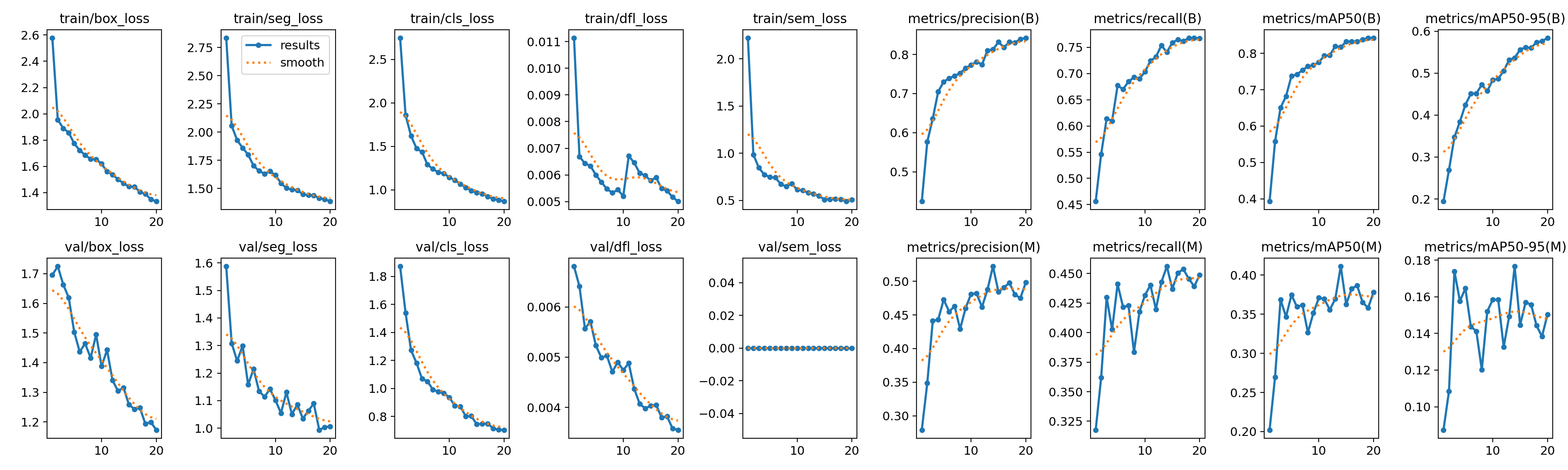
mAP50 기준으로 BOX는 84%로 잘 찾아내는 모습을 보였지만 Mask는 37%로 처첨했다.
| epoch | time | train/box_loss | train/seg_loss | train/cls_loss | train/dfl_loss | train/sem_loss | metrics/precision(B) | metrics/recall(B) | metrics/mAP50(B) | metrics/mAP50-95(B) | metrics/precision(M) | metrics/recall(M) | metrics/mAP50(M) | metrics/mAP50-95(M) | val/box_loss | val/seg_loss | val/cls_loss | val/dfl_loss | val/sem_loss | lr/pg0 | lr/pg1 | lr/pg2 |
|---|---|---|---|---|---|---|---|---|---|---|---|---|---|---|---|---|---|---|---|---|---|---|
| 1 | 313.399 | 2.57886 | 2.83564 | 2.74936 | 0.01114 | 2.22254 | 0.42429 | 0.45611 | 0.39286 | 0.19423 | 0.27895 | 0.31764 | 0.20211 | 0.08738 | 1.69591 | 1.58768 | 1.87198 | 0.00681 | 0 | 0.000663366 | 0.000663366 | 0.000663366 |
| 2 | 588.471 | 1.95494 | 2.05594 | 1.85948 | 0.00669 | 0.98588 | 0.57655 | 0.54627 | 0.55755 | 0.26892 | 0.34843 | 0.36193 | 0.26971 | 0.10836 | 1.72493 | 1.30788 | 1.53996 | 0.00641 | 0 | 0.0012642 | 0.0012642 | 0.0012642 |
| 3 | 868.5 | 1.88913 | 1.92836 | 1.62128 | 0.00643 | 0.84697 | 0.63599 | 0.61412 | 0.65049 | 0.34754 | 0.44113 | 0.42982 | 0.36858 | 0.17392 | 1.66349 | 1.24426 | 1.27246 | 0.00557 | 0 | 0.00179903 | 0.00179903 | 0.00179903 |
| 4 | 1148.99 | 1.85665 | 1.86049 | 1.4776 | 0.00634 | 0.7737 | 0.70514 | 0.60971 | 0.68182 | 0.3844 | 0.44337 | 0.40253 | 0.34678 | 0.15769 | 1.61917 | 1.29946 | 1.18247 | 0.00571 | 0 | 0.001703 | 0.001703 | 0.001703 |
| 5 | 993.12 | 1.77367 | 1.80091 | 1.43641 | 0.006 | 0.74861 | 0.73014 | 0.6771 | 0.73787 | 0.4247 | 0.47277 | 0.44098 | 0.37459 | 0.16457 | 1.50356 | 1.15831 | 1.06962 | 0.00523 | 0 | 0.001604 | 0.001604 | 0.001604 |
| 6 | 1268.2 | 1.72173 | 1.70175 | 1.29085 | 0.00573 | 0.74243 | 0.7394 | 0.67016 | 0.74186 | 0.45117 | 0.45501 | 0.42168 | 0.35944 | 0.14376 | 1.43683 | 1.21446 | 1.05061 | 0.00499 | 0 | 0.001505 | 0.001505 | 0.001505 |
| 7 | 1543.26 | 1.68469 | 1.65682 | 1.2408 | 0.00548 | 0.67467 | 0.74547 | 0.68466 | 0.75389 | 0.45182 | 0.4631 | 0.42275 | 0.36183 | 0.14124 | 1.46449 | 1.13402 | 0.99207 | 0.00503 | 0 | 0.001406 | 0.001406 | 0.001406 |
| 8 | 1815.97 | 1.65611 | 1.63123 | 1.20192 | 0.00533 | 0.64832 | 0.75234 | 0.69303 | 0.76422 | 0.47252 | 0.42907 | 0.38355 | 0.32655 | 0.12022 | 1.41625 | 1.11431 | 0.97624 | 0.00471 | 0 | 0.001307 | 0.001307 | 0.001307 |
| 9 | 2089.88 | 1.65181 | 1.65237 | 1.18985 | 0.00545 | 0.67916 | 0.76499 | 0.69048 | 0.76752 | 0.45757 | 0.46009 | 0.41765 | 0.35161 | 0.15204 | 1.49459 | 1.1418 | 0.96573 | 0.0049 | 0 | 0.001208 | 0.001208 | 0.001208 |
| 10 | 2364.08 | 1.61999 | 1.61876 | 1.1452 | 0.00521 | 0.6139 | 0.77325 | 0.7034 | 0.77522 | 0.48393 | 0.4812 | 0.43162 | 0.37096 | 0.15839 | 1.38821 | 1.10138 | 0.93674 | 0.00474 | 0 | 0.001109 | 0.001109 | 0.001109 |
| 11 | 2512.86 | 1.55864 | 1.54809 | 1.11154 | 0.00671 | 0.60705 | 0.78155 | 0.72419 | 0.79388 | 0.48671 | 0.48205 | 0.44017 | 0.36945 | 0.15849 | 1.44298 | 1.05454 | 0.87571 | 0.00488 | 0 | 0.00101 | 0.00101 | 0.00101 |
| 12 | 2655.29 | 1.53734 | 1.5033 | 1.06836 | 0.00646 | 0.58183 | 0.77421 | 0.73167 | 0.79462 | 0.50577 | 0.46182 | 0.41974 | 0.35573 | 0.13267 | 1.34049 | 1.13042 | 0.87233 | 0.00437 | 0 | 0.000911 | 0.000911 | 0.000911 |
| 13 | 2796.76 | 1.50063 | 1.49143 | 1.02669 | 0.00607 | 0.56971 | 0.81026 | 0.7537 | 0.82002 | 0.53207 | 0.48775 | 0.44264 | 0.36952 | 0.14936 | 1.30434 | 1.05064 | 0.80092 | 0.00407 | 0 | 0.000812 | 0.000812 | 0.000812 |
| 14 | 2937.89 | 1.47059 | 1.48479 | 0.99173 | 0.00598 | 0.5496 | 0.81274 | 0.74071 | 0.81696 | 0.53681 | 0.52231 | 0.45603 | 0.41119 | 0.1766 | 1.31599 | 1.0855 | 0.80344 | 0.00398 | 0 | 0.000713 | 0.000713 | 0.000713 |
| 15 | 3079.45 | 1.44526 | 1.4494 | 0.96797 | 0.00579 | 0.50994 | 0.83183 | 0.75897 | 0.83258 | 0.55635 | 0.48452 | 0.43697 | 0.3628 | 0.14466 | 1.25856 | 1.0348 | 0.74496 | 0.00403 | 0 | 0.000614 | 0.000614 | 0.000614 |
| 16 | 3222.22 | 1.44487 | 1.44095 | 0.95649 | 0.00591 | 0.51317 | 0.81847 | 0.76481 | 0.83261 | 0.56181 | 0.49068 | 0.45036 | 0.38291 | 0.15691 | 1.24323 | 1.06287 | 0.74755 | 0.00405 | 0 | 0.000515 | 0.000515 | 0.000515 |
| 17 | 3365.01 | 1.40501 | 1.44034 | 0.92429 | 0.00549 | 0.51763 | 0.83173 | 0.76166 | 0.83241 | 0.56033 | 0.49787 | 0.45373 | 0.38653 | 0.15578 | 1.24753 | 1.08917 | 0.74944 | 0.0038 | 0 | 0.000416 | 0.000416 | 0.000416 |
| 18 | 3507.23 | 1.38913 | 1.41433 | 0.89796 | 0.00541 | 0.51146 | 0.83054 | 0.768 | 0.83766 | 0.57405 | 0.4805 | 0.4456 | 0.365 | 0.14434 | 1.19376 | 0.99351 | 0.71566 | 0.00382 | 0 | 0.000317 | 0.000317 | 0.000317 |
| 19 | 3649.05 | 1.34817 | 1.40554 | 0.88273 | 0.00517 | 0.49079 | 0.83942 | 0.76824 | 0.84271 | 0.5763 | 0.47495 | 0.4391 | 0.3582 | 0.13831 | 1.19941 | 1.0036 | 0.70578 | 0.00358 | 0 | 0.000218 | 0.000218 | 0.000218 |
| 20 | 3788.2 | 1.33257 | 1.3862 | 0.86827 | 0.00501 | 0.5078 | 0.84261 | 0.76688 | 0.84227 | 0.58453 | 0.49829 | 0.4488 | 0.37828 | 0.15036 | 1.17318 | 1.0062 | 0.70426 | 0.00355 | 0 | 0.000119 | 0.000119 | 0.000119 |
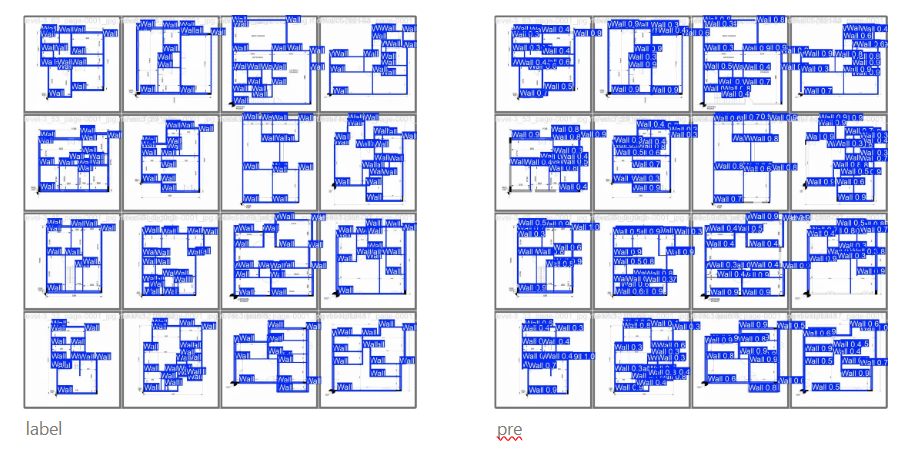
일단 결과를 해석해보면 train loss 값이 떨어짐과 동시에 val loss 값도 같이 떨어지는 모습을 보이고 있다. 특히 데이터 증강이 있던 에포크 10을 기점으로 loss 값이 튀는 걸 볼 수 있지만 다행히 잘 줄어 들었다.
종합해 봤을 때 적은 에포크 수로 인해 학습이 덜 되었던 것 같다.
정확도를 높이기 위하여
정확도를 높이기 위해 뭘 생각해야할까?
- 에포크가 너무 부족했나?
- 데이터 셋이 부족한가? 증강이 더 필요하나?
- 이미지크기가 너무 작았나? (현재 640)
에포크수와 이미지 크기를 조금더 키워서 다시 학습시켜 보겠다.
model = YOLO("yolo26n-seg.pt")

model.train(data="/content/drive/MyDrive/yolo26_seg/data.yaml", epochs = 50, imgsz = 800, name = "train_is800_e50")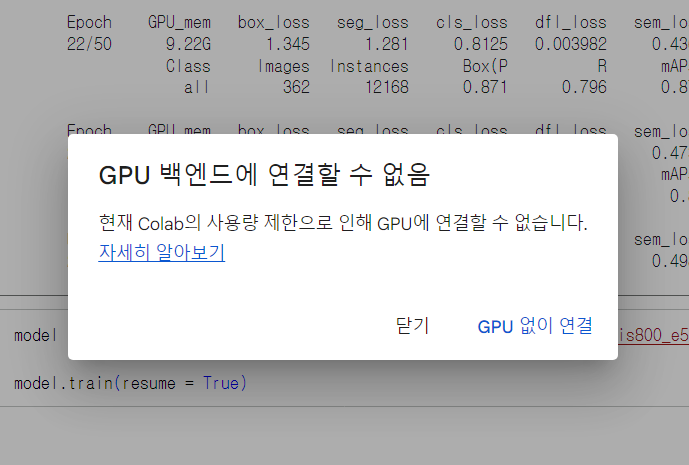
하으…. 하루 사용량을 다 사용한 것 같다.
- log 메세지
Timestamp Level Message Feb 26, 2026, 5:57:10 PM WARNING 0.00s - Note: Debugging will proceed. Set PYDEVD_DISABLE_FILE_VALIDATION=1 to disable this validation. Feb 26, 2026, 5:57:10 PM WARNING 0.00s - to python to disable frozen modules. Feb 26, 2026, 5:57:10 PM WARNING 0.00s - make the debugger miss breakpoints. Please pass -Xfrozen_modules=off Feb 26, 2026, 5:57:10 PM WARNING 0.00s - Debugger warning: It seems that frozen modules are being used, which may Feb 26, 2026, 5:57:08 PM WARNING kernel 3bc7ac6d-2692-417e-b5ff-4f53a4ad0116 restarted Feb 26, 2026, 5:57:08 PM INFO AsyncIOLoopKernelRestarter: restarting kernel (1/5), keep random ports Feb 26, 2026, 5:53:16 PM WARNING 0.00s - Note: Debugging will proceed. Set PYDEVD_DISABLE_FILE_VALIDATION=1 to disable this validation. Feb 26, 2026, 5:53:16 PM WARNING 0.00s - to python to disable frozen modules. Feb 26, 2026, 5:53:16 PM WARNING 0.00s - make the debugger miss breakpoints. Please pass -Xfrozen_modules=off Feb 26, 2026, 5:53:16 PM WARNING 0.00s - Debugger warning: It seems that frozen modules are being used, which may Feb 26, 2026, 5:53:14 PM WARNING kernel 3bc7ac6d-2692-417e-b5ff-4f53a4ad0116 restarted Feb 26, 2026, 5:53:14 PM WARNING kernel 3bc7ac6d-2692-417e-b5ff-4f53a4ad0116 restarted
imgsz를 800으로 돌렸더니 메모리부족으로 병목현상이 발생하였다.
해결방안으로 배치 크기를 8까지 줄였더니 돌아가긴 했지만 대략 1%올라가는데 2~3분 정도 걸리고 있다.
오늘 안으로 학습이 힘들것 같아 gpu가 죽기 전에 23 에포크 까지의 결과로 비교를 해보겠다.
| epoch | time | train/box_loss | train/seg_loss | train/cls_loss | train/dfl_loss | train/sem_loss | metrics/precision(B) | metrics/recall(B) | metrics/mAP50(B) | metrics/mAP50-95(B) | metrics/precision(M) | metrics/recall(M) | metrics/mAP50(M) | metrics/mAP50-95(M) | val/box_loss | val/seg_loss | val/cls_loss | val/dfl_loss | val/sem_loss | lr/pg0 | lr/pg1 | lr/pg2 |
|---|---|---|---|---|---|---|---|---|---|---|---|---|---|---|---|---|---|---|---|---|---|---|
| 1 | 359.985 | 2.36536 | 2.5937 | 2.80431 | 0.00993 | 2.06495 | 0.42397 | 0.45726 | 0.38148 | 0.18248 | 0.28052 | 0.3282 | 0.19944 | 0.09051 | 1.67807 | 1.64552 | 1.95208 | 0.00685 | 0 | 0.000663366 | 0.000663366 | 0.000663366 |
| 2 | 681.906 | 1.77886 | 1.861 | 1.82077 | 0.00622 | 0.84458 | 0.61565 | 0.583 | 0.61528 | 0.30727 | 0.38385 | 0.37524 | 0.29485 | 0.11192 | 1.69346 | 1.53284 | 1.4658 | 0.00715 | 0 | 0.0013037 | 0.0013037 | 0.0013037 |
| 3 | 1002.18 | 1.78657 | 1.75409 | 1.54108 | 0.0062 | 0.72197 | 0.65545 | 0.64637 | 0.67949 | 0.36019 | 0.45477 | 0.43992 | 0.38036 | 0.16065 | 1.64826 | 1.35111 | 1.3048 | 0.00764 | 0 | 0.00191763 | 0.00191763 | 0.00191763 |
| 4 | 1330.69 | 1.734 | 1.6632 | 1.38344 | 0.00594 | 0.66895 | 0.7219 | 0.68629 | 0.75025 | 0.44911 | 0.53179 | 0.48726 | 0.4555 | 0.21179 | 1.42383 | 1.24207 | 1.08062 | 0.00534 | 0 | 0.0018812 | 0.0018812 | 0.0018812 |
| 5 | 1651.6 | 1.65759 | 1.58589 | 1.26547 | 0.00557 | 0.65791 | 0.75321 | 0.69829 | 0.77063 | 0.47522 | 0.50878 | 0.46565 | 0.4305 | 0.18617 | 1.40759 | 1.29796 | 0.99739 | 0.00562 | 0 | 0.0018416 | 0.0018416 | 0.0018416 |
| 6 | 1972.48 | 1.65521 | 1.5451 | 1.21961 | 0.00558 | 0.58506 | 0.7704 | 0.70274 | 0.78016 | 0.44763 | 0.5671 | 0.49685 | 0.48282 | 0.22034 | 1.51897 | 1.14719 | 1.0012 | 0.00535 | 0 | 0.001802 | 0.001802 | 0.001802 |
| 7 | 2293.53 | 1.59352 | 1.49033 | 1.12752 | 0.00525 | 0.56608 | 0.79061 | 0.73357 | 0.80471 | 0.52488 | 0.56867 | 0.51644 | 0.4902 | 0.2255 | 1.31652 | 1.16029 | 0.87268 | 0.00465 | 0 | 0.0017624 | 0.0017624 | 0.0017624 |
| 8 | 2613.04 | 1.56881 | 1.48383 | 1.10526 | 0.00503 | 0.57368 | 0.77288 | 0.73562 | 0.79834 | 0.51612 | 0.53355 | 0.49022 | 0.45961 | 0.19507 | 1.34581 | 1.22835 | 0.88579 | 0.00476 | 0 | 0.0017228 | 0.0017228 | 0.0017228 |
| 9 | 2937.56 | 1.55023 | 1.48765 | 1.0687 | 0.00499 | 0.55617 | 0.80782 | 0.74417 | 0.82253 | 0.53733 | 0.5335 | 0.4797 | 0.43109 | 0.17809 | 1.2966 | 1.18683 | 0.83316 | 0.00483 | 0 | 0.0016832 | 0.0016832 | 0.0016832 |
| 10 | 3257.49 | 1.52156 | 1.44067 | 1.03757 | 0.00493 | 0.52645 | 0.8012 | 0.75152 | 0.82868 | 0.54889 | 0.54192 | 0.48365 | 0.45484 | 0.19595 | 1.28638 | 1.23603 | 0.78721 | 0.00433 | 0 | 0.0016436 | 0.0016436 | 0.0016436 |
| 11 | 3573.32 | 1.49993 | 1.41855 | 1.00346 | 0.00472 | 0.54972 | 0.80113 | 0.75251 | 0.82483 | 0.55587 | 0.55643 | 0.48923 | 0.46276 | 0.1945 | 1.25012 | 1.07164 | 0.79376 | 0.00474 | 0 | 0.001604 | 0.001604 | 0.001604 |
| 12 | 3889.49 | 1.50761 | 1.43816 | 0.98901 | 0.00485 | 0.52385 | 0.81971 | 0.76414 | 0.83431 | 0.542 | 0.56517 | 0.5312 | 0.48668 | 0.22156 | 1.29297 | 1.11953 | 0.77922 | 0.0045 | 0 | 0.0015644 | 0.0015644 | 0.0015644 |
| 13 | 4207.54 | 1.45662 | 1.40317 | 0.9668 | 0.00452 | 0.52054 | 0.83452 | 0.76348 | 0.84287 | 0.59353 | 0.5739 | 0.49926 | 0.4837 | 0.21187 | 1.14637 | 1.15528 | 0.74906 | 0.00412 | 0 | 0.0015248 | 0.0015248 | 0.0015248 |
| 14 | 4524.55 | 1.4383 | 1.33337 | 0.9214 | 0.00443 | 0.49016 | 0.82807 | 0.75958 | 0.83869 | 0.57055 | 0.56802 | 0.52104 | 0.49164 | 0.22392 | 1.24429 | 1.10302 | 0.75275 | 0.00439 | 0 | 0.0014852 | 0.0014852 | 0.0014852 |
| 15 | 4839.87 | 1.44126 | 1.36112 | 0.92282 | 0.00435 | 0.52389 | 0.82225 | 0.76757 | 0.83972 | 0.57174 | 0.53803 | 0.49343 | 0.44632 | 0.1851 | 1.19805 | 1.10426 | 0.73117 | 0.00421 | 0 | 0.0014456 | 0.0014456 | 0.0014456 |
| 16 | 5156.94 | 1.42863 | 1.37516 | 0.91008 | 0.00431 | 0.5074 | 0.83937 | 0.78657 | 0.85228 | 0.59289 | 0.56324 | 0.5217 | 0.47196 | 0.20366 | 1.17254 | 1.05619 | 0.69082 | 0.00413 | 0 | 0.001406 | 0.001406 | 0.001406 |
| 17 | 5471.49 | 1.39829 | 1.35502 | 0.88499 | 0.00429 | 0.4766 | 0.83858 | 0.7657 | 0.84219 | 0.57917 | 0.56825 | 0.51824 | 0.47939 | 0.2053 | 1.2274 | 1.11103 | 0.7338 | 0.00465 | 0 | 0.0013664 | 0.0013664 | 0.0013664 |
| 18 | 5791.22 | 1.39945 | 1.33332 | 0.87447 | 0.00419 | 0.49225 | 0.85713 | 0.77357 | 0.85531 | 0.60785 | 0.57112 | 0.50016 | 0.47348 | 0.20298 | 1.13664 | 1.04488 | 0.66667 | 0.00386 | 0 | 0.0013268 | 0.0013268 | 0.0013268 |
| 19 | 6110.69 | 1.38359 | 1.30857 | 0.85123 | 0.00413 | 0.48875 | 0.85748 | 0.78534 | 0.86399 | 0.61252 | 0.60887 | 0.53665 | 0.51988 | 0.22154 | 1.11323 | 1.04598 | 0.65563 | 0.00371 | 0 | 0.0012872 | 0.0012872 | 0.0012872 |
| 20 | 6431.47 | 1.36573 | 1.32756 | 0.84832 | 0.004 | 0.49279 | 0.84798 | 0.79722 | 0.8657 | 0.61033 | 0.56994 | 0.53649 | 0.48326 | 0.20285 | 1.13437 | 1.06789 | 0.65804 | 0.00411 | 0 | 0.0012476 | 0.0012476 | 0.0012476 |
| 21 | 6747.87 | 1.35838 | 1.31565 | 0.83729 | 0.00398 | 0.44857 | 0.85326 | 0.79076 | 0.8638 | 0.61795 | 0.57735 | 0.51831 | 0.48984 | 0.20864 | 1.13542 | 1.07525 | 0.64432 | 0.00404 | 0 | 0.001208 | 0.001208 | 0.001208 |
| 22 | 7063.86 | 1.34538 | 1.28138 | 0.81254 | 0.00398 | 0.43654 | 0.87071 | 0.79643 | 0.87597 | 0.63502 | 0.59476 | 0.53049 | 0.50217 | 0.21739 | 1.0734 | 1.00567 | 0.61725 | 0.00359 | 0 | 0.0011684 | 0.0011684 | 0.0011684 |
| 23 | 7380.52 | 1.35032 | 1.288 | 0.81478 | 0.00395 | 0.4731 | 0.86491 | 0.79611 | 0.87024 | 0.6264 | 0.61232 | 0.54906 | 0.51958 | 0.23148 | 1.09922 | 1.0158 | 0.63029 | 0.00356 | 0 | 0.0011288 | 0.0011288 | 0.0011288 |
segmention만 비교하도록 하겠다.
20 에포크를 비교하였을 때 mAP50 기준 imgsz를 늘렸을 때 48%로 이전 37%였던 결과물에 비해 정확도가 많이 상승한 것을 확인할 수 있었다.
마지막 에포크인 23에포크 에서도 mAP50 - 51% mAP50-95 23%로 정확도가 상승곡선을 그리고 있었다.
💡 마무리 하며
하이퍼파라미터 튜닝을 통해 AI 성능 최적화의 흐름을 이해할 수 있었다.
또한, 물리적인 컴퓨팅 자원(GPU/RAM)과 학습 효율 간의 상관관계를 직접 경험할 수 있었다.
수치 너머의 맥락을 읽는 법을 배우며 인공지능을 다루는 큰 틀을 잡는 유익한 과정이었습니다.
