61일차 내용 정리
Java Framework
복습
Bean 생성과 의존성 주입
MemberDaoImpl
spring boot app이 시작되는 시점에서 spring 이 직접 객체를 생성한다
- "new MemberDaoImpl( );"
public MemberDaoImpl(SqlSession session){
	this.session = session;
}
MemberDaoImpl
⭣
spring bean container
-------------------
| |
| SqlSession type |
| |
-------------------예외 처리
throw 예외객체: 예외객체를 직접 발생시킬 경우@ControllerAdvice: 프레임 워크가 동작하는 중에 특정 예외가 발생 시 직접 예외를 처리 가능 (@ExceptionHandler와 세트)DataAccessException.class: 처리하고 싶은 예외의 type
jsp가 아닌 thymeleaf
- view page의 위치를 리턴 (jsp가 현재 view page)
return "member/update"
return "member/edit"-
thymeleaf: view page -
resources/static/xxx.html
정적인 구조의 파일 -
resources/templates/yyy.html
동적 뷰 템플릿
내용이 그대로 출력되지 않고 해당 내용이 해석된 결과를 출력
jsp & thymeleaf 비교
return "member/update";- jsp 라면?
/WEB-INF/views/member/update.jsp
- thymeleaf 라면?
/templates/member/update.html
Thymeleaf
Spring05_Thymeleaf 프로젝트 생성
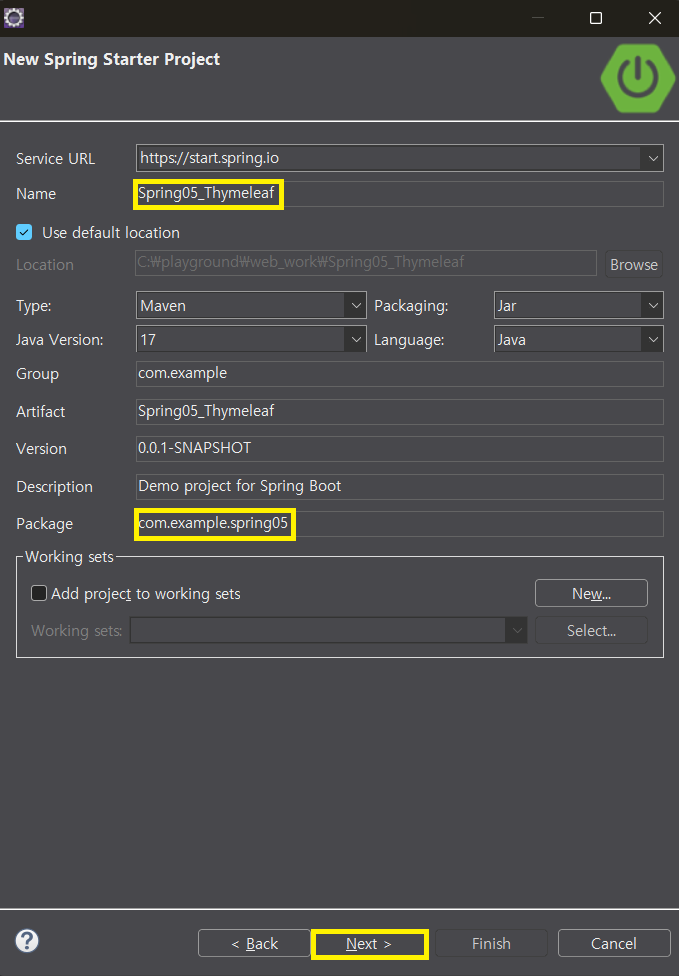
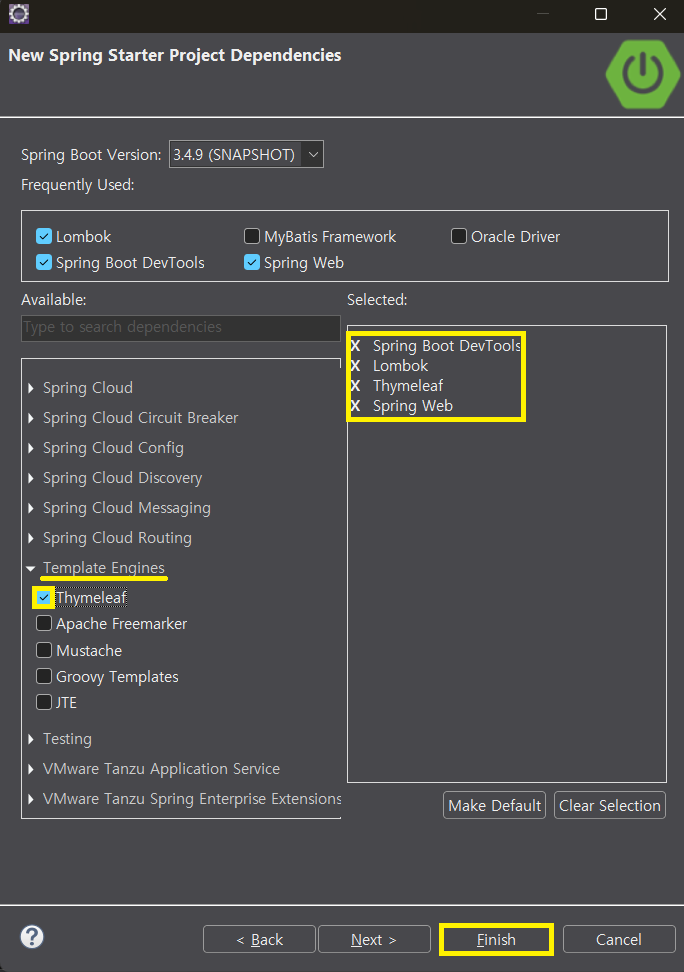
- HomeController 클래스 생성
@Controller
public class HomeController {
	@GetMapping("/")
	public String home(Model model) {
		// 오늘의 인물 (응답에 필요한 데이터라고 가정)
		String personToday = "유재석";
		// 응답에 필요한 데이터를 Model 객체에 담기
		model.addAttribute("personToday", personToday);
		// /templates/home.html	thymeleaf 페이지로 응답을 위임하기
		return "home";
	}
}- application.properties 에 port 번호 & context path 설정
# port 번호
server.port=9000
# context path 설정
server.servlet.context-path=/spring05
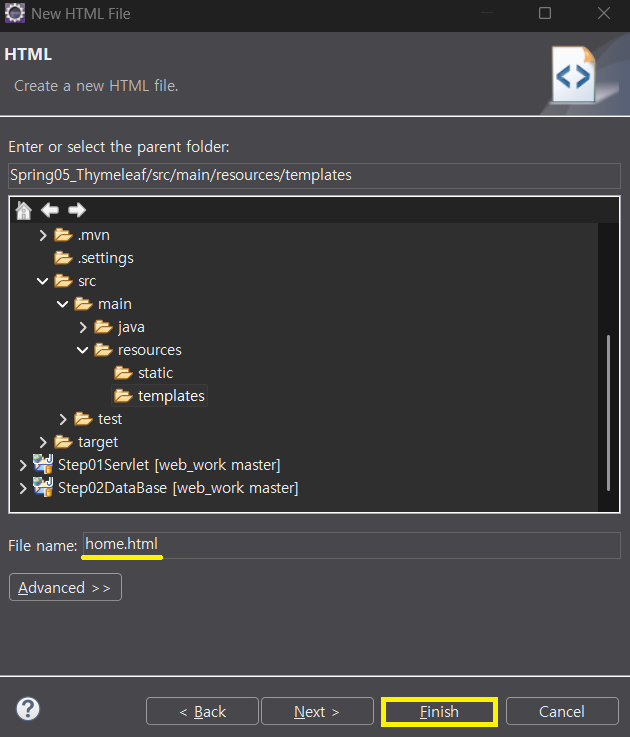
templates 폴더에 HTML 파일 생성
- templates 폴더 마우스 우클릭 ➜ New ➜ Other
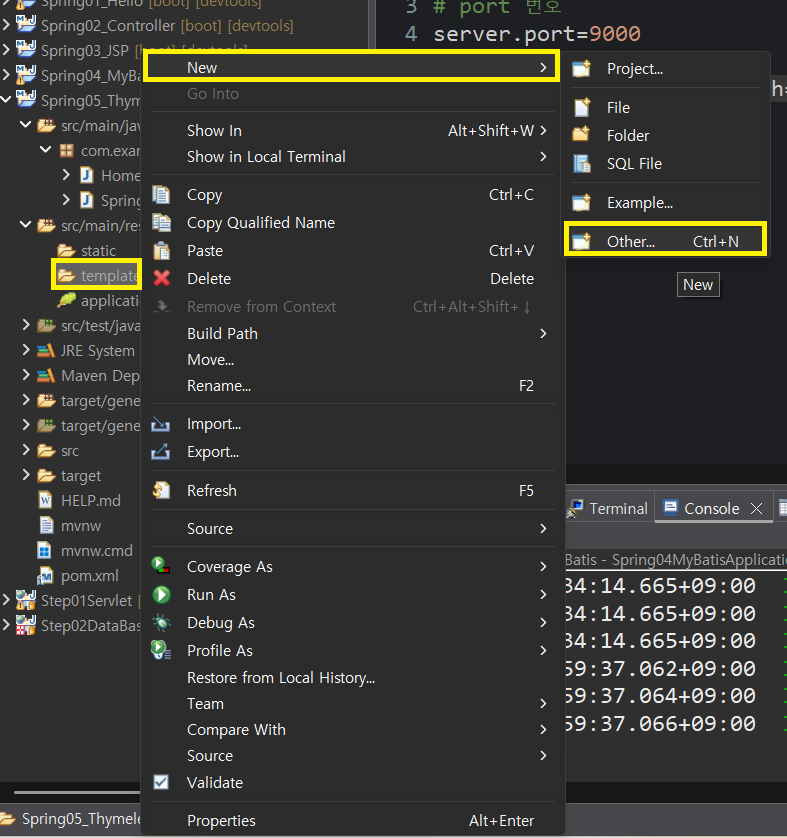
- Web ➜ HTML File ➜ Next
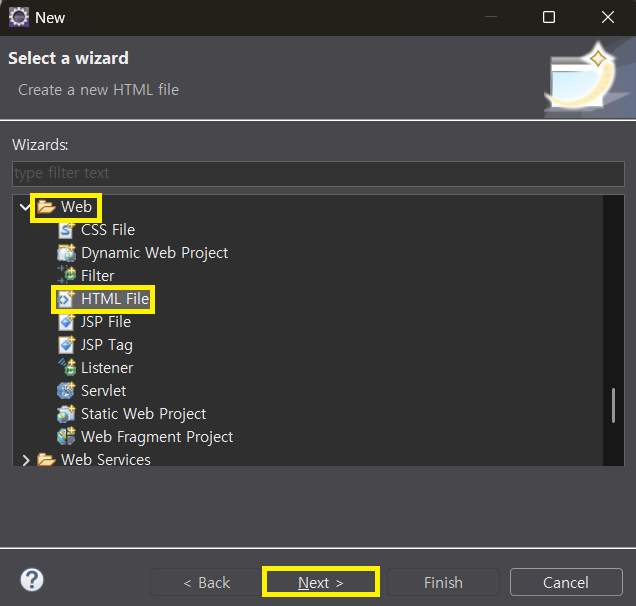
- home.html ➜ Finish
참조되는 내용 그대로 출력 : [[${ }]]
- templates 폴더에 home.html 생성
<div class="container">
	<h1>인덱스 페이지 입니다</h1>
	<p>
		오늘의 인물 : <strong>[[${personToday}]]</strong>
	</p>
</div>
➜ in jsp : ${personToday}
➜ in thymeleaf : [[${personToday}]]
- HomeController 코드 추가
// 공지사항 (DB 에서 읽어온 데이터라고 가정)
List<String> notice = List.of("Thymeleaf 를 배우자", "오늘부터", "시작");
// 응답에 필요한 데이터를 Model 객체에 담기
model.addAttribute("notice", notice); - home.html 에 코드 추가
<h2>공지사항</h2>
<ul>
	<li th:each="tmp : ${notice}">[[${tmp}]]</li>
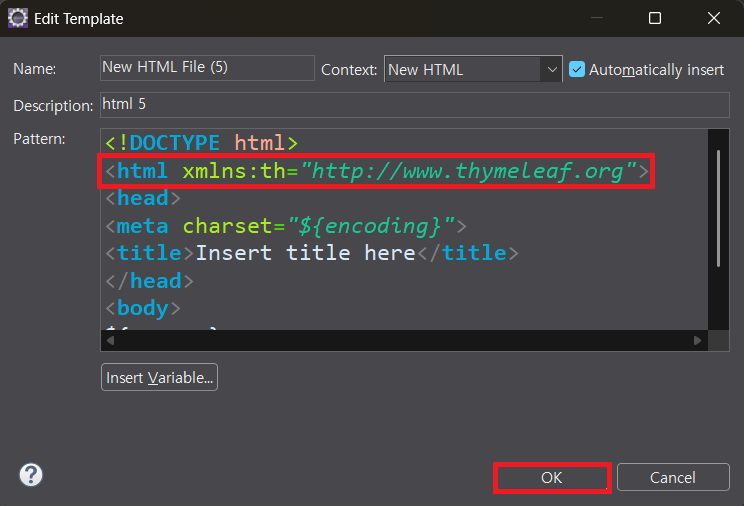
</ul>- html 루트 속성에 `` 추가
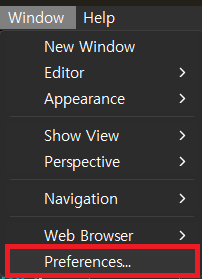
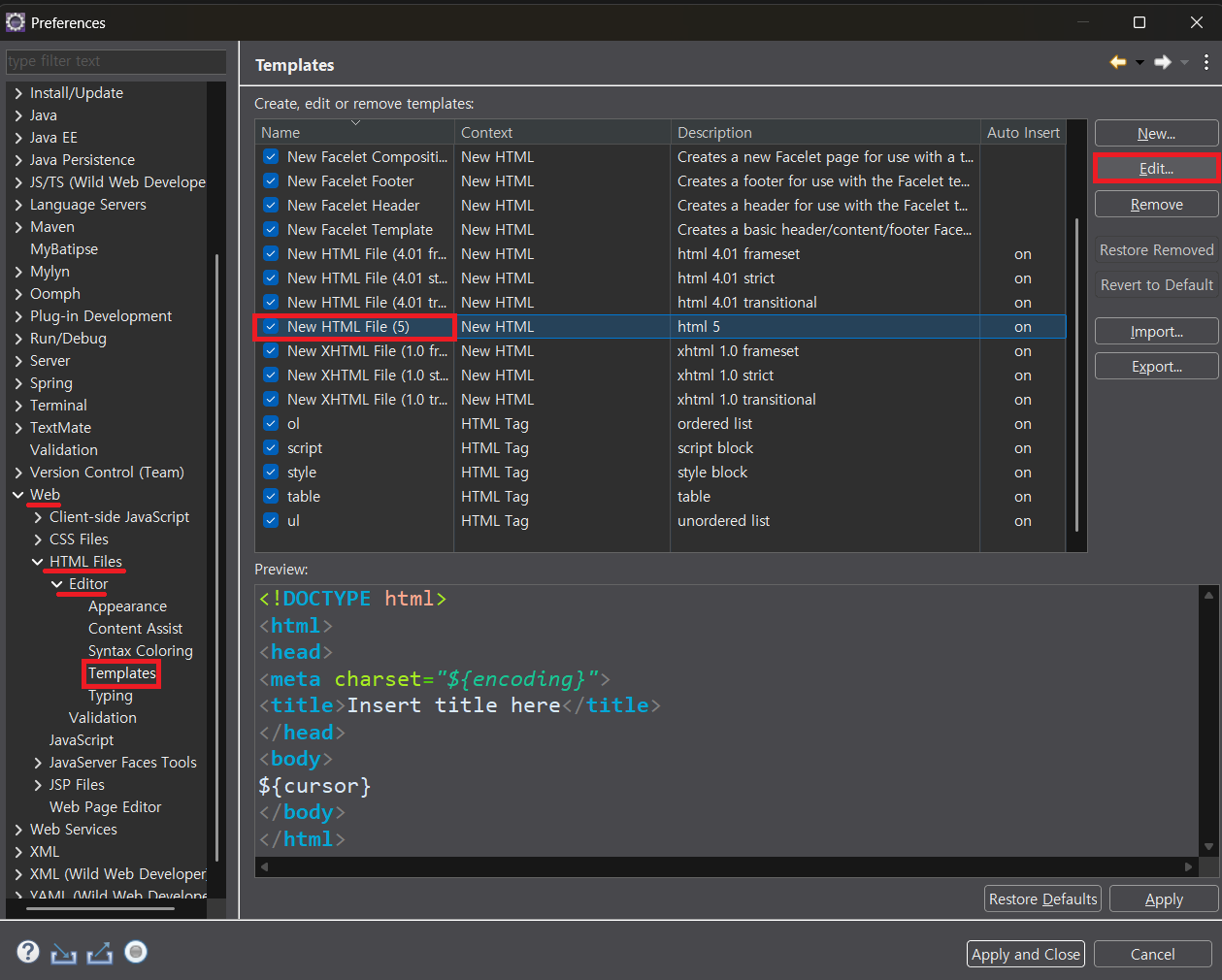
<html xmlns:th="http://www.thymeleaf.org">Thymeleaf 기본 템플릿 출력 설정
- Window ➜ Preferences
- Web ➜ HTML Files ➜ Editor ➜ Templates ➜ NEW HTML File(5) ➜ Edit
<html xmlns:th="http://www.thymeleaf.org>➜ OK
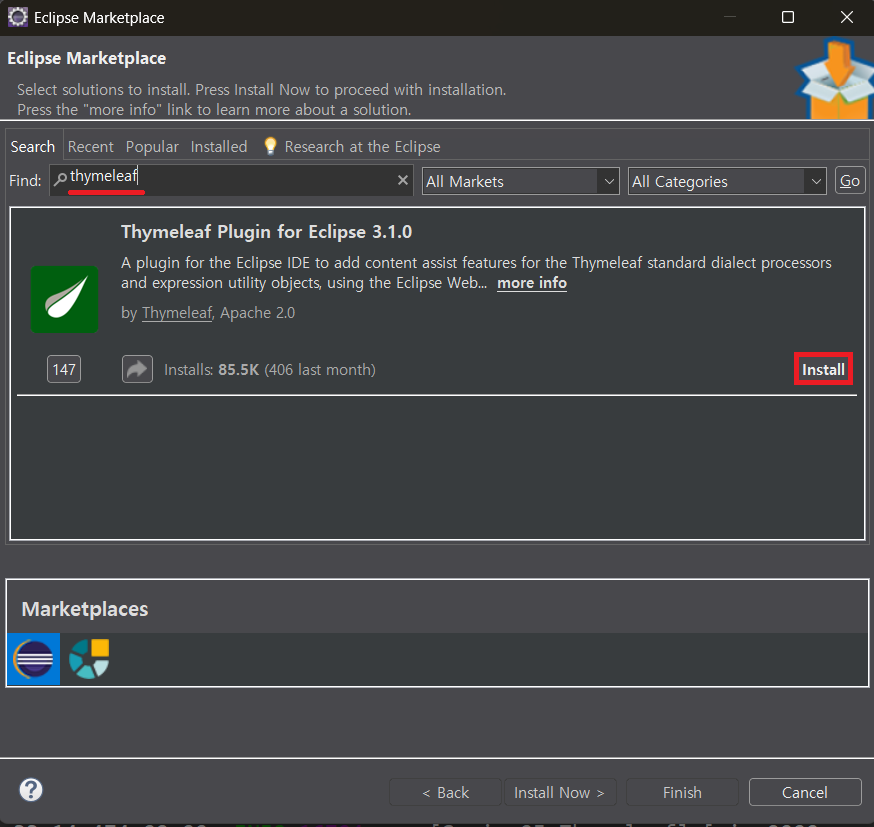
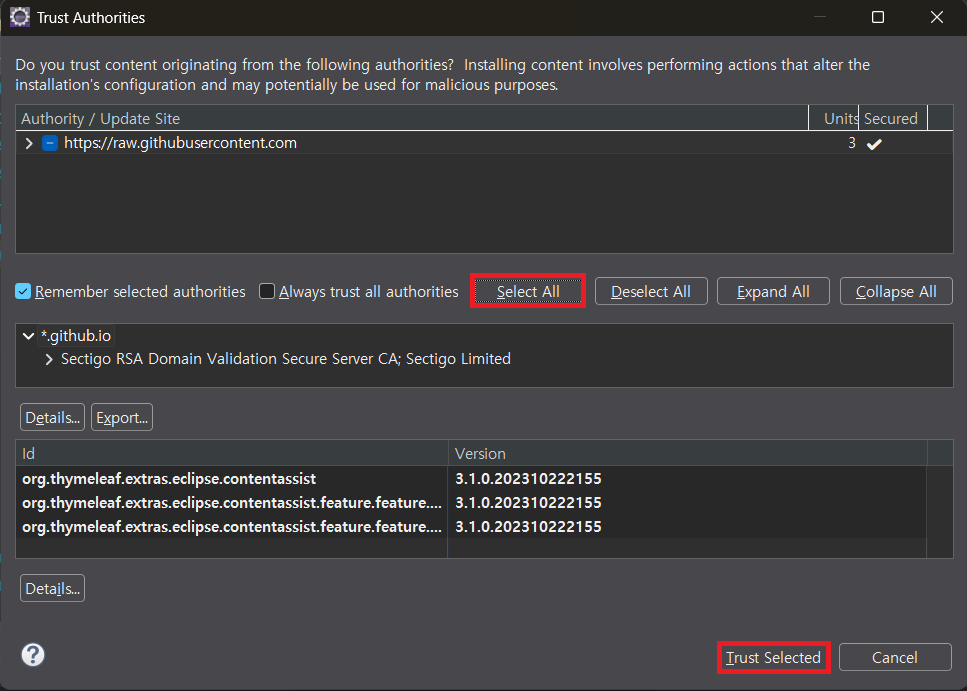
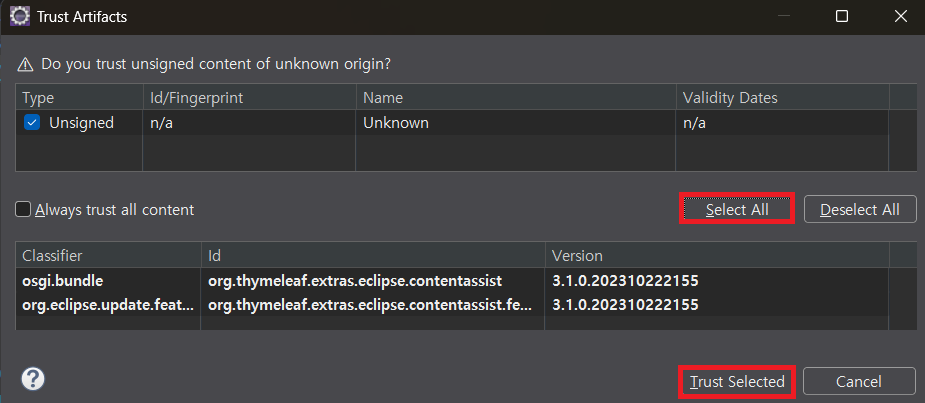
Thymeleaf 라이브러리 설치
- Help ➜ Eclipse Marketplace
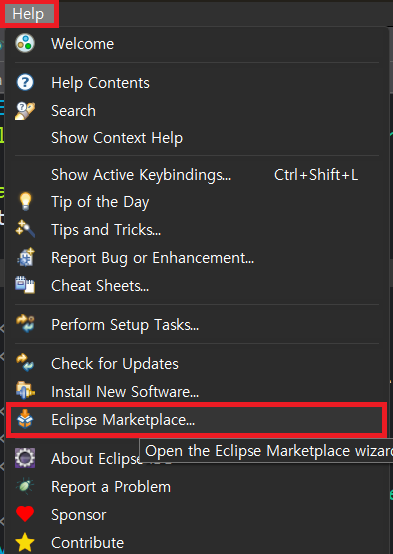
- thymeleaf 검색 ➜ Install
- Select All ➜ Trust Selected
-
Select All ➜ Trust Selected
-
thymeleaf 적용 확인
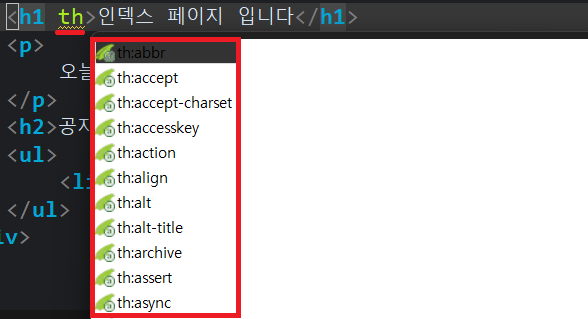
경로 작성 : @{ }
-
home.html 에 이미지 코드 추가
-
경로 작성시
th:src="@{ }": context 경로를 자동으로 출력
<img src="/spring05/images/Spain.png" alt="스페인 국가 이미지" />
<img th:src="@{/images/Spain.png}" alt="스페인 국가 이미지"/> - home.html 에 링크 추가
<h3>Thymeleaf 연습</h3>
<ul>
	<li><a th:href="@{/member/detail}">회원 한명의 정보</a></li>
</ul>- TestController 클래스 생성
@Controller
public class TestController {

	@GetMapping("/member/detail")
	public String memberDetail(Model model) {

		// /templates/member/detail.html (Thymeleaf 페이지로 응답하기)
		return "member/detail";
	}
}
@Data
setter , getter 메소드 + toString( ) 메소드를 자동으로 만들어준다
- MemberDto 클래스 생성
import lombok.Data;

@Data
public class MemberDto {
	private int num;
	private String name;
	private String addr;
}- Spring05ThymeleafApplication 에 @PostConstruct 어노테이션 코드 추가
// 이 클래스로 객체가 생성된 직후 호출될 메소드에 붙이는 어노테이션
@PostConstruct
public void test() {
	// @Data 어노테이션이 붙은 MemberDto 클래스로 테스트
	MemberDto dto = new MemberDto();
	dto.setNum(1);
	dto.setName("유재석");
	dto.setAddr("압구정");
	// @Data 어노테이션이 toString() 메소드를 재정의하기 때문에 객체의 필드 안에 들어있는 내용 확인 가능
	System.out.println(dto);
}MemberDto(num=1, name=유재석, addr=압구정)@AllArgsConstructor
필드의 모든 값을 전달받아서 저장하는 생성자를 만들어준다
- MemberDto 에 어노테이션 추가
@AllArgsConstructor@NoArgsConstructor
디폴트 생성자를 자동으로 만들어준다
- MemberDto 에 어노테이션 추가
@NoArgsConstructor@Builder
빌더 형식으로 필드에 값을 대입한 객체를 얻어낼 수 있도록 해준다
➜ 객체 생성과 필드에 값 넣기를 1줄 코딩 가능
- MemberDto 에 어노테이션 추가
@Builder-
Spring05ThymeleafApplication 에 코드 추가
-
@Builder 의 기능을 이용해서 MemberDto 객체 얻어내기
MemberDto dto2 = MemberDto.builder()
				.num(2)
				.name("박명수")
				.addr("이태원")
				.build();

System.out.println(dto2);MemberDto(num=2, name=박명수, addr=이태원)- TestController 에 코드 추가
// DB 에서 불러온 회원 한 명의 정보라고 가정하자
MemberDto dto = MemberDto.builder().num(1).name("유재석").addr("압구정").build();
// 응답에 필요한 정보를 Model 객체에 담는다
model.addAttribute("dto", dto); - templates 폴더 안에 member 폴더 생성 후 detail.html 생성
<div class="container">
	<h1>회원 한 명의 정보</h1>
	<p>
		번호 : <strong>[[${dto.num}]]</strong>
		이름 : <strong>[[${dto.name}]]</strong>
		주소 : <strong th:text="${dto.addr}"></strong>
	</p>
</div>
⭐ 주석
<!-- 클라이언트에게 출력되는 주석 -->
<!--/* Thymeleaf가 무시하는 주석 */-->- detail.html 에 링크 추가
<a th:href="@{/}">인덱스로 가기</a>회원 목록 보기
- home.html 에 링크 추가
<li><a th:href="@{/member/list}">회원 목록 보기</a></li>- testController 에 메소드 추가
@GetMapping("/member/list")
public String memberList(Model model) {
	MemberDto dto1 = MemberDto.builder().num(1).name("유재석").addr("압구정").build();
	MemberDto dto2 = MemberDto.builder().num(2).name("박명수").addr("이태원").build();
	MemberDto dto3 = MemberDto.builder().num(3).name("정준하").addr("서래마을").build();
	List<MemberDto> list = List.of(dto1, dto2, dto3);
	// 응답에 필요한 데이터를 Model 객체에 담는다
	model.addAttribute("list", list);
	// /templates/member/list.html  Thymeleaf 페이지로 응답하기
	return "member/list";
}-
list.html 생성
-
"list" 라는 키값으로
List<MemberDto>가 담겨져 있기 때문에
tmp 는 MemberDto type 이다
<div class="container">
	<h1>회원 목록</h1>
	<table>
		<thead>
			<tr>
				<th>번호</th>
				<th>이름</th>
				<th>주소</th>
			</tr>
		</thead>
		<tbody>
			<tr th:each="tmp: ${list}">
				<td>[[${tmp.num}]]</td>
				<td th:text="${tmp.name}"></td>
				<td th:text="${tmp.addr}"></td>
			</tr>
		</tbody>
	</table>
</div>
링크에 파라미터값 전달
-
list.html 에 자세히 보기 링크 추가
-
(컬럼=${전달값})
<th>자세히 보기</th>

<td>
	<a th:href="@{/member/detail(num=${tmp.num})}">바로가기</a>
</td>
조건부 랜더링 : th:if & th:unless
- home.html 링크 코드 추가
<li><a th:href="@{/if}">조건부 렌더링</a></li>- testController 에 ifTest 메소드 추가
@GetMapping("/if")
public String ifTest(Model model) {
	model.addAttribute("score", 75);
	model.addAttribute("age", 25);
	model.addAttribute("role", "staff");

	return "if";
}- templates 폴더에 if.html 생성
<div class="container">
	<p th:if="${true}">th:if true 면 렌더링 된다</p>
	<p th:if="${false}">th:if false 면 랜더링 안된다</p>

	<p>
		나이 <strong>[[${age}]]</strong> 는
		<strong th:if="${age >= 18 }">성인</strong>
		<!--/* unless 는 조건이 false 일 때 랜더링 된다*/-->
      	<strong th:unless="${age >= 18}">미성년</strong>
      입니다
	</p>
</div>
th:if true 면 렌더링 된다
나이 25 는 성인 입니다- 삼항 연산자 사용
<p>
	나이 <strong>[[${age}]]</strong> 는
	<strong>[[${age >= 18 ? '성인' : '미성년'}]]</strong>
	입니다
</p>
<p>
	나이 <strong th:text="${age}"></strong> 는
	<strong th:text="${age >= 18 ? '성인' : '미성년'}"></strong>
	입니다
</p>
나이 25 는 성인 입니다
나이 25 는 성인 입니다분기 : th:switch
- if.html 코드 추가
<h3>학점</h3>
<p th:if="${score >= 90}">A 학점</p>
<p th:if="${score >= 80 and score < 90}">B 학점</p>
<p th:if="${score >= 70 and score < 80}">C 학점</p>
<p th:if="${score >= 60 and score < 70}">D 학점</p>
<p th:unless="${score >= 60}">F 학점</p>

<h3>Role</h3>
<div th:switch="${role}">
	<p th:case="admin">관리자</p>
	<p th:case="staff">직원</p>
	<p th:case="user">사용자</p>
	<p th:case="*">알 수 없는 계정</p>
</div>
학점
C 학점
Role
직원작성한 데이터 다시 화면에 표시하기
- home.html 에 링크 추가
<li><a th:href="@{/form}">form 테스트</a></li>- TestController 에 form 메소드 추가
@GetMapping("/form")
public String form() {

	return "form";
}- templates 폴더에 form.html 생성
<div class="container">
	<form th:action="@{/save}" method="post">
		<div>
			<label for="userName">아이디</label>
			<input type="text" name="userName" id="userName"/>
		</div>
		<div>
			<label for="hobby">취미</label>
			<select name="hobby" id="hobby">
				<option value="">선택</option>
				<option value="piano">피아노</option>
				<option value="game">게임</option>
				<option value="etc">기타</option>
			</select>
		</div>
		<fieldset>
			<legend>성별</legend>
			<label>
				<input type="radio" name="gender" value="man" checked/>남자
			</label>
			<label>
				<input type="radio" name="gender" value="woman"/>여자
			</label>
		</fieldset>
		<div>
			<label for="comment">하고 싶은 말</label>
			<textarea name="comment" id="comment" cols="30" rows="5"></textarea>
		</div>
		<button type="submit">저장</button>
	</form>
</div>- UserDto 클래스 생성
@Data
public class UserDto {
	private String userName;
	private String hobby;
	private String gender;
	private String comment;
}- TestController 에 save 메소드 생성
- 컨트롤러의 메소드에 UserDto 를 선언하면 폼 전송되는 파라미터가 자동으로 추출되어서 UserDto 의 필드에 담긴 채로 전달된다
@ModelAttribute어노테이션을 이용하면 view page 에서 해당 객체에 담긴 값을 활용할 수 있다
@PostMapping("/save")
public String save(@ModelAttribute("dto") UserDto dto) {
	// "dto" 라는 키값으로 UserDto 객체에 Model 객체에 자동으로 담긴다
	return "save";
}- templates 폴더에 save.html 생성
<div class="container">
	<h1>입력한 내용 확인</h1>
	<form>
		<div>
			아이디 <input type="text" th:value="${dto.userName}"/>
		</div>
		<div>
			취미
			<select>
				<option value="">선택</option>
				<option value="piano" th:selected="${dto.hobby == 'piano'}">피아노</option>
				<option value="game" th:selected="${dto.hobby == 'game'}">게임</option>
				<option value="etc" th:selected="${dto.hobby == 'etc'}">기타</option>
			</select>
		</div>
		<div>
			성별
			<label>
				<input type="radio" th:checked="${dto.gender == 'man'}"/> 남
			</label>
			<label>
				<input type="radio" th:checked="${dto.gender == 'woman'}"/> 여
			</label>
		</div>
		<div>
			하고 싶은 말
			<textarea th:text="${dto.comment}" cols="30" rows="5"></textarea>
		</div>
	</form>
</div>
th:object & th:field
-
*{필드}: 바인딩된 객체의 해당 필드의 값을 활용하는 표현식 -
save.html 에 form 코드 추가
<h1>입력한 내용 확인2</h1>
<!--/* dto 는 키값으로 전달된 객체를 form 요소(div 등 다른 요소도 가능)에 바인딩*/-->
<form th:object="${dto}">
	<div>
		아이디 <input type="text" th:field="*{userName}"/>
	</div>
	<div>
		취미
		<select th:field="*{hobby}">
			<option value="">선택</option>
			<option value="piano">피아노</option>
			<option value="game">게임</option>
			<option value="etc">기타</option>
		</select>
	</div>
	<div>
		성별
		<label>
			<input type="radio" value="man" th:field="*{gender}"/> 남
		</label>
		<label>
			<input type="radio" value="woman" th:field="*{gender}"/> 여
		</label>
	</div>
	<div>
		하고 싶은 말
		<textarea th:field="*{comment}" cols="30" rows="5"></textarea>
	</div>
</form>
include
- home.html 링크 추가
<li><a th:href="@{/include-test}">include 테스트</a></li>- TestController 에 includeTest 메소드 생성
@GetMapping("/include-test")
public String includeTest(Model model) {
	// 테스트를 위한 데이터 전달
	model.addAttribute("title", "오늘의 운세");
	model.addAttribute("content", "동쪽으로 가면 귀인을 만나요");

	return "include-test";
}- templates 폴더에 include-test.html 생성
<div class="container">
	<h1>include 테스트</h1>
</div>- templates 폴더 안에 include 폴더 생성 후 header.html 생성
<div th:fragment="myHeader" style="height:200px; background-color:yellow;">
	<p>my Header</p>
</div>

<div th:fragment="yourHeader" style="height:200px; background-color:pink;">
	<p>your Header</p>
</div>-
include-test.html 에 코드 추가
-
/include/header.html 페이지에서
myHeader라는fragment를 여기서 출력
<th:block th:insert="/include/header :: myHeader"></th:block>- resource.html 생성
<!-- /templates/include/resource.html 파일의 내용 -->
<link rel="stylesheet" href="https://cdn.jsdelivr.net/npm/bootstrap@5.3.3/dist/css/bootstrap.min.css" />
<script src="https://cdn.jsdelivr.net/npm/bootstrap@5.3.3/dist/js/bootstrap.bundle.min.js"></script>- include-test.html 에 코드 추가
<th:block th:insert="/include/resource"></th:block>active 요소 전달
- navbar.html 생성
<ul th:fragment="myNav" class="nav nav-tabs">
	<li class="nav-item">
		<a href="#" class="nav-link active">홈</a>
	</li>
	<li class="nav-item">
		<a href="#" class="nav-link">게임</a>
	</li>
	<li class="nav-item">
		<a href="#" class="nav-link">공부</a>
	</li>
</ul>- include-test.html 에 코드 추가
<th:block th:insert="/include/navbar :: myNav('home')"></th:block>
<th:block th:insert="/include/navbar :: myNav('game')"></th:block>
<th:block th:insert="/include/navbar :: myNav('study')"></th:block>- navbar.html 에 코드 수정
<ul th:fragment="myNav(thisPage)" class="nav nav-tabs">
	<li class="nav-item">
		<a th:classappend="${thisPage == 'home' ? 'active' : null}" class="nav-link" href="#">홈</a>
	</li>
	<li class="nav-item">
		<a th:classappend="${thisPage == 'game' ? 'active' : null}" class="nav-link" href="#">게임</a>
	</li>
	<li class="nav-item">
		<a th:classappend="${thisPage == 'study' ? 'active' : null}" class="nav-link" href="#">공부</a>
	</li>
</ul>
반복문
- home.html 에 링크 추가
<li><a th:href="@{/print-num}">반복문 숫자 출력</a></li>- TestController 에 메소드 생성
@GetMapping("/print-num")
public String printNum(Model model) {

	// 테스트를 위해 데이터 전달
	model.addAttribute("start", 6);
	model.addAttribute("end", 10);

	return "print-num";
}
#numbers.sequence(시작값, 끝값, 증감값)
- print-num.html 생성
#numbers: Thymeleaf 에서 제공하는 유틸리티 객체- 숫자 관련 기능을 제공
- 원하는 범위의 숫자 생성, 포맷팅, 계산 등을 수행한다
<div class="container">
	<h1>1~10 까지 출력하기</h1>
	<ul>
		<li th:each="tmp : ${#numbers.sequence(1,10)}">[[${tmp}]]</li>
	</ul>
  	<h1>Model 에 담긴 값을 활용해서 숫자 출력</h1>
	<ul>
		<li th:each="tmp : ${#numbers.sequence(start, end)}">[[${tmp}]]</li>
	</ul>
</div>1~10 까지 출력하기
• 1
• 3
• 5
• 7
• 9
Model 에 담긴 값을 활용해서 숫자 출력
• 6
• 7
• 8
• 9
• 10#numbers.formatInteger()
- print-num.html 코드 추가
<h1>숫자 format</h1>
<p>가격 : <strong th:text="${#numbers.formatInteger(10000000, 1, 'COMMA')}"></strong>원</p>
숫자 format
가격 : 10,000,000원