AWS ec2 → jupyter notebook 원격 서버 구축
로또 분석하고 모델링 하려니까 회사서버 쓰긴 부끄럽고 로컬로 작업하자니 회사~집 동기화가 귀찮았다.
ec2 고정IP 부여
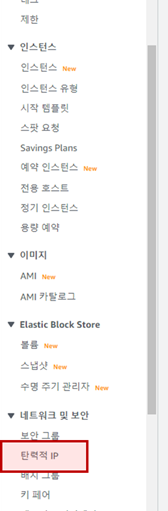
AWS 좌측 하단 "네트워크 및 보안" 그룹 및 "탄력적IP" 선택
"탄력적IP주소할당" > "할당"
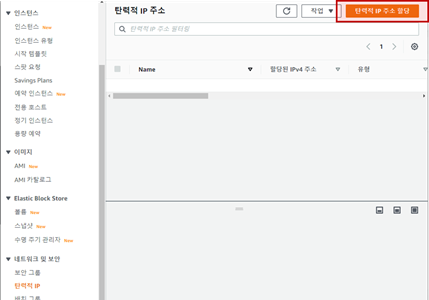
탄력적IP주소 목록 확인 후 할당할 IP주소 선택
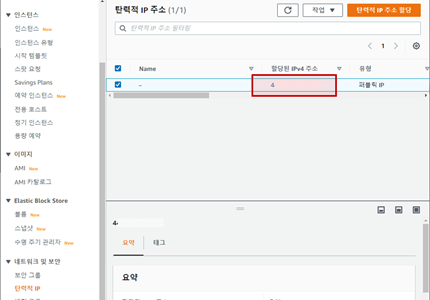
"탄력적IP주소연결"
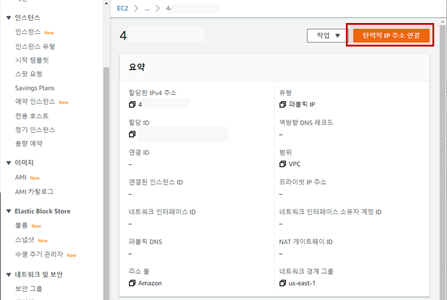
인스턴스/프라이빗IP주소 입력창을 클릭하면 현재 연결할수 있는 목록이 뜨고
(나는 현재 인스턴스가 하나뿐이다)
인스턴스/프라이빗IP주소를 선택하여 "연결"하면 완료
부록 : ssh 접속 간편 명령어 만들기
[1] .ssh 디렉토리 있는지 확인
ls -al
[2] 없으면 생성
sudo mkdir .ssh
[3] .ssh 디렉토리 권한 설정
chmod 700 .ssh
[4] config 파일 생성
touch ~/.ssh/config
touch : 있으면 수정, 없으면 생성
[5] config 파일 작성
sudo vi ~/.ssh/config
※ 파일 진입 후 "a"(입력모드) > 작성 > esc(관리모드) > ":wq"(저장후종료)
Host ec2able
HostName public.ip.add.ress
port 22
User username
IdentityFile ~/able.pem
[5] 접속테스트
ssh ec2able
접속완료
jupyter notebook 설치
[1] root 계정 비밀번호 변경
sudo passwd root
[2] root 계정 활성화
sudo vi /etc/ssh/sshd_config
"/PermitRootLogin"(단어검색, ※ enter 후 "n"으로 다음 단어 검색 가능) >
"a"(입력모드) > "PermitRootLogin yes" 수정 >
esc(관리모드) > ":wq"(저장후종료)
[3] root 계정 로그인
su
로그아웃
exit
[4] python 확인
python3 --version
Python 3.8.10
pip install Vs. apt-get install
- pip install : from PyPI(Python Software Foundation)
- apt-get install : from Ubuntu repositories(Canonical)
- pip > python-based, latest version
- apt-get > faster
[4] pip3 확인
pip3 --version
Command 'pip3' not found, but can be installed with:
apt install python3-pip
sudo apt-get install python3-pip
※ 오류발생시 update & upgrade 진행 후 재시도
sudo apt-get update
sudo apt-get upgrade
[5] jupyter notebook 설치
☆☆☆ root 계정에서 설치 ☆☆☆
su
pip3 install jupyter
jupyter --version
Selected Jupyter core packages...
IPython : 8.1.1
ipykernel : 6.9.2
ipywidgets : 7.6.5
jupyter_client : 7.1.2
jupyter_core : 4.9.2
jupyter_server : not installed
jupyterlab : not installed
nbclient : 0.5.13
nbconvert : 6.4.4
nbformat : 5.2.0
notebook : 6.4.9
qtconsole : 5.2.2
traitlets : 5.1.1
jupyter notebook 설정
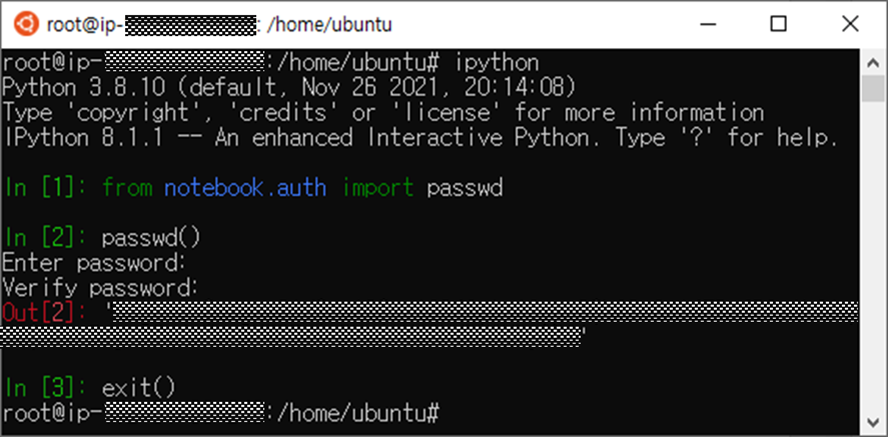
password 생성
python 접속
ipython
password 생성 후 보관
☆☆☆ 생성된 hash key 보관(복사 후 메모장에 붙여넣기 등) 필수 ☆☆☆
from notebook.auth import passwd
passwd()
jupyter config 파일 생성 & 수정
☆☆☆ root 계정에서 생성 & 수정 ☆☆☆
jupyter notebook --generate-config
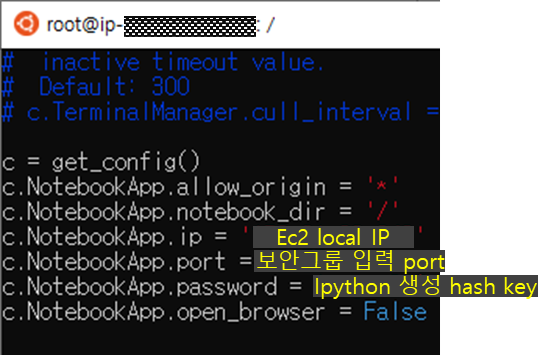
sudo vi /root/.jupyter/jupyter_notebook_config.py

* 전체 주석 중 수정사항을 주석 해제하고 수정할 수도 있지만 원본 보존을 위해 하단에 추가함
"G"(최하단이동) > "a"(입력모드)
아래와 같이 내용 작성
esc(관리모드) > ":wq"(저장후종료)
jupyter notebook 실행
백그라운드 실행 관리를 위한 netstat 설치
※ netstat : 네트워크 연결 상태 등 확인
option "a" = all : establiched상태, listen상태 모두 출력
option "t" = tcp : tcp 프로토콜만 출력
option "n" = numeric : 도메인 주소 숫자로 출력
option "p" = program : PID+프로그램명 출력
apt-get install net-tools
jupyter notebook 백그라운드 실행
sudo jupyter notebook --allow-root &
local > jupyter notebook 접속
※ 접속 시 IP : 탄력적IP(고정IP)
ec2.public.IP.address:port
접속완료!
※ 백그라운드 실행이 아닌것처럼 보일 수 있지만 enter 한번이면 빠져나온다.
백그라운드 실행 중 목록 확인
sudo netstat -ntp

백그라운드 실행 중 jupyter 종료
sudo kill -9 <PID번호>
