
const ref = useRef(value)

{current: value}

useRef에 넣은 초기값 value는 반환된 object의 current 값으로 들어간다
함수형 component에서 useRef를 부르면 → ref obj를 반환해준다!
이 obj는 수정이 가능하고,
{current: "hi"}      const ref = useRef("hi")

{current: "hello"}   ref.current = "hello"

{current: "nice"}    ref.current = "nice"
이렇게 수정된 값들은 React 전 주기에 거쳐 유지 가능 → component가 unmount 되기 전까진 유지 된다!
근데.. 왜써?
- 저장공간 - 변경 시 렌더링을 발생시키지 말아야 하는 값을 다룰 때.
- State 변화 → 렌더링 → 컴포넌트 내부 변수들 초기화
- State가 변화하면 자동으로 컴포넌트들은 다시 렌더링 된다. rerendering이 되면 함수형 컴포넌트들은 다시 호출이 되고, 내부 변수들은 모두 초기화됨.
- Ref의 변화 → No 렌더링 → 변수들 값이 유지됨!
- 아무리 Ref 내부의 값을 변경시켜도, 렌더링은 일어나지 않는다 → 변수들 값 유지 가능, 불필요한 렌더링 방지
- State의 변화 → 렌더링 → 그래도 Ref의 값은 유지된다.
- State 변화 → 렌더링 → 컴포넌트 내부 변수들 초기화
- DOM 요소에 접근
- ex) input 요소를 클릭하지 않아도 자동적으로 focus가 되어있도록
- Document.querySelector()처럼!
저장공간
import React, { useRef, useState } from 'react';

const App = () => {
  const[count, setCount] = useState(0);
  const countRef = useRef(0); // 내부 값에 접근 원하면 countRef.current

  console.log("렌더링");
  console.log("countRef");

  const increaseCountState = () => {
    setCount(count + 1);
  };

  const increaseCountRef = () => {
    countRef.current = countRef.current + 1;
  }

  return (
    <div>
      <p>State: {count}</p>
      <p>Ref: {countRef.current}</p>
      <button onClick={increaseCountState}>State 올려</button>
      <button onClick={increaseCountRef}>Ref 올려</button>

    </div>
  );
};
export default App;
//기존 React에서 State가 변화한다 -> component를 다시 불러온다 -> 함수형이니까 재호출한다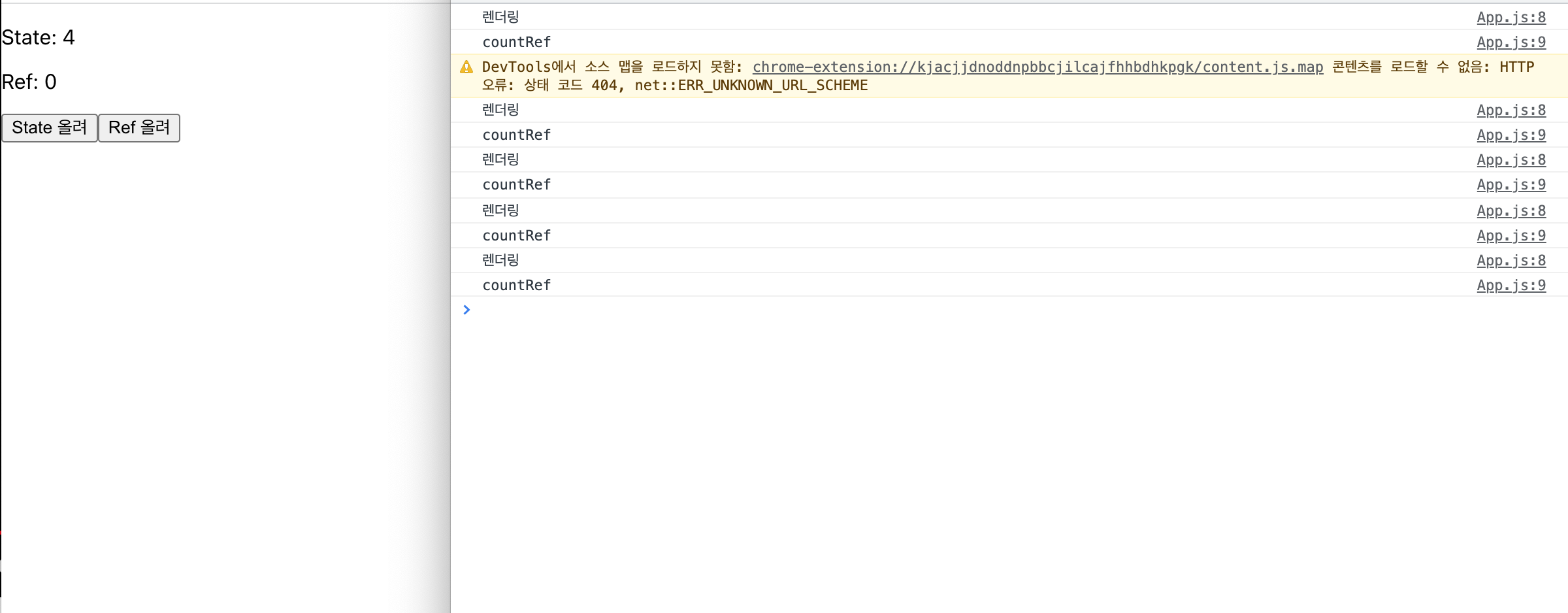
State 올려를 누르면 count도 잘 되고, 콘솔에도 잘 찍히지만, Ref 올려를 누르면 아무 반응도 일어나지 않는다.
State는 값이 변화할 때마다 다시 함수를 호출해 다시 불러오면서 콘솔에 찍어내지만,
Ref는 내부적으로 State를 변화(증가)시킨 후, 다시 Rendering을 하지 않아 콘솔에 찍히지 않은것 뿐이다.
다시 State 올려를 클릭해 화면을 렌더링하면, Ref 올려를 누른 만큼 카운트되어있는걸 볼 수 있다.
console.log(”countRef”)를 increseCountRef 함수에 넣어서 찍어보면 쉽게 이해할 수 있당
무지하게 자주 바뀌는 값이 있다면, 성능을 위해 useRef를 사용해보자
변수와 useRef의 차이점
import { render } from '@testing-library/react';
import React, { useRef, useState } from 'react';

const App = () => {
  const [renderer, setRenderer] = useState(0);
  const countRef = useRef(0);
  let countVar = 0;

  function increaseVar() {
    countVar = countVar + 1;
    console.log("var ", countVar);
  }

  function increaseRef(){
    countRef.current = countRef.current + 1;
    console.log("ref", countRef.current)
  }

  function doRendering() {
    setRenderer(render + 1);
  }

  return (
    <div>
      <p>Ref: {countRef.current}</p>
      <p>Var = {countVar}</p>
      <button onClick={doRendering}>렌더!</button>
      <button onClick={increaseRef}>Ref 올려</button>
      <button onClick={increaseVar}>Var 올려</button>
    </div>
  );
};
export default App;
//기존 React에서 State가 변화한다 -> component를 다시 불러온다 -> 함수형이니까 재호출한다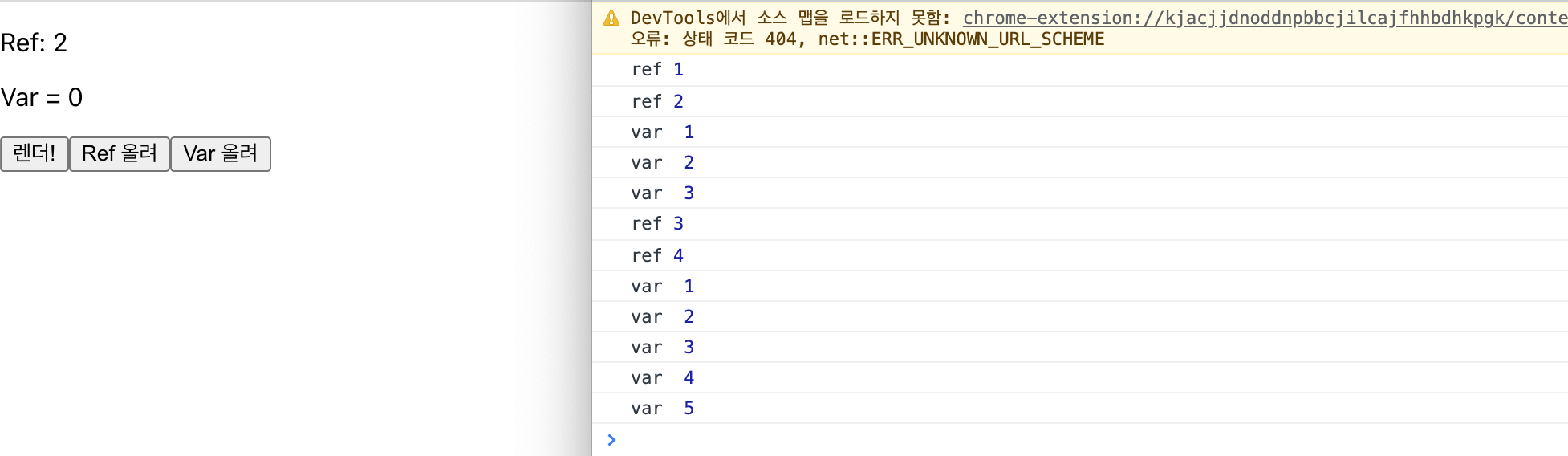
useRef와 Render
import { render } from '@testing-library/react';
import React, { useEffect, useRef, useState } from 'react';

const App = () => {
  const [count, setCount] = useState(1);
  const renderCount = useRef(0);

  useEffect(() => {
    renderCount.current = renderCount.current + 1;
    console.log('렌더링 수 ', renderCount.current);
  })

  return (
    <div>
      <p>Count: {count}</p>
      <button onClick={() => setCount(count + 1)}>올려!</button>
    </div>
  );
};
export default App;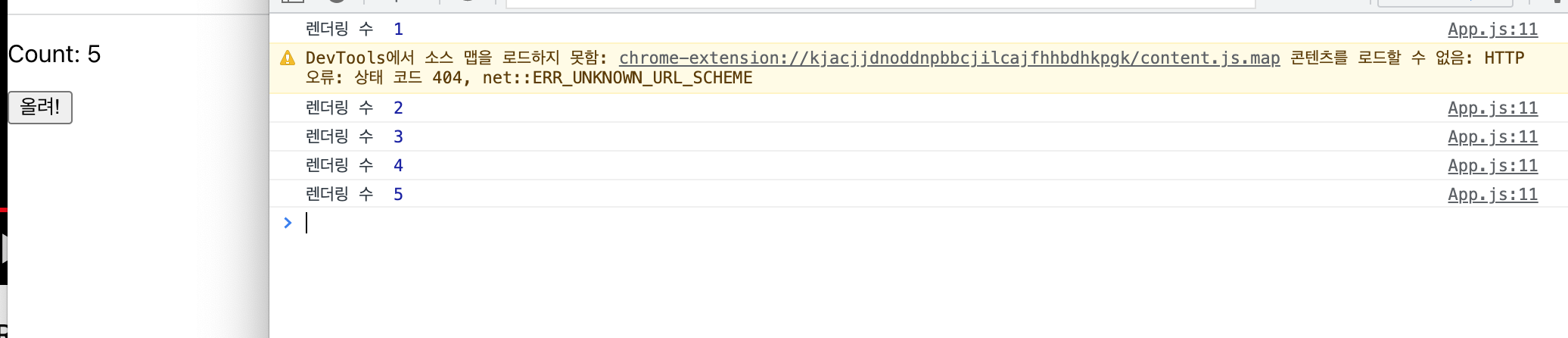
어? useEffect로도 되지 않나??
import { render } from '@testing-library/react';
import React, { useEffect, useRef, useState } from 'react';

const App = () => {
  const [count, setCount] = useState(1);
  const [renderCounter, setRenderCounter] = useState(0);
  // const renderCount = useRef(0);

   useEffect(() => {
     setRenderCounter(renderCounter+ 1);
     console.log("렌더링 수", renderCounter);
   })

  return (
    <div>
      <p>Count: {count}</p>
      <button onClick={() => setCount(count + 1)}>올려!</button>
    </div>
  );
};
export default App;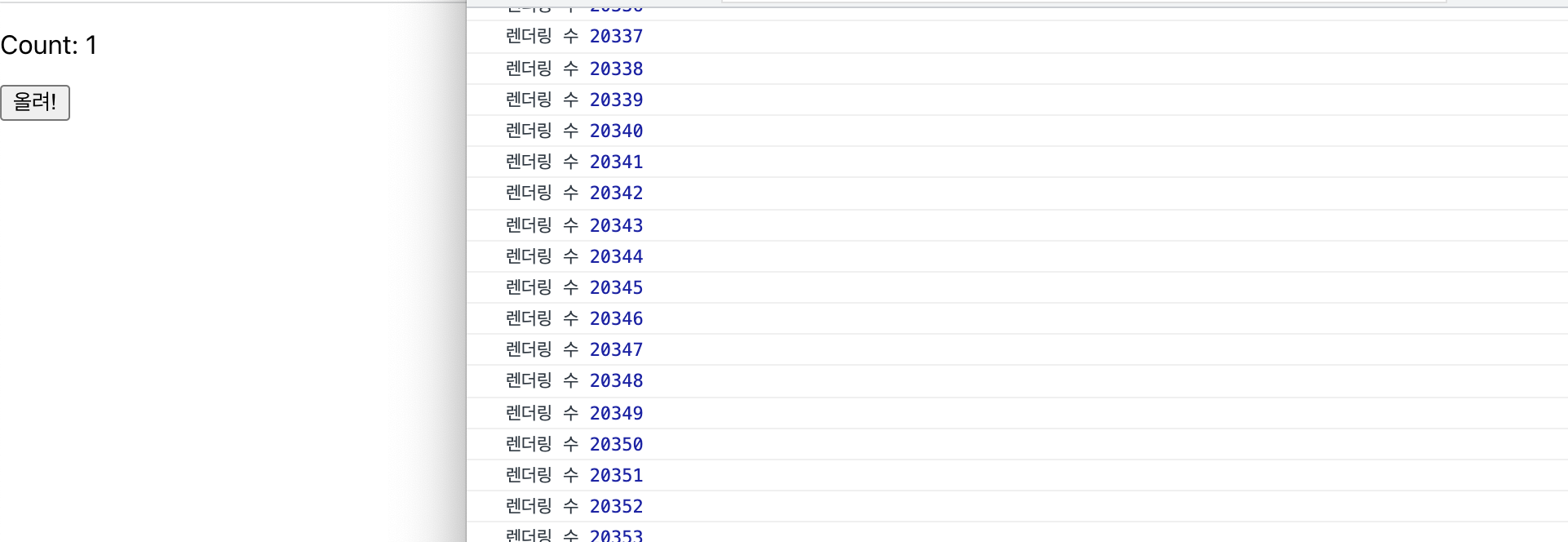
머.. 머선일이고
올려! 클릭 → count state update → useEffect 불러 → 내부 renderCount 업데이트 → useEffect 불러 → renderCount 업데이트 → 무한의 굴레..;;
DOM 요소 접근
const ref = useRef(value)

{current: value}

<input ref={ref} /> 해당 요소에 접근
페이지에 들어가면 input에 바로 커서가 가있고, alert의 확인을 누른 후에도 커서가 가있으면 좋겠다.
import React, { useEffect, useRef, useState } from 'react';

const App = () => {
  const inputRef = useRef();

  useEffect(() => {
    console.log(inputRef);
    inputRef.current.focus();
  }, [])

  const login = () => {
    alert(`환영합니다 ${inputRef.current.value}`);
    inputRef.current.focus();
  }
  return (
    <div>
      <input ref={inputRef} type="text" placeholder="username"></input>
      <button onClick={login}> 로그인</button>
    </div>
  );
};
export default App;
ref={inputRef}로 태그에 접근하고 current value에 변화 → useEffect →
inputRef.current.focus()로 input에 커서 올라감 → 로그인 button 누름 → login function → alert로 input에 입력된 값이 들어간 inputef.current.value 출력 → focus로 alert 닫히고 난 후에도 커서 올라와있음
아 벨로그 코드블록 색상 개에반데 이거 어케바꿈
별코딩님의 React Hooks 시리즈를 보고 정리하기 위해 작성했습니다!!
.jpg)