이번주는 저번주와 마찬가지로 switch문을 생성하는 코드를 작성 하였다.
Github API
Github API를 사용하여 Github에 올라와 있는 코드 중에서 switch문이 포함돼 있는 코드들을 가져와 주었다.
perplexity를 이용하여 코드를 작성 하였다.
import requests
import base64
import os
from dotenv import load_dotenv
from requests.adapters import HTTPAdapter
from urllib3.util.retry import Retry

load_dotenv()
api_url = "https://api.github.com/search/code"
github_token = os.getenv('GITHUB_TOKEN')  # 실제 토큰으로 교체하세요
LANGUAGE = "modula-2"  # 여기서 언어를 변경할 수 있습니다
query = f"switch language:{LANGUAGE}"

headers = {
    "Authorization": f"token {github_token}",
    "Accept": "application/vnd.github.v3+json"
}

params = {
    "q": query,
    "per_page": 100
}

def requests_retry_session(retries=3, backoff_factor=0.3, status_forcelist=(500, 502, 504)):
    session = requests.Session()
    retry = Retry(
        total=retries,
        read=retries,
        connect=retries,
        backoff_factor=backoff_factor,
        status_forcelist=status_forcelist,
    )
    adapter = HTTPAdapter(max_retries=retry)
    session.mount('http://', adapter)
    session.mount('https://', adapter)
    return session

def search_github_code():
    results = []
    page = 1
    cnt = 0

    while True:
        params["page"] = page
        try:
            response = requests.get(api_url, headers=headers, params=params)
            response.raise_for_status()
            data = response.json()

            if "items" not in data:
                break

            for item in data["items"]:
                file_url = item["url"]
                file_content = get_file_content(file_url)
                if file_content and "switch" in file_content:
                    result = {
                        "repo": item["repository"]["full_name"],
                        "file": item["path"],
                        "code": file_content
                    }
                    cnt += 1
                    results.append(result)
                    save_to_file(result)
                    print(f"{cnt} : Repository: {result['repo']}")

            page += 1

        except requests.exceptions.RequestException as e:
            print(f"Error occurred: {e}")
            break

        if page >= 10: break

    return results

def get_file_content(file_url):
    response = requests.get(file_url, headers=headers)
    data = response.json()
    if "content" in data:
        return base64.b64decode(data["content"]).decode("utf-8")
    return None

def save_to_file(result):
    directory = f"./data/github_api/github_switch_codes_{LANGUAGE}"
    if not os.path.exists(directory):
        os.makedirs(directory)

    repo_name = result["repo"].replace("/", "_")
    file_name = os.path.basename(result["file"])
    save_name = f"{repo_name}_{file_name}"

    with open(os.path.join(directory, save_name), "w") as f:
        f.write(f"// Repository: {result['repo']}\n")
        f.write(f"// File: {result['file']}\n\n")
        f.write(result['code'])

if __name__ == "__main__":
    results = search_github_code()
    print(f"Total {len(results)} files saved in 'github_switch_codes_{LANGUAGE}' directory.")
코드는 이렇게 작성 하였고 github_token변수에 GITHUB_TOKEN에 본인의 Github Token을 넣어 주어야 한다. 하지만 직접 넣으면 보안상의 이유로 원격 저장소에 push하지 못한다.
그렇기 때문에 메인 디렉토리에 .env파일을 생성하고 token을 써 주고 해당 파일은 gitignore해 준다.
LANGUAGE변수에 가져올 언어를 선택할 수 있다.

gcc/clang/emcc/cl로 컴파일 가능한 언어들을 가져와 주었다.
- Ada
- C
- C++
- Cobol
- Cuda
- D
- Fortran
- Go
- modula-2
- Objective-C
- Objective-C++
- OpenCl
- Rust
이렇게 언어들을 가져와 주었다.
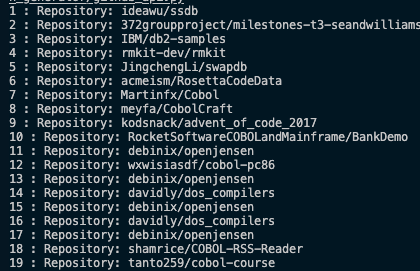
이런식으로 repository에 있는 파일들을 가져와 준다.
Count Files
가져온 데이터셋의 개수를 알아보기 위하여 파일의 개수를 세는 코드를 작성하였다.
import os

def count_files(directory):
    file_count = 0
    for root, dirs, files in os.walk(directory):
        file_count += len(files)
    return file_count

# 경로 배열 설정
paths = [
    './data/3d_switch',
    './data/computational_switch',
    './data/nested_switch',
    './data/github_api/github_switch_codes_Ada',
    './data/github_api/github_switch_codes_c',
    './data/github_api/github_switch_codes_c++',
    './data/github_api/github_switch_codes_cobol',
    './data/github_api/github_switch_codes_cuda',
    './data/github_api/github_switch_codes_d',
    './data/github_api/github_switch_codes_Fortran',
    './data/github_api/github_switch_codes_go',
    './data/github_api/github_switch_codes_modula-2',
    './data/github_api/github_switch_codes_Objective-C',
    './data/github_api/github_switch_codes_Objective-C++',
    './data/github_api/github_switch_codes_opencl',
    './data/github_api/github_switch_codes_rust',
]

# 각 경로의 파일 개수 세기
total_file_count = 0
for path in paths:
    try:
        file_count = count_files(path)
        print(f"Number of files in {path}: {file_count}")
        total_file_count += file_count
    except FileNotFoundError:
        print(f"Error: Directory '{path}' not found.")
    except Exception as e:
        print(f"An error occurred with {path}: {e}")

print(f"\nTotal number of files across all directories: {total_file_count}")
이전에 생성한 switch문을 포함하여 경로를 배열에 저장해 주고 각 경로에 있는 파일의 수를 세어 주었다.

코드를 실행하면 위와 같이 각 파일의 개수를 알 수 있다.
1,000개의 데이터를 가져오도록 하였지만 switch가 존재히지 않거나 네트워크 문제등의 이유로 개수가 부족한 파일들이 존재한다. 그리하여 현재 생성한 데이터 셋의 개수는 11,810개 이다.
Problem
데이터 개수
공식문서에서는 찾지 못하였지만 한 번의 요청으로 가져올 수 있는 데이터의 양은 1,000개 라고한다.

per_page가 100인 상태에서 page가 11이 되면 1,000이 넘어가기 때문에 위와 같이 error가 발생하게 된다.
page값을 11로 하여 실행 시키면 위와 같은 error가 발생한다. 그러므로 가져온 파일의 고유값을 이용하여 가져와야 한다고 한다.
데이터 정제
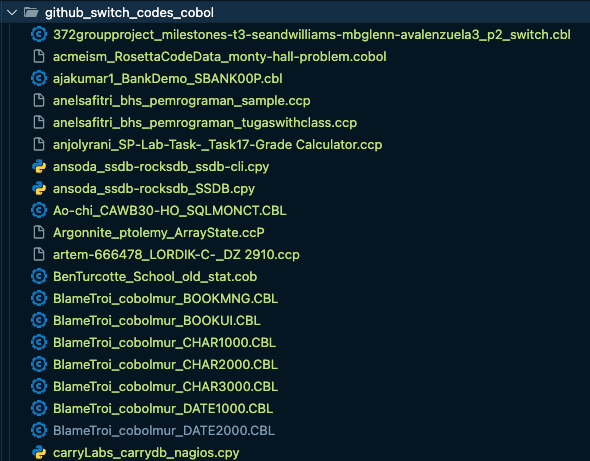
cobol파일을 요청하였지만 보면 .ccp, cpy, ccP
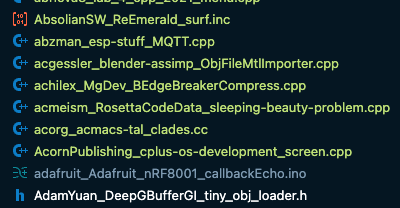
다른 파일에도 섞여 있는 것을 볼 수 있다.
이 부분은 코드를 수정하여 정확한 데이터를 가져오거나 가져온 데이터를 정제할 필요가 있다.
Todo
- Github API를 이용하여 더 많은 데이터를 가져오는 방법을 찾아 보기
- 데이터셋을 생성하는 다른 방법을 모색해 보기
- 생성한 데이터셋 정제하기