
인터페이스와 열거형
개인 과제 해설 및 피드백
학습법 특강
Chapter .1 인터페이스와 열거형
Content .1 다중 상속을 사용하지 않는 이유
- 다이아몬드 문제(Diamond Problem)
- 한 클래스가 두 개 이상의 부모 클래스로부터 동일한 멤버를 상속
- 설계의 복잡성 증가
- 관계가 복잡
- 이름 충돌과 충돌 해결의 어려움
- 여러 부모 클래스로부터 상속받은 멤버들이 이름이 충돌
- 설계의 일관성과 단순성 유지
- C#은 단일 상속
Content .2 인터페이스를 사용하는 이유
- 코드의 재사용성
- 다른 클래스에서 해당 인터페이스를 구현하여 동일한 기능을 공유
- 다중 상속 제공
- 다중 상속을 지원
- 유연한 설계
- 클래스와 인터페이스 간에 느슨한 결합
Content .3 인터페이스(Interface)
- 인터페이스 특징
- 클래스가 구현해야 하는 멤버들을 정의
- 클래스의 일종이 아니며, 클래스에 대한 제약 조건을 명시
- 클래스가 인터페이스를 구현할 경우, 모든 인터페이스 멤버를 구현
- 다중 상속을 지원
ex) USB : A타입 핀이 4개 / 2개는 입력 & 2개는 출력
- 인터페이스 구현
// 인터페이스 및 멤버 정의

interface IMyInterface
{
    void Method1();
    int Method2(string str);
}
// 인터페이스 구현
class MyClass : IMyInterface
{
public void Method1()
{
// 구현
}
public int Method2(string str)
{
// 구현
return 0;
}
}- 인터페이스 사용 예제
// 이동 구현 예제

internal class Program
{
    public interface IMovable
    {
        void Move(int x, int y); // 이동 메서드 선언
    }

    public class Player : IMovable
    {
        public void Move(int x, int y)
        {
            // 이동 구현
        }
    }

    public class Enemy : IMovable
    {
        public void Move(int x, int y)
        {
            // 이동 구현
        }
    }

    static void Main(string[] args)
    {
        IMovable movableObject1 = new Player();
        IMovable movableObject2 = new Enemy();

        movableObject1.Move(1, 2); // 플레이어 이동값
        movableObject2.Move(1, 9); // 적 이동값
    }
}
// 아이템 사용 예제
internal class Program
{
public interface IUsable
{
void Use();
}
public class Item : IUsable
{
public string Name { get; set; } // 자동 프로퍼티 (프로퍼티 + 필드)
public void Use()
{
Console.WriteLine("아이템 {0}을 사용했습니다.", Name);
}
}
public class Player
{
public void UseItem(IUsable item)
{
item.Use();
}
}
// 게임 실행
static void Main()
{
Player player = new Player();
Item item = new Item { Name = "Health Potion" };
player.UseItem(item);
}
}// 다중 상속 구현 예제
internal class Program
{
// 인터페이스 1
public interface IItemPickable
{
void PickUp();
}
// 인터페이스 2
public interface IDroppable
{
void Drop();
}
// 아이템 클래스
public class Item : IItemPickable, IDroppable
{
public string Name { get; set; }
public void PickUp()
{
Console.WriteLine("아이템 {0}을 주웠습니다.", Name);
}
public void Drop()
{
Console.WriteLine("아이템 {0}을 버렸습니다.", Name);
}
}
// 플레이어 클래스
public class Player
{
public void InteractWithItem(IItemPickable item)
{
item.PickUp();
}
public void DropItem(IDroppable item)
{
item.Drop();
}
}
// 게임 실행
static void Main()
{
Player player = new Player();
Item item = new Item { Name = "Sword" };
// 아이템 주울 수 있음
player.InteractWithItem(item);
// 아이템 버릴 수 있음
player.DropItem(item);
}
}- 인터페이스 특징 및 장단점
- 추상적인 동작만 정의
- 다중 상속이 가능
- 추상 클래스 특징과 장단점
- 일부 동작의 구현
- 단일 상속만 가능
Content .4 열거형을 사용하는 이유
- 가독성
- 연관된 상수들을 명명
- 자기 문서화(Self-documenting)
- 의미있는 이름을 사용
- 스위치문과의 호환성
Content .4 열거형 특징 및 구현
- 특징
- 서로 관련된 상수들의 집합을 정의
- 각 상수는 정수 값으로 지정
- 구현
// 열거형 정의
enum MyEnum
{
    Value1,
    Value2,
    Value3
}

//열거형 사용
MyEnum myEnum = MyEnum.Value1;

// 열거형 상수 값 지정
enum MyEnum
{
    Value1 = 10,
    Value2, // Value1 의 다음 값인 11이 지정
    Value3 = 20
}

//열거형 형변환
int intValue = (int)MyEnum.Value1;  // 열거형 값을 정수로 변환
MyEnum enumValue = (MyEnum)intValue;  // 정수를 열거형으로 변환

//스위치문과 사용
switch(enumValue)
{
    case MyEnum.Value1: // Value1에 대한 처리
        break;
    case MyEnum.Value2: // Value2에 대한 처리
        break;
    case MyEnum.Value3: // Value3에 대한 처리
        break;
    default: // 기본 처리
        break;
}- 열거형 사용 예제
// 요일 출력

enum DaysOfWeek
{
    Sunday,
    Monday,
    Tuesday,
    Wednesday,
    Thursday,
    Friday,
    Saturday
}

class Program
{
    static void Main(string[] args)
    {
        DaysOfWeek day = DaysOfWeek.Monday;
        Console.WriteLine("Today is " + day);
    }
}
//월 출력
public enum Month
{
Jan = 1,
Feb,
Mar,
Apr,
May,
Jun,
Jul,
Aug,
Sep,
Oct,
Nov,
Dec
}
public static void ProcessMonth(int month)
{
if (month >= (int)Month.Jan && month <= (int)Month.Dec)
{
Month selectedMonth = (Month)month;
Console.WriteLine("선택한 월은 {0}입니다.", selectedMonth);
}
else
{
Console.WriteLine("올바른 월을 입력해주세요.");
}
}
static void Main(string[] args)
{
int userInput = 7;
ProcessMonth(userInput);
}// 게임 상태
enum GameState
{
MainMenu,
Playing,
Paused,
GameOver
}
// 방향
enum Direction
{
Up,
Down,
Left,
Right
}
// 아이템 등급
enum ItemRarity
{
Common,
Uncommon,
Rare,
Epic
}Chapter .2 개인과제 해설 및 피드백
Content .1 LINQ
- Language INtegrated Query
- 성능 때문에 과하게 사용은 지양
- 코드가 훨씬 깔끔해짐
- List 인 Inventory 에서 Atk 값 모두 더하기
// LINQ 사용 X 방법
int totalAtk = 0;
for (int i = 0; i < inventory.Count; i++)
{
    totalAtk += inventory[i].Atk;
}

// LINQ 사용 O 방법
inventory.Select(item => item.Atk).Sum();
Content .2 설계
- 간단하게 노트에 그림으로 그려서 화면 구성 정리
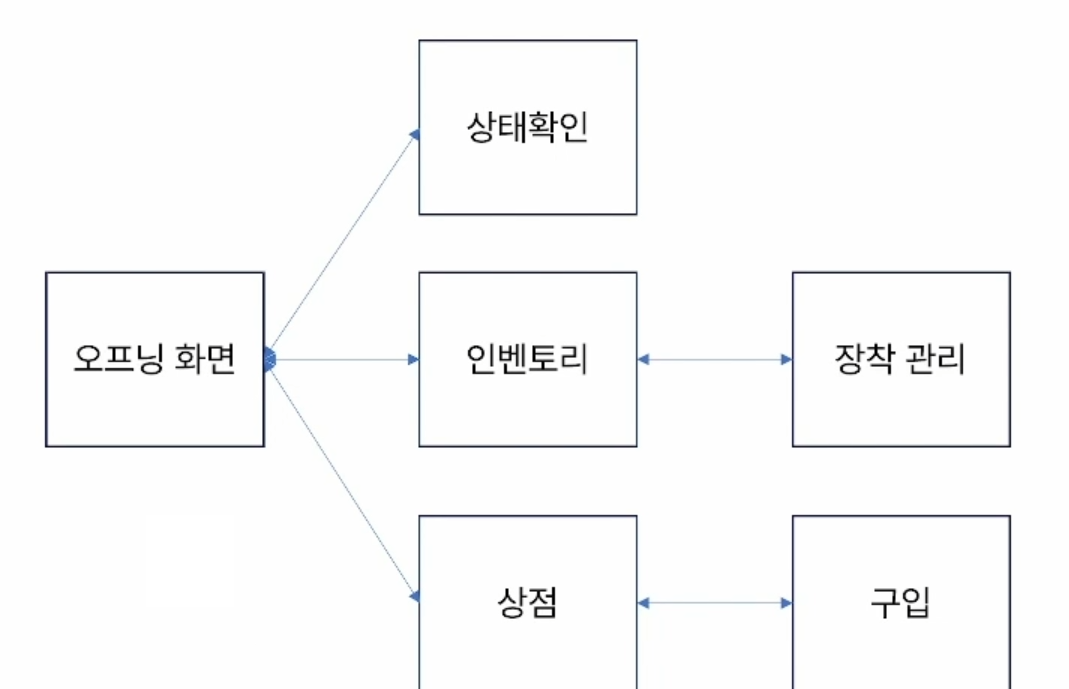
- 위와 같은 경우 4가지 클래스로 분리 (GameManager / Item / Player / ConsoleUtility)
- 하나의 Item을 각각의 개별 변수로 저장하는 것보다 클래스로 저장
- 훨씬 편리하고 실수가 적어짐
- 캐릭터 정보 클래스로 저장
- 무분별한 static 남용을 막기 위해 구성 변경
Content .3 무분별한 static 막는 법
- main 함수가 static으로 정의되어 있어서 Program 클래스에서 정의되는 함수들이 우수수 static으로 정의되기 마련
- 우리 전략
- Program에서 GameManager를 생성 -> GameManager가 로직 수행
Chapter .3 학습법 특강
Content .1 계획하기
- 하루계획 (30분 단위)
- 주 계획 (1일 단위)
- 월 계획 (1주 단위)
- 연 계획 (1달 단위)
Content .2 학습법의 구성
- Get
- 시도 : 만들어 보고, 따라해 보고 -> 성취감
- 소통 : 같은 기능, 다른 구현
- 발굴 : 해당 엔진의 세부 기능 찾아보기, 코드에 나오는 부가적인 정보 읽어보기
(결과만이 아닌 과정까지 확인해보기)
- Solve
- 에러 로그를 확인하고 해당 부분을 확인하기
- 코드의 작성 순서대로 로그를 찍어보기
- 에러에 대해 모를 땐 구글링 (Stack Overflow)
- AI를 활용하기 (구현의 용도 X / 이해의 용도 O)
- Set
- 학습한 내용을 정리하고 머릿속에 저장하는 일
- 본인이 사용하는 언어의 Document 자주 확인하기
(Unity : https://docs.unity3d.com/Manual/index.html)
(C# : https://learn.microsoft.com/ko-kr/dotnet/csharp/) - TIL 작성하기
Content .3 학습의 루팅
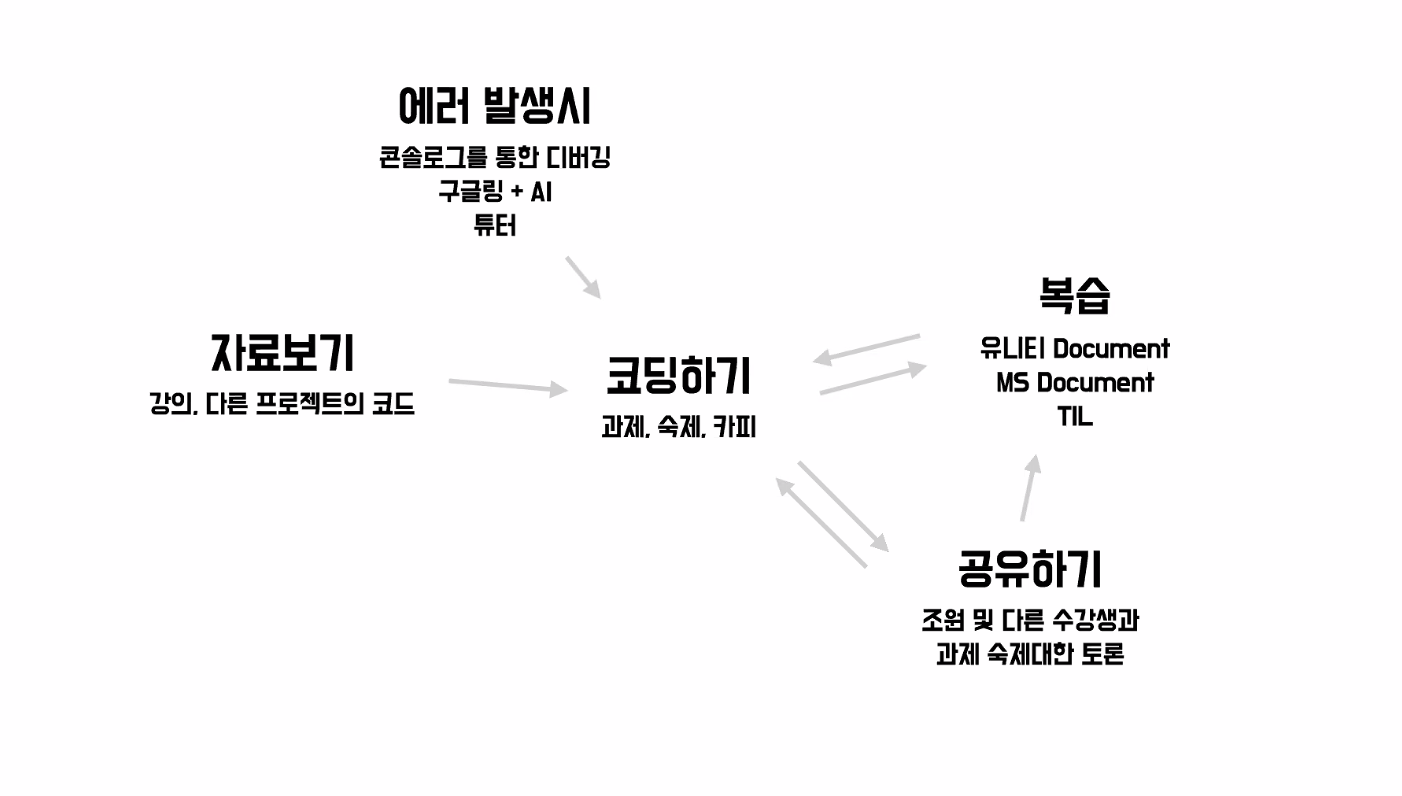
-
코딩하기
-
Document 확인하기
-
공유하기
-
Cording Test 해보기
-
튜터님에게 질문하기
-
TIL로 정리하기
문제를 마주칠수록 성장할 가능성이 높아진다!

게임은 재미와 기능!