TanStack Query(이전의 React Query)는 서버로부터 데이터 페칭, 캐싱, 동기화 및 업데이트를 자동화 해주는 라이브러리이다.
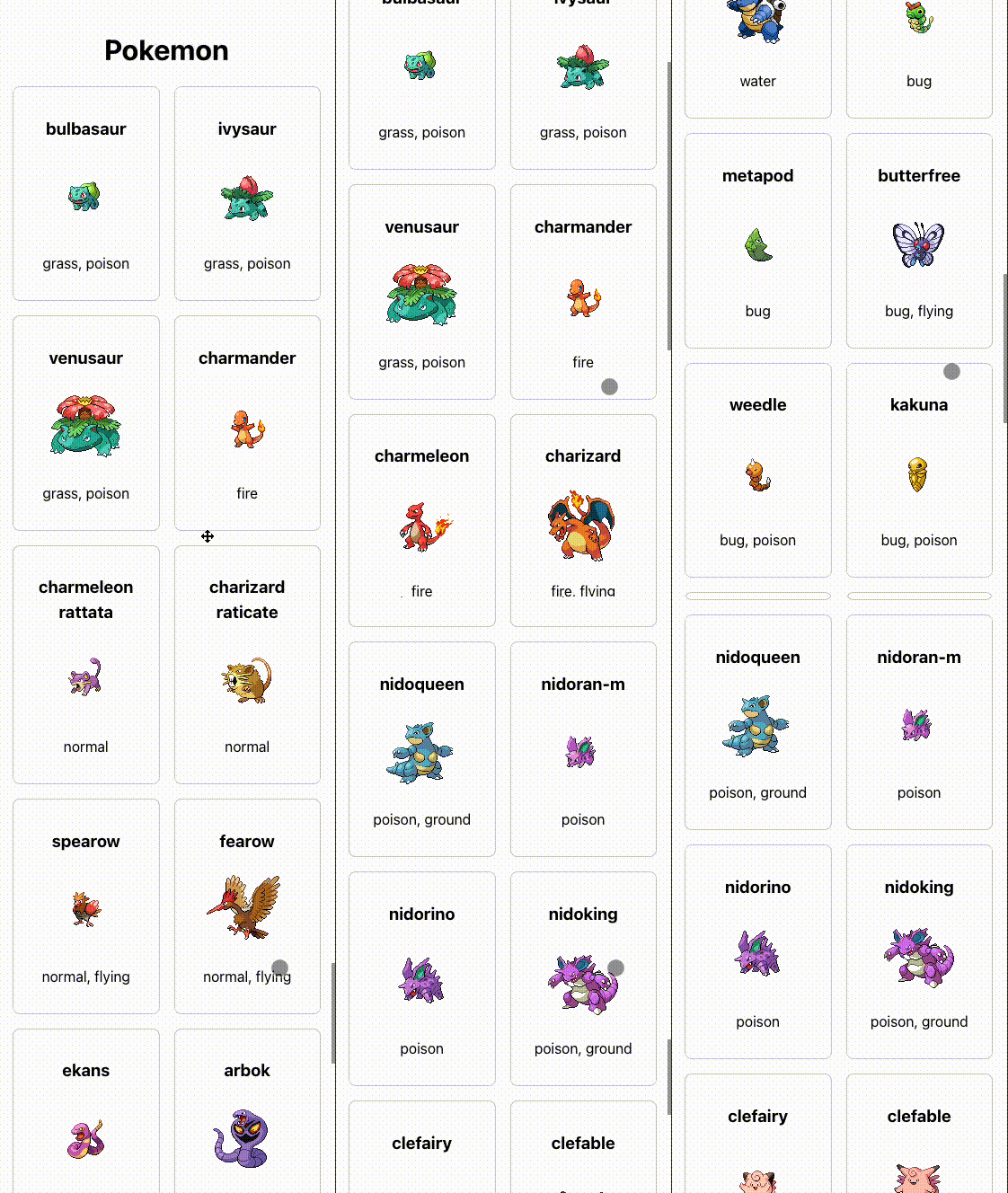
서버와의 데이터 동기화뿐만 아니라 캐싱으로 성능 최적화 또한 간편해서 이전 프로젝트에서 사용한 경험이 있는데, 이번에는 TanStack Query의 useInfiniteQuery 훅을 사용하여 무한 스크롤 기능을 구현해 보았다.
실행화면
useInfiniteQuery 살펴보기
(공식문서) https://tanstack.com/query/latest/docs/framework/react/reference/useInfiniteQuery
useInfiniteQuery 훅은 useQuery 훅과 유사한 옵션과 반환값들을 사용하지만, 무한 스크롤과 관련된 추가적인 옵션, 반환값들이 있다.
const {
  fetchNextPage,
  hasNextPage,
  hasPreviousPage,
  isFetchingNextPage,
  isFetchingPreviousPage,
  ...result
} = useInfiniteQuery({
  queryKey,
  queryFn: ({ pageParam }) => fetchPage(pageParam),
  initialPageParam: 1,
  ...options,
  getNextPageParam: (lastPage, allPages, lastPageParam, allPageParams) =>
    lastPage.nextCursor,
  getPreviousPageParam: (firstPage, allPages, firstPageParam, allPageParams) =>
    firstPage.prevCursor,
})
반환값 (Returns)
data: 서버에서 응답으로 받아온 데이터fetchNextPage: 다음 페이지의 데이터를 가져오는 함수. 스크롤을 더 내리거나 "더 보기" 버튼을 클릭할 때 호출hasNextPage: 더 가져올 다음 페이지가 있는지(boolean) 여부getNextPageParam함수가undefined또는null을 반환하면false로 설정됨isFetchingNextPage: 다음 페이지의 데이터를 가져오는 중인지(boolean) 여부
옵션 (Options)
queryKey: 캐싱과 데이터 관리에 사용되는 고유한 키. 배열 형태로 제공되어야 함.queryFn: 데이터를 가져오는 비동기 함수initialPageParam: 처음으로 데이터를 요청할 때 사용할 초기 페이지 파라미터. 첫 페이지의 데이터 페칭 시에 사용됨.getNextPageParam: 새로운 페이지의 데이터를 가져온 후 다음 페이지를 가져올 때 사용될 파라미터를 반환하는 함수. 이 함수는 마지막 페이지의 데이터(lastPage)와 전체 페이지의 배열(allPages)을 인수로 받아서 다음 페이지의 파라미터를 반환함. 반환값이undefined또는null이면 더 이상 가져올 페이지가 없음을 나타냄.
스크롤이 바닥에 도달했는지 감지하는 방법
무한스크롤은 스크롤이 페이지의 끝에 도달했을 때 자동으로 다음 데이터를 불러오는 방식인데, 이때 스크롤이 바닥 끝에 도달했음을 감지하는 방법으로 onScroll 이벤트를 활용하는 방법과 IntersectionObserver API를 사용하는 방법이 있다. 각 방식의 작동 원리와 장단점을 살펴보자.
1. onScroll 이벤트를 이용하는 방식
onScroll 이벤트는 사용자가 스크롤할 때마다 호출되는 이벤트 핸들러를 설정하는 방식이다.
구현 방식:
-
스크롤 이벤트 핸들러 추가:
- 특정 DOM 요소나
window객체에 대해onScroll이벤트 등록 - 스크롤이 발생할 때마다 현재 스크롤 위치를 확인하고, 페이지의 끝에 도달했는지 판단
- 특정 DOM 요소나
-
스크롤 위치 확인:
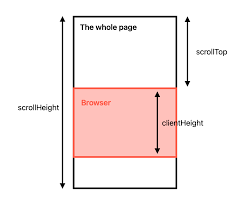
- 스크롤 위치는
scrollTop(스크롤된 위치)과scrollHeight(전체 콘텐츠 높이),clientHeight(보이는 영역 높이)를 이용해 계산한다.
- 스크롤 위치는
예제 코드:
import React, { useEffect } from 'react';

const InfiniteScrollComponent: React.FC = () => {
  const handleScroll = (e: React.UIEvent<HTMLDivElement>) => {
    const target = e.target as HTMLDivElement;
    if (target.scrollHeight - target.scrollTop === target.clientHeight) {
      // 스크롤이 바닥에 도달했을 때 데이터 로드 함수 호출
      loadMoreData();
    }
  };

  const loadMoreData = () => {
    // 데이터 로딩 함수
    console.log("Load more data...");
  };

  return (
    <div onScroll={handleScroll} style={{ height: '400px', overflowY: 'scroll' }}>
      {/* 콘텐츠 */}
    </div>
  );
};
장점:
- 간단하고 직관적이며, 브라우저 호환성 문제가 거의 없다.
- 모든 브라우저에서 일관된 동작을 기대할 수 있다.
단점:
- 스크롤 이벤트는 빈번하게 발생하므로, 성능에 부정적인 영향을 미칠 가능성 있음
2. IntersectionObserver를 이용하는 방식
IntersectionObserver API는 특정 요소가 다른 요소와 교차되거나, 뷰포트(보이는 영역)와 교차할 때 이를 감지하는 방법이다.
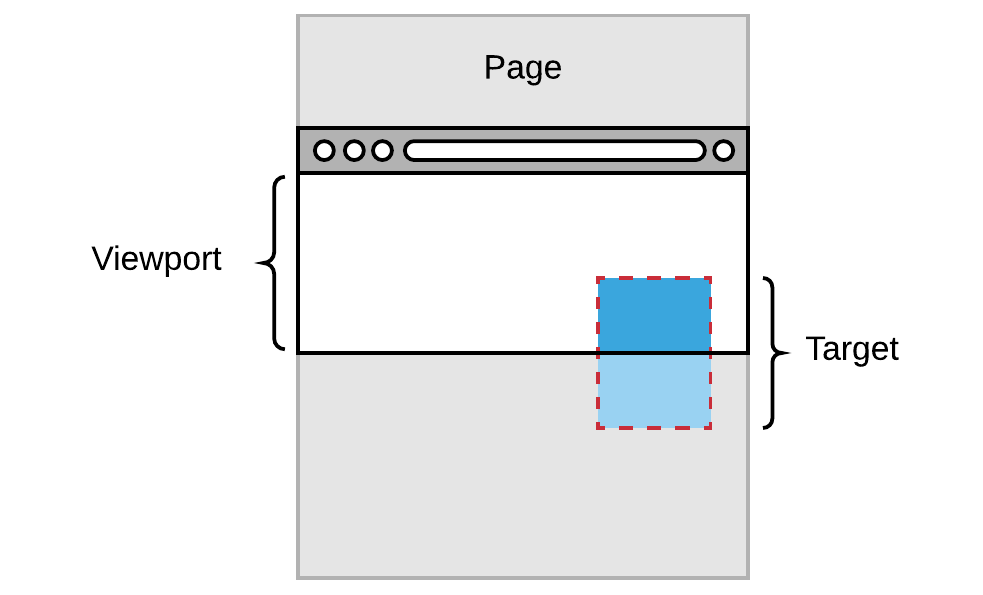
구현 방식:
-
관찰 대상 설정:
- 페이지의 마지막 요소(로딩 트리거 요소) 설정
- 이 요소가 뷰포트와 교차할 때 이벤트가 발생하도록 설정
-
IntersectionObserver 설정:
IntersectionObserver를 생성하고, 대상 요소 관찰- 대상 요소가 뷰포트에 진입하면 데이터 로딩 트리거
예제 코드:
import React, { useEffect, useRef } from 'react';

const InfiniteScrollComponent: React.FC = () => {
  const loadMoreRef = useRef<HTMLDivElement | null>(null);

  useEffect(() => {
    const observer = new IntersectionObserver((entries) => {
      if (entries[0].isIntersecting) {
        // 요소가 뷰포트에 진입했을 때 데이터 로드 함수 호출
        loadMoreData();
      }
    });

    if (loadMoreRef.current) {
      observer.observe(loadMoreRef.current);
    }

    return () => {
      if (loadMoreRef.current) {
        observer.unobserve(loadMoreRef.current);
      }
    };
  }, []);

  const loadMoreData = () => {
    // 데이터 로딩 함수
    console.log("Load more data...");
  };

  return (
    <div>
      {/* 콘텐츠 */}
      <div ref={loadMoreRef} style={{ height: '20px', background: 'transparent' }} />
    </div>
  );
};
장점:
- 성능 최적화: 스크롤 이벤트를 계속해서 감지할 필요 없이, 특정 요소가 뷰포트에 진입할 때만 이벤트가 발생
- 비동기 작업이나, 다른 연산들과의 충돌이 적다.
단점:
- 일부 오래된 브라우저(IE 등)에서는 지원하지 않음
Polyfill(기본적으로 지원하지 않는 이전 브라우저에서 최신 기능을 제공하는 데 필요한 코드)이 필요할 수 있다.
IntersectionObserver를 활용한 무한 스크롤 구현
성능 면에서 유리한 IntersectionObserver를 사용하여 무한스크롤을 구현해보자.
데모앱 구현을 위해 포켓몬 데이터를 제공하는 PokeAPI를 활용했다.
https://pokeapi.co/
1. useInfiniteQuery 설정
useInfiniteQuery훅을 사용해 포켓몬 데이터를 무한 스크롤로 불러온다.getNextPageParam함수를 통해 마지막 페이지가 아닌 경우 다음 페이지를 가져오도록 설정한다.
const { data, fetchNextPage, hasNextPage, isFetchingNextPage } =
    useInfiniteQuery({
      queryKey: ["pokemon"],
      queryFn: fetchPokemon,
      initialPageParam: 0,
      getNextPageParam: (lastPage) => {
        return lastPage.isLast ? undefined : lastPage.nextPage;
      },
    });
2. observerElem
useRef를 사용해 페이지 하단에 관찰할 DOM 요소를 참조한다. 유저가 이 요소에 도달했을 때 다음 페이지를 로드하도록 설정 할것이다.
function App() {
  ...
  const observerElem = useRef<HTMLDivElement | null>(null);

  return (
    <div className="main">
      ...
      <div ref={observerElem}></div>
    </div>
  );
}

export default App;
3. IntersectionObserver 설정
useEffect를 사용해IntersectionObserver를 설정하고, 관찰할 요소(observerElem)가 뷰포트에 들어오는지 감시한다.observerCallback
-IntersectionObserver가 관찰 중인 요소(observerElem)가 뷰포트에 들어왔을 때 호출된다.
- 요소가 뷰포트에 진입하고(entry.isIntersecting) 다음 페이지가 존재할 경우(hasNextPage),fetchNextPage를 호출해 데이터를 추가로 불러온다.- 컴포넌트가 언마운트될 때 관찰을 중지하기 위해
unobserve를 호출
const observerCallback = useCallback(
    (entries: IntersectionObserverEntry[]) => {
      const [entry] = entries;
      if (entry.isIntersecting && hasNextPage) {
        fetchNextPage();
      }
    },
    [fetchNextPage, hasNextPage]
  );

  // Intersection Observer 설정 및 해제
  useEffect(() => {
    const currentElem = observerElem.current;
    const observer = new IntersectionObserver(observerCallback, {
      root: null,	// 대상 요소가 뷰포트와 교차할 때 트리거 되도록 설정
      rootMargin: "0px",	// root 요소의 마진값
      threshold: 1,	// 관찰 대상 요소가 root와 얼마나 교차해야 콜백이 호출될지를 지정
    });

    if (currentElem) {
      observer.observe(currentElem);
    }

    // 컴포넌트가 언마운트되거나 observerCallback이 변경될 때 관찰을 중지
    return () => {
      if (currentElem) {
        observer.unobserve(currentElem);
      }
    };
  }, [observerCallback]);
전체코드
import React, { useCallback, useEffect, useRef } from "react";
import { useInfiniteQuery } from "@tanstack/react-query";
import { PokemonResult } from "./types";
import { fetchPokemon } from "./api";
import "./App.css";

function App() {
  const { data, fetchNextPage, hasNextPage, isFetchingNextPage } =
    useInfiniteQuery({
      queryKey: ["pokemon"],
      queryFn: fetchPokemon,
      initialPageParam: 0,
      getNextPageParam: (lastPage) => {
        return lastPage.isLast ? undefined : lastPage.nextPage;
      },
    });

  const observerElem = useRef<HTMLDivElement | null>(null);

  const observerCallback = useCallback(
    (entries: IntersectionObserverEntry[]) => {
      const [entry] = entries;
      if (entry.isIntersecting && hasNextPage) {
        fetchNextPage();
      }
    },
    [fetchNextPage, hasNextPage]
  );

  // Intersection Observer 설정 및 해제
  useEffect(() => {
    const currentElem = observerElem.current;
    const observer = new IntersectionObserver(observerCallback, {
      root: null,
      rootMargin: "0px",
      threshold: 1,
    });

    if (currentElem) {
      observer.observe(currentElem);
    }

    return () => {
      if (currentElem) {
        observer.unobserve(currentElem);
      }
    };
  }, [observerCallback]);

  return (
    <div className="main">
      <h1 className="title">Pokemon</h1>
      <div className="pokemon-list">
        {data?.pages.map((page, pageIndex) => (
          <React.Fragment key={pageIndex}>
            {page.results.map((pokemon: PokemonResult, index: number) => (
              <div key={index} className="pokemon-card">
                <h3>{pokemon.name}</h3>
                <img src={pokemon.image} alt={pokemon.name} />
                <p>{pokemon.type}</p>
              </div>
            ))}
          </React.Fragment>
        ))}
        {isFetchingNextPage && <p>Loading more...</p>}
      </div>
      <div ref={observerElem}></div>
    </div>
  );
}

export default App;