👽 앱의 생명주기란?
말 그대로 앱이 켜지고 꺼지는 그 과정을 말한다.
정확히는 앱의 실행/종료 및 앱이 Foreground/Background 상태에 있을 때,
시스템이 발생시키는 event에 의해 앱의 상태가 전환되는 일련의 과정을 뜻한다.
이걸 알아야 앱의 상태가 변경되거나 앱의 특정 시점에 맞게 동작을 수행시킬 수 있다.
앱의 라이프사이클은 AppDelegate와 SceneDelegate가 관리한다.
AppDelegate와 SceneDelegate
이전 버전 ~ iOS 12 버전
- UIApplicationDelegate 객체를 사용하여 앱의 생명주기(앱의 실행과 종료 등) 및 UI 라이프사이클(백그라운드 상태 로직 등)을 모두 처리했다.
iOS 13 버전 ~ 그 이후 버전
- Scene 기반 앱의 생명 주기 이벤트에 응답하기 위해 UISceneDelegate 객체를 사용한다.
- SceneDelegate가 UI 라이프사이클, UIWindow와
관련된 부분을 담당하게 되었다.
그래서 앱의 실행과 종료 (Not Running / Suspend)는 AppDelegate가,
Foreground / Background는 SceneDelegate가 담당한다.
앱의 상태
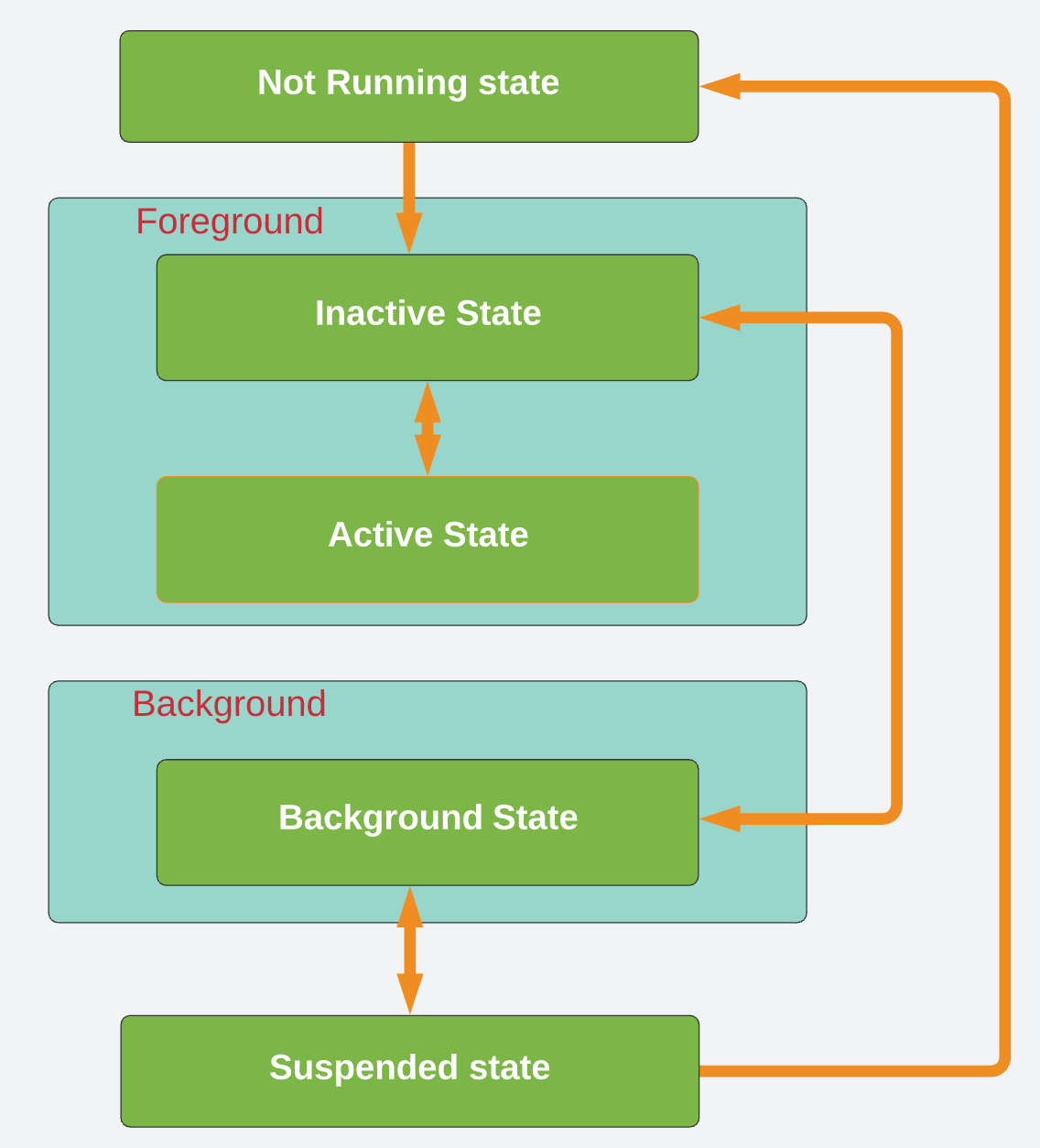
1. Not Running
- 앱이 시작되기 전 상태
- 유저가 앱에 진입하면 Foreground 상태가 된다.
- AppDelegate가 담당한다.
2. Foreground
- 앱이 실행된 상태
- SceneDelegate가 담당한다.
- active / inactive로 나눌 수 있다.
2-1. active
- 앱이 화면에서 실행중인 상태
2-2. inactive
- 앱이 화면에서 실행중이나 어떤 신호도 받지 않는 상태 (ex: 전화 왔을 때)
3. Background
- 앱이 화면에 보이지 않지만 코드를 실행하고 있는 상태
- SceneDelegate가 담당한다
4. Suspend
- 앱이 곧 종료될 상태
- AppDelegate가 담당한다
AppDelegate.swift
func application(_ application: UIApplication, didFinishLaunchingWithOptions launchOptions: [UIApplication.LaunchOptionsKey: Any]?) -> Bool {
      sleep(2)
      return true
}- 런치 스크린 떠있을 동안에 무언갈 할 수 있다.
- ex)
sleep(2)를 하면 런치스크린이 무조건 2초 동안은 켜져 있는다.
func applicationDidEnterBackground(_ application: UIApplication) {
        <#code#>
}- 앱을 실행했다가 백그라운드로 보냈을때 실행되는 함수
- ex) 금융앱 같은 경우 화면을 잠글 수 있다.
func applicationWillEnterForeground(_ application: UIApplication) {
      <#code#>
}- 앱에 다시 들어왔을 때 실행되는 함수
SceneDelegate.swift
SceneDelegate에서 Scene이 새롭게 생성되고 종료되는 트리거를 AppDelegate에게 알려줌으로써,
AppDelegate가 앱의 생성과 종료 시점을 통제할 수 있다.
func application(_ application: UIApplication, configurationForConnecting connectingSceneSession: UISceneSession, options: UIScene.ConnectionOptions) -> UISceneConfiguration {
        // Called when a new scene session is being created.
        // Use this method to select a configuration to create the new scene with.
        return UISceneConfiguration(name: "Default Configuration", sessionRole: connectingSceneSession.role)
}- 새로운 Scene이 필요할 때마다 위 AppDelegate의 함수가 호출되고,
// MARK: UISceneSession Lifecycle
func scene(_ scene: UIScene, willConnectTo session: UISceneSession, options connectionOptions: UIScene.ConnectionOptions) {
        // Use this method to optionally configure and attach the UIWindow `window` to the provided UIWindowScene `scene`.
        // If using a storyboard, the `window` property will automatically be initialized and attached to the scene.
        // This delegate does not imply the connecting scene or session are new (see `application:configurationForConnectingSceneSession` instead).
        guard let _ = (scene as? UIWindowScene) else { return }
}- Scene이 추가되면 SceneDelegate의 UISceneSesson 라이프사이클에서 위 함수가 호출된다.