📝 개발일지 - 룬 드래그 시스템 좌표 변환 트러블슈팅
👨💻 오늘의 개발 작업
오늘은 룬 드래그 앤 드롭 시스템에서 마우스 좌표 관련 버그를 해결했음
처음엔 간단할 줄 알았는데 언리얼의 좌표 시스템을 제대로 이해하지 못해서 시간이 좀 걸렸음
💡 오늘의 5분 기록
1. 문제 확인 - 드래그가 이상하게 동작
처음 구현한 코드로 테스트하니까 뭔가 이상했음
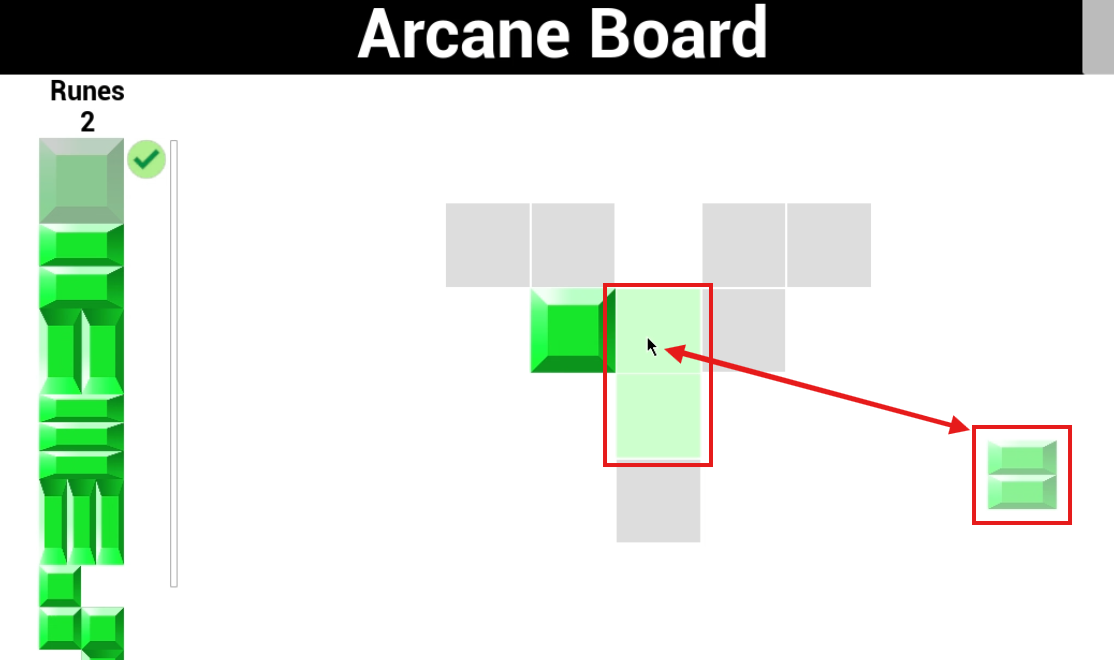
마우스 무브 이벤트 함수 내에서 마우스 이벤트로 받은 좌표를 사용하면 미리보기 위치는 정확히 뜨지만 룬 이미지가 마우스 포인터와 멀어짐
그래서 UWidgetLayoutLibrary::GetMousePositionOnViewport(GetWorld()) 이 함수를 써서 마우스 좌표를 받는걸로 구현했는데
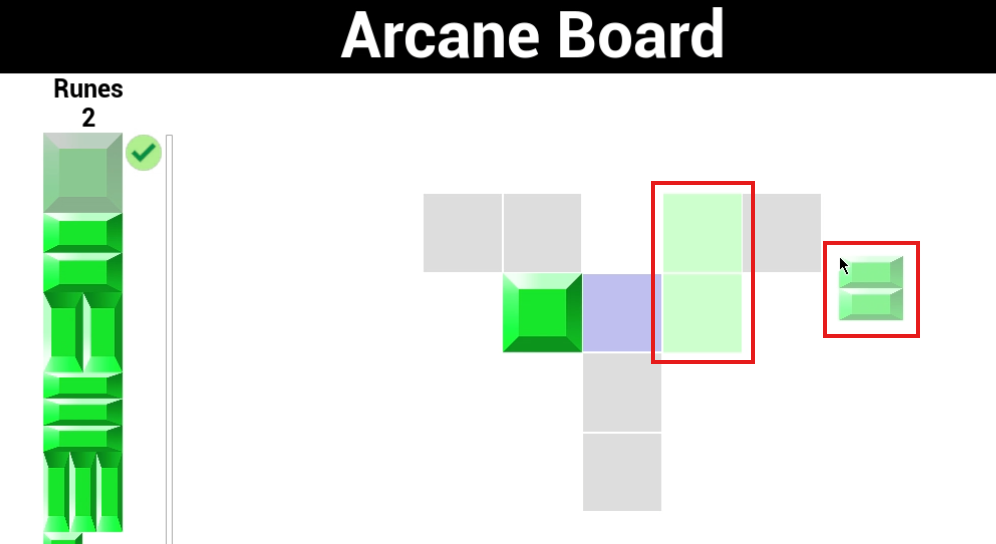
이번엔 룬 이미지는 포인터에 잘 붙는데 미리보기 위치가 맞지 않는 문제가 생김..
// 처음 만든 문제 코드
FReply UGS_ArcaneBoardWidget::NativeOnMouseMove(const FGeometry& InGeometry, const FPointerEvent& InMouseEvent)
{
    if (!bIsInSelectionMode || !SelectionVisualWidget)
    {
        return Reply;
    }

    // 문제 지점
    FVector2D MousePos = InMouseEvent.GetScreenSpacePosition();
    SelectionVisualWidget->SetPositionInViewport(MousePos);

    UGS_RuneGridCellWidget* CellUnderMouse = GetCellAtPos(MousePos);
    // ...
}

void UGS_ArcaneBoardWidget::StartRuneSelection(uint8 RuneID)
{
	// ...
    if (GetWorld())
	{
    	// 문제 지점
		FVector2D MousePos = FVector2D::ZeroVector;
		MousePos = UWidgetLayoutLibrary::GetMousePositionOnViewport(GetWorld());
		if (MousePos != FVector2D::ZeroVector)
		{
			SelectionVisualWidget->SetPositionInViewport(MousePos);
		}
	}
    // ...
}
증상들:
- 드래그 비주얼이 마우스 위치와 안 맞음
- 그리드 셀 인식이 제대로 안 됨
2. 원인 파악 - 좌표 시스템 혼동
디버그해보니 좌표 시스템을 완전히 잘못 이해하고 있었음
문제 : 스크린 vs 뷰포트 좌표 혼동
// 잘못된 이해
InMouseEvent.GetScreenSpacePosition();     // 스크린 좌표 (모니터 전체 기준)
SelectionVisualWidget->SetPositionInViewport(); // 뷰포트 좌표 필요 (게임 화면 기준)
스크린 좌표는 모니터 전체를 기준으로 하는데, 뷰포트 좌표는 게임 창 안에서의 위치였음
당연히 안 맞을 수밖에 없었음
3. 해결 과정 - 좌표 변환 체계 구축
언리얼 문서 뒤져가면서 좌표 변환하는 방법을 찾았음
핵심 깨달음:
InMouseEvent.GetScreenSpacePosition()= 스크린 좌표SetPositionInViewport()= 뷰포트 좌표 필요ScreenGeometry.AbsoluteToLocal()= 스크린 → 뷰포트 변환ScreenGeometry.LocalToAbsolute()= 뷰포트 → 스크린 변환
4. 문제 해결 - 체계적인 좌표 변환 적용
1단계: NativeOnMouseMove 수정
FReply UGS_ArcaneBoardWidget::NativeOnMouseMove(const FGeometry& InGeometry, const FPointerEvent& InMouseEvent)
{
    if (!bIsInSelectionMode || !SelectionVisualWidget)
    {
        return Reply;
    }

    // 스크린 좌표를 뷰포트 좌표로 변환
    FVector2D MousePos = InMouseEvent.GetScreenSpacePosition();
    if (APlayerController* PC = GetOwningPlayer())
    {
        FGeometry ScreenGeometry = UWidgetLayoutLibrary::GetPlayerScreenWidgetGeometry(PC);
        MousePos = ScreenGeometry.AbsoluteToLocal(MousePos);
    }

    SelectionVisualWidget->SetPositionInViewport(MousePos - DragVisualOffset, false);
    // ...
}
2단계: GetCellAtPos 함수 정리
// 매개변수명을 실제 용도에 맞게 변경
UGS_RuneGridCellWidget* GetCellAtPos(const FVector2D& ViewportPos)
{
    // 뷰포트 좌표를 스크린 좌표로 변환
    FVector2D ScreenPos = ViewportPos;
    if (APlayerController* PC = GetOwningPlayer())
    {
        FGeometry ScreenGeometry = UWidgetLayoutLibrary::GetPlayerScreenWidgetGeometry(PC);
        ScreenPos = ScreenGeometry.LocalToAbsolute(ViewportPos);
    }

    // 그리드 셀들은 스크린 좌표 기준으로 히트테스트
    for (auto& CellPair : GridCells)
    {
        UGS_RuneGridCellWidget* CellWidget = CellPair.Value;
        FGeometry CellGeometry = CellWidget->GetCachedGeometry();
        FVector2D LocalMousePos = CellGeometry.AbsoluteToLocal(ScreenPos);
        // ...
    }
}
결과
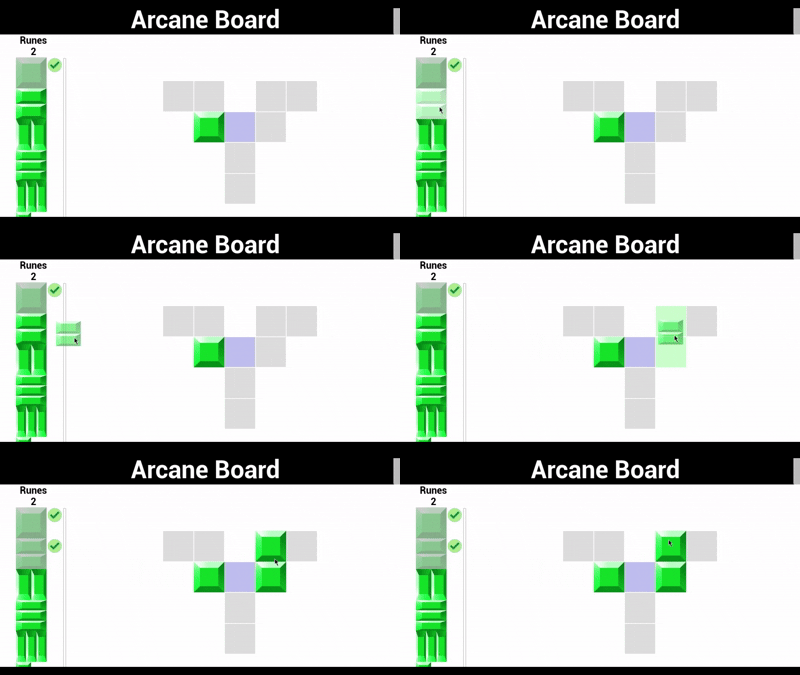
5. 성과와 깨달은 점
해결된 문제들
- ✅ 드래그 비주얼이 마우스를 정확히 따라감
- ✅ 그리드 셀 인식이 정확해짐
- ✅ 룬 배치가 의도한 위치에 정확히 됨
가장 큰 교훈
언리얼의 좌표 시스템은 생각보다 복잡함. 스크린, 뷰포트, 로컬 좌표가 각각 다른 기준점을 가지고 있고, 적절한 변환 없이 섞어 쓰면 예상치 못한 버그가 생김
단순해 보이는 마우스 따라가기 기능도 좌표 시스템을 제대로 이해해야 구현할 수 있다는 걸 배웠음
📚 개발 참고
언리얼 좌표 시스템 정리
- 스크린 좌표: 모니터 전체 기준 (0,0이 모니터 왼쪽 상단)
- 뷰포트 좌표: 게임 창 기준 (0,0이 게임 창 왼쪽 상단)
- 로컬 좌표: 각 위젯 기준 (0,0이 해당 위젯 왼쪽 상단)
주요 변환 함수들
// 스크린 → 뷰포트
FGeometry ScreenGeometry = UWidgetLayoutLibrary::GetPlayerScreenWidgetGeometry(PC);
FVector2D ViewportPos = ScreenGeometry.AbsoluteToLocal(ScreenPos);

// 뷰포트 → 스크린
FVector2D ScreenPos = ScreenGeometry.LocalToAbsolute(ViewportPos);

// 현재 마우스 뷰포트 좌표 구하기
FVector2D MousePos = UWidgetLayoutLibrary::GetMousePositionOnViewport(GetWorld());