전체적인 구상도
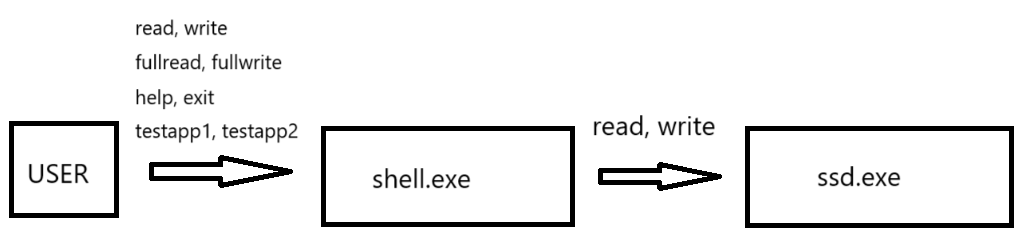
user가 shell.exe를 이용해 ssd.exe를 제어한다.
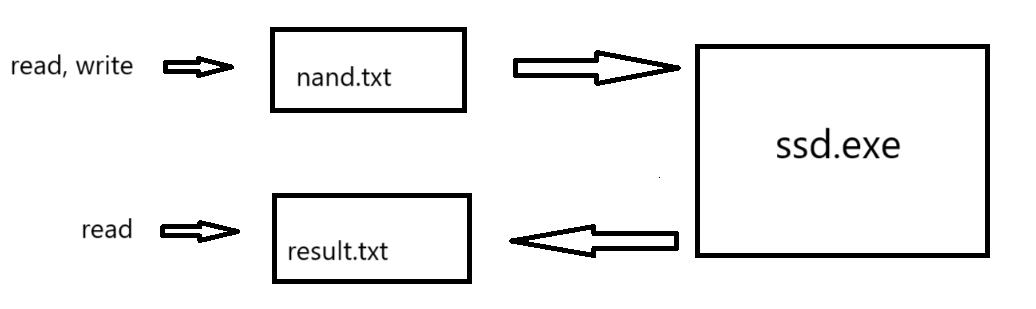
ssd.exe
write하면 nand.txt에 값 저장 read하면 result.txt에 읽은 값 저장
shell.exe
write: ssd에 명령어 전달
read: ssd에 명령어 전달 + result 출력
fullwrite: LBA 0번부터 99번까지 write 수행
fullread: LBA 0번부터 99번까지 read 수행
유효성검사
LBA의 범위는 0 ~ 99
값은 16진수로 A ~ F, 0 ~ 9까지 숫자범위 허용
없는 명령어 수행 시 "INVALID COMMAND" 출력
ssd.cpp
#include "storage.h"
#include <fstream>
#include <string.h>

class SSD: public Storage{
private:
    std::string buf[100]; // LBA는 4Byte 크기
    std::string line;
public:
    void write(uint32_t address, std::string value){
        std::ofstream fout("nand.txt", std::ios::app);
        fout << address << '-' << value << '\n';
        fout.close();
    }

    void read(uint32_t address, bool flag){
        std::ifstream fin("nand.txt");
        while (std::getline(fin, line)) {
            if(line[1] == '-'){
                buf[stoi(line.substr(0, 1))] = line.substr(2);
            }
            else if(line[2] == '-'){
                buf[stoi(line.substr(0, 2))] = line.substr(3);
            }
        }
        fin.close();

        if(flag){
            std::ofstream fout("result.txt", std::ios::app);
            fout << buf[address] << '\n';
            fout.close();
        }
        else{
            std::ofstream fout("result.txt");
            fout << buf[address] << '\n';
            fout.close();
        }
    }

    SSD(){
        std::fill_n(buf, 100, "00000000");
    }
};


int main(int argc, char* argv[]){ // argv[0]은 파일명
    SSD ssd;
    if(strcmp(argv[1], "W") == 0){
        ssd.write(atoi(argv[2]), argv[3]);
    }
    else if(strcmp(argv[1], "R") == 0){
        if(strcmp(argv[3], "FULL") == 0) {
            ssd.read(atoi(argv[2]), 1);
        }
        if(strcmp(argv[3], "ONE") == 0) {
            ssd.read(atoi(argv[2]), 0);
        }
    }

}
address + '-'로 몇번 LBA에 저장되어있는지 파악
SSD클래스 생성자를 이용해 buf를 "00000000"로 초기화, 부분집합을 이용해 숫자값만 buf에 저장 후 result에 저장
"R"을 입력 받을 시 "FULL"인 경우 모두 읽기 "ONE"인 경우 한개만 읽기
std::ios::app 이용 시 기존 파일내용부터 시작
main함수 인자로 argv이용
storage.h
#ifndef __STORAGE_H__
#define __STORAGE_H__

#include <iostream>
#include <stdint.h>

class Storage{
    public:
        virtual void write(uint32_t address, std::string value) = 0;
        virtual void read(uint32_t address, bool flag) = 0;
};

#endif
추상클래스를 이용해 확장성 보장
shell.cpp
#include "val.h"
#include "exefc.h"
#include "fcssd.h"

int main() {
    std::ofstream fout1("nand.txt");
    fout1.close();
    std::ofstream fout2("result.txt");
    fout2.close();

    std::string s, LBA_s, h;
    int LBA;
    while (1) {
        std::cout << "명령어를 입력하세요: ";
        std::cin >> s;

        if (s == "write") {
            std::cin >> LBA_s;
            std::cin >> h;
            if(write(LBA_s, h) == false){
                continue;
            }
        }

        else if (s == "fullwrite") {
            std::cin >> h;
            if(fullwrite(h) == false){
                continue;
            }
        }

        else if (s == "read") {
            std::cin >> LBA_s;
            if(read(LBA_s) == false){
                continue;
            }
        }

        else if (s == "fullread") {
            if(fullread() == false){
                continue;
            }
        }

        else if (s == "help") {
            help();
        }

        else if (s == "exit") break;

        else if(s == "testapp1"){
            std::cin >> h;
            if(fullwrite(h) == false){
                continue;
            }

            if(fullread() == false){
                continue;
            }
        }

        else if(s == "testapp2"){
            for(int i = 0; i < 30; i++){
                for(int j = 0; j < 5; j++){
                    if(write(std::to_string(j), "0xAAAABBBB") == false){
                        continue;
                    }
                }
            }

            for(int i = 0; i < 5; i++){
                if(write(std::to_string(i), "0x12345678") == false){
                    continue;
                }
            }

            for(int i = 0; i < 5; i++){
                if(read(std::to_string(i)) == false){
                    continue;
                }
            }
        }

        else {
            getline(std::cin, s); // 쓰레기값 치우기
            std::cout << "INVALID COMMAND" << std::endl;
        }

    }

    return 0;
}
초기에 파일 초기화
else에서 getline으로 뒤에 입력받은 값 처리
각 기능들 함수로 만들어 testapp구현 시 용이
fcssd.h
#ifndef __FCSSD_H_
#define __FCSSD_H_
#include "exefc.h"
#include "val.h"

bool write(std::string LBA_s, std::string h);
bool fullwrite(std::string h);
bool read(std::string LBA_s);
bool fullread();
void help();
#endif
fcssd.cpp
#include "fcssd.h"

bool write(std::string LBA_s, std::string h){
    int LBA;
    try{
        LBA = std::stoi(LBA_s);
    }
    catch(std::invalid_argument&){
        std::cout << "LBA로 올바른 타입을 입력하세요" << std::endl;
        return false;
    }

    if (isLBA(LBA) == 0) {
        std::cout << "LBA범위 오류" << std::endl;
        return false;
    }

    if (isHexadecimal(h) == 0 || h.size() != 10) {
        std::cout << "16진수 입력 값 오류" << std::endl;
        return false;
    }
    else h = h.substr(2);
    //std::cout << LBA_s << h;
    if(exefc("a.exe", "W", LBA_s, h) == false){
        std::cerr << "\nSSD 실행에 실패했습니다!" << std::endl;
        return false;
    }

    return true;
}

bool fullwrite(std::string h){
    std::ofstream fout1("nand.txt");
    fout1.close(); // 속도저하

    if (isHexadecimal(h) == 0 || h.size() != 10) {
        std::cout << "16진수 입력 값 오류" << std::endl;
        return false;
    }
    for (int i = 0; i < 100; i++) {
        if(exefc("a.exe", "W", std::to_string(i), h) == false){
            std::cerr << "\nSSD 실행에 실패했습니다!" << std::endl;
            return false;
        }
    }
    return true;
}

bool read(std::string LBA_s){
    int LBA;
    std::string line;
    try{
        LBA = std::stoi(LBA_s);
    }
    catch(std::invalid_argument&){
        std::cout << "LBA로 올바른 타입을 입력하세요" << std::endl;
        return false;
    }

    if (isLBA(LBA) == 0) {
        std::cout << "LBA범위 오류" << std::endl;
        return false;
    }

    if(exefc("a.exe", "R", LBA_s, "ONE") == false){
        std::cerr << "\nSSD 실행에 실패했습니다!" << std::endl;
        return false;
    }

    std::ifstream fin("result.txt");
    while (std::getline(fin, line)) {
        std::cout << line << std::endl;
    }
    fin.close();

    return true;
}

bool fullread(){
    std::string line;
    std::ofstream fout("result.txt");
    fout.close(); // 초기화

    for(int i = 0; i < 100; i++){
        if(exefc("a.exe", "R", std::to_string(i), "FULL") == false){
            std::cerr << "\nSSD 실행에 실패했습니다!" << std::endl;
            return false;
        }
    }
    std::ifstream fin("result.txt");
    while (std::getline(fin, line)) {
        std::cout << line << std::endl;
    }
    fin.close();

    return true;
}

void help(){
    std::cout << "====명령어 사용 방법======" << std::endl;
    std::cout << "write: LBA에 입력\n ex) write LBA번호 입력값" << std::endl;
    std::cout << "read: 화면출력\n ex) write LBA번호" << std::endl;
    std::cout << "exit: Shell 종료\n ex) exit" << std::endl;
    std::cout << "help: 명령어 사용방법 출력\n ex) help" << std::endl;
    std::cout << "fullwrite: LBA 0번부터 99번까지 입력\n ex) fullwrite 입력값" << std::endl;
    std::cout << "fullread: LBA 0번부터 99번까지 출력\n ex) fullwrite" << std::endl;
}
유효성검사 + execfc를 이용해 a.exe에 인자 전달
val.h
#ifndef __VAL_H_
#include <cctype>
#include <string>
#include <iostream>
#include <fstream>

bool isHexadecimal(const std::string& input);
bool isLBA(const int& input);
#endif
val.cpp
#include "val.h"

bool isHexadecimal(const std::string& input) {
    // 입력 문자열이 빈 문자열인지 검사
    if (input.empty()) return false;

    // 0x 또는 0X로 시작하면 이를 무시 (16진수 표기법)
    size_t startIndex = 0;
    if (input.length() > 2 && (input[0] == '0') && (input[1] == 'x' || input[1] == 'X')) {
        startIndex = 2;
    }
    else{
        return false;
    }

    // 남은 문자가 모두 16진수 값인지 검사
    for (size_t i = startIndex; i < input.length(); ++i) {
        if (!std::isxdigit(input[i])) {
            return false;
        }
    }
    return true;
}


bool isLBA(const int& input) {
    if (input >= 0 && input < 100) return true;
    else return false;
}
유효성검사
exefc.h
#ifndef __EXEFC_H_
#include <process.h>
#include "val.h"

bool exefc(std::string p_name, std::string ist, std::string LBA, std::string h);
#endif
exefc.cpp
#include "exefc.h"
#include "val.h"

bool exefc(std::string p_name, std::string ist, std::string LBA, std::string h){
    const char* program = p_name.c_str();
    const char* args[] = { program, ist.c_str(), LBA.c_str(), h.c_str(), NULL };
    int result = _spawnvp(_P_WAIT, program, args); // _P_WAIT  _P_NOWAIT

    if (result == -1) return false;
    else return true;
}
인자를 모두 string으로 받은 후 c_str()로 const char*형으로 변환
_P_WAIT를 이용해 a.exe가 끝날 때 까지 기다린 후 종료
추상클래스 사용으로 SSD클래스 외 다른 클래스도 read, write하게 만들고 shell의 기능들을 함수로 만들어 testapp만들 때 편리했다.
main함수로 인자를 받는 argv와 새로운 프로세스를 생성하는 _spawnvp 이용해 2개의 실행파일이 연결되게 했다
