1. 입력 양식 (Form)
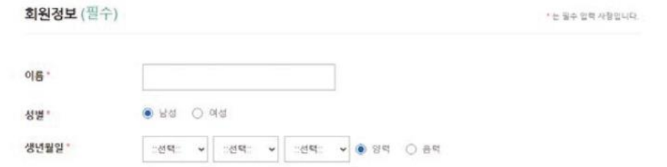
Form : 사용자에게 정보를 입력받는 요소(element)
<form> <input> </form>
<body>
  <form>
    <input type="text" name="search">
    <input type="submit">
  </form>
</body>- form 태그 속성
<form action="전송 위치" method="전송 방식>
- action : 데이터 전달할 목적지
- method : 데이터 전달 방식
GET(default) : 주소에 데이터 직접 입력, 전달
· 크기 한정, 일정 범위 넘어가면 에러
· 노출, 보안에 취약POST: 별도의 방법을 사용해 데이터를 해당 주소로 전달
· 주소 변경X, 비밀, 용량 제한X
<!-- GET -->
<body>
  <form method="get">
    <input type="text" name="search">
    <input type="submit">
  </form>
</body>
<!-- POST -->
<body>
  <form method="post">
    <input type="text" name="search">
    <input type="submit">
  </form>
</body>
2. 입력 양식 종류
1) <input>
- <input> 속성 종류
- 사용자가 입력하는 입력 양식
* text
<input type="text" name="text" value="입력 전 보이는 텍스트">
<input type="text" name="text" placeholder="가이드">
* password
<input type="password" name="password" value="잘안씀/써도안보임">
* file
<input type="file" name="file" value="password">
* checkbox
<input type="checkbox" name="checkbox" value="checkbox">
복수선택 가능
* radio
<input type="radio" name="radio" value="radio">
단일 선택
- 보이지 않는 입력 양식
* hidden
<input type="hidden" name="hidden" value="hidden">
- 버튼
* button
<input type="button" value="버튼 글씨">
* reset
<input type="reset" value="리셋 버튼 글씨">
* submit
<input type="submit" value="제출 글씨">
- 이미지
* image
<input type="image" src="http://via.placeholder.com/100x50">;
- 사용자가 입력하는 입력 양식
- radio - 여러 대상 중 하나만 선택
· radio의 name 속성 사용
· name 값을 동일하게 해야 같은 그룹으로 묶임
남자
여자<input type="radio" id="man" name="gender"> <label for="man">남자</label> <input type="radio" id="woman" name="gender"> <label for="woman">여자</label>```
2) <label>
- for 속성에 input 태그의 id 속성 입력
- 어떤 input 태그를 나타내는지 알려줌
- label 태그를 클릭했을 때 input 태그에 포커스
    <form>
      <input type="checkbox" id="agreement" />
      <label for="agreement">여기 텍스트를 눌러도 체크된다</label>
</form>(이렇게 써도 됨~)
<label>
  <input type="checkbox" id="agreement"/>
  여기 텍스트를 눌러도 체크된다
</label>3) <select> with <optgroup>, <option>
<select>
· 목록 중 하나 또는 여러 개 선택할 때 사용
· option / optgroup 태그와 함께 사용
-
한 항목 선택 - option
김밥 떡볶이 순대 어묵<form> <select> <option>김밥</option> <option>떡볶이</option> <option>순대</option> <option>어묵</option> </select> <input type="submit"> </form>
-
여러 항목 선택 - multiple
김밥 떡볶이 순대 어묵<form> <!-- 그냥 multiple만 써도 됨 --> <select multiple="multiple"> <option>김밥</option> <option>떡볶이</option> <option>순대</option> <option>어묵</option> </select> <input type="submit"> </form>
-
선택 옵션 묶기 - optgroup
김밥 떡볶이 오뎅 김치찌개 된장찌개 칼국수<form> <select> <optgroup label="분식"> <option>김밥</option> <option>떡볶이</option> <option>오뎅</option> </optgroup> <optgroup label="한식"> <option>김치찌개</option> <option>된장찌개</option> <option>칼국수</option> </optgroup> </select> </form>
4) <fieldset> with <legend>
- <fieldset> 내부에 <legend> 사용
- 입력 양식을 그룹으로 묶고 이름을 지정해서 타이틀 출력
<form>
      <fieldset>
        <legend>타이틀</legend>
        <table>
          <tr>
            <th>이름</th>
            <td>
              <input type="text" name="text" />
            </td>
          </tr>
          <tr>
            <th>이메일</th>
            <td>
              <input type="email" name="email" />
            </td>
          </tr>
        </table>
        <input type="submit" value="제출" />
      </fieldset>
</form>| 이름 | |
|---|---|
| 이메일 |
5) <textarea>
: 여러 줄을 입력 받는 요소
-
<textarea> 속성 종류
* cols: 너비
* rows: 높이 -
주의 사항
- 엔터, 탭, 스페이스가 그대로 출력 됨
<form>
   <textarea cols="40" rows="5">
올바른 형태
   </textarea>
   <textarea cols="40" rows="5">
        잘못된 형태
   </textarea>
</form>