1. 인라인 이벤트
v-on:[이벤트이름]="표현식"
@[이벤트이름]="표현식"
- v-on 디렉티브로 설정
- 이벤트 객체가 필요한 경우 :
@click="test($event)"
  <body>
    <div id="app">
      금액: <input type="text" v-model.number="amount" /><br />
      <button v-on:click="balance += parseInt(amount)">입금</button>
      <button @click="balance -= parseInt(amount)">인출</button> <br />
      <h3>계좌 잔고: {{ balance }}</h3>
    </div>

    <script src="https://unpkg.com/vue"></script>
    <script>
      let vm = Vue.createApp({
        name: 'App',
        data() {
          return {
            amount: 0,
            balance: 0,
          };
        },
      }).mount('#app');
    </script>
  </body>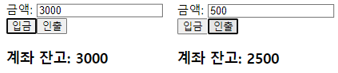
2. 이벤트 핸들러 메서드
- 로직 파트를 스크립트 파트로
- Vue 인스턴스의 methods 속성에 정의한 함수를 이벤트 처리 함수로 연결
  <body>
    <div id="app">
      금액: <input type="text" v-model.number="amount" /><br />
      <button v-on:click="deposit">입금</button>
      <button @click="withdraw">인출</button> <br />
      <h3>계좌 잔고: {{ balance }}</h3>
    </div>

    <script src="https://unpkg.com/vue"></script>
    <script>
      let vm = Vue.createApp({
        name: 'App',
        data() {
          return {
            amount: 0,
            balance: 0,
          };
        },
        methods: {
          deposit() {
            let amt = parseInt(this.amount);
            if (amt <= 0) {
              alert('0보다 큰 값을 예금하세요');
            } else {
              this.balance += amt;
              this.amount = 0;
            }
          },
          withdraw() {
            let amt = parseInt(this.amount);
            if (amt <= 0) {
              alert('0보다 큰 값을 인출하세요');
            } else if (amt > this.balance) {
              alert('잔고보다 많은 금액을 인수할 수 없습니다');
            } else {
              this.balance -= amt;
            }
            this.amount = 0;
          },
        },
      }).mount('#app');
    </script>
  </body>
3. 이벤트 객체
-
주요 속성
target
key
charCode
button
··· -
주요 메서드
preventDafault(): 기본 이벤트 자동 실행 금지
···
4. 기본 이벤트 (Default Event)
- HTML 문서나 요소에 어떤 기능을 실행하도록 이미 정의되어 있는 이벤트
<a>: 클릭했을 때 href 특성의 경로로 페이지 이동- 브라우저 화면에서 마우스 오른쪽 클릭 → 컨텍스트 메뉴 출력
- <form> 요소 내부의 submit 버튼 클릭 → 서버로 전성
- <input type="text"... /> 에서 키보드 입력 → 문자가 텍스트 박스에 나타남
- 기본 이벤트 실행 막기:
preventDefault()
  <body>
    <div id="app">
      <!-- 마우스오른쪽 눌러도 메뉴를 띄우지 X -->
      <div @contextmenu="ctxStop" style="position: absolute">
        <a href="https://facebook.com" @click="confirmFB">페이스북</a>
      </div>
    </div>

    <script src="https://unpkg.com/vue"></script>
    <script>
      let vm = Vue.createApp({
        name: 'App',
        data() {
          return {};
        },
        methods: {
          ctxStop(e) {
            e.preventDefault();
          },
          confirmFB(e) {
            // comfirm(): 확인(true) / 취소(false)
            if (!confirm('페이스북으로 이동?')) {
              e.preventDefault();
            }
          },
        },
      }).mount('#app');
    </script>
  </body>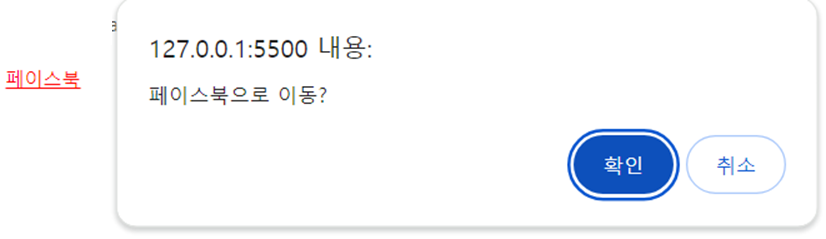
- 수식어를 통한 이벤트 차단 (좀 더 간단)
@이벤트.prevent= preventDefault()
    <div id="app">
      <!-- 마우스오른쪽 눌러도 메뉴를 띄우지 X -->
      <div @contextmenu.prevent style="position: absolute">
        <a href="https://facebook.com" @click="confirmFB">페이스북</a>
      </div>
    </div>

    <script src="https://unpkg.com/vue"></script>
    <script>
      let vm = Vue.createApp({
        name: 'App',
        data() {
          return {};
        },
        methods: {
          confirmFB(e) {
            // comfirm(): 확인(true) / 취소(false)
            if (!confirm('페이스북으로 이동?')) {
              e.preventDefault();
            }
          },
        },
      }).mount('#app');
    </script>
5. 이벤트 전파와 버블링
- 이벤트 전파 3단계

6. 이벤트 수식어
1) once
- 한 번만 이벤트 발생 후 이벤트 연결 해제
- 모든 이벤트에 연결 가능
2) 키코드 관련 수식어
- 키 관련 수식어 : up, down, left, right, enter, esc ...
@이벤트.enter="...": 엔터 쳤을 때 이벤트 핸들러 호출@keyup.ctrl.enter="...": ctrl+enter 조합 시 이벤트 핸들러 호출@keyup.ctrl.c="...": ctrl+c 조합
3) 마우스 관련 수식어
- left, right, middle : 마우스 버튼
- 키 관련 수식어 사용 가능
4) exact
- 다른 수식어와 조합해 이벤트 등록할 때
- 정확하게 일치하는 조합으로 이벤트가 일어나야 핸들러가 실행되도록 설정
<button @click.exact="num=num+1"
        @click.ctrl.exact="num=num+10"
        @click.ctrl.alt.exact="num=num+100">