JSP 문법
1) JSP 기본 요소
✅ HTML + 태그(JSP용)
✅ 태그 안에 자바 코드 삽입 (<% %>)
🔸 JSP 기본 태그 요소
- HTML 요소
- JSP 스크립팅 요소 (
<% %>) - JSP 표준 액션 태그 요소
- ★ EL (Expression Language) 요소
- 커스텀 태그 라이브러리 요소
🔸 JSP 스크립팅 요소
<% %>
JSP ➔ 서블릿 변환시 JSP 엔진에 의해 처리
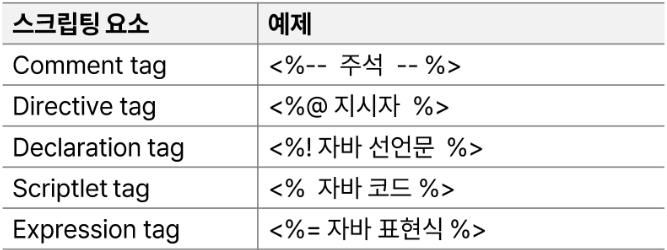
- Directive tag (JSP 지시어) : 해당 페이지를 어떻게 처리할 것인지 설정 정보 지시
- page 지시어
<%@ page 속성명="속성값" 속성명2="속성값2" %>
- include 지시어 : 다른 jsp파일을 여기에 배치시켜라, layout 잡을 때~
<%@ include file="포함할 페이지"%>
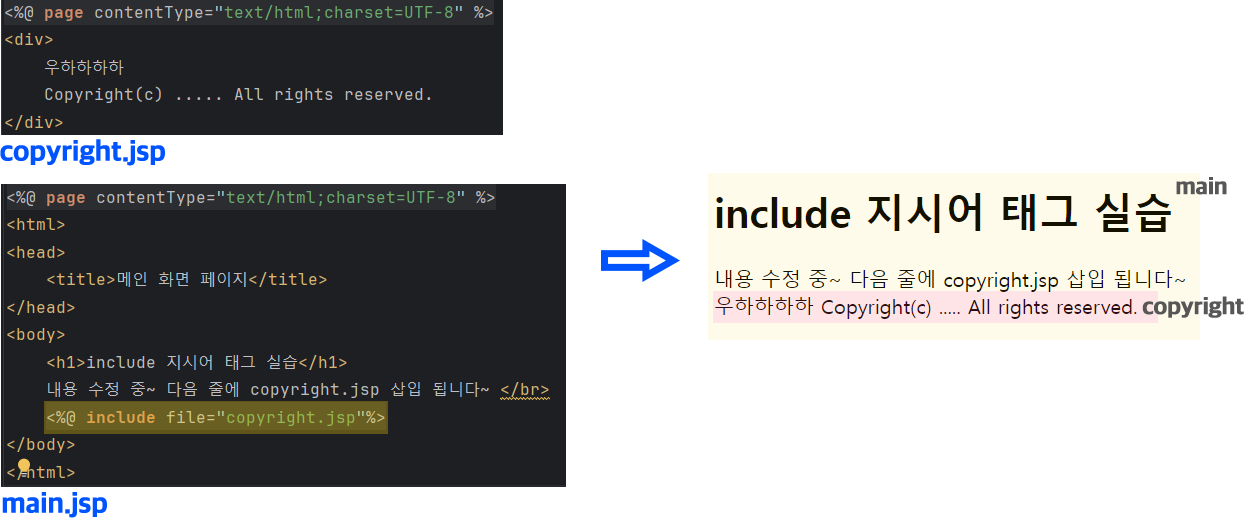
- page 지시어
- Scriptlet tag (스크립틀릿 태그) :
<% 자바코드문장; %>

     <%
        Date d = new Date();

        int sum = 0;
        for(int i = 1; i <= 10; i ++) {
            sum += i;
        }

        Date d2 = null;
    %>
    현재 날짜 : <%= d %> </br>
    1 ~ 10 합 : <%= sum%> </br>
    d2 : <%= d2%>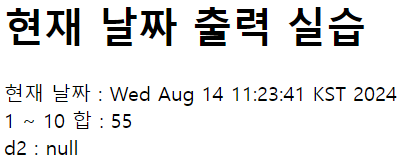
🔸 내장 객체
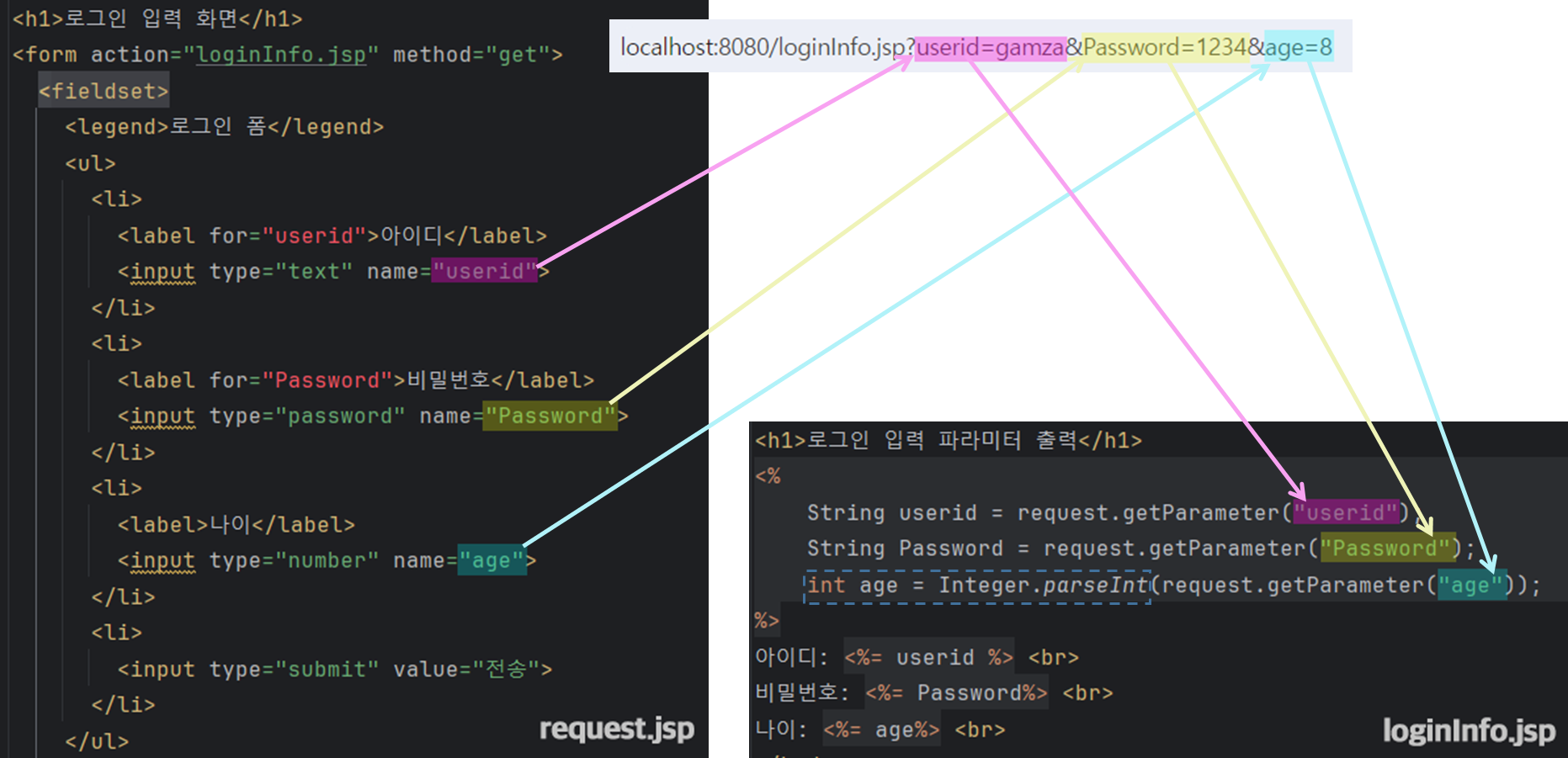
1) request 내장 객체
- 서블릿의 HttpServletRequest 객체 참조하는 변수
✅ request.getParameter("name") : String 타입 리턴
⇨ 값이 없으면 비어있는 문자열 리턴
2) response 내장 객체
- HttpSevletResponse 객체를 참조하는 변수
- 직접 응답을 내보내야 하는 경우 (ex. header의 내용을 수정할 때)
- redirect 처리 수행
* redirect
ex) co.kr ➞ com
POST, PUT, DELETE 요청(고치는 행위)일 때 항상 redirect<body> <h1>로그인 정보 세션 저장</h1> <% String id = request.getParameter("userid"); if (id == null || id.equals("")) { response.sendRedirect("loginForm.jsp"); } else { String pw = request.getParameter("Password"); session.setAttribute("userid", id); session.setAttribute("Password", pw); out.print("안녕하세요 " + id + "\n"); out.print("<a href='loginInfo.jsp'> 정보보기 </a>"); } %> </body>
id == null || id.equals("")
- id를 입력 안하면 빈 문자열로 들어감 (localhost:8080/login.jsp?userid=&Password=1234)
3) out 내장 객체
- 서블릿의 PrintWriter 객체와 동일 기능인 JspWriter 객체 참조
- 데이터 출력 시
<%=name%>/<%out.print(name);%>
4) session 내장 객체
2) JSP 표준 액션 태그
- JSP 자체에서 제공하는 태그
- 스크립틀릿 태그 사용을 대체하기 위함
🔸 <jsp:include />
<jsp:include page="삽입될페이지" flush="true"/>
: JSP 파일을 삽입
=
<%@ include file="포함할 페이지"%>
⇨ 최종 효과는 같으나 과정이 다름
- <%@ include~ > : 정적 / 변환 과정에서 두 파일이 합쳐짐 ➞ 컴파일/실행
- <jsp:inclue~ > : 동적 / 따로 변환, 실행 과정에서 해당 페이지로 이동 ➞ 실행 (≒ 메서드호출)
