HTML5 Form 태그와 서블릿
Submit ➔ Servlet
1) HTML5 - Form
checkbox 다중 선택 - 같은 이름으로 n개가 넘어갔을 때
check=value1&check=value2
➞ getParameter("check") 하면 첫 번째 값 리턴 됨 (value1) - 나머지 분실
∴ 배열 처리 해야 함 - getParameterValues( ) ⇨ String[ ]
✅ text 입력 x ⇨ 빈문자열("")
✅ checkbox, radio, select 선택 x ⇨ null (빈 배열x)
🔸 action
- submit ➔ 웹 서버에서 처리할 컴포넌트
- JSP나 Servlet 경로 지정
- 생략 가능 - 현재 url
🔸 method
: 웹 브라우저에서 웹 서버로 요청하는 방법 명시
- GET (default)
- 요청 파라미터 값이 URL에 명시
http://서버IP번호:포트번호/컨텍스트명/경로명/login?name=홍길동&age=20 - 서블릿 - doGet 메서드가 처리
- 파라미터 길이 제한
- 보안 취약
- 요청 파라미터 값이 URL에 명시
- POST
- 요청 파라미터 값이 HTTP Request 요청 body에 포함되어 전송 (URL에서 확인x)
http://서버IP번호:포트번호/컨텍스트명/경로명/login - 서블릿 - doPost 메서드가 처리
- 새로고침 - 사용자에게 재요청 의사 묻는 정보창 실행
- 요청 파라미터 값이 HTTP Request 요청 body에 포함되어 전송 (URL에서 확인x)
2) 서블릿에서 파라미터 처리
🔸 파라미터값 추출
✅ request 객체 메서드 이용

🔸 서블릿의 한글 처리
- GET : 한글 인코딩 필요 X (URL을 UTF-8로 인식)
- POST
- 톰캣 디폴트 인코딩 - ISO-8859-1
- body에 있는 입력 파라미터 값에 한글 有 - 인코딩 必
request.setCharcterEncoding("UTF-8");
👉 getParameter(name) 메서드
    @Override
    protected void doGet(HttpServletRequest request, HttpServletResponse response) throws ServletException, IOException {

        // 요청에서 파라미터 얻기
        String userid = request.getParameter("userid");
        String passwd = request.getParameter("passwd");

        // 응답 내보내기
        // MIME 타입 설정
        response.setContentType("text/html;charset=UTF-8");
        // 자바 I/O
        PrintWriter out = response.getWriter();

        // html 작성 및 출력
        out.print("<html><body>");
        out.print("아이디: " + userid + "<br>");
        out.print("비밀번호: " + passwd + "<br>");
        out.print("</body></html>");
    }
👉 request.setCharcterEncoding("UTF-8")
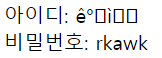
// 인코딩X
    @Override
    protected void doPost(HttpServletRequest request, HttpServletResponse response) throws ServletException, IOException {
        doGet(request, response);
    }
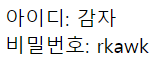
// 인코딩 O
    @Override
    protected void doPost(HttpServletRequest request, HttpServletResponse response) throws ServletException, IOException {
        request.setCharacterEncoding("UTF-8");
        doGet(request, response);
    }
👉 getParameterValues(name) 메서드
: check, select, radio
배열 ⇨ String[ ]
    @Override
    protected void doPost(HttpServletRequest request, HttpServletResponse response) throws ServletException, IOException {
        request.setCharacterEncoding("UTF-8");

        String[] sports = request.getParameterValues("sports");
        String sex = request.getParameter("sex");

        response.setContentType("text/html; charset=UTF-8");

        PrintWriter out = response.getWriter();

        out.print("<html><body>");
        if(sports != null) {
            for (String sport: sports) {
                out.print("좋아하는 운동: " + sport + "<br>");
            }
        }
        out.print("성별: " + sex + "<br>");
        out.print("</body></html>");
    }
👉 getParameterNames() 메서드
//board.jsp
<form action="/board" method="post">
    <input type="hidden" name="action" value="write">
    제목: <input type="text" name="title"><br/>
    작성자: <input type="text" name="author"><br/>
    내용: <textarea name="content" rows="10"></textarea><br/>
    <input type="submit" value="저장">
</form>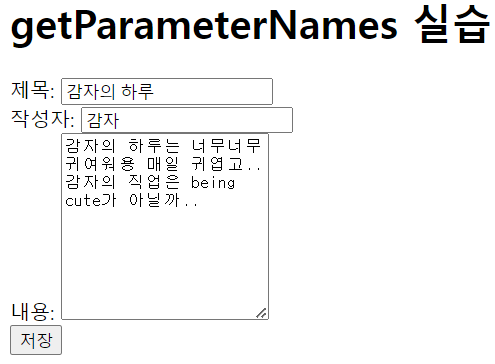
//BoardServlet
    @Override
    protected void doGet(HttpServletRequest request, HttpServletResponse response) throws ServletException, IOException {
        response.setContentType("text/html;charset=UTF-8");
        PrintWriter out = response.getWriter();

        out.print("<html><body>");

        Enumeration<String> enu = request.getParameterNames();

        while(enu.hasMoreElements()) {
            String name = enu.nextElement();
            String value = request.getParameter(name);
            out.print(name + ": " + value + "<br>");
        }
        out.print("</body></html>");
    }

    @Override
    protected void doPost(HttpServletRequest request, HttpServletResponse response) throws ServletException, IOException {
        request.setCharacterEncoding("UTF-8");
        doGet(request, response);
    }
