가시다(gasida) 님이 진행하는 AEWS(Amazon EKS Workshop Study) 3기 과정으로 학습한 내용을 정리 또는 실습한 내용을 정리한 게시글입니다. 5주차는 EKS Autoscaling 관련 다양한 기술을 Study한 내용을 실습하면서 정리하였습니다
1. K8S Autoscaling 이론정리 & 실습환경 배포
1.1 리소스 부족 대응 기술
- Application Tuning > Vertical Pod Autoscaler > Horizontal Pod Autoscaler > Cluster Autoscaler
- 최우선적으로 Application을 튜닝하여 cpu와 memory 사용을 최소화 하도록 한다
- VPA는 pod의 cpu, mem 리소스 limits을 상향 조정통해 수직확장 하는 기술
- HPA는 pod를 수평 확장하여 pod 수를 늘려 부하 분산하는 기술 (보편적으로 사용)
- CA는 노드의 cpu, mem이 부족하여 더이상 pod가 배포되지 않고 pending 상태일 때 ec2 api를 호출하여 노드를 늘려주는 기술로서 HPA와 CA를 함께 적용한다
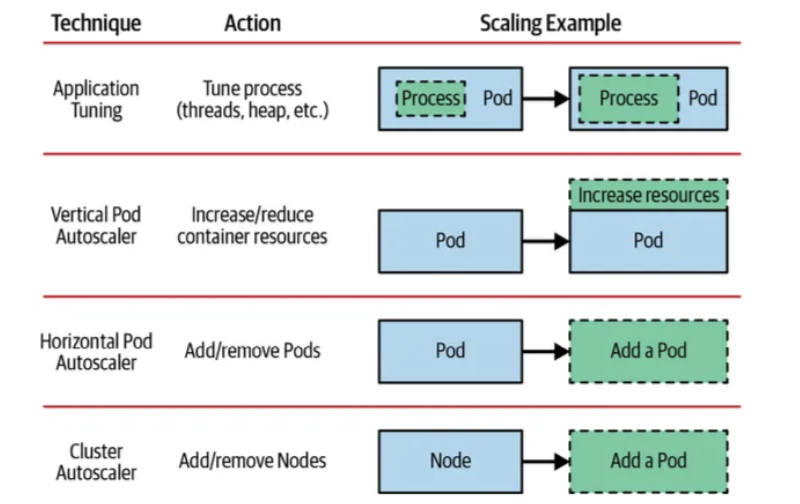 출처: kubernetes patterns ‘2nd 발췌
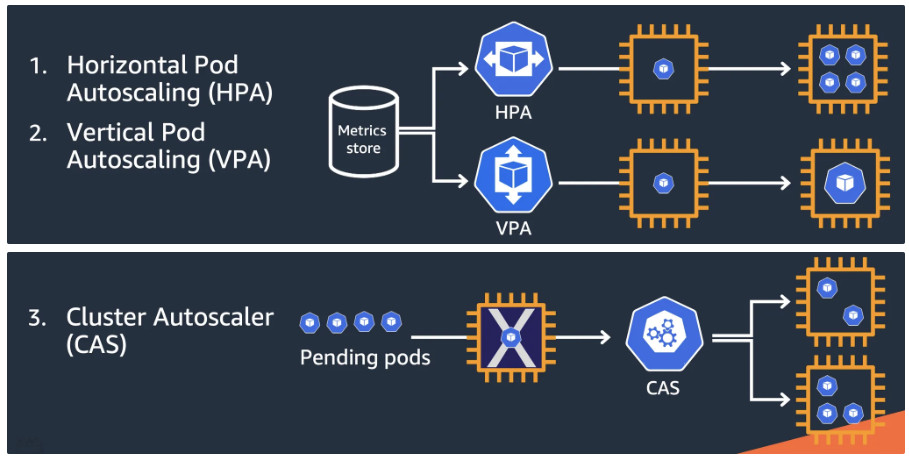
- Kubernetes autoscaling overview - CON324_Optimizing-Amazon-EKS-for-performance-and-cost-on-AWS.pdf 발췌
- HPA, VPA, CAS
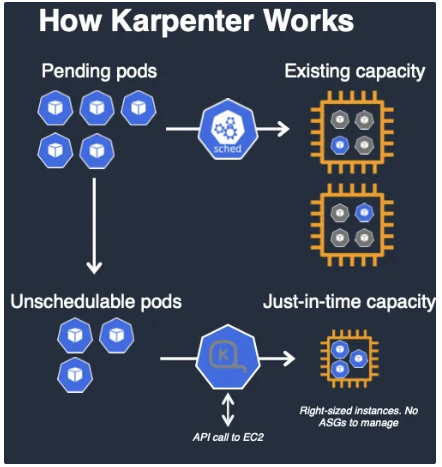
- Karpenter는 AutoScaling Group을 사용하지 않고, EC2 API를 직접 호출하여 빠르게 Node를 증감설 처리와 Node Pool에서 비용 효율적으로 Right-Sizing을 가능하게 한다
- HPA, VPA, CAS
1.2 실습환경 배포
- Amazon EKS (myeks) 윈클릭 배포 & 기본 설정
# YAML 파일 다운로드
curl -O https://s3.ap-northeast-2.amazonaws.com/cloudformation.cloudneta.net/K8S/myeks-5week.yaml

# 변수 지정
CLUSTER_NAME=myeks-sejkim
SSHKEYNAME=kp-sejkim
MYACCESSKEY=<IAM Uesr 액세스 키>
MYSECRETKEY=<IAM Uesr 시크릿 키>

# CloudFormation 스택 배포
aws cloudformation deploy --template-file myeks-5week.yaml --stack-name $CLUSTER_NAME --parameter-overrides KeyName=$SSHKEYNAME SgIngressSshCidr=$(curl -s ipinfo.io/ip)/32  MyIamUserAccessKeyID=$MYACCESSKEY MyIamUserSecretAccessKey=$MYSECRETKEY ClusterBaseName=$CLUSTER_NAME --region ap-northeast-2

# CloudFormation 스택 배포 완료 후 작업용 EC2 IP 출력
aws cloudformation describe-stacks --stack-name myeks --query 'Stacks[*].Outputs[0].OutputValue' --output text- 자신의 PC에서 AWS EKS 설치 확인 ← 스택 생성 시작 후 20분 후 접속 할 것
- 4주차 실습 내용과 유사하여 생략
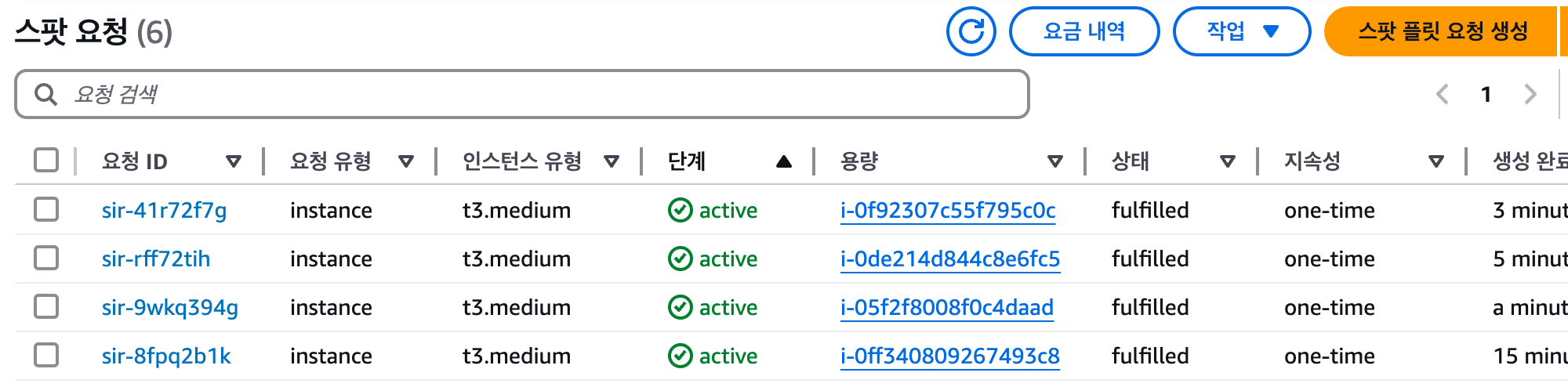
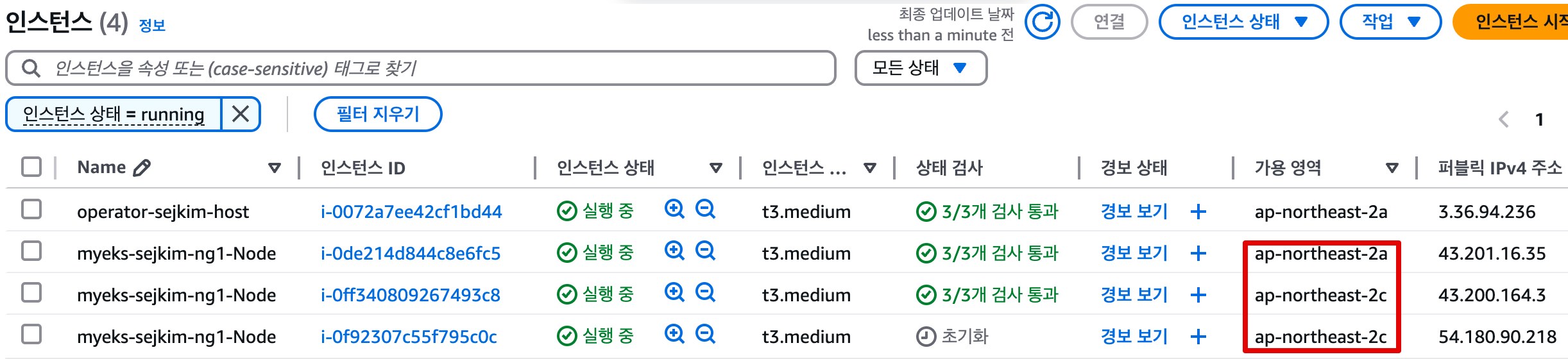
- eksctl manifest에서 spot: true로 옵션 추가하여 Node생성한 결과 2a, 2c에서만 생성

- spot 자원 생성 이력 조회
- 생성된 EC2
- eks-node-viewer (설치: go install github.com/awslabs/eks-node-viewer/cmd/eks-node-viewer@latest)

- AWS LoadBalancer Controller, ExternalDNS, gp3 storageclass, kube-ops-view(Ingress) 설치
# AWS LoadBalancerController
helm repo add eks https://aws.github.io/eks-charts
helm install aws-load-balancer-controller eks/aws-load-balancer-controller -n kube-system --set clusterName=$CLUSTER_NAME \
  --set serviceAccount.create=false --set serviceAccount.name=aws-load-balancer-controller

# ExternalDNS
export MyDomain=ksj7279.click
export MyDnzHostedZoneId=$(aws route53 list-hosted-zones-by-name --dns-name "$MyDomain." --query "HostedZones[0].Id" --output text)
export CERT_ARN=$(aws acm list-certificates --query "CertificateSummaryList[?contains(DomainName, '${MyDomain}')].CertificateArn" --output text)
echo $MyDomain $MyDnzHostedZoneId $CERT_ARN

curl -s https://raw.githubusercontent.com/gasida/PKOS/main/aews/externaldns.yaml | MyDomain=$MyDomain MyDnzHostedZoneId=$MyDnzHostedZoneId envsubst | kubectl apply -f -

# gp3 스토리지 클래스 생성
cat <<EOF | kubectl apply -f -
kind: StorageClass
apiVersion: storage.k8s.io/v1
metadata:
  name: gp3
  annotations:
    storageclass.kubernetes.io/is-default-class: "true"
allowVolumeExpansion: true
provisioner: ebs.csi.aws.com
volumeBindingMode: WaitForFirstConsumer
parameters:
  type: gp3
  allowAutoIOPSPerGBIncrease: 'true'
  encrypted: 'true'
  fsType: xfs # 기본값이 ext4
EOF
kubectl get sc

# kube-ops-view
helm repo add geek-cookbook https://geek-cookbook.github.io/charts/
helm install kube-ops-view geek-cookbook/kube-ops-view --version 1.2.2 --set service.main.type=ClusterIP  --set env.TZ="Asia/Seoul" --namespace kube-system

# kubeopsview 용 Ingress 설정 : group 설정으로 1대의 ALB를 여러개의 ingress 에서 공용 사용
echo $CERT_ARN
cat <<EOF | kubectl apply -f -
apiVersion: networking.k8s.io/v1
kind: Ingress
metadata:
  annotations:
    alb.ingress.kubernetes.io/certificate-arn: $CERT_ARN
    alb.ingress.kubernetes.io/group.name: study
    alb.ingress.kubernetes.io/listen-ports: '[{"HTTPS":443}, {"HTTP":80}]'
    alb.ingress.kubernetes.io/load-balancer-name: $CLUSTER_NAME-ingress-alb
    alb.ingress.kubernetes.io/scheme: internet-facing
    alb.ingress.kubernetes.io/ssl-redirect: "443"
    alb.ingress.kubernetes.io/success-codes: 200-399
    alb.ingress.kubernetes.io/target-type: ip
  labels:
    app.kubernetes.io/name: kubeopsview
  name: kubeopsview
  namespace: kube-system
spec:
  ingressClassName: alb
  rules:
  - host: kubeopsview.$MyDomain
    http:
      paths:
      - backend:
          service:
            name: kube-ops-view
            port:
              number: 8080  # name: http
        path: /
        pathType: Prefix
EOF
- 확인
# 설치된 파드 정보 확인
kubectl get pods -n kube-system
NAME                                           READY   STATUS    RESTARTS   AGE
aws-load-balancer-controller-86ff7688d-7dgt9   1/1     Running   0          18m
aws-load-balancer-controller-86ff7688d-9g5gr   1/1     Running   0          18m
aws-node-d9jgf                                 2/2     Running   0          31m
aws-node-gghkv                                 2/2     Running   0          35m
aws-node-lgjn7                                 2/2     Running   0          33m
coredns-86f5954566-sk46f                       1/1     Running   0          31m
coredns-86f5954566-slt5h                       1/1     Running   0          30m
ebs-csi-controller-844b978c49-5s8pn            6/6     Running   0          34m
ebs-csi-controller-844b978c49-ftm76            6/6     Running   0          31m
ebs-csi-node-fd24v                             3/3     Running   0          35m
ebs-csi-node-qx8hr                             3/3     Running   0          33m
ebs-csi-node-rpdp6                             3/3     Running   0          31m
external-dns-7dd89bd9bc-76642                  1/1     Running   0          6m26s
kube-ops-view-657dbc6cd8-ttgns                 1/1     Running   0          3m17s
kube-proxy-9qtd4                               1/1     Running   0          33m
kube-proxy-bhwcd                               1/1     Running   0          31m
kube-proxy-rsrxh                               1/1     Running   0          35m
metrics-server-6bf5998d9c-7qczk                1/1     Running   0          31m
metrics-server-6bf5998d9c-n856v                1/1     Running   0          30m

# service, ep, ingress 확인
kubectl get ingress,svc,ep -n kube-system
NAME                                    CLASS   HOSTS                       ADDRESS                                                                PORTS   AGE
ingress.networking.k8s.io/kubeopsview   alb     kubeopsview.ksj7279.click   myeks-sejkim-ingress-alb-1439144942.ap-northeast-2.elb.amazonaws.com   80      86s

NAME                                        TYPE        CLUSTER-IP       EXTERNAL-IP   PORT(S)                  AGE
service/aws-load-balancer-webhook-service   ClusterIP   10.100.92.74     <none>        443/TCP                  18m
service/eks-extension-metrics-api           ClusterIP   10.100.228.41    <none>        443/TCP                  55m
service/kube-dns                            ClusterIP   10.100.0.10      <none>        53/UDP,53/TCP,9153/TCP   52m
service/kube-ops-view                       ClusterIP   10.100.89.189    <none>        8080/TCP                 3m41s
service/metrics-server                      ClusterIP   10.100.152.236   <none>        443/TCP                  52m

NAME                                          ENDPOINTS                                                     AGE
endpoints/aws-load-balancer-webhook-service   192.168.2.171:9443,192.168.3.53:9443                          18m
endpoints/eks-extension-metrics-api           172.0.32.0:10443                                              55m
endpoints/kube-dns                            192.168.1.42:53,192.168.2.50:53,192.168.1.42:53 + 3 more...   52m
endpoints/kube-ops-view                       192.168.1.164:8080                                            3m41s
endpoints/metrics-server                      192.168.1.178:10251,192.168.3.114:10251                       52m

# Kube Ops View 접속 정보 확인 : 조금 오래 기다리면 접속됨...
echo -e "Kube Ops View URL = https://kubeopsview.$MyDomain/#scale=1.5"
Kube Ops View URL = https://kubeopsview.ksj7279.click/#scale=1.5

open "https://kubeopsview.$MyDomain/#scale=1.5" # macOS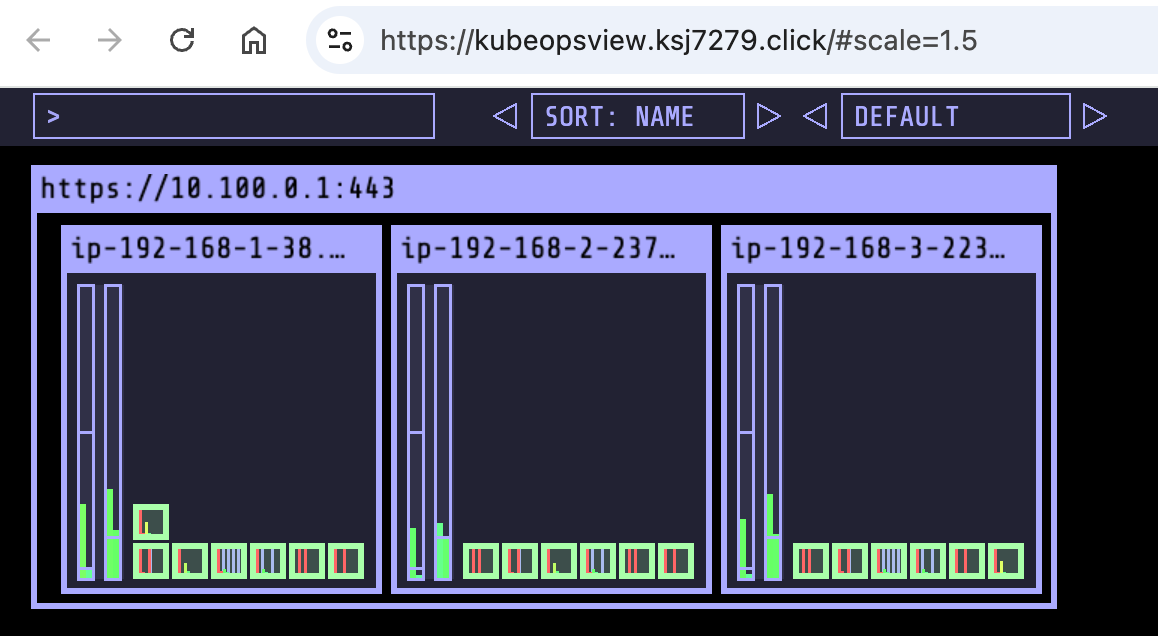
1.3 프로메테우스 & 그라파나 설치
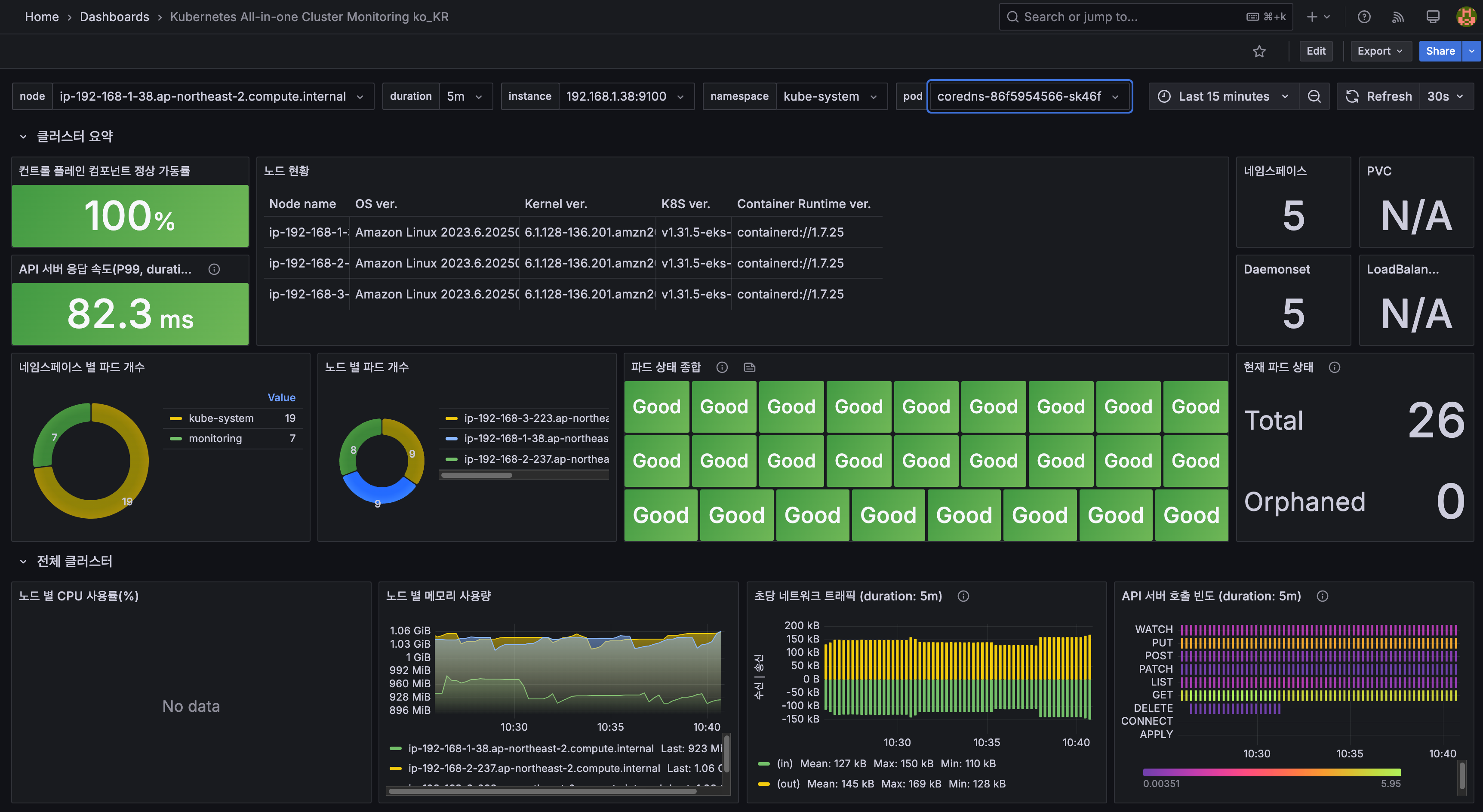
- 그라파나 admin / prom-operator, 대시보드 Import 23000, 17900 - Link
# repo 추가
helm repo add prometheus-community https://prometheus-community.github.io/helm-charts

# 파라미터 파일 생성 : PV/PVC(AWS EBS) 삭제에 불편하니, 4주차 실습과 다르게 PV/PVC 미사용
cat <<EOT > monitor-values.yaml
prometheus:
  prometheusSpec:
    scrapeInterval: "15s"
    evaluationInterval: "15s"
    podMonitorSelectorNilUsesHelmValues: false
    serviceMonitorSelectorNilUsesHelmValues: false
    retention: 5d
    retentionSize: "10GiB"

  # Enable vertical pod autoscaler support for prometheus-operator
  verticalPodAutoscaler:
    enabled: true

  ingress:
    enabled: true
    ingressClassName: alb
    hosts:
      - prometheus.$MyDomain
    paths:
      - /*
    annotations:
      alb.ingress.kubernetes.io/scheme: internet-facing
      alb.ingress.kubernetes.io/target-type: ip
      alb.ingress.kubernetes.io/listen-ports: '[{"HTTPS":443}, {"HTTP":80}]'
      alb.ingress.kubernetes.io/certificate-arn: $CERT_ARN
      alb.ingress.kubernetes.io/success-codes: 200-399
      alb.ingress.kubernetes.io/load-balancer-name: myeks-sejkim-ingress-alb
      alb.ingress.kubernetes.io/group.name: study
      alb.ingress.kubernetes.io/ssl-redirect: '443'

grafana:
  defaultDashboardsTimezone: Asia/Seoul
  adminPassword: prom-operator
  defaultDashboardsEnabled: false

  ingress:
    enabled: true
    ingressClassName: alb
    hosts:
      - grafana.$MyDomain
    paths:
      - /*
    annotations:
      alb.ingress.kubernetes.io/scheme: internet-facing
      alb.ingress.kubernetes.io/target-type: ip
      alb.ingress.kubernetes.io/listen-ports: '[{"HTTPS":443}, {"HTTP":80}]'
      alb.ingress.kubernetes.io/certificate-arn: $CERT_ARN
      alb.ingress.kubernetes.io/success-codes: 200-399
      alb.ingress.kubernetes.io/load-balancer-name: myeks-sejkim-ingress-alb
      alb.ingress.kubernetes.io/group.name: study
      alb.ingress.kubernetes.io/ssl-redirect: '443'

kube-state-metrics:
  rbac:
    extraRules:
      - apiGroups: ["autoscaling.k8s.io"]
        resources: ["verticalpodautoscalers"]
        verbs: ["list", "watch"]
  customResourceState:
    enabled: true
    config:
      kind: CustomResourceStateMetrics
      spec:
        resources:
          - groupVersionKind:
              group: autoscaling.k8s.io
              kind: "VerticalPodAutoscaler"
              version: "v1"
            labelsFromPath:
              verticalpodautoscaler: [metadata, name]
              namespace: [metadata, namespace]
              target_api_version: [apiVersion]
              target_kind: [spec, targetRef, kind]
              target_name: [spec, targetRef, name]
            metrics:
              - name: "vpa_containerrecommendations_target"
                help: "VPA container recommendations for memory."
                each:
                  type: Gauge
                  gauge:
                    path: [status, recommendation, containerRecommendations]
                    valueFrom: [target, memory]
                    labelsFromPath:
                      container: [containerName]
                commonLabels:
                  resource: "memory"
                  unit: "byte"
              - name: "vpa_containerrecommendations_target"
                help: "VPA container recommendations for cpu."
                each:
                  type: Gauge
                  gauge:
                    path: [status, recommendation, containerRecommendations]
                    valueFrom: [target, cpu]
                    labelsFromPath:
                      container: [containerName]
                commonLabels:
                  resource: "cpu"
                  unit: "core"
  selfMonitor:
    enabled: true

alertmanager:
  enabled: false
defaultRules:
  create: false
kubeControllerManager:
  enabled: false
kubeEtcd:
  enabled: false
kubeScheduler:
  enabled: false
prometheus-windows-exporter:
  prometheus:
    monitor:
      enabled: false
EOT
cat monitor-values.yaml

# helm 배포
helm install kube-prometheus-stack prometheus-community/kube-prometheus-stack --version 69.3.1 \
-f monitor-values.yaml --create-namespace --namespace monitoring

# helm 확인
helm get values -n monitoring kube-prometheus-stack

# PV 사용하지 않음
kubectl get pv,pvc -A
kubectl df-pv

# 프로메테우스 웹 접속
echo -e "https://prometheus.$MyDomain"
open "https://prometheus.$MyDomain" # macOS

# 그라파나 웹 접속 : admin / prom-operator
echo -e "https://grafana.$MyDomain"
open "https://grafana.$MyDomain" # macOS

#
kubectl get targetgroupbindings.elbv2.k8s.aws -A


# 상세 확인
kubectl get pod -n monitoring -l app.kubernetes.io/name=kube-state-metrics
NAME                                                        READY   STATUS    RESTARTS   AGE
kube-prometheus-stack-kube-state-metrics-5674c7ddd8-ssvsc   1/1     Running   0          2m23s

kubectl describe pod -n monitoring -l app.kubernetes.io/name=kube-state-metrics
...
Service Account:  kube-prometheus-stack-kube-state-metrics
...
    Args:
      --port=8080
      --resources=certificatesigningrequests,configmaps,cronjobs,daemonsets,deployments,endpoints,horizontalpodautoscalers,ingresses,jobs,leases,limitranges,mutatingwebhookconfigurations,namespaces,networkpolicies,nodes,persistentvolumeclaims,persistentvolumes,poddisruptionbudgets,pods,replicasets,replicationcontrollers,resourcequotas,secrets,services,statefulsets,storageclasses,validatingwebhookconfigurations,volumeattachments
      --custom-resource-state-config-file=/etc/customresourcestate/config.yaml
    ...
Volumes:
  customresourcestate-config:
    Type:      ConfigMap (a volume populated by a ConfigMap)
    Name:      kube-prometheus-stack-kube-state-metrics-customresourcestate-config
    Optional:  false
...

kubectl describe cm -n monitoring kube-prometheus-stack-kube-state-metrics-customresourcestate-config
...

# ClusterRole
kubectl get clusterrole kube-prometheus-stack-kube-state-metrics
kubectl describe clusterrole kube-prometheus-stack-kube-state-metrics
kubectl describe clusterrole kube-prometheus-stack-kube-state-metrics | grep verticalpodautoscalers
  verticalpodautoscalers.autoscaling.k8s.io                     []                 []              [list watch]

# ELB
kubectl get ingress  -A
NAMESPACE     NAME                               CLASS   HOSTS                       ADDRESS                                                                PORTS   AGE
kube-system   kubeopsview                        alb     kubeopsview.ksj7279.click   myeks-sejkim-ingress-alb-1439144942.ap-northeast-2.elb.amazonaws.com   80      38m
monitoring    kube-prometheus-stack-grafana      alb     grafana.ksj7279.click       myeks-sejkim-ingress-alb-1439144942.ap-northeast-2.elb.amazonaws.com   80      28m
monitoring    kube-prometheus-stack-prometheus   alb     prometheus.ksj7279.click    myeks-sejkim-ingress-alb-1439144942.ap-northeast-2.elb.amazonaws.com   80      28m

kubectl get targetgroupbindings.elbv2.k8s.aws -A
NAMESPACE     NAME                               SERVICE-NAME                       SERVICE-PORT   TARGET-TYPE   AGE
kube-system   k8s-kubesyst-kubeopsv-b711c62eab   kube-ops-view                      8080           ip            37m
monitoring    k8s-monitori-kubeprom-be1ef0cc53   kube-prometheus-stack-prometheus   9090           ip            2m25s
monitoring    k8s-monitori-kubeprom-e48cb48220   kube-prometheus-stack-grafana      80             ip            2m25s
1.4 EKS Node Viewer
- 노드 할당 가능 용량과 요청 request 리소스 표시, 실제 파드 리소스 사용량 X - 링크
- 동작
-
It displays the scheduled pod resource requests vs the allocatable capacity on the node.
-
It does not look at the actual pod resource usage.
-
Node마다 할당 가능한 용량과 스케줄링된 POD(컨테이너)의 Resource 중 request 값을 표시한다.
-
실제 POD(컨테이너) 리소스 사용량은 아니다. /pkg/model/pod.go 파일을 보면 컨테이너의 request 합을 반환하며, init containers는 미포함
-
https://github.com/awslabs/eks-node-viewer/blob/main/pkg/model/pod.go#L82
// **Requested returns the sum of the resources requested by the pod**. **This doesn't include any init containers** as we
// are interested in the steady state usage of the pod
func (p *Pod) Requested() v1.ResourceList {
	p.mu.RLock()
	defer p.mu.RUnlock()
	requested := v1.ResourceList{}
	for _, c := range p.pod.Spec.Containers {
		for rn, q := range c.Resources.Requests {
			existing := requested[rn]
			existing.Add(q)
			requested[rn] = existing
		}
	}
	requested[v1.ResourcePods] = resource.MustParse("1")
	return requested
}
-
- 설치
# macOS 설치
brew tap aws/tap
brew install eks-node-viewer

# 운영서버 EC2에 설치 : userdata 통해 이미 설치 되어 있음
yum install golang -y
go install github.com/awslabs/eks-node-viewer/cmd/eks-node-viewer@latest  # 설치 시 2~3분 정도 소요

# Windows 에 WSL2 (Ubuntu) 설치
sudo apt install golang-go
go install github.com/awslabs/eks-node-viewer/cmd/eks-node-viewer@latest  # 설치 시 2~3분 정도 소요
echo 'export PATH="$PATH:/root/go/bin"' >> /etc/profile- 사용
# Standard usage
eks-node-viewer

# Display both CPU and Memory Usage
eks-node-viewer --resources cpu,memory
eks-node-viewer --resources cpu,memory --extra-labels eks-node-viewer/node-age

# Display extra labels, i.e. AZ : node 에 labels 사용 가능
eks-node-viewer --extra-labels topology.kubernetes.io/zone
eks-node-viewer --extra-labels kubernetes.io/arch

# Sort by CPU usage in descending order
eks-node-viewer --node-sort=eks-node-viewer/node-cpu-usage=dsc

# Karenter nodes only
eks-node-viewer --node-selector "karpenter.sh/provisioner-name"

# Specify a particular AWS profile and region
AWS_PROFILE=myprofile AWS_REGION=us-west-2


Computed Labels : --extra-labels
# eks-node-viewer/node-age - Age of the node
eks-node-viewer --extra-labels eks-node-viewer/node-age
eks-node-viewer --extra-labels topology.kubernetes.io/zone,eks-node-viewer/node-age

# eks-node-viewer/node-ephemeral-storage-usage - Ephemeral Storage usage (requests)
eks-node-viewer --extra-labels eks-node-viewer/node-ephemeral-storage-usage

# eks-node-viewer/node-cpu-usage - CPU usage (requests)
eks-node-viewer --extra-labels eks-node-viewer/node-cpu-usage

# eks-node-viewer/node-memory-usage - Memory usage (requests)
eks-node-viewer --extra-labels eks-node-viewer/node-memory-usage

# eks-node-viewer/node-pods-usage - Pod usage (requests)
eks-node-viewer --extra-labels eks-node-viewer/node-pods-usage
2. Horizontal Pod Autoscaler (HPA)
2.1 실습
- kube-ops-view 와 그라파나(22128 , 22251)에서 모니터링 - Docs, K8S, AWS
- 그라파나(22128 , 22251) 대시보드 Import 설정
- 샘플 애플리케이션 배포
(참고) hpa-example : Dockerfile , index.php (CPU 과부하 연산 수행 , 100만번 덧셈 수행)- Dockerfile
FROM php:5-apache
COPY index.php /var/www/html/index.php
RUN chmod a+rx index.php- index.php
<?php
$x = 0.0001;
for ($i = 0; $i <= 1000000; $i++) {
			$x += sqrt($x);
}
echo "OK!";
?>- Run and expose php-apache server
cat << EOF > php-apache.yaml
apiVersion: apps/v1
kind: Deployment
metadata:
  name: php-apache
spec:
  selector:
    matchLabels:
      run: php-apache
  template:
    metadata:
      labels:
        run: php-apache
    spec:
      containers:
      - name: php-apache
        image: registry.k8s.io/hpa-example
        ports:
        - containerPort: 80
        resources:
          limits:
            cpu: 500m
          requests:
            cpu: 200m
---
apiVersion: v1
kind: Service
metadata:
  name: php-apache
  labels:
    run: php-apache
spec:
  ports:
  - port: 80
  selector:
    run: php-apache
EOF
kubectl apply -f php-apache.yaml

# 확인
kubectl exec -it deploy/php-apache -- cat /var/www/html/index.php
...

# 모니터링 : 터미널2개 사용
watch -d 'kubectl get hpa,pod;echo;kubectl top pod;echo;kubectl top node'
kubectl exec -it deploy/php-apache -- top

# [운영서버 EC2] 파드IP로 직접 접속
PODIP=$(kubectl get pod -l run=php-apache -o jsonpath="{.items[0].status.podIP}")
curl -s $PODIP; echo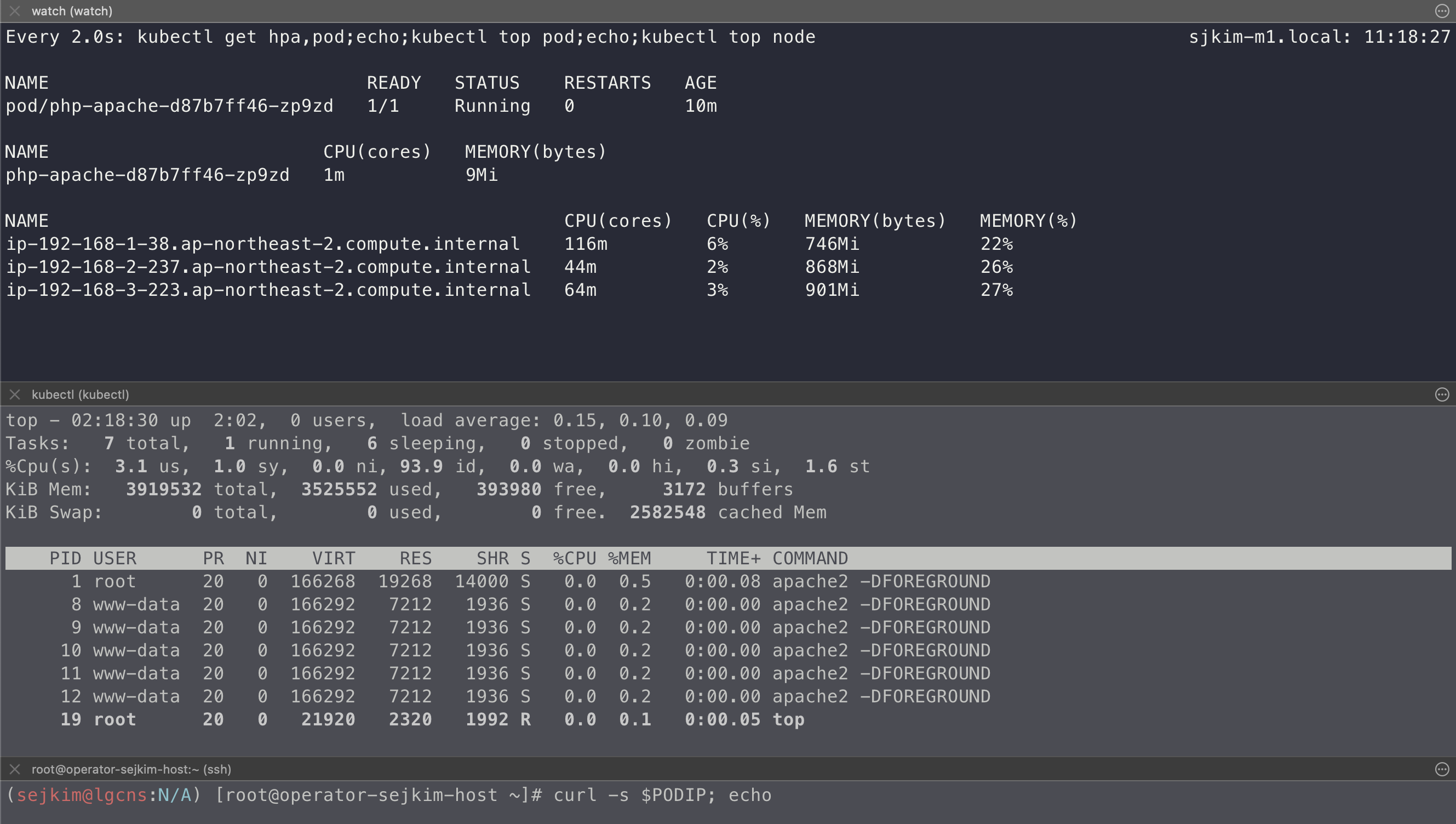
- HPA 정책 생성 및 부하 발생 후 오토 스케일링 테스트 : 증가 시 기본 대기 시간(30초), 감소 시 기본 대기 시간(5분) → 조정 가능
# Create the HorizontalPodAutoscaler : requests.cpu=200m - 알고리즘
# Since each pod requests 200 milli-cores by kubectl run, this means an average CPU usage of 100 milli-cores.
cat <<EOF | kubectl apply -f -
apiVersion: autoscaling/v2
kind: HorizontalPodAutoscaler
metadata:
  name: php-apache
spec:
  scaleTargetRef:
    apiVersion: apps/v1
    kind: Deployment
    name: php-apache
  minReplicas: 1
  maxReplicas: 10
  metrics:
  - type: Resource
    resource:
      name: cpu
      target:
        averageUtilization: 50
        type: Utilization
EOF
혹은
kubectl autoscale deployment php-apache --cpu-percent=50 --min=1 --max=10


# 확인
kubectl describe hpa
...
Metrics:                                               ( current / target )
  resource cpu on pods  (as a percentage of request):  0% (1m) / 50%
Min replicas:                                          1
Max replicas:                                          10
Deployment pods:                                       1 current / 1 desired
...

# HPA 설정 확인
kubectl get hpa php-apache -o yaml | kubectl neat
spec:
  minReplicas: 1               # [4] 또는 최소 1개까지 줄어들 수도 있습니다
  maxReplicas: 10              # [3] 포드를 최대 10개까지 늘립니다
  scaleTargetRef:
    apiVersion: apps/v1
    kind: Deployment
    name: php-apache           # [1] php-apache 의 자원 사용량에서
  metrics:
  - type: Resource
    resource:
      name: cpu
      target:
        type: Utilization
        averageUtilization: 50  # [2] CPU 활용률이 50% 이상인 경우

# 반복 접속 1 (파드1 IP로 접속) >> 증가 확인 후 중지
while true;do curl -s $PODIP; sleep 0.5; done

# 반복 접속 2 (서비스명 도메인으로 파드들 분산 접속) >> 증가 확인(몇개까지 증가되는가? 7개 / 그 이유는? 7개로 pod 증가 후 cpu 사용률 42~47% 유지됨) 후 중지
## >> [scale back down] 중지 5분 후 파드 갯수 감소 확인
# Run this in a separate terminal
# so that the load generation continues and you can carry on with the rest of the steps
kubectl run -i --tty load-generator --rm --image=busybox:1.28 --restart=Never -- /bin/sh -c "while sleep 0.01; do wget -q -O- http://php-apache; done"


# Horizontal Pod Autoscaler Status Conditions
kubectl describe hpa
...
Reference:                                             Deployment/php-apache
Metrics:                                               ( current / target )
  resource cpu on pods  (as a percentage of request):  39% (78m) / 50%
Min replicas:                                          1
Max replicas:                                          10
Deployment pods:                                       7 current / 7 desired
Conditions:
  Type            Status  Reason               Message
  ----            ------  ------               -------
  AbleToScale     True    ScaleDownStabilized  recent recommendations were higher than current one, applying the highest recent recommendation
  ScalingActive   True    ValidMetricFound     the HPA was able to successfully calculate a replica count from cpu resource utilization (percentage of request)
  ScalingLimited  False   DesiredWithinRange   the desired count is within the acceptable range
Events:
  Type    Reason             Age                   From                       Message
  ----    ------             ----                  ----                       -------
  Normal  SuccessfulRescale  10m                   horizontal-pod-autoscaler  New size: 2; reason: cpu resource utilization (percentage of request) above target
  Normal  SuccessfulRescale  10m (x4 over 169m)    horizontal-pod-autoscaler  New size: 4; reason: cpu resource utilization (percentage of request) above target
  Normal  SuccessfulRescale  9m53s                 horizontal-pod-autoscaler  New size: 5; reason:
  Normal  SuccessfulRescale  9m23s                 horizontal-pod-autoscaler  New size: 6; reason: cpu resource utilization (percentage of request) above target
  Normal  SuccessfulRescale  8m53s (x4 over 168m)  horizontal-pod-autoscaler  New size: 7; reason: cpu resource utilization (percentage of request) above target
  Normal  SuccessfulRescale  19m (x2 over 144m)   horizontal-pod-autoscaler  New size: 6; reason: All metrics below target
  Normal  SuccessfulRescale  19m (x5 over 153m)   horizontal-pod-autoscaler  New size: 1; reason: All metrics below target
2.2 실습결과
- 7개까지 Scale-out 된 후 cpu 사용률이 42~47% 유지됨, load-generator 중지 후 cpu 부하는 내려갔으나 5분 후 scale-in 동작
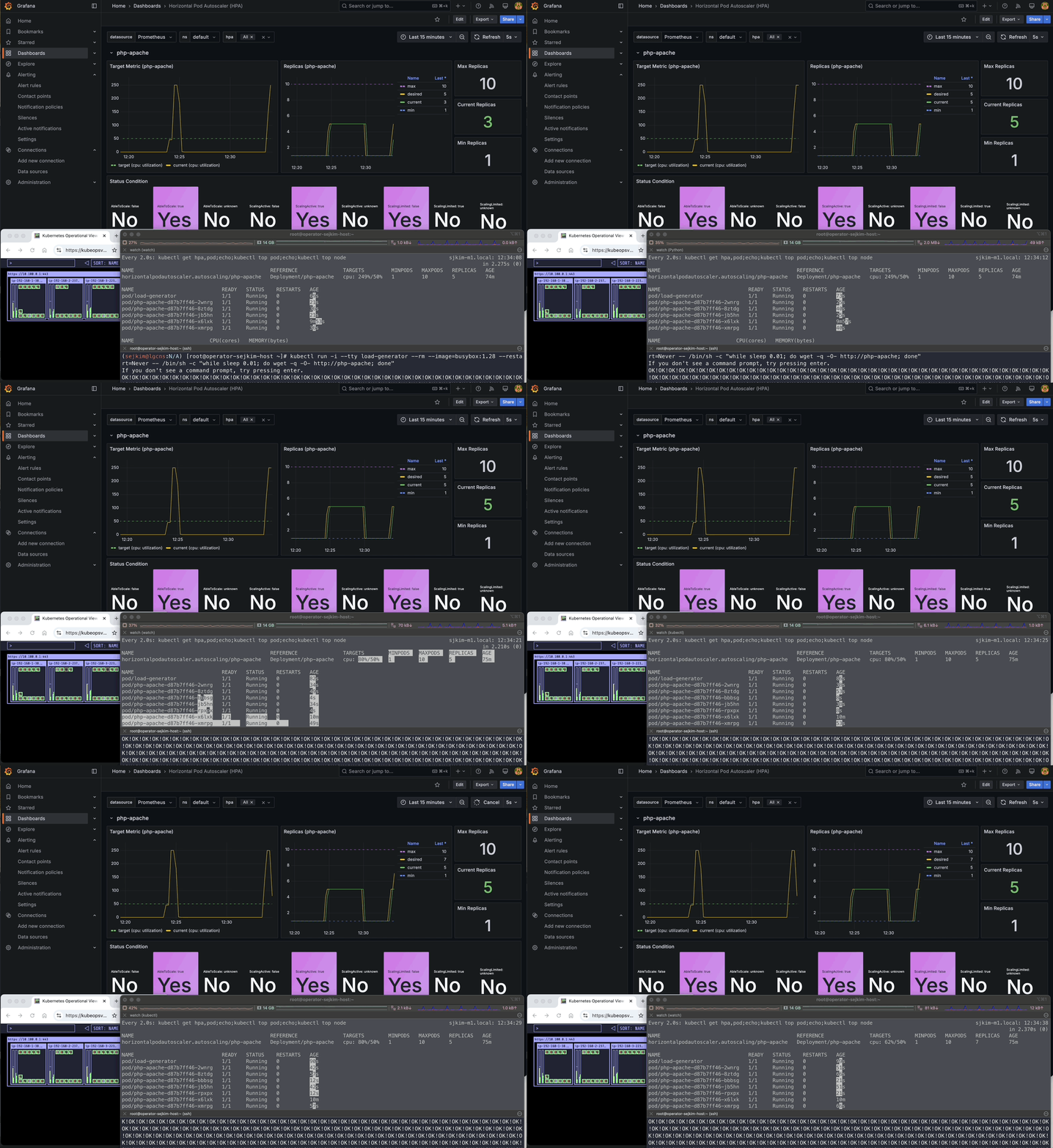
- Grafana HPA 동작 모니터링 화면
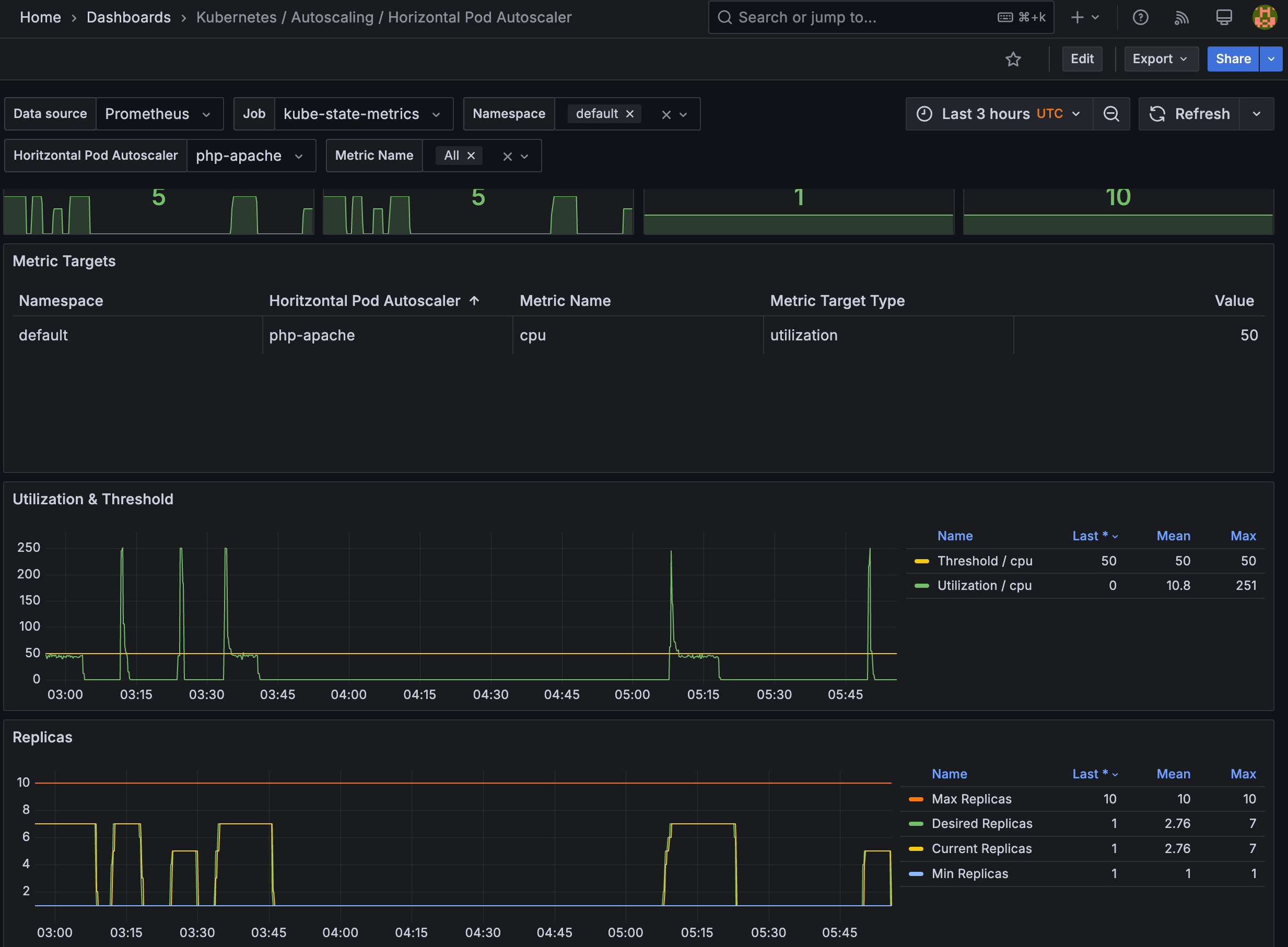
- 관련 오브젝트 삭제: kubectl delete deploy,svc,hpa,pod --all
3. Kubernetes based Event Driven Autoscaler (KEDA)
3.1 KEDA AutoScaler 소개
- 참조: Docs, DevOcean
- 기존의 HPA(Horizontal Pod Autoscaler)는 리소스(CPU, Memory) 메트릭을 기반으로 스케일 여부를 결정하게 됩니다.
반면에 KEDA는 특정 이벤트를 기반으로 스케일 여부를 결정할 수 있습니다.
예를 들어 airflow는 metadb를 통해 현재 실행 중이거나 대기 중인 task가 얼마나 존재하는지 알 수 있습니다.
이러한 이벤트를 활용하여 worker의 scale을 결정 한다면 queue에 task가 많이 추가되는 시점에 더 빠르게 확장할 수 있습니다.
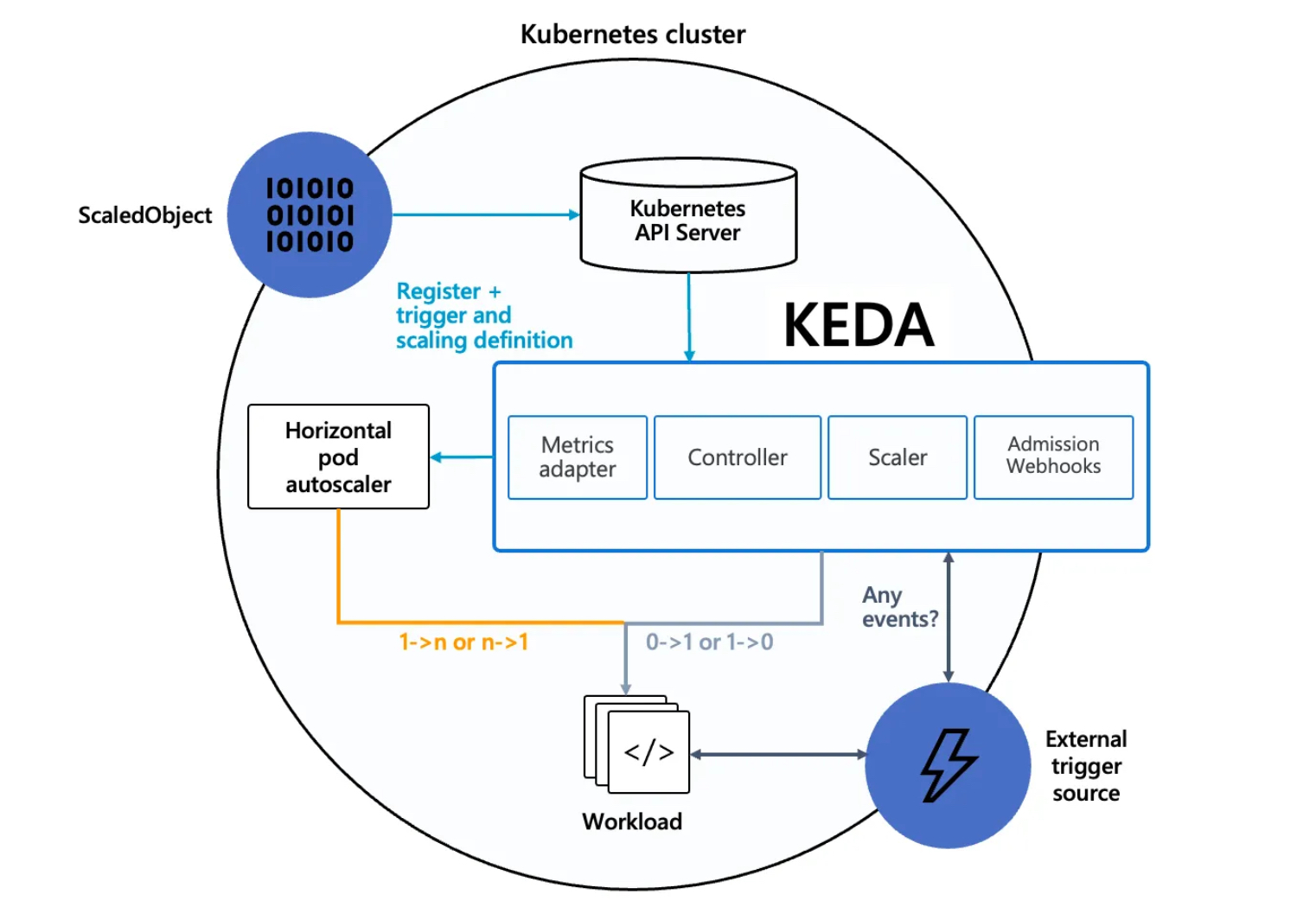 https://keda.sh/docs/2.10/concepts/
- Agent — KEDA activates and deactivates Kubernetes Deployments to scale to and from zero on no events. This is one of the primary roles of the
keda-operatorcontainer that runs when you install KEDA. - Metrics — KEDA acts as a Kubernetes metrics server that exposes rich event data like queue length or stream lag to the Horizontal Pod Autoscaler to drive scale out. It is up to the Deployment to consume the events directly from the source. This preserves rich event integration and enables gestures like completing or abandoning queue messages to work out of the box. The metric serving is the primary role of the
keda-operator-metrics-apiservercontainer that runs when you install KEDA. - Admission Webhooks - Automatically validate resource changes to prevent misconfiguration and enforce best practices by using an admission controller. As an example, it will prevent multiple ScaledObjects to target the same scale target.
keda-admission-webhooks
kubectl get pod -n keda
NAME                                               READY   STATUS    RESTARTS      AGE
keda-operator-6bdffdc78-5rqnp                      1/1     Running   1 (11m ago)   11m
keda-operator-metrics-apiserver-74d844d769-2vrcq   1/1     Running   0             11m
keda-admission-webhooks-86cffccbf5-kmb7v 1/1 Running 0 11m- 예) KEDA Scalers : kafka trigger for an Apache Kafka topic - Link
triggers:
- type: kafka
  metadata:
    bootstrapServers: kafka.svc:9092
    consumerGroup: my-group
    topic: test-topic
    lagThreshold: '5' # Average target value to trigger scaling actions. (Default: 5, Optional)
    activationLagThreshold: '3' #  Target value for activating the scaler. Learn more about activation here.
    offsetResetPolicy: latest
    allowIdleConsumers: false
    scaleToZeroOnInvalidOffset: false
    excludePersistentLag: false
    limitToPartitionsWithLag: false
    version: 1.0.0
    partitionLimitation: '1,2,10-20,31'
    sasl: plaintext
    tls: enable
    unsafeSsl: 'false'
3.2 KEDA with Helm
- 특정 이벤트(cron 등)기반의 파드 오토 스케일링 - Chart , Grafana , Cron , SQS_Scale , aws-sqs-queue
# 설치 전 기존 metrics-server 제공 Metris API 확인
kubectl get --raw "/apis/metrics.k8s.io" -v=6 | jq
kubectl get --raw "/apis/metrics.k8s.io" | jq
{
  "kind": "APIGroup",
  "apiVersion": "v1",
  "name": "metrics.k8s.io",
  "versions": [
    {
      "groupVersion": "metrics.k8s.io/v1beta1",
      "version": "v1beta1"
    }
  ],
  "preferredVersion": {
    "groupVersion": "metrics.k8s.io/v1beta1",
    "version": "v1beta1"
  }
}


# KEDA 설치 : serviceMonitor 만으로도 충분할듯..
cat <<EOT > keda-values.yaml
metricsServer:
  useHostNetwork: true

prometheus:
  metricServer:
    enabled: true
    port: 9022
    portName: metrics
    path: /metrics
    serviceMonitor:
      # Enables ServiceMonitor creation for the Prometheus Operator
      enabled: true
    podMonitor:
      # Enables PodMonitor creation for the Prometheus Operator
      enabled: true
  operator:
    enabled: true
    port: 8080
    serviceMonitor:
      # Enables ServiceMonitor creation for the Prometheus Operator
      enabled: true
    podMonitor:
      # Enables PodMonitor creation for the Prometheus Operator
      enabled: true
  webhooks:
    enabled: true
    port: 8020
    serviceMonitor:
      # Enables ServiceMonitor creation for the Prometheus webhooks
      enabled: true
EOT

helm repo add kedacore https://kedacore.github.io/charts
helm repo update
helm install keda kedacore/keda --version 2.16.0 --namespace keda --create-namespace -f keda-values.yaml
NAME: keda
LAST DEPLOYED: Sat Mar  8 15:55:33 2025
NAMESPACE: keda
STATUS: deployed
REVISION: 1
TEST SUITE: None
NOTES:
:::^.     .::::^:     :::::::::::::::    .:::::::::.                   .^.
7???~   .^7????~.     7??????????????.   :?????????77!^.              .7?7.
7???~  ^7???7~.       ~!!!!!!!!!!!!!!.   :????!!!!7????7~.           .7???7.
7???~^7????~.                            :????:    :~7???7.         :7?????7.
7???7????!.           ::::::::::::.      :????:      .7???!        :7??77???7.
7????????7:           7???????????~      :????:       :????:      :???7?5????7.
7????!~????^          !77777777777^      :????:       :????:     ^???7?#P7????7.
7???~  ^????~                            :????:      :7???!     ^???7J#@J7?????7.
7???~   :7???!.                          :????:   .:~7???!.    ~???7Y&@#7777????7.
7???~    .7???7:      !!!!!!!!!!!!!!!    :????7!!77????7^     ~??775@@@GJJYJ?????7.
7???~     .!????^     7?????????????7.   :?????????7!~:      !????G@@@@@@@@5??????7:
::::.       :::::     :::::::::::::::    .::::::::..        .::::JGGGB@@@&7:::::::::
                                                                      ?@@#~
                                                                      P@B^
                                                                    :&G:
                                                                    !5.
                                                                    .Kubernetes Event-driven Autoscaling (KEDA) - Application autoscaling made simple.

Get started by deploying Scaled Objects to your cluster:
    - Information about Scaled Objects : https://keda.sh/docs/latest/concepts/
    - Samples: https://github.com/kedacore/samples

Get information about the deployed ScaledObjects:
  kubectl get scaledobject [--namespace <namespace>]

Get details about a deployed ScaledObject:
  kubectl describe scaledobject <scaled-object-name> [--namespace <namespace>]

Get information about the deployed ScaledObjects:
  kubectl get triggerauthentication [--namespace <namespace>]

Get details about a deployed ScaledObject:
  kubectl describe triggerauthentication <trigger-authentication-name> [--namespace <namespace>]

Get an overview of the Horizontal Pod Autoscalers (HPA) that KEDA is using behind the scenes:
  kubectl get hpa [--all-namespaces] [--namespace <namespace>]

Learn more about KEDA:
- Documentation: https://keda.sh/
- Support: https://keda.sh/support/
- File an issue: https://github.com/kedacore/keda/issues/new/choose

# KEDA 설치 확인
kubectl get crd | grep keda
cloudeventsources.eventing.keda.sh           2025-03-08T06:55:34Z
clustercloudeventsources.eventing.keda.sh    2025-03-08T06:55:34Z
clustertriggerauthentications.keda.sh        2025-03-08T06:55:34Z
scaledjobs.keda.sh                           2025-03-08T06:55:34Z
scaledobjects.keda.sh                        2025-03-08T06:55:34Z
triggerauthentications.keda.sh               2025-03-08T06:55:34Z

kubectl get all -n keda
NAME                                                   READY   STATUS    RESTARTS      AGE
pod/keda-admission-webhooks-86cffccbf5-7cnqj           1/1     Running   0             77s
pod/keda-operator-6bdffdc78-9k582                      1/1     Running   1 (67s ago)   77s
pod/keda-operator-metrics-apiserver-74d844d769-wclhh   1/1     Running   0             77s

NAME                                      TYPE        CLUSTER-IP       EXTERNAL-IP   PORT(S)             AGE
service/keda-admission-webhooks           ClusterIP   10.100.241.143   <none>        443/TCP,8020/TCP    78s
service/keda-operator                     ClusterIP   10.100.188.36    <none>        9666/TCP,8080/TCP   78s
service/keda-operator-metrics-apiserver   ClusterIP   10.100.20.226    <none>        443/TCP,9022/TCP    78s

NAME                                              READY   UP-TO-DATE   AVAILABLE   AGE
deployment.apps/keda-admission-webhooks           1/1     1            1           78s
deployment.apps/keda-operator                     1/1     1            1           78s
deployment.apps/keda-operator-metrics-apiserver   1/1     1            1           78s

NAME                                                         DESIRED   CURRENT   READY   AGE
replicaset.apps/keda-admission-webhooks-86cffccbf5           1         1         1       78s
replicaset.apps/keda-operator-6bdffdc78                      1         1         1       78s
replicaset.apps/keda-operator-metrics-apiserver-74d844d769   1         1         1       78s

kubectl get validatingwebhookconfigurations keda-admission -o yaml
kubectl get podmonitor,servicemonitors -n keda
NAME                                                               AGE
podmonitor.monitoring.coreos.com/keda-operator                     116s
podmonitor.monitoring.coreos.com/keda-operator-metrics-apiserver   116s

NAME                                                                   AGE
servicemonitor.monitoring.coreos.com/keda-admission-webhooks           116s
servicemonitor.monitoring.coreos.com/keda-operator                     116s
servicemonitor.monitoring.coreos.com/keda-operator-metrics-apiserver   116s

kubectl get apiservice v1beta1.external.metrics.k8s.io -o yaml
apiVersion: apiregistration.k8s.io/v1
kind: APIService
metadata:
  annotations:
    meta.helm.sh/release-name: keda
    meta.helm.sh/release-namespace: keda
  labels:
    app.kubernetes.io/component: operator
    app.kubernetes.io/instance: keda
    app.kubernetes.io/managed-by: Helm
    app.kubernetes.io/name: v1beta1.external.metrics.k8s.io
    app.kubernetes.io/part-of: keda-operator
    app.kubernetes.io/version: 2.16.0
    helm.sh/chart: keda-2.16.0
  name: v1beta1.external.metrics.k8s.io
spec:
  caBundle: LS0tLS1CRUdJTiBDRVJUSUZJQ0FURS0tLS0tCk1JSURFRENDQWZpZ0F3SUJBZ0lCQURBTkJna3Foa2lHOXcwQkFRc0ZBREFoTVJBd0RnWURWUVFLRXdkTFJVUkIKVDFKSE1RMHdDd1lEVlFRREV3UkxSVVJCTUI0WERUSTFNRE13T0RBMU5UVTBObG9YRFRNMU1ETXdOakEyTlRVMApObG93SVRFUU1BNEdBMVVFQ2hNSFMwVkVRVTlTUnpFTk1Bc0dBMVVFQXhNRVMwVkVRVENDQVNJd0RRWUpLb1pJCmh2Y05BUUVCQlFBRGdnRVBBRENDQVFvQ2dnRUJBTXk5ZTBkL3laRWtCeElRL0F1YSs0cExPTUJFT2ZDazQyWnkKTDVWRVJ4dktiTzBWdmZvMHdYaEx1ZTE0dzVDSEYvZ1RCTTNPMHVnb0RYVE1QbnZQR3NhWXJxUm9RMDJXV1Y0Mgo1MEtKZldZTUZlR0VoTTFLMmExYWVQaFoyUjNIRGQwNjkrdC8rK0luZzBjU3Q3SGR3eUdwTzJmVXl0OHE1UGwvClM2dDdIaklXOTBPejkydHB0a0VoRkZ4bXF3d3VkZ1N0Q0tUdkxMQmhLVUpiK3hrQ0NhbUhaNHU2VjdPT1lQOVYKUXhKcXlPU0xxTkhzZmp2b0NBU3k5YzFHancvYStTcVRMbUMrVTRoSldxOFZBa1FqeG9NeUFwQThNNnJRRVJ5eAppUzFmelpOdk5kWCtPVFZQekRpMFN2eVpDWGdaRGNJcWt1NUdPNXg2N1dJek1HMWswbEVDQXdFQUFhTlRNRkV3CkRnWURWUjBQQVFIL0JBUURBZ0trTUE4R0ExVWRFd0VCL3dRRk1BTUJBZjh3SFFZRFZSME9CQllFRkJZd2JBdlYKbWcxMEFqQTR1SG5jTSsrZDNMU3BNQThHQTFVZEVRUUlNQWFDQkV0RlJFRXdEUVlKS29aSWh2Y05BUUVMQlFBRApnZ0VCQUZXdGZtZ1BjSmFQK0oyWEc0emxHcW43TlMyZUpSWldobGhkdHM2UVhMZWhCKzc2clZQZzhzeHUvaUdWCnRCTXNlbkRDdGF4dnpqdk52Ly9ZL2JOR2xFNUY2ME9VeXdVZEhkdHlENWEwQzZ1VERhenhhRUU5YTlDTVMwSlkKeGM1ZldrTGNHdEN4RnMzWjQ2Q2xId2lwWnJRdnRTbi90cC9OTEhCQ0ZDZGozekdBVUlCdkJ5empjR2FRdFFPOQo1ZzBEU0NRZjJtY2lCeEthbEx1d1duMDdoSDY1MUJhYWFSdTgrR3RGTHdYUlNEZEZjR1k4K2tWeUVWbnFPWWM0CjZ2K2lPdmx6VEhGeHg5WUNmNG5FR1dmZ1lSTzV4cmNTU3dIUTZ1VEVXWXJsTHhsSm5JS1dtTU92RytuamMvNkkKZ1dzRmJGRis4b0dqVmZaY1JOQUpDY1h0NzhNPQotLS0tLUVORCBDRVJUSUZJQ0FURS0tLS0tCg==
  group: external.metrics.k8s.io
  groupPriorityMinimum: 100
  service:
    name: keda-operator-metrics-apiserver
    namespace: keda
    port: 443
  version: v1beta1
  versionPriority: 100

# CPU/Mem은 기존 metrics-server 의존하여, KEDA metrics-server는 외부 이벤트 소스(Scaler) 메트릭을 노출
## https://keda.sh/docs/2.16/operate/metrics-server/
kubectl get pod -n keda -l app=keda-operator-metrics-apiserver
NAME                                               READY   STATUS    RESTARTS   AGE
keda-operator-metrics-apiserver-74d844d769-wclhh   1/1     Running   0          4m6s

# Querying metrics exposed by KEDA Metrics Server
kubectl get --raw "/apis/external.metrics.k8s.io/v1beta1" | jq
{
  "kind": "APIResourceList",
  "apiVersion": "v1",
  "groupVersion": "external.metrics.k8s.io/v1beta1",
  "resources": [
    {
      "name": "externalmetrics",
      "singularName": "",
      "namespaced": true,
      "kind": "ExternalMetricValueList",
      "verbs": [
        "get"
      ]
    }
  ]
}

# keda 네임스페이스에 디플로이먼트 생성
kubectl apply -f php-apache.yaml -n keda
kubectl get pod -n keda

# ScaledObject 정책 생성 : cron
cat <<EOT > keda-cron.yaml
apiVersion: keda.sh/v1alpha1
kind: ScaledObject
metadata:
  name: php-apache-cron-scaled
spec:
  minReplicaCount: 0
  maxReplicaCount: 2  # Specifies the maximum number of replicas to scale up to (defaults to 100).
  pollingInterval: 30  # Specifies how often KEDA should check for scaling events
  cooldownPeriod: 300  # Specifies the cool-down period in seconds after a scaling event
  scaleTargetRef:  # Identifies the Kubernetes deployment or other resource that should be scaled.
    apiVersion: apps/v1
    kind: Deployment
    name: php-apache
  triggers:  # Defines the specific configuration for your chosen scaler, including any required parameters or settings
  - type: cron
    metadata:
      timezone: Asia/Seoul
      start: 00,15,30,45 * * * *
      end: 05,20,35,50 * * * *
      desiredReplicas: "1"
EOT
kubectl apply -f keda-cron.yaml -n keda

# 그라파나 대시보드 추가 : 대시보드 상단에 namespace : keda 로 변경하기!
# KEDA 대시보드 Import : https://github.com/kedacore/keda/blob/main/config/grafana/keda-dashboard.json

# 모니터링
watch -d 'kubectl get ScaledObject,hpa,pod -n keda'
kubectl get ScaledObject -w

# 확인
kubectl get ScaledObject,hpa,pod -n keda
kubectl get hpa -o jsonpath="{.items[0].spec}" -n keda | jq
{
  "maxReplicas": 2,
  "metrics": [
    {
      "external": {
        "metric": {
          "name": "s0-cron-Asia-Seoul-00,15,30,45xxxx-05,20,35,50xxxx",
          "selector": {
            "matchLabels": {
              "scaledobject.keda.sh/name": "php-apache-cron-scaled"
            }
          }
        },
        "target": {
          "averageValue": "1",
          "type": "AverageValue"
        }
      },
      "type": "External"
    }
  ],
  "minReplicas": 1,
  "scaleTargetRef": {
    "apiVersion": "apps/v1",
    "kind": "Deployment",
    "name": "php-apache"
  }
}

kubectl describe  ScaledObject -n keda
Name:         php-apache-cron-scaled
Namespace:    keda
Labels:       scaledobject.keda.sh/name=php-apache-cron-scaled
Annotations:  <none>
API Version:  keda.sh/v1alpha1
Kind:         ScaledObject
Metadata:
  Creation Timestamp:  2025-03-08T07:23:14Z
  Finalizers:
    finalizer.keda.sh
  Generation:        1
  Resource Version:  136482
  UID:               2bd90742-a828-4649-90ef-d11368ebcd93
Spec:
  Cooldown Period:    300
  Max Replica Count:  2
  Min Replica Count:  0
  Polling Interval:   30
  Scale Target Ref:
    API Version:  apps/v1
    Kind:         Deployment
    Name:         php-apache
  Triggers:
    Metadata:
      Desired Replicas:  1
      End:               05,20,35,50 * * * *
      Start:             00,15,30,45 * * * *
      Timezone:          Asia/Seoul
    Type:                cron
Status:
  Conditions:
    Message:  ScaledObject is defined correctly and is ready for scaling
    Reason:   ScaledObjectReady
    Status:   True
    Type:     Ready
    Message:  Scaling is not performed because triggers are not active
    Reason:   ScalerNotActive
    Status:   False
    Type:     Active
    Message:  No fallbacks are active on this scaled object
    Reason:   NoFallbackFound
    Status:   False
    Type:     Fallback
    Status:   Unknown
    Type:     Paused
  External Metric Names:
    s0-cron-Asia-Seoul-00,15,30,45xxxx-05,20,35,50xxxx
  Hpa Name:                keda-hpa-php-apache-cron-scaled
  Last Active Time:        2025-03-08T07:49:45Z
  Original Replica Count:  1
  Scale Target GVKR:
    Group:            apps
    Kind:             Deployment
    Resource:         deployments
    Version:          v1
  Scale Target Kind:  apps/v1.Deployment
Events:
  Type    Reason                      Age                From           Message
  ----    ------                      ----               ----           -------
  Normal  KEDAScalersStarted          32m                keda-operator  Scaler cron is built.
  Normal  KEDAScalersStarted          32m                keda-operator  Started scalers watch
  Normal  ScaledObjectReady           32m                keda-operator  ScaledObject is ready for scaling
  Normal  KEDAScaleTargetActivated    10m (x2 over 25m)  keda-operator  Scaled apps/v1.Deployment keda/php-apache from 0 to 1, triggered by cronScaler
  Normal  KEDAScaleTargetDeactivated  40s (x3 over 32m)  keda-operator  Deactivated apps/v1.Deployment keda/php-apache from 1 to 0

# KEDA 및 deployment 등 삭제
kubectl delete ScaledObject -n keda php-apache-cron-scaled && kubectl delete deploy php-apache -n keda && helm uninstall keda -n keda
kubectl delete namespace keda

4. Vertical Pod Autoscaler (VPA)
4.1 소개
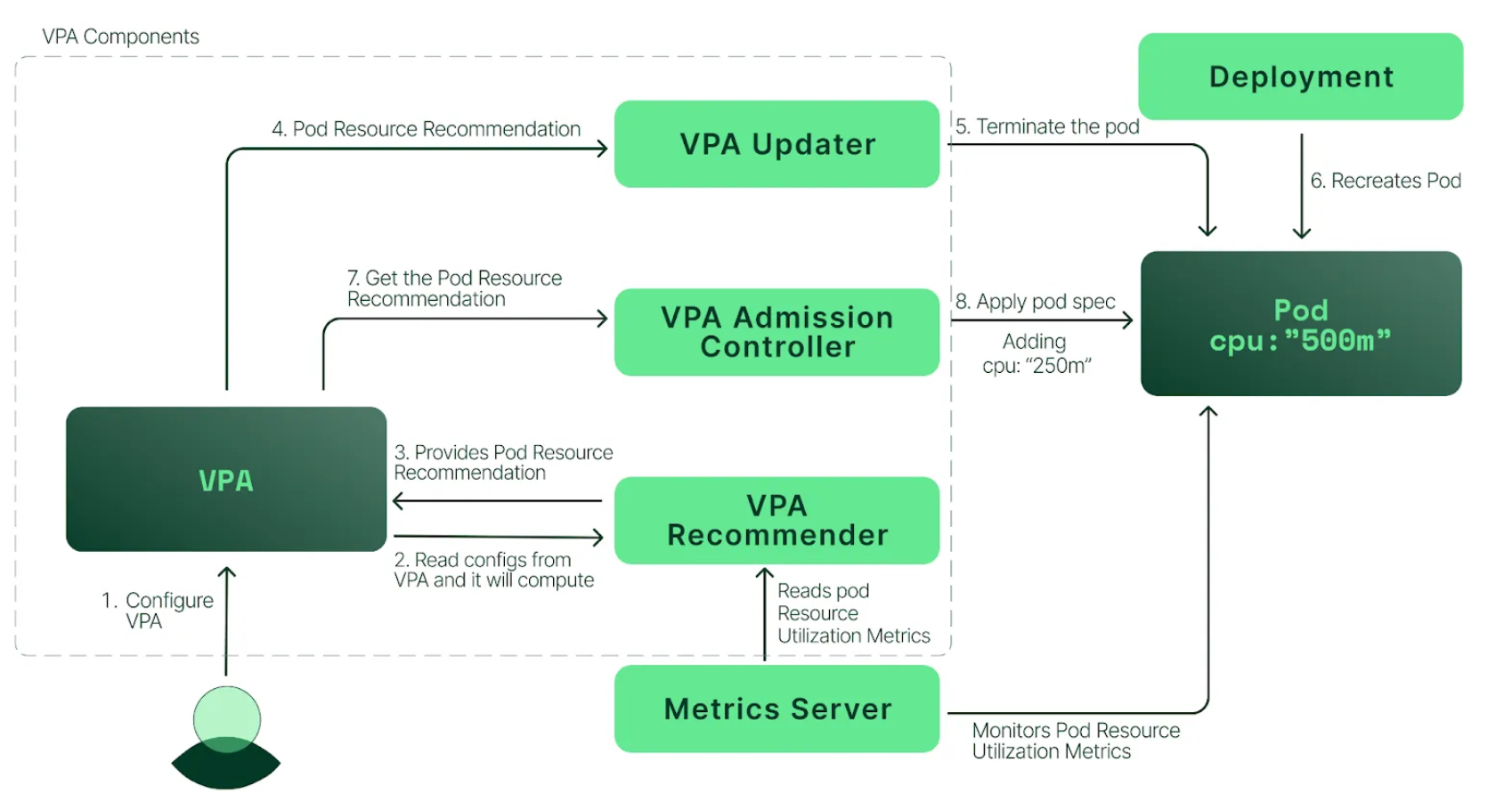
- pod resources.request을 최대한 최적값으로 수정
- VPA는 HPA와 같이 사용할 수 없습니다.
- VPA는 pod 자원을 최적값으로 수정하기 위해 pod를 재실행(기존 pod를 종료하고 새로운 pod실행)합니다.
- 계산 방식 : ‘기준값(파드가 동작하는데 필요한 최소한의 값)’ 결정 → ‘마진(약간의 적절한 버퍼)’ 추가 → 상세정리 Link
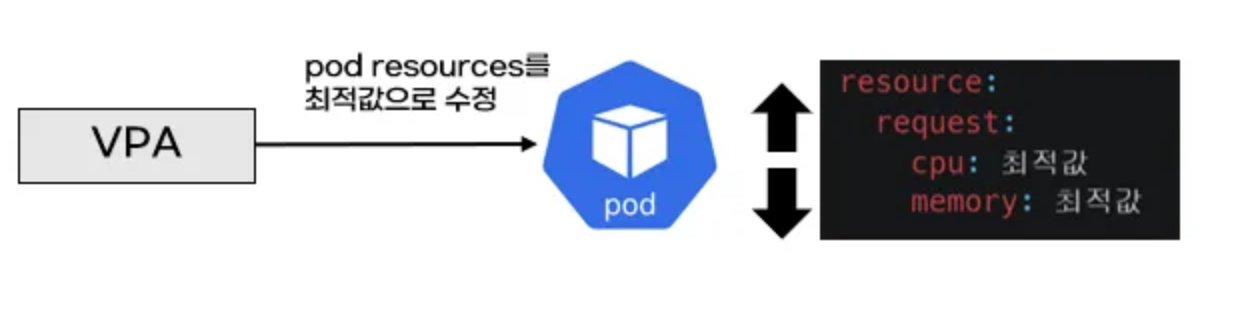
<출처: https://malwareanalysis.tistory.com/603>
<출처: https://devocean.sk.com/blog/techBoardDetail.do?ID=164786> - 그라파나 대시보드 : 상단 cluster 는 현재 프로메테우스 메트릭 label에 없으니 무시해도됨! - 링크 14588
- 프로메테우스
kube_customresource_vpa_containerrecommendations_target
kube_customresource_vpa_containerrecommendations_target{resource="cpu"}
kube_customresource_vpa_containerrecommendations_target{resource="memory"}
4.2 실습
# [운영서버 EC2] 코드 다운로드
git clone https://github.com/kubernetes/autoscaler.git # userdata 로 설치 되어 있음
cd ~/autoscaler/vertical-pod-autoscaler/
tree hack
hack
├── api-docs
│   └── config.yaml
├── boilerplate.go.txt
├── convert-alpha-objects.sh
├── deploy-for-e2e-locally.sh
├── deploy-for-e2e.sh
├── dev-deploy-locally.sh
├── e2e
│   ├── Dockerfile.externalmetrics-writer
│   ├── k8s-metrics-server.yaml
│   ├── metrics-pump.yaml
│   ├── prometheus-adapter.yaml
│   ├── prometheus.yaml
│   ├── recommender-externalmetrics-deployment.yaml
│   └── vpa-rbac.diff
├── emit-metrics.py
├── generate-api-docs.sh
├── generate-crd-yaml.sh
├── generate-flags.sh
├── lib
│   └── util.sh
├── local-cluster.md
├── run-e2e-locally.sh
├── run-e2e.sh
├── run-e2e-tests.sh
├── tools.go
├── update-codegen.sh
├── update-kubernetes-deps-in-e2e.sh
├── update-kubernetes-deps.sh
├── verify-codegen.sh
├── verify-vpa-flags.sh
├── vpa-apply-upgrade.sh
├── vpa-down.sh
├── vpa-process-yaml.sh
├── vpa-process-yamls.sh
├── vpa-up.sh
└── warn-obsolete-vpa-objects.sh

3 directories, 34 files

# openssl 버전 확인
openssl version
OpenSSL 1.0.2k-fips  26 Jan 2017

# 1.0 제거
yum remove openssl -y

# openssl 1.1.1 이상 버전 확인
yum install openssl11 -y
openssl11 version
OpenSSL 1.1.1zb  11 Feb 2025

# 스크립트파일내에 openssl11 수정
sed -i 's/openssl/openssl11/g' ~/autoscaler/vertical-pod-autoscaler/pkg/admission-controller/gencerts.sh
git status
git config --global user.email "you@example.com"
git config --global user.name "Your Name"
git add .
git commit -m "openssl version modify"

# Deploy the Vertical Pod Autoscaler to your cluster with the following command.
watch -d kubectl get pod -n kube-system
cat hack/vpa-up.sh
./hack/vpa-up.sh

# 재실행!
sed -i 's/openssl/openssl11/g' ~/autoscaler/vertical-pod-autoscaler/pkg/admission-controller/gencerts.sh
./hack/vpa-up.sh

kubectl get crd | grep autoscaling
verticalpodautoscalercheckpoints.autoscaling.k8s.io   2025-03-08T11:10:29Z
verticalpodautoscalers.autoscaling.k8s.io             2025-03-08T11:10:29Z

kubectl get mutatingwebhookconfigurations vpa-webhook-config
NAME                 WEBHOOKS   AGE
vpa-webhook-config   1          4m17s
(sejkim@lgcns:N/A) [root@operator-sejkim

kubectl get mutatingwebhookconfigurations vpa-webhook-config -o json | jq
{
  "apiVersion": "admissionregistration.k8s.io/v1",
  "kind": "MutatingWebhookConfiguration",
  "metadata": {
    "creationTimestamp": "2025-03-08T11:11:23Z",
    "generation": 1,
    "name": "vpa-webhook-config",
    "resourceVersion": "179736",
    "uid": "3e7ea8b4-a2a9-4cf6-ba5e-5c99f89db1cd"
  },
  "webhooks": [
    {
      "admissionReviewVersions": [
        "v1"
      ],
      "clientConfig": {
        "caBundle": "LS0tLS1CRUdJTiBDRVJUSUZJQ0FURS0tLS0tCk1JSURMVENDQWhXZ0F3SUJBZ0lVT1R5SkJMWWpTY2lpeWNtWHBLajNuRmxoYXVjd0RRWUpLb1pJaHZjTkFRRUwKQlFBd0dURVhNQlVHQTFVRUF3d09kbkJoWDNkbFltaHZiMnRmWTJFd0lCY05NalV3TXpBNE1URXhNRFU1V2hnUApNakk1T0RFeU1qSXhNVEV3TlRsYU1Ca3hGekFWQmdOVkJBTU1Eblp3WVY5M1pXSm9iMjlyWDJOaE1JSUJJakFOCkJna3Foa2lHOXcwQkFRRUZBQU9DQVE4QU1JSUJDZ0tDQVFFQXVHbnc5eTBCaER6RzJaUUlUaDUrMC9YNG96T0gKaDYyUkVCUThDcGptN0haWVIxTWhNNUc2UGZzN3cxVnlrM0dzaWloMkVOTTdhTzlwS1d1T0NZTm1rdWhqejZ0cgpUNkxlQjJxSUE5M0pGN291Z0d0Z3Y0T2FzRW9acmRDQytPa1NGOSswZWRZMzQ2VTNWZ1orNDVMZVJRN0lFMnFlClFLWGpsa240c0pVajhCcUJ3QzVzNEdTNVg3b3NKZzUyRDRPMEs1Q0pORzB5TTFXcVNuclBiWmorSVI3aFdjV2cKL3NQODRpalo1ZE9oRTUxdGtSYlBJTGxYa1VyREliV3RJa0UrYk5kYzc4d1Z1aXE3dnV3QzRXMzFPSFlnMXVEOQpqdVVzaktMaGs2TzdDNktMUS94dVQzTk1oRW1TZjVMZzlzWnRPcE9UODZzb0s1OHA2SFRGQ3U3Yk1RSURBUUFCCm8yc3dhVEFkQmdOVkhRNEVGZ1FVUC9KYk45TXlleDNvVWEyNFhiVDZ2SGI3NGI0d0h3WURWUjBqQkJnd0ZvQVUKUC9KYk45TXlleDNvVWEyNFhiVDZ2SGI3NGI0d0RBWURWUjBUQkFVd0F3RUIvekFaQmdOVkhSRUVFakFRZ2c1MgpjR0ZmZDJWaWFHOXZhMTlqWVRBTkJna3Foa2lHOXcwQkFRc0ZBQU9DQVFFQUtrY1llTFJxR2xreXJVYktjUUVDCjBSVFRtaGJ4bTg4MEg5YnYySDV0cVphQXFPK0lIM1dVcDJ0dnU5SEZUQytiSlhoWkRuSlZtczFMQWdTWUhnbk0KU01PQVo2ak1LY1dxYkJsQVNlK24zZXlOWjROUytTTEpNZ2hHNXFHQjVmdkdKMFhCaDFaOEd2SmNDWEFWd0xlWApSN2J0eDlJQkF0UUcrWlExRXJkbWUzZWpWd0pDNkJseXJNNmxjZ3pwUk5iVldKSVZ1ck9WSkZVTWk3TjVQcGpnCnBmOHVZWUo2anVPck9WYVladnFZTUJ1OURtWS9qOFR6clpwbFVuUnFaSFlVR2NtbGdyVjdrbm1Fb2g3aDdXRmEKRWtJRm9JQnZZUUZNVDEyUHNhbmdibHBNWXBWbTMrbkxNakFVL25sbDk2TU5rbm5CdThlVFZES25IVC9oWUg3Sgo4Zz09Ci0tLS0tRU5EIENFUlRJRklDQVRFLS0tLS0K",
        "service": {
          "name": "vpa-webhook",
          "namespace": "kube-system",
          "port": 443
        }
      },
      "failurePolicy": "Ignore",
      "matchPolicy": "Equivalent",
      "name": "vpa.k8s.io",
      "namespaceSelector": {
        "matchExpressions": [
          {
            "key": "kubernetes.io/metadata.name",
            "operator": "NotIn",
            "values": [
              ""
            ]
          }
        ]
      },
      "objectSelector": {},
      "reinvocationPolicy": "Never",
      "rules": [
        {
          "apiGroups": [
            ""
          ],
          "apiVersions": [
            "v1"
          ],
          "operations": [
            "CREATE"
          ],
          "resources": [
            "pods"
          ],
          "scope": "*"
        },
        {
          "apiGroups": [
            "autoscaling.k8s.io"
          ],
          "apiVersions": [
            "*"
          ],
          "operations": [
            "CREATE",
            "UPDATE"
          ],
          "resources": [
            "verticalpodautoscalers"
          ],
          "scope": "*"
        }
      ],
      "sideEffects": "None",
      "timeoutSeconds": 30
    }
  ]
}- 공식 예제 : pod가 실행되면 약 2~3분 뒤에 pod resource.reqeust가 VPA에 의해 수정 - 링크
- vpa에 spec.updatePolicy.updateMode를 Off 로 변경 시 파드에 Spec을 자동으로 변경 재실행 하지 않습니다. 기본값(Auto)
# 모니터링
watch -d "kubectl top pod;echo "----------------------";kubectl describe pod | grep Requests: -A2"

# 공식 예제 배포
cd ~/autoscaler/vertical-pod-autoscaler/
cat examples/hamster.yaml
kubectl apply -f examples/hamster.yaml && kubectl get vpa -w

# 파드 리소스 Requestes 확인
kubectl describe pod | grep Requests: -A2
    Requests:
      cpu:        100m
      memory:     50Mi
--
    Requests:
      cpu:        587m
      memory:     262144k
--
    Requests:
      cpu:        587m
      memory:     262144k

# VPA에 의해 기존 파드 삭제되고 신규 파드가 생성됨
kubectl get events --sort-by=".metadata.creationTimestamp" | grep VPA
34s         Normal    EvictedByVPA              pod/hamster-598b78f579-hj445                            Pod was evicted by VPA Updater to apply resource recommendation.
34s         Normal    EvictedPod                verticalpodautoscaler/hamster-vpa                       VPA Updater evicted Pod hamster-598b78f579-hj445 to apply resource recommendation.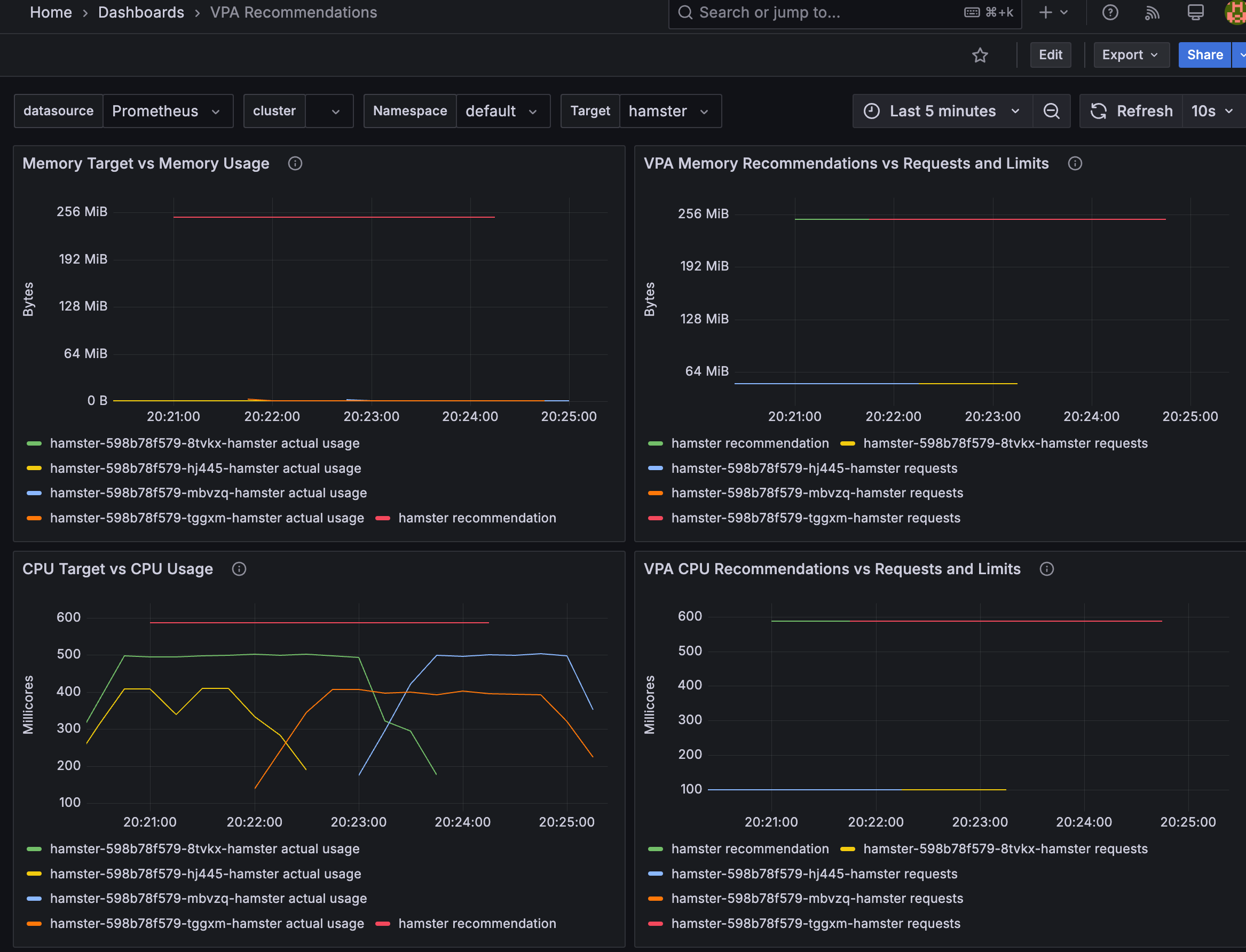
- 삭제: kubectl delete -f examples/hamster.yaml && cd ~/autoscaler/vertical-pod-autoscaler/ && ./hack/vpa-down.sh
5. Cluster Autoscaler (CAS)
5.1 구성 소개
- 참조 : Github, AWS, example
- a component that automatically adjusts the size of a Kubernetes Cluster so that all pods have a place to run and there are no unneeded nodes. Supports several public cloud providers. Version 1.0 (GA) was released with kubernetes 1.8.
- The Kubernetes Cluster Autoscaler automatically adjusts the size of a Kubernetes cluster when one of the following conditions is true:
- There are pods that fail to run in a cluster due to insufficient resources.
- There are nodes in a cluster that are underutilized for an extended period of time and their pods can be placed on other existing nodes.
- On AWS, Cluster Autoscaler utilizes Amazon EC2 Auto Scaling Groups to manage node groups. Cluster Autoscaler typically runs as a
Deploymentin your cluster.
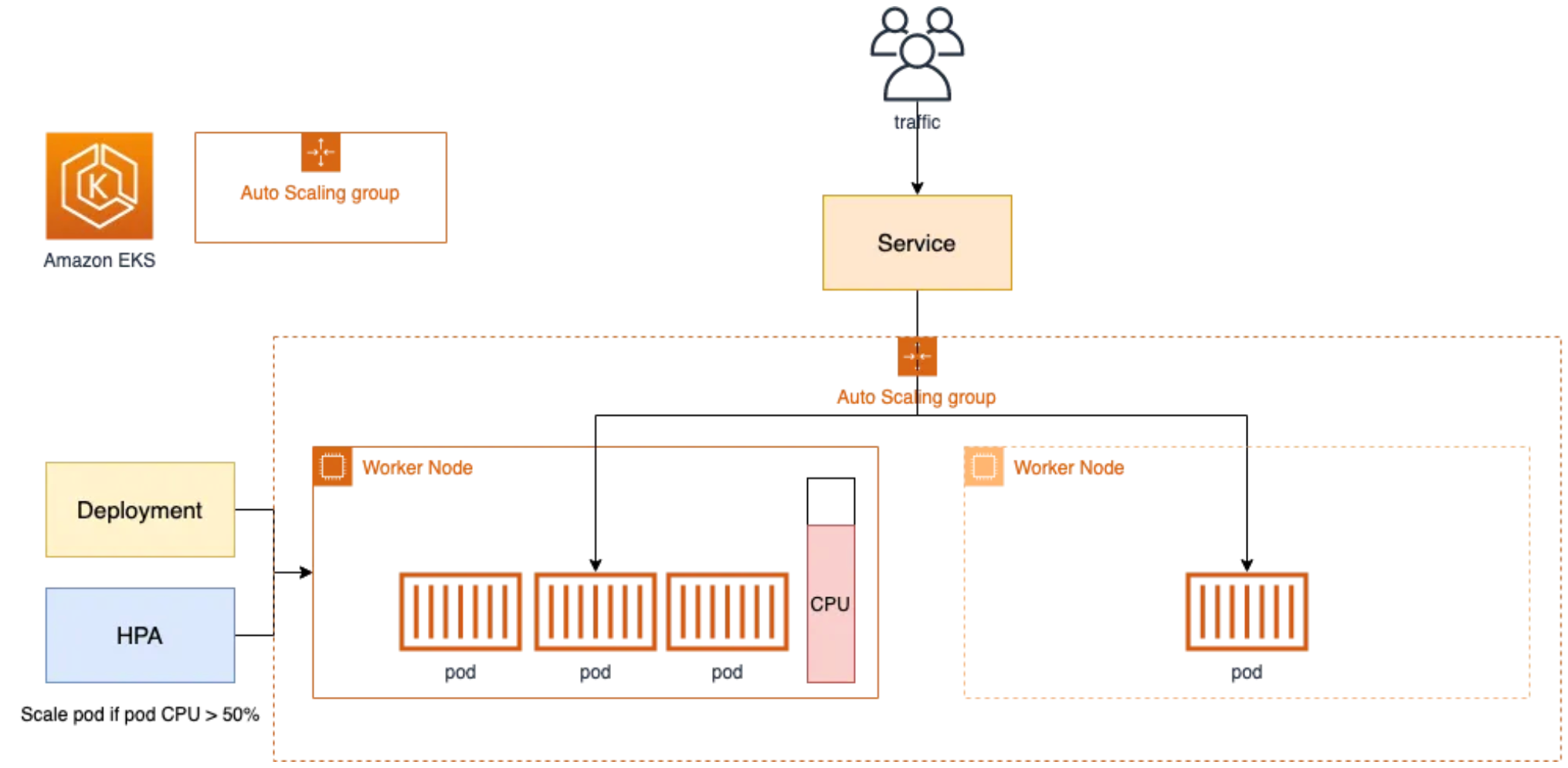
<출처: https://catalog.us-east-1.prod.workshops.aws/workshops/9c0aa9ab-90a9-44a6-abe1-8dff360ae428/ko-KR/100-scaling/200-cluster-scaling> - Cluster Autoscale 동작을 하기 위한 cluster-autoscaler 파드(디플로이먼트)를 배치합니다.
- Cluster Autoscaler(CAS)는 pending 상태인 파드가 존재할 경우, 워커 노드를 스케일 아웃합니다.
- 특정 시간을 간격으로 사용률을 확인하여 스케일 인/아웃을 수행합니다. 그리고 AWS에서는 Auto Scaling Group(ASG)을 사용하여 Cluster Autoscaler를 적용합니다.
5.2 Cluster Autoscaler(CAS) 설정
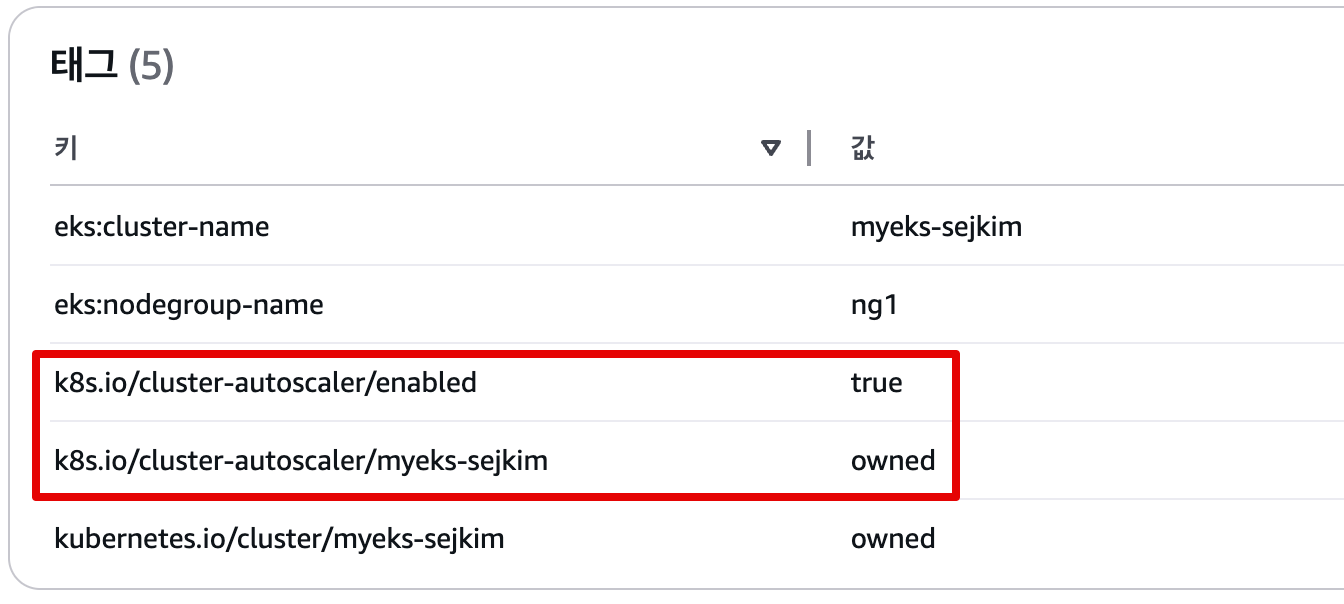
# EKS 노드에 이미 아래 tag가 들어가 있음
# k8s.io/cluster-autoscaler/enabled : true
# k8s.io/cluster-autoscaler/myeks-sejkim : owned
aws ec2 describe-instances  --filters Name=tag:Name,Values=$CLUSTER_NAME-ng1-Node --query "Reservations[*].Instances[*].Tags[*]" --output json | jq

aws ec2 describe-instances  --filters Name=tag:Name,Values=$CLUSTER_NAME-ng1-Node --query "Reservations[*].Instances[*].Tags[*]" --output yaml
...
- Key: k8s.io/cluster-autoscaler/myeks-sejkim
      Value: owned
- Key: k8s.io/cluster-autoscaler/enabled
      Value: 'true'
...
# 현재 autoscaling(ASG) 정보 확인
# aws autoscaling describe-auto-scaling-groups --query "AutoScalingGroups[? Tags[? (Key=='eks:cluster-name') && Value=='클러스터이름']].[AutoScalingGroupName, MinSize, MaxSize,DesiredCapacity]" --output table
aws autoscaling describe-auto-scaling-groups \
    --query "AutoScalingGroups[? Tags[? (Key=='eks:cluster-name') && Value=='myeks-sejkim']].[AutoScalingGroupName, MinSize, MaxSize,DesiredCapacity]" \
    --output table
-----------------------------------------------------------------
|                   DescribeAutoScalingGroups                   |
+------------------------------------------------+----+----+----+
|  eks-ng1-8ecab988-dd1a-ff47-60cf-594bc559aa6d  |  2 |  3 |  2 |

# MinSize 3개로 수정
export ASG_NAME=$(aws autoscaling describe-auto-scaling-groups --query "AutoScalingGroups[? Tags[? (Key=='eks:cluster-name') && Value=='myeks-sejkim']].AutoScalingGroupName" --output text)
aws autoscaling update-auto-scaling-group --auto-scaling-group-name ${ASG_NAME} --min-size 3 --desired-capacity 3 --max-size 3

# 확인
aws autoscaling describe-auto-scaling-groups --query "AutoScalingGroups[? Tags[? (Key=='eks:cluster-name') && Value=='myeks-sejkim']].[AutoScalingGroupName, MinSize, MaxSize,DesiredCapacity]" --output table
-----------------------------------------------------------------
|                   DescribeAutoScalingGroups                   |
+------------------------------------------------+----+----+----+
|  eks-ng1-8ecab988-dd1a-ff47-60cf-594bc559aa6d  |  3 |  3 |  3 |
+------------------------------------------------+----+----+----+

# 배포 : Deploy the Cluster Autoscaler (CAS)
curl -s -O https://raw.githubusercontent.com/kubernetes/autoscaler/master/cluster-autoscaler/cloudprovider/aws/examples/cluster-autoscaler-autodiscover.yaml
...
            - ./cluster-autoscaler
            - --v=4
            - --stderrthreshold=info
            - --cloud-provider=aws
            - --skip-nodes-with-local-storage=false # 로컬 스토리지를 가진 노드를 autoscaler가 scale down할지 결정, false(가능!)
            - --expander=least-waste # 노드를 확장할 때 어떤 노드 그룹을 선택할지를 결정, least-waste는 리소스 낭비를 최소화하는 방식으로 새로운 노드를 선택.
            - --node-group-auto-discovery=asg:tag=k8s.io/cluster-autoscaler/enabled,k8s.io/cluster-autoscaler/<YOUR CLUSTER NAME>
...

sed -i -e "s|<YOUR CLUSTER NAME>|$CLUSTER_NAME|g" cluster-autoscaler-autodiscover.yaml
kubectl apply -f cluster-autoscaler-autodiscover.yaml

# 확인
kubectl get pod -n kube-system | grep cluster-autoscaler
cluster-autoscaler-f675c56f7-xx78p             1/1     Running   0          9s

kubectl describe deployments.apps -n kube-system cluster-autoscaler
...
Events:
  Type    Reason             Age   From                   Message
  ----    ------             ----  ----                   -------
  Normal  ScalingReplicaSet  36s   deployment-controller  Scaled up replica set cluster-autoscaler-f675c56f7 to 1

kubectl describe deployments.apps -n kube-system cluster-autoscaler | grep node-group-auto-discovery
      --node-group-auto-discovery=asg:tag=k8s.io/cluster-autoscaler/enabled,k8s.io/cluster-autoscaler/myeks-sejkim

# (옵션) cluster-autoscaler 파드가 동작하는 워커 노드가 퇴출(evict) 되지 않게 설정
kubectl -n kube-system annotate deployment.apps/cluster-autoscaler cluster-autoscaler.kubernetes.io/safe-to-evict="false"
5.3 SCALE A CLUSTER WITH Cluster Autoscaler(CA)
- 참조: Link
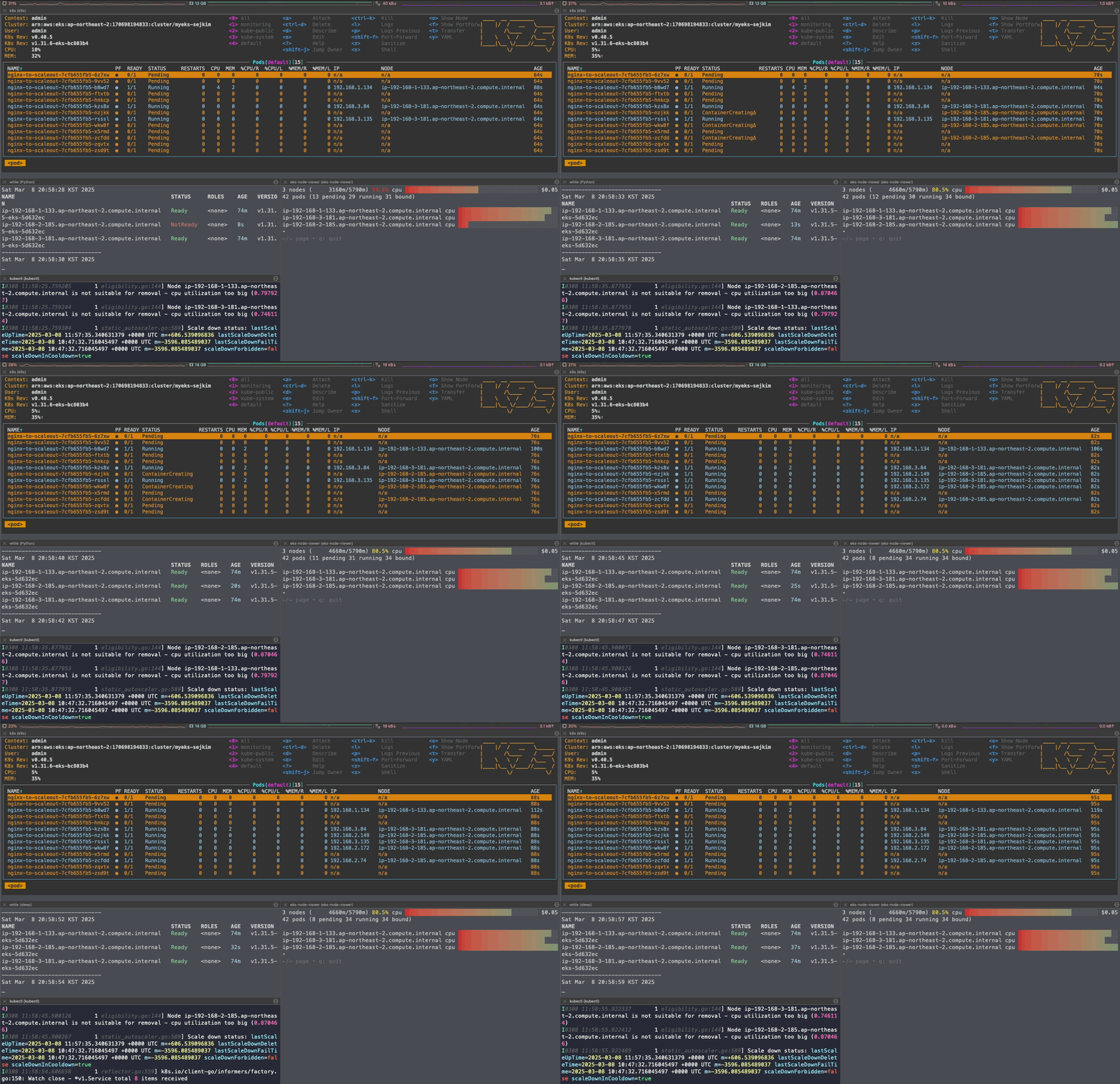
# 모니터링
kubectl get nodes -w
while true; do kubectl get node; echo "------------------------------" ; date ; sleep 1; done
while true; do aws ec2 describe-instances --query "Reservations[*].Instances[*].{PrivateIPAdd:PrivateIpAddress,InstanceName:Tags[?Key=='Name']|[0].Value,Status:State.Name}" --filters Name=instance-state-name,Values=running --output text ; echo "------------------------------"; date; sleep 1; done

# Deploy a Sample App
# We will deploy an sample nginx application as a ReplicaSet of 1 Pod
cat << EOF > nginx.yaml
apiVersion: apps/v1
kind: Deployment
metadata:
  name: nginx-to-scaleout
spec:
  replicas: 1
  selector:
    matchLabels:
      app: nginx
  template:
    metadata:
      labels:
        service: nginx
        app: nginx
    spec:
      containers:
      - image: nginx
        name: nginx-to-scaleout
        resources:
          limits:
            cpu: 500m
            memory: 512Mi
          requests:
            cpu: 500m
            memory: 512Mi
EOF
kubectl apply -f nginx.yaml
kubectl get deployment/nginx-to-scaleout

# Scale our ReplicaSet
# Let’s scale out the replicaset to 15
kubectl scale --replicas=15 deployment/nginx-to-scaleout && date

# 확인
kubectl get pods -l app=nginx -o wide --watch
kubectl -n kube-system logs -f deployment/cluster-autoscaler

# 노드 자동 증가 확인
kubectl get nodes
aws autoscaling describe-auto-scaling-groups \
    --query "AutoScalingGroups[? Tags[? (Key=='eks:cluster-name') && Value=='myeks']].[AutoScalingGroupName, MinSize, MaxSize,DesiredCapacity]" \
    --output table

eks-node-viewer --resources cpu,memory
혹은
eks-node-viewer

# [운영서버 EC2] 최근 1시간 Fleet API 호출 확인 - Link
# https://ap-northeast-2.console.aws.amazon.com/cloudtrailv2/home?region=ap-northeast-2#/events?EventName=CreateFleet
aws cloudtrail lookup-events \
  --lookup-attributes AttributeKey=EventName,AttributeValue=CreateFleet \
  --start-time "$(date -d '1 hour ago' --utc +%Y-%m-%dT%H:%M:%SZ)" \
  --end-time "$(date --utc +%Y-%m-%dT%H:%M:%SZ)"

# (참고) Event name : UpdateAutoScalingGroup
# https://ap-northeast-2.console.aws.amazon.com/cloudtrailv2/home?region=ap-northeast-2#/events?EventName=UpdateAutoScalingGroup


# 디플로이먼트 삭제
kubectl delete -f nginx.yaml && date

# [scale-down] 노드 갯수 축소 : 기본은 10분 후 scale down 됨, 물론 아래 flag 로 시간 수정 가능 >> 그러니 디플로이먼트 삭제 후 10분 기다리고 나서 보자!
# By default, cluster autoscaler will wait 10 minutes between scale down operations,
# you can adjust this using the --scale-down-delay-after-add, --scale-down-delay-after-delete,
# and --scale-down-delay-after-failure flag.
# E.g. --scale-down-delay-after-add=5m to decrease the scale down delay to 5 minutes after a node has been added.

# 터미널1
watch -d kubectl get node- CloudTrail 에 CreateFleet 이벤트 확인 - Link
# CloudTrail 에 CreateFleet 이벤트 조회 : 최근 90일 가능
aws cloudtrail lookup-events --lookup-attributes AttributeKey=EventName,AttributeValue=CreateFleet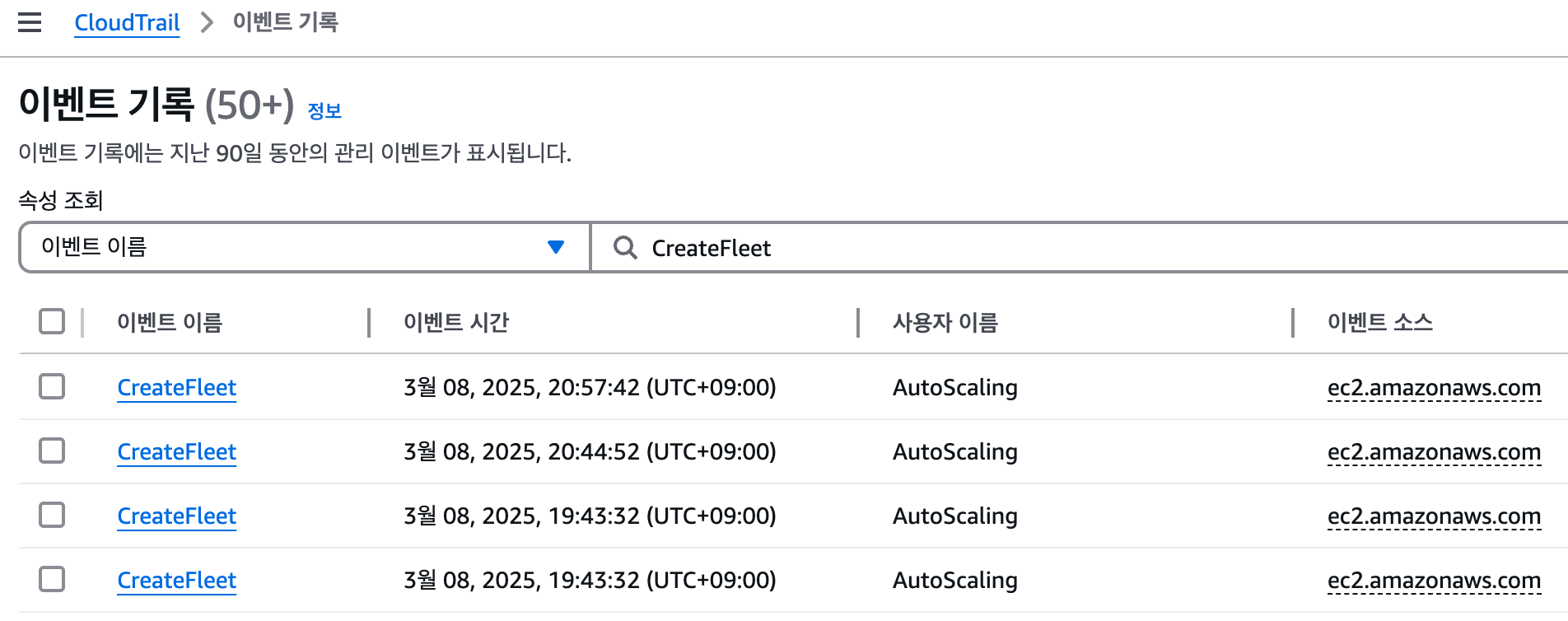
- 리소스 삭제
# 위 실습 중 디플로이먼트 삭제 후 10분 후 노드 갯수 축소되는 것을 확인 후 아래 삭제를 해보자! >> 만약 바로 아래 CA 삭제 시 워커 노드는 4개 상태가 되어서 수동으로 2대 변경 하자!
kubectl delete -f nginx.yaml

# size 수정
aws autoscaling update-auto-scaling-group --auto-scaling-group-name ${ASG_NAME} --min-size 3 --desired-capacity 3 --max-size 3
aws autoscaling describe-auto-scaling-groups --query "AutoScalingGroups[? Tags[? (Key=='eks:cluster-name') && Value=='myeks']].[AutoScalingGroupName, MinSize, MaxSize,DesiredCapacity]" --output table

# Cluster Autoscaler 삭제
kubectl delete -f cluster-autoscaler-autodiscover.yaml
5.4 CAS 문제점
하나의 자원에 대해 두군데 (AWS ASG vs AWS EKS)에서 각자의 방식으로 관리 ⇒ 관리 정보가 서로 동기화되지 않아 다양한 문제 발생
**[참고 영상]** 오픈 소스 Karpenter를 활용한 Amazon EKS 확장 운영 전략 (신재현) 무신사 - [링크](https://youtu.be/FPlCVVrCD64) , [원본영상](https://www.youtube.com/watch?v=Re0jZ4Umb80)- CA 문제점 : ASG에만 의존하고 노드 생성/삭제 등에 직접 관여 안함
- EKS에서 노드를 삭제 해도 인스턴스는 삭제 안됨
- 노드 축소 될 때 특정 노드가 축소 되도록 하기 매우 어려움 : pod이 적은 노드 먼저 축소, 이미 드레인 된 노드 먼저 축소
- 특정 노드를 삭제 하면서 동시에 노드 개수를 줄이기 어려움 : 줄일때 삭제 정책 옵션이 다양하지 않음
- 정책 미지원 시 삭제 방식(예시) : 100대 중 미삭제 EC2 보호 설정 후 삭제 될 ec2의 파드를 이주 후 scaling 조절로 삭제 후 원복
- 특정 노드를 삭제하면서 동시에 노드 개수를 줄이기 어려움
- 폴링 방식이기에 너무 자주 확장 여유를 확인 하면 API 제한에 도달할 수 있음
- 스케일링 속도가 느림
- Cluster Autoscaler 는 쿠버네티스 클러스터 자체의 오토 스케일링을 의미하며, 수요에 따라 워커 노드를 자동으로 추가하는 기능
- 언뜻 보기에 클러스터 전체나 각 노드의 부하 평균이 높아졌을 때 확장으로 보인다 → 함정! 🚧
- Pending 상태의 파드가 생기는 타이밍에 처음으로 Cluster Autoscaler 이 동작한다
- 즉, Request 와 Limits 를 적절하게 설정하지 않은 상태에서는 실제 노드의 부하 평균이 낮은 상황에서도 스케일 아웃이 되거나, 부하 평균이 높은 상황임에도 스케일 아웃이 되지 않는다!
- 기본적으로 리소스에 의한 스케줄링은 Requests(최소)를 기준으로 이루어진다. 다시 말해 Requests 를 초과하여 할당한 경우에는 최소 리소스 요청만으로 리소스가 꽉 차 버려서 신규 노드를 추가해야만 한다. 이때 실제 컨테이너 프로세스가 사용하는 리소스 사용량은 고려되지 않는다.
- 반대로 Request 를 낮게 설정한 상태에서 Limit 차이가 나는 상황을 생각해보자. 각 컨테이너는 Limits 로 할당된 리소스를 최대로 사용한다. 그래서 실제 리소스 사용량이 높아졌더라도 Requests 합계로 보면 아직 스케줄링이 가능하기 때문에 클러스터가 스케일 아웃하지 않는 상황이 발생한다.
- 여기서는 CPU 리소스 할당을 예로 설명했지만 메모리의 경우도 마찬가지다.
6. Cluster Proportional Autoscaler (CPA)
6.1 소개
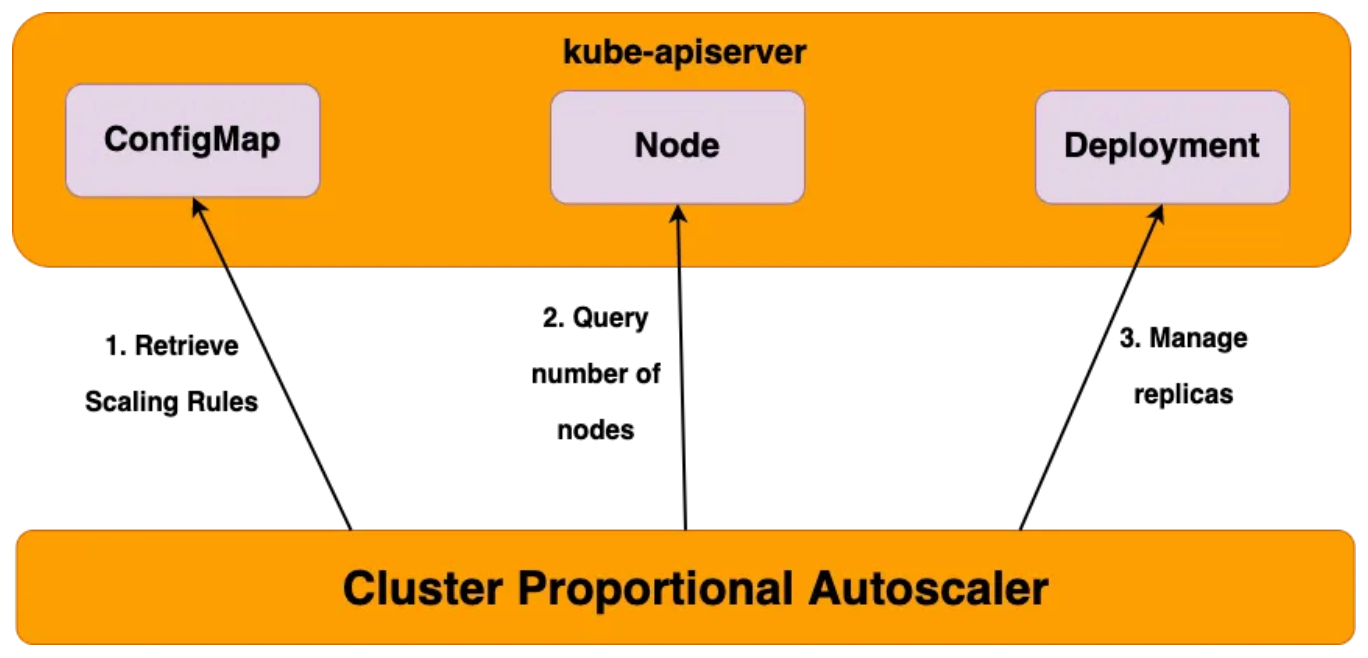
6.2 실습
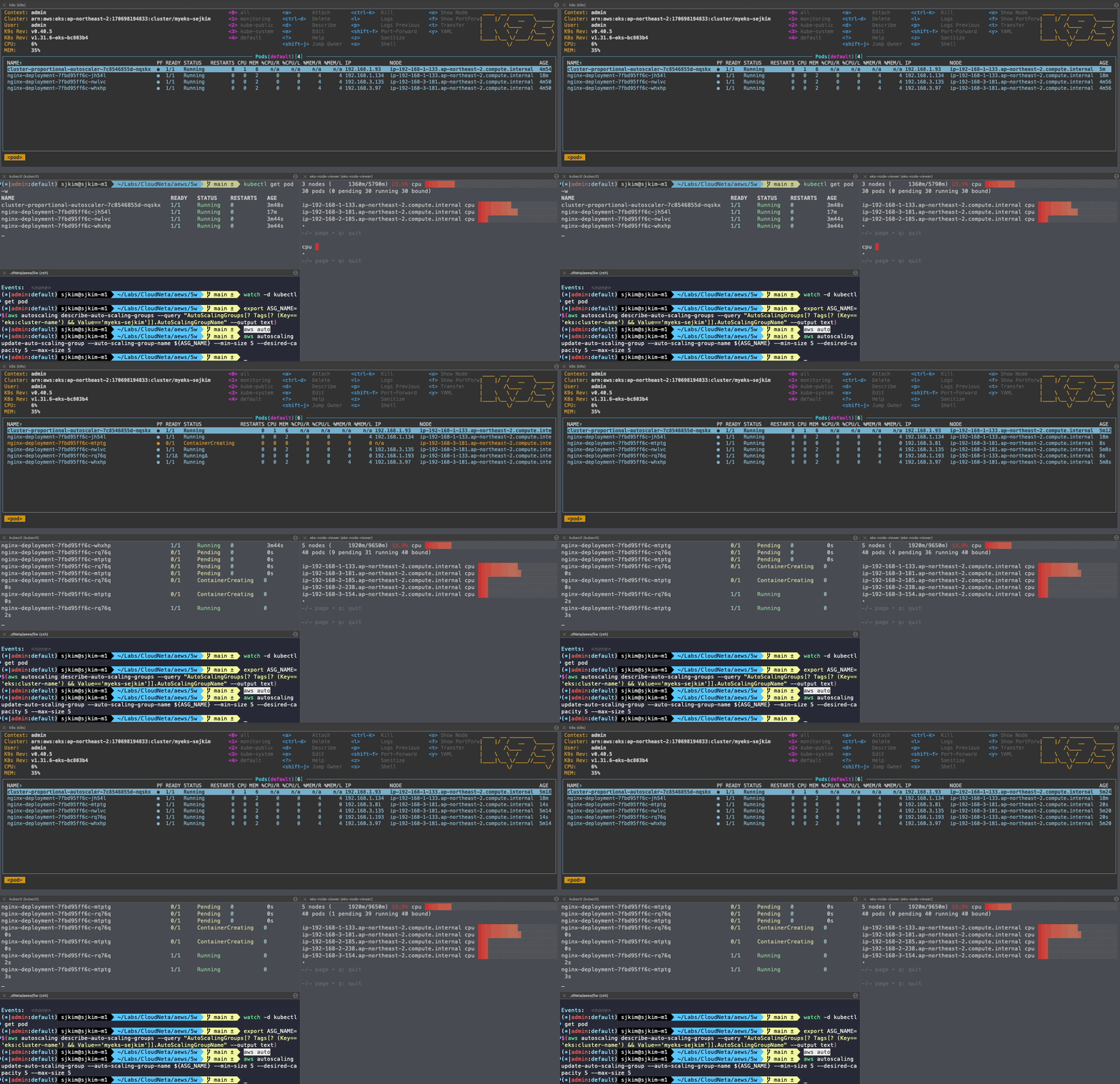
#
helm repo add cluster-proportional-autoscaler https://kubernetes-sigs.github.io/cluster-proportional-autoscaler

# CPA규칙을 설정하고 helm차트를 릴리즈 필요
helm upgrade --install cluster-proportional-autoscaler cluster-proportional-autoscaler/cluster-proportional-autoscaler

# nginx 디플로이먼트 배포
cat <<EOT > cpa-nginx.yaml
apiVersion: apps/v1
kind: Deployment
metadata:
  name: nginx-deployment
spec:
  replicas: 1
  selector:
    matchLabels:
      app: nginx
  template:
    metadata:
      labels:
        app: nginx
    spec:
      containers:
      - name: nginx
        image: nginx:latest
        resources:
          limits:
            cpu: "100m"
            memory: "64Mi"
          requests:
            cpu: "100m"
            memory: "64Mi"
        ports:
        - containerPort: 80
EOT
kubectl apply -f cpa-nginx.yaml

# CPA 규칙 설정
cat <<EOF > cpa-values.yaml
config:
  ladder:
    nodesToReplicas:
      - [1, 1]
      - [2, 2]
      - [3, 3]
      - [4, 3]
      - [5, 5]
options:
  namespace: default
  target: "deployment/nginx-deployment"
EOF
kubectl describe cm cluster-proportional-autoscaler
Name:         cluster-proportional-autoscaler
Namespace:    default
Labels:       app.kubernetes.io/managed-by=Helm
Annotations:  meta.helm.sh/release-name: cluster-proportional-autoscaler
              meta.helm.sh/release-namespace: default

Data
====
ladder:
----
{"nodesToReplicas":[[1,1],[2,2],[3,3],[4,3],[5,5]]}


BinaryData
====

Events:  <none>

# 모니터링
watch -d kubectl get pod

# helm 업그레이드
helm upgrade --install cluster-proportional-autoscaler -f cpa-values.yaml cluster-proportional-autoscaler/cluster-proportional-autoscaler

# 노드 5개로 증가
export ASG_NAME=$(aws autoscaling describe-auto-scaling-groups --query "AutoScalingGroups[? Tags[? (Key=='eks:cluster-name') && Value=='myeks-sejkim']].AutoScalingGroupName" --output text)
aws autoscaling update-auto-scaling-group --auto-scaling-group-name ${ASG_NAME} --min-size 5 --desired-capacity 5 --max-size 5
aws autoscaling describe-auto-scaling-groups --query "AutoScalingGroups[? Tags[? (Key=='eks:cluster-name') && Value=='myeks']].[AutoScalingGroupName, MinSize, MaxSize,DesiredCapacity]" --output table

# 노드 4개로 축소
aws autoscaling update-auto-scaling-group --auto-scaling-group-name ${ASG_NAME} --min-size 4 --desired-capacity 4 --max-size 4
aws autoscaling describe-auto-scaling-groups --query "AutoScalingGroups[? Tags[? (Key=='eks:cluster-name') && Value=='myeks']].[AutoScalingGroupName, MinSize, MaxSize,DesiredCapacity]" --output table- [운영서버 EC2]에서 원클릭 삭제 진행 : Karpenter 실습 환경 준비를 위해서 현재 EKS 실습 환경 전부 삭제
# eksctl delete cluster --name $CLUSTER_NAME && aws cloudformation delete-stack --stack-name $CLUSTER_NAME
nohup sh -c "eksctl delete cluster --name $CLUSTER_NAME && aws cloudformation delete-stack --stack-name $CLUSTER_NAME" > /root/delete.log 2>&1 &

# (옵션) 삭제 과정 확인
tail -f delete.log
7. Karpenter
7.1 소개
- 고성능의 지능형 k8s 컴퓨팅 프로비저닝 및 관리 솔루션, 수초 이내에 대응 가능, 더 낮은 컴퓨팅 비용으로 노드 선택
- 지능형의 동적인 인스턴스 유형 선택 - Spot, AWS Graviton 등
- 자동 워크로드 Consolidation 기능
- 일관성 있는 더 빠른 노드 구동시간을 통해 시간/비용 낭비 최소화
- 동작
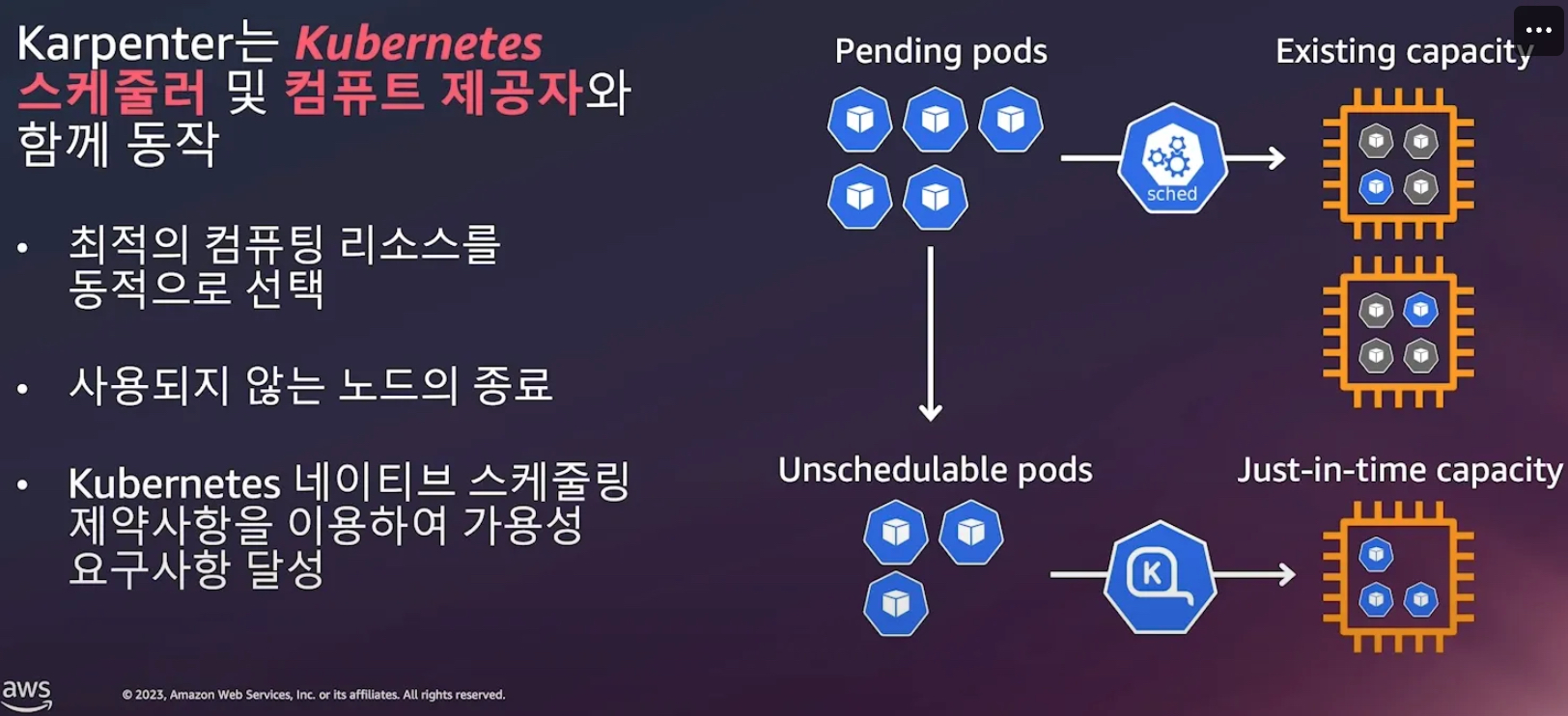
- Consolidation
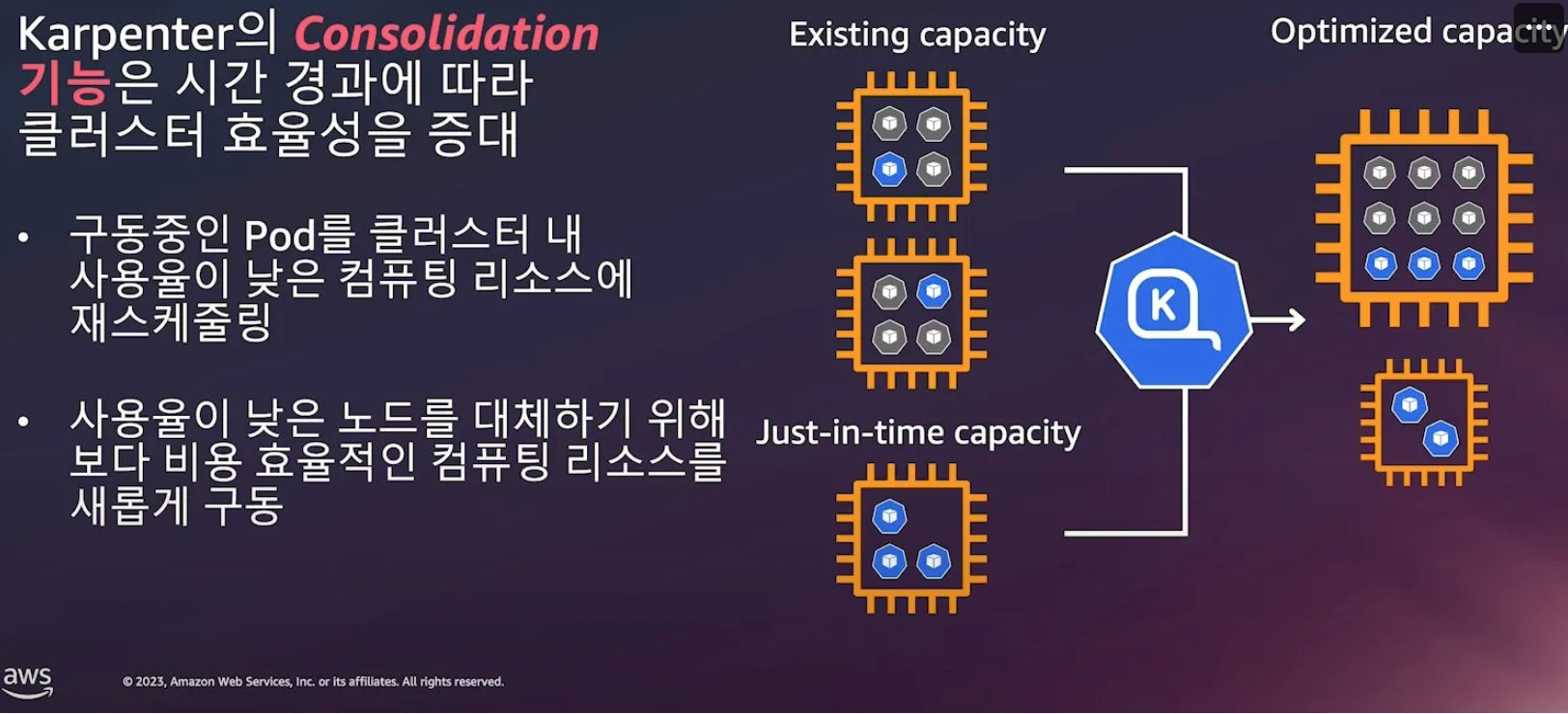
- Consolidation 동작 방식
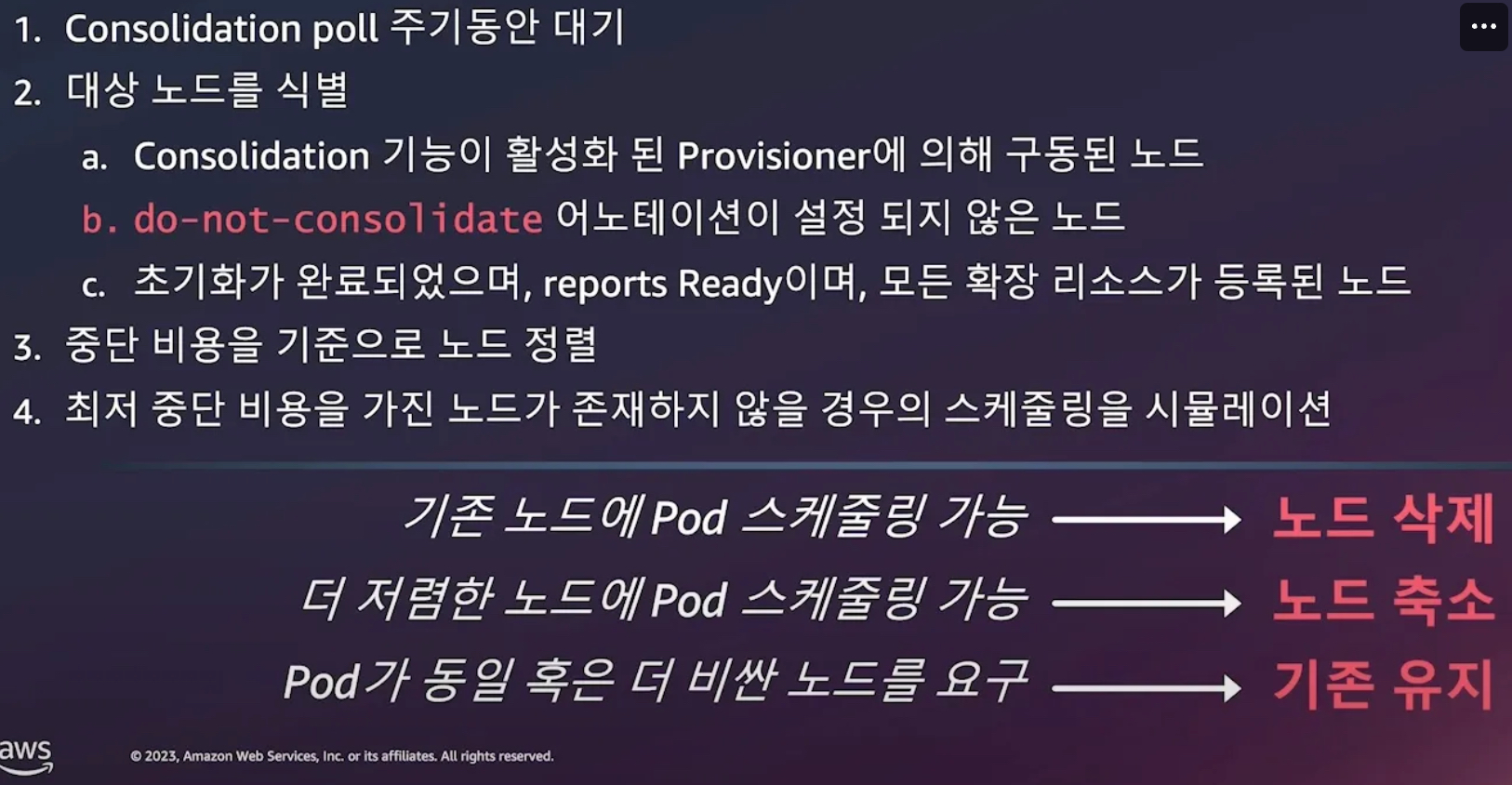
- 중단비용 - 예) 파드가 많이 배치되어서 재스케줄링 영향이 큰 경우 등 , 오래 기동된 노드 TTL, 비용 관련
- 관리 간소화
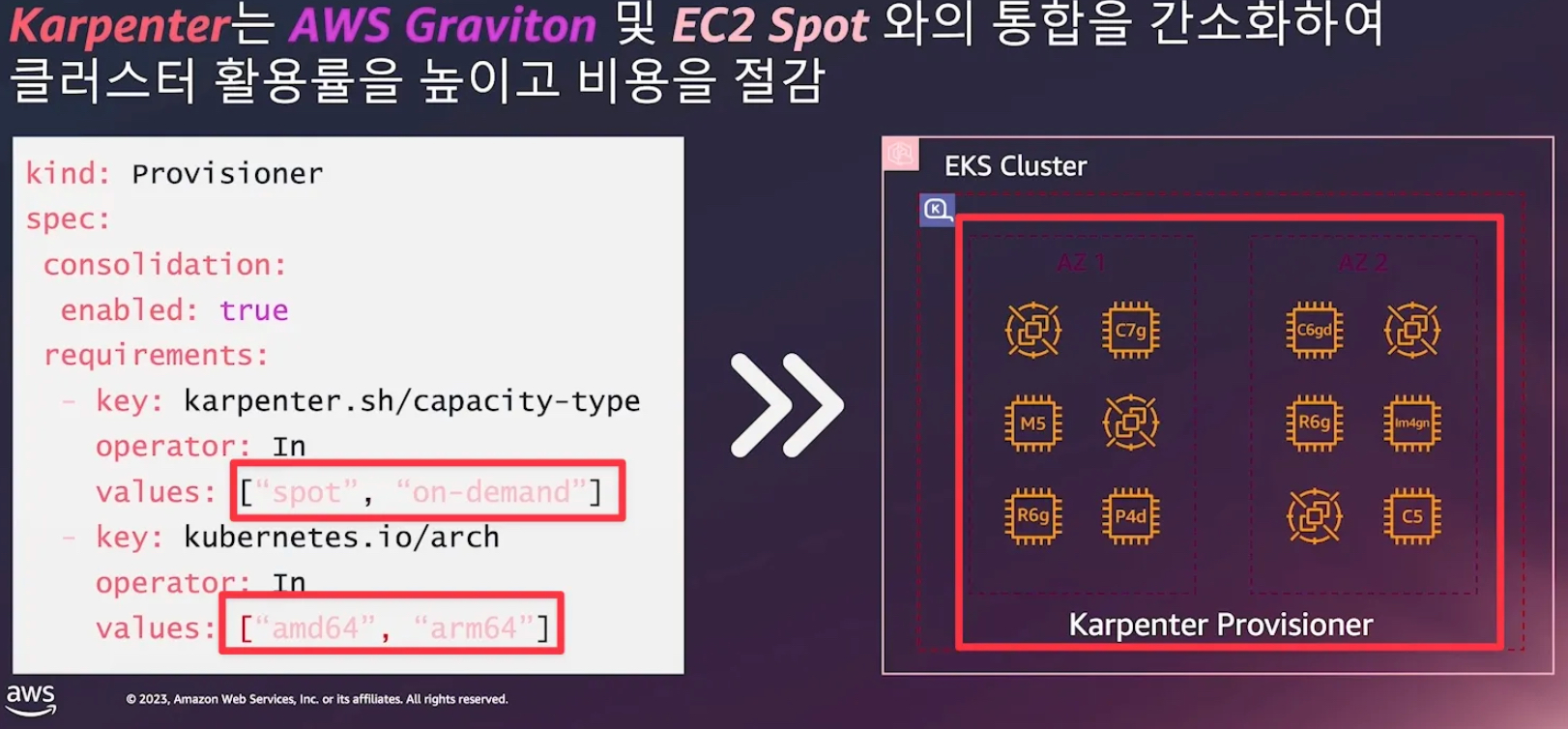
7.2 Karpenter를 활용한 EKS 확장 운영전략
- 참조: 신재현, 무신사 - Youtube
- 작동 방식
- 모니터링 → (스케줄링 안된 Pod 발견) → 스펙 평가 → 생성 ⇒ Provisioning
- 모니터링 → (비어있는 노드 발견) → 제거 ⇒ Deprovisioning
- Provisioner CRD : 시작 템플릿이 필요 없습니다! ← 시작 템플릿의 대부분의 설정 부분을 대신함
- 필수 : 보안그룹, 서브넷
- 리소스 찾는 방식 : 태그 기반 자동, 리소스 ID 직접 명시
- 인스턴스 타입은 가드레일 방식으로 선언 가능! : 스팟(우선) vs 온디멘드, 다양한 인스턴스 type 가능
- Pod에 적합한 인스턴스 중 가장 저렴한 인스턴스로 증설 됩니다
- PV를 위해 단일 서브넷에 노드 그룹을 만들 필요가 없습니다 → 자동으로 PV가 존재하는 서브넷에 노드를 만듭니다
- 사용 안하는 노드를 자동으로 정리, 일정 기간이 지나면 노드를 자동으로 만료 시킬 수 있음
- ttlSecondsAfterEmpty : 노드에 데몬셋을 제외한 모든 Pod이 존재하지 않을 경우 해당 값 이후에 자동으로 정리됨
- ttlSecondsUntilExpired : 설정한 기간이 지난 노드는 자동으로 cordon, drain 처리가 되어 노드를 정리함
- 이때 노드가 주기적으로 정리되면 자연스럽게 기존에 여유가 있는 노드에 재배치 되기 때문에 좀 더 효율적으로 리소스 사용 가능 + 최신 AMI 사용 환경에 도움
- 노드가 제때 drain 되지 않는다면 비효율적으로 운영 될 수 있습니다
- 노드를 줄여도 다른 노드에 충분한 여유가 있다면 자동으로 정리해줌!
- 큰 노드 하나가 작은 노드 여러개 보다 비용이 저렴하다면 자동으로 합쳐줌! → 기존에 확장 속도가 느려서 보수적으로 운영 하던 부분을 해소
- 오버 프로비저닝 필요 : 카펜터를 쓰더라도 EC2가 뜨고 데몬셋이 모두 설치되는데 최소 1~2분이 소요 → 깡통 증설용 Pod를 만들어서 여유 공간을 강제로 확보!
- 오버 프로비저닝 Pod x KEDA : 대규모 증설이 예상 되는 경우 미리 준비
7.3 Karpenter로 비용절감 효율성 향상
- 참조: Youtube, 원본영상
- 동작방식
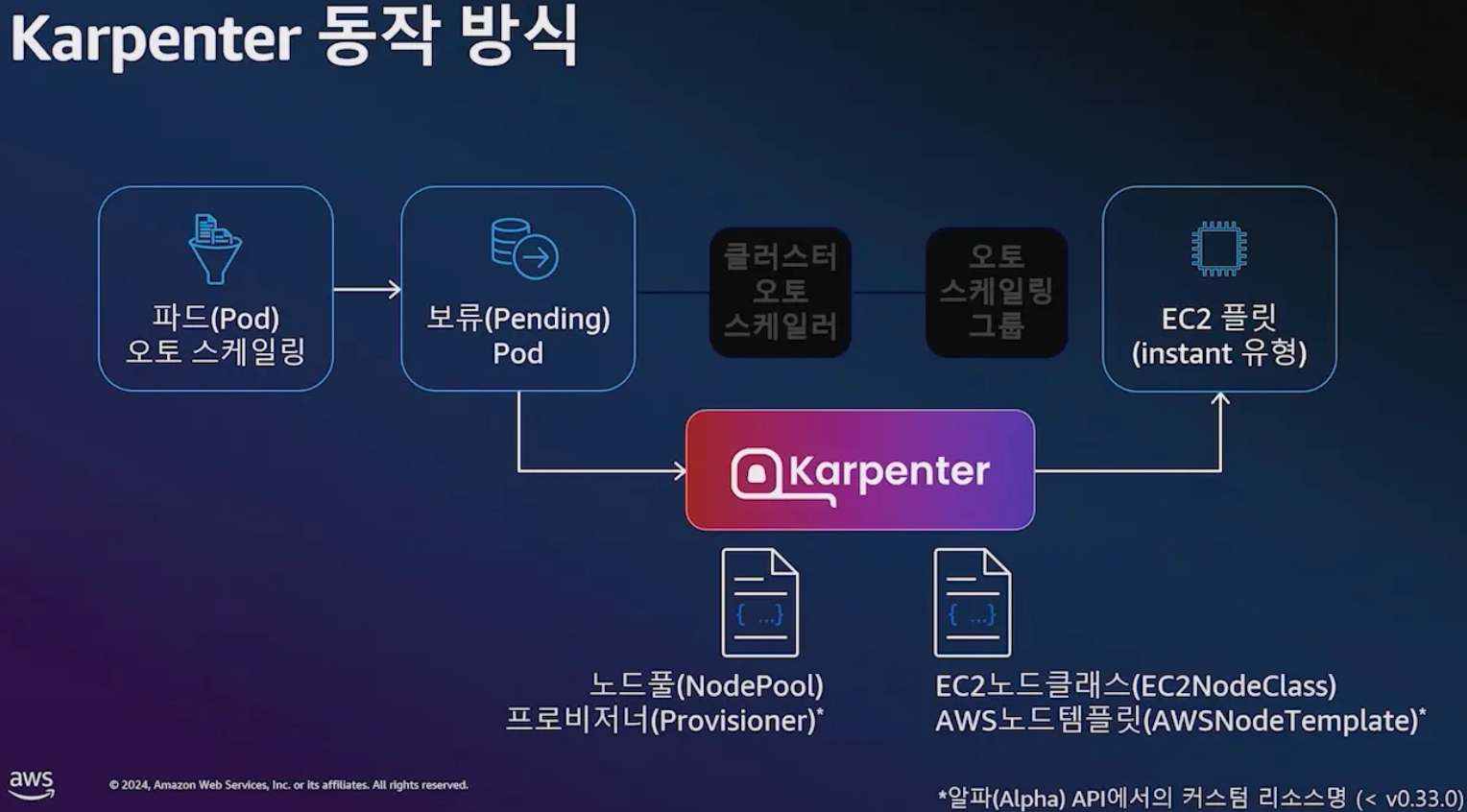
- 컴퓨팅 Spec 선정을 위해 검토해야 할 사항 ⇒ AWS 인스턴스 유형만 100가지!

- 컴퓨팅 유연성 : 구입 옵션, CPU Arch 등
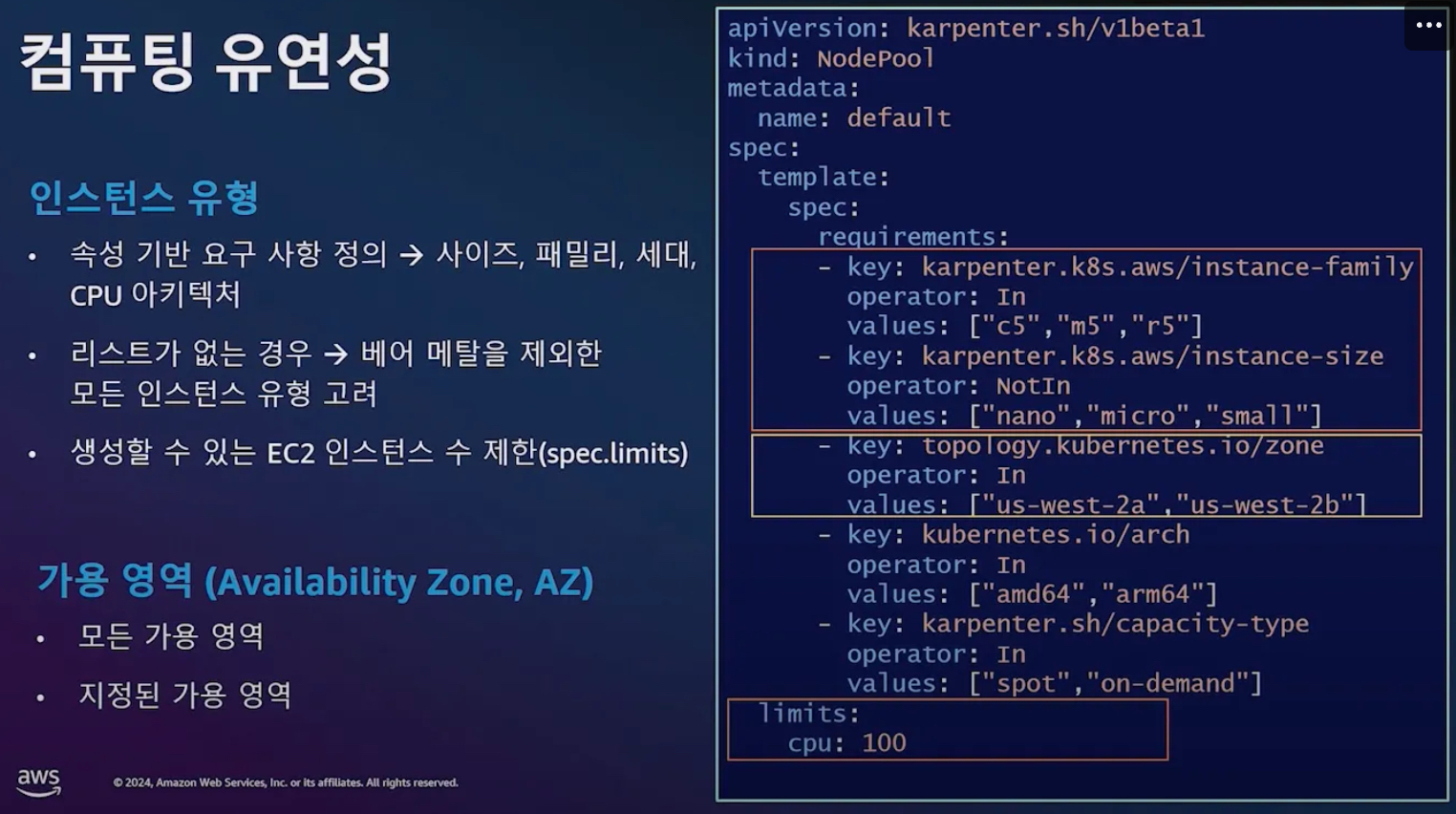
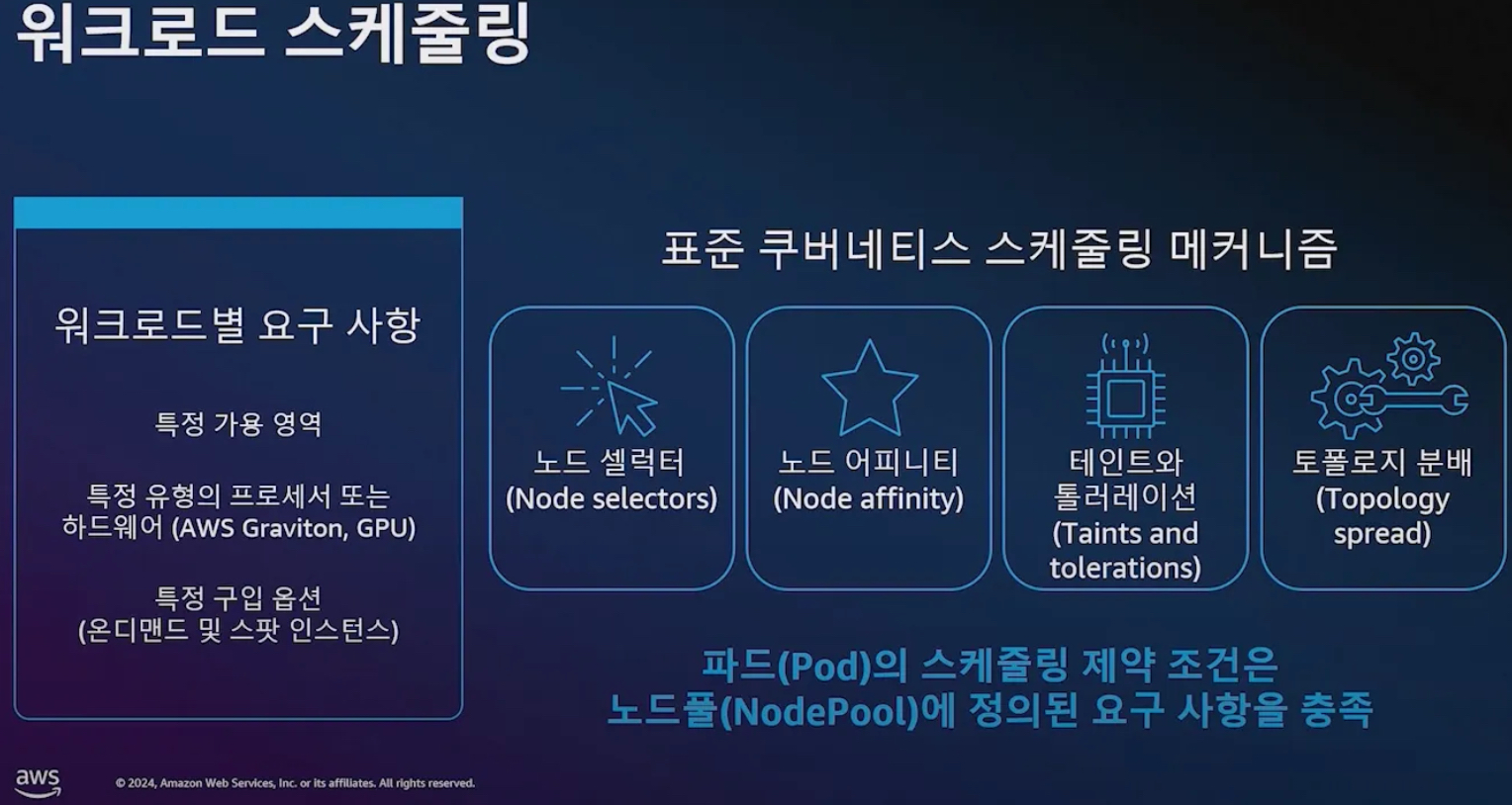
- 워크로드 스케줄링 ⇒ k8s 스케줄링 메커니즘 이해를 하고 노드풀 요구 사항 충족이 필요!
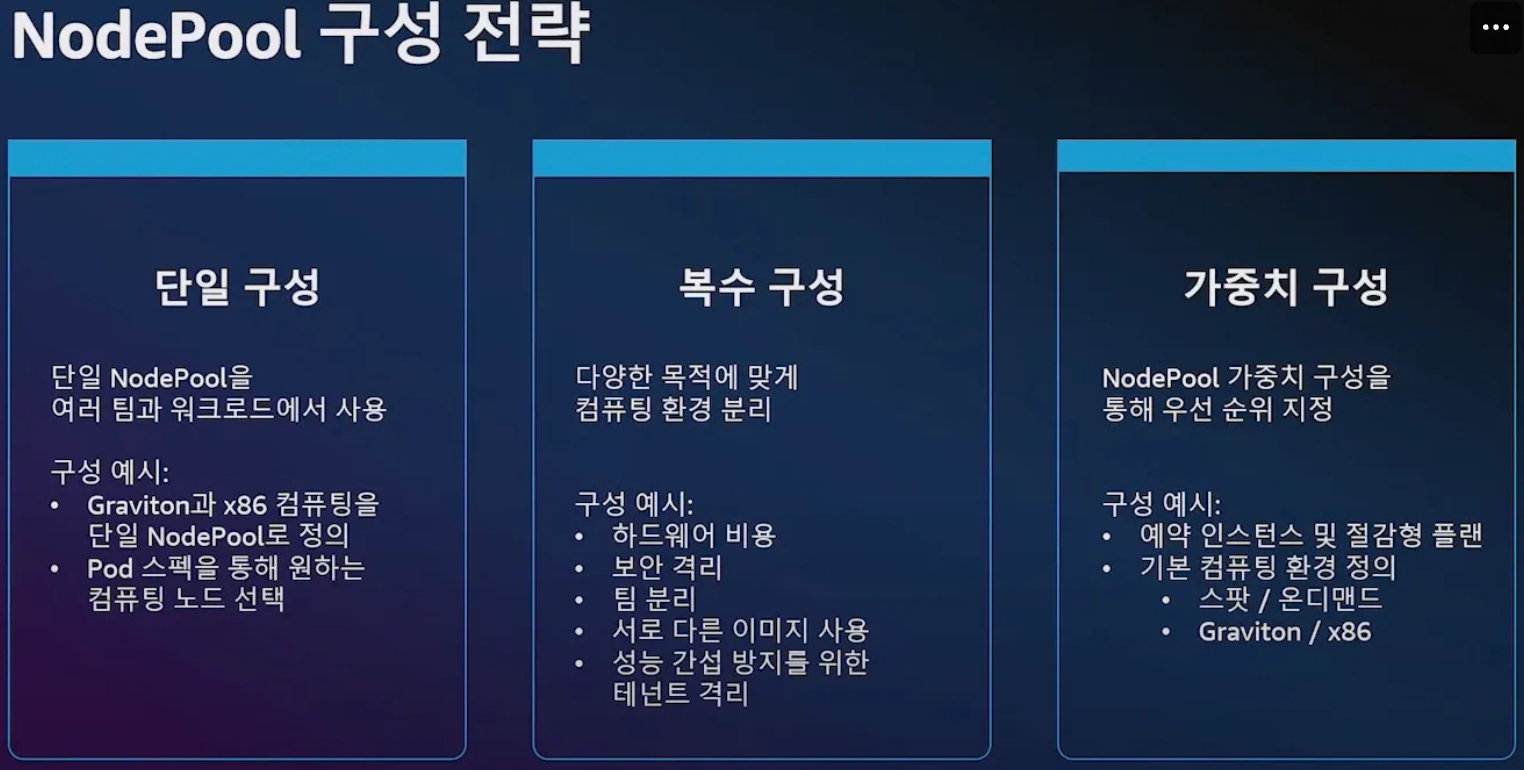
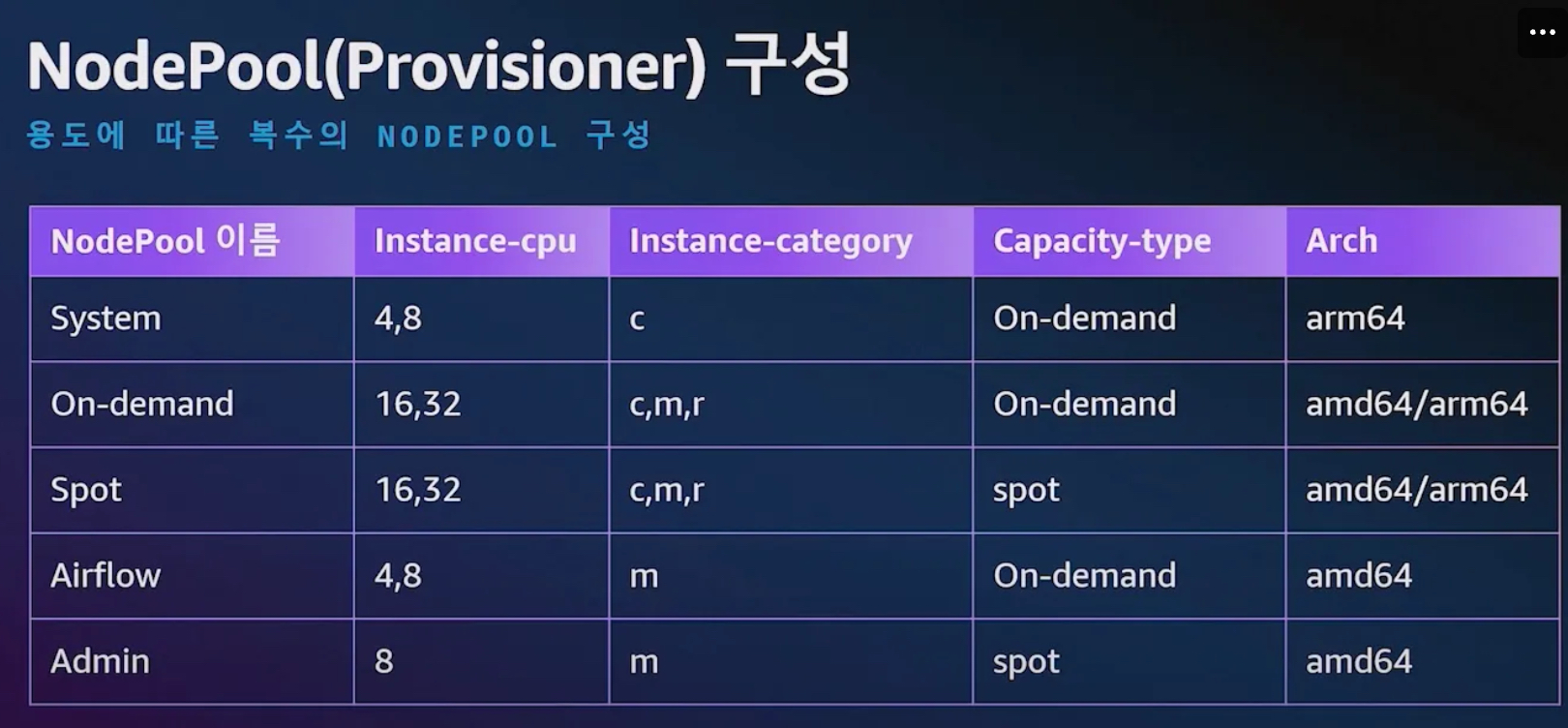
- NodePool 구성 전략 : 단일 구성, 복수 구성, 가중치 구성
- 비용 최적화 (예시)
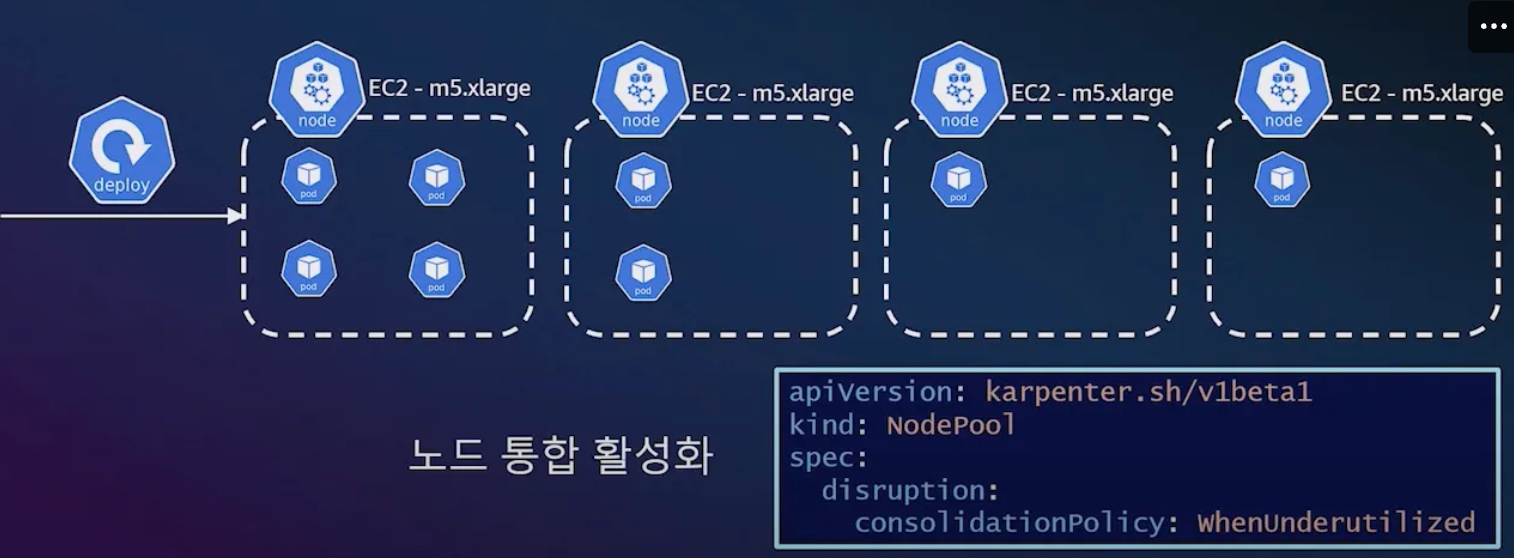
- 1단계
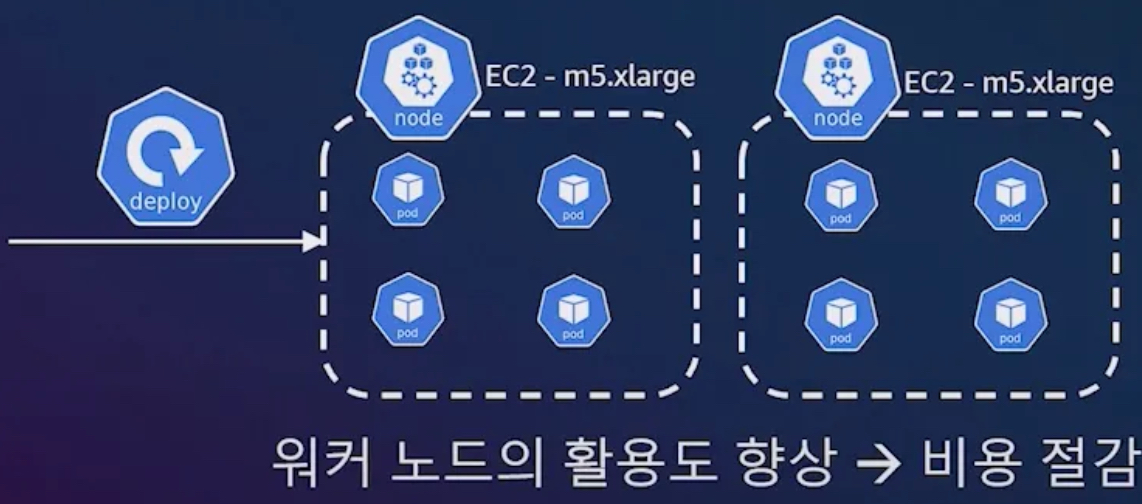
- 2단계
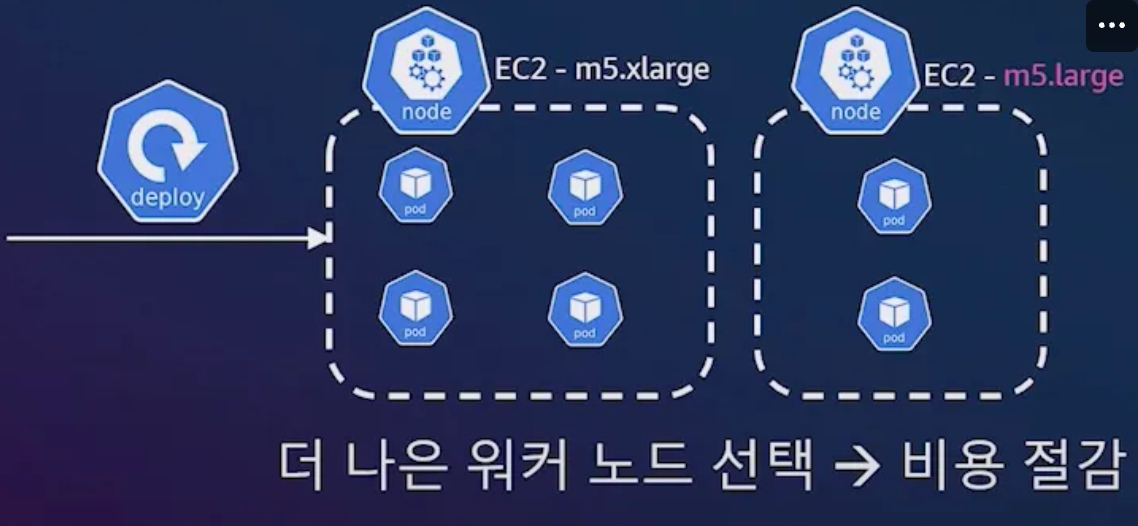
- 1단계
- 운영 효율화 : 데이터 플레인 관리 간소화
- 클러스터 오토 스케일러
- 노드 그룹
- 노드 중단 핸들러 Node Termination Handler
- 디스케줄링
- 스팟 중단 대처 : 핸들러 내장, 2분(120초) 이내에 파드가 신규 노드에 재생성(헬스체크 OK) 가능하게 준비
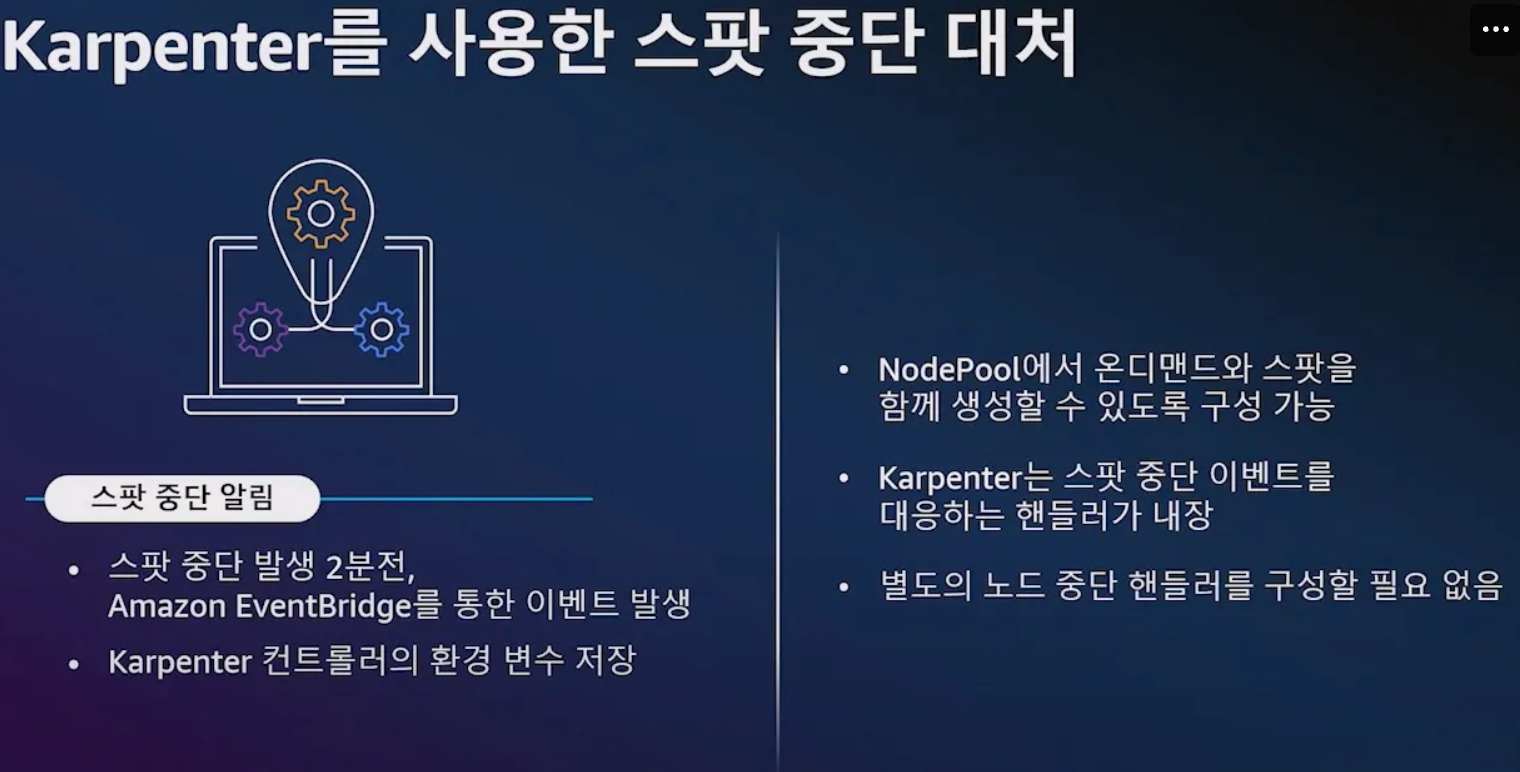
- 노드 생성 심층 분석 : 스케줄링, 배치, 빈 패킹, 의사 결정
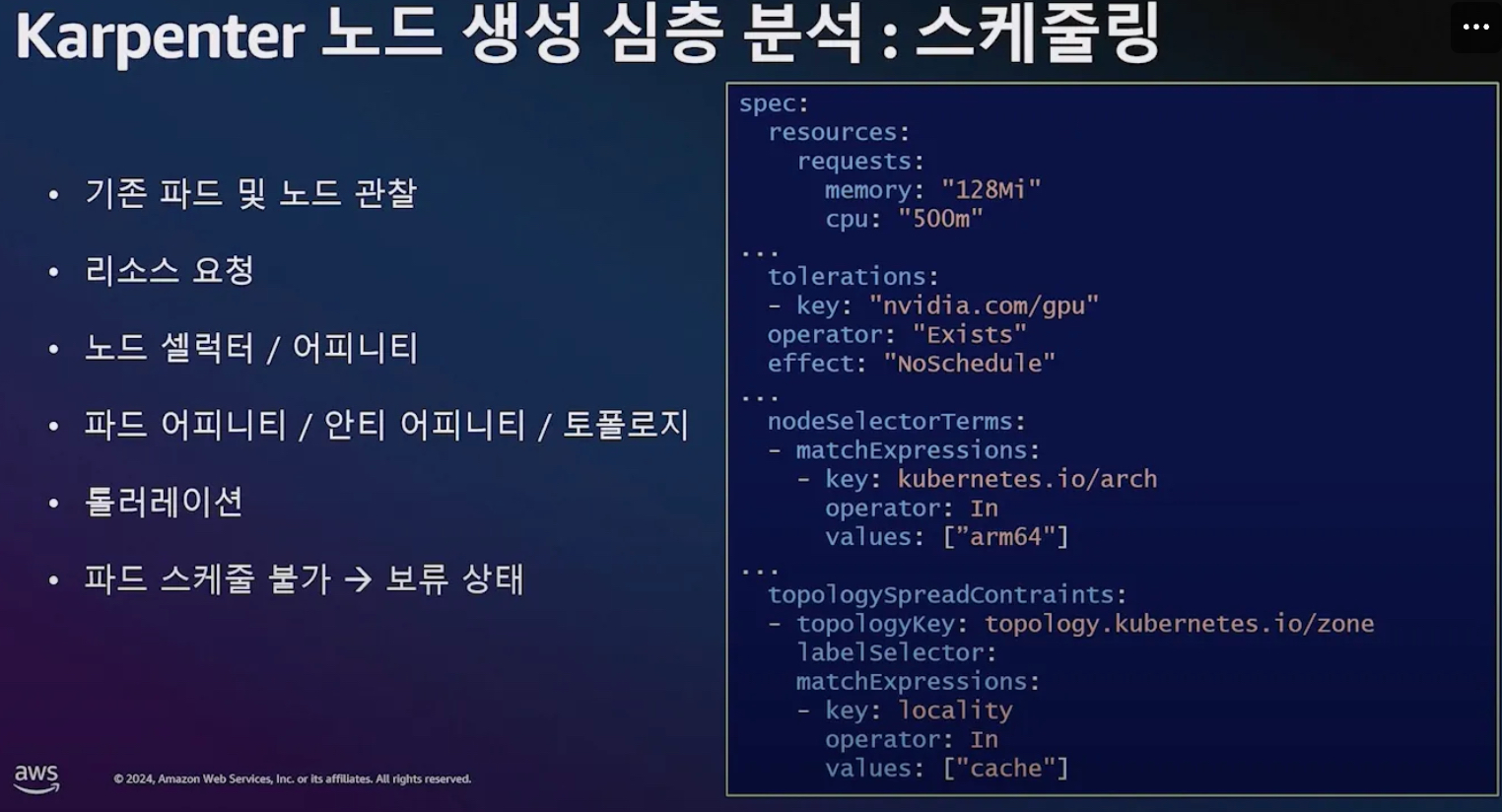
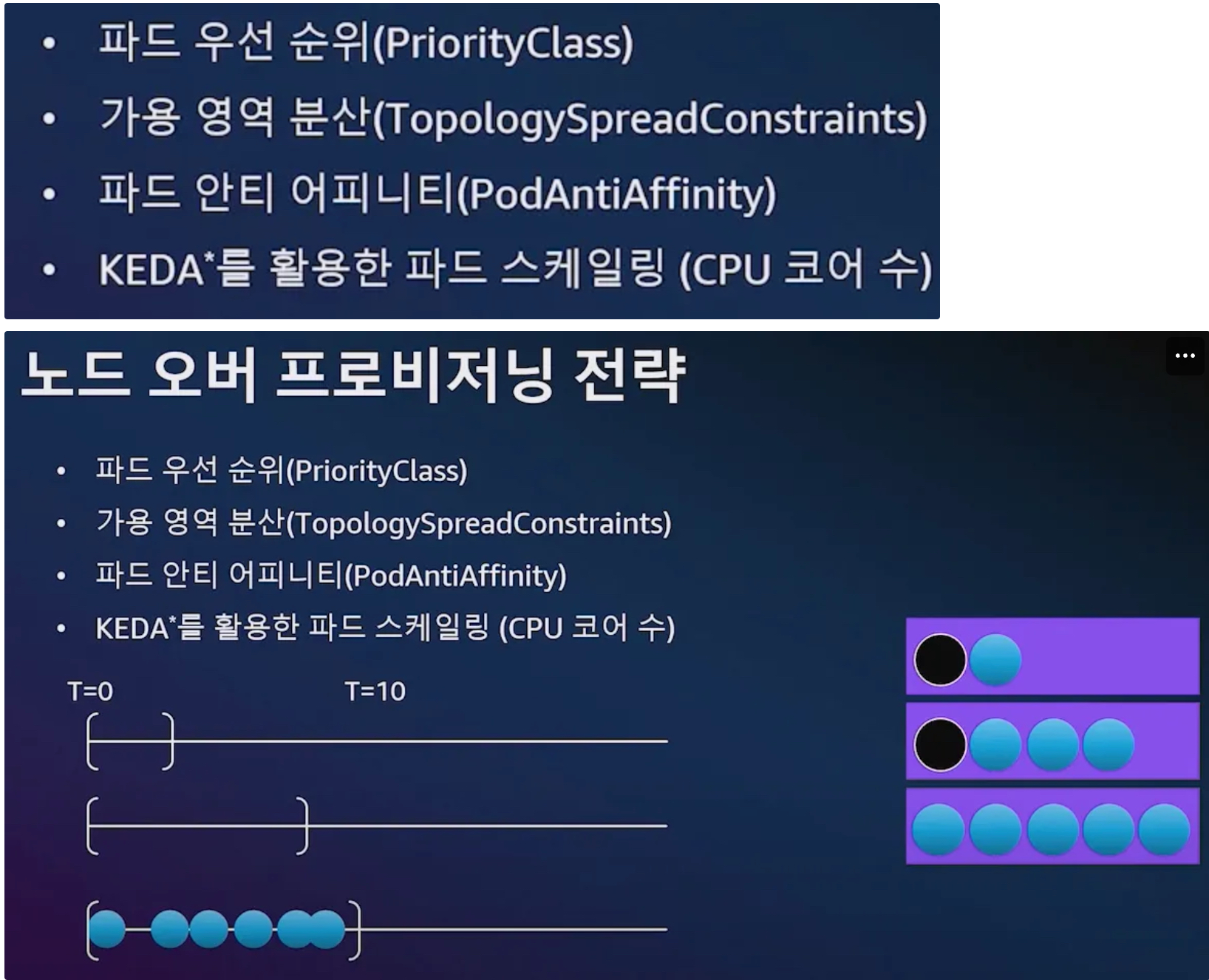
- 스케줄링 : kube-scheduler 과 협력 관계로 동작, 파드 스케줄 불가 → 파드 보류 상태 ⇒ 카펜터가 동작(watch)
- 배치 : 얼마만큼 보류 파드를 묶어서 처리, 폴링 타임(확장 윈도우 알고리즘)
- 파드 생성에는 시간이 소요
- 확장 윈도우 알고리즘 : [1, 10]초
- 유휴 시간 : 1초
- 최대 10초까지의 보류중인 파드들을 단일 배치로 구성
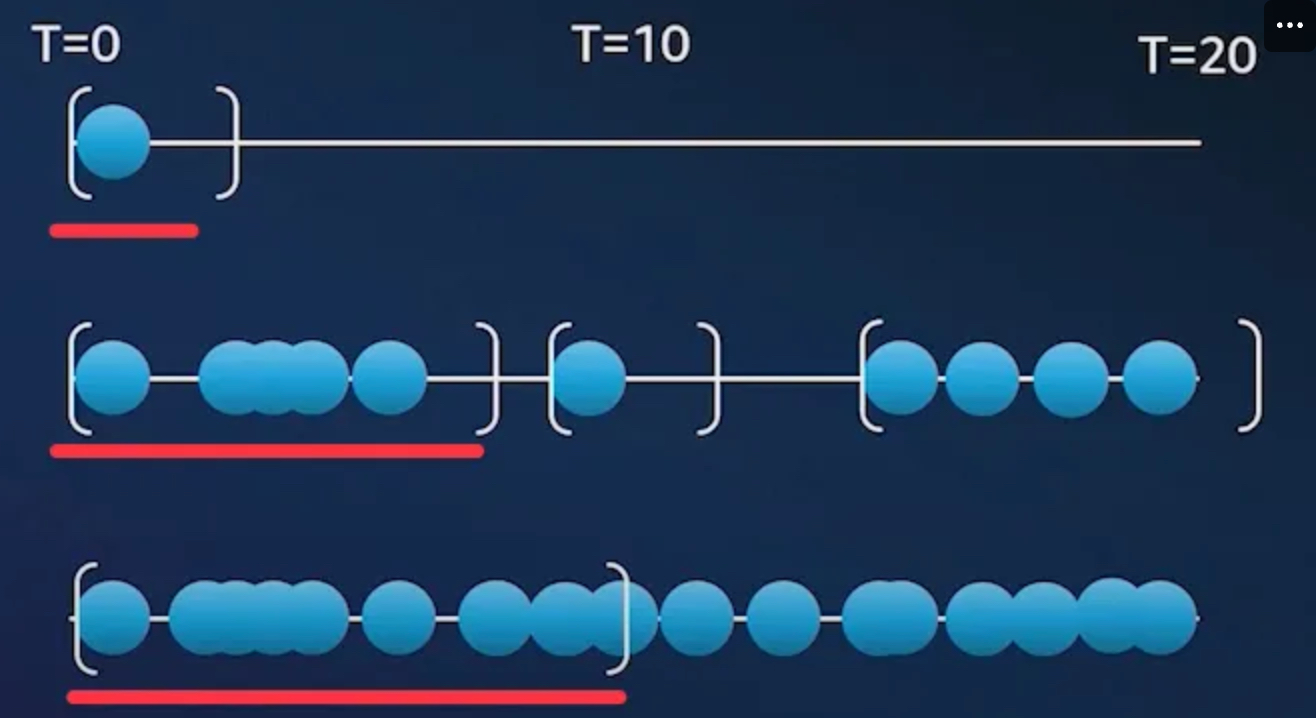
- (최상단) 1초 대기 후 처리
- (맨하단) 10초까지 보류 파드가 1초 간격 이내로 지속 발생하여, 10초까지 보류 파드를 단일 배치로 구성
- 빈 패킹 - wikipedia , k8s , 알고리즘 , Blog*
- 스케줄링과 빈패킹 시뮬레이션 결합
- 노드풀과 파드 요구 사항의 교집합 정의
- 호스트 포트, 볼륨 토폴로지, 볼륨 사용량 고려
- 데몬셋 스케줄링 고려
- 더 적은 수의, 보다 큰 인스턴스 타입 선호
사용률 최적화가 아닌 비용 최적화 : 스팟 사용 시, 사용률이 떨어지더라고 해당 타입을 선택 할 수 있음!
- 인스턴스 유형 디스커버리(AWS API)
- 비용 순으로 인스턴스 정렬
- 유구사항 교집합
- (가상의 인스턴스로 대입해서 사용 가능 여부 판단) 재사용, 스케일업 또는 생성
- 의사 결정 : 결정은 EC2 Fleet API를 통해서 이루어짐
- EC2 생성 (가용 영역 + 용량 타입 + 가격)
- 다양한 인스턴스 유형 정의를 통한 유연성 확보
- 온디멘드 할당 전략 : lowest-price → 가장 싼 것
- 스팟 할당 전략 : price-capacity-optimized → 가장 싼 것 + 경쟁 racing 이 낮은 것 (중단 가능 성능 최소화 한 것)
- Drift : 선언한 값과 운영 머신 값이 일치하지 않을 경우 재조정
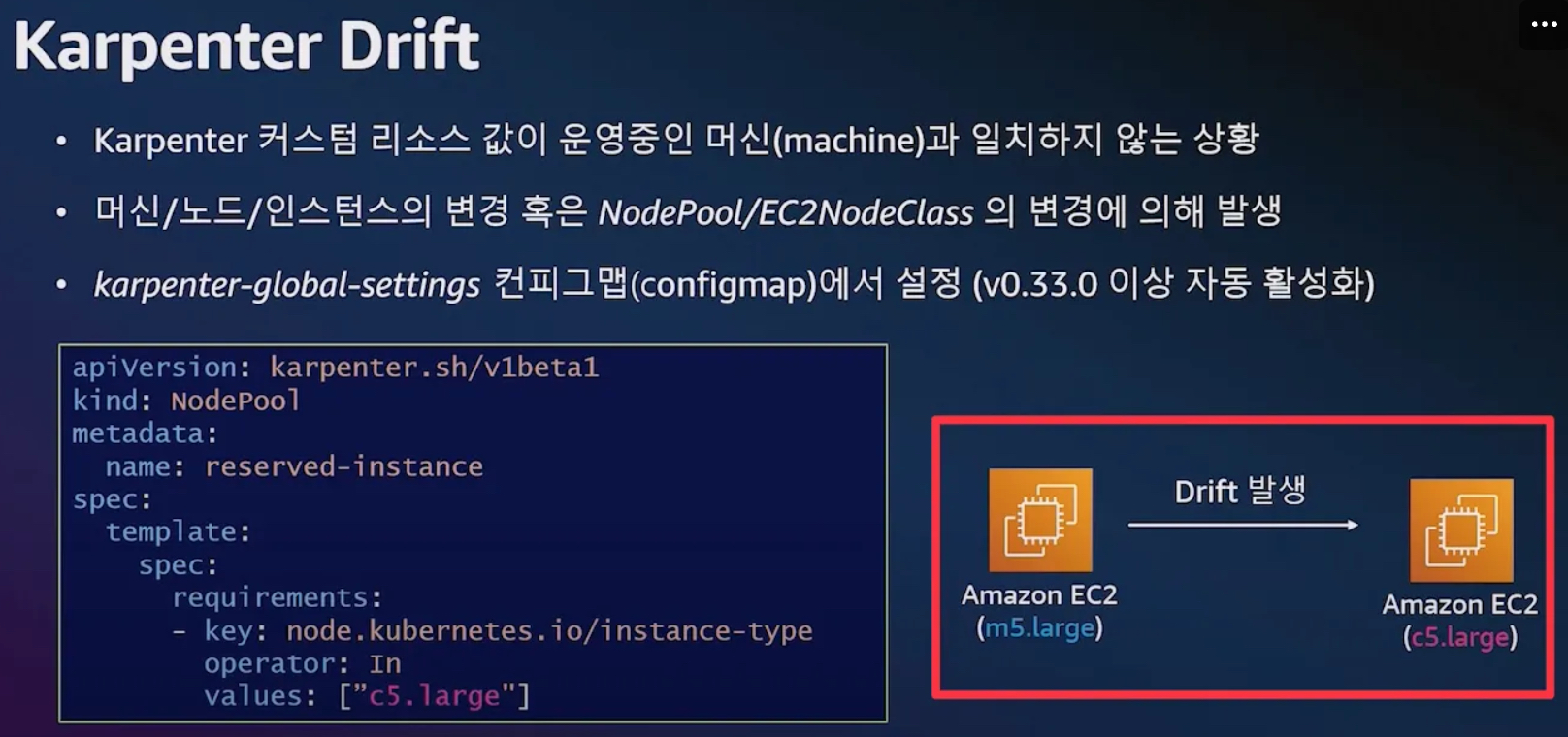
- Drift 활용 : 패치 및 업그레이드
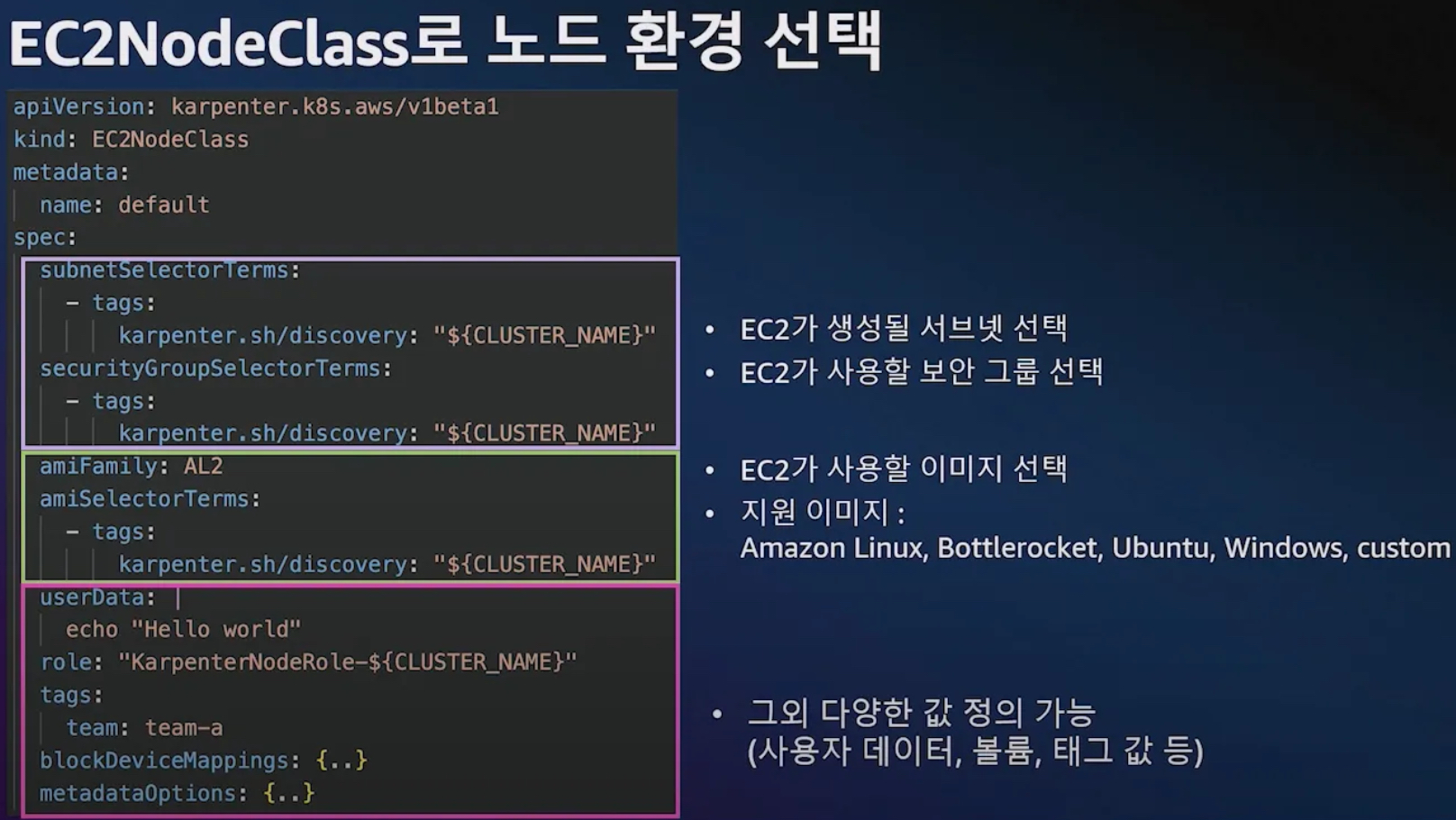
- 기본 이미지 사용 시, 신규 버전 출시 된 경우
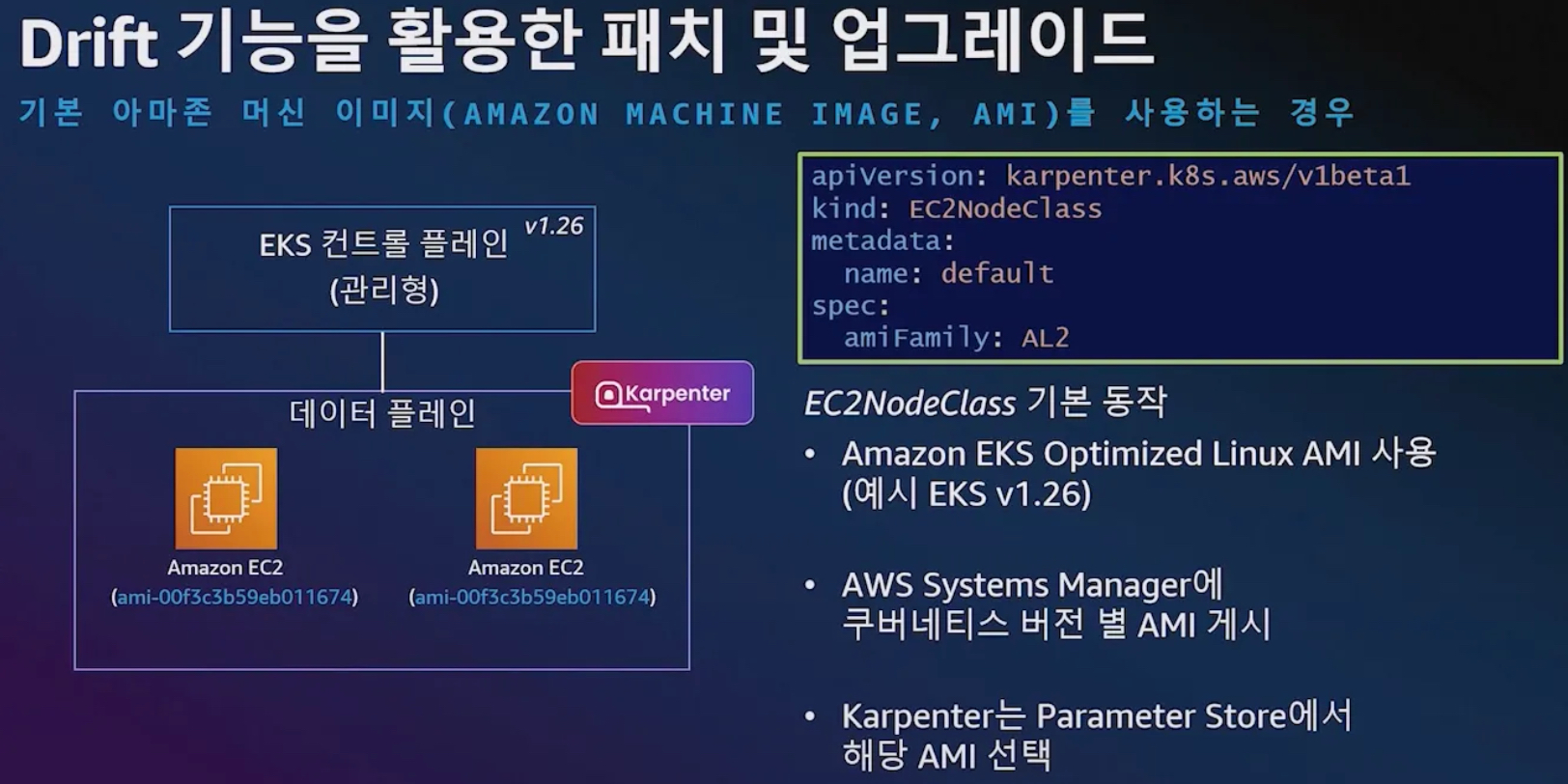
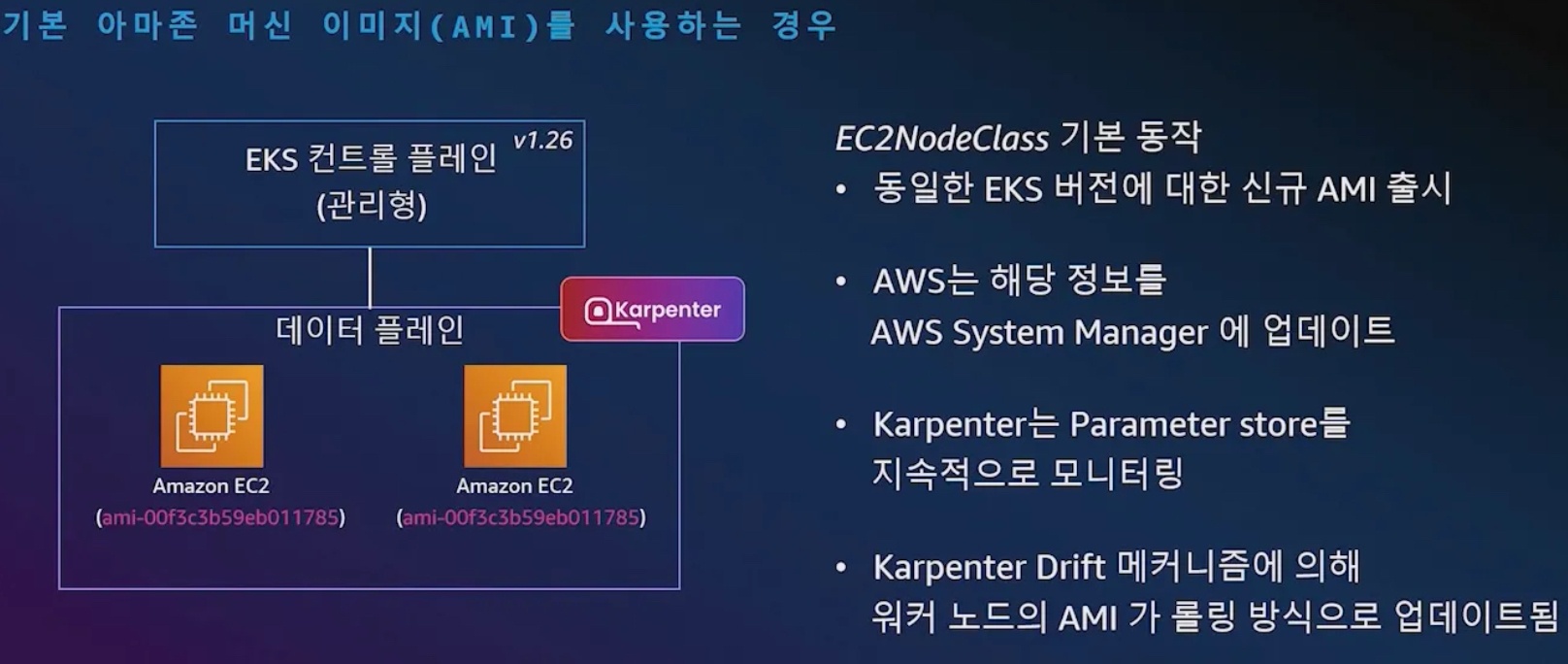
- EKS ControlPlane 업그레이드 시, 해당 버전에 맞는 AMI로 업그레이드 ⇒ 항상 최신의 EKS AMI 사용 가능(보안 향상)
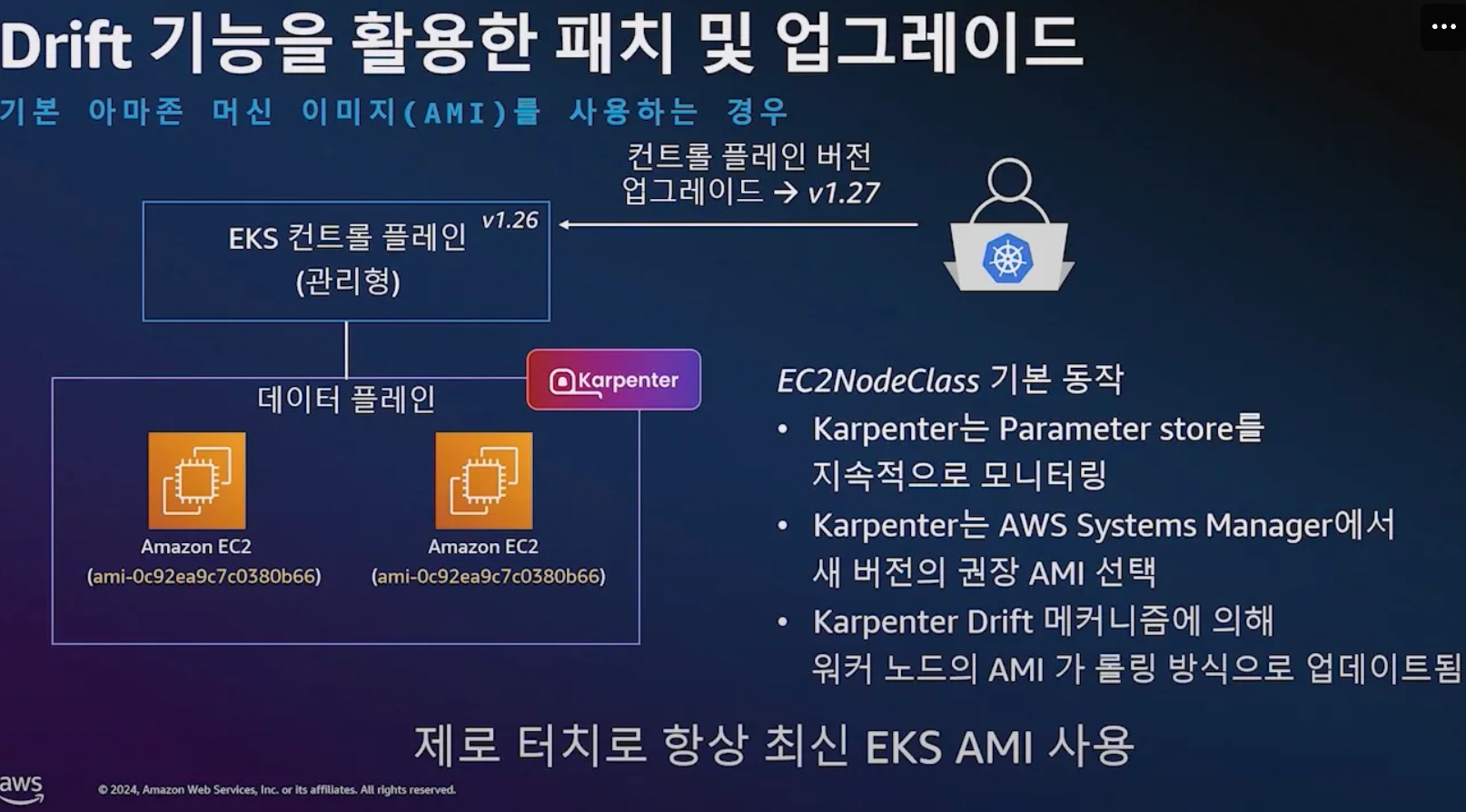
- 기본 이미지 사용 시, 신규 버전 출시 된 경우
- 노드 중단 disruption : 중요 파드는 dnd 설정 할것
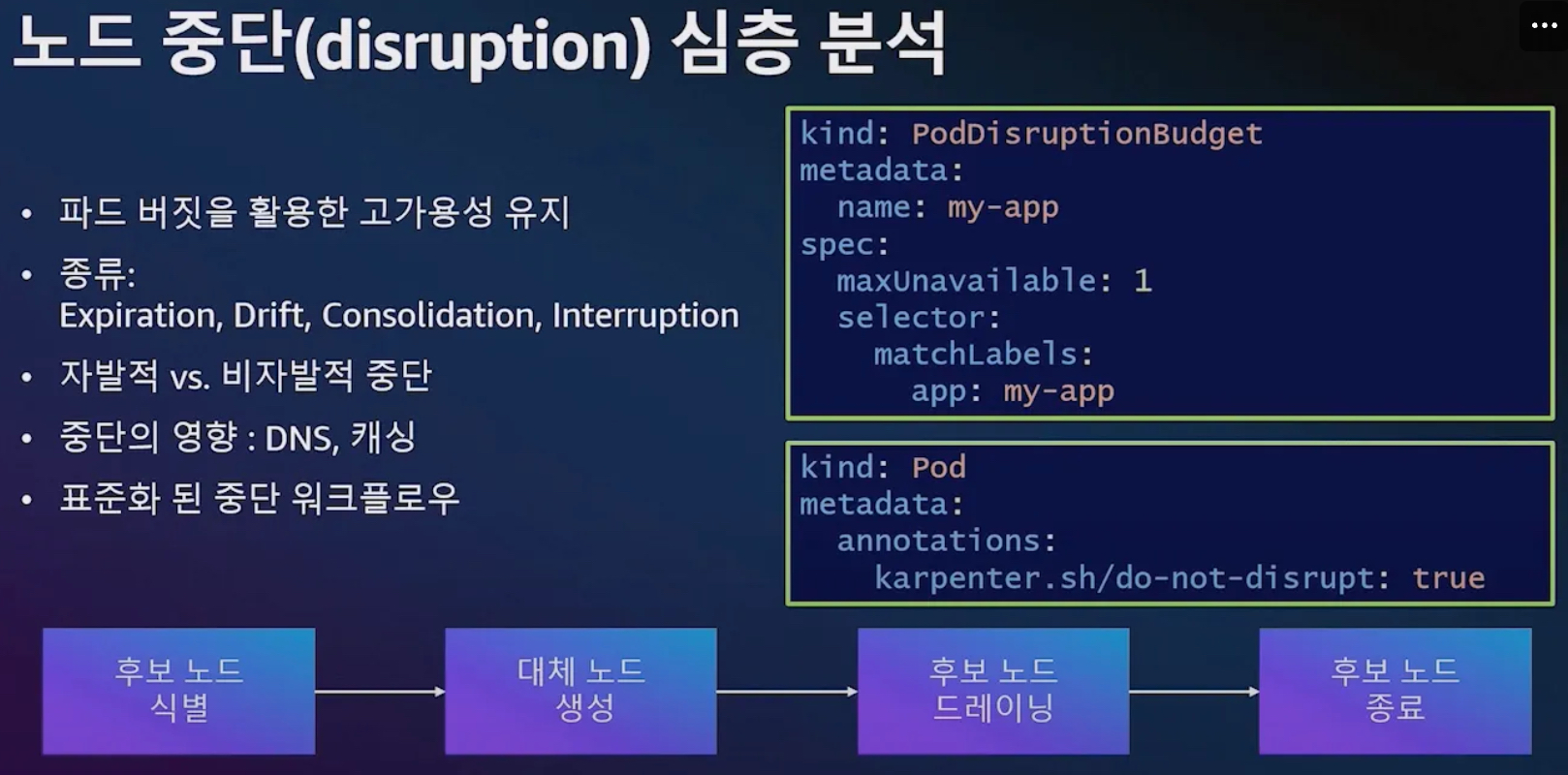
- 노드 중단 종류 : Drift, Expiration, Interruption(비자발적 중단), Consolidation(복잡함, 버전 0.33이상 기본 활성화)
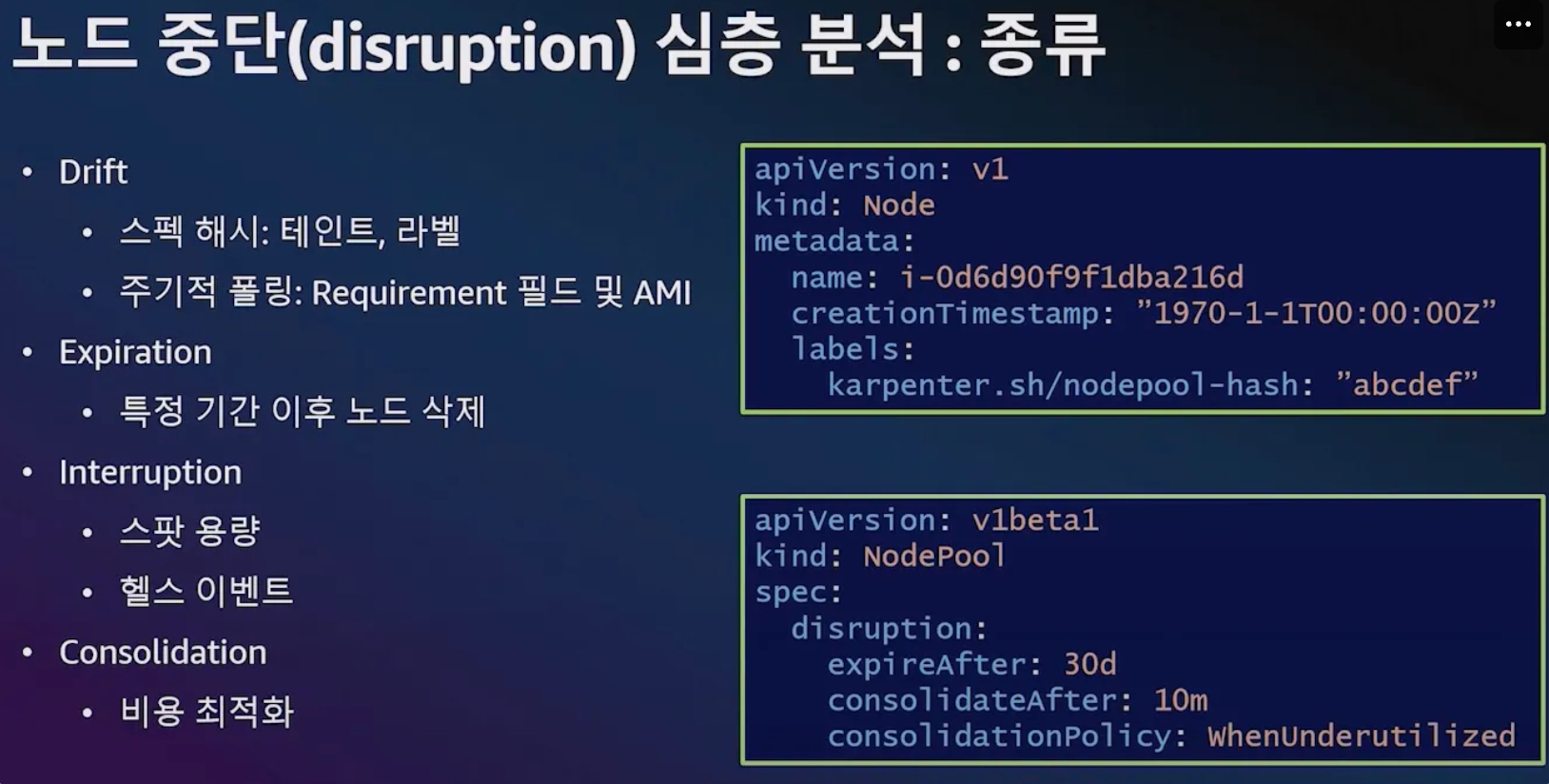
- 노드 중단 Consolidation
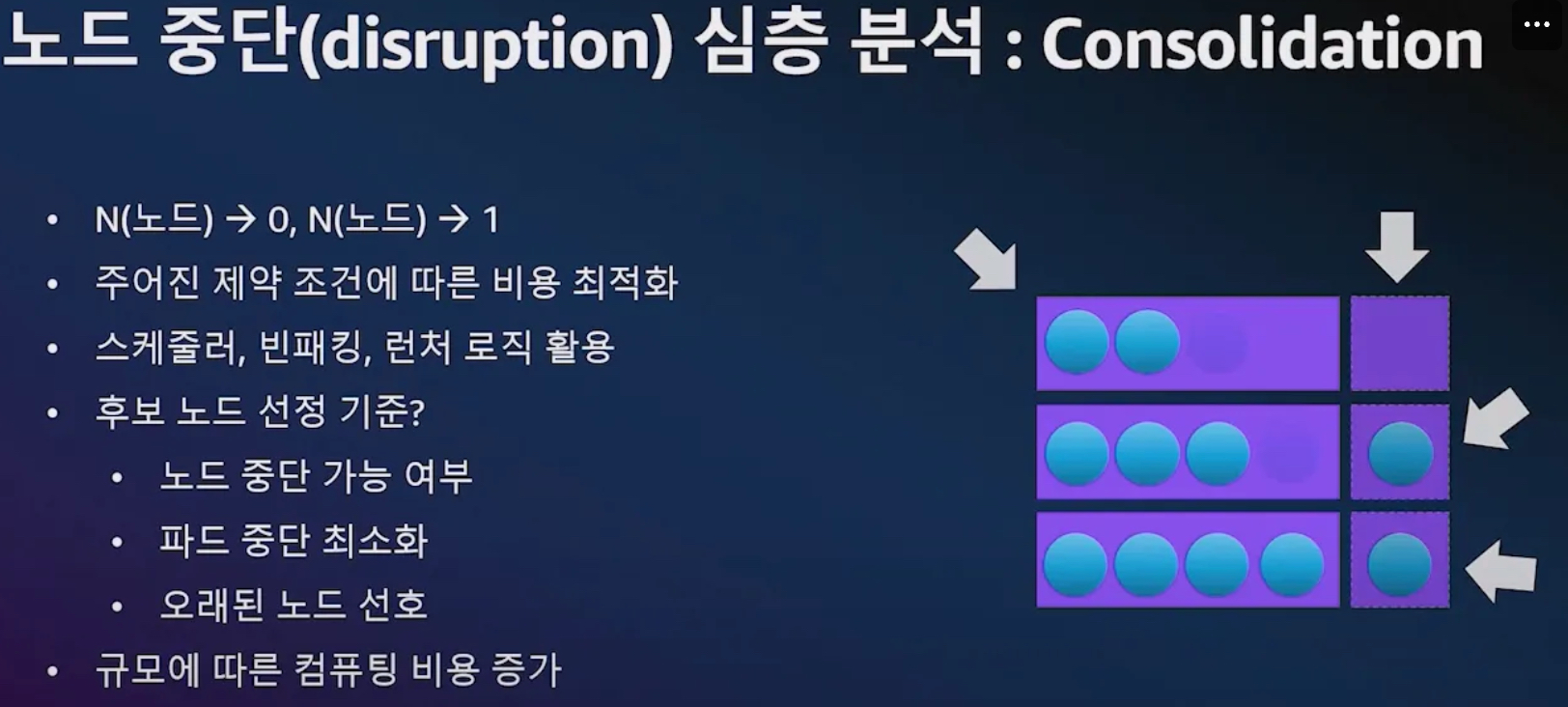
- 아래 처럼 Consolidation : 재스케줄러 고려, 빈 패킹 고려
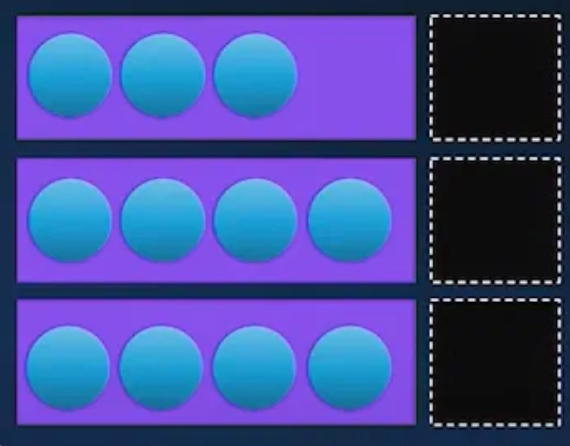
- 예시2) 활용도가 떨어지고 있음
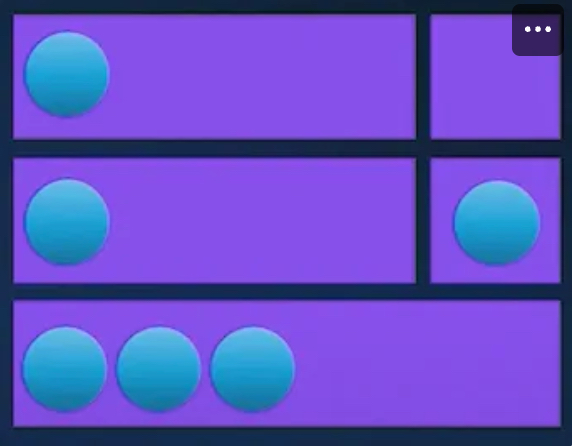
- 3개의 노드를 없애고 통합
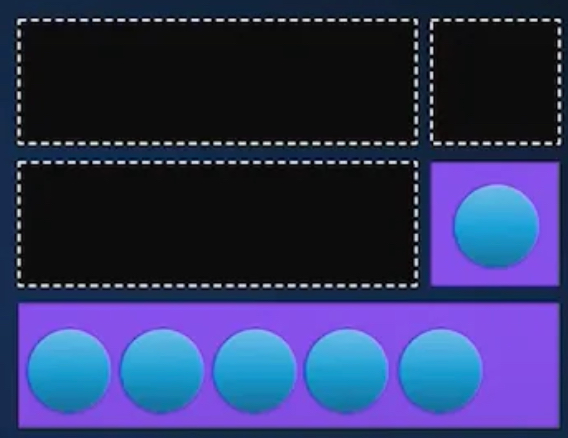
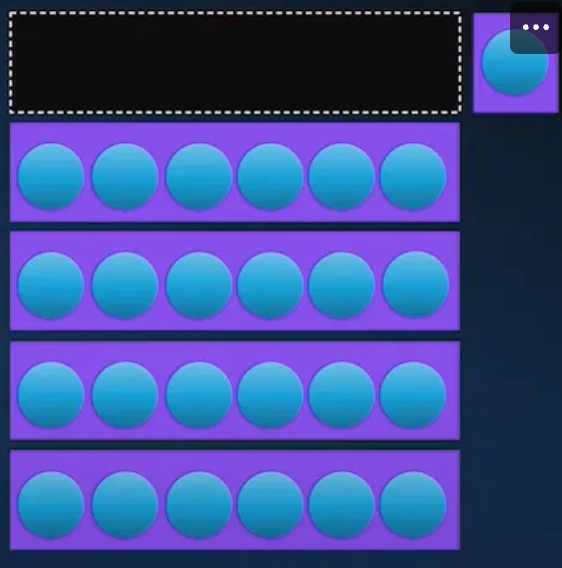
- 예시3) 어느 하나 노드에 들어가기 어려움

- 1대의 파드를 나머지 4대의 노드로 옮기고 low 노드 1대에 1개 파드 옮김 ⇒ NP(Non-deterministic Polynomial time) 문제란 해답을 빠르게 검증할 수 있지만, 정답을 찾는 것은 계산량이 기하급수적으로 늘어나는 문제를 의미합니다.
- 아래 처럼 Consolidation : 재스케줄러 고려, 빈 패킹 고려
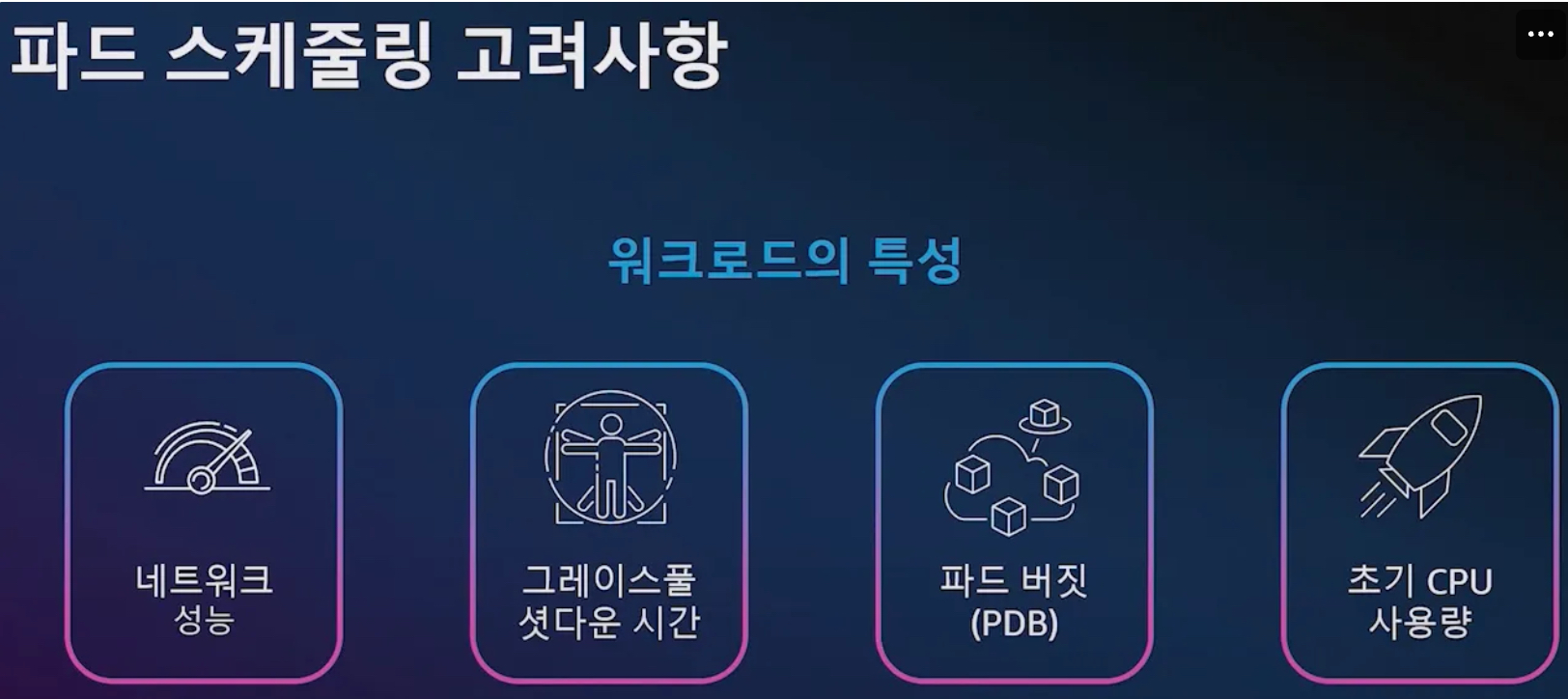
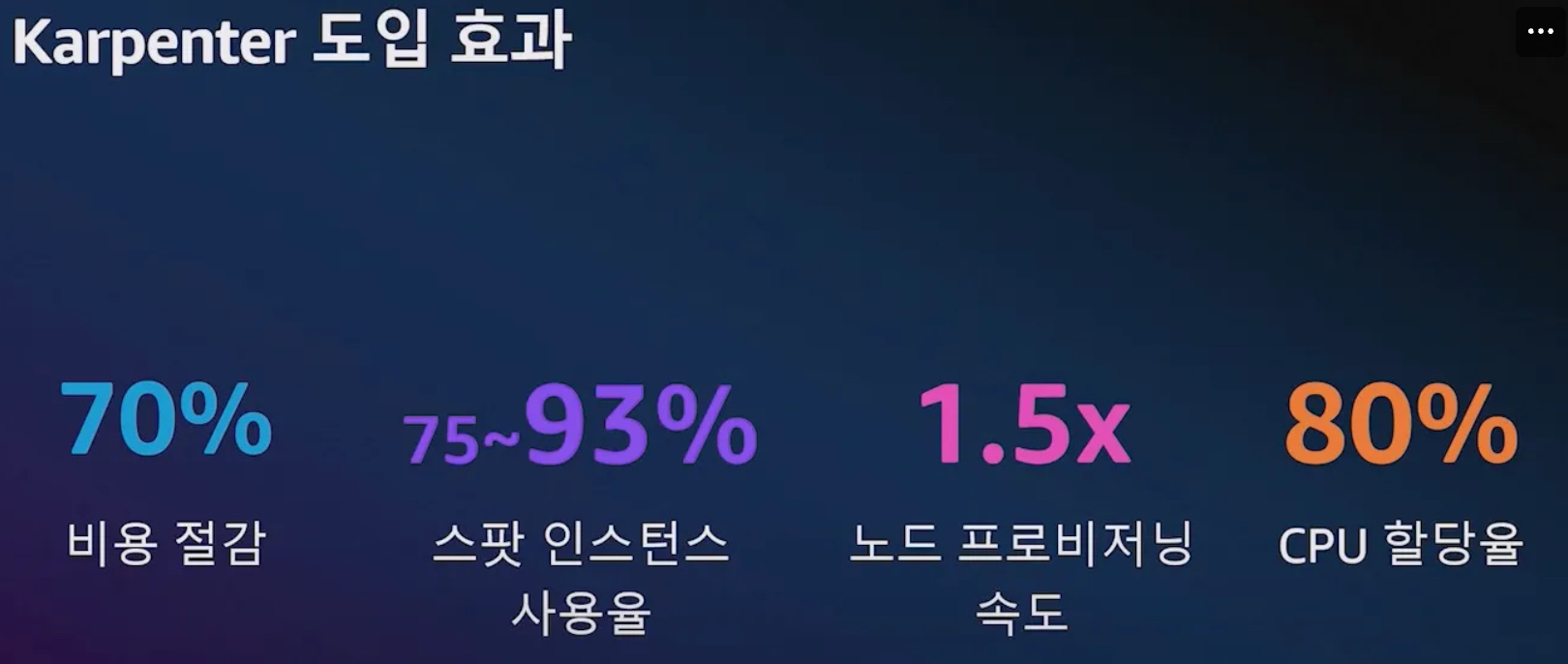
- 위대한 상상 운영 사례
- 노드 오버 프로비저닝 전략 : 우선순위 낮은 더미 파드 배치 활용
7.4 실습
7.4.1 Set environment variables
# 변수 설정
export KARPENTER_NAMESPACE="kube-system"
export KARPENTER_VERSION="1.2.1"
export K8S_VERSION="1.32"

export AWS_PARTITION="aws" # if you are not using standard partitions, you may need to configure to aws-cn / aws-us-gov
export CLUSTER_NAME="sejkim-karpenter-demo" # ${USER}-karpenter-demo
export AWS_DEFAULT_REGION="ap-northeast-2"
export AWS_ACCOUNT_ID="$(aws sts get-caller-identity --profile aews --query Account --output text)"
export TEMPOUT="$(mktemp)"
export ALIAS_VERSION="$(aws ssm get-parameter --name "/aws/service/eks/optimized-ami/${K8S_VERSION}/amazon-linux-2023/x86_64/standard/recommended/image_id" --query Parameter.Value | xargs aws ec2 describe-images --query 'Images[0].Name' --image-ids | sed -r 's/^.*(v[[:digit:]]+).*$/\1/')"

# 확인
echo "${KARPENTER_NAMESPACE}" "${KARPENTER_VERSION}" "${K8S_VERSION}" "${CLUSTER_NAME}" "${AWS_DEFAULT_REGION}" "${AWS_ACCOUNT_ID}" "${TEMPOUT}" "${ALIAS_VERSION}"
7.4.2 Create a Cluster
- Use CloudFormation to set up the infrastructure needed by the EKS cluster. See CloudFormation for a complete description of what
cloudformation.yamldoes for Karpenter. - Create a Kubernetes service account and AWS IAM Role, and associate them using IRSA to let Karpenter launch instances.
- Add the Karpenter node role to the
aws-authconfigmap to allow nodes to connect. - Use AWS EKS managed node groups for the kube-system and karpenter namespaces. Uncomment fargateProfiles settings (and comment out managedNodeGroups settings) to use Fargate for both namespaces instead.
- Set
KARPENTER_IAM_ROLE_ARNvariables. - Create a role to allow spot instances.
- Run Helm to install Karpenter
# CloudFormation 스택으로 IAM Policy/Role, SQS, Event/Rule 생성 : 3분 정도 소요
## IAM Policy : KarpenterControllerPolicy-gasida-karpenter-demo
## IAM Role : KarpenterNodeRole-gasida-karpenter-demo
curl -fsSL https://raw.githubusercontent.com/aws/karpenter-provider-aws/v"${KARPENTER_VERSION}"/website/content/en/preview/getting-started/getting-started-with-karpenter/cloudformation.yaml  > "${TEMPOUT}" \
&& aws cloudformation deploy \
  --stack-name "Karpenter-${CLUSTER_NAME}" \
  --template-file "${TEMPOUT}" \
  --capabilities CAPABILITY_NAMED_IAM \
  --parameter-overrides "ClusterName=${CLUSTER_NAME}"


# 클러스터 생성 : EKS 클러스터 생성 15분 정도 소요
eksctl create cluster -f - <<EOF
---
apiVersion: eksctl.io/v1alpha5
kind: ClusterConfig
metadata:
  name: ${CLUSTER_NAME}
  region: ${AWS_DEFAULT_REGION}
  version: "${K8S_VERSION}"
  tags:
    karpenter.sh/discovery: ${CLUSTER_NAME}

iam:
  withOIDC: true
  podIdentityAssociations:
  - namespace: "${KARPENTER_NAMESPACE}"
    serviceAccountName: karpenter
    roleName: ${CLUSTER_NAME}-karpenter
    permissionPolicyARNs:
    - arn:${AWS_PARTITION}:iam::${AWS_ACCOUNT_ID}:policy/KarpenterControllerPolicy-${CLUSTER_NAME}

iamIdentityMappings:
- arn: "arn:${AWS_PARTITION}:iam::${AWS_ACCOUNT_ID}:role/KarpenterNodeRole-${CLUSTER_NAME}"
  username: system:node:{{EC2PrivateDNSName}}
  groups:
  - system:bootstrappers
  - system:nodes
  ## If you intend to run Windows workloads, the kube-proxy group should be specified.
  # For more information, see https://github.com/aws/karpenter/issues/5099.
  # - eks:kube-proxy-windows

managedNodeGroups:
- instanceType: t3.medium
  amiFamily: AmazonLinux2023
  name: ${CLUSTER_NAME}-ng
  desiredCapacity: 2
  minSize: 1
  maxSize: 2
  iam:
    withAddonPolicies:
      externalDNS: true

addons:
- name: eks-pod-identity-agent
EOF


# eks 배포 확인
eksctl get cluster
NAME			REGION		EKSCTL CREATED
sejkim-karpenter-demo	ap-northeast-2	True

eksctl get nodegroup --cluster $CLUSTER_NAME
CLUSTER			NODEGROUP			STATUS	CREATED			MIN SIZE	MAX SIZE	DESIRED CAPACITY	INSTANCE TYPE	IMAGE ID		ASG NAME								TYPE
sejkim-karpenter-demo	sejkim-karpenter-demo-ng	ACTIVE	2025-03-08T14:37:20Z	1		2		2			t3.medium	AL2023_x86_64_STANDARD	eks-sejkim-karpenter-demo-ng-18cabb18-3178-8ce5-1fe3-2928865def0d	managed

eksctl get iamidentitymapping --cluster $CLUSTER_NAME
ARN												USERNAME				GROUPS					ACCOUNT
arn:aws:iam::1**********3:role/KarpenterNodeRole-sejkim-karpenter-demo				system:node:{{EC2PrivateDNSName}}	system:bootstrappers,system:nodes
arn:aws:iam::1**********3:role/eksctl-sejkim-karpenter-demo-nodeg-NodeInstanceRole-LpShCA5JpXgD	system:node:{{EC2PrivateDNSName}}	system:bootstrappers,system:nodes

eksctl get iamserviceaccount --cluster $CLUSTER_NAME
No iamserviceaccounts found

eksctl get addon --cluster $CLUSTER_NAME
2025-03-08 23:44:38 [ℹ]  Kubernetes version "1.32" in use by cluster "sejkim-karpenter-demo"
2025-03-08 23:44:38 [ℹ]  getting all addons
2025-03-08 23:44:39 [ℹ]  to see issues for an addon run `eksctl get addon --name <addon-name> --cluster <cluster-name>`
NAME			VERSION			STATUS		ISSUES	IAMROLE												UPDATE AVAILABLE	CONFIGURATION VALUES	POD IDENTITY ASSOCIATION ROLES
coredns			v1.11.4-eksbuild.2	DEGRADED	1
eks-pod-identity-agent	v1.3.4-eksbuild.1	ACTIVE		0													v1.3.5-eksbuild.2
kube-proxy		v1.32.0-eksbuild.2	ACTIVE		0
metrics-server		v0.7.2-eksbuild.2	DEGRADED	1
vpc-cni			v1.19.2-eksbuild.1	ACTIVE		0	arn:aws:iam::1**********3:role/eksctl-sejkim-karpenter-demo-addon-vpc-cni-Role1-72O5AIgJ21FE	v1.19.3-eksbuild.1,v1.19.2-eksbuild.5

#
kubectl ctx
kubectl config rename-context "<각자 자신의 IAM User>@<자신의 Nickname>-karpenter-demo.ap-northeast-2.eksctl.io" "karpenter-demo"
kubectl config rename-context "admin@gasida-karpenter-demo.ap-northeast-2.eksctl.io" "karpenter-demo"

# k8s 확인
kubectl ns default
kubectl cluster-info
kubectl get node --label-columns=node.kubernetes.io/instance-type,eks.amazonaws.com/capacityType,topology.kubernetes.io/zone
NAME                                                STATUS   ROLES    AGE   VERSION               INSTANCE-TYPE   CAPACITYTYPE   ZONE
ip-192-168-44-153.ap-northeast-2.compute.internal   Ready    <none>   10m   v1.32.1-eks-5d632ec   t3.medium       ON_DEMAND      ap-northeast-2b
ip-192-168-76-20.ap-northeast-2.compute.internal    Ready    <none>   10m   v1.32.1-eks-5d632ec   t3.medium       ON_DEMAND      ap-northeast-2c

kubectl get pod -n kube-system -owide
NAME                              READY   STATUS    RESTARTS   AGE   IP               NODE                                                NOMINATED NODE   READINESS GATES
aws-node-525xb                    2/2     Running   0          10m   192.168.76.20    ip-192-168-76-20.ap-northeast-2.compute.internal    <none>           <none>
aws-node-m6mk4                    2/2     Running   0          10m   192.168.44.153   ip-192-168-44-153.ap-northeast-2.compute.internal   <none>           <none>
coredns-844d8f59bb-g24dz          1/1     Running   0          14m   192.168.49.206   ip-192-168-44-153.ap-northeast-2.compute.internal   <none>           <none>
coredns-844d8f59bb-zw6ct          1/1     Running   0          14m   192.168.56.61    ip-192-168-44-153.ap-northeast-2.compute.internal   <none>           <none>
eks-pod-identity-agent-5h8f9      1/1     Running   0          10m   192.168.44.153   ip-192-168-44-153.ap-northeast-2.compute.internal   <none>           <none>
eks-pod-identity-agent-75kfn      1/1     Running   0          10m   192.168.76.20    ip-192-168-76-20.ap-northeast-2.compute.internal    <none>           <none>
kube-proxy-csx7x                  1/1     Running   0          10m   192.168.76.20    ip-192-168-76-20.ap-northeast-2.compute.internal    <none>           <none>
kube-proxy-mfr5j                  1/1     Running   0          10m   192.168.44.153   ip-192-168-44-153.ap-northeast-2.compute.internal   <none>           <none>
metrics-server-74b6cb4f8f-kt6xf   1/1     Running   0          14m   192.168.51.108   ip-192-168-44-153.ap-northeast-2.compute.internal   <none>           <none>
metrics-server-74b6cb4f8f-tqqw5   1/1     Running   0          14m   192.168.53.140   ip-192-168-44-153.ap-northeast-2.compute.internal   <none>           <none>

kubectl get pdb -A
NAMESPACE     NAME             MIN AVAILABLE   MAX UNAVAILABLE   ALLOWED DISRUPTIONS   AGE
kube-system   coredns          N/A             1                 1                     15m
kube-system   metrics-server   N/A             1                 1                     15m

kubectl describe cm -n kube-system aws-auth

# EC2 Spot Fleet의 service-linked-role 생성 확인 : 만들어있는것을 확인하는 거라 아래 에러 출력이 정상!
# If the role has already been successfully created, you will see:
# An error occurred (InvalidInput) when calling the CreateServiceLinkedRole operation: Service role name AWSServiceRoleForEC2Spot has been taken in this account, please try a different suffix.
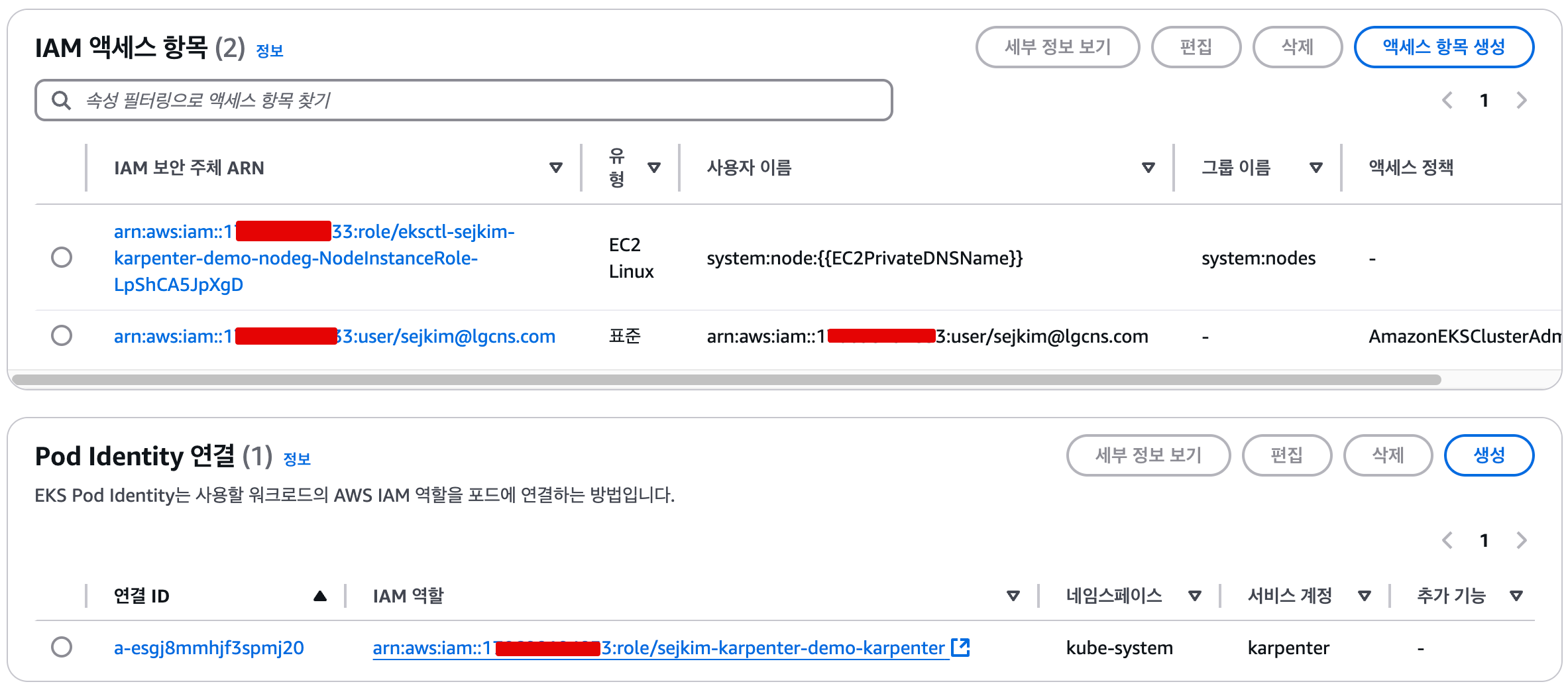
aws iam create-service-linked-role --aws-service-name spot.amazonaws.com || true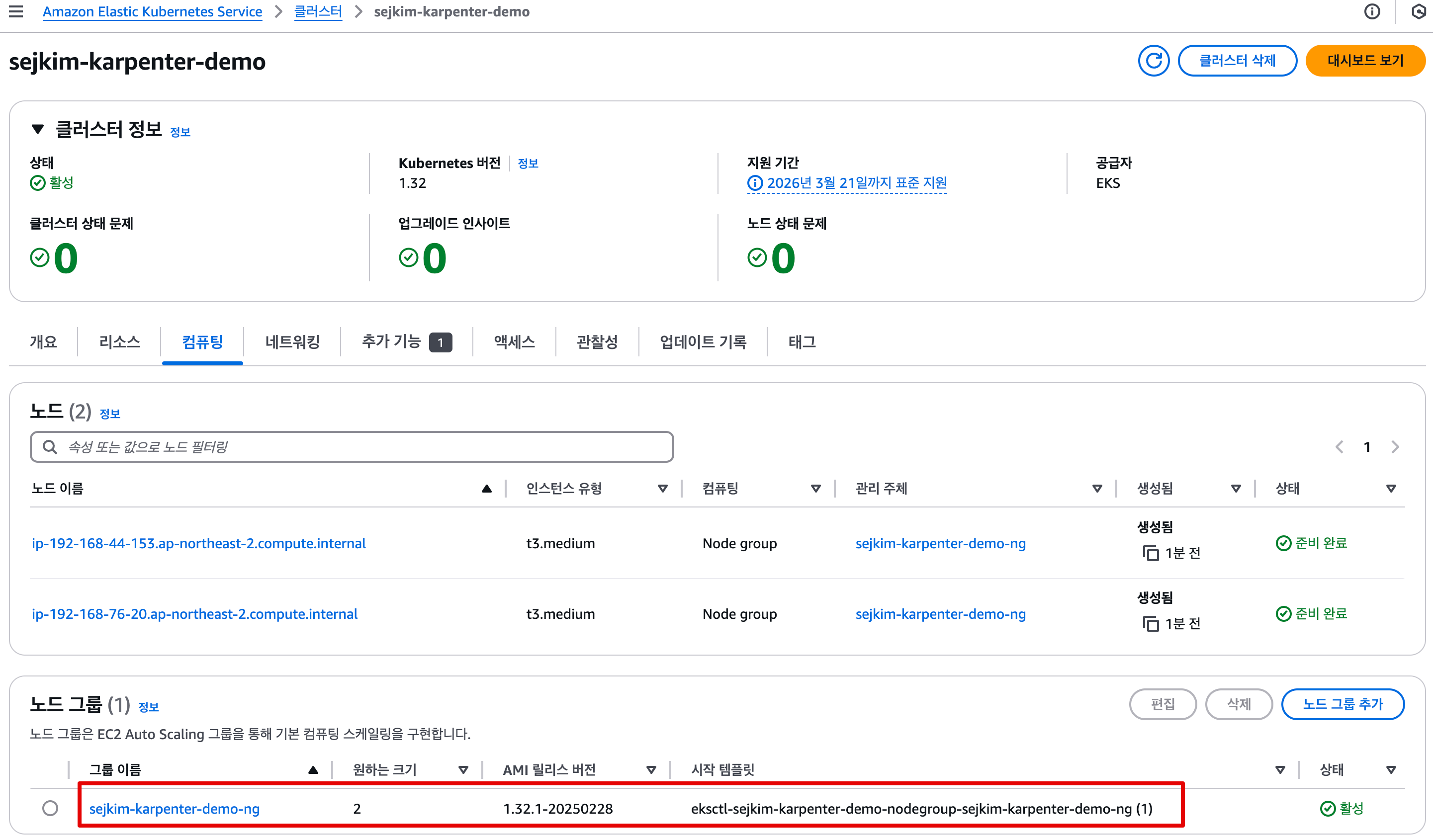
- AWS 웹 관리 콘솔 : EKS → Access , Add-ons 확인
- 실습 동작 확인을 위한 도구 설치 : kube-ops-view , (옵션) ExternalDNS
# kube-ops-view
helm repo add geek-cookbook https://geek-cookbook.github.io/charts/
helm install kube-ops-view geek-cookbook/kube-ops-view --version 1.2.2 --set service.main.type=LoadBalancer --set env.TZ="Asia/Seoul" --namespace kube-system
echo -e "http://$(kubectl get svc -n kube-system kube-ops-view -o jsonpath="{.status.loadBalancer.ingress[0].hostname}"):8080/#scale=1.5"
open "http://$(kubectl get svc -n kube-system kube-ops-view -o jsonpath="{.status.loadBalancer.ingress[0].hostname}"):8080/#scale=1.5"

혹은
kubectl annotate service kube-ops-view -n kube-system "external-dns.alpha.kubernetes.io/hostname=kubeopsview.$MyDomain"
echo -e "Kube Ops View URL = http://kubeopsview.$MyDomain:8080/#scale=1.5"
open "http://kubeopsview.$MyDomain:8080/#scale=1.5"

# (옵션) ExternalDNS
MyDomain=<자신의 도메인>
MyDomain=gasida.link
MyDnzHostedZoneId=$(aws route53 list-hosted-zones-by-name --dns-name "${MyDomain}." --query "HostedZones[0].Id" --output text)
echo $MyDomain, $MyDnzHostedZoneId
curl -s https://raw.githubusercontent.com/gasida/PKOS/main/aews/externaldns.yaml | MyDomain=$MyDomain MyDnzHostedZoneId=$MyDnzHostedZoneId envsubst | kubectl apply -f -
7.4.3 Install Karpenter
# Logout of helm registry to perform an unauthenticated pull against the public ECR
helm registry logout public.ecr.aws

# Karpenter 설치를 위한 변수 설정 및 확인
export CLUSTER_ENDPOINT="$(aws eks describe-cluster --name "${CLUSTER_NAME}" --query "cluster.endpoint" --output text)"
export KARPENTER_IAM_ROLE_ARN="arn:${AWS_PARTITION}:iam::${AWS_ACCOUNT_ID}:role/${CLUSTER_NAME}-karpenter"
echo "${CLUSTER_ENDPOINT} ${KARPENTER_IAM_ROLE_ARN}"

# karpenter 설치
helm upgrade --install karpenter oci://public.ecr.aws/karpenter/karpenter --version "${KARPENTER_VERSION}" --namespace "${KARPENTER_NAMESPACE}" --create-namespace \
  --set "settings.clusterName=${CLUSTER_NAME}" \
  --set "settings.interruptionQueue=${CLUSTER_NAME}" \
  --set controller.resources.requests.cpu=1 \
  --set controller.resources.requests.memory=1Gi \
  --set controller.resources.limits.cpu=1 \
  --set controller.resources.limits.memory=1Gi \
  --wait

# 확인
helm list -n kube-system
karpenter    	kube-system	1       	2025-03-09 00:08:30.621088 +0900 KST	deployed	karpenter-1.2.1    	1.2.1
kube-ops-view	kube-system	1       	2025-03-09 00:00:24.058658 +0900 KST	deployed	kube-ops-view-1.2.2	20.4.0

kubectl get all -n $KARPENTER_NAMESPACE
kubectl get crd | grep karpenter
ec2nodeclasses.karpenter.k8s.aws             2025-03-08T15:08:30Z
nodeclaims.karpenter.sh                      2025-03-08T15:08:30Z
nodepools.karpenter.sh 2025-03-08T15:08:30Z- Karpenter는
ClusterFirst기본적으로 포드 DNS 정책을 사용합니다. Karpenter가 DNS 서비스 포드의 용량을 관리해야 하는 경우 Karpenter가 시작될 때 DNS가 실행되지 않음을 의미합니다. 이 경우 포드 DNS 정책을Defaultwith 로 설정해야 합니다--set dnsPolicy=Default. 이렇게 하면 Karpenter가 내부 DNS 확인 대신 호스트의 DNS 확인을 사용하도록 하여 실행할 DNS 서비스 포드에 대한 종속성이 없도록 합니다. - Karpenter는 노드 용량 추적을 위해 클러스터의 CloudProvider 머신과 CustomResources 간의 매핑을 만듭니다. 이 매핑이 일관되도록 하기 위해 Karpenter는 다음 태그 키를 활용합니다.
karpenter.sh/managed-bykarpenter.sh/nodepoolkubernetes.io/cluster/${CLUSTER_NAME}
7.4.4 프로메테우스 / 그라파나 설치
#
helm repo add grafana-charts https://grafana.github.io/helm-charts
helm repo add prometheus-community https://prometheus-community.github.io/helm-charts
helm repo update
kubectl create namespace monitoring

# 프로메테우스 설치
curl -fsSL https://raw.githubusercontent.com/aws/karpenter-provider-aws/v"${KARPENTER_VERSION}"/website/content/en/preview/getting-started/getting-started-with-karpenter/prometheus-values.yaml | envsubst | tee prometheus-values.yaml
helm install --namespace monitoring prometheus prometheus-community/prometheus --values prometheus-values.yaml
extraScrapeConfigs: |
    - job_name: karpenter
      kubernetes_sd_configs:
      - role: endpoints
        namespaces:
          names:
          - kube-system
      relabel_configs:
      - source_labels:
        - __meta_kubernetes_endpoints_name
        - __meta_kubernetes_endpoint_port_name
        action: keep
        regex: karpenter;http-metrics

# 프로메테우스 얼럿매니저 미사용으로 삭제
kubectl delete sts -n monitoring prometheus-alertmanager

# 프로메테우스 접속 설정
export POD_NAME=$(kubectl get pods --namespace monitoring -l "app.kubernetes.io/name=prometheus,app.kubernetes.io/instance=prometheus" -o jsonpath="{.items[0].metadata.name}")
kubectl --namespace monitoring port-forward $POD_NAME 9090 &
open http://127.0.0.1:9090

# 그라파나 설치
curl -fsSL https://raw.githubusercontent.com/aws/karpenter-provider-aws/v"${KARPENTER_VERSION}"/website/content/en/preview/getting-started/getting-started-with-karpenter/grafana-values.yaml | tee grafana-values.yaml
helm install --namespace monitoring grafana grafana-charts/grafana --values grafana-values.yaml
datasources:
  datasources.yaml:
    apiVersion: 1
    datasources:
    - name: Prometheus
      type: prometheus
      version: 1
      url: http://prometheus-server:80
      access: proxy
dashboardProviders:
  dashboardproviders.yaml:
    apiVersion: 1
    providers:
    - name: 'default'
      orgId: 1
      folder: ''
      type: file
      disableDeletion: false
      editable: true
      options:
        path: /var/lib/grafana/dashboards/default
dashboards:
  default:
    capacity-dashboard:
      url: https://karpenter.sh/preview/getting-started/getting-started-with-karpenter/karpenter-capacity-dashboard.json
    performance-dashboard:
      url: https://karpenter.sh/preview/getting-started/getting-started-with-karpenter/karpenter-performance-dashboard.json

# admin 암호
kubectl get secret --namespace monitoring grafana -o jsonpath="{.data.admin-password}" | base64 --decode ; echo
MjTam3qgdglcOabPwid0oeNVI79X9migMwW1eKLO

# 그라파나 접속
kubectl port-forward --namespace monitoring svc/grafana 3000:80 &
open http://127.0.0.1:3000
7.4.5 Create NodePool (구 Provisioner) - Workshop, Docs, NodeClaims
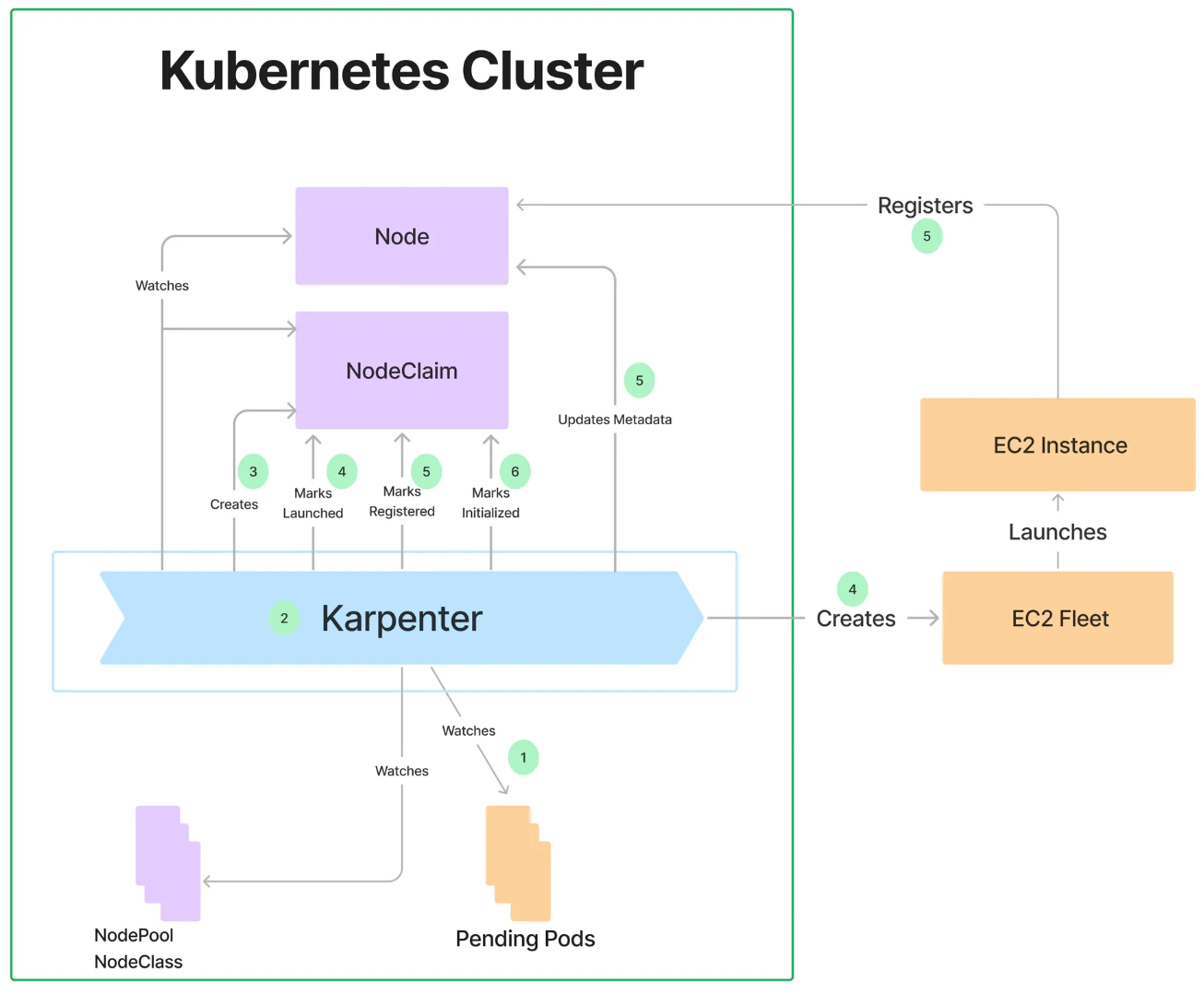
- 관리 리소스는 securityGroupSelector and subnetSelector로 찾음
- consolidationPolicy : 미사용 노드 정리 정책, 데몬셋 제외
- 단일 Karpenter NodePool은 여러 다른 포드 모양을 처리할 수 있습니다. Karpenter는 레이블 및 친화성과 같은 포드 속성을 기반으로 스케줄링 및 프로비저닝 결정을 내립니다. 즉, Karpenter는 여러 다른 노드 그룹을 관리할 필요성을 제거합니다.
- A single Karpenter NodePool is capable of handling many different pod shapes. Karpenter makes scheduling and provisioning decisions based on pod attributes such as labels and affinity. In other words, Karpenter eliminates the need to manage many different node groups.
- 아래 명령을 사용하여 기본 NodePool을 만듭니다. 이 NodePool은 노드를 시작하는 데 사용되는 리소스를 검색하기 위해
securityGroupSelectorTerms및 를 사용합니다. 위 명령 에서subnetSelectorTerms태그를 적용했습니다 . 이러한 리소스가 클러스터 간에 공유되는 방식에 따라 다른 태그 지정 체계를 사용해야 할 수 있습니다.karpenter.sh/discovery- Create a default NodePool using the command below. This NodePool uses
securityGroupSelectorTermsandsubnetSelectorTermsto discover resources used to launch nodes. We applied the tagkarpenter.sh/discoveryin theeksctlcommand above. Depending on how these resources are shared between clusters, you may need to use different tagging schemes.
- Create a default NodePool using the command below. This NodePool uses
consolidationPolicy은 Karpenter가 노드를 제거하고 교체하여 클러스터 비용을 줄이도록 구성합니다. 결과적으로 통합은 클러스터의 모든 빈 노드를 종료합니다. 이 동작은 로 설정하여 Karpenter에게 노드를 통합해서는 안 된다고 말함으로써 비활성화할 수 있습니다 . 자세한 내용은 NodePool API 문서를 검토하세요.WhenEmptyOrUnderutilizeddisruptionconsolidateAfterNever- The
consolidationPolicyset toWhenEmptyOrUnderutilizedin thedisruptionblock configures Karpenter to reduce cluster cost by removing and replacing nodes. As a result, consolidation will terminate any empty nodes on the cluster. This behavior can be disabled by settingconsolidateAftertoNever, telling Karpenter that it should never consolidate nodes. Review the NodePool API docs for more informatio
- The
- 참고: 이 NodePool은 생성된 모든 용량의 합계가 지정된 한도보다 작은 한도 내에서 용량을 생성합니다.
- This NodePool will create capacity as long as the sum of all created capacity is less than the specified limit.
#
echo $ALIAS_VERSION
v20250228

#
cat <<EOF | envsubst | kubectl apply -f -
apiVersion: karpenter.sh/v1
kind: NodePool
metadata:
  name: default
spec:
  template:
    spec:
      requirements:
        - key: kubernetes.io/arch
          operator: In
          values: ["amd64"]
        - key: kubernetes.io/os
          operator: In
          values: ["linux"]
        - key: karpenter.sh/capacity-type
          operator: In
          values: ["on-demand"]
        - key: karpenter.k8s.aws/instance-category
          operator: In
          values: ["t", "c"]
        - key: karpenter.k8s.aws/instance-generation
          operator: Gt
          values: ["2"]
      nodeClassRef:
        group: karpenter.k8s.aws
        kind: EC2NodeClass
        name: default
      expireAfter: 720h # 30 * 24h = 720h
  limits:
    cpu: 1000
  disruption:
    consolidationPolicy: WhenEmptyOrUnderutilized
    consolidateAfter: 1m
---
apiVersion: karpenter.k8s.aws/v1
kind: EC2NodeClass
metadata:
  name: default
spec:
  role: "KarpenterNodeRole-${CLUSTER_NAME}" # replace with your cluster name
  amiSelectorTerms:
    - alias: "al2023@${ALIAS_VERSION}" # ex) al2023@latest
  subnetSelectorTerms:
    - tags:
        karpenter.sh/discovery: "${CLUSTER_NAME}" # replace with your cluster name
  securityGroupSelectorTerms:
    - tags:
        karpenter.sh/discovery: "${CLUSTER_NAME}" # replace with your cluster name
EOF

# 확인
kubectl get nodepool,ec2nodeclass,nodeclaims
NAME                            NODECLASS   NODES   READY   AGE
nodepool.karpenter.sh/default   default     0       True    46s

NAME                                     READY   AGE
ec2nodeclass.karpenter.k8s.aws/default True 46s- Karpenter is now active and ready to begin provisioning nodes.
7.4.6 Scale up deployment
- This deployment uses the pause image and starts with zero replicas
- Scale up deployment
# pause 파드 1개에 CPU 1개 최소 보장 할당할 수 있게 디플로이먼트 배포
cat <<EOF | kubectl apply -f -
apiVersion: apps/v1
kind: Deployment
metadata:
  name: inflate
spec:
  replicas: 0
  selector:
    matchLabels:
      app: inflate
  template:
    metadata:
      labels:
        app: inflate
    spec:
      terminationGracePeriodSeconds: 0
      securityContext:
        runAsUser: 1000
        runAsGroup: 3000
        fsGroup: 2000
      containers:
      - name: inflate
        image: public.ecr.aws/eks-distro/kubernetes/pause:3.7
        resources:
          requests:
            cpu: 1
        securityContext:
          allowPrivilegeEscalation: false
EOF

# [신규 터미널] 모니터링
eks-node-viewer --resources cpu,memory
eks-node-viewer --resources cpu,memory --node-selector "karpenter.sh/registered=true" --extra-labels eks-node-viewer/node-age


# Scale up
kubectl get pod
kubectl scale deployment inflate --replicas 5

# 출력 로그 분석해보자!
kubectl logs -f -n "${KARPENTER_NAMESPACE}" -l app.kubernetes.io/name=karpenter -c controller
kubectl logs -f -n "${KARPENTER_NAMESPACE}" -l app.kubernetes.io/name=karpenter -c controller | jq '.'
kubectl logs -n "${KARPENTER_NAMESPACE}" -l app.kubernetes.io/name=karpenter -c controller | grep 'launched nodeclaim' | jq '.'
{
  "level": "INFO",
  "time": "2025-03-08T15:48:46.926Z",
  "logger": "controller",
  "message": "launched nodeclaim",
  "commit": "058c665",
  "controller": "nodeclaim.lifecycle",
  "controllerGroup": "karpenter.sh",
  "controllerKind": "NodeClaim",
  "NodeClaim": {
    "name": "default-dmfp7"
  },
  "namespace": "",
  "name": "default-dmfp7",
  "reconcileID": "aaed44b9-e0a7-45e8-a682-1d848b6b9715",
  "provider-id": "aws:///ap-northeast-2b/i-07fe24df563aefef5",
  "instance-type": "c5a.2xlarge",
  "zone": "ap-northeast-2b",
  "capacity-type": "on-demand",
  "allocatable": {
    "cpu": "7910m",
    "ephemeral-storage": "17Gi",
    "memory": "14162Mi",
    "pods": "58",
    "vpc.amazonaws.com/pod-eni": "38"
  }
}

# 확인
kubectl get nodeclaims
NAME            TYPE          CAPACITY    ZONE              NODE                                                 READY   AGE
default-dmfp7   c5a.2xlarge   on-demand   ap-northeast-2b   ip-192-168-138-151.ap-northeast-2.compute.internal   True    4m53s

kubectl describe nodeclaims
Name:         default-dmfp7
Namespace:
Labels:       karpenter.k8s.aws/ec2nodeclass=default
              karpenter.k8s.aws/instance-category=c
              karpenter.k8s.aws/instance-cpu=8
              karpenter.k8s.aws/instance-cpu-manufacturer=amd
              karpenter.k8s.aws/instance-cpu-sustained-clock-speed-mhz=3300
              karpenter.k8s.aws/instance-ebs-bandwidth=3170
              karpenter.k8s.aws/instance-encryption-in-transit-supported=true
              karpenter.k8s.aws/instance-family=c5a
              karpenter.k8s.aws/instance-generation=5
              karpenter.k8s.aws/instance-hypervisor=nitro
              karpenter.k8s.aws/instance-memory=16384
              karpenter.k8s.aws/instance-network-bandwidth=2500
              karpenter.k8s.aws/instance-size=2xlarge
              karpenter.sh/capacity-type=on-demand
              karpenter.sh/nodepool=default
              kubernetes.io/arch=amd64
              kubernetes.io/os=linux
              node.kubernetes.io/instance-type=c5a.2xlarge
              topology.k8s.aws/zone-id=apne2-az2
              topology.kubernetes.io/region=ap-northeast-2
              topology.kubernetes.io/zone=ap-northeast-2b
Annotations:  compatibility.karpenter.k8s.aws/cluster-name-tagged: true
              karpenter.k8s.aws/ec2nodeclass-hash: 5102623682851387637
              karpenter.k8s.aws/ec2nodeclass-hash-version: v4
              karpenter.k8s.aws/tagged: true
              karpenter.sh/nodepool-hash: 6821555240594823858
              karpenter.sh/nodepool-hash-version: v3
API Version:  karpenter.sh/v1
Kind:         NodeClaim
Metadata:
  Creation Timestamp:  2025-03-08T15:48:44Z
  Finalizers:
    karpenter.sh/termination
  Generate Name:  default-
  Generation:     1
  Owner References:
    API Version:           karpenter.sh/v1
    Block Owner Deletion:  true
    Kind:                  NodePool
    Name:                  default
    UID:                   8b637e0d-8f19-4e92-97ae-2968af2cef18
  Resource Version:        16277
  UID:                     29651b05-3894-4c7a-84b3-c7c178df224e
Spec:
  Expire After:  720h
  Node Class Ref:
    Group:  karpenter.k8s.aws
    Kind:   EC2NodeClass
    Name:   default
  Requirements:
    Key:       node.kubernetes.io/instance-type
    Operator:  In
    Values:
      c4.2xlarge
      c4.4xlarge
      c4.8xlarge
      c5.12xlarge
      c5.18xlarge
      c5.24xlarge
      c5.2xlarge
      c5.4xlarge
      c5.9xlarge
      c5.metal
      c5a.12xlarge
      c5a.16xlarge
      c5a.24xlarge
      c5a.2xlarge
      c5a.4xlarge
      c5a.8xlarge
      c5d.12xlarge
      c5d.18xlarge
      c5d.24xlarge
      c5d.2xlarge
      c5d.4xlarge
      c5d.9xlarge
      c5d.metal
      c5n.18xlarge
      c5n.2xlarge
      c5n.4xlarge
      c5n.9xlarge
      c5n.metal
      c6i.12xlarge
      c6i.16xlarge
      c6i.24xlarge
      c6i.2xlarge
      c6i.32xlarge
      c6i.4xlarge
      c6i.8xlarge
      c6i.metal
      c6id.12xlarge
      c6id.16xlarge
      c6id.24xlarge
      c6id.2xlarge
      c6id.4xlarge
      c6id.8xlarge
      c6in.12xlarge
      c6in.16xlarge
      c6in.24xlarge
      c6in.2xlarge
      c6in.4xlarge
      c6in.8xlarge
      c7i-flex.2xlarge
      c7i-flex.4xlarge
      c7i-flex.8xlarge
      c7i.12xlarge
      c7i.16xlarge
      c7i.24xlarge
      c7i.2xlarge
      c7i.4xlarge
      c7i.8xlarge
      c7i.metal-24xl
      t3.2xlarge
      t3a.2xlarge
    Key:       karpenter.sh/nodepool
    Operator:  In
    Values:
      default
    Key:       karpenter.k8s.aws/ec2nodeclass
    Operator:  In
    Values:
      default
    Key:       kubernetes.io/os
    Operator:  In
    Values:
      linux
    Key:       karpenter.sh/capacity-type
    Operator:  In
    Values:
      on-demand
    Key:       karpenter.k8s.aws/instance-category
    Operator:  In
    Values:
      c
      t
    Key:       karpenter.k8s.aws/instance-generation
    Operator:  Gt
    Values:
      2
    Key:       kubernetes.io/arch
    Operator:  In
    Values:
      amd64
  Resources:
    Requests:
      Cpu:   5150m
      Pods:  9
Status:
  Allocatable:
    Cpu:                        7910m
    Ephemeral - Storage:        17Gi
    Memory:                     14162Mi
    Pods:                       58
    vpc.amazonaws.com/pod-eni:  38
  Capacity:
    Cpu:                        8
    Ephemeral - Storage:        20Gi
    Memory:                     15155Mi
    Pods:                       58
    vpc.amazonaws.com/pod-eni:  38
  Conditions:
    Last Transition Time:  2025-03-08T15:49:15Z
    Message:
    Observed Generation:   1
    Reason:                Initialized
    Status:                True
    Type:                  Initialized
    Last Transition Time:  2025-03-08T15:48:46Z
    Message:
    Observed Generation:   1
    Reason:                Launched
    Status:                True
    Type:                  Launched
    Last Transition Time:  2025-03-08T15:49:15Z
    Message:
    Observed Generation:   1
    Reason:                Ready
    Status:                True
    Type:                  Ready
    Last Transition Time:  2025-03-08T15:49:05Z
    Message:
    Observed Generation:   1
    Reason:                Registered
    Status:                True
    Type:                  Registered
  Image ID:                ami-089f1bf55c5291efd
  Last Pod Event Time:     2025-03-08T15:54:10Z
  Node Name:               ip-192-168-138-151.ap-northeast-2.compute.internal
  Provider ID:             aws:///ap-northeast-2b/i-07fe24df563aefef5
Events:
  Type    Reason             Age    From       Message
  ----    ------             ----   ----       -------
  Normal  Launched           5m44s  karpenter  Status condition transitioned, Type: Launched, Status: Unknown -> True, Reason: Launched
  Normal  DisruptionBlocked  5m41s  karpenter  Nodeclaim does not have an associated node
  Normal  Registered         5m25s  karpenter  Status condition transitioned, Type: Registered, Status: Unknown -> True, Reason: Registered
  Normal  Initialized        5m15s  karpenter  Status condition transitioned, Type: Initialized, Status: Unknown -> True, Reason: Initialized
  Normal  Ready              5m15s  karpenter  Status condition transitioned, Type: Ready, Status: Unknown -> True, Reason: Ready

#
kubectl get node -l karpenter.sh/registered=true -o jsonpath="{.items[0].metadata.labels}" | jq '.'
{
  "beta.kubernetes.io/arch": "amd64",
  "beta.kubernetes.io/instance-type": "c5a.2xlarge",
  "beta.kubernetes.io/os": "linux",
  "failure-domain.beta.kubernetes.io/region": "ap-northeast-2",
  "failure-domain.beta.kubernetes.io/zone": "ap-northeast-2b",
  "k8s.io/cloud-provider-aws": "99c8fa5cbf14bd3ac18cdf4809beea3e",
  "karpenter.k8s.aws/ec2nodeclass": "default",
  "karpenter.k8s.aws/instance-category": "c",
  "karpenter.k8s.aws/instance-cpu": "8",
  "karpenter.k8s.aws/instance-cpu-manufacturer": "amd",
  "karpenter.k8s.aws/instance-cpu-sustained-clock-speed-mhz": "3300",
  "karpenter.k8s.aws/instance-ebs-bandwidth": "3170",
  "karpenter.k8s.aws/instance-encryption-in-transit-supported": "true",
  "karpenter.k8s.aws/instance-family": "c5a",
  "karpenter.k8s.aws/instance-generation": "5",
  "karpenter.k8s.aws/instance-hypervisor": "nitro",
  "karpenter.k8s.aws/instance-memory": "16384",
  "karpenter.k8s.aws/instance-network-bandwidth": "2500",
  "karpenter.k8s.aws/instance-size": "2xlarge",
  "karpenter.sh/capacity-type": "on-demand",
  "karpenter.sh/initialized": "true",
  "karpenter.sh/nodepool": "default",
  "karpenter.sh/registered": "true",
  "kubernetes.io/arch": "amd64",
  "kubernetes.io/hostname": "ip-192-168-138-151.ap-northeast-2.compute.internal",
  "kubernetes.io/os": "linux",
  "node.kubernetes.io/instance-type": "c5a.2xlarge",
  "topology.k8s.aws/zone-id": "apne2-az2",
  "topology.kubernetes.io/region": "ap-northeast-2",
  "topology.kubernetes.io/zone": "ap-northeast-2b"
}
# (옵션) 더욱 더 Scale up!
kubectl scale deployment inflate --replicas 30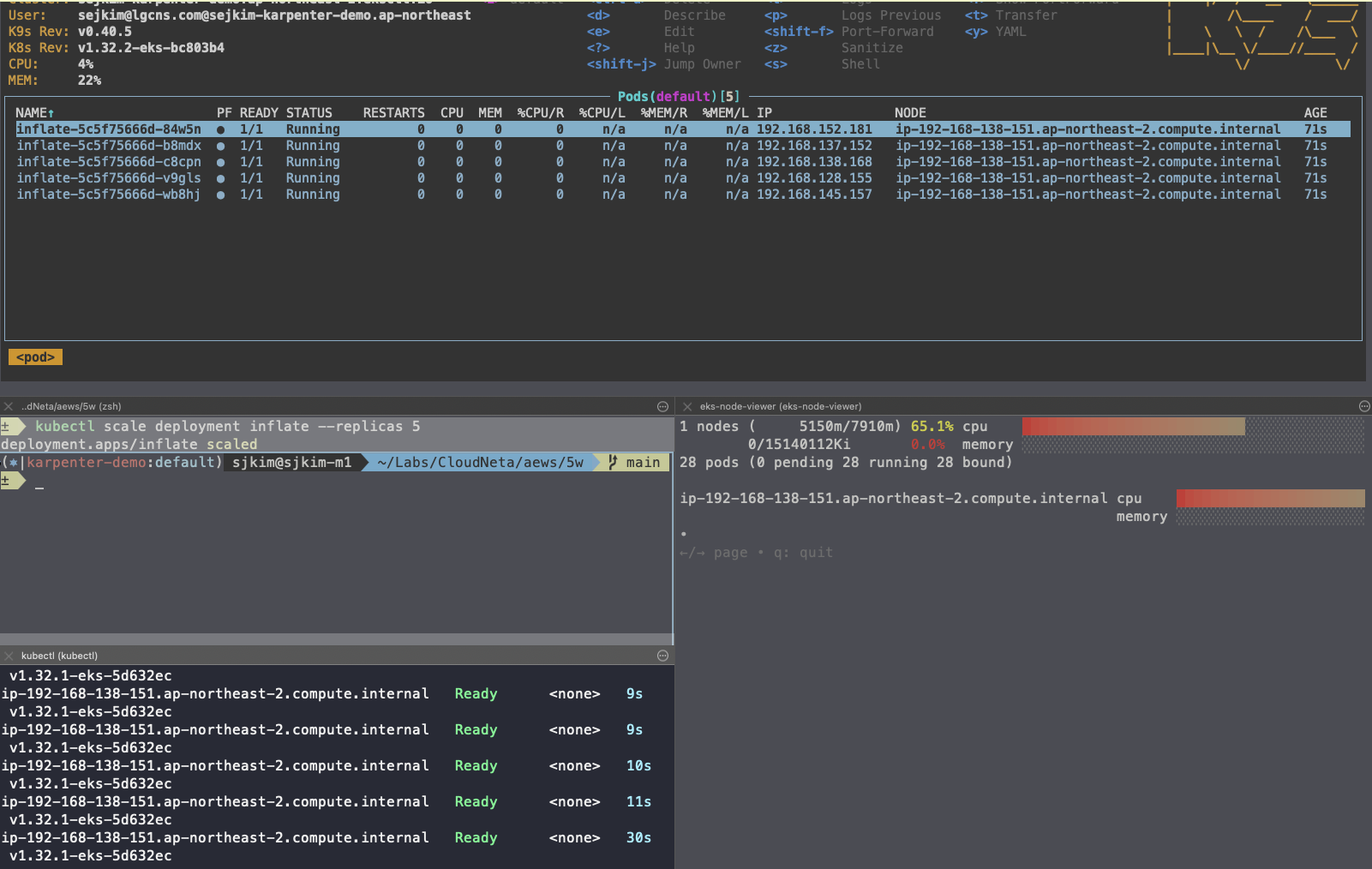
- CreateFleet 이벤트 확인 - Link
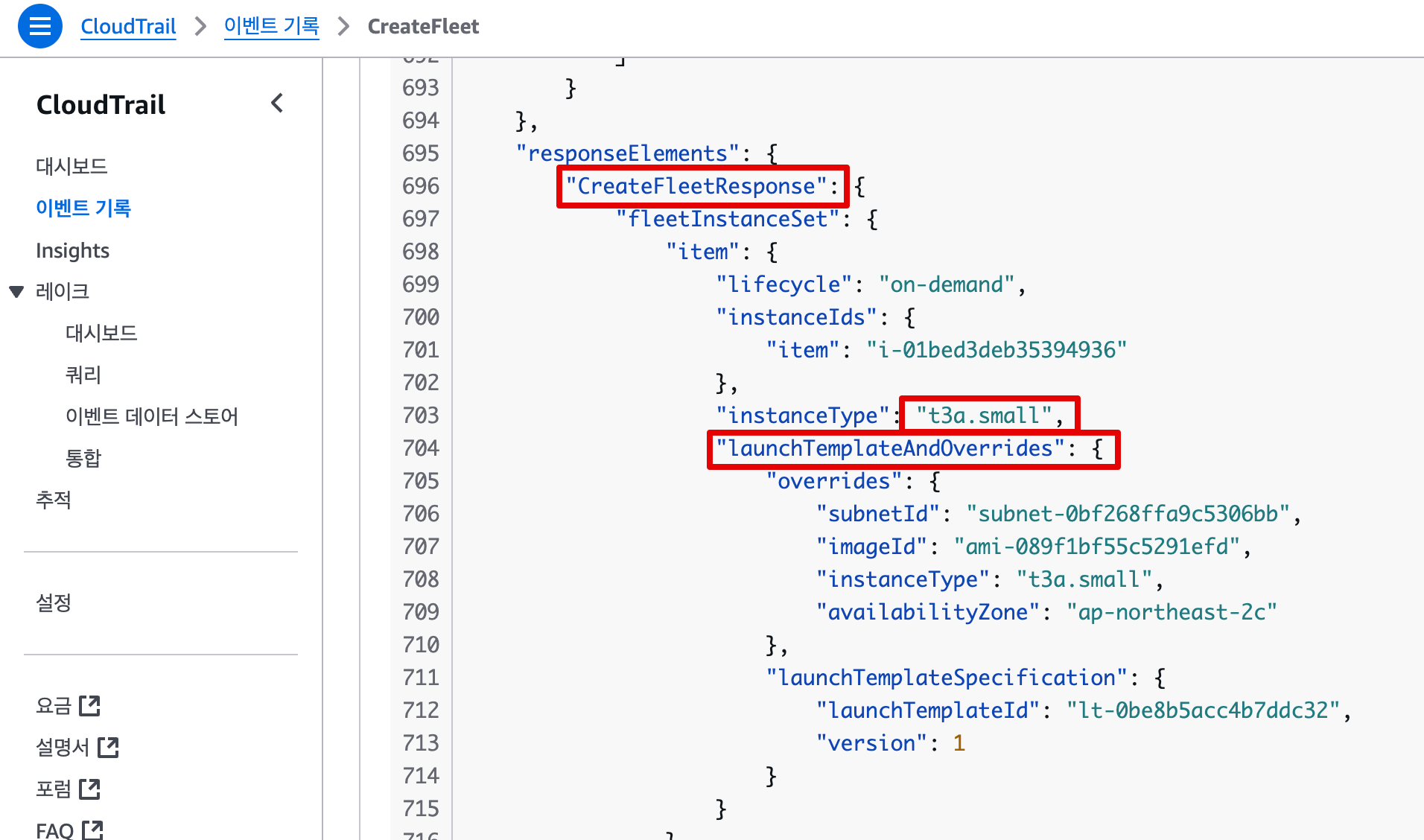
- (참고) 카펜터로 배포한 노드 tag 정보 참고
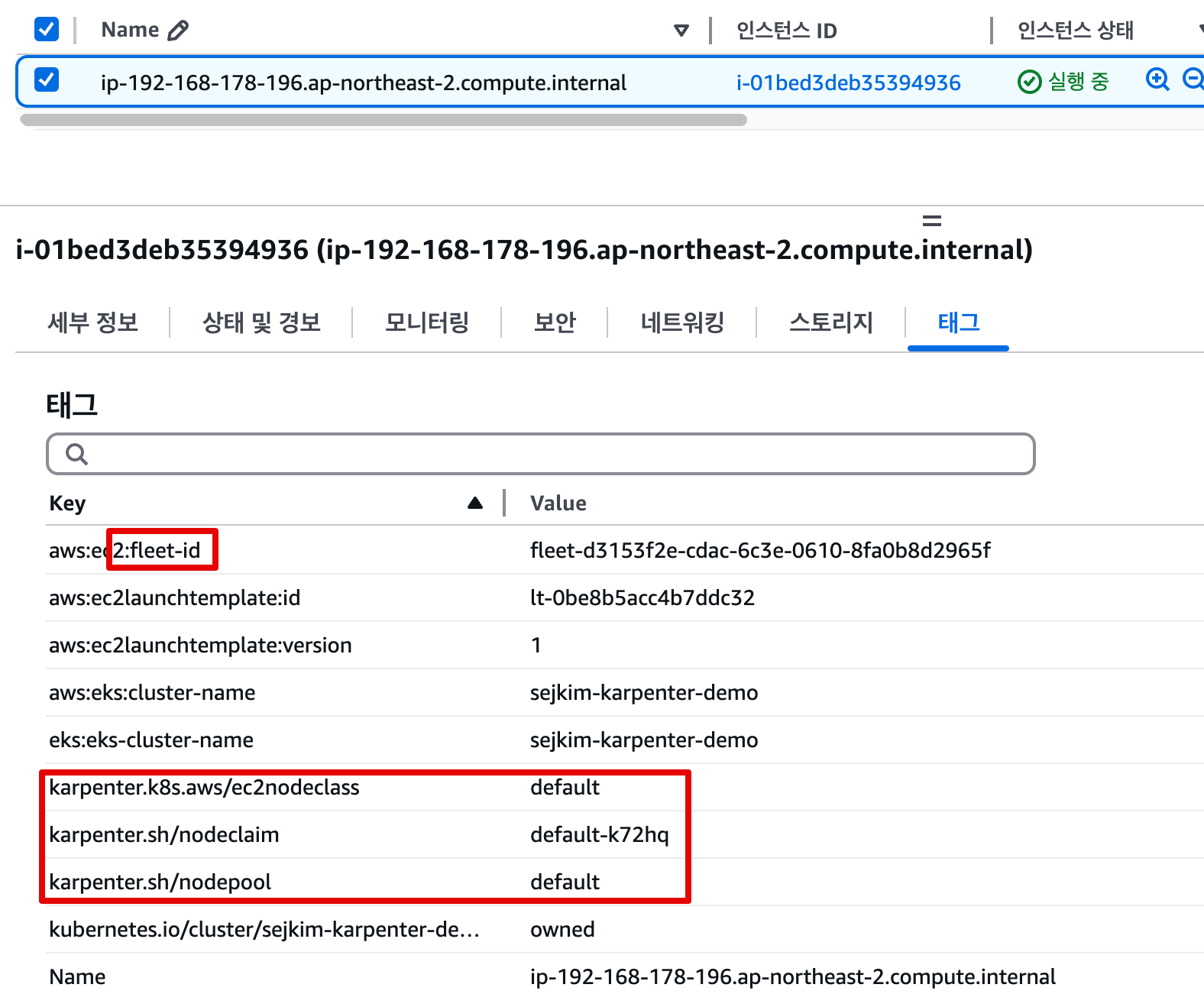
- (참고) 프로메테우스 메트릭 : karpenter_YYY
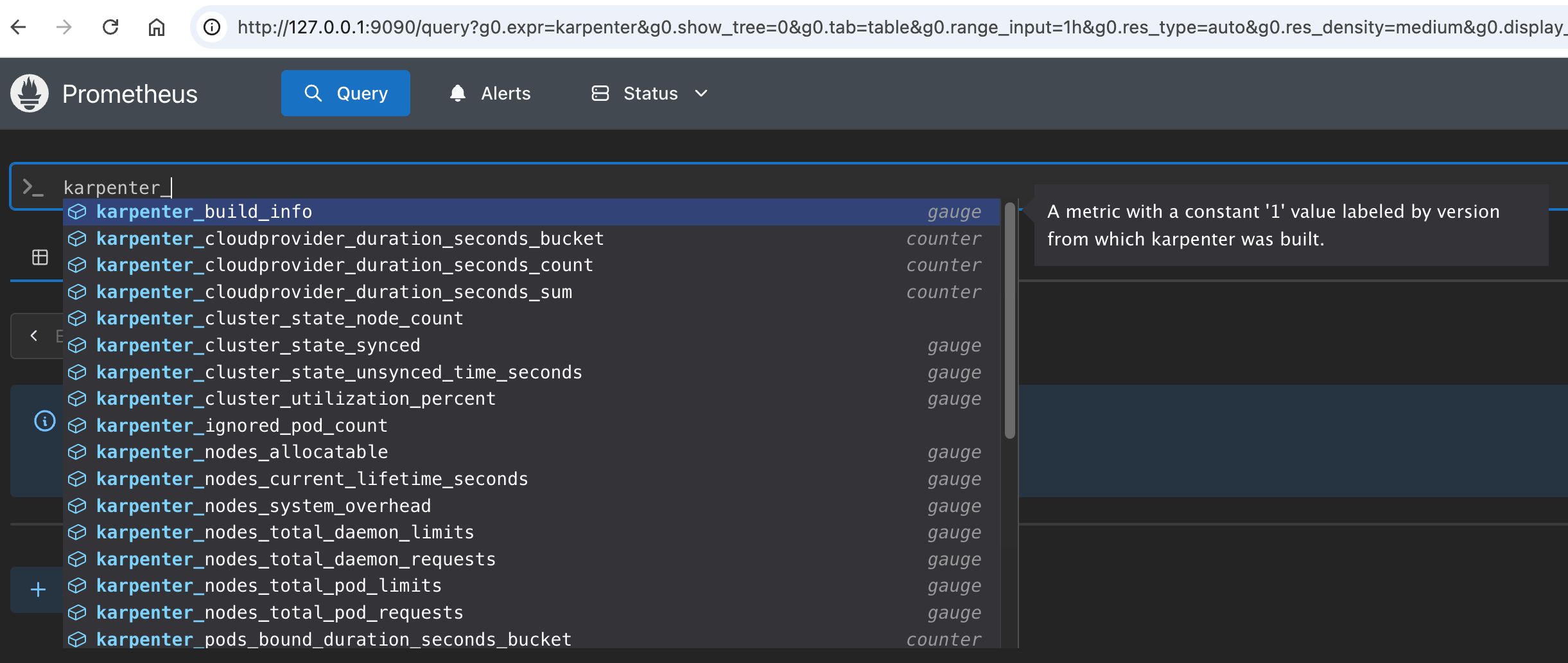
7.4.7 Scale Down deployment
# Now, delete the deployment. After a short amount of time, Karpenter should terminate the empty nodes due to consolidation.
kubectl delete deployment inflate && date
deployment.apps "inflate" deleted
Sun Mar  9 01:09:44 KST 2025
# 출력 로그 분석해보자!
kubectl logs -f -n "${KARPENTER_NAMESPACE}" -l app.kubernetes.io/name=karpenter -c controller | jq '.'
...
{
  "level": "INFO",
  "time": "2025-03-02T06:53:28.780Z",
  "logger": "controller",
  "message": "disrupting nodeclaim(s) via delete, terminating 1 nodes (1 pods) ip-192-168-131-97.ap-northeast-2.compute.internal/c5a.large/on-demand",
  "commit": "058c665",
  "controller": "disruption",
  "namespace": "",
  "name": "",
  "reconcileID": "86a3a45c-2604-4a71-808a-21290301d096",
  "command-id": "51914aee-4e09-436f-af6d-794163c3d1c2",
  "reason": "underutilized"
}
{
  "level": "INFO",
  "time": "2025-03-02T06:53:29.532Z",
  "logger": "controller",
  "message": "tainted node",
  "commit": "058c665",
  "controller": "node.termination",
  "controllerGroup": "",
  "controllerKind": "Node",
  "Node": {
    "name": "ip-192-168-131-97.ap-northeast-2.compute.internal"
  },
  "namespace": "",
  "name": "ip-192-168-131-97.ap-northeast-2.compute.internal",
  "reconcileID": "617bcb4d-5498-44d9-ba1e-6c8b7d97c405",
  "taint.Key": "karpenter.sh/disrupted",
  "taint.Value": "",
  "taint.Effect": "NoSchedule"
}
{
  "level": "INFO",
  "time": "2025-03-02T06:54:03.234Z",
  "logger": "controller",
  "message": "deleted node",
  "commit": "058c665",
  "controller": "node.termination",
  "controllerGroup": "",
  "controllerKind": "Node",
  "Node": {
    "name": "ip-192-168-131-97.ap-northeast-2.compute.internal"
  },
  "namespace": "",
  "name": "ip-192-168-131-97.ap-northeast-2.compute.internal",
  "reconcileID": "8c71fb19-b7ae-4037-afef-fbf1c7343f84"
}
{
  "level": "INFO",
  "time": "2025-03-02T06:54:03.488Z",
  "logger": "controller",
  "message": "deleted nodeclaim",
  "commit": "058c665",
  "controller": "nodeclaim.lifecycle",
  "controllerGroup": "karpenter.sh",
  "controllerKind": "NodeClaim",
  "NodeClaim": {
    "name": "default-mfkgp"
  },
  "namespace": "",
  "name": "default-mfkgp",
  "reconcileID": "757b4d88-2bf2-412c-bf83-3149f9517d85",
  "Node": {
    "name": "ip-192-168-131-97.ap-northeast-2.compute.internal"
  },
  "provider-id": "aws:///ap-northeast-2a/i-00f22c8bde3faf646"
}
{
  "level": "INFO",
  "time": "2025-03-02T07:25:55.661Z",
  "logger": "controller",
  "message": "disrupting nodeclaim(s) via delete, terminating 1 nodes (0 pods) ip-192-168-176-171.ap-northeast-2.compute.internal/c5a.2xlarge/on-demand",
  "commit": "058c665",
  "controller": "disruption",
  "namespace": "",
  "name": "",
  "reconcileID": "0942417e-7ecb-437a-85db-adc553ccade9",
  "command-id": "b2b7c689-91ca-43c5-ac1c-2052bf7418c1",
  "reason": "empty"
}
{
  "level": "INFO",
  "time": "2025-03-02T07:25:56.783Z",
  "logger": "controller",
  "message": "tainted node",
  "commit": "058c665",
  "controller": "node.termination",
  "controllerGroup": "",
  "controllerKind": "Node",
  "Node": {
    "name": "ip-192-168-176-171.ap-northeast-2.compute.internal"
  },
  "namespace": "",
  "name": "ip-192-168-176-171.ap-northeast-2.compute.internal",
  "reconcileID": "6254e6be-2445-4402-b829-0bb75fa540e0",
  "taint.Key": "karpenter.sh/disrupted",
  "taint.Value": "",
  "taint.Effect": "NoSchedule"
}
{
  "level": "INFO",
  "time": "2025-03-02T07:26:49.195Z",
  "logger": "controller",
  "message": "deleted node",
  "commit": "058c665",
  "controller": "node.termination",
  "controllerGroup": "",
  "controllerKind": "Node",
  "Node": {
    "name": "ip-192-168-176-171.ap-northeast-2.compute.internal"
  },
  "namespace": "",
  "name": "ip-192-168-176-171.ap-northeast-2.compute.internal",
  "reconcileID": "6c126a63-8bfa-4828-8ef6-5d22b8c1e7cc"
}

#
kubectl get nodeclaims
7.5 Disruption
- (구 Consolidation) : Expiration , Drift , Consolidation - Workshop, Docs, Spot-to-Spot
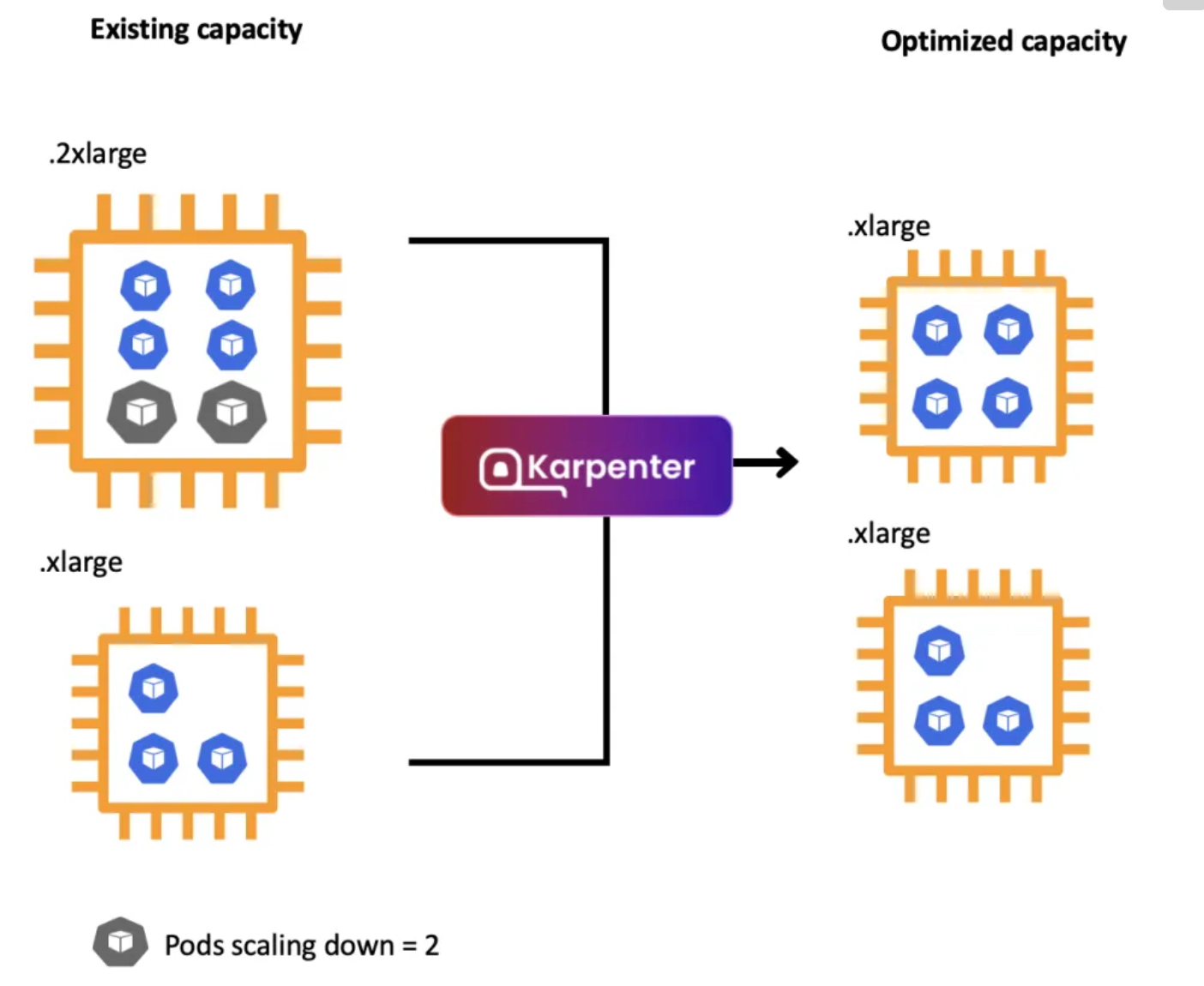
- Expiration 만료 : 기본 720시간(30일) 후 인스턴스를 자동으로 만료하여 강제로 노드를 최신 상태로 유지
- Drift 드리프트 : 구성 변경 사항(NodePool, EC2NodeClass)를 감지하여 필요한 변경 사항을 적용
- Consolidation 통합 : 비용 효율적인 컴퓨팅 최적화 선택
- A critical feature for operating compute in a cost-effective manner, Karpenter will optimize our cluster's compute on an on-going basis. For example, if workloads are running on under-utilized compute instances, it will consolidate them to fewer instances.
- 스팟 인스턴스 시작 시 Karpenter는 AWS EC2 Fleet Instance API를 호출하여 NodePool 구성 기반으로 선택한 인스턴스 유형을 전달.
- AWS EC2 Fleet Instance API는 시작된 인스턴스 목록과 시작할 수 없는 인스턴스 목록을 즉시 반환하는 API로, 시작할 수 없을 경우 Karpenter는 대체 용량을 요청하거나 워크로드에 대한 soft 일정 제약 조건을 제거할 수 있음

- Spot-to-Spot Consolidation 에는 주문형 통합과 다른 접근 방식이 필요했습니다. 온디맨드 통합의 경우 규모 조정 및 최저 가격이 주요 지표로 사용됩니다.
- 스팟 간 통합이 이루어지려면 Karpenter에는 최소 15개의 인스턴스 유형이 포함된 다양한 인스턴스 구성(연습에 정의된 NodePool 예제 참조)이 필요합니다. 이러한 제약 조건이 없으면 Karpenter가 가용성이 낮고 중단 빈도가 높은 인스턴스를 선택할 위험이 있습니다.
# 기존 nodepool 삭제
kubectl delete nodepool,ec2nodeclass default

# 모니터링
kubectl logs -f -n "${KARPENTER_NAMESPACE}" -l app.kubernetes.io/name=karpenter -c controller | jq '.'
eks-node-viewer --resources cpu,memory --node-selector "karpenter.sh/registered=true" --extra-labels eks-node-viewer/node-age
watch -d "kubectl get nodes -L karpenter.sh/nodepool -L node.kubernetes.io/instance-type -L karpenter.sh/capacity-type"

# Create a Karpenter NodePool and EC2NodeClass
cat <<EOF | envsubst | kubectl apply -f -
apiVersion: karpenter.sh/v1
kind: NodePool
metadata:
  name: default
spec:
  template:
    spec:
      nodeClassRef:
        group: karpenter.k8s.aws
        kind: EC2NodeClass
        name: default
      requirements:
        - key: kubernetes.io/os
          operator: In
          values: ["linux"]
        - key: karpenter.sh/capacity-type
          operator: In
          values: ["on-demand"]
        - key: karpenter.k8s.aws/instance-category
          operator: In
          values: ["c", "m", "r"]
        - key: karpenter.k8s.aws/instance-size
          operator: NotIn
          values: ["nano","micro","small","medium"]
        - key: karpenter.k8s.aws/instance-hypervisor
          operator: In
          values: ["nitro"]
      expireAfter: 1h # nodes are terminated automatically after 1 hour
  limits:
    cpu: "1000"
    memory: 1000Gi
  disruption:
    consolidationPolicy: WhenEmptyOrUnderutilized # policy enables Karpenter to replace nodes when they are either empty or underutilized
    consolidateAfter: 1m
---
apiVersion: karpenter.k8s.aws/v1
kind: EC2NodeClass
metadata:
  name: default
spec:
  role: "KarpenterNodeRole-${CLUSTER_NAME}" # replace with your cluster name
  amiSelectorTerms:
    - alias: "al2023@latest"
  subnetSelectorTerms:
    - tags:
        karpenter.sh/discovery: "${CLUSTER_NAME}" # replace with your cluster name
  securityGroupSelectorTerms:
    - tags:
        karpenter.sh/discovery: "${CLUSTER_NAME}" # replace with your cluster name
EOF

# 확인
kubectl get nodepool,ec2nodeclass

# Deploy a sample workload
cat <<EOF | kubectl apply -f -
apiVersion: apps/v1
kind: Deployment
metadata:
  name: inflate
spec:
  replicas: 5
  selector:
    matchLabels:
      app: inflate
  template:
    metadata:
      labels:
        app: inflate
    spec:
      terminationGracePeriodSeconds: 0
      securityContext:
        runAsUser: 1000
        runAsGroup: 3000
        fsGroup: 2000
      containers:
      - name: inflate
        image: public.ecr.aws/eks-distro/kubernetes/pause:3.7
        resources:
          requests:
            cpu: 1
            memory: 1.5Gi
        securityContext:
          allowPrivilegeEscalation: false
EOF


#
kubectl get nodes -L karpenter.sh/nodepool -L node.kubernetes.io/instance-type -L karpenter.sh/capacity-type
kubectl get nodeclaims
kubectl describe nodeclaims
kubectl logs -f -n "${KARPENTER_NAMESPACE}" -l app.kubernetes.io/name=karpenter -c controller | jq '.'
kubectl logs -n "${KARPENTER_NAMESPACE}" -l app.kubernetes.io/name=karpenter -c controller | grep 'launched nodeclaim' | jq '.'


# Scale the inflate workload from 5 to 12 replicas, triggering Karpenter to provision additional capacity
kubectl scale deployment/inflate --replicas 12

# This changes the total memory request for this deployment to around 12Gi,
# which when adjusted to account for the roughly 600Mi reserved for the kubelet on each node means that this will fit on 2 instances of type m5.large:
kubectl get nodeclaims


# Scale down the workload back down to 5 replicas
kubectl scale deployment/inflate --replicas 5
kubectl get nodeclaims
NAME            TYPE          CAPACITY    ZONE              NODE                                                 READY   AGE
default-ffnzp   c6g.2xlarge   on-demand   ap-northeast-2c   ip-192-168-185-240.ap-northeast-2.compute.internal   True    14m


# We can check the Karpenter logs to get an idea of what actions it took in response to our scaling in the deployment. Wait about 5-10 seconds before running the following command:
kubectl logs -f -n "${KARPENTER_NAMESPACE}" -l app.kubernetes.io/name=karpenter -c controller | jq '.'
{
  "level": "INFO",
  "time": "2025-03-02T08:19:13.969Z",
  "logger": "controller",
  "message": "disrupting nodeclaim(s) via delete, terminating 1 nodes (5 pods) ip-192-168-132-48.ap-northeast-2.compute.internal/c6g.2xlarge/on-demand",
  "commit": "058c665",
  "controller": "disruption",
  "namespace": "",
  "name": "",
  "reconcileID": "a900df38-7189-42aa-a3b3-9fcaf944dcf4",
  "command-id": "4b7ef3a5-6962-48a9-bd38-c9898580bb75",
  "reason": "underutilized"
}


# Karpenter can also further consolidate if a node can be replaced with a cheaper variant in response to workload changes.
# This can be demonstrated by scaling the inflate deployment replicas down to 1, with a total memory request of around 1Gi:
kubectl scale deployment/inflate --replicas 1

kubectl logs -f -n "${KARPENTER_NAMESPACE}" -l app.kubernetes.io/name=karpenter -c controller | jq '.'
{
  "level": "INFO",
  "time": "2025-03-02T08:23:59.683Z",
  "logger": "controller",
  "message": "disrupting nodeclaim(s) via replace, terminating 1 nodes (1 pods) ip-192-168-185-240.ap-northeast-2.compute.internal/c6g.2xlarge/on-demand and replacing with on-demand node from types c6g.large, c7g.large, c5a.large, c6gd.large, m6g.large and 55 other(s)",
  "commit": "058c665",
  "controller": "disruption",
  "namespace": "",
  "name": "",
  "reconcileID": "6669c544-e065-4c97-b594-ec1fb68b68b5",
  "command-id": "b115c17f-3e29-48bc-8da8-d7073f189624",
  "reason": "underutilized"
}

kubectl get nodeclaims
NAME            TYPE          CAPACITY    ZONE              NODE                                                 READY   AGE
default-ff7xn   c6g.large     on-demand   ap-northeast-2b   ip-192-168-109-5.ap-northeast-2.compute.internal     True    78s
default-ffnzp   c6g.2xlarge   on-demand   ap-northeast-2c   ip-192-168-185-240.ap-northeast-2.compute.internal   True    16m

kubectl get nodeclaims
NAME            TYPE        CAPACITY    ZONE              NODE                                               READY   AGE
default-ff7xn   c6g.large   on-demand   ap-northeast-2b   ip-192-168-109-5.ap-northeast-2.compute.internal   True    3m3s


# 삭제
kubectl delete deployment inflate
kubectl delete nodepool,ec2nodeclass default- 실습 리소스 삭제
# Karpenter helm 삭제
helm uninstall karpenter --namespace "${KARPENTER_NAMESPACE}"

# Karpenter IAM Role 등 생성한 CloudFormation 삭제
aws cloudformation delete-stack --stack-name "Karpenter-${CLUSTER_NAME}"

# EC2 Launch Template 삭제
aws ec2 describe-launch-templates --filters "Name=tag:karpenter.k8s.aws/cluster,Values=${CLUSTER_NAME}" |
    jq -r ".LaunchTemplates[].LaunchTemplateName" |
    xargs -I{} aws ec2 delete-launch-template --launch-template-name {}

# 클러스터 삭제
eksctl delete cluster --name "${CLUSTER_NAME}"
I'm SJ