가시다(gasida) 님이 진행하는 Istio Hands-on Study 1기 과정을 참여하여 정리한 글입니다. 2주차는 Envoy, Istio Gateway 주제로 학습을 진행하였습니다.
1. Istio's Data Plane (Envoy Proxy)
1.1 Envoy 개요 및 주요 기능
Envoy는 언어 독립적이고 확장 가능한 고성능 프록시로서, 마이크로서비스 환경에서 트래픽 제어, 보안, 모니터링, 서비스 간 통신 최적화를 위한 핵심 구성 요소로 자리 잡고 있다. Istio와 같은 서비스 메시 구현에서 Envoy는 각 서비스에 사이드카 형태로 배포되어 네트워크 투명성 확보 및 운영 효율성을 극대화하는 역할을 수행한다.
1.1.1 Envoy란?
Envoy는 L7(애플리케이션 계층) 프록시이자 서비스 간 통신 버스로, 대규모 마이크로서비스 아키텍처에서 네트워크를 투명하게 만들고 문제의 원인을 쉽게 파악할 수 있도록 설계된 오픈소스 소프트웨어이다. 독립 실행형 프로세스로 동작하며, 다양한 언어로 작성된 서비스 간의 통신을 중계하고 제어하는 역할을 한다.
1.1.2 주요 기능
- Out-of-process 아키텍처
- Envoy는 애플리케이션과 분리된 독립 프로세스로 동작하며, 사이드카(sidecar) 형태로 서비스 인스턴스와 함께 배포된다.
- 다양한 프로그래밍 언어(Java, Go, Python 등)를 사용하는 이기종 환경에서도 통신이 가능하며, 애플리케이션 코드 수정 없이 배포 및 업그레이드가 용이하다.
- L3/L4 필터 아키텍처
- TCP/UDP 기반의 네트워크 트래픽을 처리하기 위한 플러그형 필터 체인 구조를 제공한다.
- 일반 TCP 프록시뿐만 아니라 Redis, MongoDB, Postgres 등 다양한 프로토콜에 대한 지원이 가능하다.
- HTTP(L7) 필터 아키텍처
- HTTP 트래픽을 처리하기 위한 고급 필터 기능을 제공한다.
- 필터를 통해 버퍼링, 라우팅, 속도 제한, 트래픽 감지 등 다양한 HTTP 관련 기능을 수행할 수 있다.
- HTTP/2 및 HTTP/3 지원
- HTTP/1.1과 HTTP/2를 모두 지원하며, 상호 변환이 가능하다.
- HTTP/3는 알파(Alpha) 단계로 지원되며, 다양한 프로토콜 간 변환도 지원한다.
- 고급 라우팅 기능
- 요청 경로(path), 호스트(authority), 콘텐츠 타입 등 다양한 조건을 기반으로 정교한 라우팅 및 리디렉션을 수행할 수 있다.
- gRPC 지원
- HTTP/2를 기반으로 하는 Google의 gRPC 프레임워크와 완전히 호환되며, 라우팅 및 로드 밸런싱 프록시로서 사용 가능하다.
- 동적 구성 및 서비스 디스커버리
- Envoy는 XDS API를 통해 클러스터, 라우팅, 리스너, 인증서 등을 동적으로 구성할 수 있으며, 간단한 구성에는 DNS 기반의 정적 설정도 가능하다.
- 헬스 체크
- 액티브 및 패시브 방식의 서비스 상태 점검 기능을 제공하며, 이를 통해 장애가 발생한 인스턴스를 자동으로 제외하고 트래픽을 전달할 수 있다.
- 고급 로드 밸런싱
- 자동 재시도, 회로 차단(Circuit Breaking), 요청 쉐도잉, 이상 탐지(Outlier Detection), 전역 속도 제한 등 다양한 고급 로드 밸런싱 기능을 지원한다.
- 엣지(Edge) 프록시 지원
- TLS 종료, 다양한 HTTP 프로토콜 지원, 고급 라우팅 기능을 통해 외부 트래픽을 처리하는 프론트 프록시(Edge Proxy)로 활용 가능하다.
- 우수한 관측성(Observability)
- 내장된 통계 수집 기능과 StatsD 연동, 관리용 API(관리 포트) 제공, 분산 추적(Distributed Tracing) 기능을 통해 네트워크 및 애플리케이션 상태를 효과적으로 모니터링할 수 있다.
1.2 Envoy Proxy Configuration
Envoy는 정적 및 동적 방식 모두를 지원하는 유연한 구성 시스템을 갖추고 있다. 정적 설정은 초기 학습 및 간단한 실습에 적합하며, 운영 환경에서는 동적 설정과 ADS를 통한 통합 관리가 선호된다. 특히 Istio와 같은 서비스 메시 환경에서는 ADS 기반의 설정 구조가 표준으로 자리 잡고 있다.
Envoy는 YAML 또는 JSON 형식의 설정 파일을 통해 구동된다. 이 설정 파일은 리스너, 라우팅, 클러스터 정의 외에도 Admin API 활성화 여부, 액세스 로그 저장 위치, 트레이싱 엔진 설정 등 서버 운영에 필요한 요소들을 포괄적으로 구성할 수 있다.
Envoy는 여러 설정 API 버전을 제공해왔으며, 현재는 v3가 표준으로 자리잡았다. 본 문서에서는 Istio에서도 사용되는 v3 API 기반 설정을 중심으로 Envoy의 정적 및 동적 설정 방법을 살펴본다.
1.2.1 Envoy 정적 설정 (Static Configuration)
- 설정 구조 개요
Envoy의 정적 설정은 static_resources 필드를 통해 구성된다. 다음은 간단한 정적 설정 예시이다.
static_resources:
  listeners:
    - name: httpbin-demo
      address:
        socket_address: { address: 0.0.0.0, port_value: 15001 }
      filter_chains:
        - filters:
            - name: envoy.filters.network.http_connection_manager
              typed_config:
                "@type": type.googleapis.com/envoy.extensions.filters.network.http_connection_manager.v3.HttpConnectionManager
                stat_prefix: ingress_http
                http_filters:
                  - name: envoy.filters.http.router
                route_config:
                  name: httpbin_local_route
                  virtual_hosts:
                    - name: httpbin_local_service
                      domains: ["*"]
                      routes:
                        - match: { prefix: "/" }
                          route:
                            auto_host_rewrite: true
                            cluster: httpbin_service

  clusters:
    - name: httpbin_service
      connect_timeout: 5s
      type: LOGICAL_DNS
      dns_lookup_family: V4_ONLY
      lb_policy: ROUND_ROBIN
      load_assignment:
        cluster_name: httpbin
        endpoints:
          - lb_endpoints:
              - endpoint:
                  address:
                    socket_address:
                      address: httpbin
                      port_value: 8000
2 설정 요소 설명
- Listener: 클라이언트의 요청을 수신할 포트를 정의한다 (
0.0.0.0:15001). - Filter Chain: HTTP 요청을 처리하기 위해
http_connection_manager필터를 사용한다. - Route 설정: 모든 요청을
httpbin_service클러스터로 라우팅한다. - Cluster 설정: 업스트림 서비스(httpbin)에 대한 연결 방식, 로드 밸런싱 정책(ROUND_ROBIN), DNS 디스커버리 방식(LOGICAL_DNS) 등을 정의한다.
이 예시는 완전히 정적으로 구성된 설정으로, 모든 구성 요소가 명시적으로 정의되어 있다.
1.2.2 Envoy 동적 설정 (Dynamic Configuration)
- 개요
Envoy는 xDS API를 통해 다운타임 없이 실시간으로 설정을 업데이트할 수 있다. 필요한 것은 간단한 부트스트랩 설정 파일 하나이며, 나머지 설정은 동적으로 수신된다.
2 주요 Discovery API
| API 명칭 | 설명 |
|---|---|
| LDS (Listener Discovery Service) | 리스너 구성을 동적으로 가져옴 |
| RDS (Route Discovery Service) | 라우팅 규칙을 동적으로 가져옴 |
| CDS (Cluster Discovery Service) | 클러스터 구성을 동적으로 가져옴 |
| EDS (Endpoint Discovery Service) | 각 클러스터의 엔드포인트 목록을 제공 |
| SDS (Secret Discovery Service) | 인증서 정보 등을 제공 |
| ADS (Aggregated Discovery Service) | 위의 모든 설정을 통합하여 순차적으로 제공 |
3 예시: LDS 사용 설정
dynamic_resources:
  lds_config:
    api_config_source:
      api_type: GRPC
      grpc_services:
        - envoy_grpc:
            cluster_name: xds_cluster

clusters:
  - name: xds_cluster
    connect_timeout: 0.25s
    type: STATIC
    lb_policy: ROUND_ROBIN
    http2_protocol_options: {}
    hosts:
      - socket_address:
          address: 127.0.0.3
          port_value: 5678
이 설정은 xds_cluster라는 gRPC 클러스터를 통해 리스너 구성을 동적으로 받아온다. 클러스터 정의만 명시되어 있고, 리스너 정보는 런타임에 가져온다.
- Istio에서 사용하는 부트스트랩 설정 예시
Istio는 ADS를 이용하여 Envoy 프록시의 설정을 관리한다. ADS는 설정 간 종속성 문제 및 경쟁 조건(Race Condition)을 줄이기 위한 집계 API이다.
bootstrap:
  dynamicResources:
    ldsConfig:
      ads: {}
    cdsConfig:
      ads: {}
    adsConfig:
      apiType: GRPC
      grpcServices:
        - envoyGrpc:
            clusterName: xds-grpc
      refreshDelay: 1.000s

  staticResources:
    clusters:
      - name: xds-grpc
        type: STRICT_DNS
        connectTimeout: 10.000s
        hosts:
          - socketAddress:
              address: istio-pilot.istio-system
              portValue: 15010
        circuitBreakers:
          thresholds:
            - maxConnections: 100000
              maxPendingRequests: 100000
              maxRequests: 100000
            - priority: HIGH
              maxConnections: 100000
              maxPendingRequests: 100000
              maxRequests: 100000
        http2ProtocolOptions: {}
이 설정은 istio-pilot을 통해 ADS로부터 리스너, 클러스터 설정 등을 받아온다. 정적으로는 ADS와 통신하기 위한 xds-grpc 클러스터만 명시되어 있다.
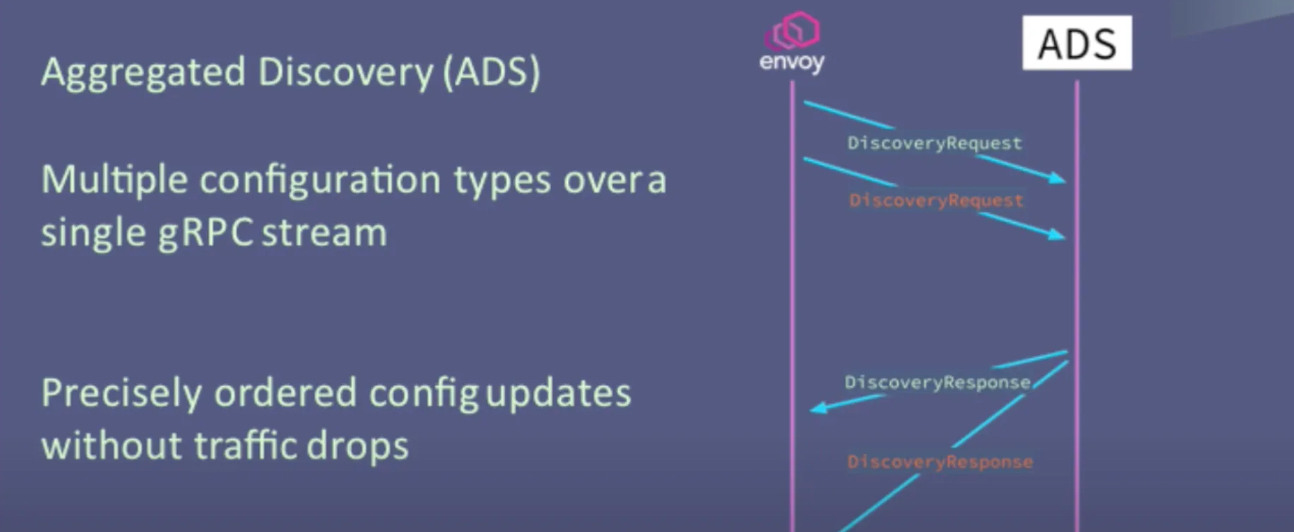 출처: https://blog.naver.com/alice_k106/222000680202
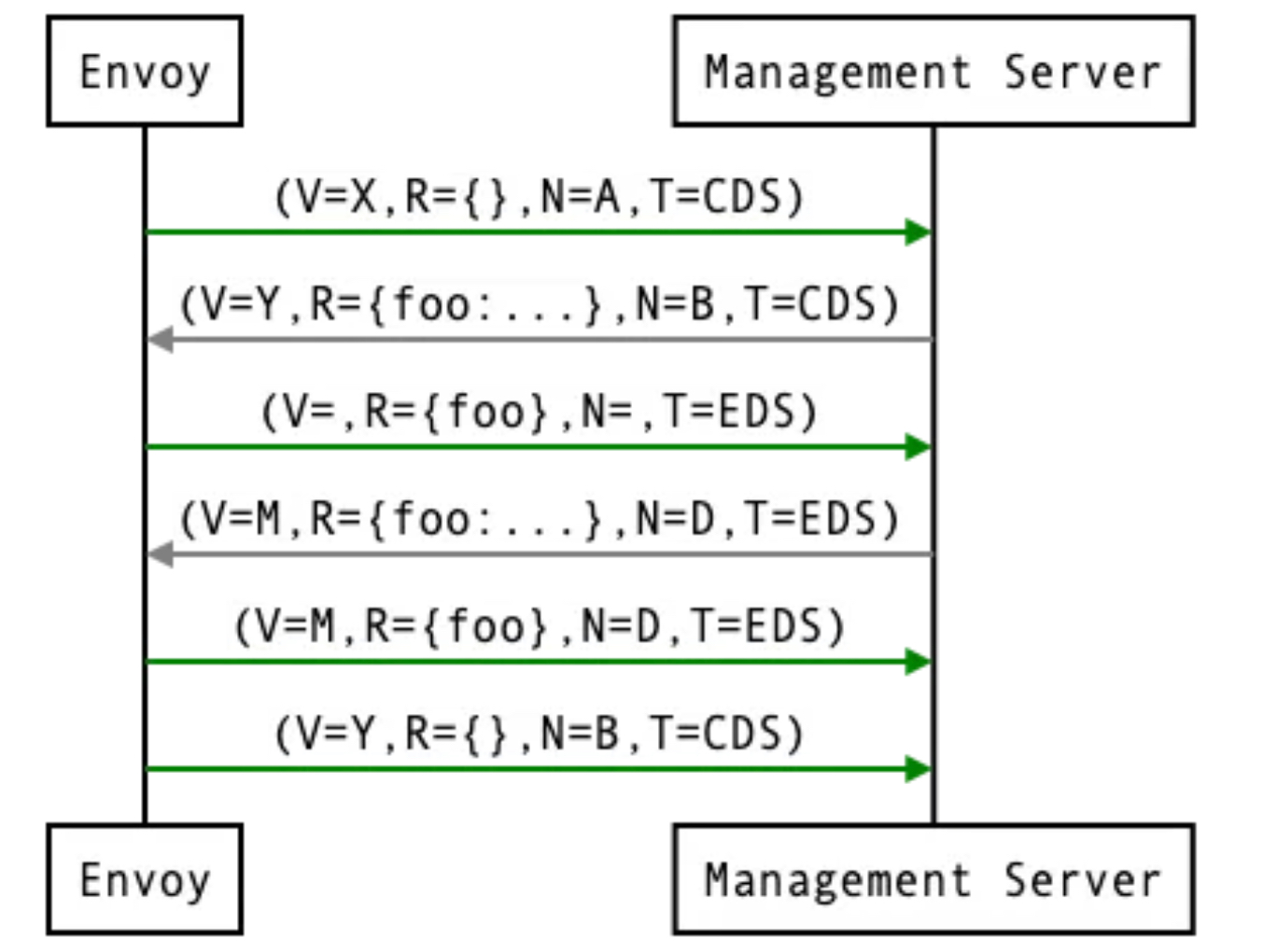 출처: https://www.envoyproxy.io/docs/envoy/latest/api-docs/xds_protocol#aggregated-discovery-service
1.3 Envoy in action (실습)
1.3.1 기본 실습
- 엔보이는 C++로 작성돼 플랫폼에 맞게 컴파일 된다. 엔보이를 시작하기 가장 좋은 방법은 도커를 사용해 컨테이너를 실행하는 것이다.
- 도커 이미지 가져오기 : citizenstig/httpbin 는 arm CPU 미지원 - Link
# 도커 이미지 가져오기
docker pull envoyproxy/envoy:v1.19.0
v1.19.0: Pulling from envoyproxy/envoy
5ab476899135: Pull complete
ac0191b92803: Pull complete
103feb2666f8: Pull complete
b3aac349f16a: Pull complete
1bf3a194e2b3: Pull complete
0af831276ac1: Pull complete
4b52eda99c5b: Pull complete
b9bb7af7248f: Pull complete
Digest: sha256:ec7228053c7e99bf481901960b9074528be407ede2363b6152fb93a1eee872cf
Status: Downloaded newer image for envoyproxy/envoy:v1.19.0
docker.io/envoyproxy/envoy:v1.19.0

docker pull curlimages/curl
docker pull mccutchen/go-httpbin

# 확인
docker images
REPOSITORY             TAG       IMAGE ID       CREATED       SIZE
curlimages/curl        latest    d43bdb28bae0   12 days ago   34.8MB
mccutchen/go-httpbin   latest    ff73c96c1445   2 weeks ago   67.8MB
envoyproxy/envoy v1.19.0 ec7228053c7e 3 years ago 178MB-
httpbin-Envoy 예제 아키텍처 요약
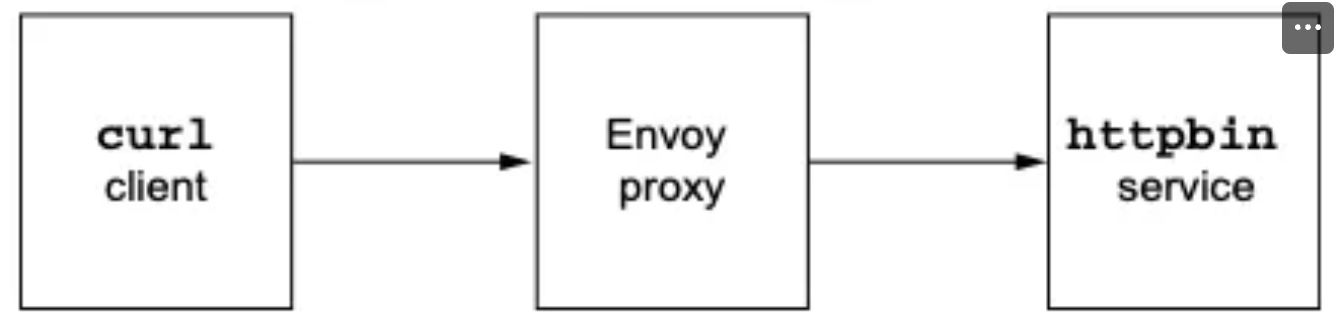
-
httpbin 서비스 시작
- httpbin은 다양한 HTTP 요청에 대해 헤더 반환, 지연, 오류 발생 등의 기능을 제공하는 테스트용 웹 서비스이다.
- 예:
http://httpbin.org/headers→ 요청 헤더를 그대로 반환.
- 예:
- httpbin은 다양한 HTTP 요청에 대해 헤더 반환, 지연, 오류 발생 등의 기능을 제공하는 테스트용 웹 서비스이다.
-
Envoy 설정 및 시작
- Envoy 프록시를 실행하고, 모든 클라이언트 요청이 httpbin 서비스로 라우팅되도록 설정.
-
클라이언트 앱 실행
- 클라이언트 앱이 Envoy를 통해 httpbin에 요청을 전달.
-
-
httpbin 서비스 실행
# mccutchen/go-httpbin 는 기본 8080 포트여서, 책 실습에 맞게 8000으로 변경
# docker run -d -e PORT=8000 --name httpbin mccutchen/go-httpbin -p 8000:8000
docker run -d -e PORT=8000 --name httpbin mccutchen/go-httpbin
docker ps
CONTAINER ID   IMAGE                  COMMAND             CREATED          STATUS          PORTS      NAMES
11f27618ecfe   mccutchen/go-httpbin   "/bin/go-httpbin"   13 seconds ago   Up 12 seconds   8080/tcp   httpbin

# curl 컨테이너로 httpbin 호출 확인
docker run -it --rm --link httpbin curlimages/curl curl -X GET http://httpbin:8000/headers
{
  "headers": {
    "Accept": [
      "*/*"
    ],
    "Host": [
      "httpbin:8000"
    ],
    "User-Agent": [
      "curl/8.13.0"
    ]
  }
}
✍🏿 /headers 엔드포인트를 호출하는데 사용한 헤더가 함께 반환된다.
- 이제 엔보이 프록시를 실행하고 help 를 전달해 플래그와 명령줄 파라미터 중 일부를 살펴보자
#
docker run -it --rm envoyproxy/envoy:v1.19.0 envoy --help
...
   --service-zone <string> # 프록시를 배포할 가용 영역을 지정
     Zone name

   --service-node <string> # 프록시에 고유한 이름 부여
     Node name

...
   -c <string>,  --config-path <string> # 설정 파일을 전달
Path to configuration file- 엔보이 실행 : 프록시를 실행하려고 했지만 유효한 설정 파일을 전달하지 않았다.
docker run -it --rm envoyproxy/envoy:v1.19.0 envoy
[2025-04-19 01:59:31.556][1][info][main] [source/server/server.cc:338] initializing epoch 0 (base id=0, hot restart version=11.120)
[2025-04-19 01:59:31.556][1][info][main] [source/server/server.cc:340] statically linked extensions:
[2025-04-19 01:59:31.556][1][info][main] [source/server/server.cc:342]   envoy.compression.compressor: envoy.compression.brotli.compressor, envoy.compression.gzip.compressor
[2025-04-19 01:59:31.556][1][info][main] [source/server/server.cc:342]   envoy.stats_sinks: envoy.dog_statsd, envoy.graphite_statsd, envoy.metrics_service, envoy.stat_sinks.dog_statsd, envoy.stat_sinks.graphite_statsd, envoy.stat_sinks.hystrix, envoy.stat_sinks.metrics_service, envoy.stat_sinks.statsd, envoy.stat_sinks.wasm, envoy.statsd
[2025-04-19 01:59:31.556][1][info][main] [source/server/server.cc:342]   envoy.wasm.runtime: envoy.wasm.runtime.null, envoy.wasm.runtime.v8
[2025-04-19 01:59:31.556][1][info][main] [source/server/server.cc:342]   envoy.formatter: envoy.formatter.req_without_query
[2025-04-19 01:59:31.556][1][info][main] [source/server/server.cc:342]   envoy.matching.http.input: request-headers, request-trailers, response-headers, response-trailers
[2025-04-19 01:59:31.556][1][info][main] [source/server/server.cc:342]   envoy.thrift_proxy.transports: auto, framed, header, unframed
[2025-04-19 01:59:31.556][1][info][main] [source/server/server.cc:342]   envoy.quic.server.crypto_stream: envoy.quic.crypto_stream.server.quiche
[2025-04-19 01:59:31.556][1][info][main] [source/server/server.cc:342]   envoy.compression.decompressor: envoy.compression.brotli.decompressor, envoy.compression.gzip.decompressor
[2025-04-19 01:59:31.556][1][info][main] [source/server/server.cc:342]   envoy.thrift_proxy.protocols: auto, binary, binary/non-strict, compact, twitter
[2025-04-19 01:59:31.556][1][info][main] [source/server/server.cc:342]   envoy.thrift_proxy.filters: envoy.filters.thrift.rate_limit, envoy.filters.thrift.router
[2025-04-19 01:59:31.556][1][info][main] [source/server/server.cc:342]   envoy.tls.cert_validator: envoy.tls.cert_validator.default, envoy.tls.cert_validator.spiffe
[2025-04-19 01:59:31.556][1][info][main] [source/server/server.cc:342]   envoy.resource_monitors: envoy.resource_monitors.fixed_heap, envoy.resource_monitors.injected_resource
[2025-04-19 01:59:31.556][1][info][main] [source/server/server.cc:342]   envoy.request_id: envoy.request_id.uuid
[2025-04-19 01:59:31.556][1][info][main] [source/server/server.cc:342]   envoy.http.cache: envoy.extensions.http.cache.simple
[2025-04-19 01:59:31.556][1][info][main] [source/server/server.cc:342]   envoy.filters.network: envoy.client_ssl_auth, envoy.echo, envoy.ext_authz, envoy.filters.network.client_ssl_auth, envoy.filters.network.connection_limit, envoy.filters.network.direct_response, envoy.filters.network.dubbo_proxy, envoy.filters.network.echo, envoy.filters.network.ext_authz, envoy.filters.network.http_connection_manager, envoy.filters.network.kafka_broker, envoy.filters.network.local_ratelimit, envoy.filters.network.mongo_proxy, envoy.filters.network.mysql_proxy, envoy.filters.network.postgres_proxy, envoy.filters.network.ratelimit, envoy.filters.network.rbac, envoy.filters.network.redis_proxy, envoy.filters.network.rocketmq_proxy, envoy.filters.network.sni_cluster, envoy.filters.network.sni_dynamic_forward_proxy, envoy.filters.network.tcp_proxy, envoy.filters.network.thrift_proxy, envoy.filters.network.wasm, envoy.filters.network.zookeeper_proxy, envoy.http_connection_manager, envoy.mongo_proxy, envoy.ratelimit, envoy.redis_proxy, envoy.tcp_proxy
[2025-04-19 01:59:31.556][1][info][main] [source/server/server.cc:342]   envoy.dubbo_proxy.serializers: dubbo.hessian2
[2025-04-19 01:59:31.556][1][info][main] [source/server/server.cc:342]   envoy.http.original_ip_detection: envoy.http.original_ip_detection.custom_header, envoy.http.original_ip_detection.xff
[2025-04-19 01:59:31.556][1][info][main] [source/server/server.cc:342]   envoy.upstreams: envoy.filters.connection_pools.tcp.generic
[2025-04-19 01:59:31.556][1][info][main] [source/server/server.cc:342]   envoy.matching.input_matchers: envoy.matching.matchers.consistent_hashing, envoy.matching.matchers.ip
[2025-04-19 01:59:31.556][1][info][main] [source/server/server.cc:342]   envoy.filters.udp_listener: envoy.filters.udp.dns_filter, envoy.filters.udp_listener.udp_proxy
[2025-04-19 01:59:31.556][1][info][main] [source/server/server.cc:342]   envoy.tracers: envoy.dynamic.ot, envoy.lightstep, envoy.tracers.datadog, envoy.tracers.dynamic_ot, envoy.tracers.lightstep, envoy.tracers.opencensus, envoy.tracers.skywalking, envoy.tracers.xray, envoy.tracers.zipkin, envoy.zipkin
[2025-04-19 01:59:31.556][1][info][main] [source/server/server.cc:342]   envoy.access_loggers: envoy.access_loggers.file, envoy.access_loggers.http_grpc, envoy.access_loggers.open_telemetry, envoy.access_loggers.stderr, envoy.access_loggers.stdout, envoy.access_loggers.tcp_grpc, envoy.access_loggers.wasm, envoy.file_access_log, envoy.http_grpc_access_log, envoy.open_telemetry_access_log, envoy.stderr_access_log, envoy.stdout_access_log, envoy.tcp_grpc_access_log, envoy.wasm_access_log
[2025-04-19 01:59:31.556][1][info][main] [source/server/server.cc:342]   envoy.bootstrap: envoy.bootstrap.wasm, envoy.extensions.network.socket_interface.default_socket_interface
[2025-04-19 01:59:31.556][1][info][main] [source/server/server.cc:342]   envoy.matching.common_inputs: envoy.matching.common_inputs.environment_variable
[2025-04-19 01:59:31.556][1][info][main] [source/server/server.cc:342]   envoy.internal_redirect_predicates: envoy.internal_redirect_predicates.allow_listed_routes, envoy.internal_redirect_predicates.previous_routes, envoy.internal_redirect_predicates.safe_cross_scheme
[2025-04-19 01:59:31.556][1][info][main] [source/server/server.cc:342]   envoy.guarddog_actions: envoy.watchdog.abort_action, envoy.watchdog.profile_action
[2025-04-19 01:59:31.556][1][info][main] [source/server/server.cc:342]   envoy.matching.action: composite-action, skip
[2025-04-19 01:59:31.556][1][info][main] [source/server/server.cc:342]   envoy.transport_sockets.downstream: envoy.transport_sockets.alts, envoy.transport_sockets.quic, envoy.transport_sockets.raw_buffer, envoy.transport_sockets.starttls, envoy.transport_sockets.tap, envoy.transport_sockets.tls, raw_buffer, starttls, tls
[2025-04-19 01:59:31.556][1][info][main] [source/server/server.cc:342]   envoy.rate_limit_descriptors: envoy.rate_limit_descriptors.expr
[2025-04-19 01:59:31.556][1][info][main] [source/server/server.cc:342]   envoy.resolvers: envoy.ip
[2025-04-19 01:59:31.556][1][info][main] [source/server/server.cc:342]   envoy.filters.listener: envoy.filters.listener.http_inspector, envoy.filters.listener.original_dst, envoy.filters.listener.original_src, envoy.filters.listener.proxy_protocol, envoy.filters.listener.tls_inspector, envoy.listener.http_inspector, envoy.listener.original_dst, envoy.listener.original_src, envoy.listener.proxy_protocol, envoy.listener.tls_inspector
[2025-04-19 01:59:31.556][1][info][main] [source/server/server.cc:342]   envoy.upstream_options: envoy.extensions.upstreams.http.v3.HttpProtocolOptions, envoy.upstreams.http.http_protocol_options
[2025-04-19 01:59:31.556][1][info][main] [source/server/server.cc:342]   envoy.dubbo_proxy.protocols: dubbo
[2025-04-19 01:59:31.556][1][info][main] [source/server/server.cc:342]   envoy.quic.proof_source: envoy.quic.proof_source.filter_chain
[2025-04-19 01:59:31.556][1][info][main] [source/server/server.cc:342]   envoy.transport_sockets.upstream: envoy.transport_sockets.alts, envoy.transport_sockets.quic, envoy.transport_sockets.raw_buffer, envoy.transport_sockets.starttls, envoy.transport_sockets.tap, envoy.transport_sockets.tls, envoy.transport_sockets.upstream_proxy_protocol, raw_buffer, starttls, tls
[2025-04-19 01:59:31.556][1][info][main] [source/server/server.cc:342]   envoy.retry_priorities: envoy.retry_priorities.previous_priorities
[2025-04-19 01:59:31.556][1][info][main] [source/server/server.cc:342]   envoy.dubbo_proxy.filters: envoy.filters.dubbo.router
[2025-04-19 01:59:31.556][1][info][main] [source/server/server.cc:342]   envoy.retry_host_predicates: envoy.retry_host_predicates.omit_canary_hosts, envoy.retry_host_predicates.omit_host_metadata, envoy.retry_host_predicates.previous_hosts
[2025-04-19 01:59:31.556][1][info][main] [source/server/server.cc:342]   envoy.grpc_credentials: envoy.grpc_credentials.aws_iam, envoy.grpc_credentials.default, envoy.grpc_credentials.file_based_metadata
[2025-04-19 01:59:31.556][1][info][main] [source/server/server.cc:342]   envoy.clusters: envoy.cluster.eds, envoy.cluster.logical_dns, envoy.cluster.original_dst, envoy.cluster.static, envoy.cluster.strict_dns, envoy.clusters.aggregate, envoy.clusters.dynamic_forward_proxy, envoy.clusters.redis
[2025-04-19 01:59:31.556][1][info][main] [source/server/server.cc:342]   envoy.dubbo_proxy.route_matchers: default
[2025-04-19 01:59:31.556][1][info][main] [source/server/server.cc:342]   envoy.http.stateful_header_formatters: preserve_case
[2025-04-19 01:59:31.556][1][info][main] [source/server/server.cc:342]   envoy.health_checkers: envoy.health_checkers.redis
[2025-04-19 01:59:31.556][1][info][main] [source/server/server.cc:342]   envoy.filters.http: envoy.bandwidth_limit, envoy.buffer, envoy.cors, envoy.csrf, envoy.ext_authz, envoy.ext_proc, envoy.fault, envoy.filters.http.adaptive_concurrency, envoy.filters.http.admission_control, envoy.filters.http.alternate_protocols_cache, envoy.filters.http.aws_lambda, envoy.filters.http.aws_request_signing, envoy.filters.http.bandwidth_limit, envoy.filters.http.buffer, envoy.filters.http.cache, envoy.filters.http.cdn_loop, envoy.filters.http.composite, envoy.filters.http.compressor, envoy.filters.http.cors, envoy.filters.http.csrf, envoy.filters.http.decompressor, envoy.filters.http.dynamic_forward_proxy, envoy.filters.http.dynamo, envoy.filters.http.ext_authz, envoy.filters.http.ext_proc, envoy.filters.http.fault, envoy.filters.http.grpc_http1_bridge, envoy.filters.http.grpc_http1_reverse_bridge, envoy.filters.http.grpc_json_transcoder, envoy.filters.http.grpc_stats, envoy.filters.http.grpc_web, envoy.filters.http.header_to_metadata, envoy.filters.http.health_check, envoy.filters.http.ip_tagging, envoy.filters.http.jwt_authn, envoy.filters.http.local_ratelimit, envoy.filters.http.lua, envoy.filters.http.oauth2, envoy.filters.http.on_demand, envoy.filters.http.original_src, envoy.filters.http.ratelimit, envoy.filters.http.rbac, envoy.filters.http.router, envoy.filters.http.set_metadata, envoy.filters.http.squash, envoy.filters.http.tap, envoy.filters.http.wasm, envoy.grpc_http1_bridge, envoy.grpc_json_transcoder, envoy.grpc_web, envoy.health_check, envoy.http_dynamo_filter, envoy.ip_tagging, envoy.local_rate_limit, envoy.lua, envoy.rate_limit, envoy.router, envoy.squash, match-wrapper
[2025-04-19 01:59:31.558][1][critical][main] [source/server/server.cc:112] error initializing configuration '': At least one of --config-path or --config-yaml or Options::configProto() should be non-empty
[2025-04-19 01:59:31.558][1][info][main] [source/server/server.cc:855] exiting
At least one of --config-path or --config-yaml or Options::configProto() should be non-empty- 이를 수정하고 앞서 봤던 예제 설정 파일을 전달해보자.
admin:
  address:
    socket_address: { address: 0.0.0.0, port_value: 15000 }

static_resources:
  listeners:
  - name: httpbin-demo
    address:
      socket_address: { address: 0.0.0.0, port_value: 15001 }
    filter_chains:
    - filters:
      - name:  envoy.filters.network.http_connection_manager
        typed_config:
          "@type": type.googleapis.com/envoy.extensions.filters.network.http_connection_manager.v3.HttpConnectionManager
          stat_prefix: ingress_http
          http_filters:
          - name: envoy.filters.http.router
          route_config:
            name: httpbin_local_route
            virtual_hosts:
            - name: httpbin_local_service
              domains: ["*"]
              routes:
              - match: { prefix: "/" }
                route:
                  auto_host_rewrite: true
                  cluster: httpbin_service
  clusters:
    - name: httpbin_service
      connect_timeout: 5s
      type: LOGICAL_DNS
      dns_lookup_family: V4_ONLY
      lb_policy: ROUND_ROBIN
      load_assignment:
        cluster_name: httpbin
        endpoints:
        - lb_endpoints:
          - endpoint:
              address:
                socket_address:
                  address: httpbin
                  port_value: 8000
🤔 기본적으로 15001 포트에 단일 리스너를 노출하고 모든 트래픽을 httpbin 클러스터로 라우팅할 것이다.
- 다시 엔보이 시작
#
cat ch3/simple.yaml

# 터미널1
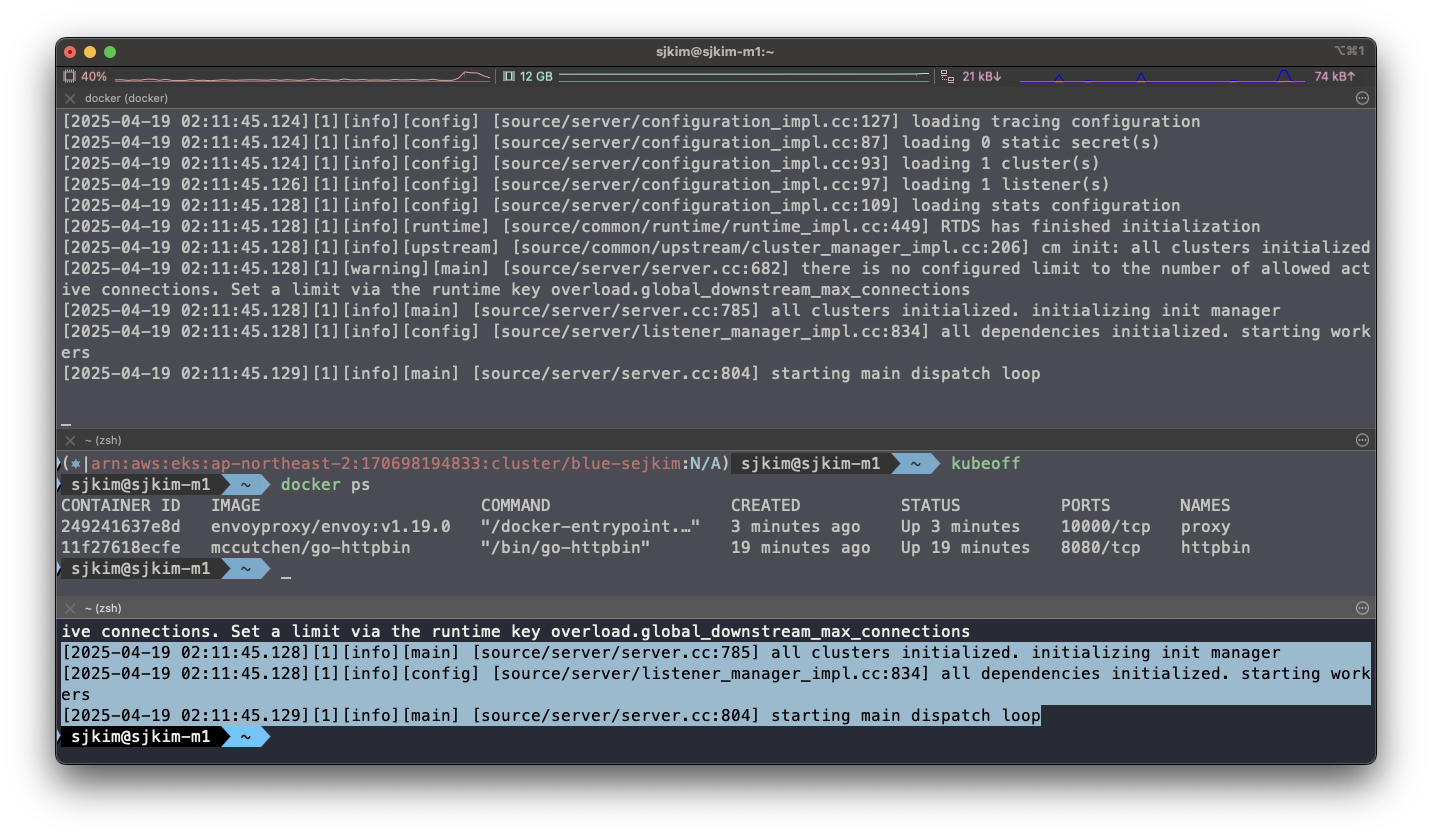
docker run --name proxy --link httpbin envoyproxy/envoy:v1.19.0 --config-yaml "$(cat ch3/simple.yaml)"

# 터미널2
docker logs proxy
[2025-04-19 02:11:45.128][1][info][main] [source/server/server.cc:785] all clusters initialized. initializing init manager
[2025-04-19 02:11:45.128][1][info][config] [source/server/listener_manager_impl.cc:834] all dependencies initialized. starting workers
[2025-04-19 02:11:45.129][1][info][main] [source/server/server.cc:804] starting main dispatch loop
🎉 프록시가 성공적으로 시작해 15001 포트를 리스닝하고 있다.
- curl로 프록시를 호출해 보자
# 터미널2
docker run -it --rm --link proxy curlimages/curl curl -X GET http://proxy:15001/headers
{
  "headers": {
    "Accept": [
      "*/*"
    ],
    "Host": [
      "httpbin"
    ],
    "User-Agent": [
      "curl/8.13.0"
    ],
    "X-Envoy-Expected-Rq-Timeout-Ms": [
      "15000"
    ],
    "X-Forwarded-Proto": [
      "http"
    ],
    "X-Request-Id": [
      "c96ff161-35ad-4556-b2b7-1b098beb1ace"
    ]
  }
}
🎯 프록시를 호출했는데도 트래픽이 httpbin 서비스로 정확하게 전송됐다. 또 다음과 같은 새로운 헤더도 추가됐다.
-
X-Envoy-Expected-Rq-Timeout-Ms
-
X-Request-Id
-
사소하게 보일 수 있지만, 이미 엔보이는 우리를 위해 많은 일을 하고 있다.
-
엔보이는 새 X-Request-Id를 만들었는데, X-Request-Id는 클러스터 내 다양한 요청 사이의 관계를 파악하고 요청을 처리하기 위해 여러 서비스를 거치는 동안(즉, 여러 홉)을 추적하는 데 활용할 수 있다.
-
두 번째 헤더인 X-Envoy-Expected-Rq-Timeout-Ms는 업스트림 서비스에 대한 힌트로, 요청이 15,000ms 후에 타임아웃될 것으로 기대한다는 의미다.
-
업스트림 시스템과 그 요청이 거치는 모든 홉은 이 힌트를 사용해 데드라인을 구현할 수 있다. 데드라인을 사용하면 업스트림 시스템에 타임아웃 의도를 전달할 수 있으며, 데드라인이 넘으면 처리를 중단하게 할 수 있다.
-
이렇게 하면 타임아웃된 후 묶여 있던 리소스가 풀려난다.
-
다음 실습을 위해 Envoy 종료
docker rm -f proxy -
이제 이 구성을 살짝 변경해 예상 요청 타임아웃을 1초로 설정해보자.
-
설정 파일에 라우팅 규칙을 업데이트하자.
              - match: { prefix: "/" }
                route:
                  auto_host_rewrite: true
                  cluster: httpbin_service
timeout: 1s- 실행
#
#docker run -p 15000:15000 --name proxy --link httpbin envoyproxy/envoy:v1.19.0 --config-yaml "$(cat ch3/simple_change_timeout.yaml)"
cat ch3/simple_change_timeout.yaml
docker run --name proxy --link httpbin envoyproxy/envoy:v1.19.0 --config-yaml "$(cat ch3/simple_change_timeout.yaml)"
docker ps
CONTAINER ID   IMAGE                      COMMAND                  CREATED          STATUS          PORTS       NAMES
e20c923154e8   envoyproxy/envoy:v1.19.0   "/docker-entrypoint.…"   16 seconds ago   Up 15 seconds   10000/tcp   proxy
11f27618ecfe   mccutchen/go-httpbin       "/bin/go-httpbin"        28 minutes ago   Up 28 minutes   8080/tcp    httpbin

# 타임아웃 설정 변경 확인
docker run -it --rm --link proxy curlimages/curl curl -X GET http://proxy:15001/headers
{
  "headers": {
    "Accept": [
      "*/*"
    ],
    "Host": [
      "httpbin"
    ],
    "User-Agent": [
      "curl/8.13.0"
    ],
    "X-Envoy-Expected-Rq-Timeout-Ms": [
      "1000"  ✅ 1000ms초 = 1초
    ],
    "X-Forwarded-Proto": [
      "http"
    ],
    "X-Request-Id": [
      "b1ba5664-dc66-4b43-b25e-15c31ff022a5"
    ]
  }
}
# 추가 테스트 : Envoy Admin API(TCP 15000) 를 통해 delay 설정
docker run -it --rm --link proxy curlimages/curl curl -X POST http://proxy:15000/logging
active loggers:
  admin: info
  aws: info
  assert: info
  backtrace: info
  cache_filter: info
  client: info
  config: info
  connection: info
  conn_handler: info
  decompression: info
  dubbo: info
  envoy_bug: info
  ext_authz: info
  rocketmq: info
  file: info
  filter: info
  forward_proxy: info
  grpc: info
  hc: info
  health_checker: info
  http: info
  http2: info
  hystrix: info
  init: info
  io: info
  jwt: info
  kafka: info
  lua: info
  main: info
  matcher: info
  misc: info
  mongo: info
  quic: info
  quic_stream: info
  pool: info
  rbac: info
  redis: info
  router: info
  runtime: info
  stats: info
  secret: info
  tap: info
  testing: info
  thrift: info
  tracing: info
  upstream: info
  udp: info
  wasm: info

docker run -it --rm --link proxy curlimages/curl curl -X POST http://proxy:15000/logging?http=debug

  http: debug

[2025-04-19 02:28:04.049][1][debug][http] [source/common/http/conn_manager_impl.cc:1456] [C5][S7246239971882766351] encoding headers via codec (end_stream=false):
':status', '200'
'content-type', 'text/plain; charset=UTF-8'
'cache-control', 'no-cache, max-age=0'
'x-content-type-options', 'nosniff'
'date', 'Sat, 19 Apr 2025 02:28:04 GMT'
'server', 'envoy'

docker run -it --rm --link proxy curlimages/curl curl -X GET http://proxy:15001/delay/0.5
{
  "args": {},
  "headers": {
    "Accept": [
      "*/*"
    ],
    "Host": [
      "httpbin"
    ],
    "User-Agent": [
      "curl/8.13.0"
    ],
    "X-Envoy-Expected-Rq-Timeout-Ms": [
      "1000"
    ],
    "X-Forwarded-Proto": [
      "http"
    ],
    "X-Request-Id": [
      "52de6634-be18-4c61-8f4f-7f064317fd36"
    ]
  },
  "method": "GET",
  "origin": "172.17.0.3:38458",
  "url": "http://httpbin/delay/0.5",
  "data": "",
  "files": {},
  "form": {},
  "json": null
}

docker run -it --rm --link proxy curlimages/curl curl -X GET http://proxy:15001/delay/1
upstream request timeout

docker run -it --rm --link proxy curlimages/curl curl -X GET http://proxy:15001/delay/2
upstream request timeout
1.3.2 Envoy’s Admin API
- 엔보이의 Admin API를 사용하면 프록시 동작에 대한 통찰력을 향상시킬 수 있고, 메트릭과 설정에 접근할 수 있다.
#
docker run --name proxy --link httpbin envoyproxy/envoy:v1.19.0 --config-yaml "$(cat ch3/simple_change_timeout.yaml)"

# admin API로 Envoy stat 확인 : 응답은 리스너, 클러스터, 서버에 대한 통계 및 메트릭
docker run -it --rm --link proxy curlimages/curl curl -X GET http://proxy:15000/stats
cluster.httpbin_service.assignment_stale: 0
cluster.httpbin_service.assignment_timeout_received: 0
cluster.httpbin_service.bind_errors: 0
cluster.httpbin_service.circuit_breakers.default.cx_open: 0
cluster.httpbin_service.circuit_breakers.default.cx_pool_open: 0
cluster.httpbin_service.circuit_breakers.default.rq_open: 0
cluster.httpbin_service.circuit_breakers.default.rq_pending_open: 0
cluster.httpbin_service.circuit_breakers.default.rq_retry_open: 0
cluster.httpbin_service.circuit_breakers.high.cx_open: 0
cluster.httpbin_service.circuit_breakers.high.cx_pool_open: 0
cluster.httpbin_service.circuit_breakers.high.rq_open: 0
cluster.httpbin_service.circuit_breakers.high.rq_pending_open: 0
cluster.httpbin_service.circuit_breakers.high.rq_retry_open: 0
cluster.httpbin_service.default.total_match_count: 1
cluster.httpbin_service.lb_healthy_panic: 0
cluster.httpbin_service.lb_local_cluster_not_ok: 0
cluster.httpbin_service.lb_recalculate_zone_structures: 0
cluster.httpbin_service.lb_subsets_active: 0
cluster.httpbin_service.lb_subsets_created: 0
cluster.httpbin_service.lb_subsets_fallback: 0
cluster.httpbin_service.lb_subsets_fallback_panic: 0
cluster.httpbin_service.lb_subsets_removed: 0
cluster.httpbin_service.lb_subsets_selected: 0
cluster.httpbin_service.lb_zone_cluster_too_small: 0
cluster.httpbin_service.lb_zone_no_capacity_left: 0
cluster.httpbin_service.lb_zone_number_differs: 0
cluster.httpbin_service.lb_zone_routing_all_directly: 0
cluster.httpbin_service.lb_zone_routing_cross_zone: 0
cluster.httpbin_service.lb_zone_routing_sampled: 0
cluster.httpbin_service.max_host_weight: 0
cluster.httpbin_service.membership_change: 1
cluster.httpbin_service.membership_degraded: 0
cluster.httpbin_service.membership_excluded: 0
cluster.httpbin_service.membership_healthy: 1
cluster.httpbin_service.membership_total: 1
cluster.httpbin_service.original_dst_host_invalid: 0
cluster.httpbin_service.retry_or_shadow_abandoned: 0
cluster.httpbin_service.update_attempt: 4
cluster.httpbin_service.update_empty: 0
cluster.httpbin_service.update_failure: 0
cluster.httpbin_service.update_no_rebuild: 0
cluster.httpbin_service.update_success: 4
cluster.httpbin_service.upstream_cx_active: 0
cluster.httpbin_service.upstream_cx_close_notify: 0
cluster.httpbin_service.upstream_cx_connect_attempts_exceeded: 0
cluster.httpbin_service.upstream_cx_connect_fail: 0
cluster.httpbin_service.upstream_cx_connect_timeout: 0
cluster.httpbin_service.upstream_cx_destroy: 0
cluster.httpbin_service.upstream_cx_destroy_local: 0
cluster.httpbin_service.upstream_cx_destroy_local_with_active_rq: 0
cluster.httpbin_service.upstream_cx_destroy_remote: 0
cluster.httpbin_service.upstream_cx_destroy_remote_with_active_rq: 0
cluster.httpbin_service.upstream_cx_destroy_with_active_rq: 0
cluster.httpbin_service.upstream_cx_http1_total: 0
cluster.httpbin_service.upstream_cx_http2_total: 0
cluster.httpbin_service.upstream_cx_http3_total: 0
cluster.httpbin_service.upstream_cx_idle_timeout: 0
cluster.httpbin_service.upstream_cx_max_requests: 0
cluster.httpbin_service.upstream_cx_none_healthy: 0
cluster.httpbin_service.upstream_cx_overflow: 0
cluster.httpbin_service.upstream_cx_pool_overflow: 0
cluster.httpbin_service.upstream_cx_protocol_error: 0
cluster.httpbin_service.upstream_cx_rx_bytes_buffered: 0
cluster.httpbin_service.upstream_cx_rx_bytes_total: 0
cluster.httpbin_service.upstream_cx_total: 0
cluster.httpbin_service.upstream_cx_tx_bytes_buffered: 0
cluster.httpbin_service.upstream_cx_tx_bytes_total: 0
cluster.httpbin_service.upstream_flow_control_backed_up_total: 0
cluster.httpbin_service.upstream_flow_control_drained_total: 0
cluster.httpbin_service.upstream_flow_control_paused_reading_total: 0
cluster.httpbin_service.upstream_flow_control_resumed_reading_total: 0
cluster.httpbin_service.upstream_internal_redirect_failed_total: 0
cluster.httpbin_service.upstream_internal_redirect_succeeded_total: 0
cluster.httpbin_service.upstream_rq_active: 0
cluster.httpbin_service.upstream_rq_cancelled: 0
cluster.httpbin_service.upstream_rq_completed: 0
cluster.httpbin_service.upstream_rq_maintenance_mode: 0
cluster.httpbin_service.upstream_rq_max_duration_reached: 0
cluster.httpbin_service.upstream_rq_pending_active: 0
cluster.httpbin_service.upstream_rq_pending_failure_eject: 0
cluster.httpbin_service.upstream_rq_pending_overflow: 0
cluster.httpbin_service.upstream_rq_pending_total: 0
cluster.httpbin_service.upstream_rq_per_try_timeout: 0
cluster.httpbin_service.upstream_rq_retry: 0
cluster.httpbin_service.upstream_rq_retry_backoff_exponential: 0
cluster.httpbin_service.upstream_rq_retry_backoff_ratelimited: 0
cluster.httpbin_service.upstream_rq_retry_limit_exceeded: 0
cluster.httpbin_service.upstream_rq_retry_overflow: 0
cluster.httpbin_service.upstream_rq_retry_success: 0
cluster.httpbin_service.upstream_rq_rx_reset: 0
cluster.httpbin_service.upstream_rq_timeout: 0
cluster.httpbin_service.upstream_rq_total: 0
cluster.httpbin_service.upstream_rq_tx_reset: 0
cluster.httpbin_service.version: 0
cluster_manager.active_clusters: 1
cluster_manager.cluster_added: 1
cluster_manager.cluster_modified: 0
cluster_manager.cluster_removed: 0
cluster_manager.cluster_updated: 0
cluster_manager.cluster_updated_via_merge: 0
cluster_manager.update_merge_cancelled: 0
cluster_manager.update_out_of_merge_window: 0
cluster_manager.warming_clusters: 0
filesystem.flushed_by_timer: 0
filesystem.reopen_failed: 0
filesystem.write_buffered: 0
filesystem.write_completed: 0
filesystem.write_failed: 0
filesystem.write_total_buffered: 0
http.admin.downstream_cx_active: 1
http.admin.downstream_cx_delayed_close_timeout: 0
http.admin.downstream_cx_destroy: 0
http.admin.downstream_cx_destroy_active_rq: 0
http.admin.downstream_cx_destroy_local: 0
http.admin.downstream_cx_destroy_local_active_rq: 0
http.admin.downstream_cx_destroy_remote: 0
http.admin.downstream_cx_destroy_remote_active_rq: 0
http.admin.downstream_cx_drain_close: 0
http.admin.downstream_cx_http1_active: 1
http.admin.downstream_cx_http1_total: 1
http.admin.downstream_cx_http2_active: 0
http.admin.downstream_cx_http2_total: 0
http.admin.downstream_cx_http3_active: 0
http.admin.downstream_cx_http3_total: 0
http.admin.downstream_cx_idle_timeout: 0
http.admin.downstream_cx_max_duration_reached: 0
http.admin.downstream_cx_overload_disable_keepalive: 0
http.admin.downstream_cx_protocol_error: 0
http.admin.downstream_cx_rx_bytes_buffered: 80
http.admin.downstream_cx_rx_bytes_total: 80
http.admin.downstream_cx_ssl_active: 0
http.admin.downstream_cx_ssl_total: 0
http.admin.downstream_cx_total: 1
http.admin.downstream_cx_tx_bytes_buffered: 0
http.admin.downstream_cx_tx_bytes_total: 0
http.admin.downstream_cx_upgrades_active: 0
http.admin.downstream_cx_upgrades_total: 0
http.admin.downstream_flow_control_paused_reading_total: 0
http.admin.downstream_flow_control_resumed_reading_total: 0
http.admin.downstream_rq_1xx: 0
http.admin.downstream_rq_2xx: 0
http.admin.downstream_rq_3xx: 0
http.admin.downstream_rq_4xx: 0
http.admin.downstream_rq_5xx: 0
http.admin.downstream_rq_active: 1
http.admin.downstream_rq_completed: 0
http.admin.downstream_rq_failed_path_normalization: 0
http.admin.downstream_rq_header_timeout: 0
http.admin.downstream_rq_http1_total: 1
http.admin.downstream_rq_http2_total: 0
http.admin.downstream_rq_http3_total: 0
http.admin.downstream_rq_idle_timeout: 0
http.admin.downstream_rq_max_duration_reached: 0
http.admin.downstream_rq_non_relative_path: 0
http.admin.downstream_rq_overload_close: 0
http.admin.downstream_rq_redirected_with_normalized_path: 0
http.admin.downstream_rq_rejected_via_ip_detection: 0
http.admin.downstream_rq_response_before_rq_complete: 0
http.admin.downstream_rq_rx_reset: 0
http.admin.downstream_rq_timeout: 0
http.admin.downstream_rq_too_large: 0
http.admin.downstream_rq_total: 1
http.admin.downstream_rq_tx_reset: 0
http.admin.downstream_rq_ws_on_non_ws_route: 0
http.admin.rs_too_large: 0
http.async-client.no_cluster: 0
http.async-client.no_route: 0
http.async-client.passthrough_internal_redirect_bad_location: 0
http.async-client.passthrough_internal_redirect_no_route: 0
http.async-client.passthrough_internal_redirect_predicate: 0
http.async-client.passthrough_internal_redirect_too_many_redirects: 0
http.async-client.passthrough_internal_redirect_unsafe_scheme: 0
http.async-client.rq_direct_response: 0
http.async-client.rq_redirect: 0
http.async-client.rq_reset_after_downstream_response_started: 0
http.async-client.rq_total: 0
http.ingress_http.downstream_cx_active: 0
http.ingress_http.downstream_cx_delayed_close_timeout: 0
http.ingress_http.downstream_cx_destroy: 0
http.ingress_http.downstream_cx_destroy_active_rq: 0
http.ingress_http.downstream_cx_destroy_local: 0
http.ingress_http.downstream_cx_destroy_local_active_rq: 0
http.ingress_http.downstream_cx_destroy_remote: 0
http.ingress_http.downstream_cx_destroy_remote_active_rq: 0
http.ingress_http.downstream_cx_drain_close: 0
http.ingress_http.downstream_cx_http1_active: 0
http.ingress_http.downstream_cx_http1_total: 0
http.ingress_http.downstream_cx_http2_active: 0
http.ingress_http.downstream_cx_http2_total: 0
http.ingress_http.downstream_cx_http3_active: 0
http.ingress_http.downstream_cx_http3_total: 0
http.ingress_http.downstream_cx_idle_timeout: 0
http.ingress_http.downstream_cx_max_duration_reached: 0
http.ingress_http.downstream_cx_overload_disable_keepalive: 0
http.ingress_http.downstream_cx_protocol_error: 0
http.ingress_http.downstream_cx_rx_bytes_buffered: 0
http.ingress_http.downstream_cx_rx_bytes_total: 0
http.ingress_http.downstream_cx_ssl_active: 0
http.ingress_http.downstream_cx_ssl_total: 0
http.ingress_http.downstream_cx_total: 0
http.ingress_http.downstream_cx_tx_bytes_buffered: 0
http.ingress_http.downstream_cx_tx_bytes_total: 0
http.ingress_http.downstream_cx_upgrades_active: 0
http.ingress_http.downstream_cx_upgrades_total: 0
http.ingress_http.downstream_flow_control_paused_reading_total: 0
http.ingress_http.downstream_flow_control_resumed_reading_total: 0
http.ingress_http.downstream_rq_1xx: 0
http.ingress_http.downstream_rq_2xx: 0
http.ingress_http.downstream_rq_3xx: 0
http.ingress_http.downstream_rq_4xx: 0
http.ingress_http.downstream_rq_5xx: 0
http.ingress_http.downstream_rq_active: 0
http.ingress_http.downstream_rq_completed: 0
http.ingress_http.downstream_rq_failed_path_normalization: 0
http.ingress_http.downstream_rq_header_timeout: 0
http.ingress_http.downstream_rq_http1_total: 0
http.ingress_http.downstream_rq_http2_total: 0
http.ingress_http.downstream_rq_http3_total: 0
http.ingress_http.downstream_rq_idle_timeout: 0
http.ingress_http.downstream_rq_max_duration_reached: 0
http.ingress_http.downstream_rq_non_relative_path: 0
http.ingress_http.downstream_rq_overload_close: 0
http.ingress_http.downstream_rq_redirected_with_normalized_path: 0
http.ingress_http.downstream_rq_rejected_via_ip_detection: 0
http.ingress_http.downstream_rq_response_before_rq_complete: 0
http.ingress_http.downstream_rq_rx_reset: 0
http.ingress_http.downstream_rq_timeout: 0
http.ingress_http.downstream_rq_too_large: 0
http.ingress_http.downstream_rq_total: 0
http.ingress_http.downstream_rq_tx_reset: 0
http.ingress_http.downstream_rq_ws_on_non_ws_route: 0
http.ingress_http.no_cluster: 0
http.ingress_http.no_route: 0
http.ingress_http.passthrough_internal_redirect_bad_location: 0
http.ingress_http.passthrough_internal_redirect_no_route: 0
http.ingress_http.passthrough_internal_redirect_predicate: 0
http.ingress_http.passthrough_internal_redirect_too_many_redirects: 0
http.ingress_http.passthrough_internal_redirect_unsafe_scheme: 0
http.ingress_http.rq_direct_response: 0
http.ingress_http.rq_redirect: 0
http.ingress_http.rq_reset_after_downstream_response_started: 0
http.ingress_http.rq_total: 0
http.ingress_http.rs_too_large: 0
http.ingress_http.tracing.client_enabled: 0
http.ingress_http.tracing.health_check: 0
http.ingress_http.tracing.not_traceable: 0
http.ingress_http.tracing.random_sampling: 0
http.ingress_http.tracing.service_forced: 0
http1.dropped_headers_with_underscores: 0
http1.metadata_not_supported_error: 0
http1.requests_rejected_with_underscores_in_headers: 0
http1.response_flood: 0
listener.0.0.0.0_15001.downstream_cx_active: 0
listener.0.0.0.0_15001.downstream_cx_destroy: 0
listener.0.0.0.0_15001.downstream_cx_overflow: 0
listener.0.0.0.0_15001.downstream_cx_overload_reject: 0
listener.0.0.0.0_15001.downstream_cx_total: 0
listener.0.0.0.0_15001.downstream_global_cx_overflow: 0
listener.0.0.0.0_15001.downstream_pre_cx_active: 0
listener.0.0.0.0_15001.downstream_pre_cx_timeout: 0
listener.0.0.0.0_15001.http.ingress_http.downstream_rq_1xx: 0
listener.0.0.0.0_15001.http.ingress_http.downstream_rq_2xx: 0
listener.0.0.0.0_15001.http.ingress_http.downstream_rq_3xx: 0
listener.0.0.0.0_15001.http.ingress_http.downstream_rq_4xx: 0
listener.0.0.0.0_15001.http.ingress_http.downstream_rq_5xx: 0
listener.0.0.0.0_15001.http.ingress_http.downstream_rq_completed: 0
listener.0.0.0.0_15001.no_filter_chain_match: 0
listener.0.0.0.0_15001.worker_0.downstream_cx_active: 0
listener.0.0.0.0_15001.worker_0.downstream_cx_total: 0
listener.0.0.0.0_15001.worker_1.downstream_cx_active: 0
listener.0.0.0.0_15001.worker_1.downstream_cx_total: 0
listener.0.0.0.0_15001.worker_2.downstream_cx_active: 0
listener.0.0.0.0_15001.worker_2.downstream_cx_total: 0
listener.0.0.0.0_15001.worker_3.downstream_cx_active: 0
listener.0.0.0.0_15001.worker_3.downstream_cx_total: 0
listener.0.0.0.0_15001.worker_4.downstream_cx_active: 0
listener.0.0.0.0_15001.worker_4.downstream_cx_total: 0
listener.0.0.0.0_15001.worker_5.downstream_cx_active: 0
listener.0.0.0.0_15001.worker_5.downstream_cx_total: 0
listener.admin.downstream_cx_active: 1
listener.admin.downstream_cx_destroy: 0
listener.admin.downstream_cx_overflow: 0
listener.admin.downstream_cx_overload_reject: 0
listener.admin.downstream_cx_total: 1
listener.admin.downstream_global_cx_overflow: 0
listener.admin.downstream_pre_cx_active: 0
listener.admin.downstream_pre_cx_timeout: 0
listener.admin.http.admin.downstream_rq_1xx: 0
listener.admin.http.admin.downstream_rq_2xx: 0
listener.admin.http.admin.downstream_rq_3xx: 0
listener.admin.http.admin.downstream_rq_4xx: 0
listener.admin.http.admin.downstream_rq_5xx: 0
listener.admin.http.admin.downstream_rq_completed: 0
listener.admin.main_thread.downstream_cx_active: 1
listener.admin.main_thread.downstream_cx_total: 1
listener.admin.no_filter_chain_match: 0
listener_manager.listener_added: 1
listener_manager.listener_create_failure: 0
listener_manager.listener_create_success: 6
listener_manager.listener_in_place_updated: 0
listener_manager.listener_modified: 0
listener_manager.listener_removed: 0
listener_manager.listener_stopped: 0
listener_manager.total_filter_chains_draining: 0
listener_manager.total_listeners_active: 1
listener_manager.total_listeners_draining: 0
listener_manager.total_listeners_warming: 0
listener_manager.workers_started: 1
main_thread.watchdog_mega_miss: 0
main_thread.watchdog_miss: 0
runtime.admin_overrides_active: 0
runtime.deprecated_feature_seen_since_process_start: 0
runtime.deprecated_feature_use: 0
runtime.load_error: 0
runtime.load_success: 1
runtime.num_keys: 0
runtime.num_layers: 0
runtime.override_dir_exists: 0
runtime.override_dir_not_exists: 1
server.compilation_settings.fips_mode: 0
server.concurrency: 6
server.days_until_first_cert_expiring: 2147483647
server.debug_assertion_failures: 0
server.dropped_stat_flushes: 0
server.dynamic_unknown_fields: 0
server.envoy_bug_failures: 0
server.hot_restart_epoch: 0
server.hot_restart_generation: 1
server.live: 1
server.main_thread.watchdog_mega_miss: 0
server.main_thread.watchdog_miss: 0
server.memory_allocated: 7612680
server.memory_heap_size: 12582912
server.memory_physical_size: 17900694
server.parent_connections: 0
server.seconds_until_first_ocsp_response_expiring: 0
server.state: 0
server.static_unknown_fields: 0
server.stats_recent_lookups: 1303
server.total_connections: 0
server.uptime: 15
server.version: 6880851
server.worker_0.watchdog_mega_miss: 0
server.worker_0.watchdog_miss: 0
server.worker_1.watchdog_mega_miss: 0
server.worker_1.watchdog_miss: 0
server.worker_2.watchdog_mega_miss: 0
server.worker_2.watchdog_miss: 0
server.worker_3.watchdog_mega_miss: 0
server.worker_3.watchdog_miss: 0
server.worker_4.watchdog_mega_miss: 0
server.worker_4.watchdog_miss: 0
server.worker_5.watchdog_mega_miss: 0
server.worker_5.watchdog_miss: 0
vhost.httpbin_local_service.vcluster.other.upstream_rq_retry: 0
vhost.httpbin_local_service.vcluster.other.upstream_rq_retry_limit_exceeded: 0
vhost.httpbin_local_service.vcluster.other.upstream_rq_retry_overflow: 0
vhost.httpbin_local_service.vcluster.other.upstream_rq_retry_success: 0
vhost.httpbin_local_service.vcluster.other.upstream_rq_timeout: 0
vhost.httpbin_local_service.vcluster.other.upstream_rq_total: 0
workers.watchdog_mega_miss: 0
workers.watchdog_miss: 0
cluster.httpbin_service.upstream_cx_connect_ms: No recorded values
cluster.httpbin_service.upstream_cx_length_ms: No recorded values
http.admin.downstream_cx_length_ms: No recorded values
http.admin.downstream_rq_time: No recorded values
http.ingress_http.downstream_cx_length_ms: No recorded values
http.ingress_http.downstream_rq_time: No recorded values
listener.0.0.0.0_15001.downstream_cx_length_ms: No recorded values
listener.admin.downstream_cx_length_ms: No recorded values
server.initialization_time_ms: P0(nan,3.0) P25(nan,3.025) P50(nan,3.05) P75(nan,3.075) P90(nan,3.09) P95(nan,3.095) P99(nan,3.099) P99.5(nan,3.0995) P99.9(nan,3.0999) P100(nan,3.1)

# retry 통계만 확인
docker run -it --rm --link proxy curlimages/curl curl -X GET http://proxy:15000/stats | grep retry
cluster.httpbin_service.circuit_breakers.default.rq_retry_open: 0
cluster.httpbin_service.circuit_breakers.high.rq_retry_open: 0
cluster.httpbin_service.retry_or_shadow_abandoned: 0
cluster.httpbin_service.upstream_rq_retry: 0
cluster.httpbin_service.upstream_rq_retry_backoff_exponential: 0
cluster.httpbin_service.upstream_rq_retry_backoff_ratelimited: 0
cluster.httpbin_service.upstream_rq_retry_limit_exceeded: 0
cluster.httpbin_service.upstream_rq_retry_overflow: 0
cluster.httpbin_service.upstream_rq_retry_success: 0
vhost.httpbin_local_service.vcluster.other.upstream_rq_retry: 0
vhost.httpbin_local_service.vcluster.other.upstream_rq_retry_limit_exceeded: 0
vhost.httpbin_local_service.vcluster.other.upstream_rq_retry_overflow: 0
vhost.httpbin_local_service.vcluster.other.upstream_rq_retry_success: 0
...

# 다른 엔드포인트 일부 목록들도 확인
docker run -it --rm --link proxy curlimages/curl curl -X GET http://proxy:15000/certs # 머신상의 인증서
{
 "certificates": []
}

docker run -it --rm --link proxy curlimages/curl curl -X GET http://proxy:15000/clusters # 엔보이에 설정한 클러스터
httpbin_service::observability_name::httpbin_service
httpbin_service::default_priority::max_connections::1024
httpbin_service::default_priority::max_pending_requests::1024
httpbin_service::default_priority::max_requests::1024
httpbin_service::default_priority::max_retries::3
httpbin_service::high_priority::max_connections::1024
httpbin_service::high_priority::max_pending_requests::1024
httpbin_service::high_priority::max_requests::1024
httpbin_service::high_priority::max_retries::3
httpbin_service::added_via_api::false
httpbin_service::172.17.0.2:8000::cx_active::0
httpbin_service::172.17.0.2:8000::cx_connect_fail::0
httpbin_service::172.17.0.2:8000::cx_total::0
httpbin_service::172.17.0.2:8000::rq_active::0
httpbin_service::172.17.0.2:8000::rq_error::0
httpbin_service::172.17.0.2:8000::rq_success::0
httpbin_service::172.17.0.2:8000::rq_timeout::0
httpbin_service::172.17.0.2:8000::rq_total::0
httpbin_service::172.17.0.2:8000::hostname::httpbin
httpbin_service::172.17.0.2:8000::health_flags::healthy
httpbin_service::172.17.0.2:8000::weight::1
httpbin_service::172.17.0.2:8000::region::
httpbin_service::172.17.0.2:8000::zone::
httpbin_service::172.17.0.2:8000::sub_zone::
httpbin_service::172.17.0.2:8000::canary::false
httpbin_service::172.17.0.2:8000::priority::0
httpbin_service::172.17.0.2:8000::success_rate::-1.0
httpbin_service::172.17.0.2:8000::local_origin_success_rate::-1.0

docker run -it --rm --link proxy curlimages/curl curl -X GET http://proxy:15000/config_dump # 엔보이 설정 덤프
{
 "configs": [
  {
   "@type": "type.googleapis.com/envoy.admin.v3.BootstrapConfigDump",
   "bootstrap": {
    "node": {
     "hidden_envoy_deprecated_build_version": "68fe53a889416fd8570506232052b06f5a531541/1.19.0/Clean/RELEASE/BoringSSL",
     "user_agent_name": "envoy",
     "user_agent_build_version": {
      "version": {
       "major_number": 1,
       "minor_number": 19
      },
      "metadata": {
       "build.type": "RELEASE",
       "revision.sha": "68fe53a889416fd8570506232052b06f5a531541",
       "revision.status": "Clean",
       "ssl.version": "BoringSSL"
      }
     },
...
...
"type.googleapis.com/envoy.admin.v3.RoutesConfigDump",
   "static_route_configs": [
    {
     "route_config": {
      "@type": "type.googleapis.com/envoy.config.route.v3.RouteConfiguration",
      "name": "httpbin_local_route",
      "virtual_hosts": [
       {
        "name": "httpbin_local_service",
        "domains": [
         "*"
        ],
        "routes": [
         {
          "match": {
           "prefix": "/"
          },
          "route": {
           "cluster": "httpbin_service",
           "auto_host_rewrite": true,
           "timeout": "1s"
          }
         }
        ]
       }
      ]
     },
     "last_updated": "2025-04-19T02:43:16.053Z"
    }
   ]
  },
  {
   "@type": "type.googleapis.com/envoy.admin.v3.SecretsConfigDump"
  }
 ]
}

docker run -it --rm --link proxy curlimages/curl curl -X GET http://proxy:15000/listeners # 엔보이에 설정한 리스너
httpbin-demo::0.0.0.0:15001

docker run -it --rm --link proxy curlimages/curl curl -X POST http://proxy:15000/logging # 로깅 설정 확인 가능

docker run -it --rm --link proxy curlimages/curl curl -X POST http://proxy:15000/logging?http=debug # 로깅 설정 편집 가능

docker run -it --rm --link proxy curlimages/curl curl -X GET http://proxy:15000/stats # 엔보이 통계

docker run -it --rm --link proxy curlimages/curl curl -X GET http://proxy:15000/stats/prometheus # 엔보이 통계(프로메테우스 레코드 형식)
# TYPE envoy_cluster_assignment_stale counter
envoy_cluster_assignment_stale{envoy_cluster_name="httpbin_service"} 0

# TYPE envoy_cluster_assignment_timeout_received counter
envoy_cluster_assignment_timeout_received{envoy_cluster_name="httpbin_service"} 0

# TYPE envoy_cluster_bind_errors counter
envoy_cluster_bind_errors{envoy_cluster_name="httpbin_service"} 0

# TYPE envoy_cluster_default_total_match_count counter
envoy_cluster_default_total_match_count{envoy_cluster_name="httpbin_service"} 1
...
envoy_server_initialization_time_ms_bucket{le="300000"} 1
envoy_server_initialization_time_ms_bucket{le="600000"} 1
envoy_server_initialization_time_ms_bucket{le="1800000"} 1
envoy_server_initialization_time_ms_bucket{le="3600000"} 1
envoy_server_initialization_time_ms_bucket{le="+Inf"} 1
envoy_server_initialization_time_ms_sum{} 3.049999999999999822364316059975
envoy_server_initialization_time_ms_count{} 1
1.3.3 Envoy request retries
- httpbin 요청을 일부러 실패시켜 엔보이가 어떻게 요청을 자동으로 재시작하는지 살펴보자.
- 먼저
retry_policy를 사용하도록 설정 파일을 업데이트 한다.
              - match: { prefix: "/" }
                route:
                  auto_host_rewrite: true
                  cluster: httpbin_service
                  retry_policy:
                      retry_on: 5xx  # 5xx 일때 재시도
num_retries: 3 # 재시도 횟수- 실습 진행
#
docker rm -f proxy
#
cat ch3/simple_retry.yaml
docker run -p 15000:15000 --name proxy --link httpbin envoyproxy/envoy:v1.19.0 --config-yaml "$(cat ch3/simple_retry.yaml)"
docker run -it --rm --link proxy curlimages/curl curl -X POST http://proxy:15000/logging?http=debug
# /stats/500 경로로 프록시를 호출 : 이 경로로 httphbin 호출하면 오류가 발생
docker run -it --rm --link proxy curlimages/curl curl -X GET http://proxy:15001/status/500
# 호출이 끝났는데 아무런 응답도 보이지 않는다. 엔보이 Admin API에 확인
docker run -it --rm --link proxy curlimages/curl curl -X GET http://proxy:15000/stats | grep retry
...
cluster.httpbin_service.retry.upstream_rq_500: 3
cluster.httpbin_service.retry.upstream_rq_5xx: 3
cluster.httpbin_service.retry.upstream_rq_completed: 3
cluster.httpbin_service.retry_or_shadow_abandoned: 0
cluster.httpbin_service.upstream_rq_retry: 3
...
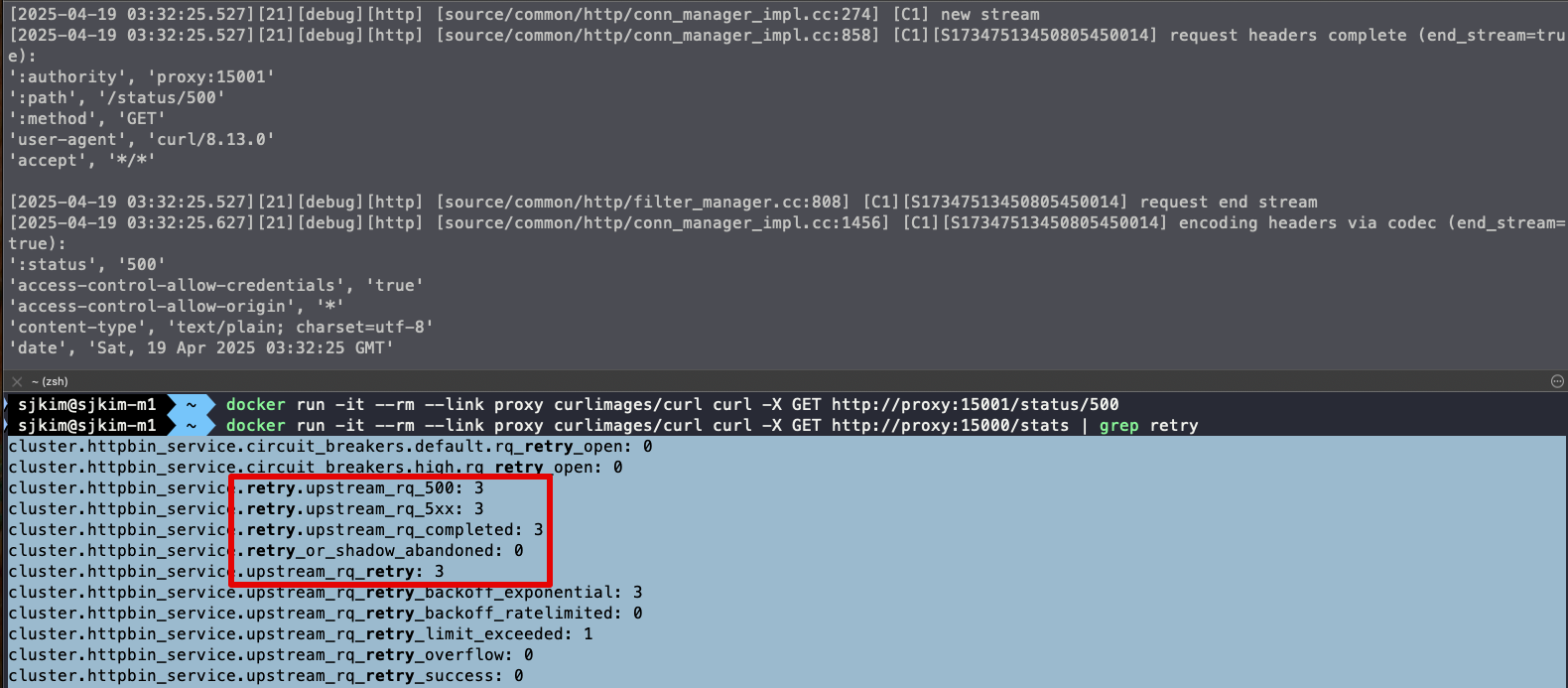🤔 엔보이는 업스트림 클러스터 httpbin 호출할 때 HTTP 500 응답을 받았다.
👏 엔보이는 요청을 재시도했으며, 이는 통계값에 cluster.httpbin_service.upstream_rq_retry: 3 으로 표시돼 있다.
-
이번 실습에서는 Envoy 프록시의 기본 기능을 직접 시연해보았다. Envoy는 애플리케이션 네트워크에 자동으로 신뢰성(Reliability)을 부여하며, 기본 설정만으로도 프록시, 라우팅, 필터링 등 다양한 기능을 수행할 수 있다.
-
실습에서는 Envoy의 기능을 추론하고 동작을 확인하기 위해 정적(static) 설정 파일을 활용했다. 이 정적 설정 방식은 설정 내용을 명확히 이해하고 기능을 세부적으로 조정하는 데 효과적이다. 다만, 규모가 커질수록 관리와 운영에 어려움이 있다.
-
반면, Istio는 동적 설정(dynamic configuration) 기능을 통해 이러한 문제를 해결한다. Istio는 Envoy가 사용하는 설정들을 중앙에서 관리하며, xDS API 기반의 동적 구성을 활용하여 수십, 수백 개에 이르는 Envoy 프록시의 설정을 실시간으로 제어하고 자동화한다.
-
이러한 구조 덕분에 Istio는 복잡하고 규모가 큰 서비스 메시 환경에서도 유연하고 안정적인 네트워크 구성을 가능하게 하며, 운영자 개입 없이도 실시간으로 설정을 전파할 수 있다.
⛔️ 다음 실습을 위해 Envoy 종료 docker rm -f proxy && docker rm -f httpbin
1.3.4 엔보이는 어떻게 이스티오에 적합한가?
- Istio의 프록시 역할은 Envoy가 수행하며, Istio는 이를 컨트롤 플레인과 부가 기능으로 보완해줍니다. 앞으로 Envoy를 ‘Istio 프록시’로 부르며, 그 기능들을 Istio API를 통해 다뤄보게 될 것입니다. 하지만 잊지 말아야 할 점은, 그 많은 기능이 실제로는 Envoy가 구현하고 있다는 사실입니다.
- 서비스 메시(Service Mesh)를 구성할 때, Envoy는 그 중심에서 프록시 역할을 수행하며 핵심 기능들을 담당합니다. 하지만 Envoy 혼자 모든 일을 처리하는 것은 아닙니다. Istio는 이러한 Envoy를 보완하고 강화하는 다양한 컨트롤 플레인 구성 요소를 함께 제공합니다.
- Envoy, 서비스 메시의 프록시
-
Envoy는 고성능 L7 프록시로, 서비스 메시 내 트래픽을 라우팅하고, 필터링하고, 관찰할 수 있는 다양한 기능을 제공합니다. 이 책에서도 다루고 있듯이, Istio의 핵심 기능 대부분은 Envoy 위에서 동작합니다.
-
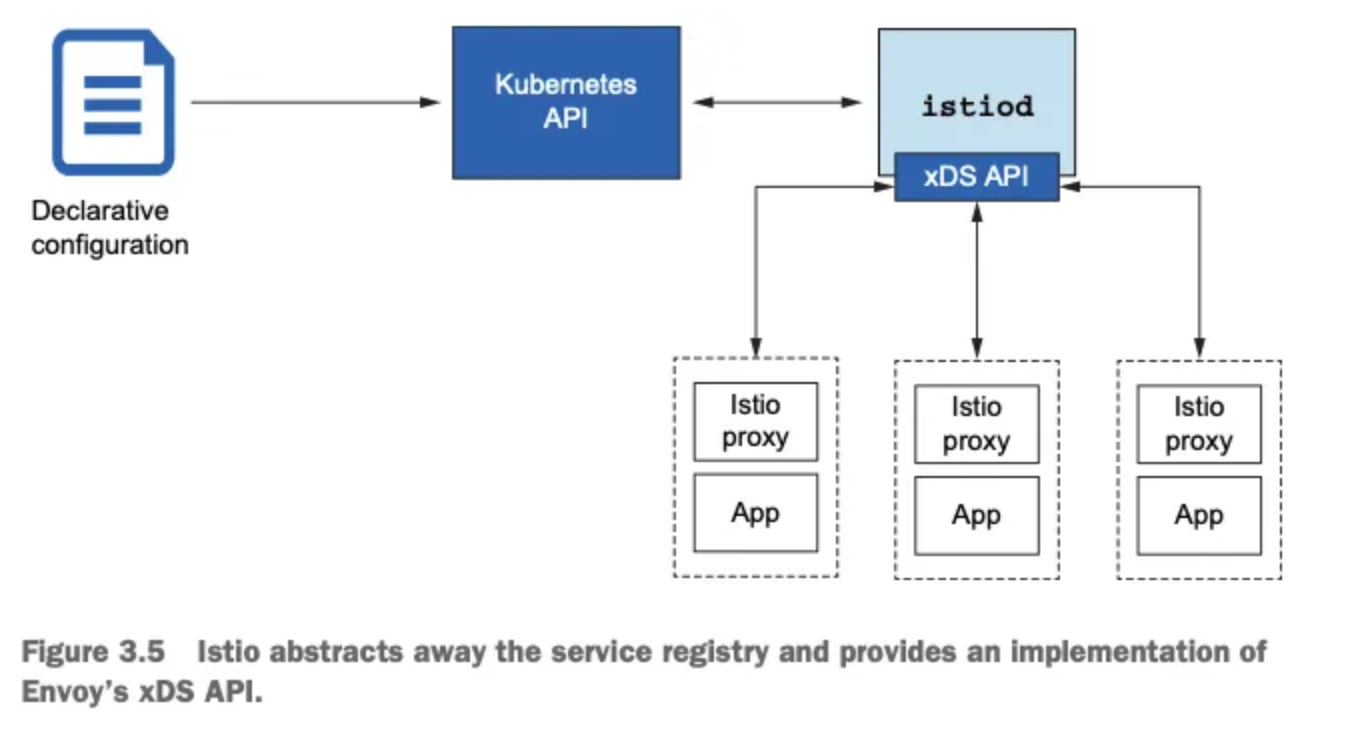
Envoy는 정적 설정 파일을 통해 기본적인 구성도 가능하지만, xDS API를 통해 리스너, 클러스터, 엔드포인트 등을 런타임에 동적으로 구성할 수 있습니다.
- Istio 컨트롤 플레인의 역할
-
이러한 동적 구성을 가능하게 하는 것이 바로 Istio의 컨트롤 플레인, 특히 istiod입니다. istiod는 Kubernetes API를 통해 VirtualService와 같은 Istio 리소스를 읽고, 이를 기반으로 Envoy 프록시에게 적절한 설정을 동적으로 내려보냅니다.
-
즉, 사용자는 쿠버네티스 자원을 정의하기만 하면 되고, Istio는 이를 해석하여 Envoy에 맞는 설정을 자동으로 구성해주는 구조입니다.
- 서비스 디스커버리: 추상화된 구현
-
Envoy는 서비스 디스커버리를 위해 서비스 레지스트리에 의존합니다. Istio는 Kubernetes 환경에서 Kubernetes 자체의 서비스 레지스트리를 활용하며, 이 구현 세부사항은 Envoy에게 완전히 추상화되어 감춰집니다.
-
개발자는 Envoy의 설정을 직접 조작할 필요 없이, Istio가 중간에서 모든 번역과 전파를 처리해줍니다.
- 텔레메트리 및 트레이싱
-
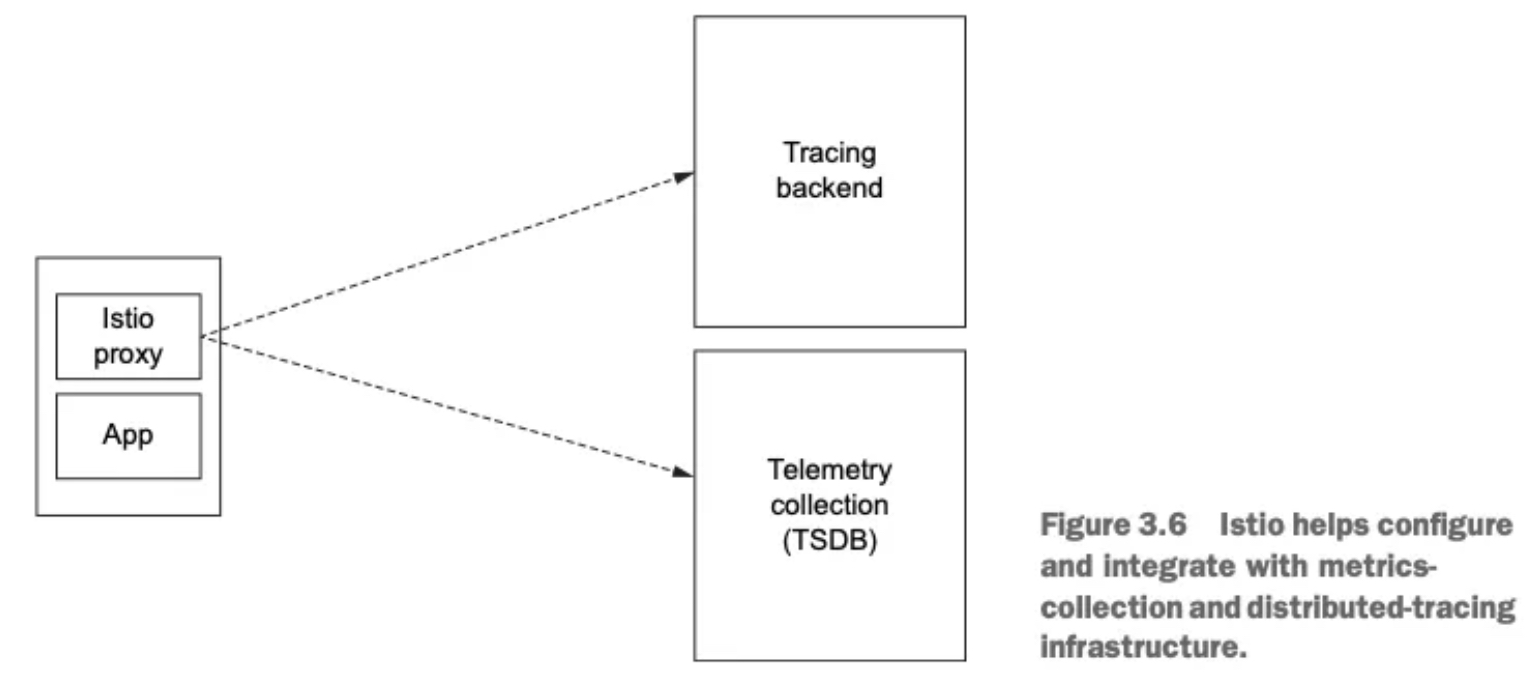
Envoy는 풍부한 메트릭과 트레이싱 데이터를 내보낼 수 있지만, 이 데이터를 수집하고 분석하려면 수신 시스템이 필요합니다. Istio는 이러한 텔레메트리를 Prometheus, Jaeger, Zipkin과 같은 도구와 쉽게 연동할 수 있도록 설정을 제공합니다.
-
트래픽 흐름을 추적하는 분산 트레이싱도 Istio를 통해 간편하게 구성 가능하며, 이는 운영과 디버깅에 큰 도움을 줍니다.
5 TLS 트래픽과 인증서 관리
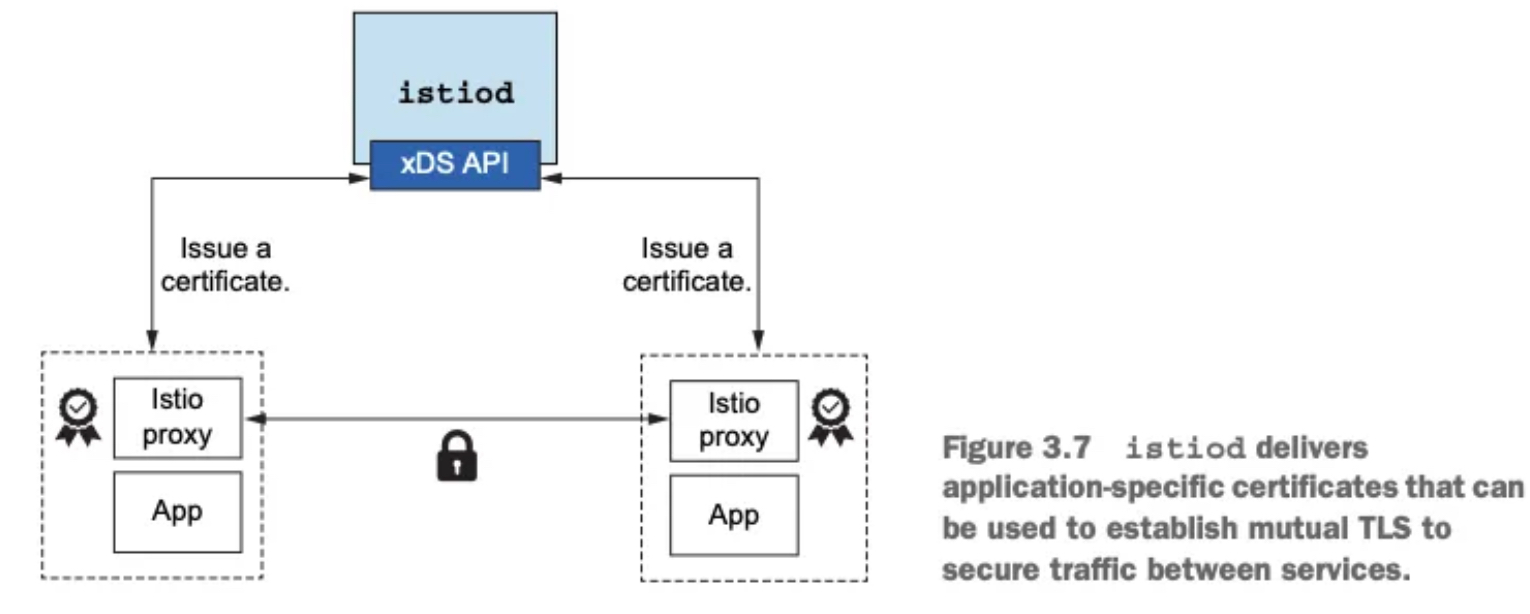
- 서비스 메시 내에서의 보안 통신 역시 Istio가 책임집니다. Envoy는 TLS 트래픽을 종료하고 시작할 수 있으나, 이를 위해서는 인증서의 발급, 서명, 갱신 등의 작업이 필요합니다. Istio는 이 과정을 자동화하는 인증서 관리 인프라를 함께 제공합니다.
2. Istio Gateway
- Getting traffic into a cluster
- 스터디 실습 환경 : docker (kind - k8s 1.23.17 ‘23.2.28) , istio 1.17.8(’23.10.11)
2.1 실습환경 구성
- k8s(1.23.17) 배포 : NodePort(30000 HTTP, 30005 HTTPS)
#
git clone https://github.com/AcornPublishing/istio-in-action
cd istio-in-action/book-source-code-master
pwd # 각자 자신의 pwd 경로
code .

# 아래 extramounts 생략 시, myk8s-control-plane 컨테이너 sh/bash 진입 후 직접 git clone 가능
kind create cluster --name myk8s --image kindest/node:v1.23.17 --config - <<EOF
kind: Cluster
apiVersion: kind.x-k8s.io/v1alpha4
nodes:
- role: control-plane
  extraPortMappings:
  - containerPort: 30000 # Sample Application (istio-ingrssgateway) HTTP
    hostPort: 30000
  - containerPort: 30001 # Prometheus
    hostPort: 30001
  - containerPort: 30002 # Grafana
    hostPort: 30002
  - containerPort: 30003 # Kiali
    hostPort: 30003
  - containerPort: 30004 # Tracing
    hostPort: 30004
  - containerPort: 30005 # Sample Application (istio-ingrssgateway) HTTPS
    hostPort: 30005
  - containerPort: 30006 # TCP Route
    hostPort: 30006
  - containerPort: 30007 # New Gateway
    hostPort: 30007
  extraMounts: # 해당 부분 생략 가능
  - hostPath: /Users/sjkim/Labs/CloudNeta/istio/istio-in-action/book-source-code-master # 각자 자신의 pwd 경로로 설정
    containerPath: /istiobook
networking:
  podSubnet: 10.10.0.0/16
  serviceSubnet: 10.200.1.0/24
EOF

Creating cluster "myk8s" ...
 ✓ Ensuring node image (kindest/node:v1.23.17) 🖼
 ✓ Preparing nodes 📦
 ✓ Writing configuration 📜
 ✓ Starting control-plane 🕹️
 ✓ Installing CNI 🔌
 ✓ Installing StorageClass 💾
Set kubectl context to "kind-myk8s"
You can now use your cluster with:

kubectl cluster-info --context kind-myk8s

Thanks for using kind! 😊

# 설치 확인
docker ps
CONTAINER ID   IMAGE                   COMMAND                  CREATED          STATUS          PORTS                                                             NAMES
681db4ee7249   kindest/node:v1.23.17   "/usr/local/bin/entr…"   53 seconds ago   Up 51 seconds   0.0.0.0:30000-30007->30000-30007/tcp, 127.0.0.1:52121->6443/tcp   myk8s-control-plane

# 노드에 기본 툴 설치
docker exec -it myk8s-control-plane sh -c 'apt update && apt install tree psmisc lsof wget bridge-utils net-tools dnsutils tcpdump ngrep iputils-ping git vim -y'

# (옵션) metrics-server
helm repo add metrics-server https://kubernetes-sigs.github.io/metrics-server/
helm install metrics-server metrics-server/metrics-server --set 'args[0]=--kubelet-insecure-tls' -n kube-system
LAST DEPLOYED: Sat Apr 19 15:17:01 2025
NAMESPACE: kube-system
STATUS: deployed
REVISION: 1
TEST SUITE: None
NOTES:
***********************************************************************
* Metrics Server                                                      *
***********************************************************************
  Chart version: 3.12.2
  App version:   0.7.2
  Image tag:     registry.k8s.io/metrics-server/metrics-server:v0.7.2
***********************************************************************

kubectl get all -n kube-system -l app.kubernetes.io/instance=metrics-server
NAME                                  READY   STATUS    RESTARTS   AGE
pod/metrics-server-65bb6f47b6-c8bmp   1/1     Running   0          30s

NAME                     TYPE        CLUSTER-IP     EXTERNAL-IP   PORT(S)   AGE
service/metrics-server   ClusterIP   10.200.1.115   <none>        443/TCP   30s

NAME                             READY   UP-TO-DATE   AVAILABLE   AGE
deployment.apps/metrics-server   1/1     1            1           30s

NAME                                        DESIRED   CURRENT   READY   AGE
replicaset.apps/metrics-server-65bb6f47b6 1 1 1 30s# myk8s-control-plane 진입 후 설치 진행
docker exec -it myk8s-control-plane bash
-----------------------------------
# (옵션) 코드 파일들 마운트 확인
tree /istiobook/ -L 1
root@myk8s-control-plane:/# tree /istiobook/ -L 1
/istiobook/
|-- README.md
|-- appendices
|-- bin
|-- ch10
|-- ch11
|-- ch12
|-- ch13
|-- ch14
|-- ch2
|-- ch3
|-- ch4
|-- ch5
|-- ch6
|-- ch7
|-- ch8
|-- ch9
`-- services
17 directories, 1 file
혹은
git clone ... /istiobook
# istioctl 설치
export ISTIOV=1.17.8
echo 'export ISTIOV=1.17.8' >> /root/.bashrc
curl -s -L https://istio.io/downloadIstio | ISTIO_VERSION=$ISTIOV sh -
Downloading istio-1.17.8 from https://github.com/istio/istio/releases/download/1.17.8/istio-1.17.8-linux-arm64.tar.gz ...
Istio 1.17.8 download complete!
The Istio release archive has been downloaded to the istio-1.17.8 directory.
To configure the istioctl client tool for your workstation,
add the /istio-1.17.8/bin directory to your environment path variable with:
export PATH="$PATH:/istio-1.17.8/bin"
Begin the Istio pre-installation check by running:
istioctl x precheck
Try Istio in ambient mode
https://istio.io/latest/docs/ambient/getting-started/
Try Istio in sidecar mode
https://istio.io/latest/docs/setup/getting-started/
Install guides for ambient mode
https://istio.io/latest/docs/ambient/install/
Install guides for sidecar mode
https://istio.io/latest/docs/setup/install/
Need more information? Visit https://istio.io/latest/docs/
cp istio-$ISTIOV/bin/istioctl /usr/local/bin/istioctl
istioctl version --remote=false
1.17.8
# default 프로파일 컨트롤 플레인 배포
istioctl install --set profile=default -y
✔ Istio core installed
✔ Istiod installed
✔ Ingress gateways installed
✔ Installation complete Making this installation the default for injection and validation.
Thank you for installing Istio 1.17. Please take a few minutes to tell us about your install/upgrade experience! https://forms.gle/hMHGiwZHPU7UQRWe9
# 설치 확인 : istiod, istio-ingressgateway, crd 등
kubectl get istiooperators -n istio-system -o yaml
kubectl get all,svc,ep,sa,cm,secret,pdb -n istio-system
root@myk8s-control-plane:/# kubectl get all,svc,ep,sa,cm,secret,pdb -n istio-system
NAME READY STATUS RESTARTS AGE
pod/istio-ingressgateway-996bc6bb6-248ws 1/1 Running 0 77s
pod/istiod-7df6ffc78d-tg88q 1/1 Running 0 93s
NAME TYPE CLUSTER-IP EXTERNAL-IP PORT(S) AGE
service/istio-ingressgateway LoadBalancer 10.200.1.202 <pending> 15021:31057/TCP,80:30122/TCP,443:30553/TCP 77s
service/istiod ClusterIP 10.200.1.203 <none> 15010/TCP,15012/TCP,443/TCP,15014/TCP 93s
NAME READY UP-TO-DATE AVAILABLE AGE
deployment.apps/istio-ingressgateway 1/1 1 1 77s
deployment.apps/istiod 1/1 1 1 93s
NAME DESIRED CURRENT READY AGE
replicaset.apps/istio-ingressgateway-996bc6bb6 1 1 1 77s
replicaset.apps/istiod-7df6ffc78d 1 1 1 93s
NAME REFERENCE TARGETS MINPODS MAXPODS REPLICAS AGE
horizontalpodautoscaler.autoscaling/istio-ingressgateway Deployment/istio-ingressgateway 8%/80% 1 5 1 77s
horizontalpodautoscaler.autoscaling/istiod Deployment/istiod 0%/80% 1 5 1 93s
NAME ENDPOINTS AGE
endpoints/istio-ingressgateway 10.10.0.7:15021,10.10.0.7:8080,10.10.0.7:8443 77s
endpoints/istiod 10.10.0.6:15012,10.10.0.6:15010,10.10.0.6:15017 + 1 more... 93s
NAME SECRETS AGE
serviceaccount/default 1 94s
serviceaccount/istio-ingressgateway-service-account 1 77s
serviceaccount/istio-reader-service-account 1 94s
serviceaccount/istiod 1 93s
serviceaccount/istiod-service-account 1 94s
NAME DATA AGE
configmap/istio 2 93s
configmap/istio-ca-root-cert 1 79s
configmap/istio-gateway-deployment-leader 0 79s
configmap/istio-gateway-status-leader 0 79s
configmap/istio-leader 0 79s
configmap/istio-namespace-controller-election 0 79s
configmap/istio-sidecar-injector 2 93s
configmap/kube-root-ca.crt 1 94s
NAME TYPE DATA AGE
secret/default-token-9fzjf kubernetes.io/service-account-token 3 94s
secret/istio-ca-secret istio.io/ca-root 5 80s
secret/istio-ingressgateway-service-account-token-xwcvj kubernetes.io/service-account-token 3 77s
secret/istio-reader-service-account-token-d2tbv kubernetes.io/service-account-token 3 94s
secret/istiod-service-account-token-p7s96 kubernetes.io/service-account-token 3 94s
secret/istiod-token-gtpmr kubernetes.io/service-account-token 3 93s
NAME MIN AVAILABLE MAX UNAVAILABLE ALLOWED DISRUPTIONS AGE
poddisruptionbudget.policy/istio-ingressgateway 1 N/A 0 77s
poddisruptionbudget.policy/istiod 1 N/A 0 93s
kubectl get cm -n istio-system istio -o yaml
apiVersion: v1
data:
mesh: |-
defaultConfig:
discoveryAddress: istiod.istio-system.svc:15012
proxyMetadata: {}
tracing:
zipkin:
address: zipkin.istio-system:9411
enablePrometheusMerge: true
rootNamespace: istio-system
trustDomain: cluster.local
meshNetworks: 'networks: {}'
kind: ConfigMap
metadata:
annotations:
kubectl.kubernetes.io/last-applied-configuration: |
labels:
install.operator.istio.io/owning-resource: unknown
install.operator.istio.io/owning-resource-namespace: istio-system
istio.io/rev: default
operator.istio.io/component: Pilot
operator.istio.io/managed: Reconcile
operator.istio.io/version: 1.17.8
release: istio
name: istio
namespace: istio-system
kubectl get crd | grep istio.io | sort
authorizationpolicies.security.istio.io 2025-04-19T06:24:33Z
destinationrules.networking.istio.io 2025-04-19T06:24:33Z
envoyfilters.networking.istio.io 2025-04-19T06:24:33Z
gateways.networking.istio.io 2025-04-19T06:24:33Z
istiooperators.install.istio.io 2025-04-19T06:24:33Z
peerauthentications.security.istio.io 2025-04-19T06:24:33Z
proxyconfigs.networking.istio.io 2025-04-19T06:24:33Z
requestauthentications.security.istio.io 2025-04-19T06:24:33Z
serviceentries.networking.istio.io 2025-04-19T06:24:33Z
sidecars.networking.istio.io 2025-04-19T06:24:33Z
telemetries.telemetry.istio.io 2025-04-19T06:24:33Z
virtualservices.networking.istio.io 2025-04-19T06:24:33Z
wasmplugins.extensions.istio.io 2025-04-19T06:24:33Z
workloadentries.networking.istio.io 2025-04-19T06:24:33Z
workloadgroups.networking.istio.io 2025-04-19T06:24:33Z
# 보조 도구 설치
kubectl apply -f istio-$ISTIOV/samples/addons
kubectl get pod -n istio-system
NAME READY STATUS RESTARTS AGE
grafana-b854c6c8-wfnqf 1/1 Running 0 65s
istio-ingressgateway-996bc6bb6-248ws 1/1 Running 0 4m52s
istiod-7df6ffc78d-tg88q 1/1 Running 0 5m8s
jaeger-5556cd8fcf-7mwbr 1/1 Running 0 65s
kiali-648847c8c4-sv7mz 1/1 Running 0 65s
prometheus-7b8b9dd44c-jvhnj 2/2 Running 0 65s
# 빠져나오기
exit
-----------------------------------
# 실습을 위한 네임스페이스 설정
kubectl create ns istioinaction
kubectl label namespace istioinaction istio-injection=enabled
kubectl get ns --show-labels
NAME STATUS AGE LABELS
default Active 17m kubernetes.io/metadata.name=default
istio-system Active 6m52s kubernetes.io/metadata.name=istio-system
istioinaction Active 18s istio-injection=enabled,kubernetes.io/metadata.name=istioinaction
kube-node-lease Active 17m kubernetes.io/metadata.name=kube-node-lease
kube-public Active 17m kubernetes.io/metadata.name=kube-public
kube-system Active 17m kubernetes.io/metadata.name=kube-system
local-path-storage Active 17m kubernetes.io/metadata.name=local-path-storage
# istio-ingressgateway 서비스 : NodePort 변경 및 nodeport 지정 변경 , externalTrafficPolicy 설정 (ClientIP 수집)
kubectl get svc -n istio-system | grep ingress
istio-ingressgateway LoadBalancer 10.200.1.202 <pending> 15021:31057/TCP,80:30122/TCP,443:30553/TCP 10m
kubectl patch svc -n istio-system istio-ingressgateway -p '{"spec": {"type": "NodePort", "ports": [{"port": 80, "targetPort": 8080, "nodePort": 30000}]}}'
kubectl patch svc -n istio-system istio-ingressgateway -p '{"spec": {"type": "NodePort", "ports": [{"port": 443, "targetPort": 8443, "nodePort": 30005}]}}'
kubectl patch svc -n istio-system istio-ingressgateway -p '{"spec":{"externalTrafficPolicy": "Local"}}'
kubectl describe svc -n istio-system istio-ingressgateway
service/istio-ingressgateway patched
Name: istio-ingressgateway
Namespace: istio-system
Labels: app=istio-ingressgateway
install.operator.istio.io/owning-resource=unknown
install.operator.istio.io/owning-resource-namespace=istio-system
istio=ingressgateway
istio.io/rev=default
operator.istio.io/component=IngressGateways
operator.istio.io/managed=Reconcile
operator.istio.io/version=1.17.8
release=istio
Annotations: <none>
Selector: app=istio-ingressgateway,istio=ingressgateway
Type: NodePort
IP Family Policy: SingleStack
IP Families: IPv4
IP: 10.200.1.202
IPs: 10.200.1.202
Port: status-port 15021/TCP
TargetPort: 15021/TCP
NodePort: status-port 31057/TCP
Endpoints: 10.10.0.7:15021
Port: http2 80/TCP
TargetPort: 8080/TCP
NodePort: http2 30000/TCP
Endpoints: 10.10.0.7:8080
Port: https 443/TCP
TargetPort: 8443/TCP
NodePort: https 30005/TCP
Endpoints: 10.10.0.7:8443
Session Affinity: None
External Traffic Policy: Local
Internal Traffic Policy: Cluster
Events:
Type Reason Age From Message
---- ------ ---- ---- -------
Normal Type 95s service-controller LoadBalancer -> NodePort
$
$ kubectl patch svc -n istio-system istio-ingressgateway -p '{"spec":{"externalTrafficPolicy": "Local"}}'
service/istio-ingressgateway patched (no change)
$ kubectl describe svc -n istio-system istio-ingressgateway
Name: istio-ingressgateway
Namespace: istio-system
Labels: app=istio-ingressgateway
install.operator.istio.io/owning-resource=unknown
install.operator.istio.io/owning-resource-namespace=istio-system
istio=ingressgateway
istio.io/rev=default
operator.istio.io/component=IngressGateways
operator.istio.io/managed=Reconcile
operator.istio.io/version=1.17.8
release=istio
Annotations: <none>
Selector: app=istio-ingressgateway,istio=ingressgateway
Type: NodePort
IP Family Policy: SingleStack
IP Families: IPv4
IP: 10.200.1.202
IPs: 10.200.1.202
Port: status-port 15021/TCP
TargetPort: 15021/TCP
NodePort: status-port 31057/TCP
Endpoints: 10.10.0.7:15021
Port: http2 80/TCP
TargetPort: 8080/TCP
NodePort: http2 30000/TCP
Endpoints: 10.10.0.7:8080
Port: https 443/TCP
TargetPort: 8443/TCP
NodePort: https 30005/TCP
Endpoints: 10.10.0.7:8443
Session Affinity: None
External Traffic Policy: Local
Internal Traffic Policy: Cluster
Events:
Type Reason Age From Message
---- ------ ---- ---- -------
Normal Type 2m23s service-controller LoadBalancer -> NodePort
# NodePort 변경 및 nodeport 30001~30003으로 변경 : prometheus(30001), grafana(30002), kiali(30003), tracing(30004)
kubectl patch svc -n istio-system prometheus -p '{"spec": {"type": "NodePort", "ports": [{"port": 9090, "targetPort": 9090, "nodePort": 30001}]}}'
kubectl patch svc -n istio-system grafana -p '{"spec": {"type": "NodePort", "ports": [{"port": 3000, "targetPort": 3000, "nodePort": 30002}]}}'
kubectl patch svc -n istio-system kiali -p '{"spec": {"type": "NodePort", "ports": [{"port": 20001, "targetPort": 20001, "nodePort": 30003}]}}'
kubectl patch svc -n istio-system tracing -p '{"spec": {"type": "NodePort", "ports": [{"port": 80, "targetPort": 16686, "nodePort": 30004}]}}'
# Prometheus 접속 : envoy, istio 메트릭 확인
open http://127.0.0.1:30001
# Grafana 접속
open http://127.0.0.1:30002
# Kiali 접속 1 : NodePort
open http://127.0.0.1:30003
# (옵션) Kiali 접속 2 : Port forward
kubectl port-forward deployment/kiali -n istio-system 20001:20001 &
open http://127.0.0.1:20001
# tracing 접속 : 예거 트레이싱 대시보드
open http://127.0.0.1:30004
# 접속 테스트용 netshoot 파드 생성
cat <<EOF | kubectl apply -f -
apiVersion: v1
kind: Pod
metadata:
name: netshoot
spec:
containers:
- name: netshoot
image: nicolaka/netshoot
command: ["tail"]
args: ["-f", "/dev/null"]
terminationGracePeriodSeconds: 0
EOF- K9S
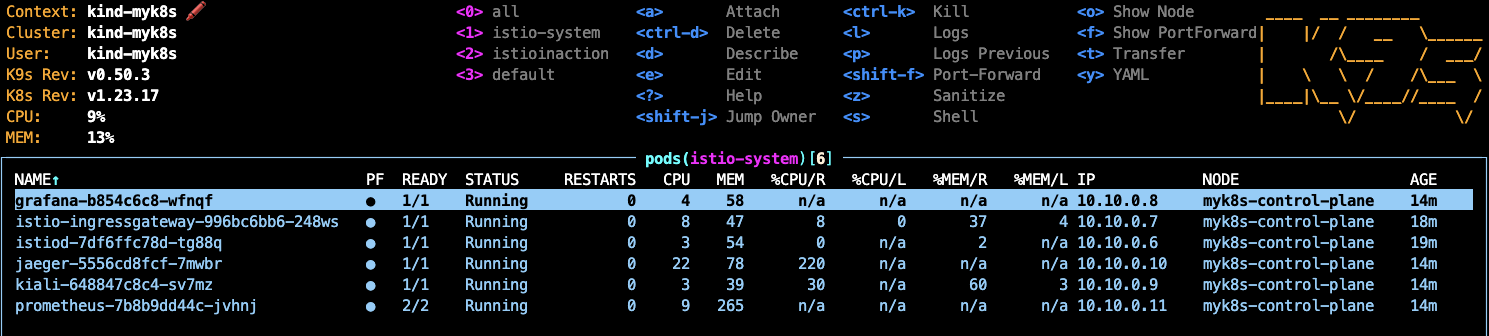
- Prometheus
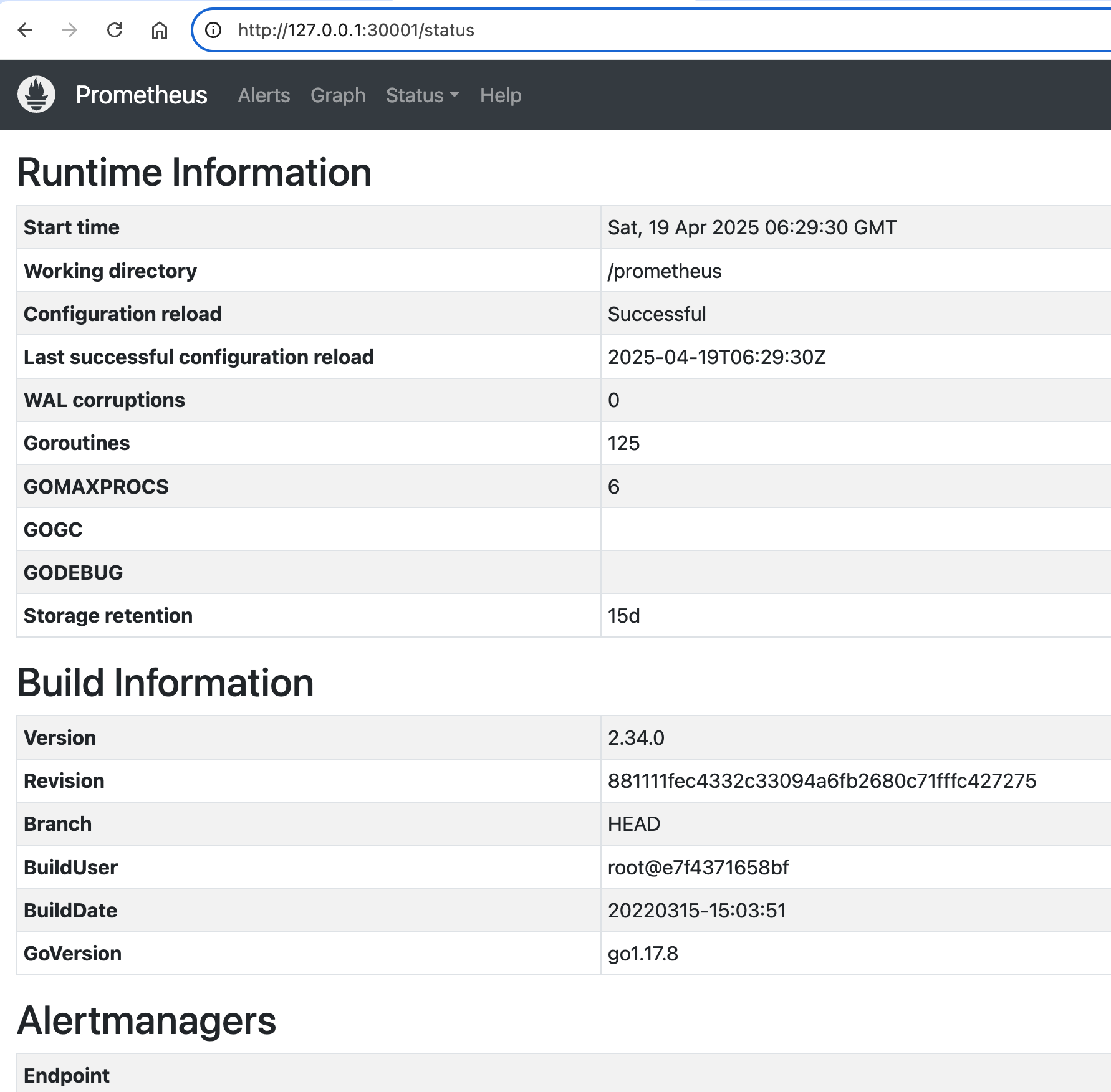
- Grafana
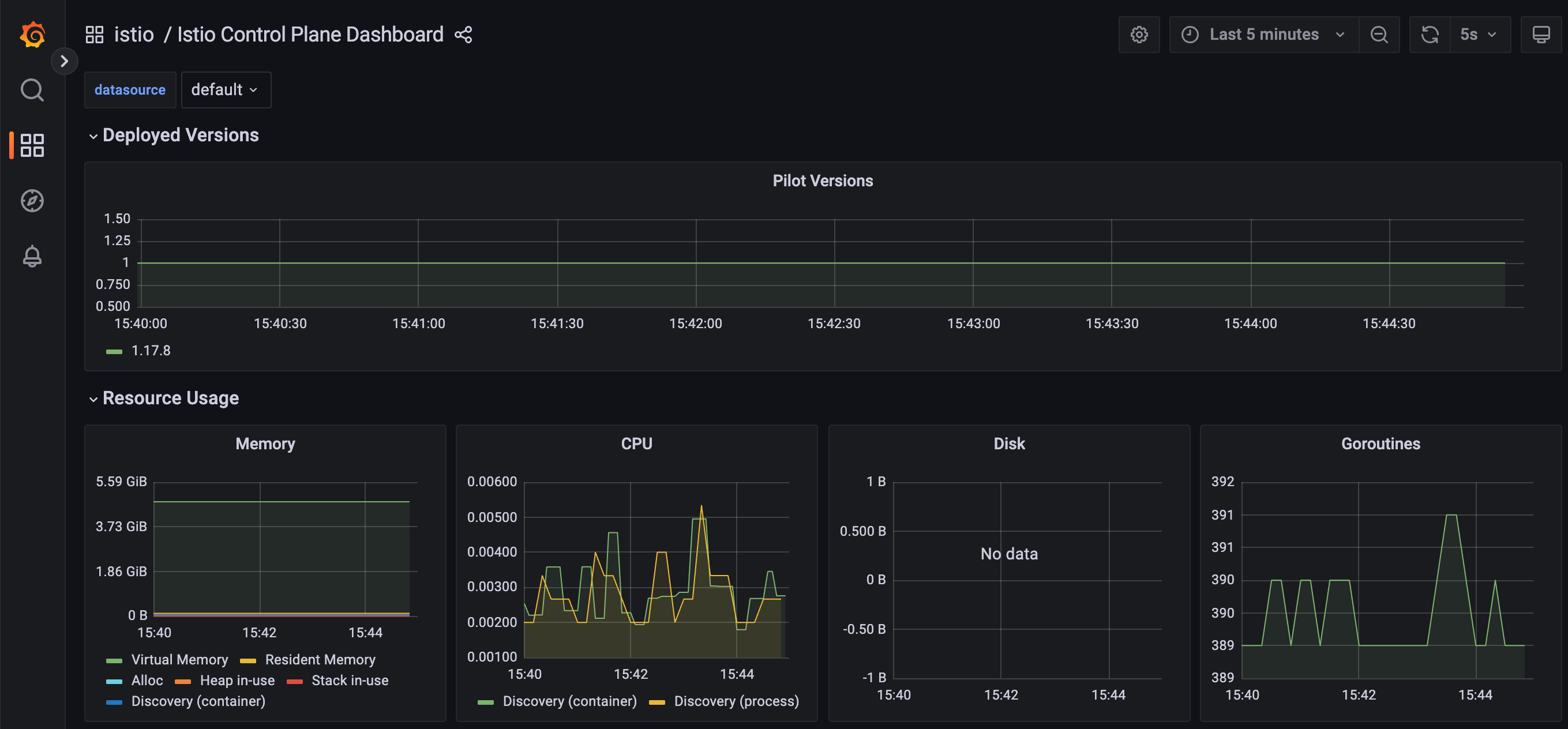
- Kiali
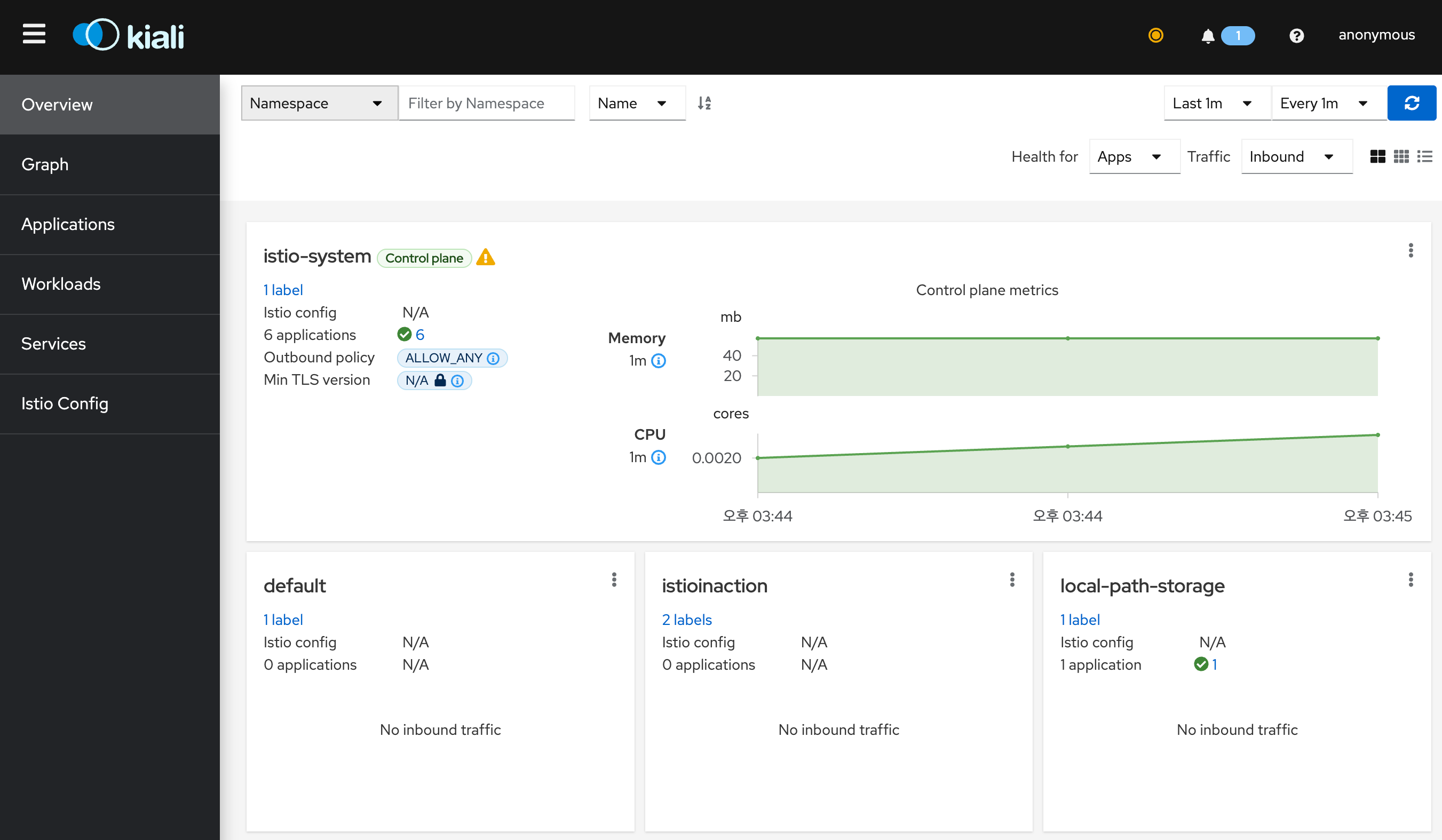
- Jaeger UI
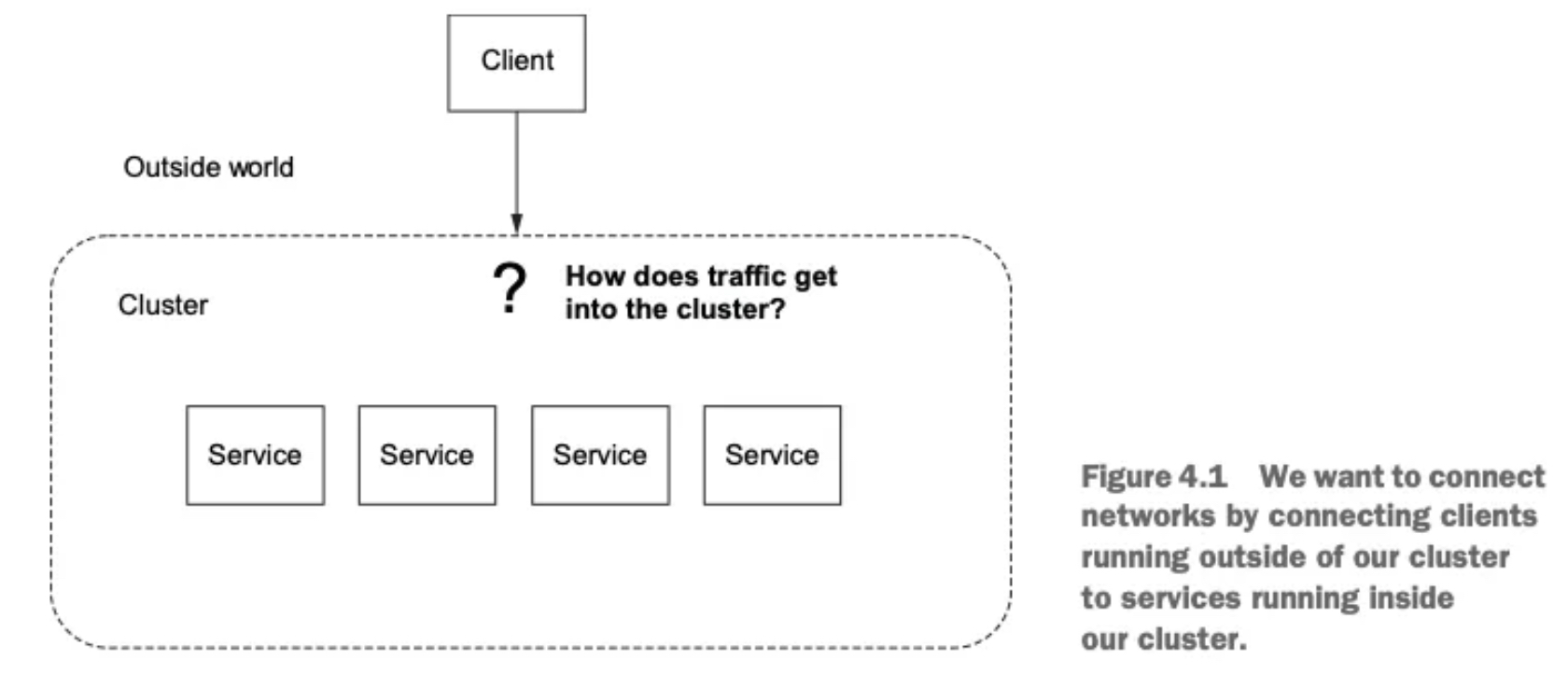
2.2 Istio Gateway는
- Defining entry points into a cluster 클러스터 진입 지점 정의
- Routing ingress traffic to deployments in your cluster 인입 트래픽을 클러스터 내 배포로 라우팅하기
- Securing ingress traffic 인입 트래픽 보호하기 (HTTPS, x.509)
- Routing non HTTP/S traffic HTTP아닌 트래픽 라우팅 (TCP)
2.3 Traffic Ingress Concept
2.3.1 Ingress와 Ingress Point
- 인그레스란 네트워크 외부에서 내부로 들어오는 트래픽을 의미한다.
- 이 트래픽은 먼저 인그레스 포인트를 거쳐야 하며, 이는 네트워크의 문지기 역할을 한다.
- 인그레스 포인트는 접근 정책과 규칙을 적용하여, 허용된 트래픽만 내부 엔드포인트로 프록시한다.
- 허용되지 않은 트래픽은 차단된다.
2.3.2 Virtual IPs
Simplifying services access 가상IP: 서비스 접근 단순화
-
DNS와 서비스 노출의 첫걸음
- 외부 시스템이 api.istioinaction.io/v1/products 같은 엔드포인트에 접근하려면, 먼저 도메인 이름을 IP 주소로 해석(DNS 쿼리) 해야 한다.
- 이 과정은 DNS 서버를 통해 이루어지며, 도메인 이름은 적절한 서비스 IP 주소에 매핑돼야 한다.
-
문제점: 도메인을 단일 IP에 직접 매핑하면?
- 특정 IP 주소(단일 엔드포인트) 에 도메인을 매핑하면, 그 인스턴스가 다운될 경우 전체 서비스가 중단된다.
- DNS를 통해 새로운 IP로 매핑되기 전까지 클라이언트는 계속 오류를 경험한다.
- 이는 가용성을 크게 떨어뜨리는 구조로, 실무에서는 부적절하다.
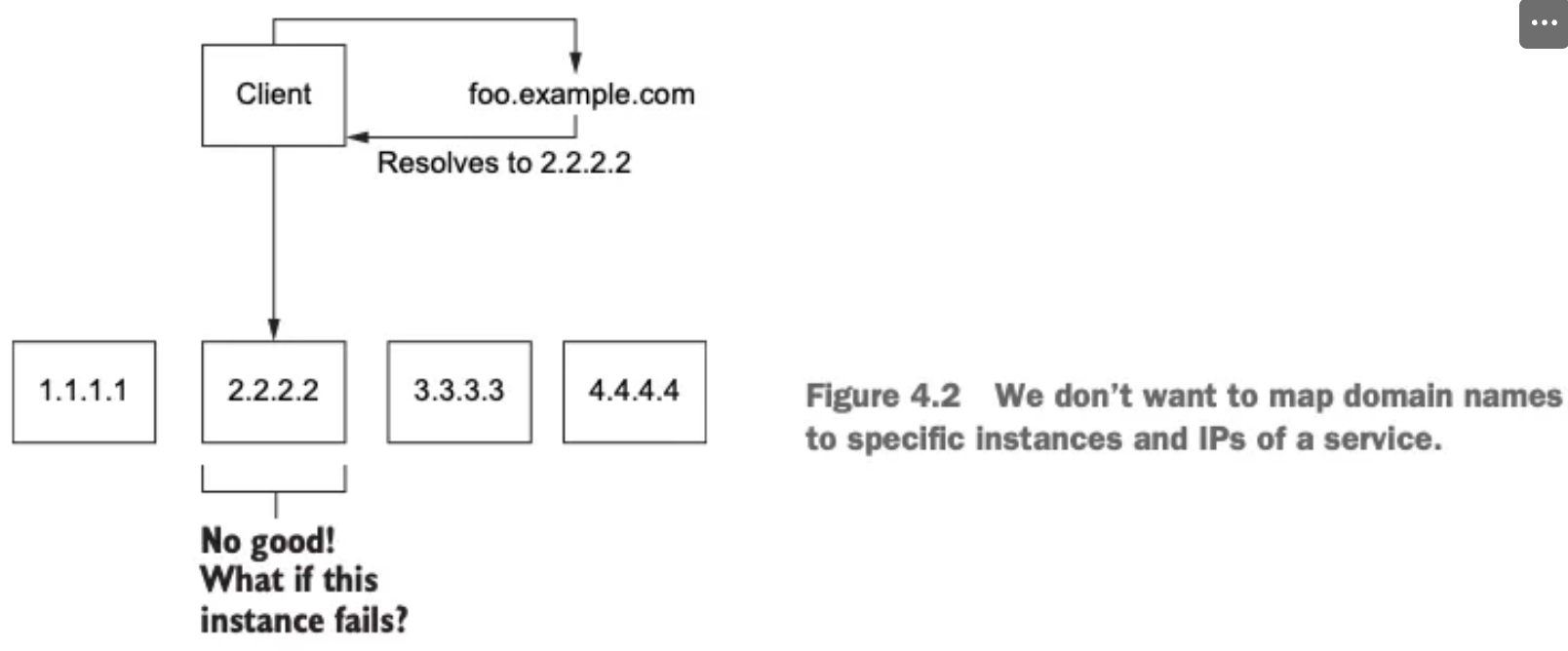
-
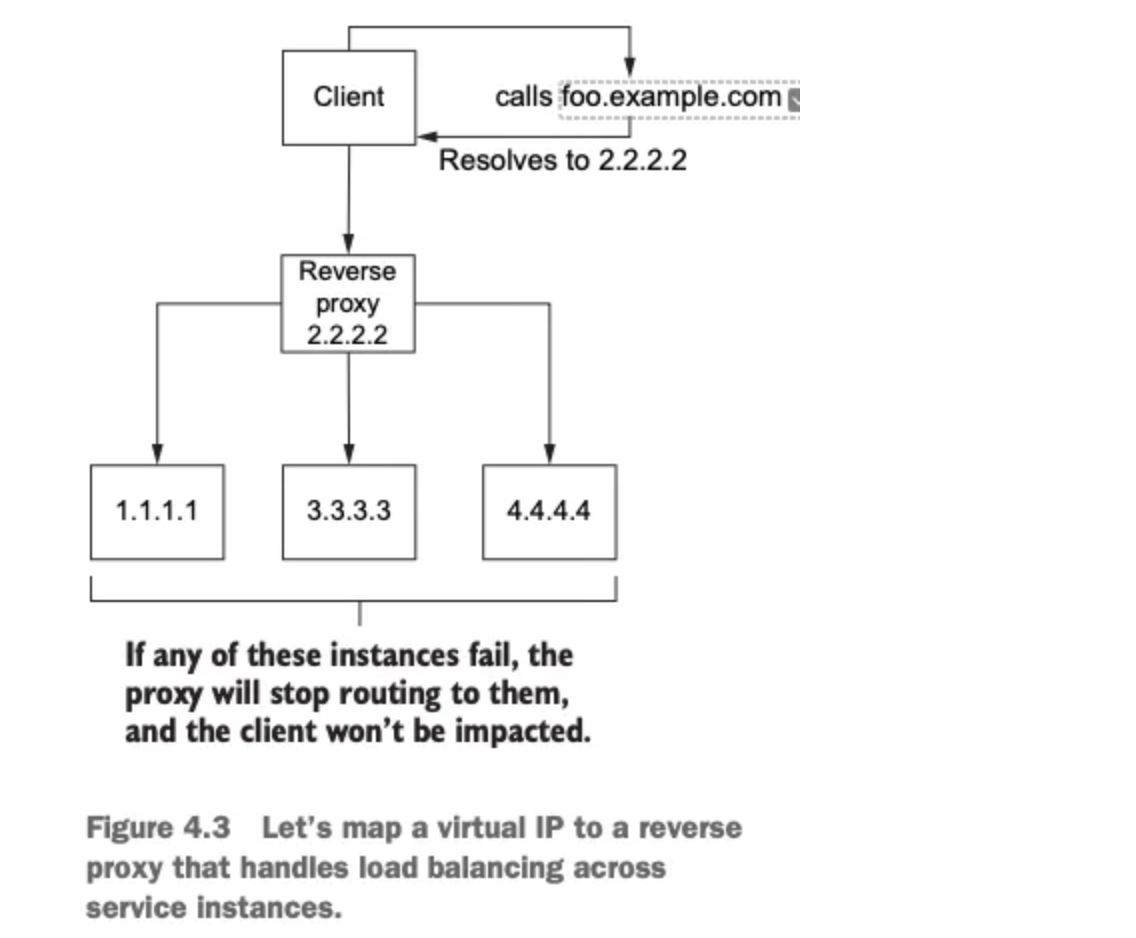
도메인 이름을 가상 IP에 매핑하는 이유
- 도메인 이름을 가상 IP 주소에 대응시키면, 이 IP가 여러 서비스 인스턴스로 트래픽을 분산시킬 수 있어 가용성과 유연성이 높아진다.
- 이 가상 IP는 리버스 프록시(인그레스 포인트의 한 유형) 에 바인딩된다.
-
리버스 프록시의 역할
- 백엔드 서비스에 트래픽을 분산시키는 중간 구성 요소다.
- 로드 밸런싱을 통해 특정 서비스가 과부하되지 않도록 조절할 수 있다.
- 하나의 고정 IP(가상 IP)를 통해 안정적이고 유연하게 서비스 진입점을 제공할 수 있다.
2.3.3 Virtual hosting
Multiple services from a single access point 가상호스팅: 단일 접근 지점의 여러 서비스
-
가상 IP와 호스트네임의 관계
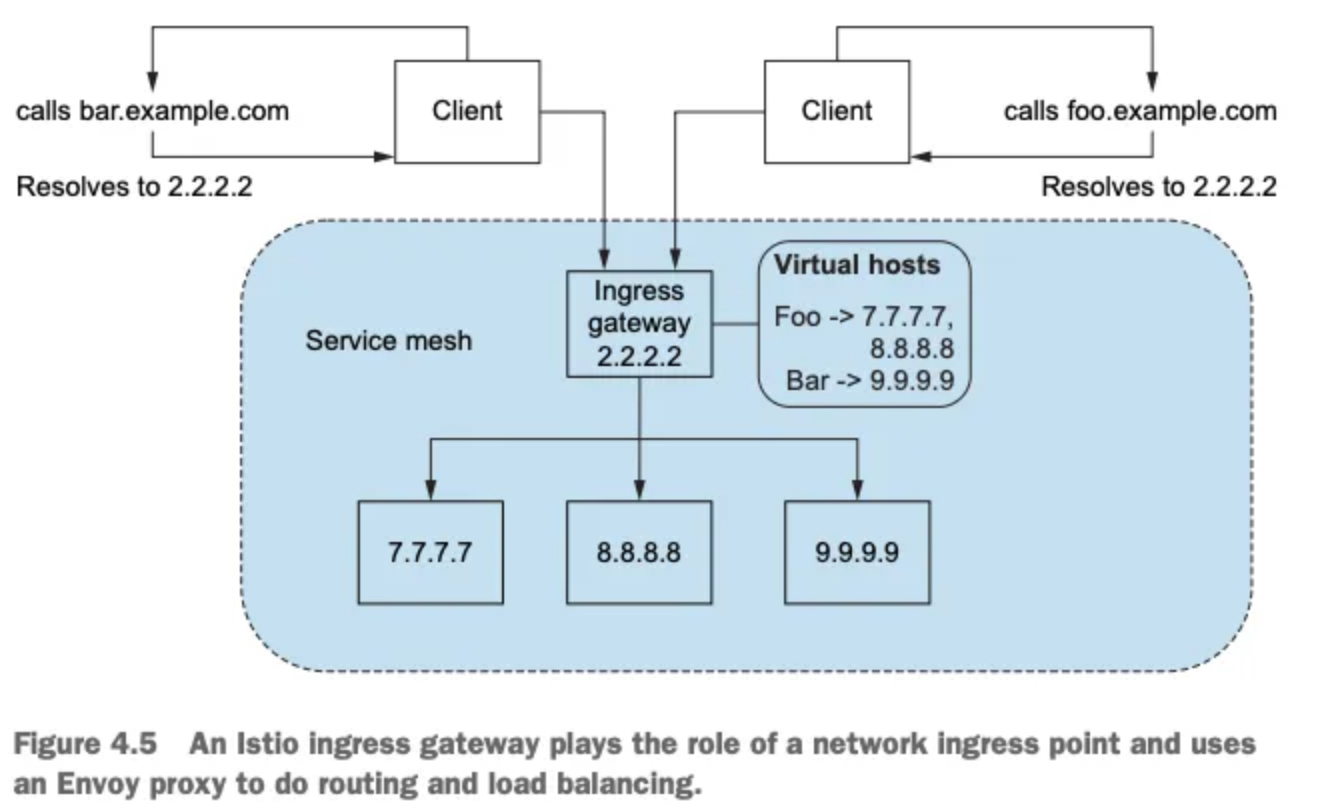
- 여러 서비스 인스턴스가 있지만, 클라이언트는 오직 하나의 가상 IP만 사용한다.
- 여러 호스트네임(prod.istioinaction.io, api.istioinaction.io 등)을 하나의 가상 IP로 매핑할 수 있다.
- 따라서 모든 요청이 동일한 인그레스 리버스 프록시를 통해 들어오게 된다.
-
리버스 프록시의 라우팅 방식
- 리버스 프록시는 들어온 요청의 Host 헤더를 분석해, 요청을 올바른 서비스 그룹으로 라우팅할 수 있다.
- 즉, 하나의 IP로 여러 서비스를 구분해 처리할 수 있는 유연한 구조를 제공한다.
-
가상 호스팅이란: 하나의 진입점(IP)으로 여러 서비스를 동시에 호스팅하는 방식이다.
-
요청 구분 방법:
- HTTP/1.1: Host 헤더 사용
- HTTP/2: :authority 헤더 사용
- TLS 기반 TCP: SNI (Server Name Indication) 사용
-
Istio의 활용: Istio의 에지 인그레스 게이트웨이는 가상 IP + 가상 호스팅을 조합해 들어오는 트래픽을 클러스터 내부의
올바른 서비스로 라우팅한다.
2.4 Istio ingress gateways
2.4.1 소개 (실습) Gateway(L4/L5) , VirtualService(L7)
-
역할: 클러스터 외부에서 시작된 트래픽이 클러스터 내부 서비스에 접근하는 것을 제어한다.
-
기능: 방화벽 역할, 로드 밸런싱, 가상 호스트 기반 라우팅, 리버스 프록시 역할 수행
-
구현: Istio는 단일 Envoy 프록시를 인그레스 게이트웨이로 사용한다.
✅ 엔보이의 기존 기능(TLS 종료, 트래픽 제어, 모니터링 등)은
인그레스 게이트웨이에서도 동일하게 사용 가능!
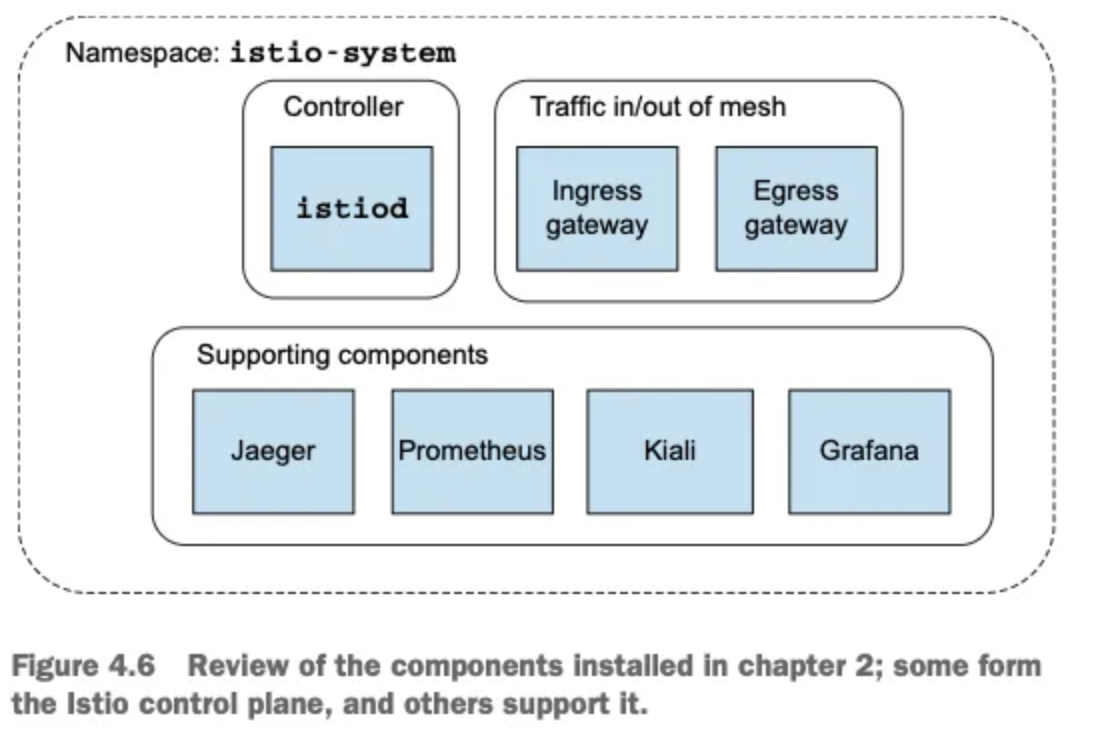
- 이스티오가 어떻게 엔보이를 사용해 인그레스 게이트웨이를 구현하는지 자세히 살펴보자.
- 아래 그림은 컨트롤 플레인을 구성하는 요소와 컨트롤 플레인을 보조하는 추가 구성 요소의 목록을 보여준다.
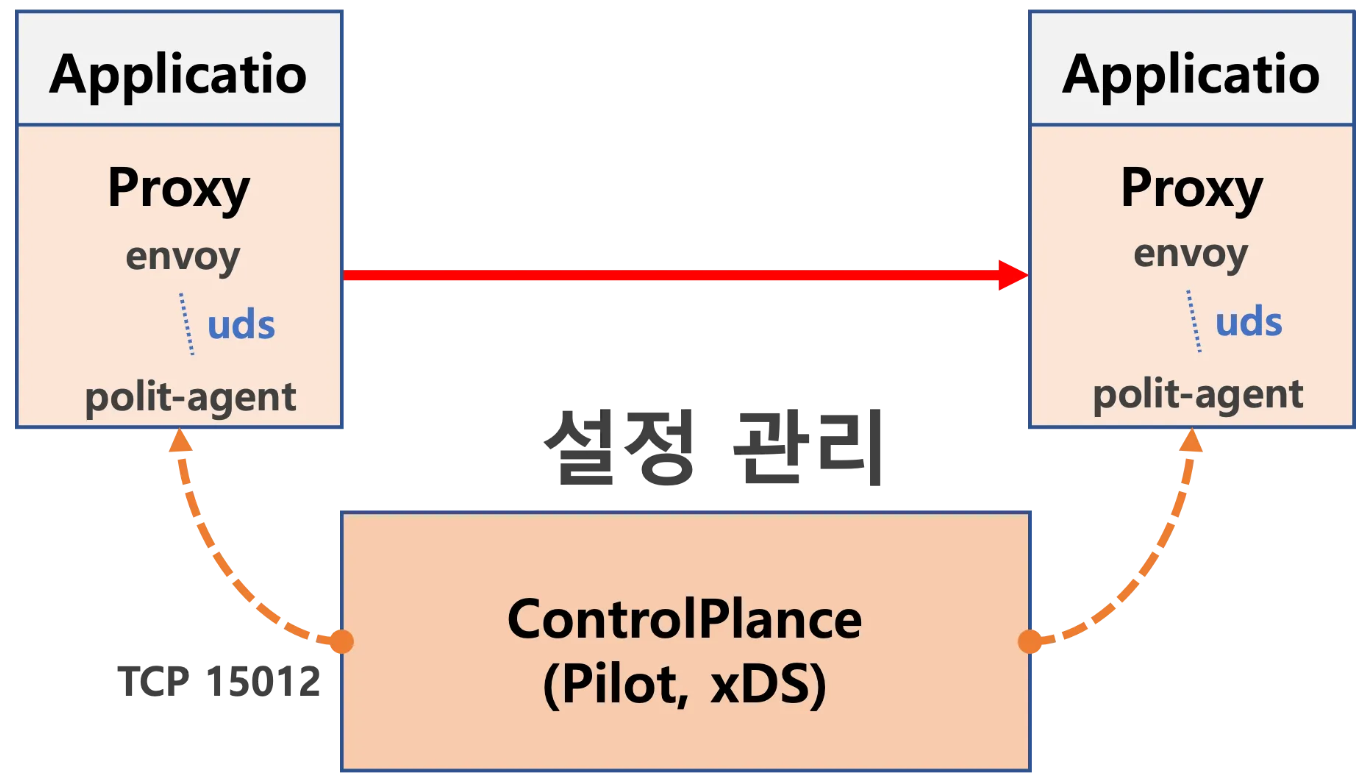
- 이스티오 서비스 프록시(엔보이 프록시)가 이스티오 인그레스 게이트웨이에서 실제로 작동 중인지 확인해보자.
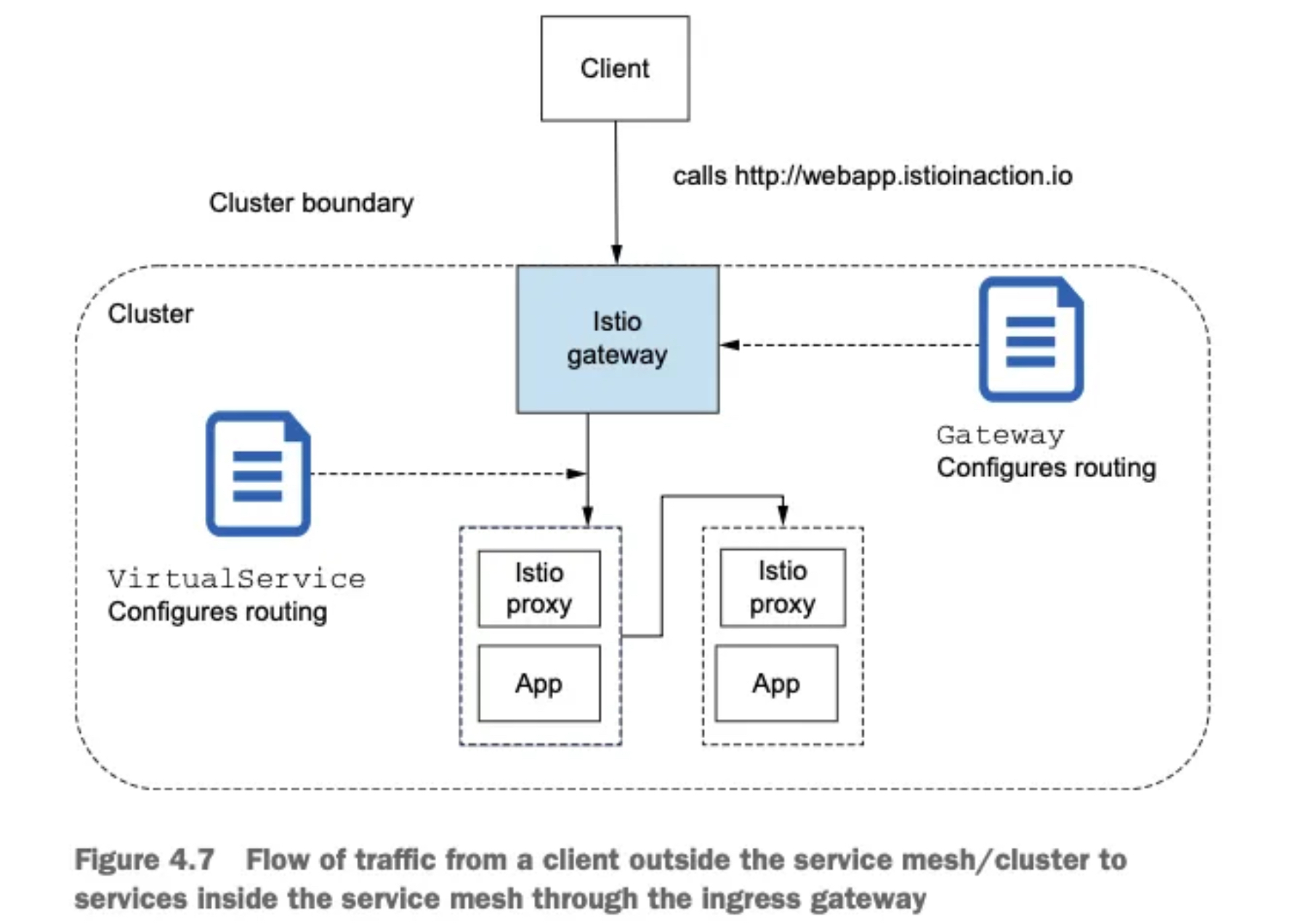
# 파드에 컨테이너 1개 기동 : 별도의 애플리케이션 컨테이너가 불필요.
kubectl get pod -n istio-system -l app=istio-ingressgateway
NAME READY STATUS RESTARTS AGE
istio-ingressgateway-996bc6bb6-248ws 1/1 Running 0 77m
# proxy 상태 확인
docker exec -it myk8s-control-plane istioctl proxy-status
NAME CLUSTER CDS LDS EDS RDS ECDS ISTIOD VERSION
istio-ingressgateway-996bc6bb6-248ws.istio-system Kubernetes SYNCED SYNCED SYNCED NOT SENT NOT SENT istiod-7df6ffc78d-tg88q 1.17.8
# proxy 설정 확인
docker exec -it myk8s-control-plane istioctl proxy-config all deploy/istio-ingressgateway.istio-system
SERVICE FQDN PORT SUBSET DIRECTION TYPE DESTINATION RULE
BlackHoleCluster - - - STATIC
agent - - - STATIC
grafana.istio-system.svc.cluster.local 3000 - outbound EDS
istio-ingressgateway.istio-system.svc.cluster.local 80 - outbound EDS
istio-ingressgateway.istio-system.svc.cluster.local 443 - outbound EDS
istio-ingressgateway.istio-system.svc.cluster.local 15021 - outbound EDS
istiod.istio-system.svc.cluster.local 443 - outbound EDS
istiod.istio-system.svc.cluster.local 15010 - outbound EDS
istiod.istio-system.svc.cluster.local 15012 - outbound EDS
istiod.istio-system.svc.cluster.local 15014 - outbound EDS
jaeger-collector.istio-system.svc.cluster.local 9411 - outbound EDS
jaeger-collector.istio-system.svc.cluster.local 14250 - outbound EDS
jaeger-collector.istio-system.svc.cluster.local 14268 - outbound EDS
kiali.istio-system.svc.cluster.local 9090 - outbound EDS
kiali.istio-system.svc.cluster.local 20001 - outbound EDS
kube-dns.kube-system.svc.cluster.local 53 - outbound EDS
kube-dns.kube-system.svc.cluster.local 9153 - outbound EDS
kubernetes.default.svc.cluster.local 443 - outbound EDS
metrics-server.kube-system.svc.cluster.local 443 - outbound EDS
prometheus.istio-system.svc.cluster.local 9090 - outbound EDS
prometheus_stats - - - STATIC
sds-grpc - - - STATIC
tracing.istio-system.svc.cluster.local 80 - outbound EDS
tracing.istio-system.svc.cluster.local 16685 - outbound EDS
xds-grpc - - - STATIC
zipkin - - - STRICT_DNS
zipkin.istio-system.svc.cluster.local 9411 - outbound EDS
ADDRESS PORT MATCH DESTINATION
0.0.0.0 15021 ALL Inline Route: /healthz/ready*
0.0.0.0 15090 ALL Inline Route: /stats/prometheus*
NAME DOMAINS MATCH VIRTUAL SERVICE
* /stats/prometheus*
* /healthz/ready*
RESOURCE NAME TYPE STATUS VALID CERT SERIAL NUMBER NOT AFTER NOT BEFORE
default Cert Chain ACTIVE true 309451020605014285992152532325172317299 2025-04-20T06:25:01Z 2025-04-19T06:23:01Z
ROOTCA CA ACTIVE true 274849445769865462744500542778186825883 2035-04-17T06:24:47Z 2025-04-19T06:24:47Z
docker exec -it myk8s-control-plane istioctl proxy-config listener deploy/istio-ingressgateway.istio-system
ADDRESS PORT MATCH DESTINATION
0.0.0.0 15021 ALL Inline Route: /healthz/ready*
0.0.0.0 15090 ALL Inline Route: /stats/prometheus*
docker exec -it myk8s-control-plane istioctl proxy-config routes deploy/istio-ingressgateway.istio-system
NAME DOMAINS MATCH VIRTUAL SERVICE
* /stats/prometheus*
* /healthz/ready*
docker exec -it myk8s-control-plane istioctl proxy-config cluster deploy/istio-ingressgateway.istio-system
SERVICE FQDN PORT SUBSET DIRECTION TYPE DESTINATION RULE
BlackHoleCluster - - - STATIC
agent - - - STATIC
grafana.istio-system.svc.cluster.local 3000 - outbound EDS
istio-ingressgateway.istio-system.svc.cluster.local 80 - outbound EDS
istio-ingressgateway.istio-system.svc.cluster.local 443 - outbound EDS
istio-ingressgateway.istio-system.svc.cluster.local 15021 - outbound EDS
istiod.istio-system.svc.cluster.local 443 - outbound EDS
istiod.istio-system.svc.cluster.local 15010 - outbound EDS
istiod.istio-system.svc.cluster.local 15012 - outbound EDS
istiod.istio-system.svc.cluster.local 15014 - outbound EDS
jaeger-collector.istio-system.svc.cluster.local 9411 - outbound EDS
jaeger-collector.istio-system.svc.cluster.local 14250 - outbound EDS
jaeger-collector.istio-system.svc.cluster.local 14268 - outbound EDS
kiali.istio-system.svc.cluster.local 9090 - outbound EDS
kiali.istio-system.svc.cluster.local 20001 - outbound EDS
kube-dns.kube-system.svc.cluster.local 53 - outbound EDS
kube-dns.kube-system.svc.cluster.local 9153 - outbound EDS
kubernetes.default.svc.cluster.local 443 - outbound EDS
metrics-server.kube-system.svc.cluster.local 443 - outbound EDS
prometheus.istio-system.svc.cluster.local 9090 - outbound EDS
prometheus_stats - - - STATIC
sds-grpc - - - STATIC
tracing.istio-system.svc.cluster.local 80 - outbound EDS
tracing.istio-system.svc.cluster.local 16685 - outbound EDS
xds-grpc - - - STATIC
zipkin - - - STRICT_DNS
zipkin.istio-system.svc.cluster.local 9411 - outbound EDS
docker exec -it myk8s-control-plane istioctl proxy-config endpoint deploy/istio-ingressgateway.istio-system
ENDPOINT STATUS OUTLIER CHECK CLUSTER
10.10.0.10:9411 HEALTHY OK outbound|9411||jaeger-collector.istio-system.svc.cluster.local
10.10.0.10:9411 HEALTHY OK outbound|9411||zipkin.istio-system.svc.cluster.local
10.10.0.10:14250 HEALTHY OK outbound|14250||jaeger-collector.istio-system.svc.cluster.local
10.10.0.10:14268 HEALTHY OK outbound|14268||jaeger-collector.istio-system.svc.cluster.local
10.10.0.10:16685 HEALTHY OK outbound|16685||tracing.istio-system.svc.cluster.local
10.10.0.10:16686 HEALTHY OK outbound|80||tracing.istio-system.svc.cluster.local
10.10.0.11:9090 HEALTHY OK outbound|9090||prometheus.istio-system.svc.cluster.local
10.10.0.2:53 HEALTHY OK outbound|53||kube-dns.kube-system.svc.cluster.local
10.10.0.2:9153 HEALTHY OK outbound|9153||kube-dns.kube-system.svc.cluster.local
10.10.0.3:53 HEALTHY OK outbound|53||kube-dns.kube-system.svc.cluster.local
10.10.0.3:9153 HEALTHY OK outbound|9153||kube-dns.kube-system.svc.cluster.local
10.10.0.5:10250 HEALTHY OK outbound|443||metrics-server.kube-system.svc.cluster.local
10.10.0.6:15010 HEALTHY OK outbound|15010||istiod.istio-system.svc.cluster.local
10.10.0.6:15012 HEALTHY OK outbound|15012||istiod.istio-system.svc.cluster.local
10.10.0.6:15014 HEALTHY OK outbound|15014||istiod.istio-system.svc.cluster.local
10.10.0.6:15017 HEALTHY OK outbound|443||istiod.istio-system.svc.cluster.local
10.10.0.7:8080 HEALTHY OK outbound|80||istio-ingressgateway.istio-system.svc.cluster.local
10.10.0.7:8443 HEALTHY OK outbound|443||istio-ingressgateway.istio-system.svc.cluster.local
10.10.0.7:15021 HEALTHY OK outbound|15021||istio-ingressgateway.istio-system.svc.cluster.local
10.10.0.8:3000 HEALTHY OK outbound|3000||grafana.istio-system.svc.cluster.local
10.10.0.9:9090 HEALTHY OK outbound|9090||kiali.istio-system.svc.cluster.local
10.10.0.9:20001 HEALTHY OK outbound|20001||kiali.istio-system.svc.cluster.local
10.200.1.41:9411 HEALTHY OK zipkin
127.0.0.1:15000 HEALTHY OK prometheus_stats
127.0.0.1:15020 HEALTHY OK agent
172.19.0.2:6443 HEALTHY OK outbound|443||kubernetes.default.svc.cluster.local
unix://./etc/istio/proxy/XDS HEALTHY OK xds-grpc
unix://./var/run/secrets/workload-spiffe-uds/socket HEALTHY OK sds-grpc
docker exec -it myk8s-control-plane istioctl proxy-config log deploy/istio-ingressgateway.istio-system
istio-ingressgateway-996bc6bb6-248ws.istio-system:
active loggers:
admin: warning
alternate_protocols_cache: warning
aws: warning
assert: warning
backtrace: warning
cache_filter: warning
client: warning
config: warning
connection: warning
conn_handler: warning
decompression: warning
dns: warning
dubbo: warning
envoy_bug: warning
ext_authz: warning
ext_proc: warning
rocketmq: warning
file: warning
filter: warning
forward_proxy: warning
grpc: warning
happy_eyeballs: warning
hc: warning
health_checker: warning
http: warning
http2: warning
hystrix: warning
init: warning
io: warning
jwt: warning
kafka: warning
key_value_store: warning
lua: warning
main: warning
matcher: warning
misc: error
mongo: warning
multi_connection: warning
oauth2: warning
quic: warning
quic_stream: warning
pool: warning
rate_limit_quota: warning
rbac: warning
rds: warning
redis: warning
router: warning
runtime: warning
stats: warning
secret: warning
tap: warning
testing: warning
thrift: warning
tracing: warning
upstream: warning
udp: warning
wasm: warning
websocket: warning
docker exec -it myk8s-control-plane istioctl proxy-config secret deploy/istio-ingressgateway.istio-system
RESOURCE NAME TYPE STATUS VALID CERT SERIAL NUMBER NOT AFTER NOT BEFORE
default Cert Chain ACTIVE true 309451020605014285992152532325172317299 2025-04-20T06:25:01Z 2025-04-19T06:23:01Z
ROOTCA CA ACTIVE true 274849445769865462744500542778186825883 2035-04-17T06:24:47Z 2025-04-19T06:24:47Z
# 설정 참고
kubectl get istiooperators -n istio-system -o yaml
apiVersion: v1
items:
- apiVersion: install.istio.io/v1alpha1
kind: IstioOperator
metadata:
annotations:
install.istio.io/ignoreReconcile: "true"
name: installed-state
namespace: istio-system
spec:
components:
base:
enabled: true
cni:
enabled: false
egressGateways:
- enabled: false
name: istio-egressgateway
ingressGateways:
- enabled: true
name: istio-ingressgateway
istiodRemote:
enabled: false
pilot:
enabled: true
hub: docker.io/istio
meshConfig:
defaultConfig:
proxyMetadata: {}
enablePrometheusMerge: true
profile: default
tag: 1.17.8
values:
base:
enableCRDTemplates: false
validationURL: ""
defaultRevision: ""
gateways:
istio-egressgateway:
autoscaleEnabled: true
env: {}
name: istio-egressgateway
secretVolumes:
- mountPath: /etc/istio/egressgateway-certs
name: egressgateway-certs
secretName: istio-egressgateway-certs
- mountPath: /etc/istio/egressgateway-ca-certs
name: egressgateway-ca-certs
secretName: istio-egressgateway-ca-certs
type: ClusterIP
istio-ingressgateway:
autoscaleEnabled: true
env: {}
name: istio-ingressgateway
secretVolumes:
- mountPath: /etc/istio/ingressgateway-certs
name: ingressgateway-certs
secretName: istio-ingressgateway-certs
- mountPath: /etc/istio/ingressgateway-ca-certs
name: ingressgateway-ca-certs
secretName: istio-ingressgateway-ca-certs
type: LoadBalancer
global:
configValidation: true
defaultNodeSelector: {}
defaultPodDisruptionBudget:
enabled: true
defaultResources:
requests:
cpu: 10m
imagePullPolicy: ""
imagePullSecrets: []
istioNamespace: istio-system
istiod:
enableAnalysis: false
jwtPolicy: third-party-jwt
logAsJson: false
logging:
level: default:info
meshNetworks: {}
mountMtlsCerts: false
multiCluster:
clusterName: ""
enabled: false
network: ""
omitSidecarInjectorConfigMap: false
oneNamespace: false
operatorManageWebhooks: false
pilotCertProvider: istiod
priorityClassName: ""
proxy:
autoInject: enabled
clusterDomain: cluster.local
componentLogLevel: misc:error
enableCoreDump: false
excludeIPRanges: ""
excludeInboundPorts: ""
excludeOutboundPorts: ""
image: proxyv2
includeIPRanges: '*'
logLevel: warning
privileged: false
readinessFailureThreshold: 30
readinessInitialDelaySeconds: 1
readinessPeriodSeconds: 2
resources:
limits:
cpu: 2000m
memory: 1024Mi
requests:
cpu: 100m
memory: 128Mi
statusPort: 15020
tracer: zipkin
proxy_init:
image: proxyv2
resources:
limits:
cpu: 2000m
memory: 1024Mi
requests:
cpu: 10m
memory: 10Mi
sds:
token:
aud: istio-ca
sts:
servicePort: 0
tracer:
datadog: {}
lightstep: {}
stackdriver: {}
zipkin: {}
useMCP: false
istiodRemote:
injectionURL: ""
pilot:
autoscaleEnabled: true
autoscaleMax: 5
autoscaleMin: 1
configMap: true
cpu:
targetAverageUtilization: 80
deploymentLabels: null
enableProtocolSniffingForInbound: true
enableProtocolSniffingForOutbound: true
env: {}
image: pilot
keepaliveMaxServerConnectionAge: 30m
nodeSelector: {}
podLabels: {}
replicaCount: 1
traceSampling: 1
telemetry:
enabled: true
v2:
enabled: true
metadataExchange:
wasmEnabled: false
prometheus:
enabled: true
wasmEnabled: false
stackdriver:
configOverride: {}
enabled: false
logging: false
monitoring: false
topology: false
kind: List
metadata:
resourceVersion: ""
# pilot-agent 프로세스가 envoy 를 부트스트랩
kubectl exec -n istio-system deploy/istio-ingressgateway -- ps
PID TTY TIME CMD
1 ? 00:00:04 pilot-agent
21 ? 00:00:34 envoy
42 ? 00:00:00 ps
kubectl exec -n istio-system deploy/istio-ingressgateway -- ps aux
USER PID %CPU %MEM VSZ RSS TTY STAT START TIME COMMAND
istio-p+ 1 0.0 0.4 753320 54268 ? Ssl 06:25 0:04 /usr/local/bin/pilot-agent proxy router --domain istio-system.svc.cluster.local --proxyLogLevel=warning --proxyComponentLogLevel=misc:error --log_output_level=default:info
istio-p+ 21 0.6 0.4 244224 57604 ? Sl 06:25 0:34 /usr/local/bin/envoy -c etc/istio/proxy/envoy-rev.json --drain-time-s 45 --drain-strategy immediate --local-address-ip-version v4 --file-flush-interval-msec 1000 --disable-hot-restart --allow-unknown-static-fields --log-format %Y-%m-%dT%T.%fZ.%l.envoy %n %g:%#.%v.thread=%t -l warning --component-log-level misc:error
istio-p+ 48 0.0 0.0 6412 2496 ? Rs 07:52 0:00 ps aux
# 프로세스 실행 유저 정보 확인
kubectl exec -n istio-system deploy/istio-ingressgateway -- whoami
istio-proxy
kubectl exec -n istio-system deploy/istio-ingressgateway -- id
uid=1337(istio-proxy) gid=1337(istio-proxy) groups=1337(istio-proxy)✅ 실행 결과, 이스티오 서비스 프록시에서 동작 중인 프로세스로 pilot-agent 와 envoy가 보여야 한다.
✅ pilot-agent 프로세스는 처음에 엔보이 프록시를 설정하고 부트스트랩한다.
✅ 그리고 13장에서 보겠지만, DNS 프록시도 구현한다.
- 인그레스 게이트웨이가 트래픽을 클러스터 내부로 허용하도록 설정하려면, 우선 이스티오의 리소스인 Gateway 와 VirtualService 를 이해해야 한다.
- 이 두 리소스는 이스티오에서 트래픽의 흐름을 조절하는 데 핵심적인 역할을 한다. 하지만 여기서는 클러스터 내부로 트래픽을 수용하는 것과 관련된 맥락에서만 살펴본다.
2.4.2 게이트웨이 리소스 지정하기
- 이스티오에서 인그레스 게이트웨이를 설정하려면, Gateway 리소스를 사용해 개방하고 싶은 포트와 그 포트에서 허용할 가상 호스트를 지정한다.
- 살펴볼 예시 Gateway 리소스는 매우 간단해 80 포트에서 가상 호스트
webapp.istioinaction.io를 향하는 트래픽을 허용하는 HTTP 포트를 개방한다.
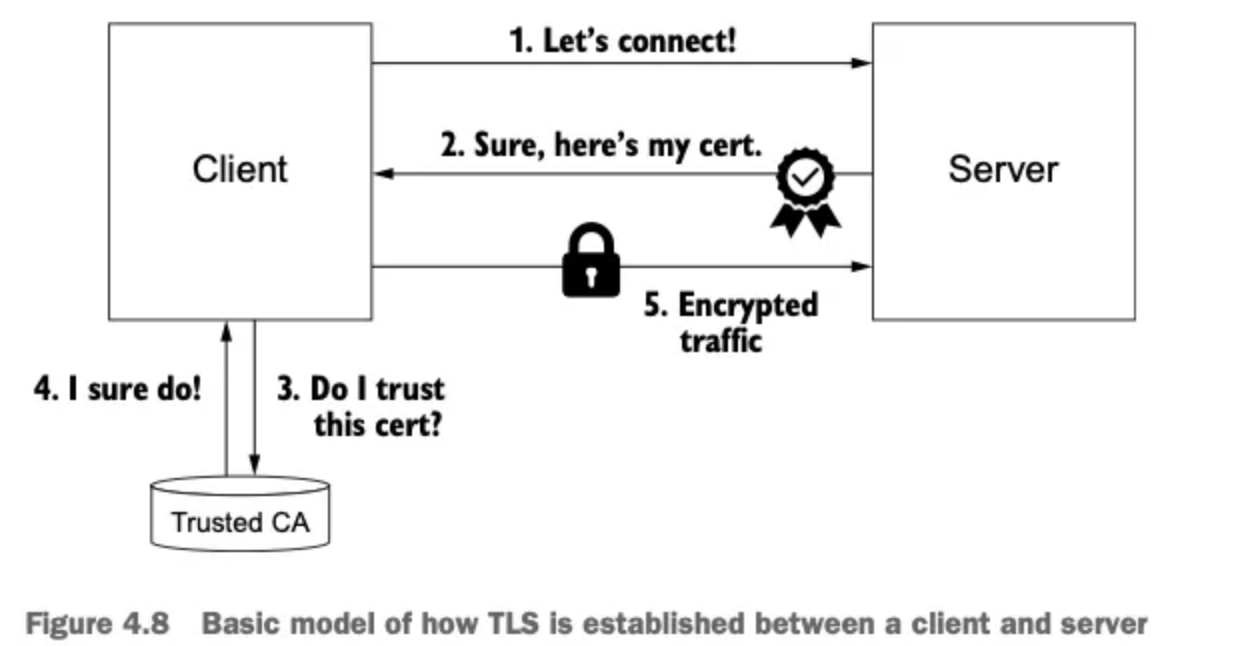
apiVersion: networking.istio.io/v1alpha3
kind: Gateway
metadata:
  name: coolstore-gateway #(1) 게이트웨이 이름
spec:
  selector:
    istio: ingressgateway #(2) 어느 게이트웨이 구현체인가?
  servers:
  - port:
      number: 80          #(3) 노출할 포트
      name: http
      protocol: HTTP
    hosts:
- "webapp.istioinaction.io" #(4) 이 포트의 호스트- 이 게이트웨이 리소스는 80포트를 리스닝하고 HTTP 트래픽을 기대하도록 엔보이를 설정한다. 이 리소스를 만들고 무엇을 하는지 살펴보자.
# 신규터미널 : istiod 로그
kubectl stern -n istio-system -l app=istiod
+ istiod-7df6ffc78d-tg88q › discovery
istiod-7df6ffc78d-tg88q discovery 2025-04-19T06:24:47.848583Z   info    FLAG: --caCertFile=""
istiod-7df6ffc78d-tg88q discovery 2025-04-19T06:24:47.848620Z   info    FLAG: --clusterAliases="[]"
istiod-7df6ffc78d-tg88q discovery 2025-04-19T06:24:47.848622Z   info    FLAG: --clusterID="Kubernetes"
istiod-7df6ffc78d-tg88q discovery 2025-04-19T06:24:47.848623Z   info    FLAG: --clusterRegistriesNamespace="istio-system"
istiod-7df6ffc78d-tg88q discovery 2025-04-19T06:24:47.848624Z   info    FLAG: --configDir=""
istiod-7df6ffc78d-tg88q discovery 2025-04-19T06:24:47.848625Z   info    FLAG: --ctrlz_address="localhost"
istiod-7df6ffc78d-tg88q discovery 2025-04-19T06:24:47.848627Z   info    FLAG: --ctrlz_port="9876"
istiod-7df6ffc78d-tg88q discovery 2025-04-19T06:24:47.848628Z   info    FLAG: --domain="cluster.local"
istiod-7df6ffc78d-tg88q discovery 2025-04-19T06:24:47.848629Z   info    FLAG: --grpcAddr=":15010"
istiod-7df6ffc78d-tg88q discovery 2025-04-19T06:24:47.848631Z   info    FLAG: --help="false"
istiod-7df6ffc78d-tg88q discovery 2025-04-19T06:24:47.848631Z   info    FLAG: --httpAddr=":8080"
istiod-7df6ffc78d-tg88q discovery 2025-04-19T06:24:47.848632Z   info    FLAG: --httpsAddr=":15017"
istiod-7df6ffc78d-tg88q discovery 2025-04-19T06:24:47.848634Z   info    FLAG: --keepaliveInterval="30s"
istiod-7df6ffc78d-tg88q discovery 2025-04-19T06:24:47.848636Z   info    FLAG: --keepaliveMaxServerConnectionAge="30m0s"
istiod-7df6ffc78d-tg88q discovery 2025-04-19T06:24:47.848637Z   info    FLAG: --keepaliveTimeout="10s"
istiod-7df6ffc78d-tg88q discovery 2025-04-19T06:24:47.848638Z   info    FLAG: --kubeconfig=""
istiod-7df6ffc78d-tg88q discovery 2025-04-19T06:24:47.848639Z   info    FLAG: --kubernetesApiBurst="160"
istiod-7df6ffc78d-tg88q discovery 2025-04-19T06:24:47.848641Z   info    FLAG: --kubernetesApiQPS="80"
istiod-7df6ffc78d-tg88q discovery 2025-04-19T06:24:47.848642Z   info    FLAG: --log_as_json="false"
istiod-7df6ffc78d-tg88q discovery 2025-04-19T06:24:47.848643Z   info    FLAG: --log_caller=""
istiod-7df6ffc78d-tg88q discovery 2025-04-19T06:24:47.848644Z   info    FLAG: --log_output_level="default:info"
istiod-7df6ffc78d-tg88q discovery 2025-04-19T06:24:47.848645Z   info    FLAG: --log_rotate=""
istiod-7df6ffc78d-tg88q discovery 2025-04-19T06:24:47.848646Z   info    FLAG: --log_rotate_max_age="30"
istiod-7df6ffc78d-tg88q discovery 2025-04-19T06:24:47.848647Z   info    FLAG: --log_rotate_max_backups="1000"
istiod-7df6ffc78d-tg88q discovery 2025-04-19T06:24:47.848648Z   info    FLAG: --log_rotate_max_size="104857600"
istiod-7df6ffc78d-tg88q discovery 2025-04-19T06:24:47.848649Z   info    FLAG: --log_stacktrace_level="default:none"
istiod-7df6ffc78d-tg88q discovery 2025-04-19T06:24:47.848651Z   info    FLAG: --log_target="[stdout]"
istiod-7df6ffc78d-tg88q discovery 2025-04-19T06:24:47.848652Z   info    FLAG: --meshConfig="./etc/istio/config/mesh"
istiod-7df6ffc78d-tg88q discovery 2025-04-19T06:24:47.848653Z   info    FLAG: --monitoringAddr=":15014"
istiod-7df6ffc78d-tg88q discovery 2025-04-19T06:24:47.848654Z   info    FLAG: --namespace="istio-system"
istiod-7df6ffc78d-tg88q discovery 2025-04-19T06:24:47.848655Z   info    FLAG: --networksConfig="./etc/istio/config/meshNetworks"
istiod-7df6ffc78d-tg88q discovery 2025-04-19T06:24:47.848656Z   info    FLAG: --profile="true"
istiod-7df6ffc78d-tg88q discovery 2025-04-19T06:24:47.848659Z   info    FLAG: --registries="[Kubernetes]"
istiod-7df6ffc78d-tg88q discovery 2025-04-19T06:24:47.848660Z   info    FLAG: --secureGRPCAddr=":15012"
istiod-7df6ffc78d-tg88q discovery 2025-04-19T06:24:47.848661Z   info    FLAG: --shutdownDuration="10s"
istiod-7df6ffc78d-tg88q discovery 2025-04-19T06:24:47.848662Z   info    FLAG: --tls-cipher-suites="[]"
istiod-7df6ffc78d-tg88q discovery 2025-04-19T06:24:47.848663Z   info    FLAG: --tlsCertFile=""
istiod-7df6ffc78d-tg88q discovery 2025-04-19T06:24:47.848664Z   info    FLAG: --tlsKeyFile=""
istiod-7df6ffc78d-tg88q discovery 2025-04-19T06:24:47.848666Z   info    FLAG: --vklog="0"
istiod-7df6ffc78d-tg88q discovery 2025-04-19T06:24:47.855310Z   info    initializing Istiod admin server
istiod-7df6ffc78d-tg88q discovery 2025-04-19T06:24:47.855621Z   info    klog    Config not found: /var/run/secrets/remote/config
istiod-7df6ffc78d-tg88q discovery 2025-04-19T06:24:47.855616Z   info    starting HTTP service at [::]:8080
istiod-7df6ffc78d-tg88q discovery 2025-04-19T06:24:47.861524Z   info    initializing mesh configuration ./etc/istio/config/mesh
istiod-7df6ffc78d-tg88q discovery 2025-04-19T06:24:47.865021Z   info    controllers     starting        controller=configmap istio
istiod-7df6ffc78d-tg88q discovery 2025-04-19T06:24:47.865411Z   info    Loaded MeshNetworks config from Kubernetes API server.
istiod-7df6ffc78d-tg88q discovery 2025-04-19T06:24:47.865437Z   info    mesh networks configuration updated to: {
istiod-7df6ffc78d-tg88q discovery
istiod-7df6ffc78d-tg88q discovery }
istiod-7df6ffc78d-tg88q discovery 2025-04-19T06:24:47.867269Z   info    Loaded MeshConfig config from Kubernetes API server.
istiod-7df6ffc78d-tg88q discovery 2025-04-19T06:24:47.867450Z   info    mesh configuration updated to: {
istiod-7df6ffc78d-tg88q discovery     "proxyListenPort": 15001,
istiod-7df6ffc78d-tg88q discovery     "connectTimeout": "10s",
istiod-7df6ffc78d-tg88q discovery     "protocolDetectionTimeout": "0s",
istiod-7df6ffc78d-tg88q discovery     "ingressClass": "istio",
istiod-7df6ffc78d-tg88q discovery     "ingressService": "istio-ingressgateway",
istiod-7df6ffc78d-tg88q discovery     "ingressControllerMode": "STRICT",
istiod-7df6ffc78d-tg88q discovery     "enableTracing": true,
istiod-7df6ffc78d-tg88q discovery     "defaultConfig": {
istiod-7df6ffc78d-tg88q discovery         "configPath": "./etc/istio/proxy",
istiod-7df6ffc78d-tg88q discovery         "binaryPath": "/usr/local/bin/envoy",
istiod-7df6ffc78d-tg88q discovery         "serviceCluster": "istio-proxy",
istiod-7df6ffc78d-tg88q discovery         "drainDuration": "45s",
istiod-7df6ffc78d-tg88q discovery         "discoveryAddress": "istiod.istio-system.svc:15012",
istiod-7df6ffc78d-tg88q discovery         "proxyAdminPort": 15000,
istiod-7df6ffc78d-tg88q discovery         "controlPlaneAuthPolicy": "MUTUAL_TLS",
istiod-7df6ffc78d-tg88q discovery         "statNameLength": 189,
istiod-7df6ffc78d-tg88q discovery         "concurrency": 2,
istiod-7df6ffc78d-tg88q discovery         "tracing": {
istiod-7df6ffc78d-tg88q discovery             "zipkin": {
istiod-7df6ffc78d-tg88q discovery                 "address": "zipkin.istio-system:9411"
istiod-7df6ffc78d-tg88q discovery             }
istiod-7df6ffc78d-tg88q discovery         },
istiod-7df6ffc78d-tg88q discovery         "statusPort": 15020,
istiod-7df6ffc78d-tg88q discovery         "terminationDrainDuration": "5s"
istiod-7df6ffc78d-tg88q discovery     },
...

# 터미널2
cat ch4/coolstore-gw.yaml
apiVersion: networking.istio.io/v1alpha3
kind: Gateway
metadata:
  name: coolstore-gateway
spec:
  selector:
    istio: ingressgateway
  servers:
  - port:
      number: 80
      name: http
      protocol: HTTP
    hosts:
    - "webapp.istioinaction.io"

kubectl -n istioinaction apply -f ch4/coolstore-gw.yaml
gateway.networking.istio.io/coolstore-gateway created

# 확인
kubectl get gw,vs -n istioinaction
NAME                                            AGE
gateway.networking.istio.io/coolstore-gateway   23s
#
docker exec -it myk8s-control-plane istioctl proxy-status
NAME                                                  CLUSTER        CDS        LDS        EDS        RDS        ECDS         ISTIOD                      VERSION
istio-ingressgateway-996bc6bb6-248ws.istio-system     Kubernetes     SYNCED     SYNCED     SYNCED     SYNCED     NOT SENT     istiod-7df6ffc78d-tg88q     1.17.8

docker exec -it myk8s-control-plane istioctl proxy-config listener deploy/istio-ingressgateway.istio-system
ADDRESS PORT  MATCH DESTINATION
0.0.0.0 8080  ALL   Route: http.8080
...

docker exec -it myk8s-control-plane istioctl proxy-config routes deploy/istio-ingressgateway.istio-system
NAME          DOMAINS     MATCH                  VIRTUAL SERVICE
http.8080     *           /*                     404
...

# http.8080 정보의 의미는? 그외 나머지 포트의 역할은?
kubectl get svc -n istio-system istio-ingressgateway -o jsonpath="{.spec.ports}" | jq
[
  {
    "name": "status-port",
    "nodePort": 31674,
    "port": 15021,
    "protocol": "TCP",
    "targetPort": 15021
  },
  {
    "name": "http2",
    "nodePort": 30000, # 순서1
    "port": 80,
    "protocol": "TCP",
    "targetPort": 8080 # 순서2
  },
  {
    "name": "https",
    "nodePort": 30005,
    "port": 443,
    "protocol": "TCP",
    "targetPort": 8443
  }
]

# HTTP 포트(80)을 올바르게 노출했다. VirtualService 는 아직 아무것도 없다.
docker exec -it myk8s-control-plane istioctl proxy-config routes deploy/istio-ingressgateway.istio-system -o json
docker exec -it myk8s-control-plane istioctl proxy-config routes deploy/istio-ingressgateway.istio-system -o json --name http.8080
[
    {
        "name": "http.8080",
        "virtualHosts": [
            {
                "name": "blackhole:80",
                "domains": [
                    "*"
                ]
            }
        ],
        "validateClusters": false,
        "ignorePortInHostMatching": true
    }
]
✅ 리스너는 모든 것을 HTTP 404로 라우팅하는 기본 블랙홀 루트로 바인딩돼 있다.
✅ 다음 절에서 트래픽을 80 포트에서 서비스 메시 내의 서비스로 라우팅하도록 가상 호스트를 설정할 것이다.
- 기본 istio-ingresgateway 는 권한 있는 privileged 접근이 필요하지 않다. 시스템 포트(HTTP의 경우 80)을 리스닝하지 않기 때문이다.
- istio-ingresgateway 는 기본적으로 8080 포트를 리스닝한다. 그러나 실제 포트는 서비스일지 로드밸런서일지는 모르겠지만 게이트웨이를 노출하는 데 사용하는 포트다.
2.4.3 VirtualService로 게이트웨이 라우팅하기
- 지금까지는 이스티오 게이트웨이를 설정했다.
- 특정 포트를 노출하고, 그 포트에서 특정 프로토콜을 예상하고, 그 포트/프로토콜 쌍에서 서빙할 특정 호스트를 정의했다.
- 이제 트래픽이 게이트웨이로 들어오면 그 트래픽을 서비스 메시 내 특정 서비스로 가져올 방법이 필요하다.
- 이때 사용하는 것이 VirtualService 리소스다.
- 이스티오에서 VirtualService 리소스는 클라이언트가 특정 서비스와 통신하는 방법을 정의하는데, 구체적으로 FQDN, 사용 가능한 서비스 버전, 기타 라우팅 속성(재시도, 요청 타임아웃 등)이 있다.
- 가상 호스트 webapp.istioinaction.io 로 향하는 트래픽을 서비스 메시 내에 배포된 서비스로 라우팅하는 VirtualService 예제는 다음과 같다.
apiVersion: networking.istio.io/v1alpha3
kind: VirtualService
metadata:
  name: webapp-vs-from-gw     #1 VirtualService 이름
spec:
  hosts:
  - "webapp.istioinaction.io" #2 비교할 가상 호스트네임(또는 호스트네임들)
  gateways:
  - coolstore-gateway         #3 이 VirtualService 를 적용할 게이트웨이
  http:
  - route:
    - destination:            #4 이 트래픽의 목적 서비스
        host: webapp
        port:
number: 80- 게이트웨이로 들어오는 트래픽에 대해 수행할 작업을 이 VirtualService 리소스로 정의한다.
- spec.gateway 필드에서 보듯이, 이 트래픽 규칙들은 이전 절에서 만든 coolstore-gateway 게이트웨이 정의를 통해 들어온 트래픽만 적용된다.
- 또한 이 규칙들은 가상 호스트
webapp.istioinaction.io로 향하는 트래픽에만 적용된다. - 실행해보자!
# 신규터미널 : istiod 로그
kubectl stern -n istio-system -l app=istiod
tiod-7df6ffc78d-tg88q discovery 2025-04-19T07:51:32.785989Z   info    rootcertrotator Check and rotate root cert.
istiod-7df6ffc78d-tg88q discovery 2025-04-19T07:51:32.794400Z   info    rootcertrotator Root cert is not about to expire, skipping root cert rotation.
istiod-7df6ffc78d-tg88q discovery 2025-04-19T07:57:23.941074Z   info    ads     ADS: "10.10.0.7:38142" istio-ingressgateway-996bc6bb6-248ws.istio-system-3 terminated
istiod-7df6ffc78d-tg88q discovery 2025-04-19T07:57:24.077153Z   info    ads     ADS: new connection for node:istio-ingressgateway-996bc6bb6-248ws.istio-system-4
istiod-7df6ffc78d-tg88q discovery 2025-04-19T07:57:24.077441Z   info    ads     CDS: PUSH request for node:istio-ingressgateway-996bc6bb6-248ws.istio-system resources:22 size:21.8kB cached:21/21
istiod-7df6ffc78d-tg88q discovery 2025-04-19T07:57:24.077610Z   info    ads     EDS: PUSH request for node:istio-ingressgateway-996bc6bb6-248ws.istio-system resources:21 size:3.6kB empty:0 cached:18/21
istiod-7df6ffc78d-tg88q discovery 2025-04-19T07:57:24.077680Z   info    ads     LDS: PUSH request for node:istio-ingressgateway-996bc6bb6-248ws.istio-system resources:0 size:0B
istiod-7df6ffc78d-tg88q discovery 2025-04-19T08:08:19.670858Z   info    ads     Push debounce stable[17] 1 for config Gateway/istioinaction/coolstore-gateway: 100.715625ms since last change, 100.715417ms since last push, full=true
istiod-7df6ffc78d-tg88q discovery 2025-04-19T08:08:19.671529Z   info    ads     XDS: Pushing:2025-04-19T08:08:19Z/12 Services:11 ConnectedEndpoints:1 Version:2025-04-19T08:08:19Z/12
istiod-7df6ffc78d-tg88q discovery 2025-04-19T08:08:19.677129Z   info    ads     LDS: PUSH for node:istio-ingressgateway-996bc6bb6-248ws.istio-system resources:1 size:2.2kB
istiod-7df6ffc78d-tg88q discovery 2025-04-19T08:08:19.685980Z   warn    constructed http route config for route http.8080 on port 80 with no vhosts; Setting up a default 404 vhost
istiod-7df6ffc78d-tg88q discovery 2025-04-19T08:08:19.686359Z   info    ads     RDS: PUSH request for node:istio-ingressgateway-996bc6bb6-248ws.istio-system resources:1 size:34B cached:0/0
...
#
cat ch4/coolstore-vs.yaml
kubectl apply -n istioinaction -f ch4/coolstore-vs.yaml

apiVersion: networking.istio.io/v1alpha3
kind: VirtualService
metadata:
  name: webapp-vs-from-gw
spec:
  hosts:
  - "webapp.istioinaction.io"
  gateways:
  - coolstore-gateway
  http:
  - route:
    - destination:
        host: webapp
        port:
          number: 80

kubectl apply -n istioinaction -f ch4/coolstore-vs.yaml
virtualservice.networking.istio.io/webapp-vs-from-gw created

# 확인
kubectl get gw,vs -n istioinaction
NAME                                            AGE
gateway.networking.istio.io/coolstore-gateway   13m

NAME                                                   GATEWAYS                HOSTS                         AGE
virtualservice.networking.istio.io/webapp-vs-from-gw   ["coolstore-gateway"]   ["webapp.istioinaction.io"]   2m2s

#
docker exec -it myk8s-control-plane istioctl proxy-status
NAME                                                  CLUSTER        CDS        LDS        EDS        RDS        ECDS         ISTIOD                      VERSION
istio-ingressgateway-996bc6bb6-248ws.istio-system     Kubernetes     SYNCED     SYNCED     SYNCED     SYNCED     NOT SENT     istiod-7df6ffc78d-tg88q     1.17.8

docker exec -it myk8s-control-plane istioctl proxy-config listener deploy/istio-ingressgateway.istio-system
ADDRESS PORT  MATCH DESTINATION
0.0.0.0 8080  ALL   Route: http.8080
...

docker exec -it myk8s-control-plane istioctl proxy-config routes deploy/istio-ingressgateway.istio-system
NAME          DOMAINS     MATCH                  VIRTUAL SERVICE
http.8080     webapp.istioinaction.io     /*                     webapp-vs-from-gw.istioinaction
...

docker exec -it myk8s-control-plane istioctl proxy-config routes deploy/istio-ingressgateway.istio-system -o json --name http.8080
[
    {
        "name": "http.8080",
        "virtualHosts": [
            {
                "name": "webapp.istioinaction.io:80",
                "domains": [
                    "webapp.istioinaction.io" #1 비교할 도메인
                ],
                "routes": [
                    {
                        "match": {
                            "prefix": "/"
                        },
                        "route": { #2 라우팅 할 곳
                            "cluster": "outbound|80||webapp.istioinaction.svc.cluster.local",
                            "timeout": "0s",
                            "retryPolicy": {
                                "retryOn": "connect-failure,refused-stream,unavailable,cancelled,retriable-status-codes",
                                "numRetries": 2,
                                "retryHostPredicate": [
                                    {
                                        "name": "envoy.retry_host_predicates.previous_hosts",
                                        "typedConfig": {
                                            "@type": "type.googleapis.com/envoy.extensions.retry.host.previous_hosts.v3.PreviousHostsPredicate"
                                        }
                                    }
                                ],
                                "hostSelectionRetryMaxAttempts": "5",
                                "retriableStatusCodes": [
                                    503
                                ]
                            },
                            "maxGrpcTimeout": "0s"
                        },
                        "metadata": {
                            "filterMetadata": {
                                "istio": {
                                    "config": "/apis/networking.istio.io/v1alpha3/namespaces/istioinaction/virtual-service/webapp-vs-from-gw"
                                }
                            }
                        },
                        "decorator": {
                            "operation": "webapp.istioinaction.svc.cluster.local:80/*"
                        }
                    }
                ],
                "includeRequestAttemptCount": true
            }
        ],
        "validateClusters": false,
        "ignorePortInHostMatching": true
    }
]

# 실제 애플리케이션(서비스)를 배포 전으로 cluster 에 webapp, catalog 정보가 없다.
docker exec -it myk8s-control-plane istioctl proxy-config cluster deploy/istio-ingressgateway.istio-system
SERVICE FQDN                                            PORT      SUBSET     DIRECTION     TYPE           DESTINATION RULE
BlackHoleCluster                                        -         -          -             STATIC
agent                                                   -         -          -             STATIC
grafana.istio-system.svc.cluster.local                  3000      -          outbound      EDS
istio-ingressgateway.istio-system.svc.cluster.local     80        -          outbound      EDS
istio-ingressgateway.istio-system.svc.cluster.local     443       -          outbound      EDS
istio-ingressgateway.istio-system.svc.cluster.local     15021     -          outbound      EDS
istiod.istio-system.svc.cluster.local                   443       -          outbound      EDS
istiod.istio-system.svc.cluster.local                   15010     -          outbound      EDS
istiod.istio-system.svc.cluster.local                   15012     -          outbound      EDS
istiod.istio-system.svc.cluster.local                   15014     -          outbound      EDS
jaeger-collector.istio-system.svc.cluster.local         9411      -          outbound      EDS
jaeger-collector.istio-system.svc.cluster.local         14250     -          outbound      EDS
jaeger-collector.istio-system.svc.cluster.local         14268     -          outbound      EDS
kiali.istio-system.svc.cluster.local                    9090      -          outbound      EDS
kiali.istio-system.svc.cluster.local                    20001     -          outbound      EDS
kube-dns.kube-system.svc.cluster.local                  53        -          outbound      EDS
kube-dns.kube-system.svc.cluster.local                  9153      -          outbound      EDS
kubernetes.default.svc.cluster.local                    443       -          outbound      EDS
metrics-server.kube-system.svc.cluster.local            443       -          outbound      EDS
prometheus.istio-system.svc.cluster.local               9090      -          outbound      EDS
prometheus_stats                                        -         -          -             STATIC
sds-grpc                                                -         -          -             STATIC
tracing.istio-system.svc.cluster.local                  80        -          outbound      EDS
tracing.istio-system.svc.cluster.local                  16685     -          outbound      EDS
xds-grpc                                                -         -          -             STATIC
zipkin                                                  -         -          -             STRICT_DNS
zipkin.istio-system.svc.cluster.local 9411 - outbound EDS -
루트 출력은 다른 속성 및 정보를 포함할 수 있지만 이전과 비슷해야 한다.
-
핵심은 VirtualService를 정의하면 이스티오 게이트웨이에 엔보이 루트를 어떻게 생성하는지 확인 할 수 있다는 점이다.
-
이 예제에서는 도메인이
webapp.istioinaction.io와 일치하는 트래픽을 서비스 메시 내webapp으로 라우팅하는 엔보이 루트다. -
동작을 위해서 실제 애플리케이션(서비스)를 배포하자.
# 로그
kubectl stern -n istioinaction -l app=webapp
kubectl stern -n istioinaction -l app=catalog
kubectl stern -n istio-system -l app=istiod
...
istiod-7df6ffc78d-tg88q discovery 2025-04-19T08:08:19.686359Z info ads RDS: PUSH request for node:istio-ingressgateway-996bc6bb6-248ws.istio-system resources:1 size:34B cached:0/0
istiod-7df6ffc78d-tg88q discovery 2025-04-19T08:19:40.794725Z info ads Push debounce stable[18] 1 for config VirtualService/istioinaction/webapp-vs-from-gw: 101.456291ms since last change, 101.456083ms since last push, full=true
istiod-7df6ffc78d-tg88q discovery 2025-04-19T08:19:40.795505Z info ads XDS: Pushing:2025-04-19T08:19:40Z/13 Services:11 ConnectedEndpoints:1 Version:2025-04-19T08:19:40Z/13
istiod-7df6ffc78d-tg88q discovery 2025-04-19T08:19:40.796773Z info ads CDS: PUSH for node:istio-ingressgateway-996bc6bb6-248ws.istio-system resources:22 size:21.8kB cached:21/21
istiod-7df6ffc78d-tg88q discovery 2025-04-19T08:19:40.798202Z info ads LDS: PUSH for node:istio-ingressgateway-996bc6bb6-248ws.istio-system resources:1 size:2.2kB
istiod-7df6ffc78d-tg88q discovery 2025-04-19T08:19:40.799749Z info ads RDS: PUSH for node:istio-ingressgateway-996bc6bb6-248ws.istio-system resources:1 size:538B cached:0/0
istiod-7df6ffc78d-tg88q discovery 2025-04-19T08:25:11.726617Z info ads ADS: "10.10.0.7:38634" istio-ingressgateway-996bc6bb6-248ws.istio-system-4 terminated
istiod-7df6ffc78d-tg88q discovery 2025-04-19T08:25:12.011398Z info ads ADS: new connection for node:istio-ingressgateway-996bc6bb6-248ws.istio-system-5
istiod-7df6ffc78d-tg88q discovery 2025-04-19T08:25:12.012009Z info ads CDS: PUSH request for node:istio-ingressgateway-996bc6bb6-248ws.istio-system resources:22 size:21.8kB cached:21/21
istiod-7df6ffc78d-tg88q discovery 2025-04-19T08:25:12.012346Z info ads EDS: PUSH request for node:istio-ingressgateway-996bc6bb6-248ws.istio-system resources:21 size:3.6kB empty:0 cached:18/21
istiod-7df6ffc78d-tg88q discovery 2025-04-19T08:25:12.013214Z info ads LDS: PUSH request for node:istio-ingressgateway-996bc6bb6-248ws.istio-system resources:1 size:2.2kB
istiod-7df6ffc78d-tg88q discovery 2025-04-19T08:25:12.013554Z info ads RDS: PUSH request for node:istio-ingressgateway-996bc6bb6-248ws.istio-system resources:1 size:538B cached:0/0
...
# 배포
cat services/catalog/kubernetes/catalog.yaml
apiVersion: v1
kind: ServiceAccount
metadata:
name: catalog
---
apiVersion: v1
kind: Service
metadata:
labels:
app: catalog
name: catalog
spec:
ports:
- name: http
port: 80
protocol: TCP
targetPort: 3000
selector:
app: catalog
---
apiVersion: apps/v1
kind: Deployment
metadata:
labels:
app: catalog
version: v1
name: catalog
spec:
replicas: 1
selector:
matchLabels:
app: catalog
version: v1
template:
metadata:
labels:
app: catalog
version: v1
spec:
serviceAccountName: catalog
containers:
- env:
- name: KUBERNETES_NAMESPACE
valueFrom:
fieldRef:
fieldPath: metadata.namespace
image: istioinaction/catalog:latest
imagePullPolicy: IfNotPresent
name: catalog
ports:
- containerPort: 3000
name: http
protocol: TCP
securityContext:
privileged: false
cat services/webapp/kubernetes/webapp.yaml
apiVersion: v1
kind: ServiceAccount
metadata:
name: webapp
---
apiVersion: v1
kind: Service
metadata:
labels:
app: webapp
name: webapp
spec:
ports:
- name: http
port: 80
protocol: TCP
targetPort: 8080
selector:
app: webapp
---
apiVersion: apps/v1
kind: Deployment
metadata:
labels:
app: webapp
name: webapp
spec:
replicas: 1
selector:
matchLabels:
app: webapp
template:
metadata:
labels:
app: webapp
spec:
serviceAccountName: webapp
containers:
- env:
- name: KUBERNETES_NAMESPACE
valueFrom:
fieldRef:
fieldPath: metadata.namespace
- name: CATALOG_SERVICE_HOST
value: catalog.istioinaction
- name: CATALOG_SERVICE_PORT
value: "80"
- name: FORUM_SERVICE_HOST
value: forum.istioinaction
- name: FORUM_SERVICE_PORT
value: "80"
image: istioinaction/webapp:latest
imagePullPolicy: IfNotPresent
name: webapp
ports:
- containerPort: 8080
name: http
protocol: TCP
securityContext:
privileged: false
kubectl apply -f services/catalog/kubernetes/catalog.yaml -n istioinaction
serviceaccount/catalog created
service/catalog created
deployment.apps/catalog created
kubectl apply -f services/webapp/kubernetes/webapp.yaml -n istioinaction
serviceaccount/webapp created
service/webapp created
deployment.apps/webapp created
# 확인
kubectl get pod -n istioinaction -owide
NAME READY STATUS RESTARTS AGE IP NODE NOMINATED NODE READINESS GATES
catalog-6cf4b97d-f7gcl 2/2 Running 0 56s 10.10.0.13 myk8s-control-plane <none> <none>
webapp-7685bcb84-5448j 2/2 Running 0 26s 10.10.0.14 myk8s-control-plane <none> <none>
# krew plugin images 설치 후 사용
kubectl images -n istioinaction
[Summary]: 1 namespaces, 2 pods, 6 containers and 3 different images
+------------------------+-------------------+--------------------------------+
| Pod | Container | Image |
+------------------------+-------------------+--------------------------------+
| catalog-6cf4b97d-f7gcl | catalog | istioinaction/catalog:latest |
+ +-------------------+--------------------------------+
| | istio-proxy | docker.io/istio/proxyv2:1.17.8 |
+ +-------------------+ +
| | (init) istio-init | |
+------------------------+-------------------+--------------------------------+
| webapp-7685bcb84-5448j | webapp | istioinaction/webapp:latest |
+ +-------------------+--------------------------------+
| | istio-proxy | docker.io/istio/proxyv2:1.17.8 |
+ +-------------------+ +
| | (init) istio-init | |
+------------------------+-------------------+--------------------------------+
# krew plugin resource-capacity 설치 후 사용 : istioinaction 네임스페이스에 파드에 컨테이너별 CPU/Mem Request/Limit 확인
NODE POD CONTAINER CPU REQUESTS CPU LIMITS MEMORY REQUESTS MEMORY LIMITS POD COUNT
myk8s-control-plane * * 200m (3%) 4000m (66%) 256Mi (2%) 2048Mi (17%) 2/110
myk8s-control-plane catalog-6cf4b97d-f7gcl * 100m (1%) 2000m (33%) 128Mi (1%) 1024Mi (8%)
myk8s-control-plane catalog-6cf4b97d-f7gcl catalog 0m (0%) 0m (0%) 0Mi (0%) 0Mi (0%)
myk8s-control-plane catalog-6cf4b97d-f7gcl istio-proxy 100m (1%) 2000m (33%) 128Mi (1%) 1024Mi (8%)
myk8s-control-plane webapp-7685bcb84-5448j * 100m (1%) 2000m (33%) 128Mi (1%) 1024Mi (8%)
myk8s-control-plane webapp-7685bcb84-5448j istio-proxy 100m (1%) 2000m (33%) 128Mi (1%) 1024Mi (8%)
myk8s-control-plane webapp-7685bcb84-5448j webapp 0m (0%) 0m (0%) 0Mi (0%) 0Mi (0%)
kubectl resource-capacity -n istioinaction -c --pod-count -u
NODE POD CONTAINER CPU REQUESTS CPU LIMITS CPU UTIL MEMORY REQUESTS MEMORY LIMITS MEMORY UTIL POD COUNT
myk8s-control-plane * * 200m (3%) 4000m (66%) 11m (0%) 256Mi (2%) 2048Mi (17%) 112Mi (0%) 2/110
myk8s-control-plane catalog-6cf4b97d-f7gcl * 100m (1%) 2000m (33%) 6m (0%) 128Mi (1%) 1024Mi (8%) 67Mi (0%)
myk8s-control-plane catalog-6cf4b97d-f7gcl catalog 0m (0%) 0m (0%) 0m (0%) 0Mi (0%) 0Mi (0%) 21Mi (0%)
myk8s-control-plane catalog-6cf4b97d-f7gcl istio-proxy 100m (1%) 2000m (33%) 6m (0%) 128Mi (1%) 1024Mi (8%) 47Mi (0%)
myk8s-control-plane webapp-7685bcb84-5448j * 100m (1%) 2000m (33%) 6m (0%) 128Mi (1%) 1024Mi (8%) 46Mi (0%)
myk8s-control-plane webapp-7685bcb84-5448j istio-proxy 100m (1%) 2000m (33%) 6m (0%) 128Mi (1%) 1024Mi (8%) 42Mi (0%)
myk8s-control-plane webapp-7685bcb84-5448j webapp 0m (0%) 0m (0%) 0m (0%) 0Mi (0%) 0Mi (0%) 4Mi (0%)
#
docker exec -it myk8s-control-plane istioctl proxy-status
NAME CLUSTER CDS LDS EDS RDS ECDS ISTIOD VERSION
catalog-6cf4b97d-f7gcl.istioinaction Kubernetes SYNCED SYNCED SYNCED SYNCED NOT SENT istiod-7df6ffc78d-tg88q 1.17.8
istio-ingressgateway-996bc6bb6-248ws.istio-system Kubernetes SYNCED SYNCED SYNCED SYNCED NOT SENT istiod-7df6ffc78d-tg88q 1.17.8
webapp-7685bcb84-5448j.istioinaction Kubernetes SYNCED SYNCED SYNCED SYNCED NOT SENT istiod-7df6ffc78d-tg88q 1.17.8
docker exec -it myk8s-control-plane istioctl proxy-config listener deploy/istio-ingressgateway.istio-system
ADDRESS PORT MATCH DESTINATION
0.0.0.0 8080 ALL Route: http.8080
docker exec -it myk8s-control-plane istioctl proxy-config cluster deploy/istio-ingressgateway.istio-system | egrep 'TYPE|istioinaction'
SERVICE FQDN PORT SUBSET DIRECTION TYPE DESTINATION RULE
catalog.istioinaction.svc.cluster.local 80 - outbound EDS
webapp.istioinaction.svc.cluster.local 80 - outbound EDS
# istio-ingressgateway 에서 catalog/webapp 의 Service(ClusterIP)로 전달하는게 아니라, 바로 파드 IP인 Endpoint 로 전달함.
## 즉, istio 를 사용하지 않았다면, Service(ClusterIP) 동작 처리를 위해서 Node에 iptable/conntrack 를 사용했었어야 하지만,
## istio 사용 시에는 Node에 iptable/conntrack 를 사용하지 않아서, 이 부분에 대한 통신 라우팅 효율이 있다.
docker exec -it myk8s-control-plane istioctl proxy-config endpoint deploy/istio-ingressgateway.istio-system | egrep 'ENDPOINT|istioinaction'
ENDPOINT STATUS OUTLIER CHECK CLUSTER
10.10.0.13:3000 HEALTHY OK outbound|80||catalog.istioinaction.svc.cluster.local
10.10.0.14:8080 HEALTHY OK outbound|80||webapp.istioinaction.svc.cluster.local
#
docker exec -it myk8s-control-plane istioctl proxy-config listener deploy/webapp.istioinaction
ADDRESS PORT MATCH DESTINATION
10.200.1.10 53 ALL Cluster: outbound|53||kube-dns.kube-system.svc.cluster.local
0.0.0.0 80 Trans: raw_buffer; App: http/1.1,h2c Route: 80
0.0.0.0 80 ALL PassthroughCluster
10.200.1.1 443 ALL Cluster: outbound|443||kubernetes.default.svc.cluster.local
10.200.1.115 443 ALL Cluster: outbound|443||metrics-server.kube-system.svc.cluster.local
10.200.1.202 443 ALL Cluster: outbound|443||istio-ingressgateway.istio-system.svc.cluster.local
10.200.1.203 443 ALL Cluster: outbound|443||istiod.istio-system.svc.cluster.local
10.200.1.40 3000 Trans: raw_buffer; App: http/1.1,h2c Route: grafana.istio-system.svc.cluster.local:3000
10.200.1.40 3000 ALL Cluster: outbound|3000||grafana.istio-system.svc.cluster.local
0.0.0.0 9090 Trans: raw_buffer; App: http/1.1,h2c Route: 9090
0.0.0.0 9090 ALL PassthroughCluster
10.200.1.10 9153 Trans: raw_buffer; App: http/1.1,h2c Route: kube-dns.kube-system.svc.cluster.local:9153
10.200.1.10 9153 ALL Cluster: outbound|9153||kube-dns.kube-system.svc.cluster.local
0.0.0.0 9411 Trans: raw_buffer; App: http/1.1,h2c Route: 9411
0.0.0.0 9411 ALL PassthroughCluster
10.200.1.54 14250 Trans: raw_buffer; App: http/1.1,h2c Route: jaeger-collector.istio-system.svc.cluster.local:14250
10.200.1.54 14250 ALL Cluster: outbound|14250||jaeger-collector.istio-system.svc.cluster.local
10.200.1.54 14268 Trans: raw_buffer; App: http/1.1,h2c Route: jaeger-collector.istio-system.svc.cluster.local:14268
10.200.1.54 14268 ALL Cluster: outbound|14268||jaeger-collector.istio-system.svc.cluster.local
0.0.0.0 15001 ALL PassthroughCluster
0.0.0.0 15001 Addr: *:15001 Non-HTTP/Non-TCP
0.0.0.0 15006 Addr: *:15006 Non-HTTP/Non-TCP
0.0.0.0 15006 Trans: tls; App: istio-http/1.0,istio-http/1.1,istio-h2; Addr: 0.0.0.0/0 InboundPassthroughClusterIpv4
0.0.0.0 15006 Trans: raw_buffer; App: http/1.1,h2c; Addr: 0.0.0.0/0 InboundPassthroughClusterIpv4
0.0.0.0 15006 Trans: tls; App: TCP TLS; Addr: 0.0.0.0/0 InboundPassthroughClusterIpv4
0.0.0.0 15006 Trans: raw_buffer; Addr: 0.0.0.0/0 InboundPassthroughClusterIpv4
0.0.0.0 15006 Trans: tls; Addr: 0.0.0.0/0 InboundPassthroughClusterIpv4
0.0.0.0 15006 Trans: tls; App: istio,istio-peer-exchange,istio-http/1.0,istio-http/1.1,istio-h2; Addr: *:8080 Cluster: inbound|8080||
0.0.0.0 15006 Trans: raw_buffer; Addr: *:8080 Cluster: inbound|8080||
0.0.0.0 15010 Trans: raw_buffer; App: http/1.1,h2c Route: 15010
0.0.0.0 15010 ALL PassthroughCluster
10.200.1.203 15012 ALL Cluster: outbound|15012||istiod.istio-system.svc.cluster.local
0.0.0.0 15014 Trans: raw_buffer; App: http/1.1,h2c Route: 15014
0.0.0.0 15014 ALL PassthroughCluster
0.0.0.0 15021 ALL Inline Route: /healthz/ready*
10.200.1.202 15021 Trans: raw_buffer; App: http/1.1,h2c Route: istio-ingressgateway.istio-system.svc.cluster.local:15021
10.200.1.202 15021 ALL Cluster: outbound|15021||istio-ingressgateway.istio-system.svc.cluster.local
0.0.0.0 15090 ALL Inline Route: /stats/prometheus*
0.0.0.0 16685 Trans: raw_buffer; App: http/1.1,h2c Route: 16685
0.0.0.0 16685 ALL PassthroughCluster
0.0.0.0 20001 Trans: raw_buffer; App: http/1.1,h2c Route: 20001
0.0.0.0 20001 ALL PassthroughCluster
docker exec -it myk8s-control-plane istioctl proxy-config routes deploy/webapp.istioinaction
NAME DOMAINS MATCH VIRTUAL SERVICE
grafana.istio-system.svc.cluster.local:3000 * /*
jaeger-collector.istio-system.svc.cluster.local:14268 * /*
istio-ingressgateway.istio-system.svc.cluster.local:15021 * /*
kube-dns.kube-system.svc.cluster.local:9153 * /*
80 catalog, catalog.istioinaction + 1 more... /*
80 istio-ingressgateway.istio-system, 10.200.1.202 /*
80 tracing.istio-system, 10.200.1.4 /*
80 webapp, webapp.istioinaction + 1 more... /*
9411 jaeger-collector.istio-system, 10.200.1.54 /*
9411 zipkin.istio-system, 10.200.1.41 /*
15014 istiod.istio-system, 10.200.1.203 /*
9090 kiali.istio-system, 10.200.1.39 /*
9090 prometheus.istio-system, 10.200.1.42 /*
InboundPassthroughClusterIpv4 * /*
20001 kiali.istio-system, 10.200.1.39 /*
16685 tracing.istio-system, 10.200.1.4 /*
jaeger-collector.istio-system.svc.cluster.local:14250 * /*
* /stats/prometheus*
inbound|8080|| * /*
inbound|8080|| * /*
InboundPassthroughClusterIpv4 * /*
* /healthz/ready*
15010 istiod.istio-system, 10.200.1.203 /*
docker exec -it myk8s-control-plane istioctl proxy-config cluster deploy/webapp.istioinaction
SERVICE FQDN PORT SUBSET DIRECTION TYPE DESTINATION RULE
8080 - inbound ORIGINAL_DST
BlackHoleCluster - - - STATIC
InboundPassthroughClusterIpv4 - - - ORIGINAL_DST
PassthroughCluster - - - ORIGINAL_DST
agent - - - STATIC
catalog.istioinaction.svc.cluster.local 80 - outbound EDS
grafana.istio-system.svc.cluster.local 3000 - outbound EDS
istio-ingressgateway.istio-system.svc.cluster.local 80 - outbound EDS
istio-ingressgateway.istio-system.svc.cluster.local 443 - outbound EDS
istio-ingressgateway.istio-system.svc.cluster.local 15021 - outbound EDS
istiod.istio-system.svc.cluster.local 443 - outbound EDS
istiod.istio-system.svc.cluster.local 15010 - outbound EDS
istiod.istio-system.svc.cluster.local 15012 - outbound EDS
istiod.istio-system.svc.cluster.local 15014 - outbound EDS
jaeger-collector.istio-system.svc.cluster.local 9411 - outbound EDS
jaeger-collector.istio-system.svc.cluster.local 14250 - outbound EDS
jaeger-collector.istio-system.svc.cluster.local 14268 - outbound EDS
kiali.istio-system.svc.cluster.local 9090 - outbound EDS
kiali.istio-system.svc.cluster.local 20001 - outbound EDS
kube-dns.kube-system.svc.cluster.local 53 - outbound EDS
kube-dns.kube-system.svc.cluster.local 9153 - outbound EDS
kubernetes.default.svc.cluster.local 443 - outbound EDS
metrics-server.kube-system.svc.cluster.local 443 - outbound EDS
prometheus.istio-system.svc.cluster.local 9090 - outbound EDS
prometheus_stats - - - STATIC
sds-grpc - - - STATIC
tracing.istio-system.svc.cluster.local 80 - outbound EDS
tracing.istio-system.svc.cluster.local 16685 - outbound EDS
webapp.istioinaction.svc.cluster.local 80 - outbound EDS
xds-grpc - - - STATIC
zipkin - - - STRICT_DNS
zipkin.istio-system.svc.cluster.local 9411 - outbound EDS
docker exec -it myk8s-control-plane istioctl proxy-config endpoint deploy/webapp.istioinaction
ENDPOINT STATUS OUTLIER CHECK CLUSTER
10.10.0.10:9411 HEALTHY OK outbound|9411||jaeger-collector.istio-system.svc.cluster.local
10.10.0.10:9411 HEALTHY OK outbound|9411||zipkin.istio-system.svc.cluster.local
10.10.0.10:14250 HEALTHY OK outbound|14250||jaeger-collector.istio-system.svc.cluster.local
10.10.0.10:14268 HEALTHY OK outbound|14268||jaeger-collector.istio-system.svc.cluster.local
10.10.0.10:16685 HEALTHY OK outbound|16685||tracing.istio-system.svc.cluster.local
10.10.0.10:16686 HEALTHY OK outbound|80||tracing.istio-system.svc.cluster.local
10.10.0.11:9090 HEALTHY OK outbound|9090||prometheus.istio-system.svc.cluster.local
10.10.0.13:3000 HEALTHY OK outbound|80||catalog.istioinaction.svc.cluster.local
10.10.0.14:8080 HEALTHY OK outbound|80||webapp.istioinaction.svc.cluster.local
10.10.0.2:53 HEALTHY OK outbound|53||kube-dns.kube-system.svc.cluster.local
10.10.0.2:9153 HEALTHY OK outbound|9153||kube-dns.kube-system.svc.cluster.local
10.10.0.3:53 HEALTHY OK outbound|53||kube-dns.kube-system.svc.cluster.local
10.10.0.3:9153 HEALTHY OK outbound|9153||kube-dns.kube-system.svc.cluster.local
10.10.0.5:10250 HEALTHY OK outbound|443||metrics-server.kube-system.svc.cluster.local
10.10.0.6:15010 HEALTHY OK outbound|15010||istiod.istio-system.svc.cluster.local
10.10.0.6:15012 HEALTHY OK outbound|15012||istiod.istio-system.svc.cluster.local
10.10.0.6:15014 HEALTHY OK outbound|15014||istiod.istio-system.svc.cluster.local
10.10.0.6:15017 HEALTHY OK outbound|443||istiod.istio-system.svc.cluster.local
10.10.0.7:8080 HEALTHY OK outbound|80||istio-ingressgateway.istio-system.svc.cluster.local
10.10.0.7:8443 HEALTHY OK outbound|443||istio-ingressgateway.istio-system.svc.cluster.local
10.10.0.7:15021 HEALTHY OK outbound|15021||istio-ingressgateway.istio-system.svc.cluster.local
10.10.0.8:3000 HEALTHY OK outbound|3000||grafana.istio-system.svc.cluster.local
10.10.0.9:9090 HEALTHY OK outbound|9090||kiali.istio-system.svc.cluster.local
10.10.0.9:20001 HEALTHY OK outbound|20001||kiali.istio-system.svc.cluster.local
10.200.1.41:9411 HEALTHY OK zipkin
127.0.0.1:15000 HEALTHY OK prometheus_stats
127.0.0.1:15020 HEALTHY OK agent
172.19.0.2:6443 HEALTHY OK outbound|443||kubernetes.default.svc.cluster.local
unix://./etc/istio/proxy/XDS HEALTHY OK xds-grpc
unix://./var/run/secrets/workload-spiffe-uds/socket HEALTHY OK sds-grpc
docker exec -it myk8s-control-plane istioctl proxy-config secret deploy/webapp.istioinaction
RESOURCE NAME TYPE STATUS VALID CERT SERIAL NUMBER NOT AFTER NOT BEFORE
default Cert Chain ACTIVE true 101377489448710614906957988763197255951 2025-04-20T08:36:29Z 2025-04-19T08:34:29Z
ROOTCA CA ACTIVE true 274849445769865462744500542778186825883 2035-04-17T06:24:47Z 2025-04-19T06:24:47Z
docker exec -it myk8s-control-plane istioctl proxy-config endpoint deploy/webapp.istioinaction | egrep 'ENDPOINT|istioinaction'
ENDPOINT STATUS OUTLIER CHECK CLUSTER
10.10.0.13:3000 HEALTHY OK outbound|80||catalog.istioinaction.svc.cluster.local
10.10.0.14:8080 HEALTHY OK outbound|80||webapp.istioinaction.svc.cluster.local
# 현재 모든 istio-proxy 가 EDS로 K8S Service(Endpoint) 정보를 알 고 있다
docker exec -it myk8s-control-plane istioctl proxy-config listener deploy/catalog.istioinaction
ADDRESS PORT MATCH DESTINATION
10.200.1.10 53 ALL Cluster: outbound|53||kube-dns.kube-system.svc.cluster.local
0.0.0.0 80 Trans: raw_buffer; App: http/1.1,h2c Route: 80
0.0.0.0 80 ALL PassthroughCluster
10.200.1.1 443 ALL Cluster: outbound|443||kubernetes.default.svc.cluster.local
10.200.1.115 443 ALL Cluster: outbound|443||metrics-server.kube-system.svc.cluster.local
10.200.1.202 443 ALL Cluster: outbound|443||istio-ingressgateway.istio-system.svc.cluster.local
10.200.1.203 443 ALL Cluster: outbound|443||istiod.istio-system.svc.cluster.local
10.200.1.40 3000 Trans: raw_buffer; App: http/1.1,h2c Route: grafana.istio-system.svc.cluster.local:3000
10.200.1.40 3000 ALL Cluster: outbound|3000||grafana.istio-system.svc.cluster.local
0.0.0.0 9090 Trans: raw_buffer; App: http/1.1,h2c Route: 9090
0.0.0.0 9090 ALL PassthroughCluster
10.200.1.10 9153 Trans: raw_buffer; App: http/1.1,h2c Route: kube-dns.kube-system.svc.cluster.local:9153
10.200.1.10 9153 ALL Cluster: outbound|9153||kube-dns.kube-system.svc.cluster.local
0.0.0.0 9411 Trans: raw_buffer; App: http/1.1,h2c Route: 9411
0.0.0.0 9411 ALL PassthroughCluster
10.200.1.54 14250 Trans: raw_buffer; App: http/1.1,h2c Route: jaeger-collector.istio-system.svc.cluster.local:14250
10.200.1.54 14250 ALL Cluster: outbound|14250||jaeger-collector.istio-system.svc.cluster.local
10.200.1.54 14268 Trans: raw_buffer; App: http/1.1,h2c Route: jaeger-collector.istio-system.svc.cluster.local:14268
10.200.1.54 14268 ALL Cluster: outbound|14268||jaeger-collector.istio-system.svc.cluster.local
0.0.0.0 15001 ALL PassthroughCluster
0.0.0.0 15001 Addr: *:15001 Non-HTTP/Non-TCP
0.0.0.0 15006 Addr: *:15006 Non-HTTP/Non-TCP
0.0.0.0 15006 Trans: tls; App: istio-http/1.0,istio-http/1.1,istio-h2; Addr: 0.0.0.0/0 InboundPassthroughClusterIpv4
0.0.0.0 15006 Trans: raw_buffer; App: http/1.1,h2c; Addr: 0.0.0.0/0 InboundPassthroughClusterIpv4
0.0.0.0 15006 Trans: tls; App: TCP TLS; Addr: 0.0.0.0/0 InboundPassthroughClusterIpv4
0.0.0.0 15006 Trans: raw_buffer; Addr: 0.0.0.0/0 InboundPassthroughClusterIpv4
0.0.0.0 15006 Trans: tls; Addr: 0.0.0.0/0 InboundPassthroughClusterIpv4
0.0.0.0 15006 Trans: tls; App: istio,istio-peer-exchange,istio-http/1.0,istio-http/1.1,istio-h2; Addr: *:3000 Cluster: inbound|3000||
0.0.0.0 15006 Trans: raw_buffer; Addr: *:3000 Cluster: inbound|3000||
0.0.0.0 15010 Trans: raw_buffer; App: http/1.1,h2c Route: 15010
0.0.0.0 15010 ALL PassthroughCluster
10.200.1.203 15012 ALL Cluster: outbound|15012||istiod.istio-system.svc.cluster.local
0.0.0.0 15014 Trans: raw_buffer; App: http/1.1,h2c Route: 15014
0.0.0.0 15014 ALL PassthroughCluster
0.0.0.0 15021 ALL Inline Route: /healthz/ready*
10.200.1.202 15021 Trans: raw_buffer; App: http/1.1,h2c Route: istio-ingressgateway.istio-system.svc.cluster.local:15021
10.200.1.202 15021 ALL Cluster: outbound|15021||istio-ingressgateway.istio-system.svc.cluster.local
0.0.0.0 15090 ALL Inline Route: /stats/prometheus*
0.0.0.0 16685 Trans: raw_buffer; App: http/1.1,h2c Route: 16685
0.0.0.0 16685 ALL PassthroughCluster
0.0.0.0 20001 Trans: raw_buffer; App: http/1.1,h2c Route: 20001
0.0.0.0 20001 ALL PassthroughCluster
docker exec -it myk8s-control-plane istioctl proxy-config routes deploy/catalog.istioinaction
NAME DOMAINS MATCH VIRTUAL SERVICE
80 catalog, catalog.istioinaction + 1 more... /*
80 istio-ingressgateway.istio-system, 10.200.1.202 /*
80 tracing.istio-system, 10.200.1.4 /*
80 webapp, webapp.istioinaction + 1 more... /*
9090 kiali.istio-system, 10.200.1.39 /*
9090 prometheus.istio-system, 10.200.1.42 /*
9411 jaeger-collector.istio-system, 10.200.1.54 /*
9411 zipkin.istio-system, 10.200.1.41 /*
kube-dns.kube-system.svc.cluster.local:9153 * /*
15010 istiod.istio-system, 10.200.1.203 /*
15014 istiod.istio-system, 10.200.1.203 /*
istio-ingressgateway.istio-system.svc.cluster.local:15021 * /*
jaeger-collector.istio-system.svc.cluster.local:14268 * /*
16685 tracing.istio-system, 10.200.1.4 /*
grafana.istio-system.svc.cluster.local:3000 * /*
jaeger-collector.istio-system.svc.cluster.local:14250 * /*
20001 kiali.istio-system, 10.200.1.39 /*
InboundPassthroughClusterIpv4 * /*
inbound|3000|| * /*
InboundPassthroughClusterIpv4 * /*
* /stats/prometheus*
inbound|3000|| * /*
* /healthz/ready*
docker exec -it myk8s-control-plane istioctl proxy-config cluster deploy/catalog.istioinaction
SERVICE FQDN PORT SUBSET DIRECTION TYPE DESTINATION RULE
3000 - inbound ORIGINAL_DST
BlackHoleCluster - - - STATIC
InboundPassthroughClusterIpv4 - - - ORIGINAL_DST
PassthroughCluster - - - ORIGINAL_DST
agent - - - STATIC
catalog.istioinaction.svc.cluster.local 80 - outbound EDS
grafana.istio-system.svc.cluster.local 3000 - outbound EDS
istio-ingressgateway.istio-system.svc.cluster.local 80 - outbound EDS
istio-ingressgateway.istio-system.svc.cluster.local 443 - outbound EDS
istio-ingressgateway.istio-system.svc.cluster.local 15021 - outbound EDS
istiod.istio-system.svc.cluster.local 443 - outbound EDS
istiod.istio-system.svc.cluster.local 15010 - outbound EDS
istiod.istio-system.svc.cluster.local 15012 - outbound EDS
istiod.istio-system.svc.cluster.local 15014 - outbound EDS
jaeger-collector.istio-system.svc.cluster.local 9411 - outbound EDS
jaeger-collector.istio-system.svc.cluster.local 14250 - outbound EDS
jaeger-collector.istio-system.svc.cluster.local 14268 - outbound EDS
kiali.istio-system.svc.cluster.local 9090 - outbound EDS
kiali.istio-system.svc.cluster.local 20001 - outbound EDS
kube-dns.kube-system.svc.cluster.local 53 - outbound EDS
kube-dns.kube-system.svc.cluster.local 9153 - outbound EDS
kubernetes.default.svc.cluster.local 443 - outbound EDS
metrics-server.kube-system.svc.cluster.local 443 - outbound EDS
prometheus.istio-system.svc.cluster.local 9090 - outbound EDS
prometheus_stats - - - STATIC
sds-grpc - - - STATIC
tracing.istio-system.svc.cluster.local 80 - outbound EDS
tracing.istio-system.svc.cluster.local 16685 - outbound EDS
webapp.istioinaction.svc.cluster.local 80 - outbound EDS
xds-grpc - - - STATIC
zipkin - - - STRICT_DNS
zipkin.istio-system.svc.cluster.local 9411 - outbound EDS
docker exec -it myk8s-control-plane istioctl proxy-config endpoint deploy/catalog.istioinaction
ENDPOINT STATUS OUTLIER CHECK CLUSTER
10.10.0.10:9411 HEALTHY OK outbound|9411||jaeger-collector.istio-system.svc.cluster.local
10.10.0.10:9411 HEALTHY OK outbound|9411||zipkin.istio-system.svc.cluster.local
10.10.0.10:14250 HEALTHY OK outbound|14250||jaeger-collector.istio-system.svc.cluster.local
10.10.0.10:14268 HEALTHY OK outbound|14268||jaeger-collector.istio-system.svc.cluster.local
10.10.0.10:16685 HEALTHY OK outbound|16685||tracing.istio-system.svc.cluster.local
10.10.0.10:16686 HEALTHY OK outbound|80||tracing.istio-system.svc.cluster.local
10.10.0.11:9090 HEALTHY OK outbound|9090||prometheus.istio-system.svc.cluster.local
10.10.0.13:3000 HEALTHY OK outbound|80||catalog.istioinaction.svc.cluster.local
10.10.0.14:8080 HEALTHY OK outbound|80||webapp.istioinaction.svc.cluster.local
10.10.0.2:53 HEALTHY OK outbound|53||kube-dns.kube-system.svc.cluster.local
10.10.0.2:9153 HEALTHY OK outbound|9153||kube-dns.kube-system.svc.cluster.local
10.10.0.3:53 HEALTHY OK outbound|53||kube-dns.kube-system.svc.cluster.local
10.10.0.3:9153 HEALTHY OK outbound|9153||kube-dns.kube-system.svc.cluster.local
10.10.0.5:10250 HEALTHY OK outbound|443||metrics-server.kube-system.svc.cluster.local
10.10.0.6:15010 HEALTHY OK outbound|15010||istiod.istio-system.svc.cluster.local
10.10.0.6:15012 HEALTHY OK outbound|15012||istiod.istio-system.svc.cluster.local
10.10.0.6:15014 HEALTHY OK outbound|15014||istiod.istio-system.svc.cluster.local
10.10.0.6:15017 HEALTHY OK outbound|443||istiod.istio-system.svc.cluster.local
10.10.0.7:8080 HEALTHY OK outbound|80||istio-ingressgateway.istio-system.svc.cluster.local
10.10.0.7:8443 HEALTHY OK outbound|443||istio-ingressgateway.istio-system.svc.cluster.local
10.10.0.7:15021 HEALTHY OK outbound|15021||istio-ingressgateway.istio-system.svc.cluster.local
10.10.0.8:3000 HEALTHY OK outbound|3000||grafana.istio-system.svc.cluster.local
10.10.0.9:9090 HEALTHY OK outbound|9090||kiali.istio-system.svc.cluster.local
10.10.0.9:20001 HEALTHY OK outbound|20001||kiali.istio-system.svc.cluster.local
10.200.1.41:9411 HEALTHY OK zipkin
127.0.0.1:15000 HEALTHY OK prometheus_stats
127.0.0.1:15020 HEALTHY OK agent
172.19.0.2:6443 HEALTHY OK outbound|443||kubernetes.default.svc.cluster.local
unix://./etc/istio/proxy/XDS HEALTHY OK xds-grpc
unix://./var/run/secrets/workload-spiffe-uds/socket HEALTHY OK sds-grpc
docker exec -it myk8s-control-plane istioctl proxy-config secret deploy/catalog.istioinaction
docker exec -it myk8s-control-plane istioctl proxy-config endpoint deploy/catalog.istioinaction | egrep 'ENDPOINT|istioinaction'
ENDPOINT STATUS OUTLIER CHECK CLUSTER
10.10.0.18:3000 HEALTHY OK outbound|80||catalog.istioinaction.svc.cluster.local
10.10.0.19:8080 HEALTHY OK outbound|80||webapp.istioinaction.svc.cluster.local
# netshoot로 내부에서 catalog 접속 확인
kubectl exec -it netshoot -- curl -s http://catalog.istioinaction/items/1 | jq
{
"id": 1,
"color": "amber",
"department": "Eyewear",
"name": "Elinor Glasses",
"price": "282.00"
}
# netshoot로 내부에서 webapp 접속 확인 : 즉 webapp은 다른 백엔드 서비스의 파사드 facade 역할을 한다.
kubectl exec -it netshoot -- curl -s http://webapp.istioinaction/api/catalog/items/1 | jq
{
"id": 1,
"color": "amber",
"department": "Eyewear",
"name": "Elinor Glasses",
"price": "282.00"
}- (추가) catalog, webapp 에 replicas=1 → 2로 증가 후 istio EDS(Endpoint) 정보 확인
# 로그 모니터링
kubectl stern -n istio-system -l app=istiod

# catalog, webapp 에 replicas=1 → 2로 증가
kubectl scale deployment -n istioinaction webapp --replicas 2
kubectl scale deployment -n istioinaction catalog --replicas 2

# 모든 istio-proxy 가 EDS로 해당 K8S Service의 Endpoint 목록 정보 동기화되어 알고 있음을 확인
docker exec -it myk8s-control-plane istioctl proxy-config endpoint deploy/istio-ingressgateway.istio-system | egrep 'ENDPOINT|istioinaction'
ENDPOINT                                                STATUS      OUTLIER CHECK     CLUSTER
10.10.0.13:3000                                         HEALTHY     OK                outbound|80||catalog.istioinaction.svc.cluster.local
10.10.0.14:8080                                         HEALTHY     OK                outbound|80||webapp.istioinaction.svc.cluster.local
10.10.0.15:8080                                         HEALTHY     OK                outbound|80||webapp.istioinaction.svc.cluster.local
10.10.0.16:3000                                         HEALTHY     OK                outbound|80||catalog.istioinaction.svc.cluster.local

docker exec -it myk8s-control-plane istioctl proxy-config endpoint deploy/webapp.istioinaction | egrep 'ENDPOINT|istioinaction'
ENDPOINT                                                STATUS      OUTLIER CHECK     CLUSTER
10.10.0.13:3000                                         HEALTHY     OK                outbound|80||catalog.istioinaction.svc.cluster.local
10.10.0.14:8080                                         HEALTHY     OK                outbound|80||webapp.istioinaction.svc.cluster.local
10.10.0.15:8080                                         HEALTHY     OK                outbound|80||webapp.istioinaction.svc.cluster.local
10.10.0.16:3000                                         HEALTHY     OK                outbound|80||catalog.istioinaction.svc.cluster.local

docker exec -it myk8s-control-plane istioctl proxy-config endpoint deploy/catalog.istioinaction | egrep 'ENDPOINT|istioinaction'
ENDPOINT                                                STATUS      OUTLIER CHECK     CLUSTER
10.10.0.13:3000                                         HEALTHY     OK                outbound|80||catalog.istioinaction.svc.cluster.local
10.10.0.14:8080                                         HEALTHY     OK                outbound|80||webapp.istioinaction.svc.cluster.local
10.10.0.15:8080                                         HEALTHY     OK                outbound|80||webapp.istioinaction.svc.cluster.local
10.10.0.16:3000                                         HEALTHY     OK                outbound|80||catalog.istioinaction.svc.cluster.local

# 다음 실습을 위해서 catalog, webapp 에 replicas=2 → 1로 감소 해두기
kubectl scale deployment -n istioinaction webapp --replicas 1
kubectl scale deployment -n istioinaction catalog --replicas 1
🤔 istio controlplane 는 어떻게 K8S Service(Endpoint)의 정보를 획득할 수 있었을까? ⇒ Istio 가 K8S API에 요청하여 Service 등 정보를 주기적으로 Watch 하고, 변경 시 정보 요청하여 획득함
🤔 Service(Endpoint)가 빈번하게 변경될 경우, istio 가 역시 빈번하게 istio-proxy 들에게 전파가 될 것인데, 이를 최적화 하는 방법은 무엇이 있을까?
- 이제 외부(?)에서 호출 해보자!
# 터미널 : istio-ingressgateway 로깅 수준 상향
kubectl exec -it deploy/istio-ingressgateway -n istio-system -- curl -X POST http://localhost:15000/logging?http=debug
kubectl stern -n istio-system -l app=istio-ingressgateway
혹은
kubectl logs -n istio-system -l app=istio-ingressgateway -f
2025-04-19T09:05:28.603916Z     debug   envoy http external/envoy/source/common/http/conn_manager_impl.cc:1049  [C4855][S17070202515248102753] request headers complete (end_stream=true):
':authority', '10.10.0.7:15021'
':path', '/healthz/ready'
':method', 'GET'
'user-agent', 'kube-probe/1.23'
'accept', '*/*'
'connection', 'close'
        thread=30
2025-04-19T09:05:28.603944Z     debug   envoy http external/envoy/source/common/http/conn_manager_impl.cc:1032  [C4855][S17070202515248102753] request end stream      thread=30
2025-04-19T09:05:28.604859Z     debug   envoy http external/envoy/source/common/http/conn_manager_impl.cc:1629  [C4855][S17070202515248102753] closing connection due to connection close header       thread=30
2025-04-19T09:05:28.604898Z     debug   envoy http external/envoy/source/common/http/conn_manager_impl.cc:1687  [C4855][S17070202515248102753] encoding headers via codec (end_stream=true):
':status', '200'
'date', 'Sat, 19 Apr 2025 09:05:28 GMT'
'content-length', '0'
'x-envoy-upstream-service-time', '0'
'server', 'envoy'
'connection', 'close'
        thread=30
...

# 외부(?)에서 호출 시도 : Host 헤더가 게이트웨이가 인식하는 호스트가 아니다
* Host localhost:30000 was resolved.
* IPv6: ::1
* IPv4: 127.0.0.1
*   Trying [::1]:30000...
* Connected to localhost (::1) port 30000
* using HTTP/1.x
> GET /api/catalog HTTP/1.1
> Host: localhost:30000
> User-Agent: curl/8.13.0
> Accept: */*
>
* Request completely sent off
< HTTP/1.1 404 Not Found
< date: Sat, 19 Apr 2025 09:06:14 GMT
< server: istio-envoy
< content-length: 0
<
* Connection #0 to host localhost left intact

# curl 에 host 헤더 지정 후 호출 시도
curl -s http://localhost:30000/api/catalog -H "Host: webapp.istioinaction.io" | jq
[
  {
    "id": 1,
    "color": "amber",
    "department": "Eyewear",
    "name": "Elinor Glasses",
    "price": "282.00"
  },
  {
    "id": 2,
    "color": "cyan",
    "department": "Clothing",
    "name": "Atlas Shirt",
    "price": "127.00"
  },
  {
    "id": 3,
    "color": "teal",
    "department": "Clothing",
    "name": "Small Metal Shoes",
    "price": "232.00"
  },
  {
    "id": 4,
    "color": "red",
    "department": "Watches",
    "name": "Red Dragon Watch",
    "price": "232.00"
  }
]
2.4.4 Istio ingress gateway vs. Kubernetes Ingress
- 쿠버네티스를 실행할 때 ‘왜 이스티오는 그냥 쿠버네티스 인그레스 v1 리소스를 인그레스로 지정하지 않는가?’ 라는 의문이 생길 수 있다. 이스티오는 쿠버네티스 인그레스 v1 리소스를 지원하지만, 쿠버네티스 인그레스 v1 사양에는 상당한 한계가 있다.
- 첫 번째 한계는 쿠버네티스 인그레스 v1 의 사양이 HTTP 워크로드에 맞춰져 매우 단순하다는 점이다.
- 실제로 인그레스 사양은 80포트와 443 포트만 인그레스 포인트로 간주한다. 이는 클러스터 운영자가 서비스 메시로 허용할 수 있는 트래픽 유형을 심각하게 제한한다.
- 예를 들어 카프카나 NATS.io 워크로드가 있다면, 이들 메시지 시스템에 TCP 커넥션을 직접 노출하고 싶을 수 있다. 쿠버네티스 인그레스는 이를 허용하지 않는다.
- 두 번째로, 쿠버네티스 인그레스 v1 리소스는 사양이 심각하게 부족하다는 점을 지적할 수 있다.
- 복잡한 트래픽 라우팅 규칙, 트래픽 분할, 트래픽 섀도잉 같은 것들을 지정하는 일반적인 방법이 없다.
- 이런 영역에서 사양이 부족한 까닭에 각 벤더는 인그레스 구현체(HAProxy, Nginx 등)에서 설정의 최적 구현법을 재창조해야했다.
- 마지막으로, 사양이 부족하다 보니 벤더 대부분의 설정이 디플로이먼트의 맞춤형 애노테이션으로 노출하는 방식을 택했다는 점을 꼽을 수 있다.
- 이 애노테이션은 벤더마다 상이하고 호환되지 않으므로, 이스티오가 이런 추세에 따랐다면 에지 게이트웨이로서 엔보이의 모든 기능을 반영하기 위해 애노테이션이 더 많이 필요했을 것이다.
- 결국 이스티오는 인그레스 패턴을 백지 상태에서 시작해 구축하기로 결정했고, 4계층(전송)과 5계층(세션) 속성을 7계층(애플리케이션) 라우팅 문제로부터 명확하게 분리해냈다.
- 이스티오 Gateway는 L4/L5 문제를 처리하고, VirtualService는 L7 문제를 처리한다.
👉 쿠버네티스 Gateway API- 이 책을 저술하는 시점(’21~22년)에 쿠버네티스 커뮤니티는 인그레스 v1 API를 대체하고자 Gateway API를 열심히 준비하고 있다.
- 이 API는 책에서 다룬 Istio Gateway 및 VirtualService 리소스와 다른다.
- Istio의 구현체와 리소스는 Gateway API 보다 먼저 등장했고, 여러 면에서 Gateway API에 영감을 줬다
2.4.5 Istio ingress gateway vs. API gateways
- API 게이트웨이는 조직이 네트워크나 아키텍처 경계의 서비스를 사용하는 클라이언트에게 서비스 구현의 세부 사항을 추상화활 수 있게 해준다.
- 예컨대 클라이언트는 잘 문서화된 API들을 호출하게 되고, 이 API들은 앞뒤 호환성을 지니면서 발전하며, 셀프 서비스와 기타 사용 메커니즘을 제공할 수 있다.
- 이를 달성하려면 API 게이트웨이는 여러 보안 기술(OIDC, OAuth 2.0, LDAP)을 사용해 클라이언트를 식별할 수 있어야 하고, 메시지를 변형할 수 있어야 하며(SOAP → REST, gRPC → REST, 바디 및 헤더 텍스트 기반 변환 등), 비즈니스 수준으로 정교하게 속도를 제한할 수 있어야 하고, 자체 가입 기능이나 개발자 포털을 제공할 수 있어야 한다.
- 이스티오의 인그레스 게이트웨이는 이런 것들을 기본적으로는 제공하지 않는다.
- 메시 안팎에서 이런 역할을 수행하는 더욱 강력한 API 게이트웨이를 찾는다면, 엔보이 프록시를 기반으로 하는 Solo.io Gloo Edge 같은 것을 살펴볼만 한다.
2.5 게이트웨이 트래픽 보안
2.5.1 들어가며
- 지금까지 Gateway, VirtualService 리소스를 사용해 이스티오 게이트웨이에서 기본 HTTP 서비스를 노출하는 방법을 살펴봤다.
- 클러스터 외부(퍼블릭 인터넷 등)의 서비스를 클러스터 내부에서 실행 중인 서비스에 연결할 때, 인그레스 게이트웨이의 기본 기능 중 하나는 트래픽을 보호해 시스템의 신뢰 구축을 돕는 것이다.
- 트래픽 보호는 클라이언트가 통신하려는 서버의 진위를 가리는 것에서 시작할 수 있다. 자신이 그 서비스라고 주장하는 서비스가 정말 통신하려는 서비스가 맞는지 검증하는 것이다. 또한 누군가가 도청하는 일을 막고 싶으므로 트래픽을 암호화해야 한다.
- 이스티오의 게이트웨이 구현을 사용하면 들어오는 TLS/SSL 트래픽을 종료하고, 백엔드 서비스로 전달하고, TLS가 아닌 트래픽을 적절한 TLS 포트로 리다이렉트하고, mTLS를 구현할 수 있다.
2.5.2 HTTP traffic with TLS
-
MITM 공격을 방지하고 서비스 메시로 들어오는 모든 트래픽을 암호화하기 위해 이스티오 게이트웨이에 TLS를 설정할 수 있다.
-
들어오는 트래픽 모두가 HTTPS로 제공되도록 하는 것이다.
-
MITM 공격이란 클라이언트가 어떤 서비스에 연결하려고 하지만, 그 서비스가 아닌 사칭 서비스에 연결할 때를 말한다.
-
사칭 서비스는 통신에 접근할 수 있게 되며, 여기에는 민감 정보도 포함된다. TLS는 이 공격을 완화하는 데 도움을 준다.
-
수신 트래픽에 HTTPS를 활성화하려면 게이트웨이가 사용할 비공개 키와 인증서를 올바르게 지정해야 한다.
-
서버가 제시하는 인증서는 서버가 클라이언트에게 자신의 정체를 알리는 방법이다.
-
인증서란 기본적으로 서버의 공개 키이며, 신뢰할 수 있는 기관인 인증 기관 (CA, Certificate Authority)에서 서명한 것이다.
-
아래 그림은 클라이언트가 서버 인증서의 유효성을 판단하는 방법을 도식화한 것이다.
-
먼저 클라이언트에 CA 발급자의 인증서가 설치돼 있어야 한다.
-
이는 이 발급자가 신뢰할 수 있는 CA이며 발급자가 발급한 인증서 역시 신뢰할 수 있다는 의미다.
-
CA 인증서가 설치돼 있으면, 클라이언트는 인증서가 신뢰할 수 있는 CA가 서명한 것인지 검증할 수 있다.
-
그런 다음, 클라이언트는 인증서 내 공개 키를 사용해 서버로 보내는 트래픽을 암호화 한다.
-
서버는 비밀 키로 트래픽을 복호화 할 수 있다.
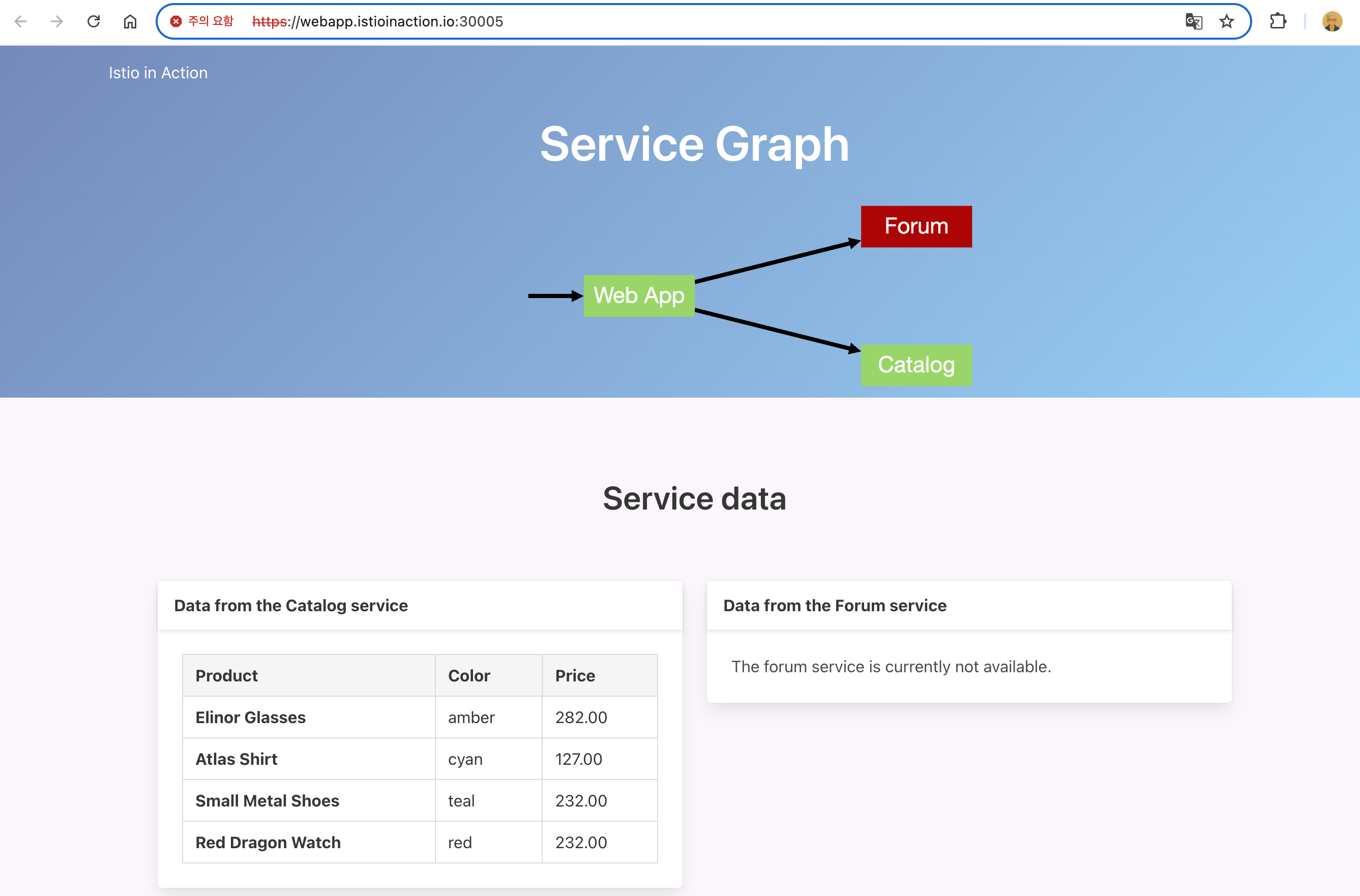
-
기본 istio-ingressgateway 가 인증서와 키를 사용하도록 설정하려면 먼저 인증서/키를 쿠버네티스 시크릿으로 만들어야 한다.
#
docker exec -it myk8s-control-plane istioctl proxy-config secret deploy/istio-ingressgateway.istio-system
RESOURCE NAME     TYPE           STATUS     VALID CERT     SERIAL NUMBER                               NOT AFTER                NOT BEFORE
default           Cert Chain     ACTIVE     true           309451020605014285992152532325172317299     2025-04-20T06:25:01Z     2025-04-19T06:23:01Z
ROOTCA            CA             ACTIVE     true           274849445769865462744500542778186825883     2035-04-17T06:24:47Z     2025-04-19T06:24:47Z

# 파일 정보 확인
cat ch4/certs/3_application/private/webapp.istioinaction.io.key.pem # 비밀키(개인키)
cat ch4/certs/3_application/certs/webapp.istioinaction.io.cert.pem
openssl x509 -in ch4/certs/3_application/certs/webapp.istioinaction.io.cert.pem -noout -text
...
        Issuer: C=US, ST=Denial, O=Dis, CN=webapp.istioinaction.io
        Validity
            Not Before: Jul  4 12:49:32 2021 GMT
            Not After : Jun 29 12:49:32 2041 GMT
        Subject: C=US, ST=Denial, L=Springfield, O=Dis, CN=webapp.istioinaction.io
        ...
        X509v3 extensions:
            X509v3 Basic Constraints:
                CA:FALSE
            Netscape Cert Type:
                SSL Server
            Netscape Comment:
                OpenSSL Generated Server Certificate
            X509v3 Subject Key Identifier:
                87:0E:5E:A4:4C:A5:57:C5:6D:97:95:64:C4:7D:60:1E:BB:07:94:F4
            X509v3 Authority Key Identifier:
                keyid:B9:F3:84:08:22:37:2C:D3:75:18:D2:07:C4:6F:4E:67:A9:0C:7D:14
                DirName:/C=US/ST=Denial/L=Springfield/O=Dis/CN=webapp.istioinaction.io
                serial:10:02:12
            X509v3 Key Usage: critical
                Digital Signature, Key Encipherment
            X509v3 Extended Key Usage:
                TLS Web Server Authentication
...

# webapp-credential 시크릿 만들기
kubectl create -n istio-system secret tls webapp-credential \
--key ch4/certs/3_application/private/webapp.istioinaction.io.key.pem \
--cert ch4/certs/3_application/certs/webapp.istioinaction.io.cert.pem
secret/webapp-credential created

# 확인 : krew view-secret
kubectl view-secret -n istio-system webapp-credential --all
tls.crt='-----BEGIN CERTIFICATE-----
MIIFXzCCA0egAwIBAgIDEAISMA0GCSqGSIb3DQEBCwUAME4xCzAJBgNVBAYTAlVT
...
NelTeXRTAz2iM7x5jxzzTa1Sv7T4TCHbuiUepUeYOdBVFjg=
-----END CERTIFICATE-----'
tls.key='-----BEGIN RSA PRIVATE KEY-----
MIIEowIBAAKCAQEAr9h0Mp2CFavJPi4kNBHVqN5XhMem2w+L3n3gLFZw8kLu5v9i
q1IxLNWgyBZ/9mWoJZDbZ0GuYWQA/nYCw4cq3ZB5bdkjDoSHXt1Tfs5LJgRsXkI4
...
-----END RSA PRIVATE KEY-----'-
istio-system 네임스페이스에 시크릿을 만든다. 이 책을 저술하는 시점에서(istio 1.13.0) 게이트웨이의 TLS에서 사용하는 시크릿은 이스티오 인그레스 게이트웨이와 동일한 네임스페이스에 있을 때만 가져올 수 있다.
-
운영 환경에서는 인그레스 게이트웨이를 istio-system과 분리해 자체 네임스페이스에서 실행해야 한다.
-
이제 이스티오 게이트웨이 리소스가 인증서와 키를 사용하도록 설정할 수 있다.
apiVersion: networking.istio.io/v1alpha3
kind: Gateway
metadata:
  name: coolstore-gateway
spec:
  selector:
    istio: ingressgateway
  servers:
  - port:
      number: 80  #1 HTTP 트래픽 허용
      name: http
      protocol: HTTP
    hosts:
    - "webapp.istioinaction.io"
  - port:
      number: 443 #2 HTTPS 트래픽 허용
      name: https
      protocol: HTTPS
    tls:
      mode: SIMPLE #3 보안 연결
      credentialName: webapp-credential #4 TLS 인증서가 들어 있는 쿠버네티스 시크릿 이름
    hosts:
    - "webapp.istioinaction.io"
✅ Gateway 리소스에서 인그레스 게이트웨이의 443 포트를 열고, 이를 HTTPS로 지정한다.
✅ 또한 게이트웨이 설정에 tls 부분을 추가해 TLS에 사용할 인증서와 키의 위치를 지정한다.
✅ 이 위치가 앞서 istio-ingressgateway 에 마운트한 위치와 동일하다는 것을 확인하자.
- 설정해 보자~
#
cat ch4/coolstore-gw-tls.yaml
kubectl apply -f ch4/coolstore-gw-tls.yaml -n istioinaction
gateway.networking.istio.io/coolstore-gateway configured

#
docker exec -it myk8s-control-plane istioctl proxy-config secret deploy/istio-ingressgateway.istio-system
RESOURCE NAME                      TYPE           STATUS     VALID CERT     SERIAL NUMBER                               NOT AFTER                NOT BEFORE
default                            Cert Chain     ACTIVE     true           309451020605014285992152532325172317299     2025-04-20T06:25:01Z     2025-04-19T06:23:01Z
kubernetes://webapp-credential     Cert Chain     ACTIVE     true           1049106                                     2041-06-29T12:49:32Z     2021-07-04T12:49:32Z
ROOTCA                             CA             ACTIVE     true           274849445769865462744500542778186825883     2035-04-17T06:24:47Z     2025-04-19T06:24:47Z

# 호출 테스트 1
curl -v -H "Host: webapp.istioinaction.io" https://localhost:30005/api/catalog
* Host localhost:30005 was resolved.
* IPv6: ::1
* IPv4: 127.0.0.1
*   Trying [::1]:30005...
* ALPN: curl offers h2,http/1.1
* TLSv1.3 (OUT), TLS handshake, Client hello (1):
* TLS connect error: error:00000000:lib(0)::reason(0)
* OpenSSL SSL_connect: SSL_ERROR_SYSCALL in connection to localhost:30005
* closing connection #0
curl: (35) TLS connect error: error:00000000:lib(0)::reason(0)

# 서버(istio-ingressgateway 파드)에서 제공하는 인증서는 기본 CA 인증서 체인을 사용해 확인할 수 없다는 의미다.
# curl 클라이언트에 적절한 CA 인증서 체인을 전달해보자.
# (호출 실패) 원인: (기본 인증서 경로에) 인증서 없음. 사설인증서 이므로 “사설CA 인증서(체인)” 필요

#
kubectl exec -it deploy/istio-ingressgateway -n istio-system -- ls -l /etc/ssl/certs
...
lrwxrwxrwx 1 root root     23 Oct  4  2023  f081611a.0 -> Go_Daddy_Class_2_CA.pem
lrwxrwxrwx 1 root root     47 Oct  4  2023  f0c70a8d.0 -> SSL.com_EV_Root_Certification_Authority_ECC.pem
lrwxrwxrwx 1 root root     44 Oct  4  2023  f249de83.0 -> Trustwave_Global_Certification_Authority.pem
lrwxrwxrwx 1 root root     41 Oct  4  2023  f30dd6ad.0 -> USERTrust_ECC_Certification_Authority.pem
lrwxrwxrwx 1 root root     34 Oct  4  2023  f3377b1b.0 -> Security_Communication_Root_CA.pem
lrwxrwxrwx 1 root root     24 Oct  4  2023  f387163d.0 -> Starfield_Class_2_CA.pem
lrwxrwxrwx 1 root root     18 Oct  4  2023  f39fc864.0 -> SecureTrust_CA.pem
lrwxrwxrwx 1 root root     20 Oct  4  2023  f51bb24c.0 -> Certigna_Root_CA.pem
lrwxrwxrwx 1 root root     20 Oct  4  2023  fa5da96b.0 -> GLOBALTRUST_2020.pem
...

#
cat ch4/certs/2_intermediate/certs/ca-chain.cert.pem
openssl x509 -in ch4/certs/2_intermediate/certs/ca-chain.cert.pem -noout -text
...
           X509v3 Basic Constraints: critical
                CA:TRUE, pathlen:0
...


# 호출 테스트 2
curl -v -H "Host: webapp.istioinaction.io" https://localhost:30005/api/catalog \
--cacert ch4/certs/2_intermediate/certs/ca-chain.cert.pem
* Host localhost:30005 was resolved.
* IPv6: ::1
* IPv4: 127.0.0.1
*   Trying [::1]:30005...
* Connected to localhost (::1) port 30005
* ALPN: curl offers h2,http/1.1
* (304) (OUT), TLS handshake, Client hello (1):
*  CAfile: ch4/certs/2_intermediate/certs/ca-chain.cert.pem
*  CApath: none
* LibreSSL SSL_connect: SSL_ERROR_SYSCALL in connection to localhost:30005
* Closing connection
curl: (35) LibreSSL SSL_connect: SSL_ERROR_SYSCALL in connection to localhost:30005
# (호출 실패) 원인: 인증실패. 서버인증서가 발급된(issued) 도메인 “webapp.istioinaction.io”로 호출하지 않음 (localhost로 호출함)


# 도메인 질의를 위한 임시 설정 : 실습 완료 후에는 삭제 해둘 것
echo "127.0.0.1       webapp.istioinaction.io" | sudo tee -a /etc/hosts
cat /etc/hosts | tail -n 1
127.0.0.1       webapp.istioinaction.io

# 호출 테스트 3
curl -v https://webapp.istioinaction.io:30005/api/catalog \
--cacert ch4/certs/2_intermediate/certs/ca-chain.cert.pem
* Host webapp.istioinaction.io:30005 was resolved.
* IPv6: (none)
* IPv4: 127.0.0.1
*   Trying 127.0.0.1:30005...
* ALPN: curl offers h2,http/1.1
* TLSv1.3 (OUT), TLS handshake, Client hello (1):
*  CAfile: ch4/certs/2_intermediate/certs/ca-chain.cert.pem
*  CApath: none
* TLSv1.3 (IN), TLS handshake, Server hello (2):
* TLSv1.3 (IN), TLS change cipher, Change cipher spec (1):
* TLSv1.3 (IN), TLS handshake, Encrypted Extensions (8):
* TLSv1.3 (IN), TLS handshake, Certificate (11):
* TLSv1.3 (IN), TLS handshake, CERT verify (15):
* TLSv1.3 (IN), TLS handshake, Finished (20):
* TLSv1.3 (OUT), TLS change cipher, Change cipher spec (1):
* TLSv1.3 (OUT), TLS handshake, Finished (20):
* SSL connection using TLSv1.3 / TLS_AES_256_GCM_SHA384 / x25519 / RSASSA-PSS
* ALPN: server accepted h2
* Server certificate:
*  subject: C=US; ST=Denial; L=Springfield; O=Dis; CN=webapp.istioinaction.io
*  start date: Jul  4 12:49:32 2021 GMT
*  expire date: Jun 29 12:49:32 2041 GMT
*  common name: webapp.istioinaction.io (matched)
*  issuer: C=US; ST=Denial; O=Dis; CN=webapp.istioinaction.io
*  SSL certificate verify ok.
*   Certificate level 0: Public key type RSA (2048/112 Bits/secBits), signed using sha256WithRSAEncryption
*   Certificate level 1: Public key type RSA (4096/152 Bits/secBits), signed using sha256WithRSAEncryption
* Connected to webapp.istioinaction.io (127.0.0.1) port 30005
* using HTTP/2
* [HTTP/2] [1] OPENED stream for https://webapp.istioinaction.io:30005/api/catalog
* [HTTP/2] [1] [:method: GET]
* [HTTP/2] [1] [:scheme: https]
* [HTTP/2] [1] [:authority: webapp.istioinaction.io:30005]
* [HTTP/2] [1] [:path: /api/catalog]
* [HTTP/2] [1] [user-agent: curl/8.13.0]
* [HTTP/2] [1] [accept: */*]
> GET /api/catalog HTTP/2
> Host: webapp.istioinaction.io:30005
> User-Agent: curl/8.13.0
> Accept: */*
>
* Request completely sent off
* TLSv1.3 (IN), TLS handshake, Newsession Ticket (4):
* TLSv1.3 (IN), TLS handshake, Newsession Ticket (4):
< HTTP/2 200
< content-length: 357
< content-type: application/json; charset=utf-8
< date: Sat, 19 Apr 2025 10:36:31 GMT
< x-envoy-upstream-service-time: 18
< server: istio-envoy
<
* Connection #0 to host webapp.istioinaction.io left intact
[{"id":1,"color":"amber","department":"Eyewear","name":"Elinor Glasses","price":"282.00"},{"id":2,"color":"cyan","department":"Clothing","name":"Atlas Shirt","price":"127.00"},{"id":3,"color":"teal","department":"Clothing","name":"Small Metal Shoes","price":"232.00"},{"id":4,"color":"red","department":"Watches","name":"Red Dragon Watch","price":"232.00"}]%

open https://webapp.istioinaction.io:30005
open https://webapp.istioinaction.io:30005/api/catalog

# http 접속도 확인해보자
curl -v http://webapp.istioinaction.io:30000/api/catalog
open http://webapp.istioinaction.io:30000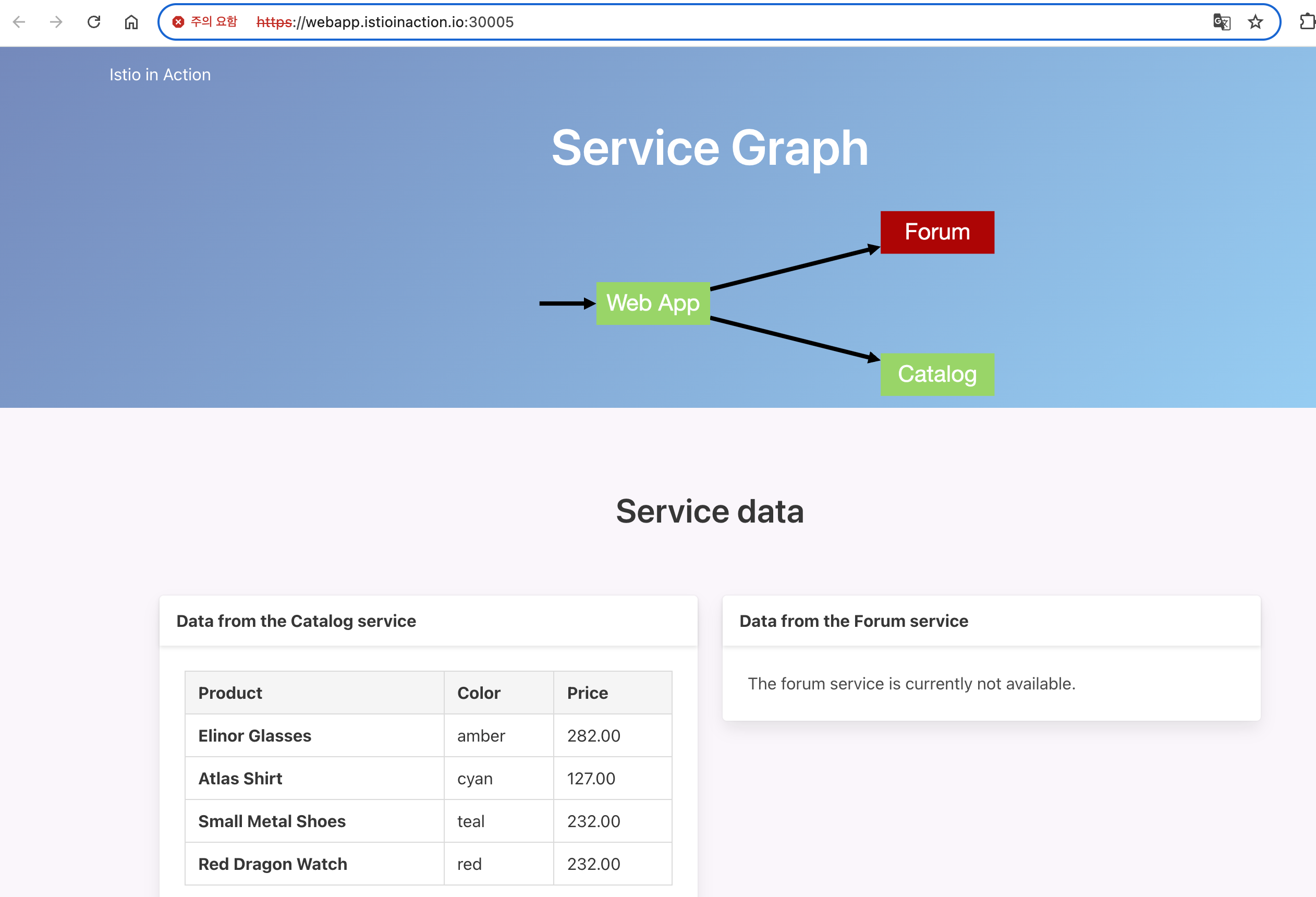
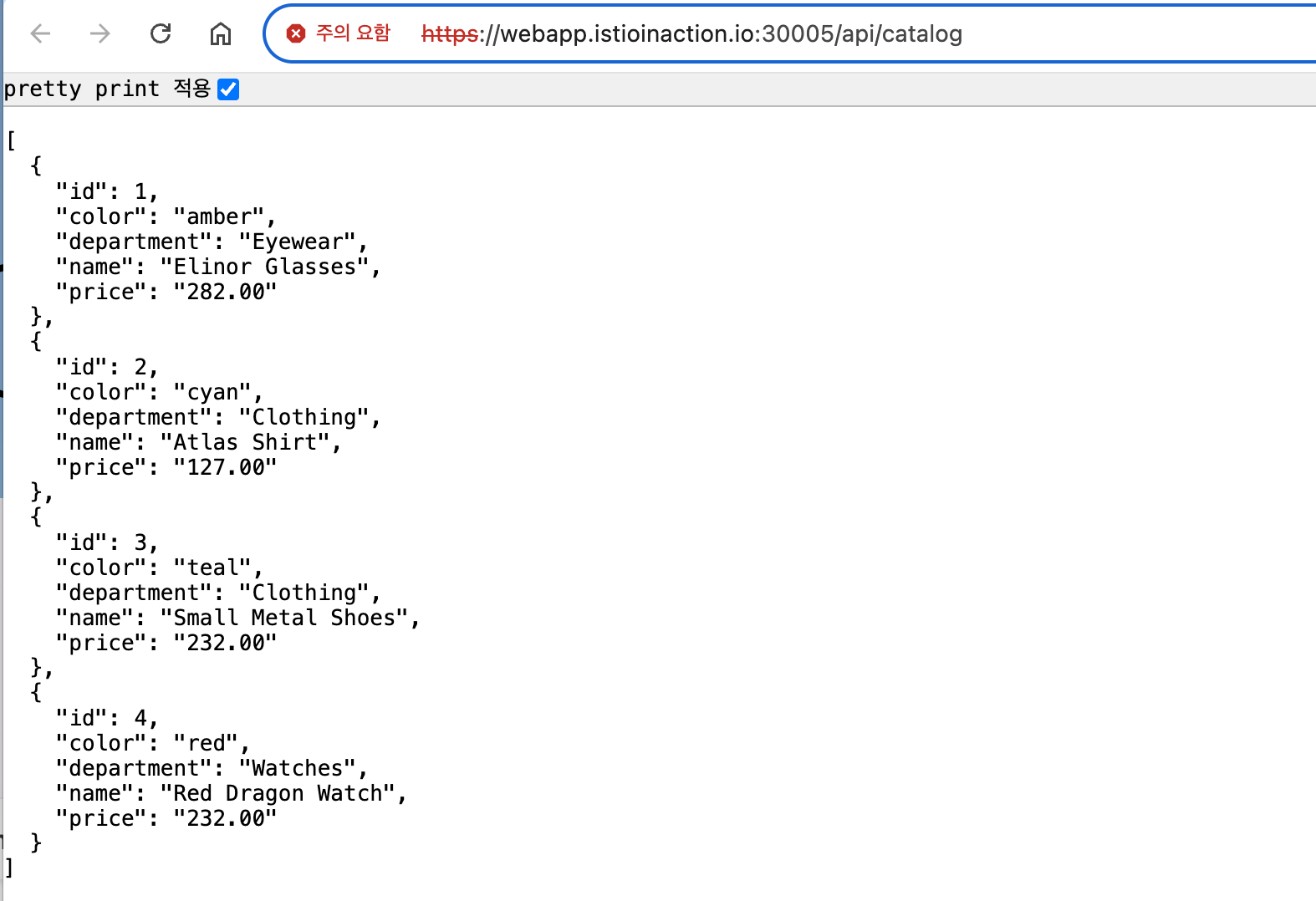
- 아래 그림은 종단 간 end-to-end 암호화를 달성했음을 보여준다.
- 우리는 이스티오 게이트웨이를 향하는 트래픽을 암호화함으로써 보호한다.
- 이스티오 인그레스 게이트웨이는 TLS 커넥션을 종료하고, 트래픽을 서비스 메시 내에서 실행 중인 뒷단의 webapp 서비스로 보낸다.
- istio-ingressgateway 와 webapp 서비스 사이의 홉은 서비스의 ID를 사용해 암호화한다.
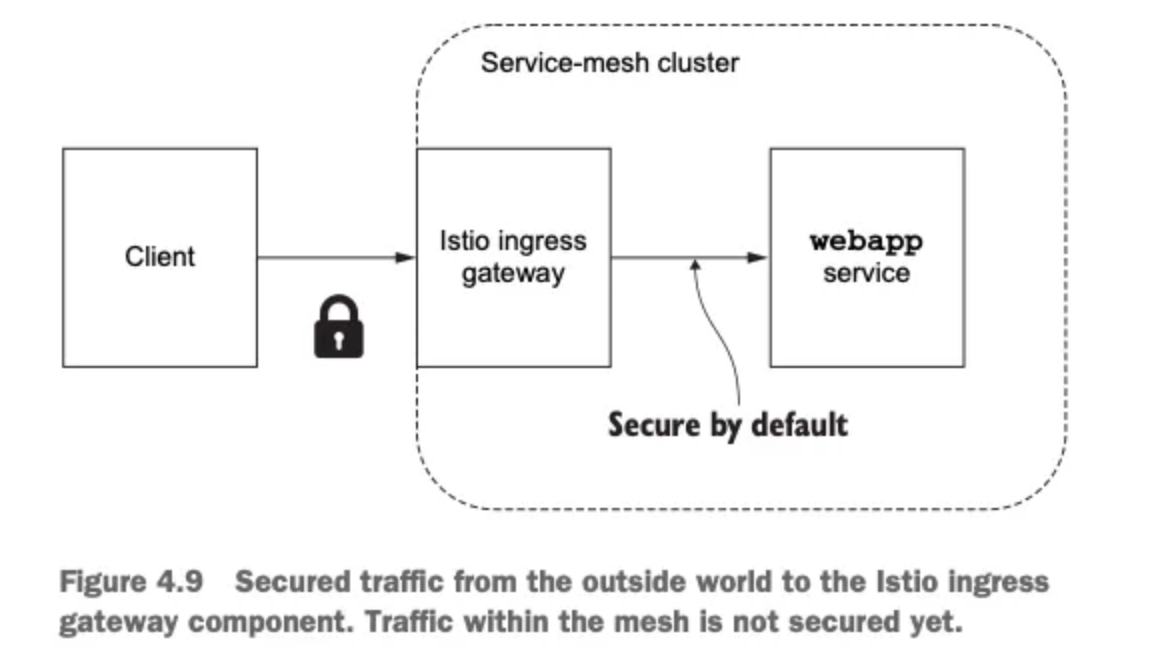
2.5.3 HTTP redirect to HTTPS
- 모든 트래픽 항상 TLS를 쓰도록 강제, HTTP 트래픽을 강제로 리다이렉트하게 Gateway 수정
apiVersion: networking.istio.io/v1alpha3
kind: Gateway
metadata:
  name: coolstore-gateway
spec:
  selector:
    istio: ingressgateway
  servers:
  - port:
      number: 80
      name: http
      protocol: HTTP
    hosts:
    - "webapp.istioinaction.io"
    tls:
      httpsRedirect: true
  - port:
      number: 443
      name: https
      protocol: HTTPS
    tls:
      mode: SIMPLE
      credentialName: webapp-credential
    hosts:
- "webapp.istioinaction.io"- 실행
#
kubectl apply -f ch4/coolstore-gw-tls-redirect.yaml

# HTTP 301 리다이렉트
curl -v http://webapp.istioinaction.io:30000/api/catalog

* Host webapp.istioinaction.io:30000 was resolved.
* IPv6: (none)
* IPv4: 127.0.0.1
*   Trying 127.0.0.1:30000...
* Connected to webapp.istioinaction.io (127.0.0.1) port 30000
* using HTTP/1.x
> GET /api/catalog HTTP/1.1
> Host: webapp.istioinaction.io:30000
> User-Agent: curl/8.13.0
> Accept: */*
>
* Request completely sent off
< HTTP/1.1 301 Moved Permanently
< location: https://webapp.istioinaction.io:30000/api/catalog
< date: Sat, 19 Apr 2025 10:45:59 GMT
< server: istio-envoy
< content-length: 0
<
* Connection #0 to host webapp.istioinaction.io left intact
👉 이 리다이렉트는 클라이언트에게 API의 HTTPS 버전을 호출하라고 지시한다.
2.5.4 HTTP traffic with mutual TLS
- 앞 절에서는 표준 TLS를 사용해 서버가 자신의 정체를 클라이언트에게 증명하게 했다.
- 그런데 만약 클러스터 외부의 트래픽을 받아들이기 전에 클라이언트가 누군지 검증하고 싶다면 어떻게 해야 할까?
- 단순 TLS 시나리오에서는 서버가 자신의 공개 인증서를 클라이언트에게 보냈고, 클라이언트는 서버의 인증서에 서명한 CA를 신뢰할 수 있음을 검증했다.
- 우리는 클라이언트가 자신의 공개 인증서를 보내게 하고 서버가 인증서를 신뢰하는지 검증하게 하고 싶다.
- 아래 그림은 mTLS 프로토콜에서 클라이언트와 서버 모두가 어떻게 서로의 인증서를 검증하는지, 즉 어떻게 서로 인증하는지 보여준다.
- 그리고 인증서는 트래픽을 암호화하는 데 사용한다.
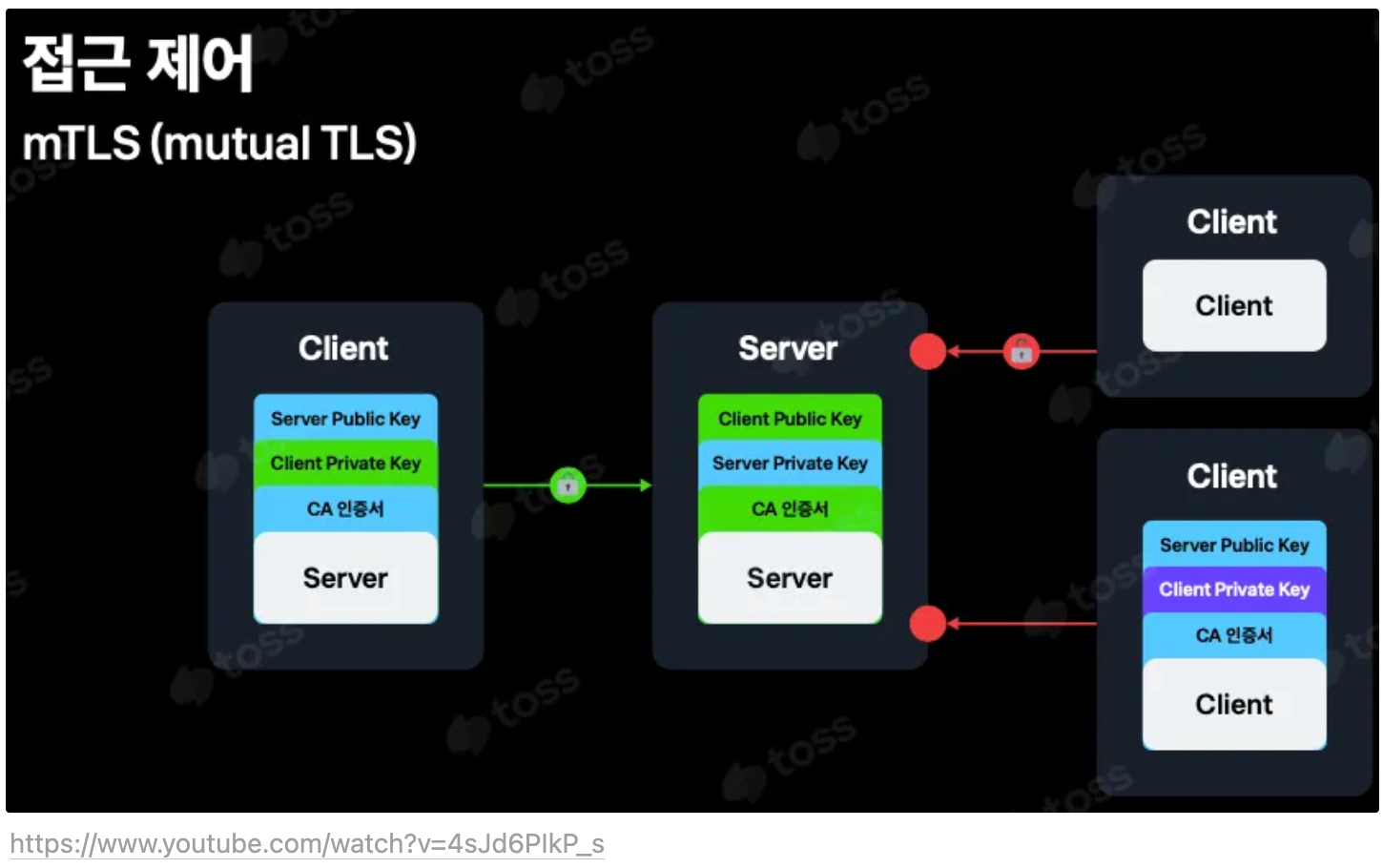
- 기본 istio-ingressgateway 가 mTLS 커넥션에 참여하도록 구성하려면, 클라이언트의 인증서를 검증하는 데 사용할 수 있도록 CA 인증서 집합을 제공해야 한다.
- 알 절에서 했던 것처럼, 쿠버네티스 시크릿으로 istio-ingressgateway 에세 이 CA 인증서(더 구체적으로 인증서 체인)를 사용할 수 있게 해야 한다.
- 적절한 CA 인증서 체인으로 istio-ingressgateway-ca-cert 시크릿을 구성하는 것으로 시작하겠다.
# 인증서 파일들 확인
cat ch4/certs/3_application/private/webapp.istioinaction.io.key.pem
cat ch4/certs/3_application/certs/webapp.istioinaction.io.cert.pem
cat ch4/certs/2_intermediate/certs/ca-chain.cert.pem
openssl x509 -in ch4/certs/2_intermediate/certs/ca-chain.cert.pem -noout -text

# Secret 생성 : (적절한 CA 인증서 체인) 클라이언트 인증서
kubectl create -n istio-system secret \
generic webapp-credential-mtls --from-file=tls.key=\
ch4/certs/3_application/private/webapp.istioinaction.io.key.pem \
--from-file=tls.crt=\
ch4/certs/3_application/certs/webapp.istioinaction.io.cert.pem \
--from-file=ca.crt=\
ch4/certs/2_intermediate/certs/ca-chain.cert.pem
secret/webapp-credential-mtls created

# 확인
kubectl view-secret -n istio-system webapp-credential-mtls --all
a.crt='-----BEGIN CERTIFICATE-----
MIIFlTCCA32gAwIBAgIDEAISMA0GCSqGSIb3DQEBCwUAMGQxCzAJBgNVBAYTAlVT
...
sWXNM0TF1ZL6mg8dUFoS8NPt4AvGwxMCE8NX7Ez+uIW9E2fg6Aw25A4=
-----END CERTIFICATE-----
-----BEGIN CERTIFICATE-----
MIIFrjCCA5agAwIBAgIJAPlSxA3cU9i4MA0GCSqGSIb3DQEBCwUAMGQxCzAJBgNV
...
Yu91e2W4lkqQiQffDt/Xd9Iq
-----END CERTIFICATE-----'
tls.crt='-----BEGIN CERTIFICATE-----
MIIFXzCCA0egAwIBAgIDEAISMA0GCSqGSIb3DQEBCwUAME4xCzAJBgNVBAYTAlVT
...
NelTeXRTAz2iM7x5jxzzTa1Sv7T4TCHbuiUepUeYOdBVFjg=
-----END CERTIFICATE-----'
tls.key='-----BEGIN RSA PRIVATE KEY-----
MIIEowIBAAKCAQEAr9h0Mp2CFavJPi4kNBHVqN5XhMem2w+L3n3gLFZw8kLu5v9i
...
KSgYWGmCLTKckavPKhMKps2wpY848gImQVK1DTnCO04+xPOb2mnz
-----END RSA PRIVATE KEY-----'- 이제 CA 인증서 체인의 위치를 가리키도록 이스티오 Gateway 리소스를 업데이트하고, expected 프로토콜을 mTLS로 구성하자.
apiVersion: networking.istio.io/v1alpha3
kind: Gateway
metadata:
  name: coolstore-gateway
spec:
  selector:
    istio: ingressgateway
  servers:
  - port:
      number: 80
      name: http
      protocol: HTTP
    hosts:
    - "webapp.istioinaction.io"
  - port:
      number: 443
      name: https
      protocol: HTTPS
    tls:
      mode: MUTUAL # mTLS 설정
      credentialName: webapp-credential-mtls # 신뢰할 수 있는 CA가 구성된 자격 증명
    hosts:
- "webapp.istioinaction.io"- 실행
#
kubectl apply -f ch4/coolstore-gw-mtls.yaml -n istioinaction
gateway.networking.istio.io/coolstore-gateway configured

# (옵션) SDS 로그 확인
istiod-7df6ffc78d-tg88q discovery 2025-04-19T10:59:33.019076Z   warn    model   skipping server on gateway default/coolstore-gateway, duplicate host names: [webapp.istioinaction.io]
istiod-7df6ffc78d-tg88q discovery 2025-04-19T10:59:33.019143Z   info    ads     ADS: new connection for node:istio-ingressgateway-996bc6bb6-248ws.istio-system-22
istiod-7df6ffc78d-tg88q discovery 2025-04-19T10:59:33.019258Z   warn    model   skipping server on gateway default/coolstore-gateway, duplicate host names: [webapp.istioinaction.io]
istiod-7df6ffc78d-tg88q discovery 2025-04-19T10:59:33.019970Z   info    ads     CDS: PUSH request for node:istio-ingressgateway-996bc6bb6-248ws.istio-system resources:24 size:23.8kB cached:21/23
istiod-7df6ffc78d-tg88q discovery 2025-04-19T10:59:33.020045Z   warn    model   skipping server on gateway default/coolstore-gateway, duplicate host names: [webapp.istioinaction.io]
istiod-7df6ffc78d-tg88q discovery 2025-04-19T10:59:33.020188Z   info    ads     EDS: PUSH request for node:istio-ingressgateway-996bc6bb6-248ws.istio-system resources:23 size:4.0kB empty:0 cached:23/23
istiod-7df6ffc78d-tg88q discovery 2025-04-19T10:59:33.020259Z   warn    model   skipping server on gateway default/coolstore-gateway, duplicate host names: [webapp.istioinaction.io]
istiod-7df6ffc78d-tg88q discovery 2025-04-19T10:59:33.020694Z   info    ads     LDS: PUSH request for node:istio-ingressgateway-996bc6bb6-248ws.istio-system resources:2 size:4.8kB
istiod-7df6ffc78d-tg88q discovery 2025-04-19T10:59:33.020763Z   warn    model   skipping server on gateway default/coolstore-gateway, duplicate host names: [webapp.istioinaction.io]
istiod-7df6ffc78d-tg88q discovery 2025-04-19T10:59:33.020941Z   info    ads     RDS: PUSH request for node:istio-ingressgateway-996bc6bb6-248ws.istio-system resources:2 size:1.1kB cached:0/0
istiod-7df6ffc78d-tg88q discovery 2025-04-19T10:59:33.021031Z   warn    model   skipping server on gateway default/coolstore-gateway, duplicate host names: [webapp.istioinaction.io]
istiod-7df6ffc78d-tg88q discovery 2025-04-19T10:59:33.021120Z   info    ads     SDS: PUSH request for node:istio-ingressgateway-996bc6bb6-248ws.istio-system resources:3 size:11.4kB cached:3/3
...

#
docker exec -it myk8s-control-plane istioctl proxy-config secret deploy/istio-ingressgateway.istio-system
RESOURCE NAME                                  TYPE           STATUS     VALID CERT     SERIAL NUMBER                               NOT AFTER                NOT BEFORE
kubernetes://webapp-credential-mtls            Cert Chain     ACTIVE     true           1049106                                     2041-06-29T12:49:32Z     2021-07-04T12:49:32Z
default                                        Cert Chain     ACTIVE     true           309451020605014285992152532325172317299     2025-04-20T06:25:01Z     2025-04-19T06:23:01Z
ROOTCA                                         CA             ACTIVE     true           274849445769865462744500542778186825883     2035-04-17T06:24:47Z     2025-04-19T06:24:47Z
kubernetes://webapp-credential-mtls-cacert     CA             ACTIVE     true           1049106                                     2041-06-29T12:49:29Z     2021-07-04T12:49:29Z


# 호출 테스트 1 : (호출실패) 클라이언트 인증서 없음 - SSL 핸드섀이크가 성공하지 못하여 거부됨
curl -v https://webapp.istioinaction.io:30005/api/catalog \
--cacert ch4/certs/2_intermediate/certs/ca-chain.cert.pem

# 웹브라우저에서 확인 시 클라이언트 인증서 확인되지 않아서 접속 실패 확인
open https://webapp.istioinaction.io:30005
open https://webapp.istioinaction.io:30005/api/catalog

webapp.istioinaction.io에 대한 액세스가 거부됨
webapp.istioinaction.io에서 로그인 인증서를 승인하지 않았거나 로그인 인증서가 제공되지 않았을 수 있습니다.

시스템 관리자에게 문의하세요.
ERR_BAD_SSL_CLIENT_AUTH_CERT

# 호출 테스트 2 : 클라이언트 인증서/키 추가 성공!
curl -v https://webapp.istioinaction.io:30005/api/catalog \
--cacert ch4/certs/2_intermediate/certs/ca-chain.cert.pem \
--cert ch4/certs/4_client/certs/webapp.istioinaction.io.cert.pem \
--key ch4/certs/4_client/private/webapp.istioinaction.io.key.pem
* Host webapp.istioinaction.io:30005 was resolved.
* IPv6: (none)
* IPv4: 127.0.0.1
*   Trying 127.0.0.1:30005...
* ALPN: curl offers h2,http/1.1
* TLSv1.3 (OUT), TLS handshake, Client hello (1):
*  CAfile: ch4/certs/2_intermediate/certs/ca-chain.cert.pem
*  CApath: none
* TLSv1.3 (IN), TLS handshake, Server hello (2):
* TLSv1.3 (IN), TLS change cipher, Change cipher spec (1):
* TLSv1.3 (IN), TLS handshake, Encrypted Extensions (8):
* TLSv1.3 (IN), TLS handshake, Request CERT (13):
* TLSv1.3 (IN), TLS handshake, Certificate (11):
* TLSv1.3 (IN), TLS handshake, CERT verify (15):
* TLSv1.3 (IN), TLS handshake, Finished (20):
* TLSv1.3 (OUT), TLS change cipher, Change cipher spec (1):
* TLSv1.3 (OUT), TLS handshake, Certificate (11):
* TLSv1.3 (OUT), TLS handshake, CERT verify (15):
* TLSv1.3 (OUT), TLS handshake, Finished (20):
* SSL connection using TLSv1.3 / TLS_AES_256_GCM_SHA384 / x25519 / RSASSA-PSS
* ALPN: server accepted h2
* Server certificate:
*  subject: C=US; ST=Denial; L=Springfield; O=Dis; CN=webapp.istioinaction.io
*  start date: Jul  4 12:49:32 2021 GMT
*  expire date: Jun 29 12:49:32 2041 GMT
*  common name: webapp.istioinaction.io (matched)
*  issuer: C=US; ST=Denial; O=Dis; CN=webapp.istioinaction.io
*  SSL certificate verify ok.
*   Certificate level 0: Public key type RSA (2048/112 Bits/secBits), signed using sha256WithRSAEncryption
*   Certificate level 1: Public key type RSA (4096/152 Bits/secBits), signed using sha256WithRSAEncryption
* Connected to webapp.istioinaction.io (127.0.0.1) port 30005
* using HTTP/2
* [HTTP/2] [1] OPENED stream for https://webapp.istioinaction.io:30005/api/catalog
* [HTTP/2] [1] [:method: GET]
* [HTTP/2] [1] [:scheme: https]
* [HTTP/2] [1] [:authority: webapp.istioinaction.io:30005]
* [HTTP/2] [1] [:path: /api/catalog]
* [HTTP/2] [1] [user-agent: curl/8.13.0]
* [HTTP/2] [1] [accept: */*]
> GET /api/catalog HTTP/2
> Host: webapp.istioinaction.io:30005
> User-Agent: curl/8.13.0
> Accept: */*
>
* Request completely sent off
* TLSv1.3 (IN), TLS handshake, Newsession Ticket (4):
* TLSv1.3 (IN), TLS handshake, Newsession Ticket (4):
< HTTP/2 200
< content-length: 357
< content-type: application/json; charset=utf-8
< date: Sat, 19 Apr 2025 11:02:07 GMT
< x-envoy-upstream-service-time: 18
< server: istio-envoy
<
* Connection #0 to host webapp.istioinaction.io left intact
[{"id":1,"color":"amber","department":"Eyewear","name":"Elinor Glasses","price":"282.00"},{"id":2,"color":"cyan","department":"Clothing","name":"Atlas Shirt","price":"127.00"},{"id":3,"color":"teal","department":"Clothing","name":"Small Metal Shoes","price":"232.00"},{"id":4,"color":"red","department":"Watches","name":"Red Dragon Watch","price":"232.00"}]%
✅ 이스티오 게이트웨이는 istio-proxy 를 시작하는 데 사용하는 istio-agent 프로세스에 내장된 SDS에서 인증서를 가져온다.
✅ SDS는 업데이트를 자동으로 전파해야 하는 동적 API이다. 서비스 프록시도 마찬가지다.
2.5.5 Serving multiple virtual hosts with TLS
- 이스티오의 인그레스 게이트웨이는 동일한 HTTPS 포트(443)에서 자체 인증서와 비밀 키가 있는 여러 가상 호스트를 서빙할 수 있다.
- 이를 위해 동일 포트 및 프로토콜에 여러 항목을 추가한다.
- 예를 들어 자체 인증서와 키 쌍이 있는 `webapp.istioinaction.io
와 **catalog**.istioinaction.io` 서비스를 둘 다 추가할 수 있다. - HTTPS로 서빙하는 가상 호스트를 여럿 기술하고 있는 이스티오 Gateway 리소스는 다음과 같다.
apiVersion: networking.istio.io/v1alpha3
kind: Gateway
metadata:
  name: coolstore-gateway
spec:
  selector:
    istio: ingressgateway
  servers:
  - port:
      number: 443
      name: https-webapp
      protocol: HTTPS
    tls:
      mode: SIMPLE
      credentialName: webapp-credential
    hosts:
    - "webapp.istioinaction.io"
  - port:
      number: 443
      name: https-catalog
      protocol: HTTPS
    tls:
      mode: SIMPLE
      credentialName: catalog-credential
    hosts:
    - "catalog.istioinaction.io"
👉 둘 다 443 포트 리스닝하고 HTTPS 를 서빙하지만, 호스트이름이 다르다는 것을 유의하자.
- 각 항목에는 서빙하는 가상 호스트용으로 사용하는 고유한 인증서와 키가 있다. 이를 위해 인증서와 키를 추가하자.
#
cat ch4/certs2/3_application/private/catalog.istioinaction.io.key.pem
cat ch4/certs2/3_application/certs/catalog.istioinaction.io.cert.pem
openssl x509 -in ch4/certs2/3_application/certs/catalog.istioinaction.io.cert.pem -noout -text
...
        Issuer: C=US, ST=Denial, O=Dis, CN=catalog.istioinaction.io
        Validity
            Not Before: Jul  4 13:30:38 2021 GMT
            Not After : Jun 29 13:30:38 2041 GMT
        Subject: C=US, ST=Denial, L=Springfield, O=Dis, CN=catalog.istioinaction.io
...

#
kubectl create -n istio-system secret tls catalog-credential \
--key ch4/certs2/3_application/private/catalog.istioinaction.io.key.pem \
--cert ch4/certs2/3_application/certs/catalog.istioinaction.io.cert.pem
secret/catalog-credential created

# Gateway 설정 업데이트
kubectl apply -f ch4/coolstore-gw-multi-tls.yaml -n istioinaction
gateway.networking.istio.io/coolstore-gateway configured

# Gateway 로 노출한 catalog 서비스용 VirtualService 리소스 생성
cat ch4/catalog-vs.yaml
apiVersion: networking.istio.io/v1alpha3
kind: VirtualService
metadata:
  name: catalog-vs-from-gw
spec:
  hosts:
  - "catalog.istioinaction.io"
  gateways:
  - coolstore-gateway
  http:
  - route:
    - destination:
        host: catalog
        port:
          number: 80

#
kubectl apply -f ch4/catalog-vs.yaml -n istioinaction
virtualservice.networking.istio.io/catalog-vs-from-gw created

kubectl get gw,vs -n istioinaction
NAME                                            AGE
gateway.networking.istio.io/coolstore-gateway   3h1m

NAME                                                    GATEWAYS                HOSTS                          AGE
virtualservice.networking.istio.io/catalog-vs-from-gw   ["coolstore-gateway"]   ["catalog.istioinaction.io"]   19s
virtualservice.networking.istio.io/webapp-vs-from-gw    ["coolstore-gateway"]   ["webapp.istioinaction.io"]    169m

# 도메인 질의를 위한 임시 설정 : 실습 완료 후에는 삭제 해둘 것
echo "127.0.0.1       catalog.istioinaction.io" | sudo tee -a /etc/hosts
cat /etc/hosts | tail -n 2
127.0.0.1       webapp.istioinaction.io
127.0.0.1       catalog.istioinaction.io

# 호출테스트 1 - webapp.istioinaction.io
curl -v https://webapp.istioinaction.io:30005/api/catalog \
--cacert ch4/certs/2_intermediate/certs/ca-chain.cert.pem
* Host webapp.istioinaction.io:30005 was resolved.
* IPv6: (none)
* IPv4: 127.0.0.1
*   Trying 127.0.0.1:30005...
* ALPN: curl offers h2,http/1.1
* TLSv1.3 (OUT), TLS handshake, Client hello (1):
*  CAfile: ch4/certs/2_intermediate/certs/ca-chain.cert.pem
*  CApath: none
* TLSv1.3 (IN), TLS handshake, Server hello (2):
* TLSv1.3 (IN), TLS change cipher, Change cipher spec (1):
* TLSv1.3 (IN), TLS handshake, Encrypted Extensions (8):
* TLSv1.3 (IN), TLS handshake, Certificate (11):
* TLSv1.3 (IN), TLS handshake, CERT verify (15):
* TLSv1.3 (IN), TLS handshake, Finished (20):
* TLSv1.3 (OUT), TLS change cipher, Change cipher spec (1):
* TLSv1.3 (OUT), TLS handshake, Finished (20):
* SSL connection using TLSv1.3 / TLS_AES_256_GCM_SHA384 / x25519 / RSASSA-PSS
* ALPN: server accepted h2
* Server certificate:
*  subject: C=US; ST=Denial; L=Springfield; O=Dis; CN=webapp.istioinaction.io
*  start date: Jul  4 12:49:32 2021 GMT
*  expire date: Jun 29 12:49:32 2041 GMT
*  common name: webapp.istioinaction.io (matched)
*  issuer: C=US; ST=Denial; O=Dis; CN=webapp.istioinaction.io
*  SSL certificate verify ok.
*   Certificate level 0: Public key type RSA (2048/112 Bits/secBits), signed using sha256WithRSAEncryption
*   Certificate level 1: Public key type RSA (4096/152 Bits/secBits), signed using sha256WithRSAEncryption
* Connected to webapp.istioinaction.io (127.0.0.1) port 30005
* using HTTP/2
* [HTTP/2] [1] OPENED stream for https://webapp.istioinaction.io:30005/api/catalog
* [HTTP/2] [1] [:method: GET]
* [HTTP/2] [1] [:scheme: https]
* [HTTP/2] [1] [:authority: webapp.istioinaction.io:30005]
* [HTTP/2] [1] [:path: /api/catalog]
* [HTTP/2] [1] [user-agent: curl/8.13.0]
* [HTTP/2] [1] [accept: */*]
> GET /api/catalog HTTP/2
> Host: webapp.istioinaction.io:30005
> User-Agent: curl/8.13.0
> Accept: */*
>
* Request completely sent off
* TLSv1.3 (IN), TLS handshake, Newsession Ticket (4):
* TLSv1.3 (IN), TLS handshake, Newsession Ticket (4):
< HTTP/2 200
< content-length: 357
< content-type: application/json; charset=utf-8
< date: Sat, 19 Apr 2025 11:10:35 GMT
< x-envoy-upstream-service-time: 12
< server: istio-envoy
<
* Connection #0 to host webapp.istioinaction.io left intact
[{"id":1,"color":"amber","department":"Eyewear","name":"Elinor Glasses","price":"282.00"},{"id":2,"color":"cyan","department":"Clothing","name":"Atlas Shirt","price":"127.00"},{"id":3,"color":"teal","department":"Clothing","name":"Small Metal Shoes","price":"232.00"},{"id":4,"color":"red","department":"Watches","name":"Red Dragon Watch","price":"232.00"}]%

# 호출테스트 2 - catalog.istioinaction.io (cacert 경로가 ch4/certs2/* 임에 유의)
curl -v https://catalog.istioinaction.io:30005/items \
--cacert ch4/certs2/2_intermediate/certs/ca-chain.cert.pem
* Host catalog.istioinaction.io:30005 was resolved.
* IPv6: (none)
* IPv4: 127.0.0.1
*   Trying 127.0.0.1:30005...
* ALPN: curl offers h2,http/1.1
* TLSv1.3 (OUT), TLS handshake, Client hello (1):
*  CAfile: ch4/certs2/2_intermediate/certs/ca-chain.cert.pem
*  CApath: none
* TLSv1.3 (IN), TLS handshake, Server hello (2):
* TLSv1.3 (IN), TLS change cipher, Change cipher spec (1):
* TLSv1.3 (IN), TLS handshake, Encrypted Extensions (8):
* TLSv1.3 (IN), TLS handshake, Certificate (11):
* TLSv1.3 (IN), TLS handshake, CERT verify (15):
* TLSv1.3 (IN), TLS handshake, Finished (20):
* TLSv1.3 (OUT), TLS change cipher, Change cipher spec (1):
* TLSv1.3 (OUT), TLS handshake, Finished (20):
* SSL connection using TLSv1.3 / TLS_AES_256_GCM_SHA384 / x25519 / RSASSA-PSS
* ALPN: server accepted h2
* Server certificate:
*  subject: C=US; ST=Denial; L=Springfield; O=Dis; CN=catalog.istioinaction.io
*  start date: Jul  4 13:30:38 2021 GMT
*  expire date: Jun 29 13:30:38 2041 GMT
*  common name: catalog.istioinaction.io (matched)
*  issuer: C=US; ST=Denial; O=Dis; CN=catalog.istioinaction.io
*  SSL certificate verify ok.
*   Certificate level 0: Public key type RSA (2048/112 Bits/secBits), signed using sha256WithRSAEncryption
*   Certificate level 1: Public key type RSA (4096/152 Bits/secBits), signed using sha256WithRSAEncryption
* Connected to catalog.istioinaction.io (127.0.0.1) port 30005
* using HTTP/2
* [HTTP/2] [1] OPENED stream for https://catalog.istioinaction.io:30005/items
* [HTTP/2] [1] [:method: GET]
* [HTTP/2] [1] [:scheme: https]
* [HTTP/2] [1] [:authority: catalog.istioinaction.io:30005]
* [HTTP/2] [1] [:path: /items]
* [HTTP/2] [1] [user-agent: curl/8.13.0]
* [HTTP/2] [1] [accept: */*]
> GET /items HTTP/2
> Host: catalog.istioinaction.io:30005
> User-Agent: curl/8.13.0
> Accept: */*
>
* Request completely sent off
* TLSv1.3 (IN), TLS handshake, Newsession Ticket (4):
* TLSv1.3 (IN), TLS handshake, Newsession Ticket (4):
< HTTP/2 200
< x-powered-by: Express
< vary: Origin, Accept-Encoding
< access-control-allow-credentials: true
< cache-control: no-cache
< pragma: no-cache
< expires: -1
< content-type: application/json; charset=utf-8
< content-length: 502
< etag: W/"1f6-ih2h+hDQ0yLLcKIlBvwkWbyQGK4"
< date: Sat, 19 Apr 2025 11:11:02 GMT
< x-envoy-upstream-service-time: 22
< server: istio-envoy
<
[
  {
    "id": 1,
    "color": "amber",
    "department": "Eyewear",
    "name": "Elinor Glasses",
    "price": "282.00"
  },
  {
    "id": 2,
    "color": "cyan",
    "department": "Clothing",
    "name": "Atlas Shirt",
    "price": "127.00"
  },
  {
    "id": 3,
    "color": "teal",
    "department": "Clothing",
    "name": "Small Metal Shoes",
    "price": "232.00"
  },
  {
    "id": 4,
    "color": "red",
    "department": "Watches",
    "name": "Red Dragon Watch",
    "price": "232.00"
  }
* Connection #0 to host catalog.istioinaction.io left intact
]% - 두 호출 모두 동일한 응답으로 성공했다. 그런데 발신자마다 어떤 인증서를 제시해야 하는지를 이스티오 인그레스가 어떻게 아는지가 궁금할 수 있다.
- 이 커넥션들이 열린 포트는 하나인데, 게이트웨이는 클라이언트가 접근하려는 서비스가 어느것이고 그 서비스에 해당하는 인증서가 어느 것인지를 알 수 있을까?
- 해답은 SNI(서버 이름 표시)라는 TLS 확장에 있다.
- 기본적으로 HTTPS 커넥션이 만들어지면 클라이언트는 먼저 TLS 핸드셰이크의 ClientHello 부분에서 어느 서비스에 접근해야 하는지부터 전달한다.
- 이스티오의 게이트웨이(엄밀히는 엔보이)가 TLS의 SNI를 구현하는 덕분에 올바른 인증서를 제시할 수 있고 올바른 서비스로 라우팅 할 수 있는 것이다.
HTTPS경우 TLS CliendHello 의SNI의 Server Name 에서 주소를 확인 후 통제합니다.
- Squid v3.5 부터 SslPeekAndSplice 기능으로 TLS ClientHello 의 SNI 값(URL 주소) 기반 통제 가능
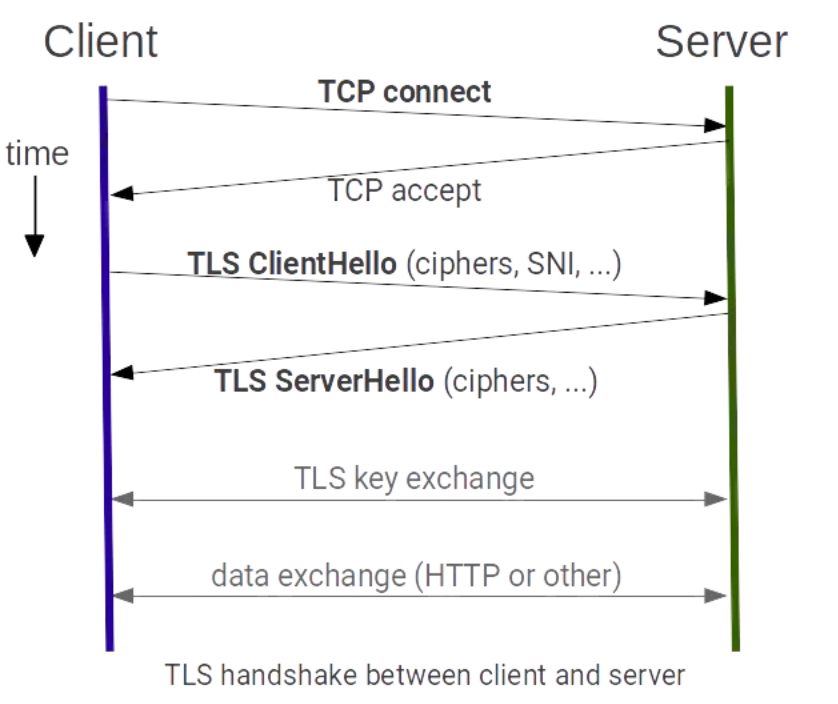
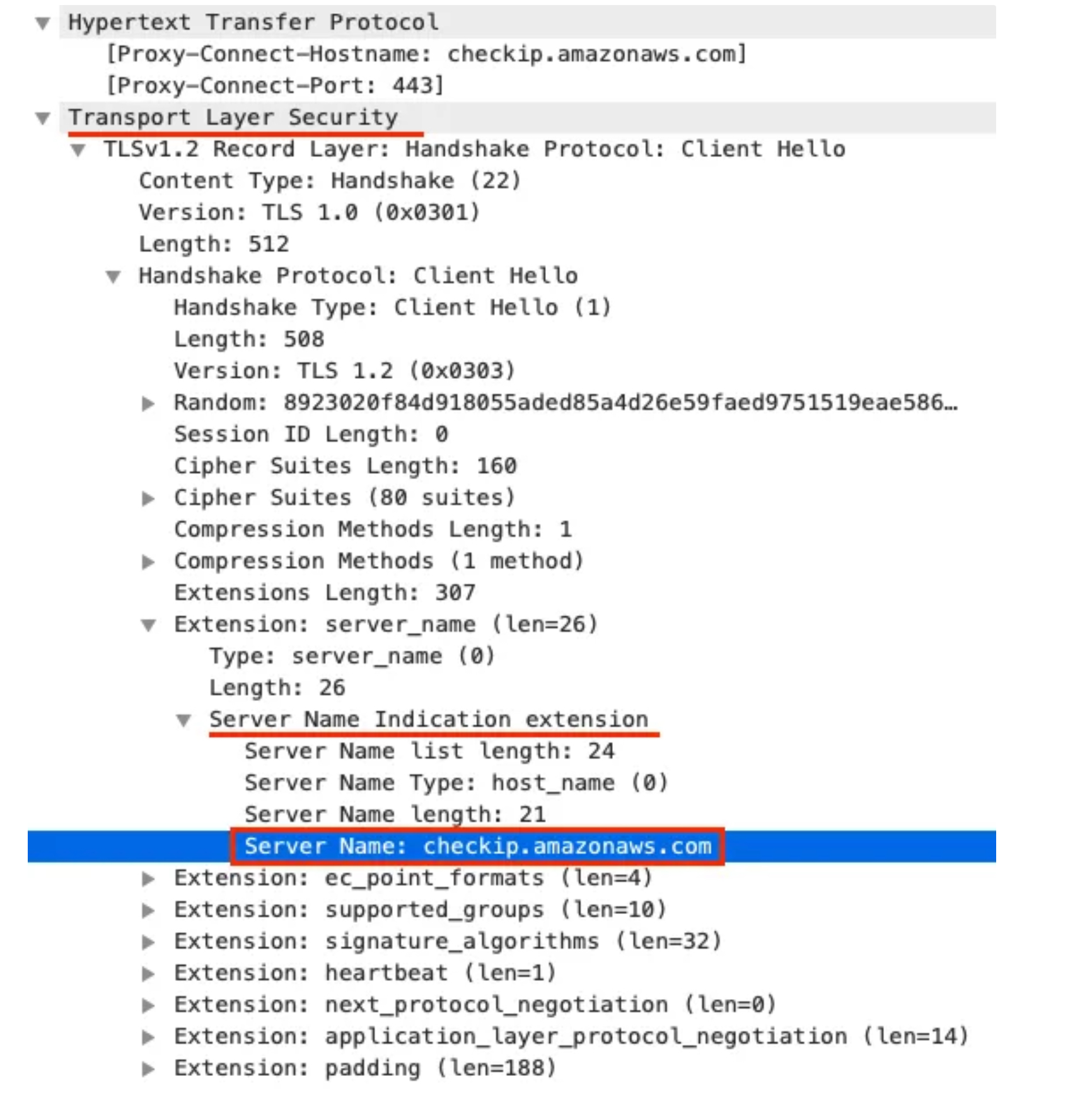
2.6 TCP traffic
2.6.1 들어가며
- 이스티오 게이트웨이는 HTTP/HTTPS 트래픽뿐 아니라 TCP로 접근하는 모든 트래픽을 처리할 수 있다.
- 예를 들어, 인그레스 게이트웨이로 데이터베이스(MongoDB 등)나 메시지 큐(카프카 등)를 노출할 수 있다.
- 이스티오가 트래픽을 단순 TCP로 다루면 재시도, 요청 수준 서킷 브레이킹, 복잡한 라우팅 등과 같은 유용한 기능을 사용할 수 없다.
- 단순히 이스티오가 어떤 프로토콜을 사용하는지 분간할 수 없기 때문이다. (MongoDB 처럼 이스티오-엔보이가 이해하는 프로토콜을 사용하는 것이 아닌 이상).
- 클러스터 외부의 클라이언트가 클러스터 내에서 실행 중인 서비스와 통신할 수 있도록 이스티오 게이트웨이에 TCP 트래픽을 노출하는 방법을 알아보자.
2.6.2 Exposing TCP ports on an Istio gateway
- 가장 먼저 해야 할일은 서비스 메시 내에서 TCP 기반 서비스를 만드는 것이다.
- 이 예제는 깃허브의 에코 서비스를 사용한다. https://github.com/cjimti/go-echo
- 이 TCP 서비스는 Telnet 같은 간단한 TCP 클라이언트로 접속해 명령어를 입력하면 그대로 되돌려준다.
- 배포 실행! - dockerhub
#
cat ch4/echo.yaml
apiVersion: apps/v1
kind: Deployment
metadata:
  name: tcp-echo-deployment
  labels:
    app: tcp-echo
    system: example
spec:
  replicas: 1
  selector:
    matchLabels:
      app: tcp-echo
  template:
    metadata:
      labels:
        app: tcp-echo
        system: example
    spec:
      containers:
        - name: tcp-echo-container
          image: cjimti/go-echo:latest
          imagePullPolicy: IfNotPresent
          env:
            - name: TCP_PORT
              value: "2701"
            - name: NODE_NAME
              valueFrom:
                fieldRef:
                  fieldPath: spec.nodeName
            - name: POD_NAME
              valueFrom:
                fieldRef:
                  fieldPath: metadata.name
            - name: POD_NAMESPACE
              valueFrom:
                fieldRef:
                  fieldPath: metadata.namespace
            - name: POD_IP
              valueFrom:
                fieldRef:
                  fieldPath: status.podIP
            - name: SERVICE_ACCOUNT
              valueFrom:
                fieldRef:
                  fieldPath: spec.serviceAccountName
          ports:
            - name: tcp-echo-port
              containerPort: 2701
---
apiVersion: v1
kind: Service
metadata:
  name: "tcp-echo-service"
  labels:
    app: tcp-echo
    system: example
spec:
  selector:
    app: "tcp-echo"
  ports:
    - protocol: "TCP"
      port: 2701
      targetPort: 2701

kubectl apply -f ch4/echo.yaml -n istioinaction
deployment.apps/tcp-echo-deployment created
service/tcp-echo-service created

#
kubectl get pod -n istioinaction
NAME                                   READY   STATUS    RESTARTS   AGE
tcp-echo-deployment-584f6d6d6b-sv2gz   2/2     Running   0          31s
...- 실습
# tcp 서빙 포트 추가 : 편집기는 vi 대신 nano 선택 <- 편한 툴 사용
KUBE_EDITOR="nano"  kubectl edit svc istio-ingressgateway -n istio-system
...
  - name: tcp
    nodePort: 30006
    port: 31400
    protocol: TCP
    targetPort: 31400
...

# 확인
kubectl get svc istio-ingressgateway -n istio-system -o jsonpath='{.spec.ports[?(@.name=="tcp")]}'
{"name":"tcp","nodePort":30006,"port":31400,"protocol":"TCP","targetPort":31400}


# 게이트웨이 생성
cat ch4/gateway-tcp.yaml
apiVersion: networking.istio.io/v1alpha3
kind: Gateway
metadata:
  name: echo-tcp-gateway
spec:
  selector:
    istio: ingressgateway
  servers:
  - port:
      number: 31400
      name: tcp-echo
      protocol: TCP
    hosts:
    - "*"

kubectl apply -f ch4/gateway-tcp.yaml -n istioinaction
gateway.networking.istio.io/echo-tcp-gateway created

kubectl get gw -n istioinaction
NAME                AGE
coolstore-gateway   3h17m
echo-tcp-gateway    14s

# 에코 서비스로 라우팅하기 위해 VirtualService 리소스 생성
cat ch4/echo-vs.yaml
apiVersion: networking.istio.io/v1alpha3
kind: VirtualService
metadata:
  name: tcp-echo-vs-from-gw
spec:
  hosts:
  - "*"
  gateways:
  - echo-tcp-gateway
  tcp:
  - match:
    - port: 31400
    route:
    - destination:
        host: tcp-echo-service
        port:
          number: 2701

#
kubectl apply -f ch4/echo-vs.yaml -n istioinaction
virtualservice.networking.istio.io/tcp-echo-vs-from-gw created

kubectl get vs -n istioinaction
NAME                  GATEWAYS                HOSTS                          AGE
catalog-vs-from-gw    ["coolstore-gateway"]   ["catalog.istioinaction.io"]   16m
tcp-echo-vs-from-gw   ["echo-tcp-gateway"]    ["*"]                          21s
webapp-vs-from-gw     ["coolstore-gateway"]   ["webapp.istioinaction.io"]    3h6m

# mac 에 telnet 설치
brew install telnet

#
telnet localhost 30006
Trying ::1...
Connected to localhost.
Escape character is '^]'.
Welcome, you are connected to node myk8s-control-plane.
Running on Pod tcp-echo-deployment-584f6d6d6b-sv2gz.
In namespace istioinaction.
With IP address 10.10.0.20.
Service default.
hello istio! # <-- type here
hello istio! # <-- echo here

# telnet 종료하기 : 세션종료 Ctrl + ] > 텔넷 종료 quit
2.6.3 Traffic routing with SNI passthrough
-
이번 절에서는 두 기능의 조합. 즉 이스티오 인그레스 게이트웨이에서 트래픽을 종료하지 않고 SNI 호스트네임에 따라 TCP 트래픽을 라우팅하는 방법을 다룬다.
-
게이트웨이가 하는 일은 SNI 헤더를 살펴보고 트래픽을 특정 백엔드로 라우팅하는 것 뿐이다. TLS 커넥션 종료는 그 후 백엔드에서 처리한다.
-
커넥션은 게이트웨이를 ‘통과 passthrough’ 하고, 처리는 게이트웨이가 아닌 실제 서비스가 담당하게 된다.
-
이런 방식은 서비스 메시에 참여할 수 있는 애플리케이션의 범위를 휠씬 넓혀준다.
-
데이터베이스, 메시지 큐, 캐시 등과 같은 TLS 상의 TCP 서비스는 물론, HTTPS/TLS 트래픽을 직접 처리하고 종료할 것이라고 예상되는 레거시 애플리케이션까지도 포함될 수 있다.
-
Gateway 살펴보자
apiVersion: networking.istio.io/v1alpha3
kind: Gateway
metadata:
  name: sni-passthrough-gateway
spec:
  selector:
    istio: ingressgateway
  servers:
  - port:
      number: 31400 #1 HTTP 포트가 아닌 특정 포트 열기
      name: tcp-sni
      protocol: TLS
    hosts:
    - "simple-sni-1.istioinaction.io" #2 이 호스트를 포트와 연결
    tls:
mode: PASSTHROUGH #3 통과 트래픽으로 처리- 예제 애플리케이션에서 TLS를 종료하도록 설정한다. 즉, 인그레스 게이트웨이는 커넥션에 아무것도 하지 않아도 된다.
- 앞 절에서 했던 것처럼 게이트웨이에 인증서를 설정할 필요가 없다.
- TLS를 종료하는 예제 에플리케이션을 배포하는 것부터 시작하자.
# TLS 인증을 직접 처리하는 앱 배포. (gw는 route 만 처리, pass through )
cat ch4/sni/simple-tls-service-1.yaml
kubectl apply -f ch4/sni/simple-tls-service-1.yaml -n istioinaction
service/simple-tls-service-1 created
deployment.apps/simple-tls-service-1 created
secret/simple-sni-1.istioinaction.io created

kubectl get pod -n istioinaction
NAME                                   READY   STATUS    RESTARTS   AGE
catalog-6cf4b97d-f7gcl                 2/2     Running   0          3h6m
simple-tls-service-1-ffcc5bfd-72xpb    2/2     Running   0          7m10s
tcp-echo-deployment-584f6d6d6b-sv2gz   2/2     Running   0          22m
webapp-7685bcb84-5448j                 2/2     Running   0          3h6m

# 기존 Gateway 명세(echo-tcp-gateway) 제거 : istio-ingressgateway의 동일한 port (31400, TCP)를 사용하므로 제거함
kubectl delete gateway echo-tcp-gateway -n istioinaction

# 신규 Gateway 설정
kubectl apply -f ch4/sni/passthrough-sni-gateway.yaml -n istioinaction
kubectl get gw -n istioinaction
NAME                      AGE
coolstore-gateway         3h28m
sni-passthrough-gateway 7s- VirtualService 리소스 라우팅 규칙 지정하자
apiVersion: networking.istio.io/v1alpha3
kind: VirtualService
metadata:
  name: simple-sni-1-vs
spec:
  hosts:
  - "simple-sni-1.istioinaction.io"
  gateways:
  - sni-passthrough-gateway
  tls:
  - match: #1 특정 포트와 호스트의 비교 부분
    - port: 31400
      sniHosts:
      - simple-sni-1.istioinaction.io
    route:
    - destination: #2 트래픽이 일치하는 경우 라우팅 목적지
        host: simple-tls-service-1
        port:
          number: 80 #3 서비스 포트로 라우팅
#
kubectl apply -f ch4/sni/passthrough-sni-vs-1.yaml -n istioinaction
virtualservice.networking.istio.io/simple-sni-1-vs created
kubectl get vs -n istioinaction
NAME GATEWAYS HOSTS AGE
catalog-vs-from-gw ["coolstore-gateway"] ["catalog.istioinaction.io"] 32m
simple-sni-1-vs ["sni-passthrough-gateway"] ["simple-sni-1.istioinaction.io"] 16s
tcp-echo-vs-from-gw ["echo-tcp-gateway"] ["*"] 16m
webapp-vs-from-gw ["coolstore-gateway"] ["webapp.istioinaction.io"] 3h22m
# 호출테스트1
echo "127.0.0.1 simple-sni-1.istioinaction.io" | sudo tee -a /etc/hosts
127.0.0.1 simple-sni-1.istioinaction.io
curl https://simple-sni-1.istioinaction.io:30006/ \
--cacert ch4/sni/simple-sni-1/2_intermediate/certs/ca-chain.cert.pem
{
"name": "simple-tls-service-1",
"uri": "/",
"type": "HTTP",
"ip_addresses": [
"10.10.0.19"
],
"start_time": "2025-04-19T11:43:29.934150",
"end_time": "2025-04-19T11:43:29.940369",
"duration": "6.216ms",
"body": "Hello from simple-tls-service-1!!!",
"code": 200
}✅ curl 호출은 이스티오 인그레스 게이트웨이로 갔다가, 종료 없이 예제 서비스 simple-tls-service-1 에 도달한다.
- 라우팅을 더 명확하게 하기 위해 인증서가 다르고 SNI 호스트에 기반해 라우팅을 하는 두 번째 서비스를 배포해보자.
# 두 번째 서비스 배포
cat ch4/sni/simple-tls-service-2.yaml
kubectl apply -f ch4/sni/simple-tls-service-2.yaml -n istioinaction
service/simple-tls-service-2 created
deployment.apps/simple-tls-service-2 created
secret/simple-sni-2.istioinaction.io created

# gateway 설정 업데이트
cat ch4/sni/passthrough-sni-gateway-both.yaml
kubectl apply -f ch4/sni/passthrough-sni-gateway-both.yaml -n istioinaction
gateway.networking.istio.io/sni-passthrough-gateway configured

# VirtualService 설정
cat ch4/sni/passthrough-sni-vs-2.yaml
apiVersion: networking.istio.io/v1alpha3
kind: VirtualService
metadata:
  name: simple-sni-2-vs
spec:
  hosts:
  - "simple-sni-2.istioinaction.io"
  gateways:
  - sni-passthrough-gateway
  tls:
  - match:
    - port: 31400
      sniHosts:
      - simple-sni-2.istioinaction.io
    route:
    - destination:
        host: simple-tls-service-2
        port:
          number: 80

kubectl apply -f ch4/sni/passthrough-sni-vs-2.yaml -n istioinaction
virtualservice.networking.istio.io/simple-sni-2-vs created

# 호출테스트2
echo "127.0.0.1       simple-sni-2.istioinaction.io" | sudo tee -a /etc/hosts
127.0.0.1       simple-sni-2.istioinaction.io

curl https://simple-sni-2.istioinaction.io:30006 \
--cacert ch4/sni/simple-sni-2/2_intermediate/certs/ca-chain.cert.pem
{
  "name": "simple-tls-service-2",
  "uri": "/",
  "type": "HTTP",
  "ip_addresses": [
    "10.10.0.20"
  ],
  "start_time": "2025-04-19T11:49:20.288658",
  "end_time": "2025-04-19T11:49:20.296210",
  "duration": "7.545ms",
  "body": "Hello from simple-tls-service-2!!!",
  "code": 200
}
✅ 이 요청을 simple-tls-sni-2 서비스가 서빙했음을 body 필드의 응답이 어떻게 알려주는지 주목하자.
3. 마무리
- 인그레스 게이트웨이는 서비스 메시에 들어오는 트래픽을 세밀하게 제어합니다.
- Ingress gateways provide fine-grained control over what traffic enters our service mesh.
- 게이트웨이 리소스를 사용하면 메시 내로 허용하는 트래픽 종류를 호스트별로 설정할 수 있다.
- Using the Gateway resource, we can configure the type of traffic admitted into the mesh for a specific host.
- 메시 내의 다른 서비스와 마찬가지로, 트래픽을 라우팅하기 위해 VirtualService 리소스를 사용합니다.
- Just as with any service in the mesh, it uses VirtualService resources to route the traffic.
- TLS 모드는 호스트마다 다음 모드 중 하나로 구성할 수 있습니다. TLS mode is configurable per host with one of the following modes:
- Encrypt and prevent man-in-the-middle attacks with the SIMPLE TLS mode.
- Mutually authenticate both server and client with the MUTUAL TLS mode.
- Admit and reverse proxy encrypted traffic using the SNI header with the PASSTHROUGH TLS mode.
- 현재 지원되지 않는 L7 프로토콜의 경우 Istio에서 순수 TCP 트래픽이 지원됩니다. 그러나 재시도, 복잡한 라우팅 등 일반 TCP에서는 많은 기능을 사용할 수 없습니다.
- Plain TCP traffic is supported in Istio for L7 protocols that are currently not supported. However, many features are not possible with plain TCP, such as retries, complex routing, and so on.
- 게이트웨이 주입을 사용하여 팀이 자체 게이트웨이를 관리할 수 있도록 할 수 있습니다.
- We can enable teams to manage their own gateways by using gateway injection.
실습 후 삭제
kind delete cluster --name myk8s/etc/hosts파일에 추가했던 도메인 제거