namespace project_s
{
    internal class Program
    {
        struct Position
        {
            public int x;
            public int y;
        }

        static void Main(string[] args)
        {
            bool gameOver = false;
            Position playerPos;		// player 위치
            char[,] map;			// 맵 2차원 배열로

            // 게임 준비
            Start(out playerPos, out map);

            while (gameOver == false)
            {	// 0. 콘솔만 Render->Input->Update. // 실시간 게임은 Input->Update->Render
            	// 1. Render : 그리기
                Render(playerPos, map);
                // 2. Input : 입력
                ConsoleKey key = Input();
                // 3. Update : 처리
                Update(key, ref playerPos, map, ref gameOver);
            }
            // 게임 종료
            End();
        }

        static void Start(out Position playerPos, out char[,] map)
        {
            // 게임 설정
            Console.CursorVisible = false;	// false 일 경우 커서 깜박임 안보임

            // 플레이어 초기 위치 설정
            playerPos.x = 4;
            playerPos.y = 4;

            // 맵 설정
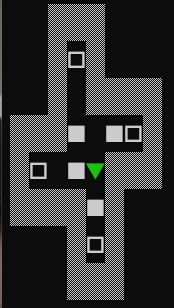
            map = new char[8, 8]
            {
                { ' ', ' ', '▒', '▒', '▒', ' ', ' ', ' ' },
                { ' ', ' ', '▒', '□', '▒', ' ', ' ', ' ' },
                { ' ', ' ', '▒', ' ', '▒', '▒', '▒', '▒' },
                { '▒', '▒', '▒', '■', ' ', '■', '□', '▒' },
                { '▒', '□', ' ', '■', ' ', '▒', '▒', '▒' },
                { '▒', '▒', '▒', '▒', '■', '▒', ' ', ' ' },
                { ' ', ' ', ' ', '▒', '□', '▒', ' ', ' ' },
                { ' ', ' ', ' ', '▒', '▒', '▒', ' ', ' ' },
            };
        }

        static void Render(Position playerPos, char[,] map)		// 출력 작업
        {
        	// 콘솔 지우기(백버퍼) -> 게임은 연속해서 그려주는 과정, 전 화면을 지워주는 것
			//Console.Clear();          // 맵을 지워서 다시그리기 -> 깜박거림

            // 맵을 덮어서 그리기 -> 깜박거리지 않으나 택스트등을 남기면 남아있을 수 있다.
            Console.SetCursorPosition(0, 0);

            // 맵을 먼저 그린 후 플레이어를 그릴것!! 맵에 플레이어를 덮어버릴 수 있음
            PrintMap(map);				// 맵 출력
            PrintPlayer(playerPos);		// 플레이어 출력 이동
        }

        static void PrintMap(char[,] map)
        {
        	// 맵 출력     y -> x 순서 바꾸지 말것!
            for (int y = 0; y < map.GetLength(0); y++)
            {					 // GetLength -> 0일경우 map[a,b] 의 a 값을 가져올 수 있음
                for (int x = 0; x < map.GetLength(1); x++)
                {					 // GetLength -> 1일경우 map[a,b] 의 b 값을 가져올 수 있음
                    Console.Write(map[y, x]);
                }
                Console.WriteLine();	// 행 마다 줄바꿈 -> 맵의 새로 완성을 위함
            }
        }

        static void PrintPlayer(Position playerPos)
        {
        	// 플레이어 위치로 커서 옮기기
            Console.SetCursorPosition(playerPos.x, playerPos.y);
            // 플레이어 출력
            Console.ForegroundColor = ConsoleColor.Green;	// 글자 색상 변경
            Console.Write('▼');
            Console.ResetColor();	// 꼭 리셋 해야 계속 색깔이 변하지 않음
        }

        static ConsoleKey Input()	// 입력 작업
        {
        	// 키를 눌렀을때 움직이게 하기 위해
            return Console.ReadKey(true).Key;	// true를 쓰지 않으면 내가 입력한 키 출력됨.
        }

        static void Update(ConsoleKey key, ref Position playerPos, char[,] map, ref bool gameOver)	// 처리 작업
        {
            Move(key, ref playerPos, map);	// 이동

            bool isClear = IsClear(map);	// 종료 조건
            if (isClear)
            {
                gameOver = true;
            }
        }

        static void Move(ConsoleKey key, ref Position playerPos, char[,] map)
        {
            // 지금 상황 : 4방향에 대해서 모두 다 만들어둔 경우
            // 개선 사항 : 방향만 다를 뿐이지, 밀리고 못밀리고에 대한 내용은 공통적인 것을 볼 수 있다.
            // 플레이어 위치, 움직일 위치, 그 뒤 위치
            Position targetPos;
            Position overPos;
            switch (key)
            {
                case ConsoleKey.A:
                case ConsoleKey.LeftArrow:
                    targetPos.x = playerPos.x - 1;
                    targetPos.y = playerPos.y;
                    overPos.x = playerPos.x - 2;
                    overPos.y = playerPos.y;
                    break;
                case ConsoleKey.D:
                case ConsoleKey.RightArrow:
                    targetPos.x = playerPos.x + 1;
                    targetPos.y = playerPos.y;
                    overPos.x = playerPos.x + 2;
                    overPos.y = playerPos.y;
                    break;
                case ConsoleKey.W:
                case ConsoleKey.UpArrow:
                    targetPos.x = playerPos.x;
                    targetPos.y = playerPos.y - 1;
                    overPos.x = playerPos.x;
                    overPos.y = playerPos.y - 2;
                    break;
                case ConsoleKey.S:
                case ConsoleKey.DownArrow:
                    targetPos.x = playerPos.x;
                    targetPos.y = playerPos.y + 1;
                    overPos.x = playerPos.x;
                    overPos.y = playerPos.y + 2;
                    break;
                default:
                    return;
            }
            // 움직이는 방향에 박스가 있을 때
            if (map[targetPos.y, targetPos.x] == '■')
            {
                // 그 다음 위치에 골이 있을 때
                if (map[overPos.y, overPos.x] == '□')
                {
                    // 1. 골 위치에 골박스로
                    map[overPos.y, overPos.x] = '▣';
                    // 2. 박스 위치를 빈칸으로
                    map[targetPos.y, targetPos.x] = ' ';
                    // 3. 플레이어를 움직이려는 위치로
                    playerPos.x = targetPos.x;
                    playerPos.y = targetPos.y;
                }
                // 그 다음 위치에 빈칸이 있을 때
                else if (map[overPos.y, overPos.x] == ' ')
                {
                    // 1. 빈칸 위치에 박스로
                    map[overPos.y, overPos.x] = '■';
                    // 2. 박스 위치를 빈칸으로
                    map[targetPos.y, targetPos.x] = ' ';
                    // 3. 플레이어를 움직이려는 위치로
                    playerPos.x = targetPos.x;
                    playerPos.y = targetPos.y;
                }
            }
            // 움직이는 방향에 골이 있을 때
            else if (map[targetPos.y, targetPos.x] == '□')
            {
                playerPos.x = targetPos.x;
                playerPos.y = targetPos.y;
            }
            // 움직이는 방향에 골박스가 있을 때
            else if (map[targetPos.y, targetPos.x] == '▣')
            {
                // 그 다음 위치에 골이 있을 때
                if (map[overPos.y, overPos.x] == '□')
                {
                    // 1. 골 위치에 골박스로
                    map[overPos.y, overPos.x] = '▣';
                    // 2. 박스 위치를 빈칸으로
                    map[targetPos.y, targetPos.x] = '□';
                    // 3. 플레이어를 움직이려는 위치로
                    playerPos.x = targetPos.x;
                    playerPos.y = targetPos.y;
                }
                // 그 다음 위치에 빈칸이 있을 때
                else if (map[overPos.y, overPos.x] == ' ')
                {
                    // 1. 빈칸 위치에 박스로
                    map[overPos.y, overPos.x] = '■';
                    // 2. 박스 위치를 빈칸으로
                    map[targetPos.y, targetPos.x] = '□';
                    // 3. 플레이어를 움직이려는 위치로
                    playerPos.x = targetPos.x;
                    playerPos.y = targetPos.y;
                }
            }
            // 움직이는 방향에 빈칸일 때
            else if (map[targetPos.y, targetPos.x] == ' ')
            {
                playerPos.x = targetPos.x;
                playerPos.y = targetPos.y;
            }
            // 움직이는 방향에 벽일 때
            else if (map[targetPos.y, targetPos.x] == '▒')
            {
                // 아무것도 안함
            }
        }

        static bool IsClear(char[,] map)
        {
            int goalCount = 0;
            // 클리어 조건 : 빈칸이 없을 때
            foreach (char tile in map)
            {
                if (tile == '□')
                {
                    goalCount++;
                    break;
                }
            }
            if (goalCount == 0)
            {
                return true;
            }
            else
            {
                return false;
            }
        }

        static void End()	// 종료 작업
        {
            Console.Clear();
            Console.WriteLine("축하합니다!!! \n소코반 게임을 성공적으로 클리어했습니다");
        }

    }
}
초보 개발자