Android Program
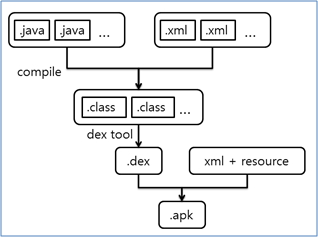
Program → APK
APK : Android application package
안드로이드 앱의 확장자
- Android OS 기기에 앱(애플리케이션)을 설치하는 데 사용
- 공식 IDE Google Android Studio를 사용하여 실행 파일로 생성되며 Google Play 스토어에 업로드되어 최종 사용자가 다운로드하여 설치할 수 있습니다.
- zip 형식으로 압축되어 있음
Reference, APK 파일이란?
Reference, APK란? 그 구조는?
APK 패키지 콘텐츠 (Structure)
💡apk 파일은 zip방식으로 압축 되어있기 때문에
확장자를 zip으로 변환하고 압축해제하면 내용물을 확인할 수 있다.
-
AndroidManifest.xml
설치된 앱의 정보가 저장된 파일. (패키지명, 버전과 같은 정보)
• Encoded XML file :*.xml파일은 바이너리로 되어있기 때문에 그냥 실행하면 내용을 알아보기가 어렵다. 전용 툴로 디컴파일해야 볼 수 있다.[저장된 정보]
• Description
• Package name
• Permissions
• SDK version
• Intent• Unique identifier
• Components definition : Activities, Services, Broadcast Receivers, Content Providers with Intent message
• Permission application need
• Minimum level of the Android API• AndroidManifest.xml : → (Unique)
• package : Unique identifier on the system -
classes.dex
•
.dex(Dalvik Executable) is a compiled android application code file
• Compiler(Java) = .dex
• Have to understand the DEX structure
• Multi-Dex
올릴 코드의 양을 쪼개서 여러개로 만드는 것
classes[N].dex on Android 5.0+(API Level 21+)
If # of method > 64K,
-
resources.arsc
리소스의 배열이라는 뜻이며, res의 정보가 기록되어있음
• Compiled resources file
• aapt dump --values resources HelloActivity.apk -
META-INF/CERT.RSA, CERT.SF, MANIFEST.MF
META-INF : 인증 서명과 관련한 정보가 담겨 있는 디렉토리
Android self-signing process
MANIFEST.MF : META-INF 디렉토리 내부의 파일을 제외한 APK 패키지 내부 모든 파일(Entry)에 대한 리스트를 보여주는 텍스트 파일
CERT.RSA : 공개키 인증서 (소유자, 발행자, 일련번호, 유효기간, 인증서 지문, 알고리즘 등이 표시)• Based on the RSA
• Signature ßà Verification
Android Program Information
ADB (Android Debug Bridge)
서버 클라이언트 모델
ADB Command
• devices
• shell
• install/uninstall
• logcat : 분석할 때 꽤 유용하게 사용 가능
• bugreport : dumpsys, dumpstate, logcat
• jdwp
• push/pull
• forward
• am (activity manager) : 화면 관리
• pm
• get-serialno, get-state, wait-for-device
devices
start-server, kill-server
adb devices
install/uninstall [package name]
adb uninstall com.v00n.smsdetector
shell [command]
adb shell pm list package
jdwp
pm list/path
am profile [PID] start/stop [PATH]
Check the method call like DDMS
With ”Android Device Monitor”… Make trace file with am command
And traceview…
am start –a [INTENT] -n [COMPONENT]
adb shell am start -a android.intent.action.MAIN -n [PACKAGE/ACTIVITY]