❖ 웹 사이트에 포함된 정보 추출하기
◇ 웹 스크래핑
Web Scraping
- 웹사이트의 HTML 코드를 확인하고 원하는 정보를 얻는 것
- API가 없거나 API로 원하는 작업을 하기 힘든 웹사이트에서 필요한 작업
- 웹 스크래핑 관련 법적 문제
- 합법의 영역
- 제작자 개인을 위한 서비스
- 대중에 공개되어 있고 저작권이 없는 데이터를 스크랩
- 조건에 만족하더라도 CAPTCHA 또는 reCAPTCHA를 사용한다면 스크랩 불가능
(봇을 통해 데이터를 스크랩하는 것을 방지하는 서비스)
- 조건에 만족하더라도 CAPTCHA 또는 reCAPTCHA를 사용한다면 스크랩 불가능
- 불법이 될 수 있는 부분
- 저작권이 있는 데이터를 상업화(다른 사람의 데이터가 관련된 비즈니스)
- 인증(로그인)을 거쳐야 하는 데이터를 스크랩
- 합법의 영역
- 윤리적 측면에서의 웹 스크래핑
- 해당 웹사이트에서 제공하는 공공 API가 있을 경우 그 API를 이용하기
- 웹사이트의 소유자를 존중하기
- URL 뒤에
/robot.txt을 붙이면 소유자가 제출한 txt 파일 확인 가능 - 봇이 접근해도 되는 경로(Allow)와 접근하면 안 되는 경로(Disallow) 체크하기
- URL 뒤에
- for문으로 스크래핑을 짧은 시간동안 반복할 경우 트래픽과 서버 부하를 증가시킬 수 있음
robot.txt에crawl-delay가 설정된 경우 준수하기- 반복 간격을 제한해서 서버를 과부하시키지 않도록 하기
(1분에 1회 이상 스크랩하지 않는 것 추천)
◇ bs4 모듈
- "beatiful soup 버전 4"의 약자
- 개발자가 웹사이트를 이해할 수 있도록 돕는 파이썬 모듈
(웹사이트는 스파게티 수프처럼 복잡하므로 원하는 요소를 가져오려면 HTML parser가 필요) - HTML과 XML 파일에서 데이터를 가져옴
❖ HTML 파싱 및 soup 만들기
soup = BeautifulSoup(contents, "언어.parser")
- contents : markup, 즉 파일 전체를 입력
- "언어.parser" : bs4 모듈이 contents가 무슨 언어인지 파악하도록 도와주는 파서
(특정 웹사이트에서 lxml 파서가 필요한 경우lxml패키지도 임포트 해야 함)
🏗️ website.html
<!DOCTYPE html>
<html>
<head>
	<meta charset="utf-8">
	<title>Angela's Personal Site</title>
</head>

<body>
	…
</body>
</html>
⌨️ main.py
######################## 기본 설정 ###########################
from bs4 import BeautifulSoup

# html 파일 오픈
with open("website.html") as file:
    contents = file.read()

# 수프 만들기
soup = BeautifulSoup(contents, "html.parser")

###########################################################

# HTML 코드인 객체를 파이썬 객체로 가져올 수 있음
print(soup)                 # HTML 파일 전체 가져오기
print(soup.prettify())      # HTML 파일을 들여쓰기해서 가져오기

print(soup.title)           # 태그 가져오기
print(soup.title.name)      # 태그의 이름 가져오기
print(soup.title.string)    # 태그의 문자열 가져오기

print(soup.a)               # 첫 번째 앵커 태그 가져오기
print(soup.p)               # 첫 번째 단락 가져오기
[ 출력 결과 ]
# HTML 파일 전체 가져오기
<!DOCTYPE html>
<html>
<head>
…
</html>
# HTML 파일을 들여쓰기해서 가져오기
<!DOCTYPE html>
<html>
<head>
…
</html>
# 태그 가져오기
<title>Angela's Personal Site</title>
# 태그의 이름 가져오기
title
# 태그의 문자열 가져오기
Angela's Personal Site
# 첫 번째 앵커 태그 가져오기
<a href="url주소">The App Brewery</a>
# 첫 번째 단락 가져오기
<p><em>Founder of <strong><a href="url주소">The App Brewery</a></strong>.</em></p>❖ bs4로 특정 요소 찾고 선택하기
◇ find()
name(태그 이름), attrs(속성 이름) 등과 일치하는
- soup.find( name, attrs, ... ) : 첫 번째 항목만 가져오는 함수
- soup.find_all( name, attrs... ) : 모든 항목을 리스트로 가져오는 함수
- 조건은 name 또는 attrs 하나만 지정하거나 복수 지정 가능
- find는
soup.find("span").find("a")처럼 반복 호출 가능
tag.getText() : 가져온 태그 내에서 텍스트만 추출(리스트에는 사용 불가)
tag.get( name, attrs, ... ) : 가져온 태그 내에서 괄호 안의 조건과 같은 항목만 추출
# 모든 앵커 태그
all_anchor_tags = soup.find_all(name="a")
print(all_anchor_tags)

# 앵커 태그의 텍스트만 가져오기
for tag in all_anchor_tags:
    print(tag.getText())

# 앵커 태그의 url만 가져오기
for tag in all_anchor_tags:
    print(tag.get("href"))


# 조건에 맞는 첫 번째 항목만 가져오기
# (class는 파이썬 예약어이기 때문에 뒤에 _를 붙여서 구분)
print(soup.find(name="h3", class_="heading"))
[ 출력 결과 ]
[<a href="https://www.appbrewery.co/">The App Brewery</a>, ……, ……]
The App Brewery
My Hobbies
Contact Me
https://www.appbrewery.co/
https://angelabauer.github.io/cv/hobbies.html
https://angelabauer.github.io/cv/contact-me.html
<h3 class="heading">Books and Teaching</h3>◇ select()
CSS 선택기를 사용하여 원하는 요소의 범위를 좁혀가며 찾는 방법
- soup.select_one( selector, ... ) : selector와 처음으로 일치하는 항목을 가져오는 함수
- soup.select( selector, ... ) : selector와 일치하는 모든 항목을 가져오는 함수
- selector로 지정한 문자열이 CSS 선택기가 됨
- 중첩된 요소를 찾아갈 경우 : 바깥쪽부터 안쪽 순으로
요소 요소…로 입력 (요소 사이에 공백) - id를 기준으로 요소 선택 시 : #id이름 으로 입력
- class를 기준으로 요소 선택 시 : .class이름 으로 입력
(class=값1 값2처럼 여러 값이 있을 경우.값1.값2로 공백 없이 붙이기)
- 중첩된 요소를 찾아갈 경우 : 바깥쪽부터 안쪽 순으로
company_url = soup.select_one(selector="p a")
print(company_url)

name = soup.select_one(selector="#name")
print(name)

headings = soup.select(".heading")
print(headings)
[ 출력 결과 ]
<a href="https://www.appbrewery.co/">The App Brewery</a>
<h1 id="name">Angela Yu</h1>
[<h3 class="heading">Books and Teaching</h3>, <h3 class="heading">Other Pages</h3>]❖ 라이브 웹사이트 스크래핑하기
requests 모듈로 웹사이트의 실시간 데이터 스크래핑하기
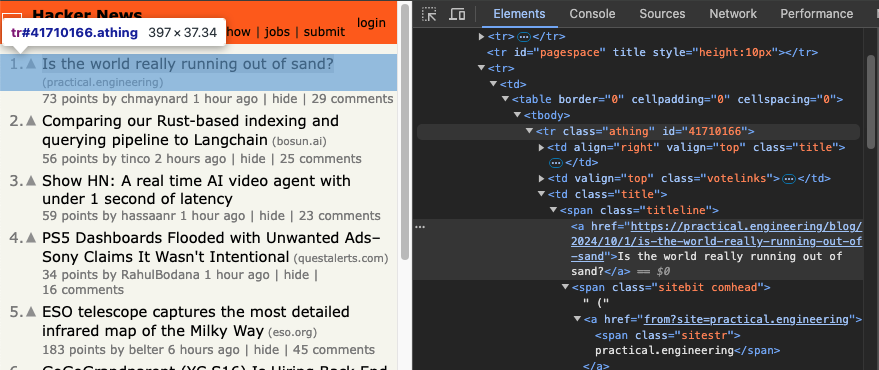
먼저 Hacker News에서 각 항목의 제목과 링크 가져오기
↓
크롬 브라우저에서 스크래핑하려는 부분의 HTML 코드 확인
↓
먼저 첫 번째 항목만 추출하여 원하는 데이터가 출력되는지 확인
from bs4 import BeautifulSoup
import requests

response = requests.get("https://news.ycombinator.com/news")
yc_web_page = response.text

soup = BeautifulSoup(yc_web_page, "html.parser")


article_tag = soup.find(name="span", class_="titleline").find(name="a")
article_text = article_tag.getText()
article_link = article_tag.get("href")
article_upvotes = soup.find(name="span", class_="score").getText()
Ryujinx (Nintendo Switch emulator) has been removed from GitHub
https://github.com/Ryujinx/Ryujinx
46 points
↓
확인 후 모든 항목을 추출하는 것으로 변경
from bs4 import BeautifulSoup
import requests

response = requests.get("https://news.ycombinator.com/news")
yc_web_page = response.text

soup = BeautifulSoup(yc_web_page, "html.parser")

articles = soup.find_all(name="span", class_="titleline")
article_texts = []
article_links = []

for article in articles:
    article_tag = article.find(name="a")
    text = article_tag.getText()
    article_texts.append(text)
    link = article_tag.get("href")
    if "https://" not in link:
        link = "https://news.ycombinator.com/" + link
    article_links.append(link)

article_upvotes = [int(score.getText().split()[0]) for score in soup.find_all(name="span", class_="score")]

print(article_texts)
print(article_links)
print(article_upvotes)
['Ryujinx (Nintendo Switch emulator) has been removed from GitHub', ...]
['https://github.com/Ryujinx/Ryujinx', ...]
[89, 181, 48, 16, 30, 12, 195, 3, 104, 69, 118, 436, 203, 2271, 51, ...]
↓ 추천수가 가장 많은 기사 찾기
…

largest_number = max(article_upvotes)
largest_index = article_upvotes.index(largest_number)

print(article_texts[largest_index])
print(article_links[largest_index])
Bop Spotter
https://walzr.com/bop-spotter
🗂️ Day45 프로젝트: 꼭 봐야할 영화 100선
웹사이트에서 꼭 봐야할 영화 100선 목록을 스크랩하기
🔍 유의 사항
- Empire's 100 Greatest Movie Of All Times에서 100개의 영화를 스크랩하기
📄movies.txt생성 후 영화 목록 작성- 웹사이트에서는 목록이 100부터 시작하지만 파일에서는 1부터 시작하도록 변경하기
⌨️ main.py
import requests
from bs4 import BeautifulSoup

URL = "https://web.archive.org/web/20200518073855/https://www.empireonline.com/movies/features/best-movies-2/"

response = requests.get(URL)
website_html = response.text
soup = BeautifulSoup(website_html, "html.parser")

all_movies = [movie.getText() for movie in soup.find_all(name="h3", class_="title")]
movies = all_movies[::-1]

with open("movies.txt", "w") as file:
    for movie in movies:
        file.write(f"{movie}\n")
📄movies.txt
1) The Godfather
2) The Empire Strikes Back
3) The Dark Knight
…
100) Stand By Me