맛집 프로젝트용 ...
맛집 프로젝트용으로 OCR API를 선택하기 위한 두번째 과정. 네이버 Clova API를 이용해서 OCR을 진행해 보았다!
미리 이야기하자면, 느리다! ㅋㅋㅋㅋㅋ 하지만 Google Cloud 보다 진짜진짜 사용하기 편했고, 설명도 잘 나와있어서 어렵지 않았다.
구현
설정
Clova에 들어가서 API 사용하기 신청을 했나 ...?? 아무튼! 하고 도메인을 생성하면 끝 !!!!
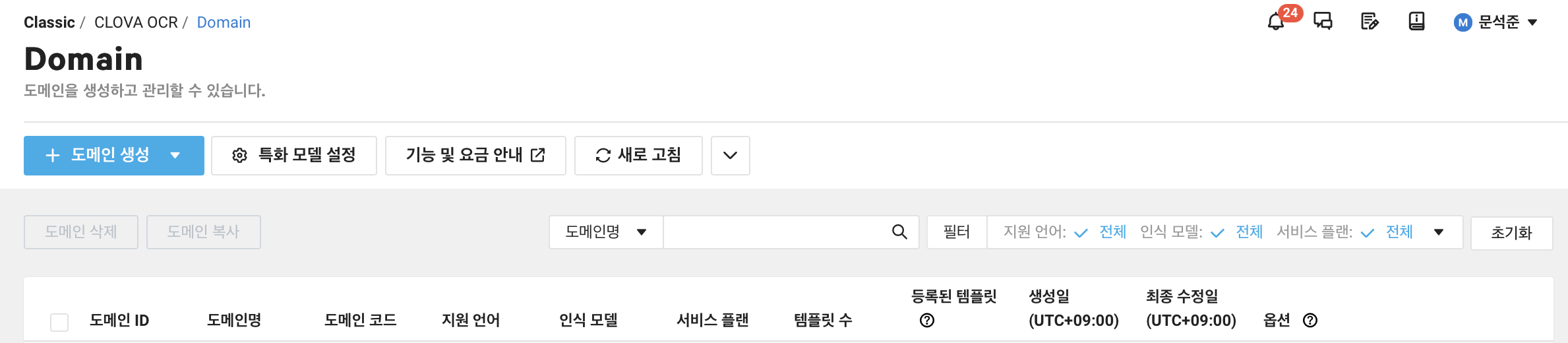
저기서 도메인 생성을 누르면 아마 바로 생성된 것 같았다. 그리고 옵션을 수정해야 하는데,
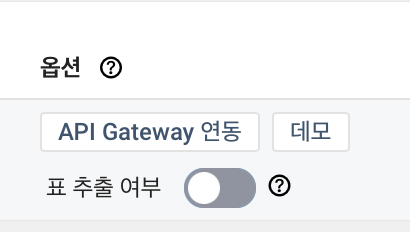
여기에서 API Gateway 연동 을 누르면
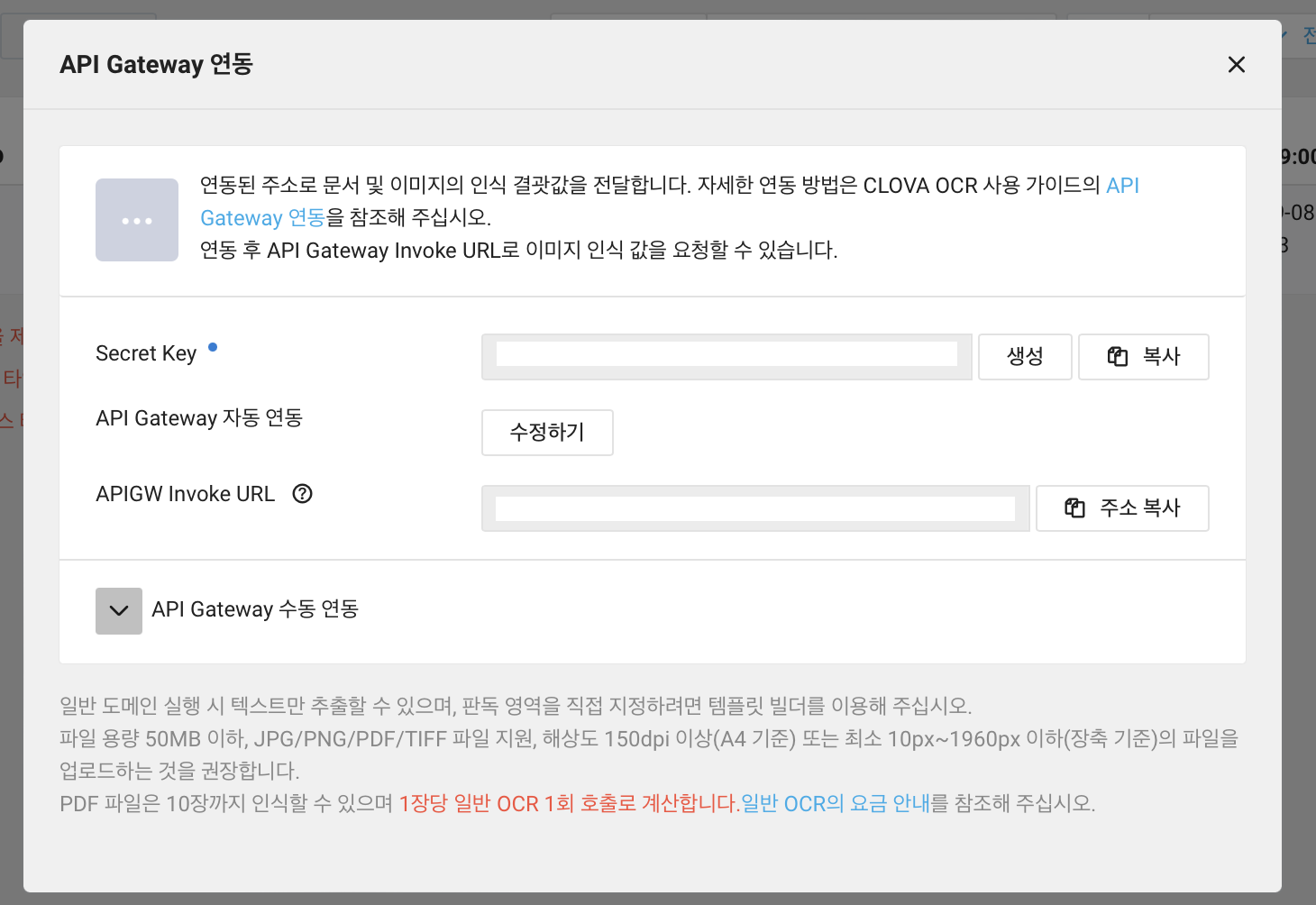
이런 화면이 나타난다. 여기서 Secret Key를 만들고, API Gateway를 연동시킨다. (API Gateway를 사용신청 안하면 자꾸 사용신청 하라고 뜬다! 좌측 메뉴에서 Sevices 에 있었던거로 기억한다! 거기서 신청하기 누르면 바로 사용 가능해서 간편함
이러면 준비 끝 !!! 저기서 시크릿 키와 URL만 있으면 끝이다.
Service 로직
API를 호출하기 위한 로직! 요청 정보는
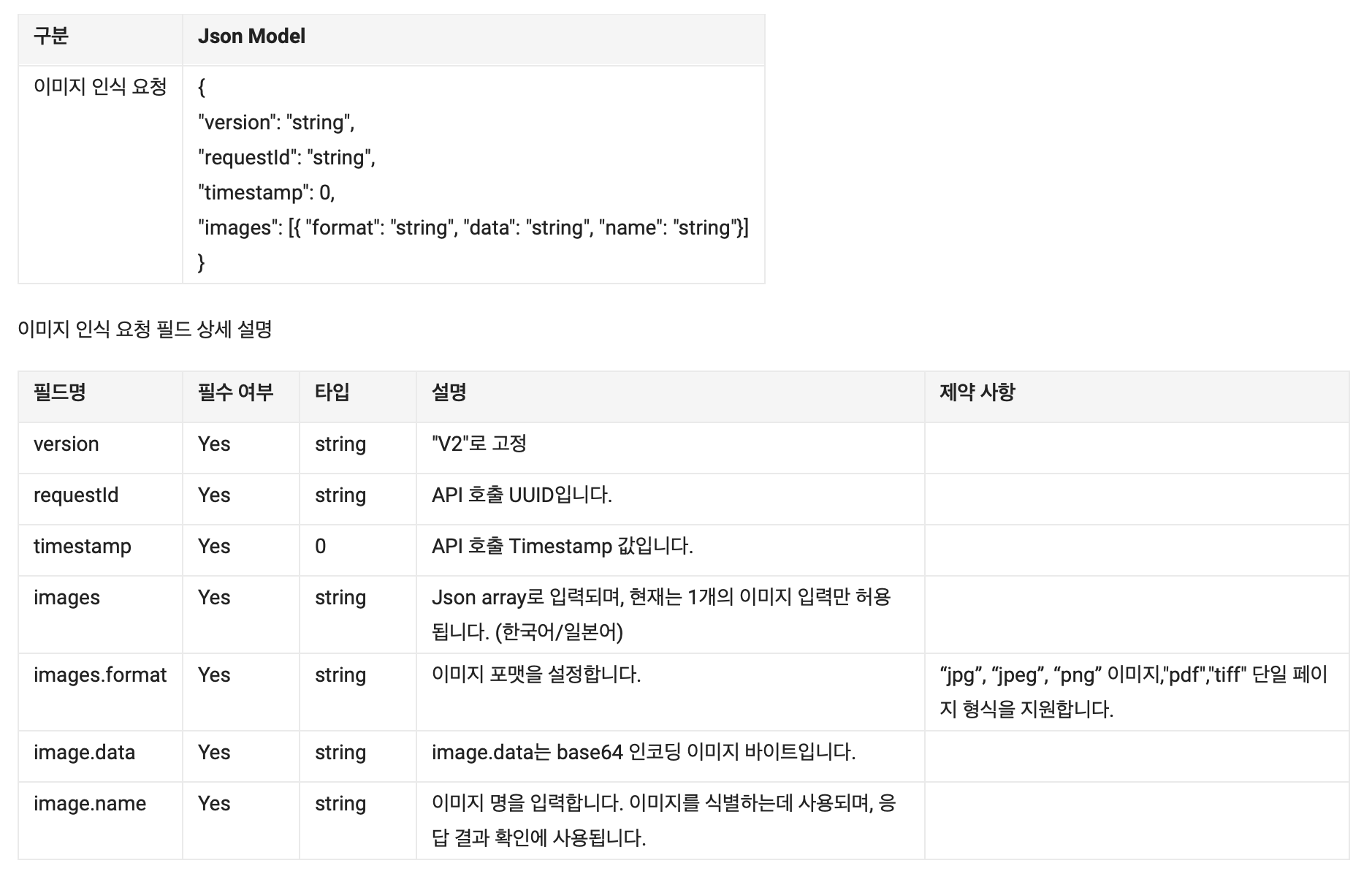
여기에 맞추어 작성하면 된다. 응답 형식은
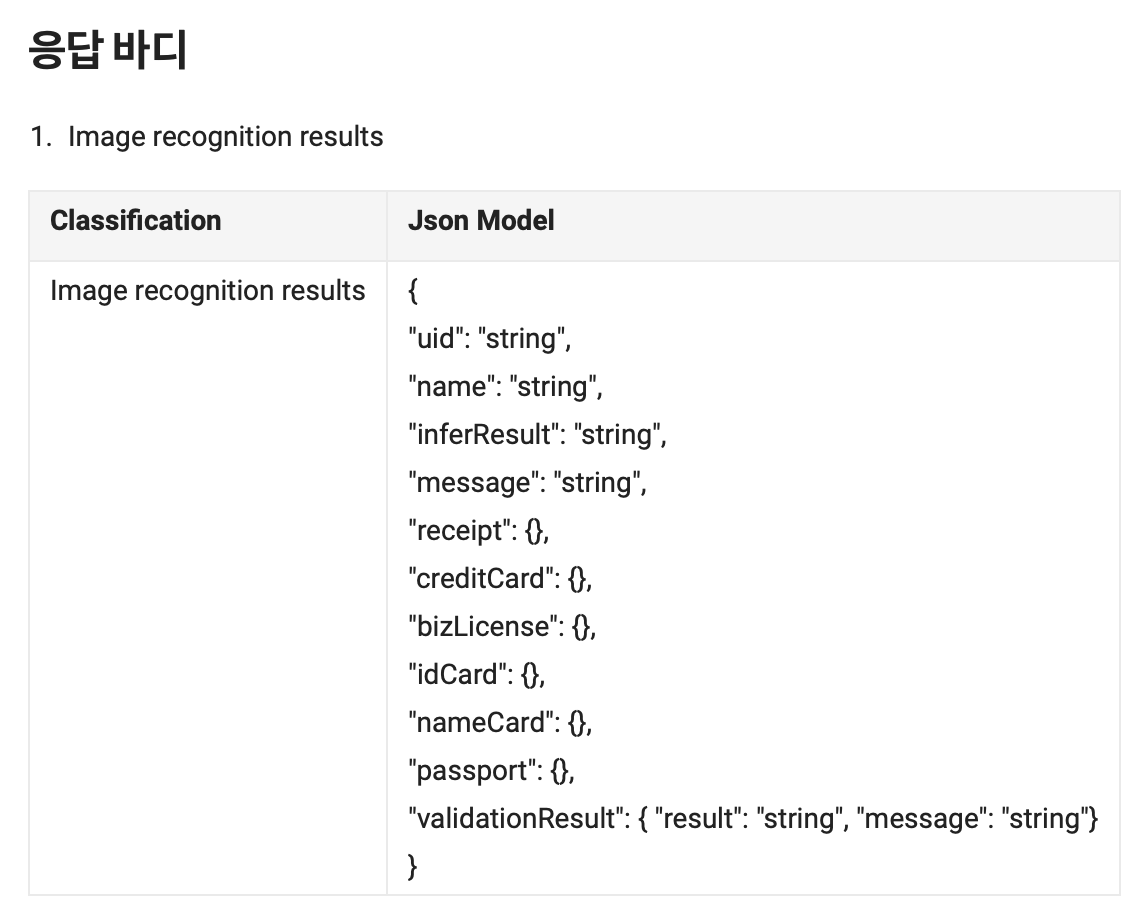
이건데 자세한 정보는
https://api.ncloud-docs.com/docs/ai-application-service-ocr-ocrdocumentocr#document-ocr-요청-예시
여기에서 확인! 아무튼 로직은
@Service
public class ClovaOCR {
    public static String SECRET = 시크릿키;

    public static String API_URL = api주소;

    public static String execute(ImageParsingRequest request) {
        try {
            StopWatch totalTime = new StopWatch();
            totalTime.start();

            // ----------- 요청 전송 ---------------------
            StopWatch requestStopWatch = new StopWatch();
            requestStopWatch.start();

            URL url = new URL(API_URL);
            HttpURLConnection connection = createRequestHeader(url);
            createRequestBody(connection, request);

            requestStopWatch.stop();
            System.out.println("request 생성 시간 : " + requestStopWatch.getTotalTimeMillis() + "ms");

            // ----------- 응답 수신 ---------------------
            StopWatch responseStopWatch = new StopWatch();
            responseStopWatch.start();

            StringBuilder response = getResponseData(connection);

            responseStopWatch.stop();
            System.out.println("응답 수신 시간 : " + responseStopWatch.getTotalTimeMillis() + "ms");

            // ----------- 데이터 파싱 ---------------------
            StopWatch parsingStopWatch = new StopWatch();
            parsingStopWatch.start();

            StringBuilder result = parseResponseData(response);

            parsingStopWatch.stop();
            System.out.println("data parsing 시간 : " + parsingStopWatch.getTotalTimeMillis() + "ms");

            totalTime.stop();
            System.out.println("Total Time = " + totalTime.getTotalTimeMillis() + "ms");
            return result.toString();
        }
        catch (Exception exception) {
            exception.printStackTrace();
        }

        return null;
    }

    private static HttpURLConnection createRequestHeader(URL url) throws IOException {
        HttpURLConnection connection = (HttpURLConnection) url.openConnection();
        connection.setUseCaches(false);
        connection.setDoInput(true);
        connection.setDoOutput(true);
        connection.setReadTimeout(5000);
        connection.setRequestMethod("POST");
        connection.setRequestProperty("Content-Type", "application/json;");
        connection.setRequestProperty("X-OCR-SECRET", SECRET);
        return connection;
    }

    private static void createRequestBody(HttpURLConnection connection, ImageParsingRequest request) throws IOException {
        JSONObject image = new JSONObject();
        image.put("format", "PNG");
        image.put("name", "requestImage");
        image.put("url", request.url());

        JSONArray images = new JSONArray();
        images.put(image);

        JSONObject requestObject = new JSONObject();
        requestObject.put("version", "V2");
        requestObject.put("requestId", UUID.randomUUID().toString());
        requestObject.put("timestamp", System.currentTimeMillis());
        requestObject.put("lang", "ko");
        requestObject.put("resultType", "string");
        requestObject.put("images", images);

        connection.connect();
        DataOutputStream outputStream = new DataOutputStream(connection.getOutputStream());
        outputStream.write(requestObject.toString().getBytes(StandardCharsets.UTF_8));
        outputStream.flush();
        outputStream.close();
    }

    private static BufferedReader checkResponse(HttpURLConnection connection) throws IOException {
        int responseCode = connection.getResponseCode();
        BufferedReader reader;

        if (responseCode == 200) {
            reader = new BufferedReader(new InputStreamReader(connection.getInputStream()));
        }
        else {
            reader = new BufferedReader(new InputStreamReader(connection.getErrorStream()));
        }
        return reader;
    }

    private static StringBuilder getResponseData(HttpURLConnection connection) throws IOException {
        BufferedReader reader = checkResponse(connection);
        String line;
        StringBuilder response = new StringBuilder();
        while ((line = reader.readLine()) != null) {
            response.append(line);
        }
        reader.close();
        return response;
    }

    private static StringBuilder parseResponseData(StringBuilder response) throws ParseException {
        JSONParser responseParser = new JSONParser(response.toString());
        LinkedHashMap<String, String> hashMap = (LinkedHashMap<String, String>) responseParser.parse();
        JSONObject parsed = new JSONObject(hashMap);
        JSONArray parsedImages = (JSONArray) parsed.get("images");
        StringBuilder result = new StringBuilder();

        if (parsedImages != null) {
            JSONObject parsedImage = (JSONObject) parsedImages.get(0);
            JSONArray parsedTexts = (JSONArray) parsedImage.get("fields");

            for (int i = 0; i < parsedTexts.length(); i++) {
                JSONObject current = (JSONObject) parsedTexts.get(i);
                result.append((String) current.get("inferText")).append(" ");
            }
        }
        return result;
    }
}
끝!!! 성능은 과연 얼마나 나올까 !?!?
성능 테스트
1번
이 이미지로 테스트를 진행해본 결과
-
1차
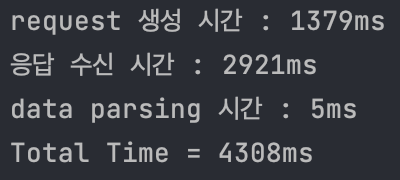
-
2차
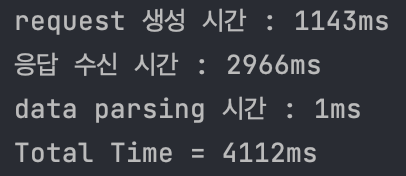
-
3차
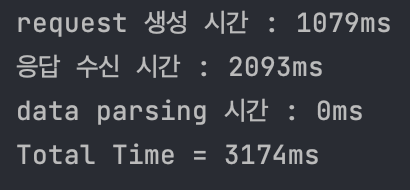
-
4차
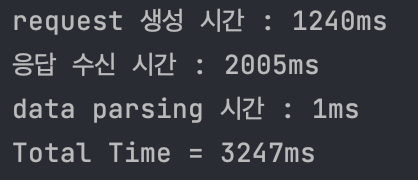
-
5차
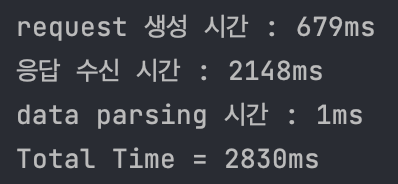
점점 줄어든다 ...!!!
마무리
네이버 Clova API는 사용하기 쉬운 API였다! 설명도 잘 나와있어서 큰 어려움 없이 해결할 수 있었다. 다음은 구글 API랑 비교해볼 예정 ㅎㅎㅎ