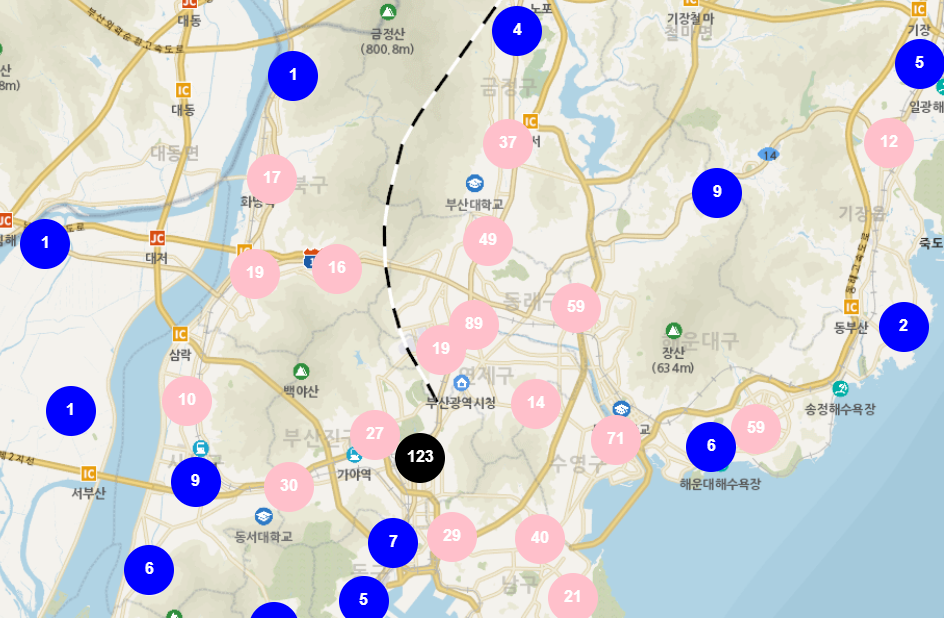
클러스터 맵이란 feature 위치를 기준으로 일정 거리의 가까운 feature들을 그룹화하여 표현한 지도이다.
클러스터 맵을 만들기 위해 누리집 공공데이터포털에서 제공하는 부산광역시 종합병원 현황 api를 활용했다.
cluster map을 그리기 위해서는 위도, 경도 좌표값이 필요하다.
- 기본 openLayers 지도를 그려주고
<script>
const view = new ol.View({
	projection: 'EPSG:3857',
 	center: [14210441.372369962, 4272332.772121915],
 	zoom: 8,
 	minZoom: 8,
	maxZoom: 20
});

const mapLayer = new ol.layer.Tile({
    source: new ol.source.XYZ({
		url : 'http://api.vworld.kr/req/wmts/1.0.0/${vworldApiKey}/Base/{z}/{y}/{x}.png',
		crossOrigin: "Anonymous",
		minZoom: 8,
		maxZoom: 20
    })
});

const overlay = new ol.Overlay({
	autoPan : true,
	element: document.getElementById('martInfo_pop'),
	autoPanAnimation : {
        duration : 250,
	}
});

let map = new ol.Map({
	target: 'map',
    layers: [
    	mapLayer
    ],
    overlays: [overlay],
    view: view
});
</script>- fetch로 api 데이터를 받아온다.
<scritp>
let url = "https://apis.data.go.kr/6260000/MedicInstitService/MedicalInstitInfo?serviceKey=${serviceKey}&numOfRows=1000&pageNo=1&resultType=json";
fetch(url)
.then((response) => response.json())
.then((data) => {
	console.log(data)
	});

	map.addLayer(locLayer);
});
</script>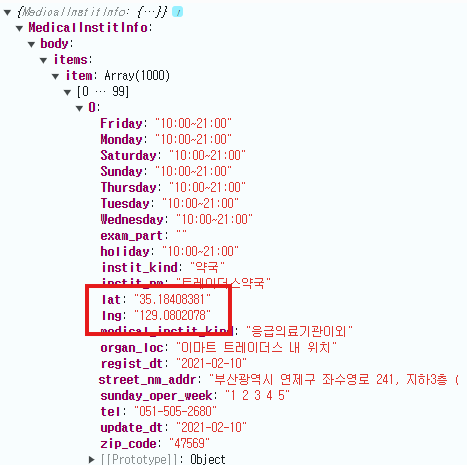
받아온 api 데이터에서 가장 중요한 건 위도 경도 좌표값이다. 위도 경도 좌표값을 활용해서 클러스터맵을 그려줄 수 있다.
<script>
	const respData = data.MedicalInstitInfo.body.items.item;
	const features = [];
	for (let i = 0; i < respData.length; i++) {
		const lng = respData[i].lng; // 경도
		const lat = respData[i].lat; // 위도

		// 좌표를 통한 feature 생성
		const feature = new ol.Feature({
			geometry: new ol.geom.Point(ol.proj.fromLonLat([lng, lat]))
		});

		features.push(feature);
	}

	const markerSource = new ol.source.Vector({
		projection: map.getView().projection,
		features: features
	});

	const clusterSource = new ol.source.Cluster({
		distance: 70,
		source: markerSource
	});
</script>
ol.proj.fromLonLat : 위경도에 포인트 설정
distance : cluster 좌표 간의 거리 설정 (distance 값에 따라 그 거리 안의 feature들이 그룹화된다. distance 값이 클 수록 더 많은 feature들이 그룹화되어 지도에 보여지는 cluster 수가 적어진다.)
- 만들어진 clusterSource로 레이어를 구성한다.
<script>
	const locLayer = new ol.layer.Vector({
		source: clusterSource,
        // 클러스터 feature에 대한 스타일 설정 가능
		style: function(feature) {
        	// size : 그룹화 된 feature 개수
			const size = feature.get('features').length;
			const style = new ol.style.Style({
				image: new ol.style.Circle({
					radius: 25,
					fill: new ol.style.Fill({
						color: 'blue'
					}),
				}),
				text: new ol.style.Text({
					text: size.toString(),
					font: 'bold 16px Arial',
                    fill: new ol.style.Fill({
                        color: '#fff'
                    })
				})
			});


			return style;
		}
	});

    // 구성한 레이어를 맵에 추가
	map.addLayer(locLayer);

</script>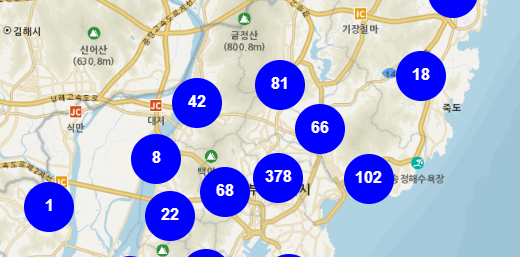
🌟추가 사항
1. 객체 변수를 활용하여 클러스터맵 성능을 향상시킬 수 있다.
<script>
	const styleCache = {}; // 객체 변수 선언
	const locLayer = new ol.layer.Vector({
		source: clusterSource,
		style: function(feature) {
			const size = feature.get('features').length;
			let style = styleCache[size];
			if (!style) {
				const style = new ol.style.Style({
					image: new ol.style.Circle({
						radius: 25,
						fill: new ol.style.Fill({
							color: 'blue'
						}),
					}),
					text: new ol.style.Text({
						text: size.toString(),
						font: 'bold 16px Arial',
	                    fill: new ol.style.Fill({
	                        color: '#fff'
	                    })
					})
				});
				styleCache[size] = style;
			}

			return style;
		}
	});
</script>
객체 변수 활용(styleCache[size]) : 클러스터의 크기에 따라 미리 계산된 스타일을 저장하고 재사용한다.
- 클러스터의 크기에 따라 채워지는 색깔을 함수로 넣을 수 있다.
<script>
fill: new ol.style.Fill({
	color: getClusterFillColor(size)
}),

function getClusterFillColor(size) {
	if (size < 10) {
		return "blue";
	} else if (size < 100) {
		return "pink";
	} else {
		return "black";
	}
}
</script>- zoom 값에 따라서 cluster distance 조절도 가능하다.
<script>
let clusterSource = '';
map.addEventListener('moveend', function(e) {
	if (clusterSource != '' ) {
    	clusterSource.setDistance(parseInt(70,10));
    }
})
</script>- 스타일에 이미지 넣어주기도 가능하다.
<script>
const style = new ol.style.Style({
	geometry: clusterMember.getGeometry(),
    image: new ol.style.Icon({
    	src: '이미지 경로'
    })
});

return style;
</script>- 클러스터 맵을 생성하다 보면 개수가 제대로 표현되지 않을 때가 있다. 여러 이유가 있겠지만 나 같은 경우는 for 문으로 위경도feature을 생성하다 보니 중간에 null 값과 같은 위경도 값이 제대로 들어가지 않은 데이터가 feature로 생성되었기 때문이었다. 그런 경우는 예외처리로 해결하면 된다!
전체 코드
<script>
const view = new ol.View({
	projection: 'EPSG:3857',
 	center: [14210441.372369962, 4272332.772121915],
 	zoom: 8,
 	minZoom: 8,
	maxZoom: 20
});

const mapLayer = new ol.layer.Tile({
    source: new ol.source.XYZ({
		url : 'http://api.vworld.kr/req/wmts/1.0.0/${vworldApiKey}/Base/{z}/{y}/{x}.png',
		crossOrigin: "Anonymous",
		minZoom: 8,
		maxZoom: 20
    })
});

const overlay = new ol.Overlay({
	autoPan : true,
	element: document.getElementById('martInfo_pop'),
	autoPanAnimation : {
        duration : 250,
	}
});

let map = new ol.Map({
	target: 'map',
    layers: [
    	mapLayer
    ],
    overlays: [overlay],
    view: view
});
const styleCache = {};
let url = "https://apis.data.go.kr/6260000/MedicInstitService/MedicalInstitInfo?serviceKey=${serviceKey}&numOfRows=1000&pageNo=1&resultType=json";
fetch(url)
.then((response) => response.json())
.then((data) => {

	const respData = data.MedicalInstitInfo.body.items.item;
	const features = [];
	for (let i = 0; i < respData.length; i++) {
		const lng = respData[i].lng;
		const lat = respData[i].lat;

		const feature = new ol.Feature({
			geometry: new ol.geom.Point(ol.proj.fromLonLat([lng, lat]))
		});

		features.push(feature);
	}

	const markerSource = new ol.source.Vector({
		projection: map.getView().projection,
		features: features
	});

	const clusterSource = new ol.source.Cluster({
		distance: 70,
		source: markerSource
	});


	const locLayer = new ol.layer.Vector({
		source: clusterSource,
		style: function(feature) {
			const size = feature.get('features').length;
			let style = styleCache[size];
			if (!style) {
				const style = new ol.style.Style({
					image: new ol.style.Circle({
						radius: 25,
						fill: new ol.style.Fill({
							color: getClusterFillColor(size)
						}),
					}),
					text: new ol.style.Text({
						text: size.toString(),
						font: 'bold 16px Arial',
	                    fill: new ol.style.Fill({
	                        color: '#fff'
	                    })
					})
				});
				styleCache[size] = style;
			}

            // 이 부분에서 styleCache 변수를 활용하는 방법도 있지 않을까?
			if (size > 1 && map.getView().getZoom() < 15) {
	    		return style;
	    	} else {
	    		const originalFeature = feature.get('features')[0];
	    		if (originalFeature != undefined) {
	    			return new ol.style.Style({
	    			  geometry: clusterMember.getGeometry(),
	    			  image: new ol.style.Icon({
	    			   	src: '이미지 경로'
	    			  }),
	    			});
	    		}
	    	}

		}
	});

	map.addLayer(locLayer);
});

function getClusterFillColor(size) {
	if (size < 10) {
		return "blue";
	} else if (size < 100) {
		return "pink";
	} else {
		return "black";
	}
}
</script>
기록끼록끼룩