외부 git에 있는 코드를 가져오고, 해당하는 레파지토리 안에 포함된 shell script 파일 실행해보자
Docker가 리눅스 기반으로 실행되기에, sh 파일 실행하면 된다
Jenkins가 제공하는 문법 제공기 사용
-> 얘로 코드를 가져오는 파이프라인 스크립트 자동 생성해볼 것
깃에서 가져온 코드 스테이지에 추가

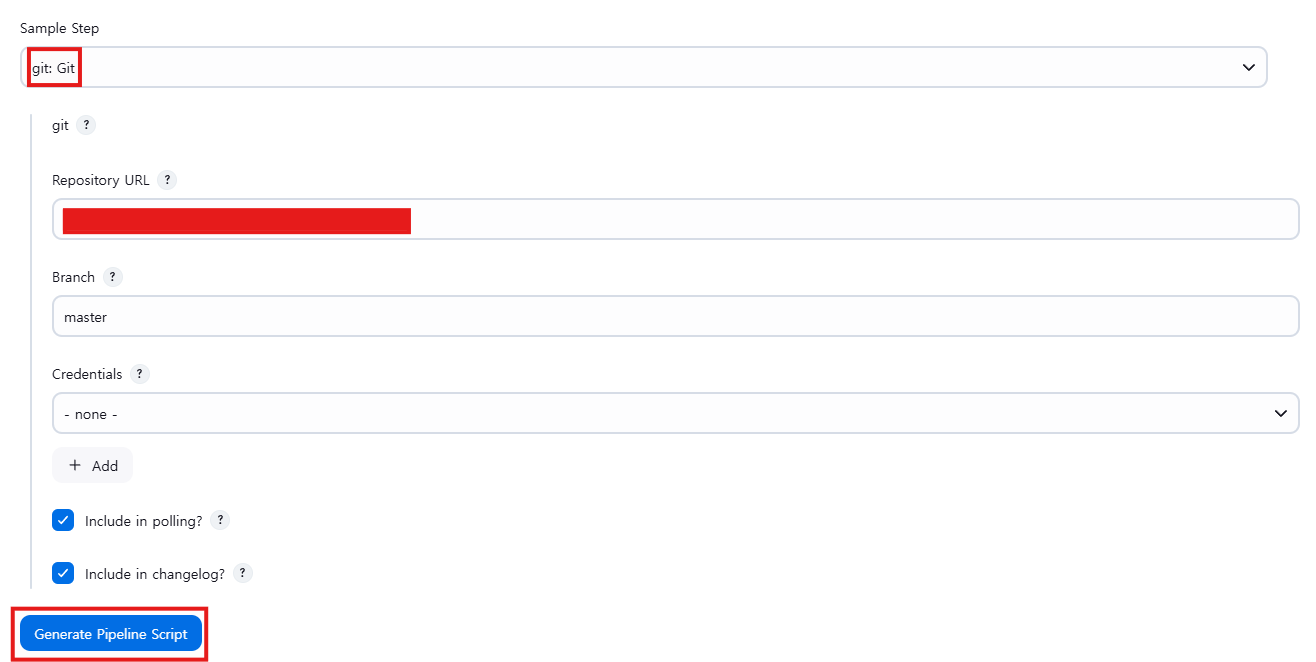
여기 Generate Pipeline Script 누르면, 위의 설정 사용할 수 있는 pipeline syntax 생성된다
아래에 나온 코드 복사한다
pipeline {
    agent any
    stages {
        stage('Git clone') {
            steps {
                git '깃 서버 주소';
            }
        }

        stage('Compile') {
            steps {
                echo "Compiled successfully!";
                sh './build.sh'
            }
        }

        stage('JUnit') {
            steps {
                echo "JUnit passed successfully!";
                sh './unit.sh'
            }
        }

        stage('Code Analysis') {
            steps {
                echo "Code Analysis completed successfully!";
                sh './quality.sh'
            }
        }

        stage('Deploy') {
            steps {
                echo "Deployed successfully!";
                sh './deploy.sh'
            }
        }
    }
   post {
      always {
        echo "This will always run"
      }
      success {
        echo "This will run when the run finished successfully"
      }
      failure {
        echo "This will run if failed"
      }
      unstable {
        echo "This will run when the run was marked as unstable"
      }
      changed {
        echo "This will run when the state of the pipeline has changed"
      }
    }

}- post는 pipeline 작업 안전하게 끝나면 하는것
해당 git repository에 있는 .sh 파일을 찾아서 다 셸 파일로 실행하는 과정이 있는 것
