Path

css폴더 생성 후 css 파일 만들기
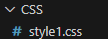
소스 입력
img {
    width: 100px;
    height: 100px;
}<head>
<!-- 외부의 스타일 시트 참조 하는 방법 -->
<link rel='stylesheet' type='text/css' media='screen' href='./CSS/style1.css'>
<style>
img {
border-radius: 10px; /* 모서리 굴곡 */
}
</style>
</head>
<body>
<img src="../0522_HTML/images/G.jpg">
</body>border-radius: 10px; 모서리 굴곡
path(경로)의 2가지 : 1.상대경로 2.절대경로
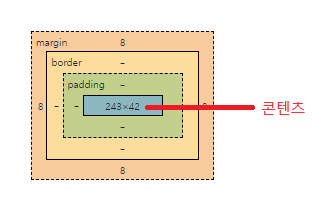
Margin
<단위>
    px: pixel
    em: font-size 기준으로 px로 변경 (고정사이즈)
        (해당 요소에 폰트 사이즈가 없으면 상위 요소 기준으로 적욕됨)
        - 웹 평균 사이즈 16 -> 32px(2배)
    rem(최상위): root 요소에서 지정된 폰트 크기를 기준으로 px 변경
        (폰트 크기가 없으면 일반적으로 16px)
    %: 모니터 해상도
        - 반응형 웹에 사용됨.

padding: 콘텐츠와 border의 내부 간격

    <마진 margin> : 외부의 간격.
    	margin-top: 10px;
      	margin-bottom: 10px;

    [축약 표시] : 한꺼번에 적용시 사용
    1. 4면 모두 적용
        margin: 1em;
    2. top-bottom, left-right 동시에
        margin: 5% auto;
    3. top, left-right, bottom
        margin: 1em auto 2em;
    4. top, right, bottom, left
        margin: 1px 2px 3px 4px;
    5. 전역값
        margin: inherit; -> 부모 요소의 마진값 속성을 상속
        margin: initial; -> 초기화
        margin: unset; -> margin 제거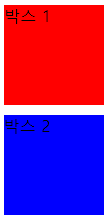
<head>
    <style>
        div {
            display: block;
            width: 100px;
            height: 100px;
        }
        #box1 {
            background-color: red;
        }
        #box2 {
            background-color: blue;
            margin-top: 10px;
        }
    </style>
</head>
<body>
    <div id="box1">박스 1</div>
    <div id="box2">박스 2</div>
</body>
Padding
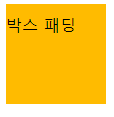
<head>
    <style>
        .box {
            width: 100px;
            height: 100px;
            background-color: rgb(34, 34, 30);
            box-sizing: border-box; /* border-box 기준으로 하라 */
            padding-top: 10px;
        }
    </style>
</head>
<body>
    <div class="box">박스 패딩</div>
</body>
Display
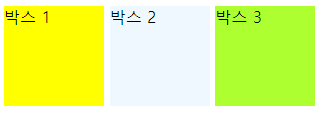
<head>
    <style>
        div {
            /* display: block; */
            /* display: inline; */
            display: inline-block;
            width: 100px;
            height: 100px;
        }
        #box1 {
            background-color: yellow;
        }
        #box2 {
            background-color: aliceblue;
        }
        #box3 {
            background-color: greenyellow;
        }
    </style>
</head>
<body>
    <div id="box1">박스 1</div>
    <div id="box2">박스 2</div>
    <div id="box3">박스 3</div>
</body>
float
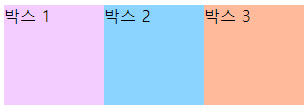
<head>
    <style>
        div {
            width: 100px;
            height: 100px;
        }
        #box1{
            float: left;
            background-color: rgb(243, 205, 255);
        }
        #box2{
            float: left;
            background-color: rgb(139, 212, 255);
        }
        #box3{
            float: left;
            background-color: rgb(255, 186, 155);
        }
    </style>
</head>
<body>
    <div id="box1">박스 1</div>
    <div id="box2">박스 2</div>
    <div id="box3">박스 3</div>
</body>
Child 들

<head>
    <style>
        ul {
            overflow: hidden;
        }
        li {
            list-style: none;
            float: left;
            padding: 15px;
        }
        /* 가상 클래스 */
        li:first-child {border-radius: 50px 0 0 50px;}
        li:last-child {border-radius: 0 50px 50px 0;}
        li:nth-child(2n) {  /* 2n 짝수 */
            background-color: yellow;
        }
        li:nth-child(2n+1) { /* 2n+1 홀수 */
            background-color: greenyellow;
        }
    </style>
</head>
<body>
    <div>
        <ul> <!--ul 순서가 없는-->
            <li>항목 1</li>
            <li>항목 2</li>
            <li>항목 3</li>
            <li>항목 4</li>
            <li>항목 5</li>
            <li>항목 6</li>
            <li>항목 7</li>
        </ul>
    </div>
</body>
나야