전체 선택자
<head>
      <style>
        /* 모든 태그의 color 속성에 red 적용 */
        *{
            color: red;
        }
    </style>
</head>

<body>
    <h1>테스트 html</h1>
    <p>안녕</p>
</body>
태그 선택자
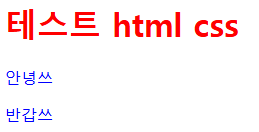
<head>
    <style>
        /* h1 태그 color 속성에 색상 적용 */
        h1 {color: red; }
        p {color: blue; }
    </style>
</head>
<body>
    <h1>테스트 html css</h1>
    <p>안녕쓰</p>
    <p>반갑쓰</p>
</body>- 여러 선택자 선택 : (,)쉼표 사용
<style>
	h1, p {color: red;}
</style>
id 선택자 -> #
: id 속성은 웹 페이지 내부에서 중복되면 안 된다.
일반적으로 공간분할태그(div, span)에 적용.
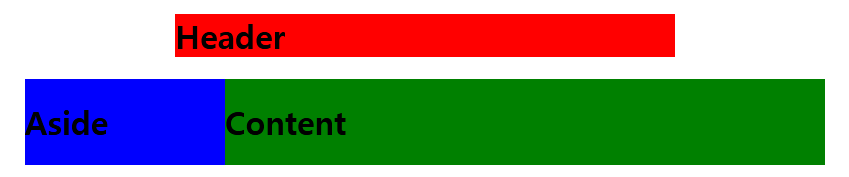
<head>
    <style>
        #header{
            width:500px;
            margin: 0 auto;
            background: red;
        }
        #wrap{
            width: 800px;
            margin: 0 auto;
            overflow: hidden;
        }
        #aside{
            width: 200px;
            float: left;
            background: blue;
        }
        #content{
            width: 600px;
            float: left;
            background: green;
        }
    </style>
</head>
<body>
    <div id="header">
        <h1>Header</h1>
    </div>
    <div id="wrap">
        <div id="aside">
            <h1>Aside</h1>
        </div>
        <div id="content">
            <h1>Content</h1>
        </div>
    </div>
</body>
클래스 선택자 -> .
id(#) : 중복이 되지 않는다.
class(.) : 중복 가능.
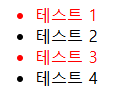
<head>
    <style>
        /* 클래스 지정 */
        .select{
            color:red;
        }
    </style>
</head>
<body>
    <ul>
        <li class="select">테스트 1</li>
        <li>테스트 2</li>
        <li class="select">테스트 3</li>
        <li>테스트 4</li>
    </ul>
</body>
2개 이상 클래스 선택자 : ( )공백 사용

<head>
    <style>
        .item{
            color: red;
        }
        .header{
            background-color: blue;
        }
    </style>
</head>
<body>
    <h1 class="item header">테스트 html css</h1>
</body>
-> class="item header"에서 item(공백)header 시 2개 이상 선택자 사용 가능
태그 선택자.클래스 선택자
만약 클래스 속성이 서로 다른 태그에 사용된다면 태그사용자.클래스선택자를 같이 사용하면 더 정확하게 태그 선택 가능
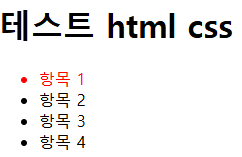
<head>
    <style>
        li.select{
            color: red;
        }
    </style>
</head>
<body>
    <h1 class="select">테스트 html css</h1>
    <ul>
        <li class="select">항목 1</li>
        <li>항목 2</li>
        <li>항목 3</li>
        <li>항목 4</li>
    </ul>
</body>
속성 선택자
선택자 뒤에 [] 대괄호 사용
기본 속성 선택자(input type)
input 태그 선택 시 많이 사용.
+ input 태그에 type 속성을 입력하지 않으면 자동으로 text 속성값이 적용됨. but, 속성 선택자 적용 시에는 정확하게 속성값이 text로 입력된 태그만 스타일이 적용됨.

입력창 배경의 색이 바뀜
<head>
    <style>
        input[type="text"]{
            background: red;
        }
        input[type="password"]{
            background: blue;
        }
    </style>
</head>
<body>
    <form>
        <input type="text"/>
        <input type="password"/>
    </form>
</body>
문자열 속성 선택자(이미지)
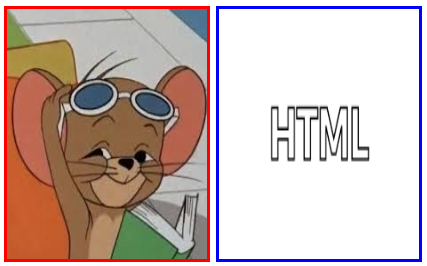
<head>
    <style>
        img[src$="jpg"]{
            border: 3px solid red;
        }
        img[src$="png"]{
            border: 3px solid blue;
        }
    </style>
</head>
<body>
    <img src="../0522_HTML/images/G.jpg" width="200" height="250"/>
    <img src="../0522_HTML/images/html.png" width="200" height="250"/>
</body>
후손 선택자
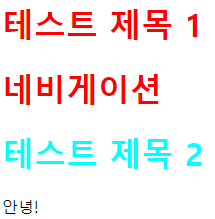
<head>
    <style>
        #header h1{
            color: red;
        }
        #section h1{
            color: aqua;
        }
    </style>
</head>
<body>
    <div id="header">
        <h1 class="title">테스트 제목 1</h1>
        <div id="nav">
            <h1>네비게이션</h1>
        </div>
    </div>
    <div id="section">
        <h1 class="title">테스트 제목 2</h1>
        <p>안녕!</p>
    </div>
</body>- 여러 후손 선택자 선택시 주의
<style>
	#header h1, h2 {}  /* 후손 h1과 일반 h2 선택됨 */
    #header h1, #header h2 {} /* 후손 h1, h2 선택됨 */
</style>
자손 선택자 ( >로 지정한 자식만)
table 태그 요소 선택 시 자손 선택자를 사용하지 않는 것이 좋다. why? html 계층 구조에 따라 웹 브라우저가 자동으로 태그를 추가 하여 스타일 적용이 안되어 질 수 있다.
ex) table>tr>th 에 적용시 tbody태그를 자동으로 추가되어 table>tbody>tr>th로 인식되어 스타일 적용 안 됨.
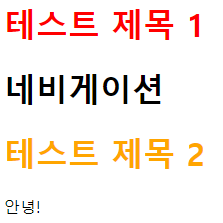
<head>
    <style>
        #header > h1{
            color: red;
        }
        #section > h1{
            color: orange;
        }
    </style>
</head>
<body>
    <div id="header">
        <h1 class="title">테스트 제목 1</h1>
        <div id="nav">
            <h1>네비게이션</h1>
        </div>
    </div>
    <div id="section">
        <h1 class="title">테스트 제목 2</h1>
        <p>안녕!</p>
    </div>
</body>
후손 : header 아래에 있는 모든 h1 적용.
자손(자식) : header 바로 아래에 있는 h1만 적용됨.
동위 선택자(형제 선택자)
동위 관계에서 뒤에 위치한 태그 선택시 사용.
인접한 형제(+) or 일반 형제(~) 로 2가지 나뉨
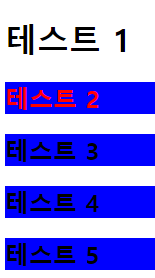
<head>
    <style>
        /* 인접한 형제 */
        h1 + h2 {
            color: red;
        }
        /* 일반 형제 */
        h1 ~ h2 {
            background-color: blue;
        }
    </style>
</head>
<body>
    <h1>테스트 1</h1>
    <h2>테스트 2</h2>
    <h2>테스트 3</h2>
    <h2>테스트 4</h2>
    <h2>테스트 5</h2>
</body>
반응 선택자(hover & active)
: 이벤트(특정 사건) 동작에 관련.

:hover 마우스를 위에 대면 red

:active 클릭하면 blue
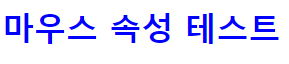
<head>
    <style>
        /* 컨텐츠 영역에 진입하면 동작 */
        h1:hover {
            color: red;
        }
        /* click 동작 */
        h1:active {
            color: blue;
        }
    </style>
</head>
<body>
    <h1>마우스 속성 테스트</h1>
</body>
hover : 특정 컨텐츠 영영으로 진입하면 발생. 마우스가 위치에 진입하면 동작.
active : click 동작 시 발생
상태 선택자 (Enabled & Disabled)
:enabled 활성화 (사용 가능한 input 태그 선택) input태그(입력 양식)
:Disabled 비활성화 (사용 불가능한 input 태그 선택)
:checked (체크 상태의 input 태그 선택)
:focus (초점이 맞추어진 input 태그 선택)
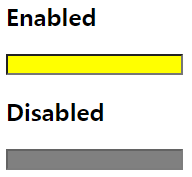
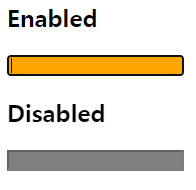
<head>
    <style>
        input:enabled {
            background-color: yellow;
        }
        input:disabled {
            background-color: gray;
        }
        input:focus {
            background-color: orange;
        }
    </style>
</head>
<body>
    <h2>Enabled</h2>
    <input type="text"/>
    <h2>Disabled</h2>
    <input disabled="Disabled"/>
</body>
상태 선택자와 동위 선택자 복합 활용
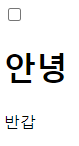
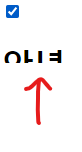
클릭하면 위쪽 방향으로 그라데이션으로 사라짐.
<head>
    <style>
        input[type=checkbox]:checked + div {
            height: 0px;
        }
        div{
            overflow: hidden;
            width: 650px;
            height: 300px;
            -ms-transition-duration: 1s;
            -webkit-transition-duration: 1s;
            -moz-transition-duration: 1s;
            transition-duration: 1s;
        }
    </style>
</head>
<body>
    <input type="checkbox"/>
    <div>
        <h1>안녕</h1>
        <p>반갑</p>
    </div>
</body>
구조 선택자
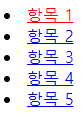
first-child
<head>
    <style>
        li:first-child > a {
            color: red;
        }
    </style>
</head>
<body>
    <li><a href="#">항목 1</a></li>
    <li><a href="#">항목 2</a></li>
    <li><a href="#">항목 3</a></li>
    <li><a href="#">항목 4</a></li>
    <li><a href="#">항목 5</a></li>
</body>
first-of-type
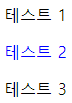
<head>
    <style>
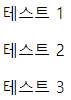
        div p:first-child { /* p태그는 first child 없어서 적용 안됨. */
            color: red;
        }
        div p:first-of-type {   /* p태그 중에 첫번째 타입에 적용 */
            color: blue;
        }
    </style>
</head>
<body>
    <div>
        <div>테스트 1</div>  <!-- first child는 요녀석이라 p태그는 적용 안됨.-->
        <p>테스트 2</p>
        <p>테스트 3</p>
    </div>
</body>
의사요소 드래그
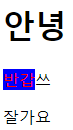
<head>
    <style>
        /* 의사요소: html 요소의 특정 부분만을 선택: 드래그 */
        p::selection {
            background: blue;
            color: red;
        }
    </style>
</head>
<body>
    <h1>안녕</h1>
    <p>반갑쓰</p>
    <p>잘가요</p>
</body>
의사요소 선택
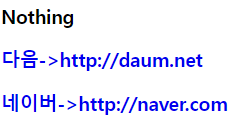
한번 클릭하면 빨갛게 변함
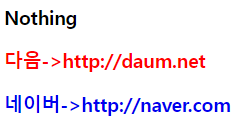
<head>
    <style>
        a {text-decoration: none;}
        a:visited {
            color: red;
        }
        a:link::after {
            content: '->' attr(href);
        }
    </style>
</head>
<body>
    <h3><a>Nothing</a></h3>
    <h3><a href="http://daum.net">다음</a></h3>
    <h3><a href="http://naver.com">네이버</a></h3>
</body>