폰트 파일 적용

폰트 폴더 만들어 폰트 파일 넣기

<head>
    <style>
        @font-face {
            font-family: "GmarketSansLight";
            src: url("./fonts/GmarketSansTTFLight.ttf");
        }
        #box1 {
            font-family: "GmarketSansBold";
        }
        #box2 {
            font-family: "GmarketSansMedium";
        }
        #box3 {
            font-family: "GmarketSansLight";
        }
    </style>
</head>
<body>
    <div id="box1">
        G마켓 산스 진하게
    </div>
    <div id="box2">
        G마켓 산스 중간
    </div>
    <div id="box3">
        G마켓 산스 연하게
    </div>
</body>
폰트 import 적용
fonts.google.com : 폰트 관련 사이트
.
lighter(100~300): normal 보다 얇음
normal(400): 기본
bolder(600~900): normal 보다 굵음

<head>
    <style>
        @import url('https://fonts.googleapis.com/css?family=Dokdo:400');
        #wrap {
            font-family: "Dokdo";
        }
    </style>
</head>
<body>
    <div id="wrap"> 구글 독도 폰트!!!</div>
</body>
폰트 link 적용
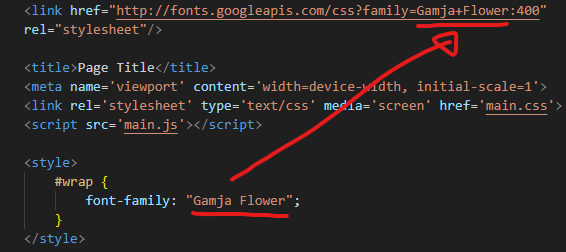
웹상에서 전달할때는 띄어쓰기를 +로 작성.
<head>
    <link href="http://fonts.googleapis.com/css?family=Gamja+Flower:400"
    rel="stylesheet"/>

    <title>Page Title</title>


    <style>
        #wrap {
            font-family: "Gamja Flower";
        }
    </style>
</head>
<body>
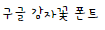
    <div id="wrap">구글 감자꽃 폰트</div>
</body>
폰트 local 적용
파일이 다운 받아 놓아서 빠르다
소스 크기가 크다

<head>
    <style>
        @font-face {
            font-family: 'test_font';  /* 임의로 이름 정의 */
            src: local('NanumGothic'),
            url('./fonts/NanumGothic.eot'),
            url('./fonts/NanumGothic.ttf'),
            url('./fonts/NanumGothic.woff');
        }
        *{
            font-family: "test_font";
        }
    </style>
</head>
<body>
    <h1>나눔 고딕</h1>
    <p>안녕하세요</p>
    <p>반갑습니다</p>
    <p>감사합니다</p>
</body>
나야