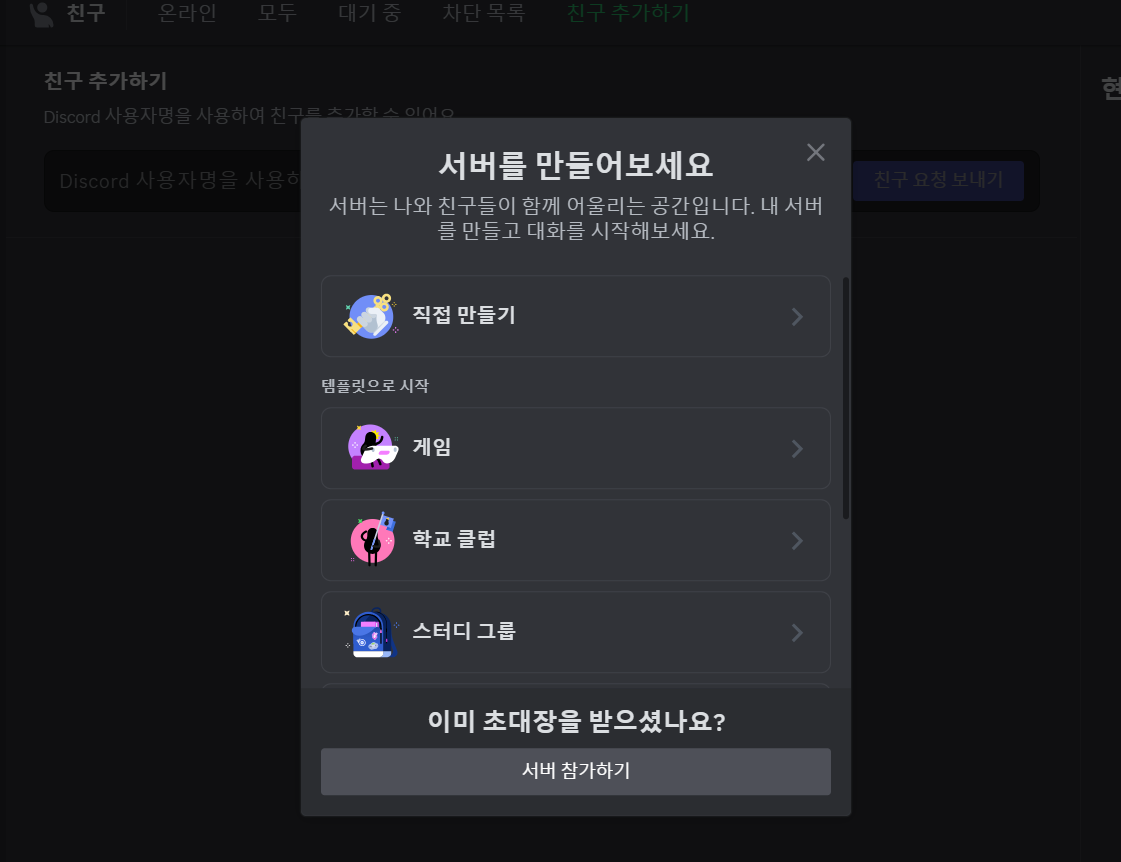
1. 디스코드 서버 생성
이미 서버가 있는 상태면 패스
2. 봇 생성
Discord Developer Portal 접속 디스코드 개발자 포탈 링크
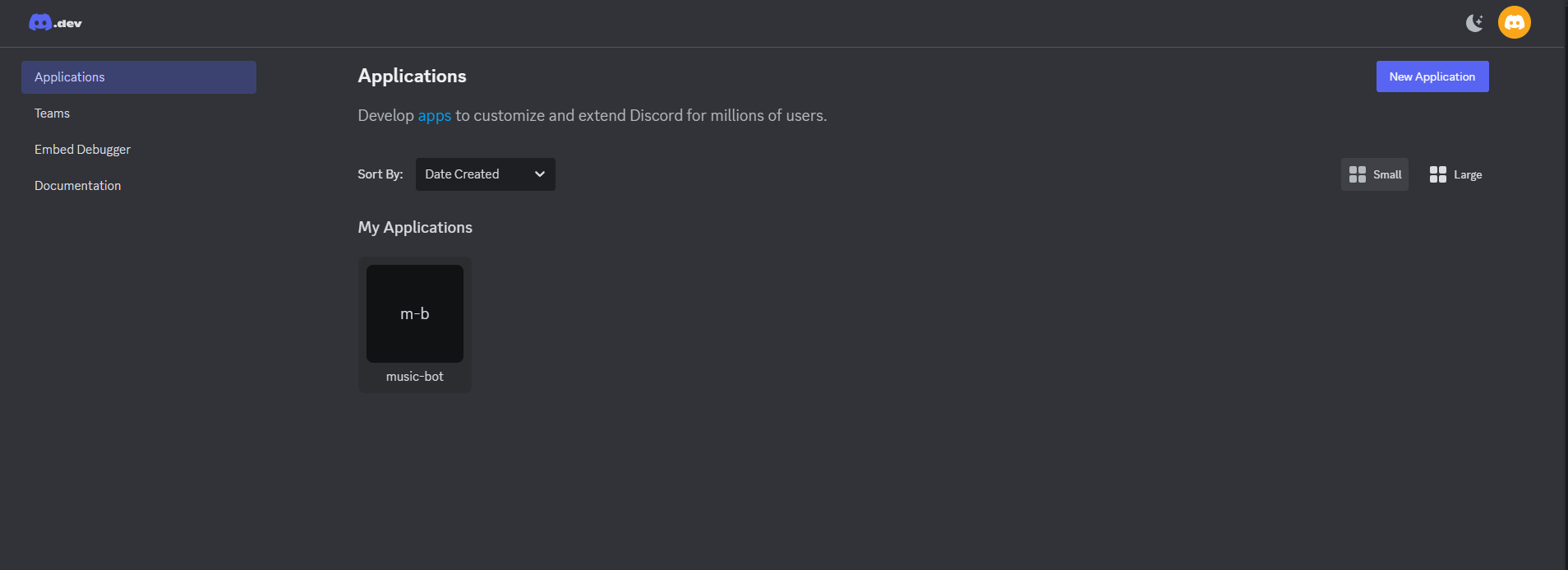
우측 상단 New Application 클릭

Installation 탭에 들어가서 Copy 눌러주고
저 링크를 주소창에 입력해 접속한 뒤 보이는거 클릭클릭클릭
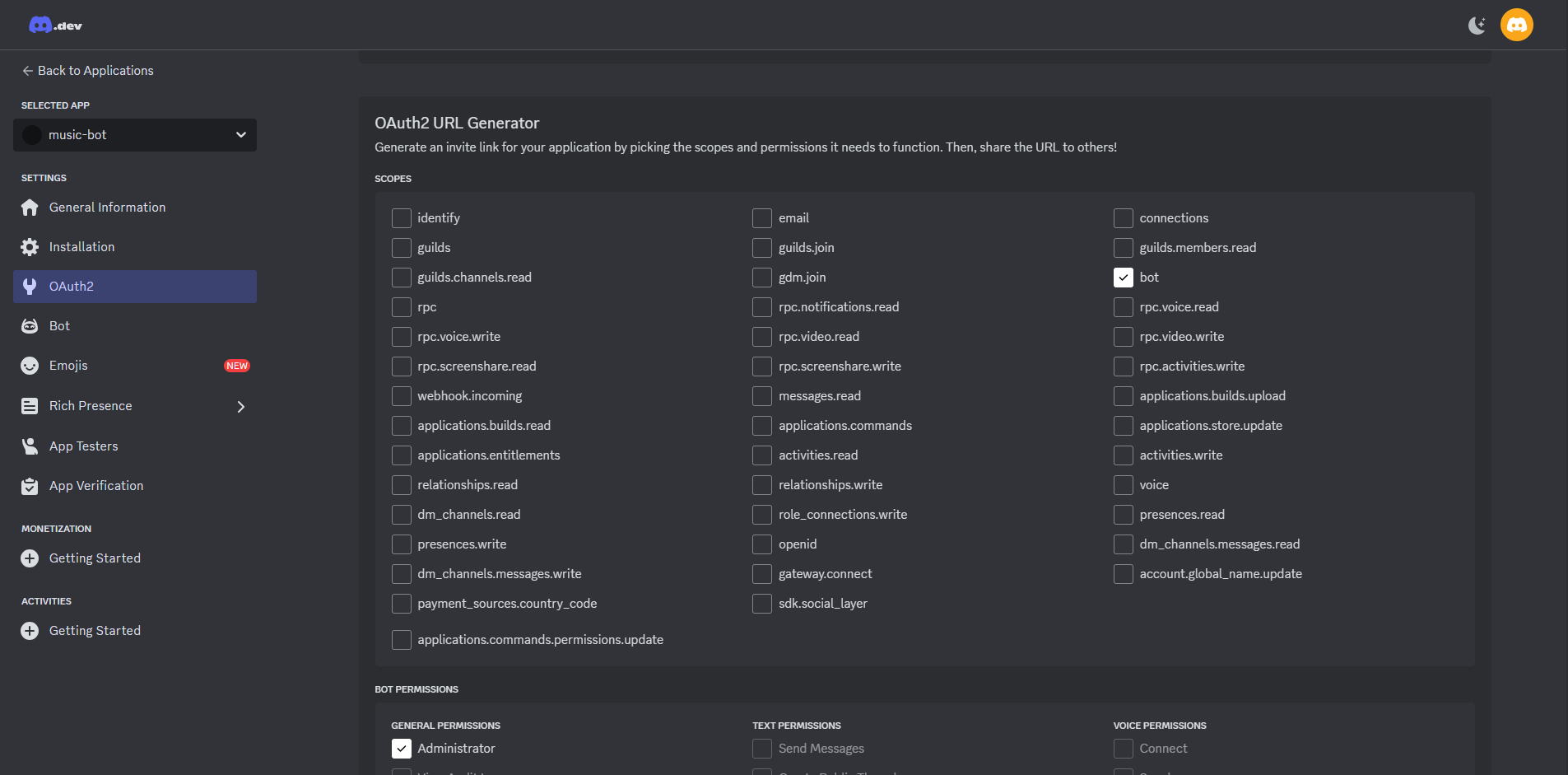
OAuth2 들어가서 bot 체크 하면 하단에 Bot Permissions (권한이란뜻) 나오게 되는데
Administrator 체크
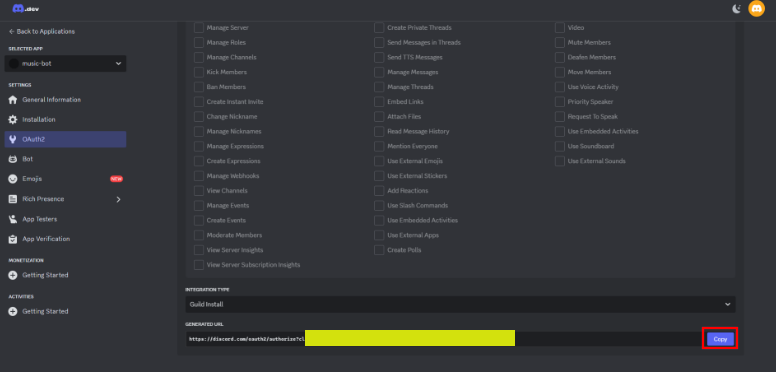
그다음에 스크롤 살짝 내려서 주소창 나오는거 아까랑 똑같이 진행
이러면 디스코드 채널에 봇이 추가가 됩니다.
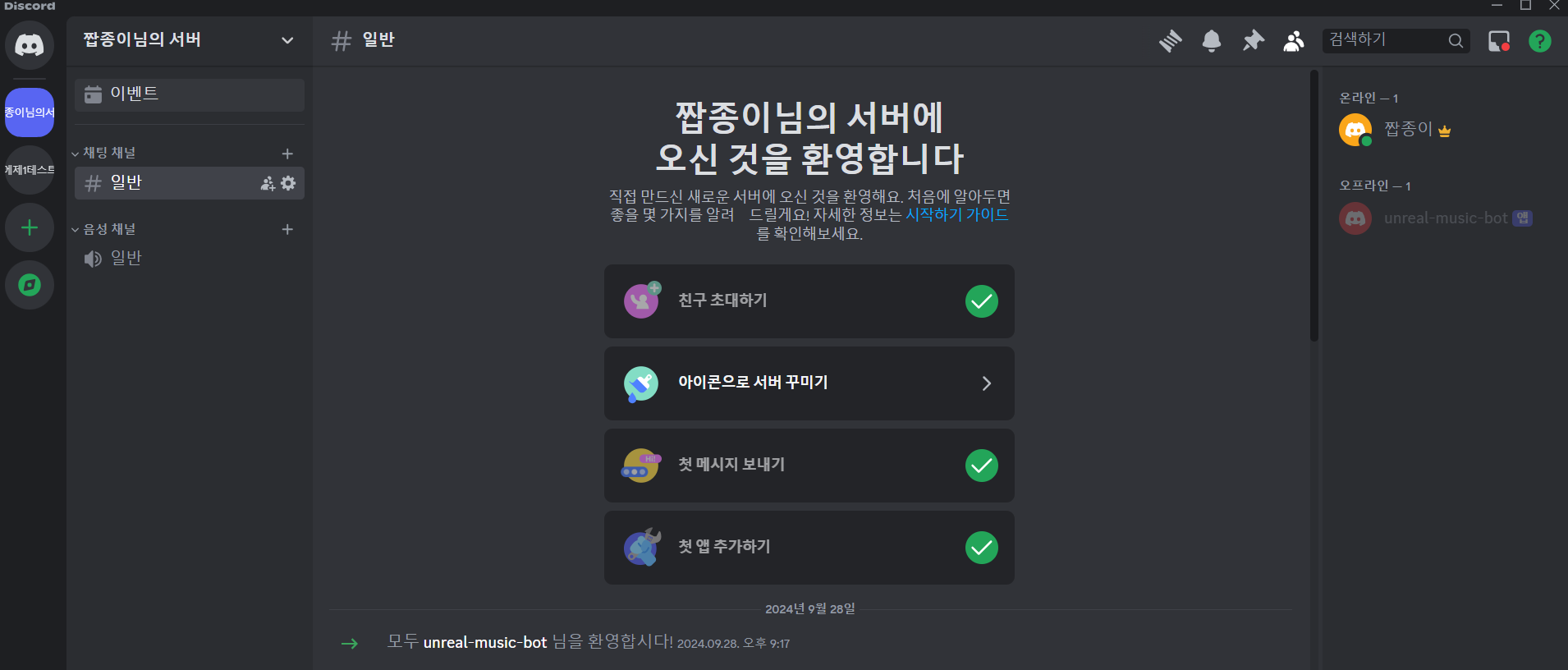
(봇이 잘 추가된 모습)
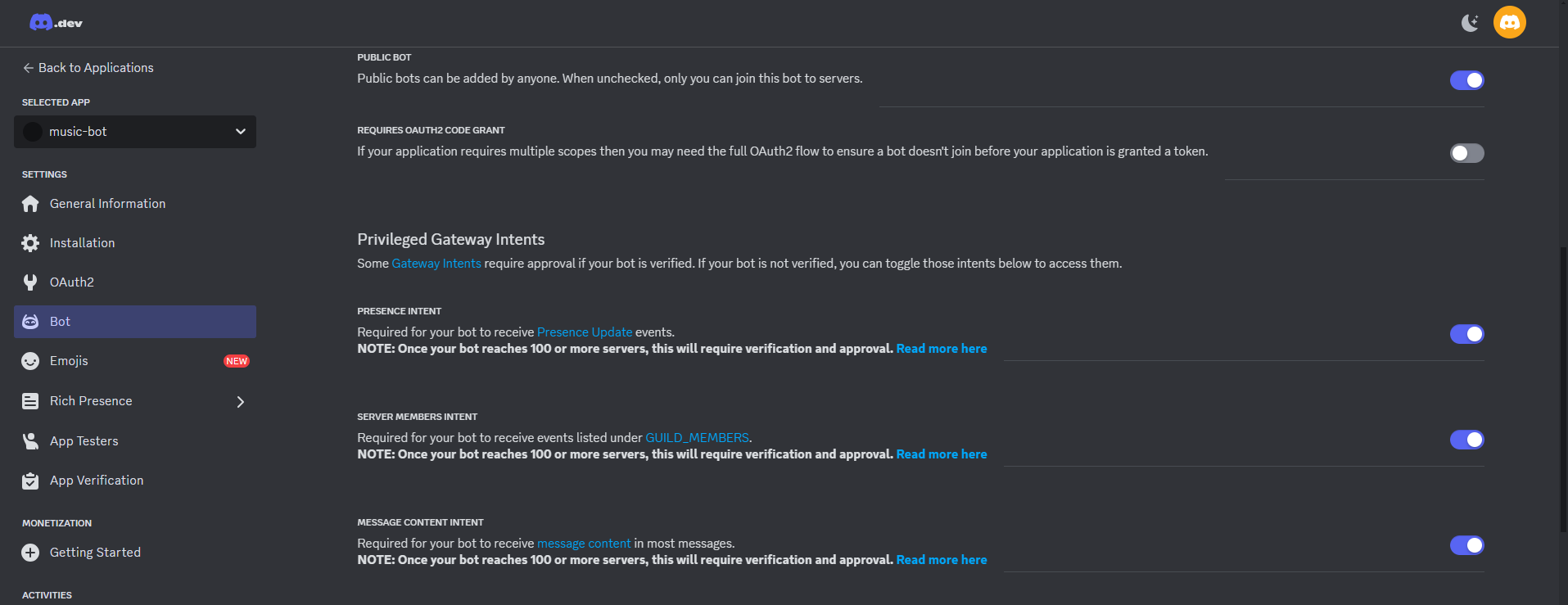
우측에 Bot 탭에 들어가서
Privieged Gateway Intents 여기 세개 전부 다 체크 후 위로 올려서
Reset Token 눌러서 토큰 발급 (코드에서 사용 목적)
3. 코드
pip install discord.py
pip install yt_dlp
pip install PyNaCl
pip install ffmpeg
인스톨하기
전에 ffmpeg는 따로 다운로드 하는 작업이 필요함니다.
3-1 ffmpeg 다운로드 (이거 안하면 안됩니다 간단해용)
ffmpeg 다운로드 참고
위 링크 들어가서 참고하셔서 다운로드 하시면 됩니다.
ffmpeg 깃허브 링크
위 링크에서 파일 다운로드 하시면 됩니다.
ffmpeg-n5.1-latest-win64-lgpl-5.1 2024년 9월 28일 기준 저는 이거 다운받았습니다
파이썬에 파일 넣는 과정은 위 블로그 참고
3-2 전체 소스코드
import discord
from discord.ext import commands
import yt_dlp
import asyncio

intents = discord.Intents.default()
intents.message_content = True  # 메시지 읽기 권한
bot = commands.Bot(command_prefix="!", intents=intents)

# 유튜브 DL 옵션
ytdl_format_options = {
    'format': 'bestaudio/best',
    'outtmpl': '%(extractor)s-%(id)s-%(title)s.%(ext)s',
    'restrictfilenames': True,
    'noplaylist': True,
    'nocheckcertificate': True,
    'ignoreerrors': False,
    'logtostderr': False,
    'quiet': True,
    'no_warnings': True,
    'default_search': 'auto',
    'source_address': '0.0.0.0'  # ipv6로 인한 문제 방지
}

ffmpeg_options = {
    'before_options': '-reconnect 1 -reconnect_streamed 1 -reconnect_delay_max 5',
    'options': '-vn'
}

ytdl = yt_dlp.YoutubeDL(ytdl_format_options)

class YTDLSource(discord.PCMVolumeTransformer):
    def __init__(self, source, *, data, volume=0.5):
        super().__init__(source, volume)
        self.data = data
        self.title = data.get('title')
        self.url = data.get('url')

    @classmethod
    async def from_url(cls, url, *, loop=None, stream=False):
        loop = loop or asyncio.get_event_loop()
        data = await loop.run_in_executor(None, lambda: ytdl.extract_info(url, download=not stream))

        if 'entries' in data:
            data = data['entries'][0]

        filename = data['url'] if stream else ytdl.prepare_filename(data)
        return cls(discord.FFmpegPCMAudio(filename, **ffmpeg_options), data=data)

# 봇이 명령어를 받으면 실행하는 부분
@bot.command(name="실행")
async def play(ctx, url: str):
    if not ctx.message.author.voice:
        await ctx.send("먼저 음성 채널에 입장해야 합니다.")
        return

    channel = ctx.message.author.voice.channel
    voice_client = discord.utils.get(bot.voice_clients, guild=ctx.guild)

    if not voice_client:
        voice_client = await channel.connect()

    async with ctx.typing():
        player = await YTDLSource.from_url(url, loop=bot.loop, stream=True)
        voice_client.play(player, after=lambda e: print(f'Player error: {e}') if e else None)

    await ctx.send(f'재생 중: {player.title}')

@bot.command(name="멈춰")
async def stop(ctx):
    voice_client = discord.utils.get(bot.voice_clients, guild=ctx.guild)

    if voice_client and voice_client.is_connected():
        await voice_client.disconnect()
        await ctx.send("음악을 멈추고 봇이 퇴장했습니다.")
    else:
        await ctx.send("봇이 음성 채널에 있지 않습니다.")

# 토큰으로 봇 실행
bot.run('여기에 발급받은 토큰을 입력해주세요')
작동방식
음악실행
!실행 [url]
음악종료
!멈춰
4. 결과
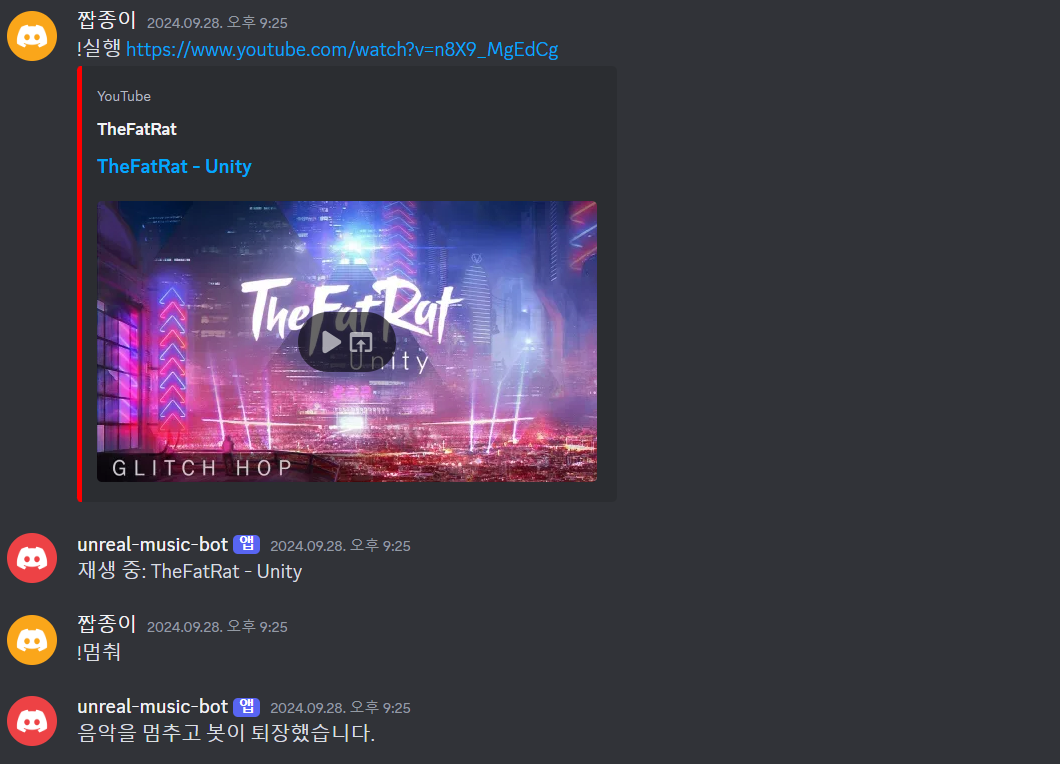
잘되는걸 확인 할 수 있습니다.

내 머리속에서 나오는 코드는 없다
안녕하세요 유튜브를 통해서 블로그를 보고 도움을 받아 감사합니다!
추가적인 질문을 하고 싶습니다
이런 봇은 단순히 라이브러리 혹은 파이썬 공부만 하면 만들 수 있는건지 궁금합니다 이제 막 봇 개발을 시도하고 있어 막연한 마음에 여쭤봅니다...!
구체적으로는 제가 구상하는 봇의 여러 기능들을 구현해야 할지 막연합니다...