
MSA(Microservice Architecture)에 대한 강의를 들었다. 오늘은 그 중 Spring Cloud의 기능들에 집중하여 강의를 수강하였고, 서비스 등록 및 디스커버리, 로드 밸런싱, 서킷 브레이커에 관한 내용을 수강하였다.
MSA
-
MSA는 하나의 애플리케이션을 여러 개의 독립적인 서비스로 분리하여 개발, 배포, 유지보수를 용이하게 하는 소프트웨어 아키텍처 스타일
-
각 서비스는 특정 비즈니스 기능을 수행하며, 서로 독립적으로 배포되고 확장될 수 있음
-
서비스 간의 통신은 주로 HTTP/HTTPS, 메시지 큐 등을 통해 이루어짐
-
주요 특징
- 독립적인 배포 가능성: 각 서비스는 독립적으로 배포할 수 있으며, 다른 서비스에 영향을 주지 않고 업데이트할 수 있음
- 작은 팀 구성: 각 서비스는 작은 팀이 독립적으로 개발하고 관리할 수 있음
- 기술 스택의 다양성: 각 서비스는 적절한 기술 스택을 자유롭게 선택할 수 있음
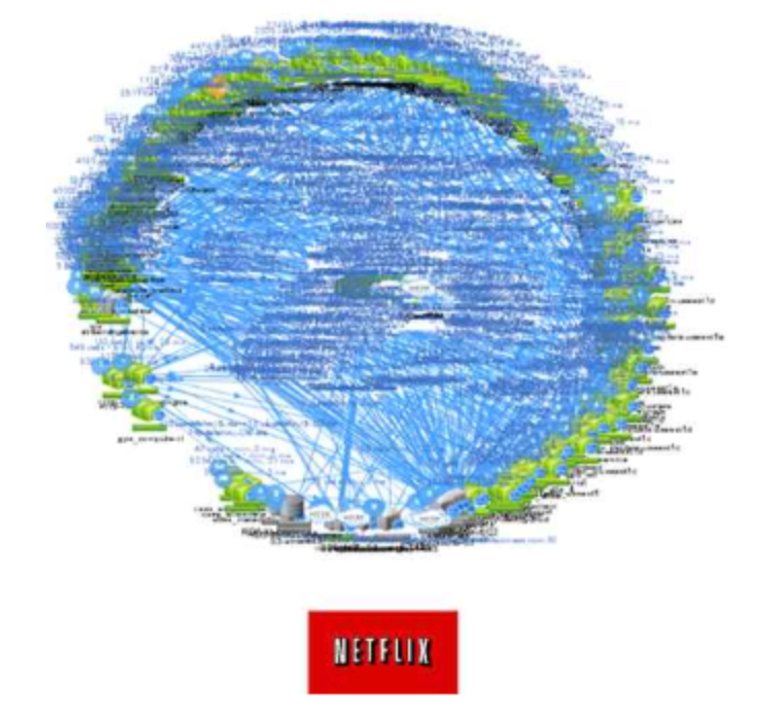
모놀리틱 아키텍처와는 다르게 확장성, 유연성이 뛰어나며 독립적 배포가 가능하고 작은 팀 구성이 가능하다는 장점이 있으나 복잡성 및 운영비용, 데이터/네트워크 관리 측면에서 효율이 떨어진다는 단점이 있다.
서비스 등록 및 디스커버리
Eureka
- 넷플릭스가 개발한 디스커버리 서버로, Spring Cloud의 주요 모듈 중 하나이다. 마이크로서비스 아키텍처에서 각 서비스의 위치를 동적으로 관리한다.
- 주요 특징
- 서비스 레지스트리 : 모든 서비스 인스턴스의 위치를 저장하는 중앙 저장소
- 헬스 체크(Health check) : 서비스 인스턴스의 상태를 주기적으로 확인하여 가용성을 보장
실습
Eureka server 하나에 같은 기능을 하는 인스턴스 2개를 연결해보자.
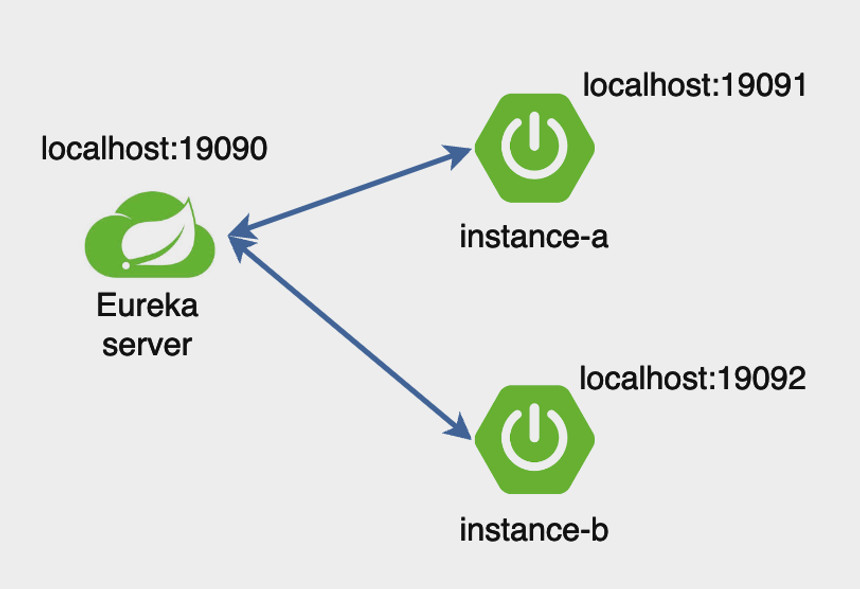
server
spring initializr를 이용해 아래와 같이 의존성을 주입한 후 프로젝트를 생성, 실행한다.
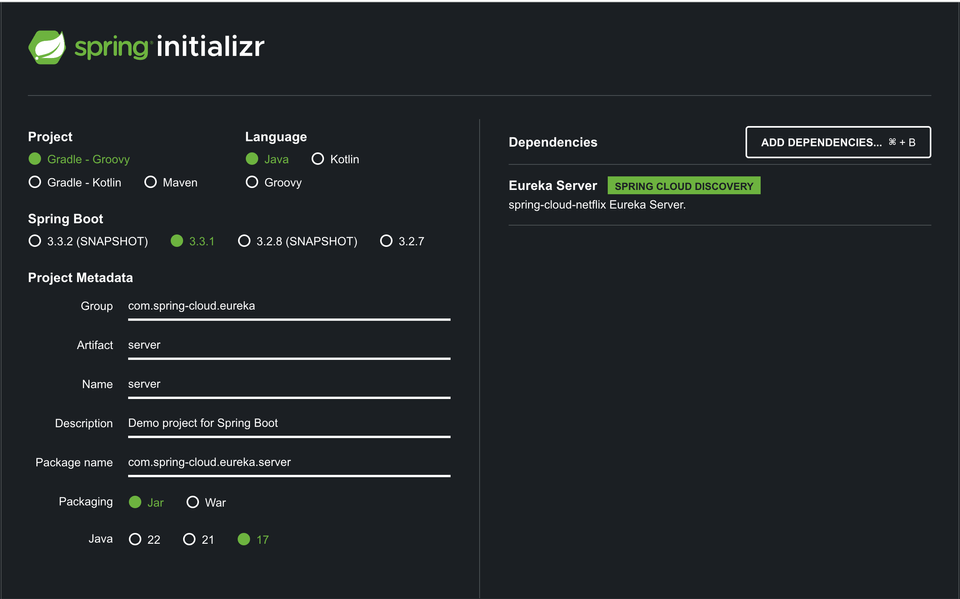
@EnableEurekaServer 어노테이션을 이용해 서버 사용이 가능하도록 한다.
import org.springframework.boot.SpringApplication;
import org.springframework.boot.autoconfigure.SpringBootApplication;
import org.springframework.cloud.netflix.eureka.server.EnableEurekaServer;

@EnableEurekaServer
@SpringBootApplication
public class ServerApplication {

	public static void main(String[] args) {
		SpringApplication.run(ServerApplication.class, args);
	}

}
application.properties를 아래와 같이 수정하여 서버측 인스턴스를 완성한다.
spring.application.name=server

server.port=19090

# 유레카 서버에 자신을 등록할지 여부를 설정
eureka.client.register-with-eureka=false

# 유레카 서버로부터 레지스트리를 가져올지 여부를 설정
eureka.client.fetch-registry=false

eureka.instance.hostname=localhost

eureka.client.service-url.defaultZone=http://localhost:19090/eureka/
client
Artifact를 second로 바꿔서 프로젝트를 하나 더 생성한다.
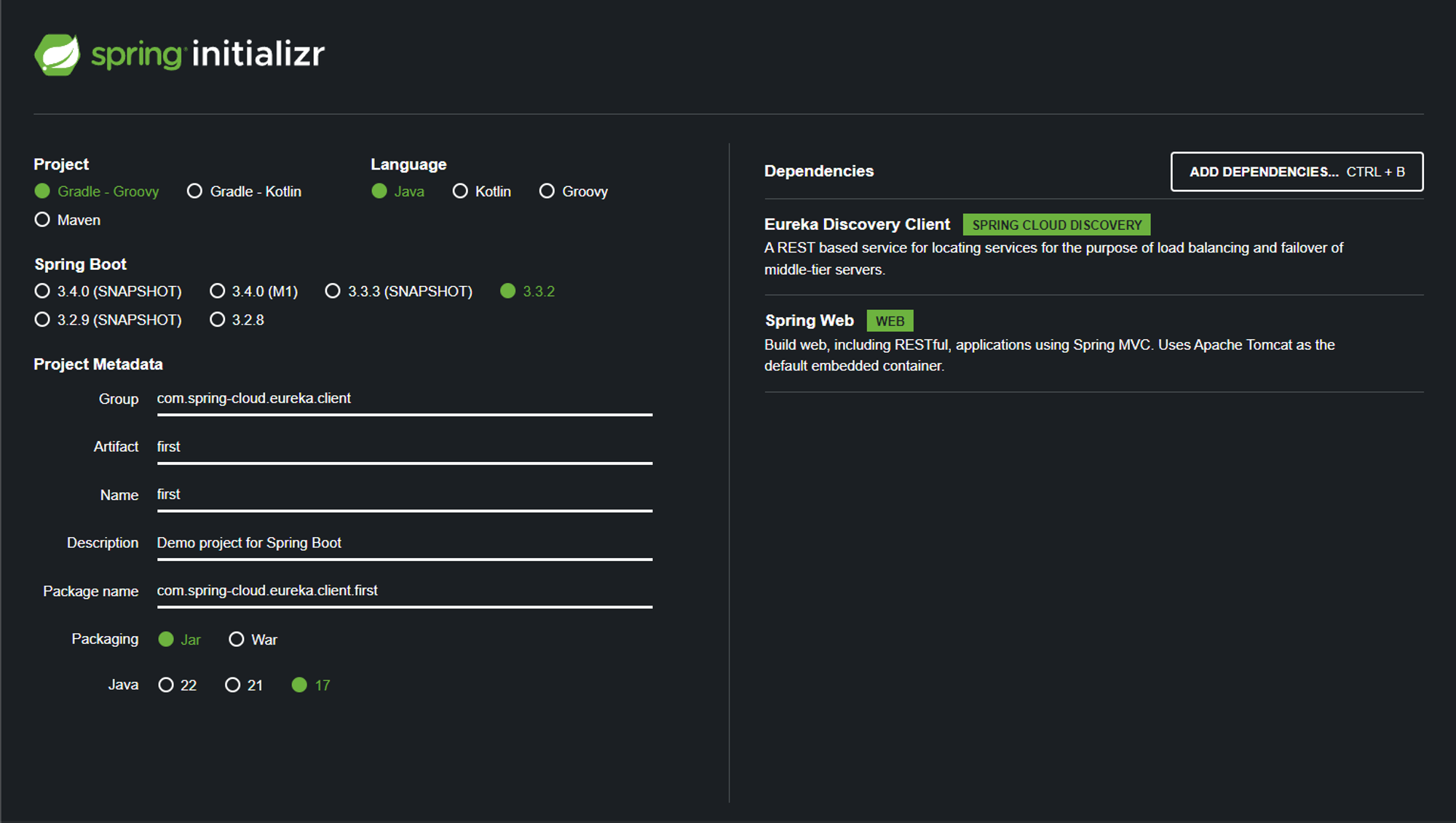
application.properties를 아래와 같이 수정하여 서버측 인스턴스를 완성한다. second 프로젝트의 경우 application 이름과 서버 포트를 수정해야한다.
server.port=19091

eureka.client.service-url.defaultZone=http://localhost:19090/eureka/
Run
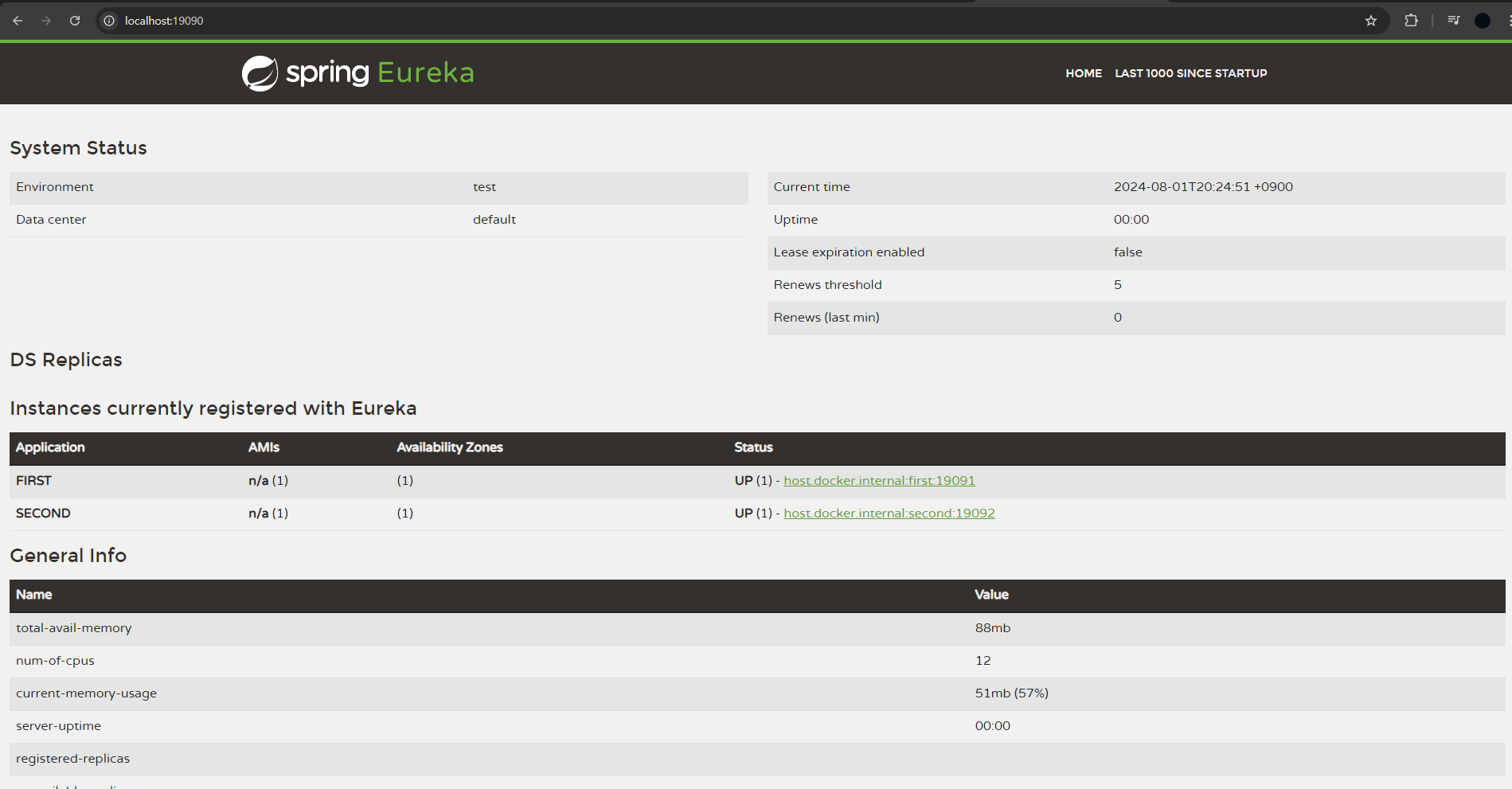
유레카 서버를 먼저 실행하고 클라이언트측 인스턴스들을 실행시킨다. 이후
http://localhost:19090/으로 접속하면 두개의 인스턴스가 있는것을 확인할 수 있다.
로드 밸런싱
-
로드 밸런싱은 네트워크 트래픽을 여러 서버로 분산시켜 서버의 부하를 줄이고, 시스템의 성능과 가용성을 높이는 기술이다. 이번 실습에서는 라운드 로빈 알고리즘(각 서버에 순차적으로 요청을 분배하는 방식)을 사용한다.
-
Eureka와 FeignClient를 함께 사용하면 동적으로 서비스 인스턴스를 조회하여 로드 밸런싱을 수행할 수 있다.
FeignClient와 Ribbon 동작 원리
- 서비스 이름:
@FeignClient(name = "my-service")어노테이션은 Eureka에 등록된 서비스 이름을 참조 - 서비스 인스턴스 조회: Eureka 서버에서
my-service라는 이름으로 등록된 서비스 인스턴스 목록을 조회 - 로드 밸런싱: 조회된 서비스 인스턴스 목록 중 하나를 선택하여 요청을 보냅니다. 이는 기본적으로 Ribbon을 사용하여 로드 밸런싱을 수행
- 요청 분배: 여러 서비스 인스턴스가 있을 경우, Round Robin 또는 다른 설정된 로드 밸런싱 알고리즘을 사용하여 요청을 분배
실습
💡 유레카 서버 하나에 주문 인스턴스 1개와 같은 기능의 포트만 다른 상품 인스턴스 3개를 연결한다. 상품을 요청(http://localhost:19091/order/1) 하면 응답하는 인스턴스의 포트를 받아서 노출한다. 이를 통해 라운드로빈으로 로드밸런싱이 되는것을 확인한다.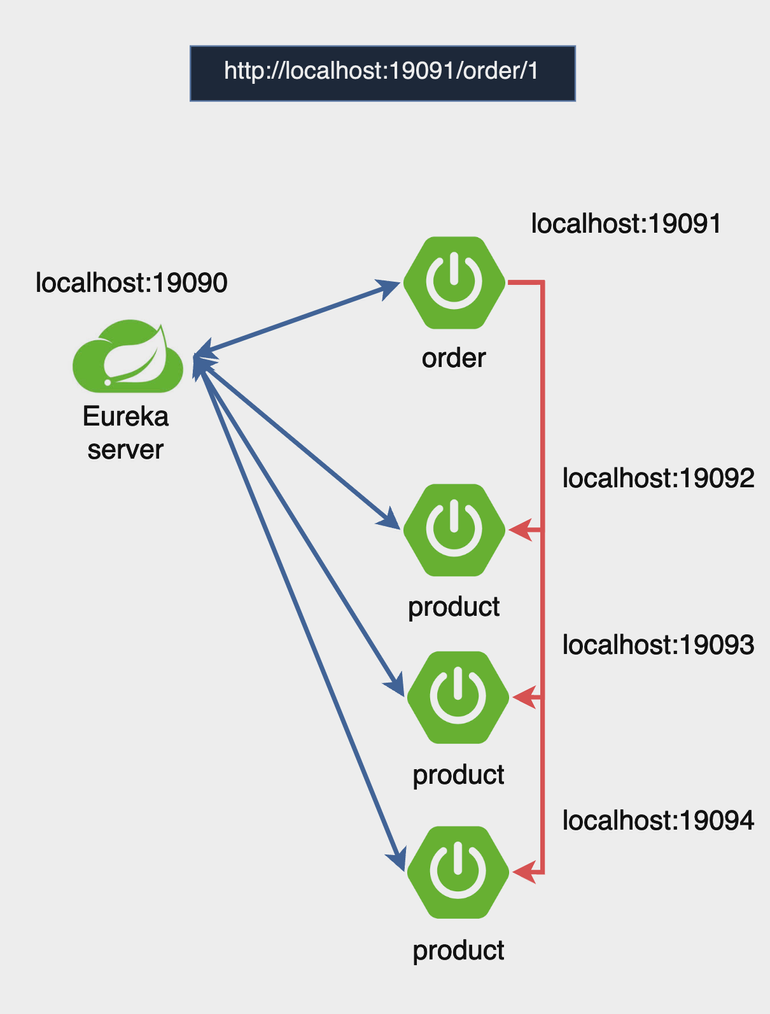
Eureka 서버는 이전에 사용했던 서버 프로젝트를 가져와 사용한다.
Product instance
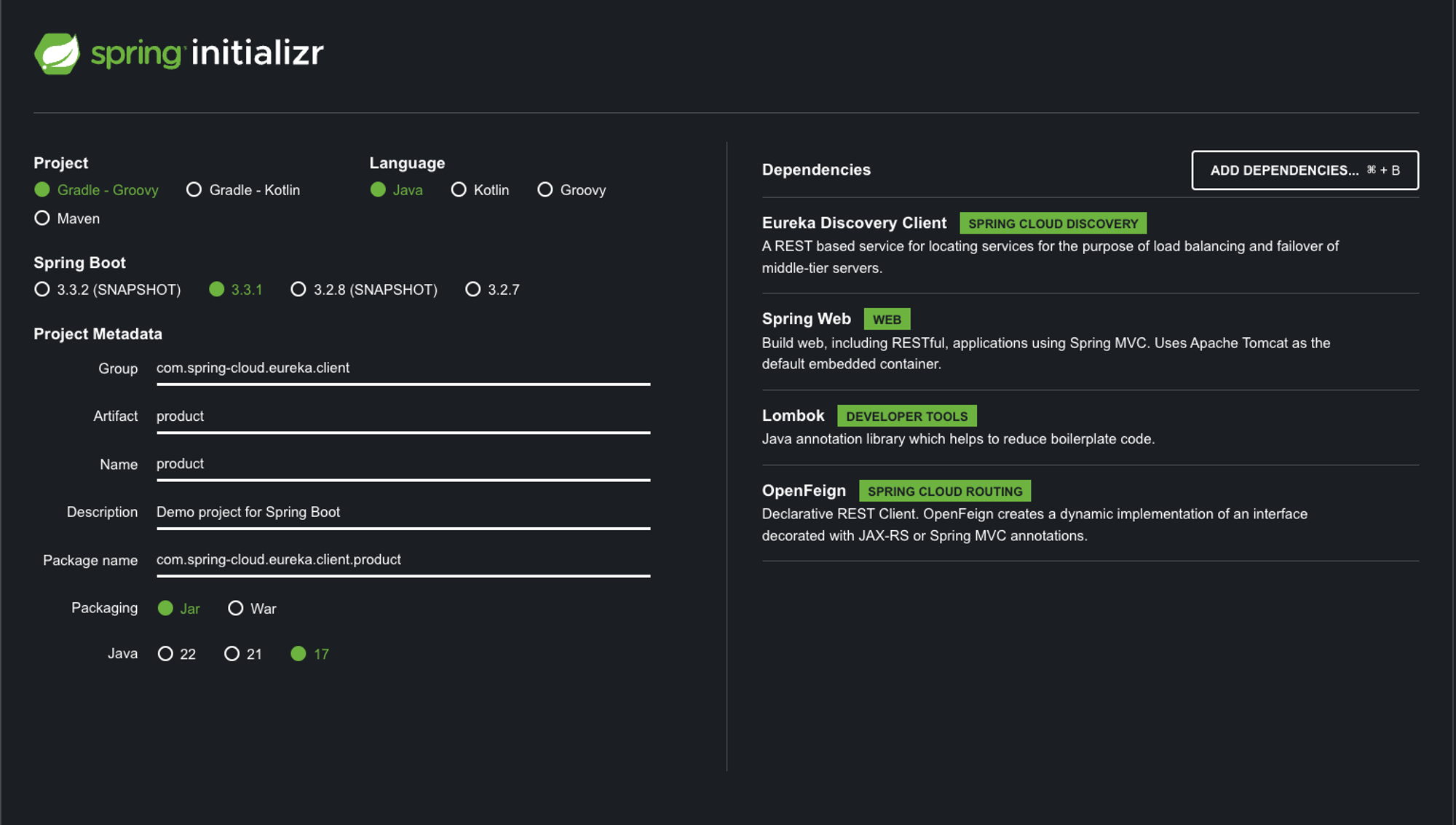
아래와 같이 의존성을 설정하고 프로젝트를 생성한다.
-
ProductApplication.java
import org.springframework.boot.SpringApplication; import org.springframework.boot.autoconfigure.SpringBootApplication; import org.springframework.cloud.openfeign.EnableFeignClients; @SpringBootApplication @EnableFeignClients public class ProductApplication { public static void main(String[] args) { SpringApplication.run(ProductApplication.class, args); } } -
ProductController.java
import org.springframework.beans.factory.annotation.Value; import org.springframework.web.bind.annotation.GetMapping; import org.springframework.web.bind.annotation.PathVariable; import org.springframework.web.bind.annotation.RestController; @RestController public class ProductController { @Value("${server.port}") // 애플리케이션이 실행 중인 포트를 주입 private String serverPort; @GetMapping("/product/{id}") public String getProduct(@PathVariable String id) { return "Product " + id + " info!!!!! From port : " + serverPort ; } } -
resources/application.yml (application.properties 파일은 삭제)
spring: application: name: product-service server: port: 19092 eureka: client: service-url: defaultZone: http://localhost:19090/eureka/ -
19092,19093,19094 포트에 같은 애플리케이션 실행하기
- 인텔리제이의 상단 메뉴에서 실행 > 구성 편집으로 들어간다.
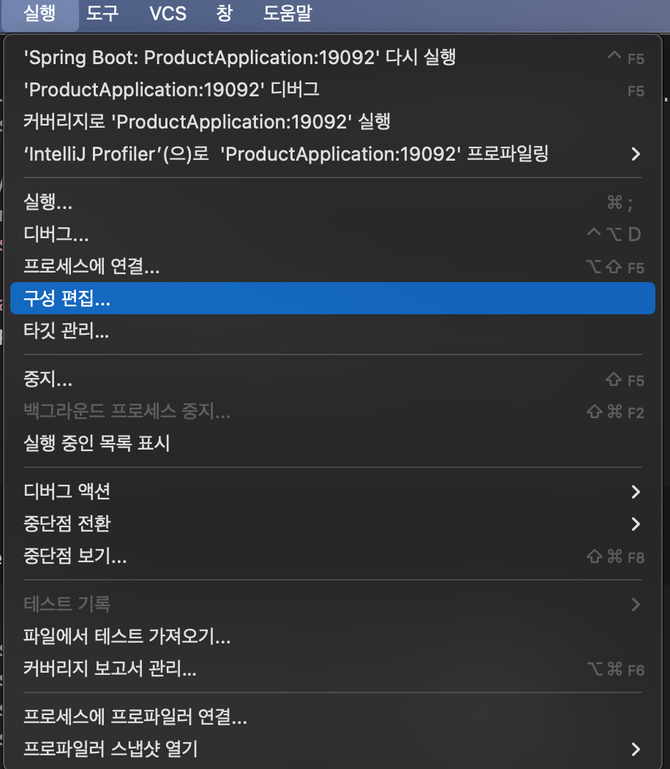
- ProductApplication 의 이름을 ProdcutApplication:19092로 변경한다.
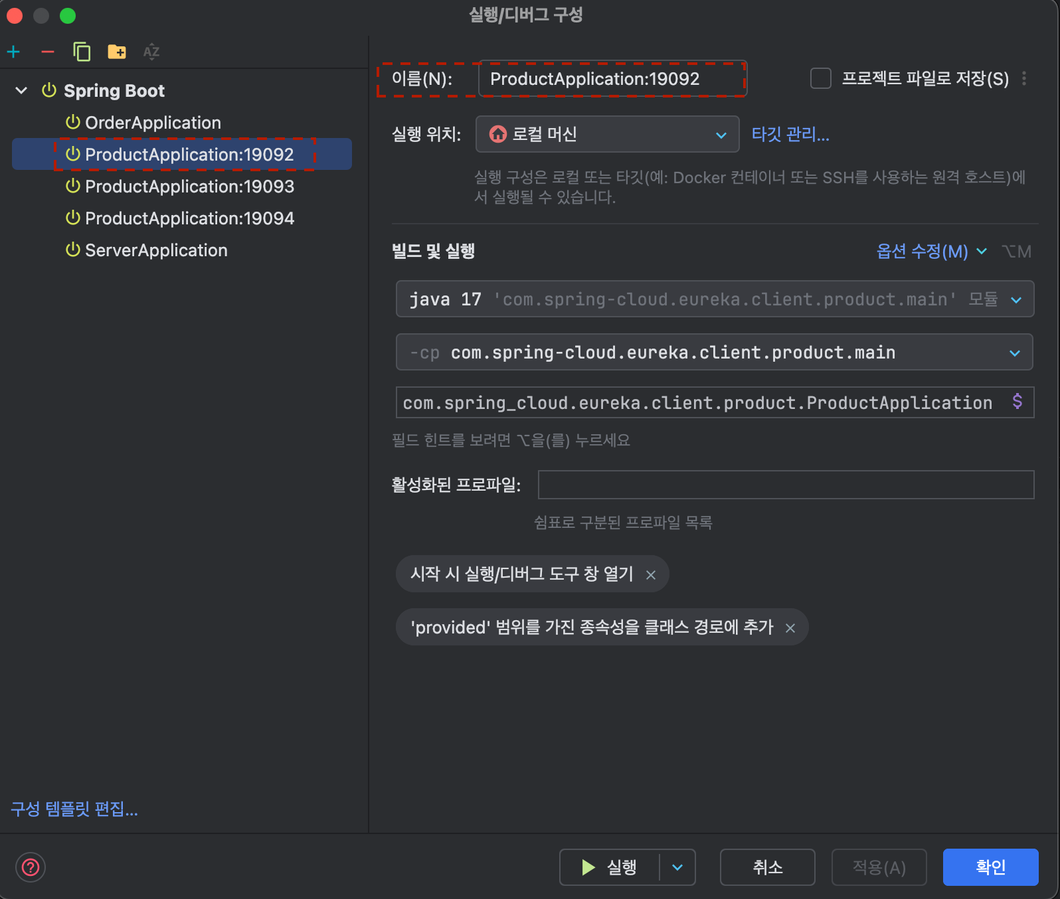
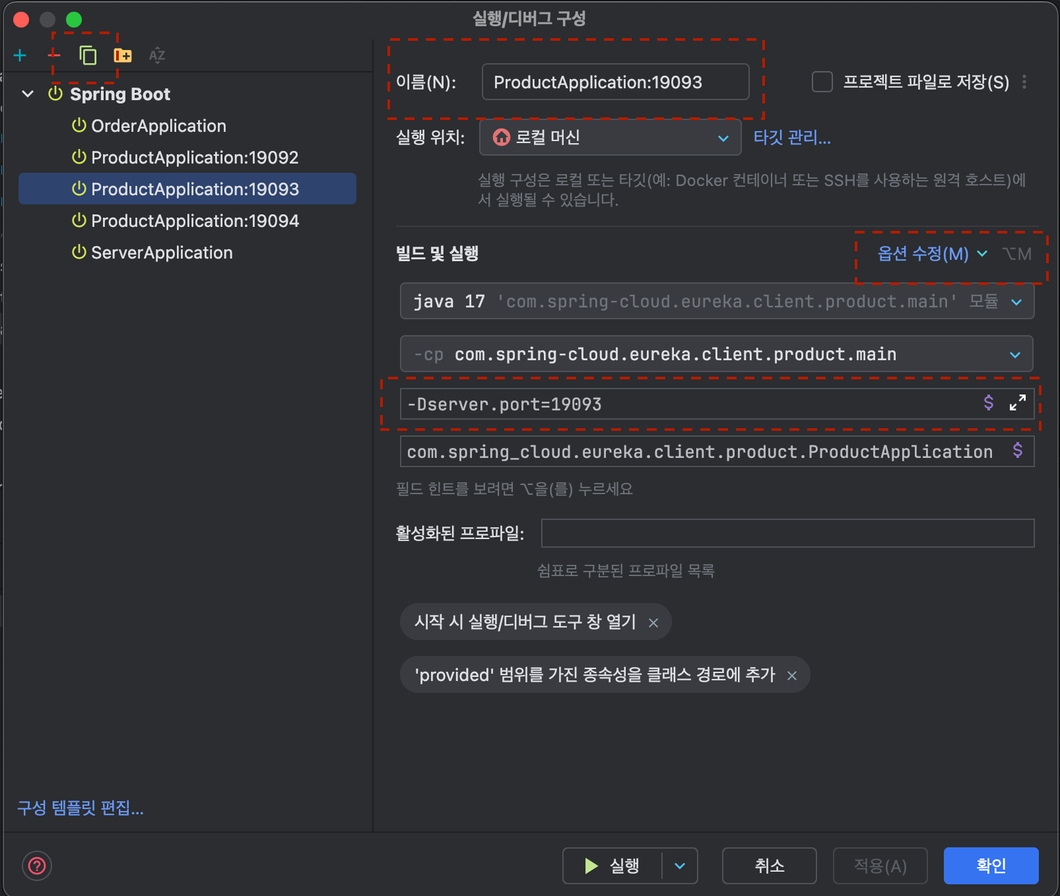
- 우측 상단의 복사버튼을 클릭하여 ProductApplication을 두개 더 생성하고 이미지와 같이 19093,19094로 이름을 변경한다.
- 옵션수정을 클릭하여 VM옵션 추가를 클릭한다.
- 이미지와 같이 -Dserver.port=19093 을 입력한다. 19094에도 같은 작업을 해준다.
- 인텔리제이의 상단 메뉴에서 실행 > 구성 편집으로 들어간다.
Order instance
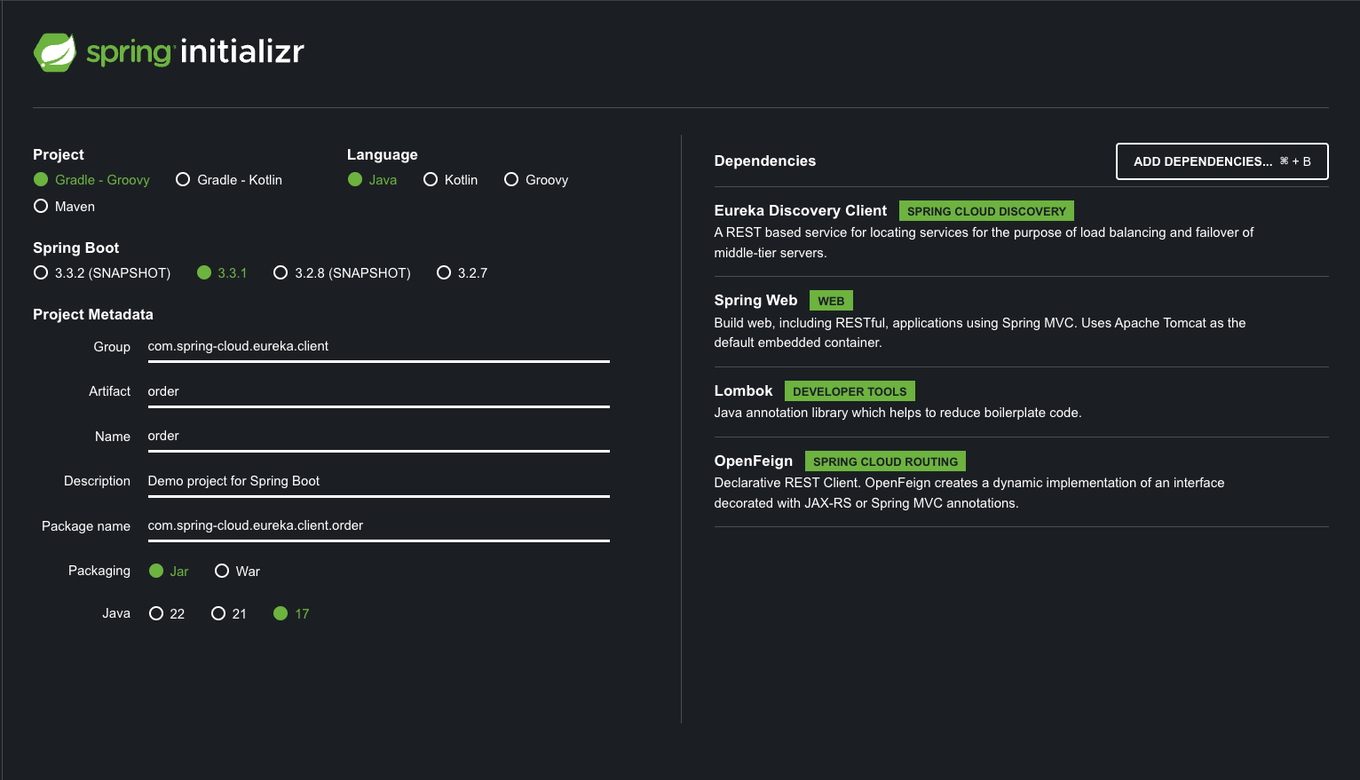
아래와 같이 의존성을 설정하고 프로젝트를 생성한다.
- OrderApplication.java
import org.springframework.boot.SpringApplication; import org.springframework.boot.autoconfigure.SpringBootApplication; import org.springframework.cloud.openfeign.EnableFeignClients; @SpringBootApplication @EnableFeignClients public class OrderApplication { public static void main(String[] args) { SpringApplication.run(OrderApplication.class, args); } } - OrderController.java
import org.springframework.web.bind.annotation.RestController; import lombok.RequiredArgsConstructor; import org.springframework.web.bind.annotation.GetMapping; import org.springframework.web.bind.annotation.PathVariable; @RestController @RequiredArgsConstructor public class OrderController { private final OrderService orderService; @GetMapping("/order/{orderId}") public String getOrder(@PathVariable String orderId) { return orderService.getOrder(orderId); } } - ProdcutClient.java (클래스가 아닌 인터페이스로 생성)
import org.springframework.cloud.openfeign.FeignClient; import org.springframework.web.bind.annotation.GetMapping; import org.springframework.web.bind.annotation.PathVariable; @FeignClient(name = "product-service") public interface ProductClient { @GetMapping("/product/{id}") String getProduct(@PathVariable("id") String id); } - OrderService.java
import org.springframework.stereotype.Service; import lombok.RequiredArgsConstructor; @Service @RequiredArgsConstructor public class OrderService { private final ProductClient productClient; public String getProductInfo(String productId) { return productClient.getProduct(productId); } public String getOrder(String orderId) { if(orderId.equals("1") ){ String productId = "2"; String productInfo = getProductInfo(productId); return "Your order is " + orderId + " and " + productInfo; } return "Not exist order..."; } } - application.yml
spring:
  application:
    name: order-service
server:
  port: 19091
eureka:
  client:
    service-url:
      defaultZone: http://localhost:19090/eureka/
Run
- 유레카 서버 → order → product(3개 모두) 순으로 실행
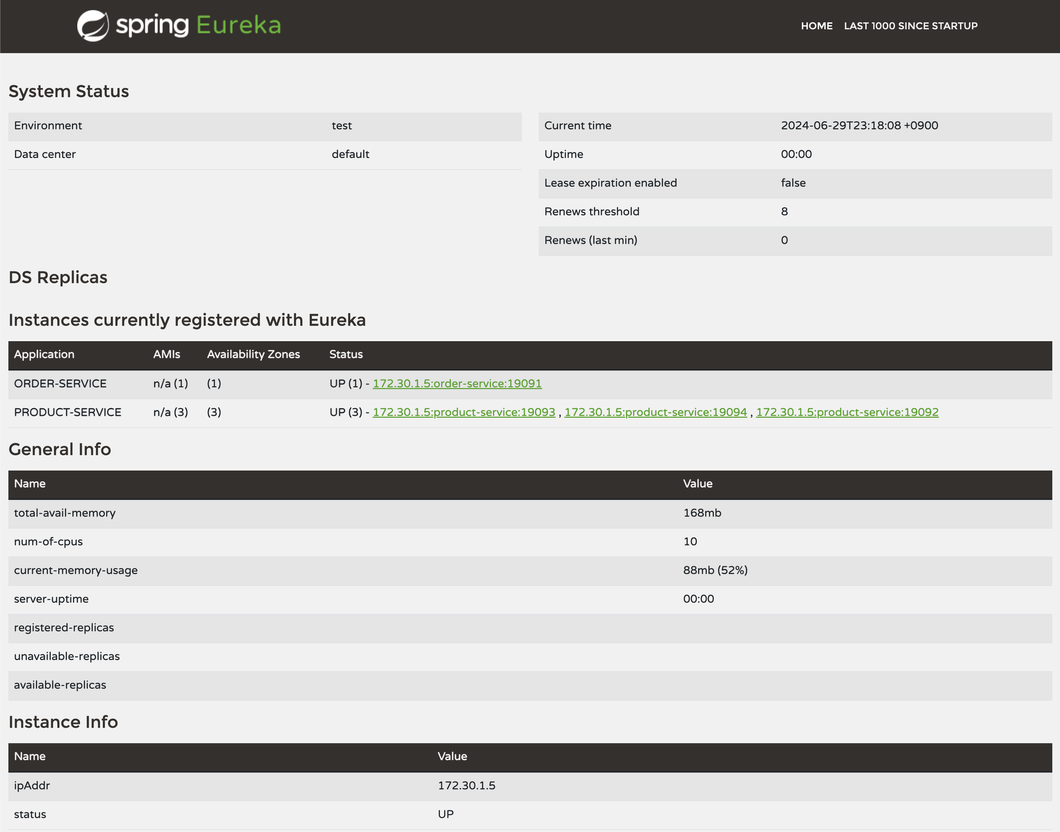
- http://localhost:19090/ 으로 접속하면 인스턴스를 확인할 수 있음
- PRODUCT-SERVICE에 포트가 19092,19093,19094 3개가 떠있는것을 확인할 수 있음
확인
- http://localhost:19091/order/1 에 접속할때마다 텍스트의 포트가 변경되는것을 볼 수 있음
이를통해 요청마다 라운드로빈으로 동작함을 확인할 수 있음

서킷 브레이커
서킷 브레이커란?
- 서킷 브레이커는 마이크로서비스 간의 호출 실패를 감지하고 시스템의 전체적인 안정성을 유지하는 패턴
- 외부 서비스 호출 실패 시 빠른 실패를 통해 장애를 격리하고, 시스템의 다른 부분에 영향을 주지 않도록 함
- 상태 변화: 클로즈드 -> 오픈 -> 하프-오픈
Fallback 메커니즘
5.4.1 Fallback 설정
- Fallback 메서드는 외부 서비스 호출이 실패했을 때 대체 로직을 제공하는 메서드이다.
- 예시 코드:
@Service
public class MyService {

    @CircuitBreaker(name = "myService", fallbackMethod = "fallbackMethod")
    public String myMethod() {
        // 외부 서비스 호출
        return externalService.call();
    }

    public String fallbackMethod(Throwable t) {
        return "Fallback response";
    }
}
5.4.2 Fallback의 장점
- 시스템의 안정성을 높이고, 장애가 발생해도 사용자에게 일정한 응답을 제공할 수 있다.
- 장애가 다른 서비스에 전파되는 것을 방지한다.
실습
💡 프로젝트에서는 상품을 조회하는것을 가정한다. 상품 아이디 111을 호출하면 에러를 발생시켜 `fallbackMethod` 를 실행하는것을 확인한다. 또한 이벤트리스너를 사용하여 서킷브레이커의 상태를 조회하여보자.5.7.1 프로젝트 생성 및 코드 작성
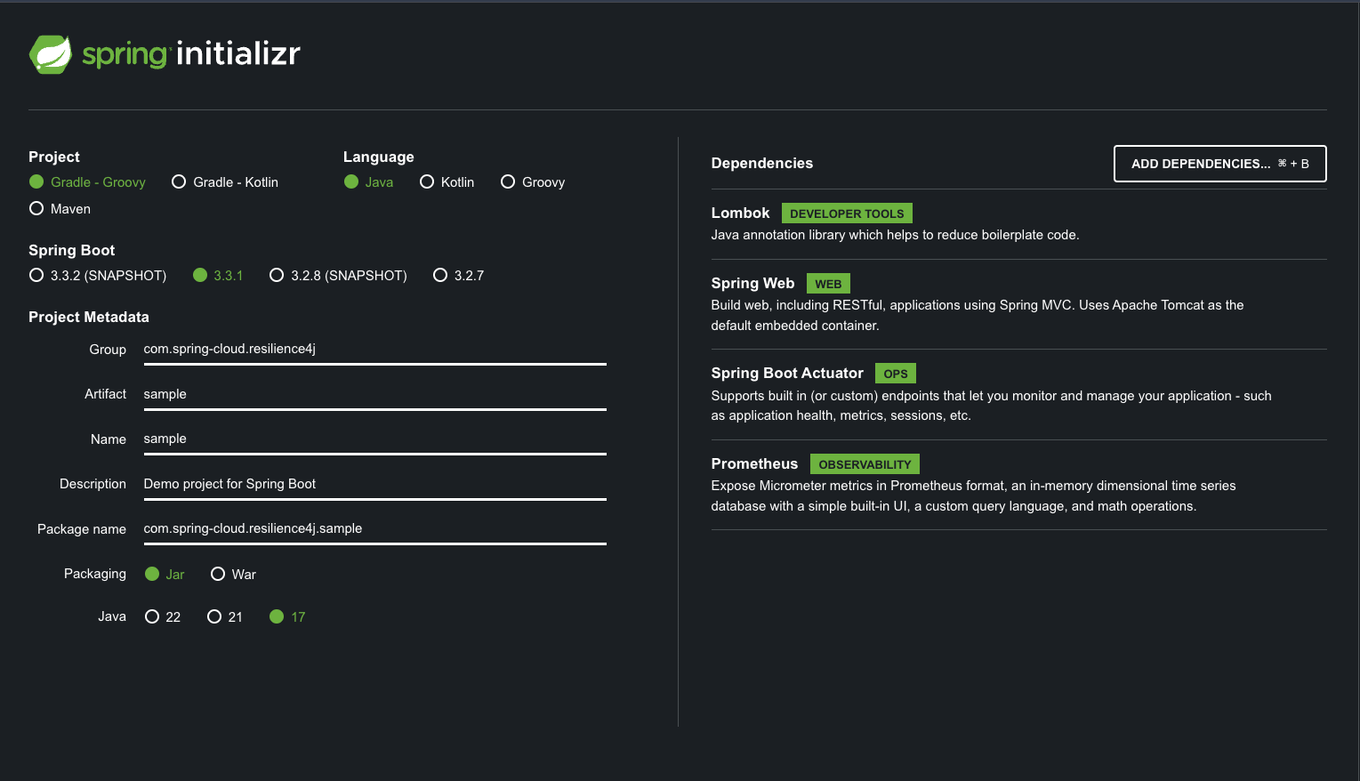
- start.spring.io 에 접속하여 프로젝트를 생성한다. (디펜던시는 이미지 참고) ❗ 주의 starter에서 `resilience4j` 디펜던시를 추가하지 않는다. starter 에서 추가하면 “org.springframework.cloud:spring-cloud-starter-circuitbreaker-resilience4j”가 추가된다. 이는 추상화 계층을 통해 Resilience4j를 사용하는데 우리는 직접 resilience4j를 사용하기 위해 build.gradle에 “io.github.resilience4j:resilience4j-spring-boot3:2.2.0”를 추가한다.
-
build.gradle의 dependencies에 다음을 추가한다. (아래 코드는 완성코드)
dependencies { implementation 'io.github.resilience4j:resilience4j-spring-boot3:2.2.0' implementation 'org.springframework.boot:spring-boot-starter-aop' implementation 'org.springframework.boot:spring-boot-starter-actuator' implementation 'org.springframework.boot:spring-boot-starter-web' compileOnly 'org.projectlombok:lombok' runtimeOnly 'io.micrometer:micrometer-registry-prometheus' annotationProcessor 'org.projectlombok:lombok' testImplementation 'org.springframework.boot:spring-boot-starter-test' testRuntimeOnly 'org.junit.platform:junit-platform-launcher' } tasks.named('test'){ useJUnitPlatform() } -
java/com/spring_cloud/resilience4j/sample/products/Product.java
import lombok.AllArgsConstructor; import lombok.Data; import lombok.NoArgsConstructor; @Data @AllArgsConstructor @NoArgsConstructor public class Product { private String id; private String title; } -
java/com/spring_cloud/resilience4j/sample/products/ProductController.java
import lombok.RequiredArgsConstructor; import org.springframework.web.bind.annotation.GetMapping; import org.springframework.web.bind.annotation.PathVariable; import org.springframework.web.bind.annotation.RestController; @RestController @RequiredArgsConstructor public class ProductController { private final ProductService productService; @GetMapping("/product/{id}") public Product getProduct(@PathVariable("id") String id) { return productService.getProductDetails(id); } } -
java/com/spring_cloud/resilience4j/sample/products/ProductService.java
import org.slf4j.Logger; import org.slf4j.LoggerFactory; import org.springframework.stereotype.Service; import io.github.resilience4j.circuitbreaker.CircuitBreakerRegistry; import io.github.resilience4j.circuitbreaker.annotation.CircuitBreaker; import jakarta.annotation.PostConstruct; import lombok.RequiredArgsConstructor; @Service @RequiredArgsConstructor public class ProductService { private final Logger log = LoggerFactory.getLogger(getClass()); private final CircuitBreakerRegistry circuitBreakerRegistry; @PostConstruct public void registerEventListener() { circuitBreakerRegistry.circuitBreaker("productService").getEventPublisher() .onStateTransition(event -> log.info("#######CircuitBreaker State Transition: {}", event)) // 상태 전환 이벤트 리스너 .onFailureRateExceeded(event -> log.info("#######CircuitBreaker Failure Rate Exceeded: {}", event)) // 실패율 초과 이벤트 리스너 .onCallNotPermitted(event -> log.info("#######CircuitBreaker Call Not Permitted: {}", event)) // 호출 차단 이벤트 리스너 .onError(event -> log.info("#######CircuitBreaker Error: {}", event)); // 오류 발생 이벤트 리스너 } @CircuitBreaker(name = "productService", fallbackMethod = "fallbackGetProductDetails") public Product getProductDetails(String productId) { log.info("###Fetching product details for productId: {}", productId); if ("111".equals(productId)) { log.warn("###Received empty body for productId: {}", productId); throw new RuntimeException("Empty response body"); } return new Product( productId, "Sample Product" ); } public Product fallbackGetProductDetails(String productId, Throwable t) { log.error("####Fallback triggered for productId: {} due to: {}", productId, t.getMessage()); return new Product( productId, "Fallback Product" ); } // 이벤트 설명 표 // +---------------------------+-------------------------------------------------+--------------------------------------------+ // | 이벤트 | 설명 | 로그 출력 | // +---------------------------+-------------------------------------------------+--------------------------------------------+ // | 상태 전환 (Closed -> Open) | 연속된 실패로 인해 서킷 브레이커가 오픈 상태로 전환되면 발생 | CircuitBreaker State Transition: ... | // | 실패율 초과 | 설정된 실패율 임계치를 초과하면 발생 | CircuitBreaker Failure Rate Exceeded: ... | // | 호출 차단 | 서킷 브레이커가 오픈 상태일 때 호출이 차단되면 발생 | CircuitBreaker Call Not Permitted: ... | // | 오류 발생 | 서킷 브레이커 내부에서 호출이 실패하면 발생 | CircuitBreaker Error: ... | // +---------------------------+-------------------------------------------------+--------------------------------------------+ // +------------------------------------------+-------------------------------------------+-----------------------------------------------------------------+ // | 이벤트 | 설명 | 로그 출력 | // +------------------------------------------+-------------------------------------------+-----------------------------------------------------------------+ // | 메서드 호출 | 제품 정보를 얻기 위해 메서드를 호출 | ###Fetching product details for productId: ... | // | (성공 시) 서킷 브레이커 내부에서 호출 성공 | 메서드 호출이 성공하여 정상적인 응답을 반환 | | // | (실패 시) 서킷 브레이커 내부에서 호출 실패 | 메서드 호출이 실패하여 예외가 발생 | #######CircuitBreaker Error: ... | // | (실패 시) 실패 횟수 증가 | 서킷 브레이커가 실패 횟수를 증가시킴 | | // | (실패율 초과 시) 실패율 초과 | 설정된 실패율 임계치를 초과하면 발생 | #######CircuitBreaker Failure Rate Exceeded: ... | // | (실패율 초과 시) 상태 전환 (Closed -> Open) | 연속된 실패로 인해 서킷 브레이커가 오픈 상태로 전환됨 | #######CircuitBreaker State Transition: Closed -> Open at ... | // | (오픈 상태 시) 호출 차단 | 서킷 브레이커가 오픈 상태일 때 호출이 차단됨 | #######CircuitBreaker Call Not Permitted: ... | // | (오픈 상태 시) 폴백 메서드 호출 | 메서드 호출이 차단될 경우 폴백 메서드 호출 | ####Fallback triggered for productId: ... due to: ... | // +------------------------------------------+-------------------------------------------+-----------------------------------------------------------------+ } -
resources/application.yml
spring:
  application:
    name: sample

server:
  port: 19090

resilience4j:
  circuitbreaker:
    configs:
      default:  # 기본 구성 이름
        registerHealthIndicator: true  # 애플리케이션의 헬스 체크에 서킷 브레이커 상태를 추가하여 모니터링 가능
        # 서킷 브레이커가 동작할 때 사용할 슬라이딩 윈도우의 타입을 설정
        # COUNT_BASED: 마지막 N번의 호출 결과를 기반으로 상태를 결정
        # TIME_BASED: 마지막 N초 동안의 호출 결과를 기반으로 상태를 결정
        slidingWindowType: COUNT_BASED  # 슬라이딩 윈도우의 타입을 호출 수 기반(COUNT_BASED)으로 설정
        # 슬라이딩 윈도우의 크기를 설정
        # COUNT_BASED일 경우: 최근 N번의 호출을 저장
        # TIME_BASED일 경우: 최근 N초 동안의 호출을 저장
        slidingWindowSize: 5  # 슬라이딩 윈도우의 크기를 5번의 호출로 설정
        minimumNumberOfCalls: 5  # 서킷 브레이커가 동작하기 위해 필요한 최소한의 호출 수를 5로 설정
        slowCallRateThreshold: 100  # 느린 호출의 비율이 이 임계값(100%)을 초과하면 서킷 브레이커가 동작
        slowCallDurationThreshold: 60000  # 느린 호출의 기준 시간(밀리초)으로, 60초 이상 걸리면 느린 호출로 간주
        failureRateThreshold: 50  # 실패율이 이 임계값(50%)을 초과하면 서킷 브레이커가 동작
        permittedNumberOfCallsInHalfOpenState: 3  # 서킷 브레이커가 Half-open 상태에서 허용하는 최대 호출 수를 3으로 설정
        # 서킷 브레이커가 Open 상태에서 Half-open 상태로 전환되기 전에 기다리는 시간
        waitDurationInOpenState: 20s  # Open 상태에서 Half-open 상태로 전환되기 전에 대기하는 시간을 20초로 설정

management:
  endpoints:
    web:
      exposure:
        include: prometheus
  prometheus:
    metrics:
      export:
        enabled: true
Run
-
http://localhost:19090/products/11를 3번 호출한다.
-
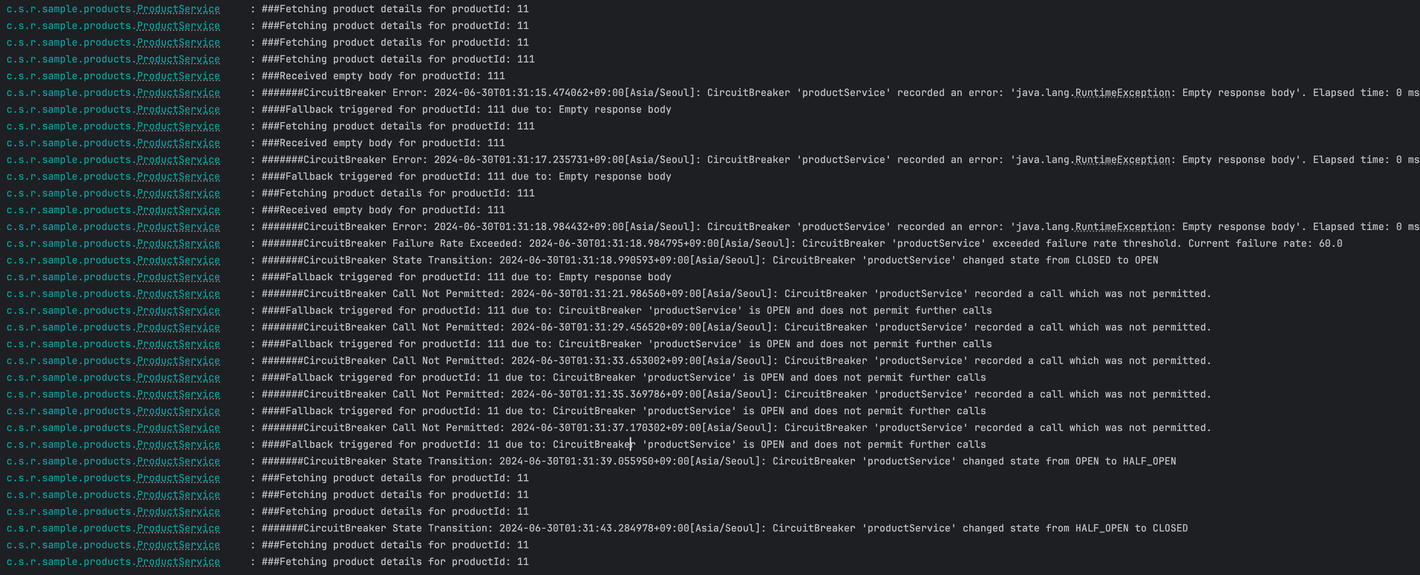
http://localhost:19090/products/111을 여러번 호출 하면서 서킷브레이커의 상태가 변경되는것을 확인한다.
-
또한 서킷브레이커가 Open 상태가 되면
getProductDetails함수를 타지않고 바로fallbackGetProductDetails로 호출 되는것을 확인 할 수 있다.

설명과 실습한 내용을 정말 잘 정리해주셨습니다 👍🏻