이전글에서 JSONDecoder와 MockData에 대해 알아보았는데 커뮤니티 예제를 통해 실습하려고한다.
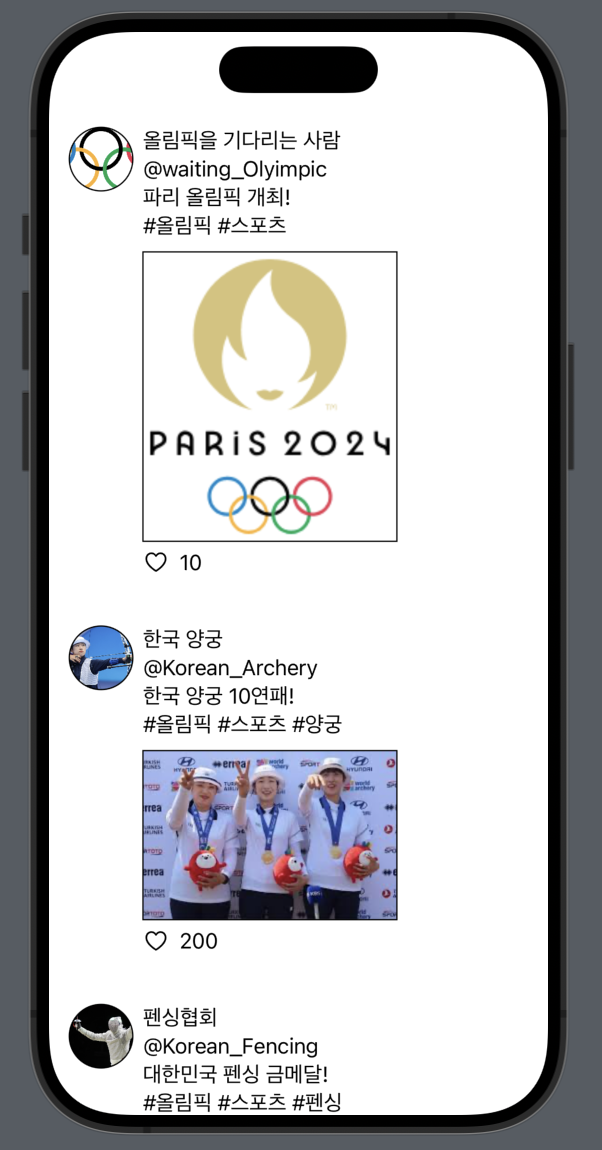
이 화면을 구성하는 데이터들은 모두 MockData이며 JSONDecoder로 파싱한것이다.
실습하기
Model파일, Json파일, Parser파일, Manager파일, View파일로 구성한다.
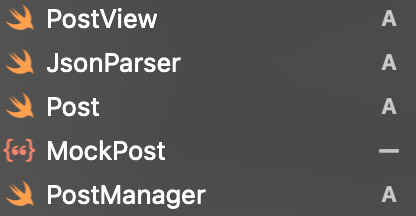
1. 모델 생성하기
Post 파일
import Foundation

struct Post: Codable {
    var id : Int
    var userId: String
    var userName: String
    var userImage : String
    var title: String
    var tag: String
    var postImage : String
    var heart: Int
}
Codable은 인코딩과 디코딩을 간편하게 하게 해주는 Protocol인데
조금있다 JSONDecoder를 다룰때 같이 볼거니 일단 넘어가자
2. JSON파일 생성하기
MockPost 파일
[
    {
        "id": 1,
        "userName": "올림픽을 기다리는 사람",
        "userId": "@waiting_Olyimpic",
        "userImage" : "user1",
        "postImage": "post1",
        "title": "파리 올림픽 개최!",
        "tag" : "#올림픽 #스포츠",
        "heart": 10
    },
    {
        "id": 2,
        "userName": "한국 양궁",
        "userId": "@Korean_Archery",
        "userImage" : "user2",
        "postImage": "post2",
        "title": "한국 양궁 10연패!",
        "tag" : "#올림픽 #스포츠 #양궁",
        "heart": 200
    },
    {
        "id": 3,
        "userName": "펜싱협회",
        "userId": "@Korean_Fencing",
        "userImage" : "user3",
        "postImage": "post3",
        "title": "대한민국 펜싱 금메달!",
        "tag" : "#올림픽 #스포츠 #펜싱",
        "heart": 50
    },
]
임의로 만들어낸 JSON형태의 MockData이다.
3. Parser 생성하기
JsonParser 파일
import Foundation

class JsonParser {
    static func parse<T: Codable>(fileName: String) -> T? {
        guard let path = Bundle.main.path(forResource: fileName, ofType: "json") else {
            return nil
        }

        do {
            let jsonData = try Data(contentsOf: URL(fileURLWithPath: path))
            let decoder = JSONDecoder()

            let decodedObject = try decoder.decode(T.self, from: jsonData)
            return decodedObject

        } catch {
            print("JSON 파싱 에러: \(error)")
            return nil
        }
    }
}
코드가 복잡해 보이지만 쫄거 없다.
일단 이 코드부터 보자
이 함수는 간단히 말해서 파일명을 인자로 받아서 파싱하겠다는 메서드다.
static func parse<T: Codable>(fileName: String) -> T?- 제네릭을 사용하는 이유
static func parsePost(fileName: String) -> Post?
static func parseUser(fileName: String) -> User?
이와 같이 여러 모델을 반환할려면 여러개의 함수가 필요하기 때문에 비효율적이라 제네릭함수를 사용해준다.
- <T: Codable>과 T?
<T: Codable>을 요구함으로써, 함수는 Codable프로토콜을 준수하는 타입에 대해서만 파싱을하고, 아닌경우에는 하지않는다. Codable은 밑에서 다시 설명할것이다.
그 다음 코드를 보자
 guard let path = Bundle.main.path(forResource: fileName, ofType: "json") else {
            return nil
}- guard를 통해 nil값이 나올때를 대비해 방어해주고,
- Bundle.main.path()를 통해 파일이름과 파일타입을 인자로 받아 파일의 경로값(String)을 알아낸다.
다음 코드들을 보자
let jsonData = try Data(contentsOf: URL(fileURLWithPath: path))
            let decoder = JSONDecoder()

            let decodedObject = try decoder.decode(T.self, from: jsonData)
return decodedObject- URL(fileURLWithPath: )를 통해 파일의 경로값을 URL타입의 객체로 바꿔주고, Data(contentsOf: )를 통해 URL타입의 객체를 Data타입의 객체로 바꿔준다.
- 이제 대망의 JSONDecoder 클래스를 활용할 것이다.
JSONDecoder의 메서드인
decode<T>(_:T.type, from: Data)이 메서드의 첫번째 인자에는 디코딩하고자 하는 모델의 타입을, 두번째 인자에는 JSON데이터를 Data타입으로 넣어주면 알아서 디코딩을 해준다.
그리고 이 메서드의 원형에는
throws -> T where T : Decodable가 붙기때문에 T가 Decodable을 준수해야한다. 그렇기 때문에 처음 모델을 생성할때 Codable이라는 프로토콜을 채택한 것이고, parse함수를 생성할때 Codable프로토콜을 채택한 것이다.
만약 Codable 프로토콜을 채택하지 않는다면 오류가 날 것이다.
또한 디코딩의 실패할수있으니 try를 써준다
4. Manager 생성하기
-PostManager파일
import Foundation

final class PostManager {
    static let shared = PostManager()

    private init() {}
}

extension PostManager {
    func getPostMock() -> [Post] {
        return JsonParser.parse(fileName: "MockPost")!
    }
}
이 코드를 이해하기 위해서는 '싱글톤 패턴'을 이해해야 하지만
여기서는 간단히 설명하려고 한다.(왜냐면 나도 이해못했다.)
final class PostManager {
    static let shared = PostManager()

    private init() {}
}- PostManager 클래스를 만들고 PostManager의 유일한 인스턴스를 생성한다. 또한 외부에서 직접 인스턴스를 생성할 수 없도록 private init() 사용한다.
extension PostManager {
    func getPostMock() -> [Post] {
        return JsonParser.parse(fileName: "MockPost")!
    }
}- 기존 PostManager 클래스에 extension을 통해 JSON 파일을 파싱하고 데이터를 반환하는 기능을 추가한다.
5. View 구성하기
-PostView 파일
import SwiftUI

struct PostView: View {

    @State private var posts: [Post] = []

    var body: some View {
        ScrollView(){
            VStack(){
                ForEach(posts, id: \.id) { post in
                    HStack(alignment: .top){
                        Image(post.userImage)
                            .resizable()
                            .aspectRatio(contentMode: .fill)
                            .clipShape(Circle())
                            .overlay(Circle().stroke())
                            .frame(width: 50, height: 50)

                        VStack(alignment : .leading){
                            Text(post.userName)
                            Text(post.userId)
                            Text(post.title)
                            Text(post.tag)
                            Image(post.postImage)
                                .resizable()
                                .aspectRatio(contentMode: .fill)
                                .overlay(Rectangle().stroke())
                                .frame(width: 200)

                            HStack(){
                                Image(systemName :
                                        "heart")
                                Text("\(post.heart)")
                            }
                        }
                        Spacer()

                    }

                }.padding()

            }}.onAppear {
                posts = PostManager.shared.getPostMock()
            }
    }
}
#Preview {
    PostView()
}
View를 구성하는 코드라 길지만 여기서 핵심적인 부분만 보겠다.
@State private var posts: [Post] = []- @State를 통해 posts라는 Post모델타입의 빈 배열을 생성한다.
ForEach(posts, id: \.id) { post in }- ForEach()를 통해 posts배열을 반복적으로 꺼낸다.
- 그리고 id: \ .id 로 각 항목의 고유한 식별자를 제공해준다.
.onAppear {
                posts = PostManager.shared.getPostMock()
}- .onAppear 를 통해 view가 나타날때 posts배열에 파싱된 MockData를 가져온다.
Text(post.userName)
Text(post.userId)- ForEach에서 post에 받았기때문에 post.userName 이런식으로 데이터를 표현하면된다.
마치며
이렇게 커뮤니티 예제로 JSONDecoder를 활용하여 MockData를 파싱하고 View구성을 해보았는데 생각보다 알아야 할 내용이 많다.
각각의 설명이 부족한 부분도 있지만 이 글에서는 어떻게 MockData를 파싱하고 활용하는지 전반적인 과정을 학습할 수 있을것이다.
🔻🔻🔻참고했어요🔻🔻🔻