Lottie
-> JSON 형식을 애니메이션으로 렌더링 해주는 라이브러리
SwiftUI를 사용하면서 디자이너가 작업한 애니메이션 에셋을 넣고 싶을때 'Lottie' 라이브러리를 사용하면 손쉽게 적용할 수 있다.
간단하게 예제를 살펴보자면
1. 패키지 설치
[File] -> [Add Package Dependencies] 에 들어가서
' https://github.com/airbnb/lottie-ios ' url을 검색하고 Add Package 버튼을 누른다.
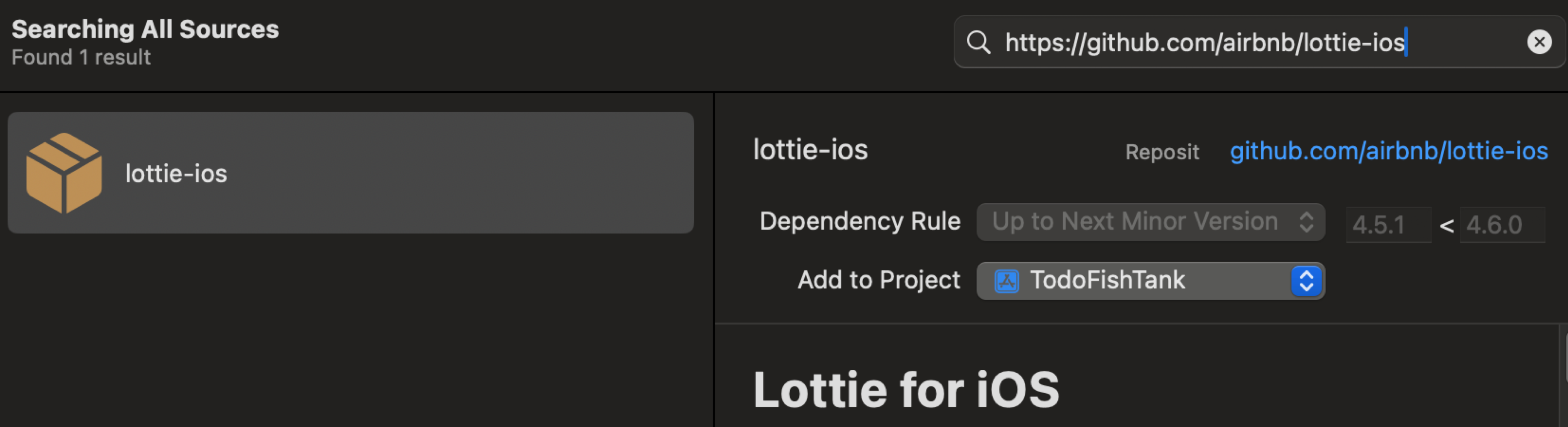
2. 테스트용 로티파일 다운
https://lottiefiles.com/featured-free-animations 에 들어가서 무료로 로티파일을 다운받고, Xcode안에 복사해준다.
3. LottieView 생성
자유롭게 사용할 LottieView를 만들어준다.
import SwiftUI
import Lottie

struct LottieView: UIViewRepresentable {

    var animationFileName: String
    let loopMode: LottieLoopMode

    func updateUIView(_ uiView: UIViewType, context: Context) {}

    func makeUIView(context: Context) -> Lottie.LottieAnimationView {
        let animationView = LottieAnimationView(name: animationFileName)
        animationView.loopMode = loopMode
        animationView.play()
        animationView.contentMode = .scaleAspectFill
        return animationView
    }
}
4. LottieView 적용
animationFileName에는 내가 적용해보고 싶은 json파일 이름을 넣으면 된다. (나는 다운받은 로티파일을 'test'로 이름 변경했다.)
import SwiftUI

struct LottieEx: View {
    var body: some View {
        VStack {
            LottieView(animationFileName: "test", loopMode: .loop)
                .frame(width: 200, height: 200)
        }
    }
}
그러면 잘 애니메이션이 잘 적용되는 모습을 볼 수 있을 것이다.
그런데 나는 오류가 발생했는데, no such file of directory: /Lottie-Dynamic.framework/Lottie-Dynamic 이라는 오류가 발생해서 애를 많이 먹었다. 이 오류는 다음 글에서 해결해보자.