애플 로그인은 다른 OAuth2.0과는 다르게 매우 복잡합니다. 하지만 앱스토어에 OAuth2.0를 포함해서 앱을 출시하려면 애플 로그인이 꼭 필요합니다. 그렇기 때문에 저희도 애플 로그인을 도입하기로 했습니다.
또한 OAuth2만으로는 서비스 이용에 필요한 정보를 모두 받을 수 없기 때문에 OAuth로 로그인후에 자체 회원가입을 통해 필요한 정보를 받을 수 있게 하였습니다.
이번 구현에서는 애플 SDK를 이용한 인증 흐름을 전제로 개발하였습니다.
아래는 제가 구현한 애플 로그인의 흐름입니다.
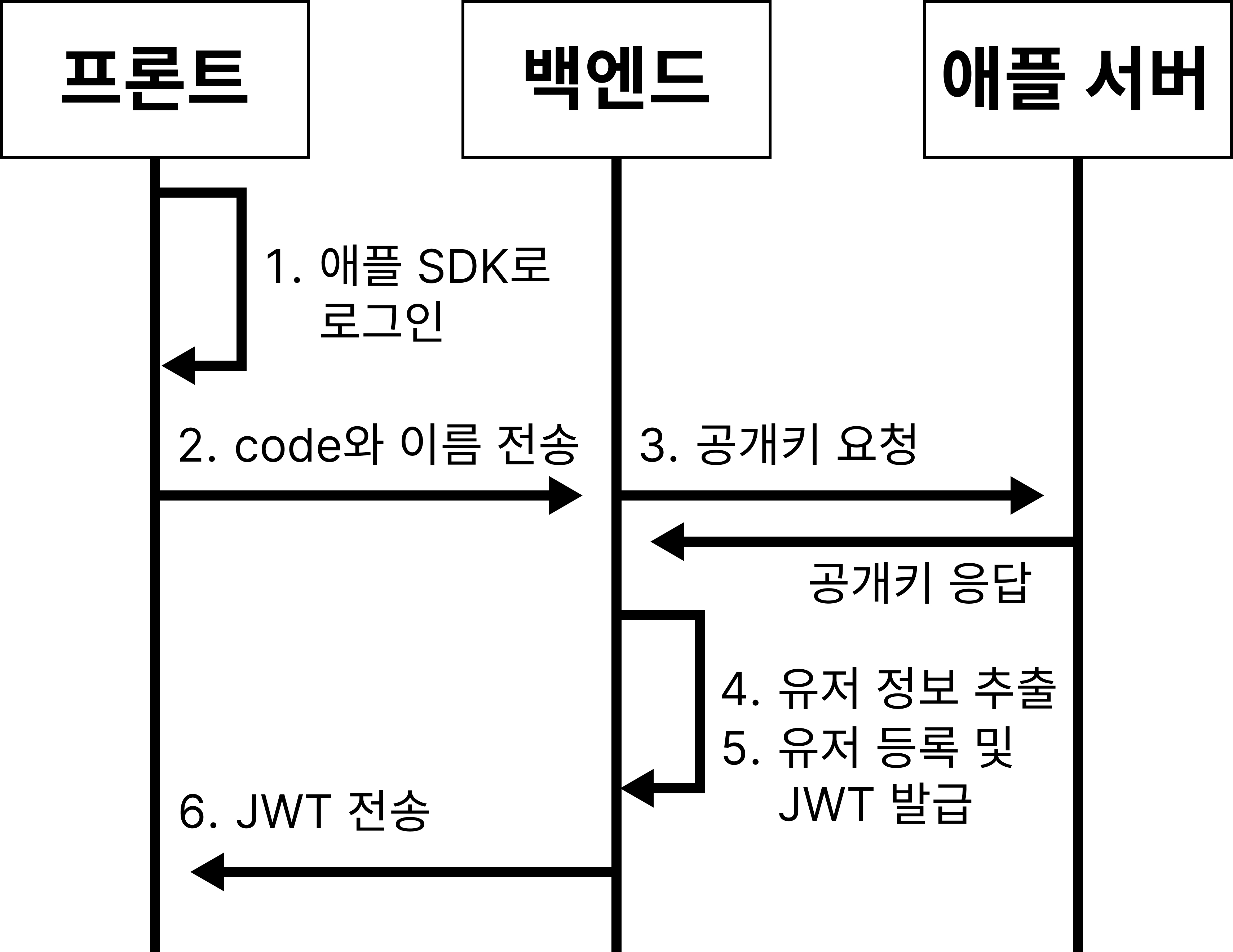
- 프론트가 애플 SDK를 통해 로그인
- 백엔드로 authorization code와 유저 이름 전송
- 백엔드가 애플에게 공개키 요청
- 공개키로 유저 정보 추출
- 유저 등록 및 JWT 발급
- 프론트로 JWT 전송
개발환경
JAVA: 25
SpringBoot: 3.5.6
프로젝트 구조
com.oauth2.project
 ├ domain
 |  ├ auth
 |  |  ├ oauth2
 |  |  |  ├ controller
 |  |  |  |  └ Oauth2Controller.java
 |  |  |  ├ dto
 |  |  |  |  ├ Oauth2ReqeuestDto.java
 |  |  |  |  └ Oauth2ResponseDto.java
 |  |  |  └  service
 |  |  |      └ Oauth2Service.java
 |  |  └ ...
 |  └ ...
 |
 └global
   ├ auth
   |  ├ apple
   |  |  ├ dto
   |  |  |  ├ key
   |  |  |  |  ├ ApplePublicKeyDto.java
   |  |  |  |  └ ApplePublicKeyResponseDto.java
   |  |  |  └ token
   |  |  |     └ AppleTokenResponseDto.java
   |  |  ├ feign
   |  |  |  └ AppleAuthClient.java
   |  |  └ util
   |  |  |  └ AppleKeyGenerator.java
   |  ├ jwt
   |  |  └ JwtProvider.java
   |  └...
   ├ config
   |  ├ WebClientConfig.java
   |  ├ WebSecurityConfig.java
   |  └ ...
   ├ exception
   |  ├ CustomException.java
   |  └ ...
   └ ...
프로젝트 환경 설정
apple.auth.base-url=https://appleid.apple.com
apple.auth.token-uri=/auth/token
apple.auth.public-key-uri=/auth/keys
apple.auth.authorize=/auth/authorize
apple.client-id=애플-클라이언트-아이디
apple.team-id=애플-팀-아이디
apple.key.id=애플-키-아이디
apple.key.path=file:/your/key/path/AuthKey_애플-키-아이디.p8apple.auth.base-url는 애플에게 API요청을 넣을 때 사용하는 API의 base-URL입니다.apple.auth.token-uri,apple.auth.public-key-uri,apple.auth.authorize는 애플 API의 엔드포인트입니다.apple.client-id,apple.team-id,apple.key.id는 애플에서 애플 로그인 진행시에 개발자를 식별할 수 있게하는 값들입니다.apple.key.path는 애플 로그인 과정에서 개인키를 생성할 때 사용하는 PEM파일의 위치입니다.
apple.client-id값은Identifiers>Services IDs선택시 나오는 서비스 아이디의Identifier를 입력하시면 됩니다.
apple.team-id값은Identifiers>App IDs선택시 나오는 앱 아이디의App ID Prefix를 입력하시면 됩니다.
apple.key.id값은Keys에 가면 나오는 키의KEY ID를 입력하시면 됩니다.
(모든 값은 https://developer.apple.com/account/resources/identifiers/list 에서 찾으실 수 있습니다.)
build.gradle 설정
//JWT
implementation 'io.jsonwebtoken:jjwt-api:0.12.7'
runtimeOnly 'io.jsonwebtoken:jjwt-impl:0.12.7'
runtimeOnly 'io.jsonwebtoken:jjwt-jackson:0.12.7'
//WebClient
implementation 'org.springframework.boot:spring-boot-starter-webflux'
//BouncyCastle (for PEM file)
implementation 'org.bouncycastle:bcpkix-jdk15on:1.70'
implementation 'org.bouncycastle:bcprov-jdk15on:1.70'
애플 로그인 연동 및 보안 검증 로직 구현을 위해 다음 라이브러리들을 도입합니다.
JJWT: 애플 서버에서 발행한identity_token의 유효성을 검증하고, 내부의 페이로드를 안전하게 파싱 및 추출하기 위해 사용합니다.WebClient: 애플의 공개키를 조회하기 위해서 사용합니다.BouncyCastle: 애플에서 제공하는 .p8 형식의 PEM 파일을 읽어오기 위해서 사용합니다.
구현
Oauth2Controller.java
OAuth2를 요청하기 위한 컨트롤러입니다.
import com.oauth2.project.domain.auth.oauth2.dto.Oauth2RequestDto;
import com.oauth2.project.domain.auth.oauth2.dto.Oauth2ResponseDto;
import com.oauth2.project.domain.auth.oauth2.service.Oauth2Service;

import lombok.RequiredArgsConstructor;
import org.springframework.http.ResponseEntity;
import org.springframework.web.bind.annotation.PostMapping;
import org.springframework.web.bind.annotation.RequestBody;
import org.springframework.web.bind.annotation.RestController;

@RestController
@RequiredArgsConstructor
public class Oauth2Controller {

   private final Oauth2Service oauth2Service;

   //프론트에서 authorization code 받아서 oauth2완료하는 API
   @PostMapping("/api/v1/auth/oauth2")
   public ResponseEntity<Oauth2ResponseDto> oauth2Login(
           @RequestBody final Oauth2RequestDto oauth2RequestDto
   ){
       return ResponseEntity.ok().body(oauth2Service.processOauth2(oauth2RequestDto));
   }
}
각종 OAuth2의 시작점이 되는 컨트롤러입니다.
Oauth2RequestDto.java
OAuth2를 요청받을 때 받아야하는 RequestBody의 형식입니다.
import lombok.Getter;

@Getter
public class Oauth2RequestDto {
   private String code;
   private String provider;
   private String name;
}
프론트에서 OAuth2 로그인 요청을 보낼 때 보내야하는 Request Body의 정보들이 담긴 DTO입니다.
code는 프론트에서 SDK를 통해 로그인하고 받은 authorization code이고, provider는 apple이나 google 같이 OAuth2를 제공하는 플랫폼의 아이디를 적습니다.
name은 provider가 제공해주는 유저의 이름을 적습니다. 구글은 백엔드에서 유저의 이름을 조회할 수 있지만, 애플의 경우에는 최초 로그인시에 authorization code와 함께 단 한번만 주기 때문에 프론트에서 받아야 합니다.
Oauth2ResponseDto.java
OAuth2가 끝나고 프론트로 보낼 ResponseBody의 형식입니다.
import com.oauth2.project.domain.user.entity.Role;

import lombok.Builder;
import lombok.Getter;

@Getter
public class Oauth2ResponseDto {
   private final Role role;
   private final String accessToken;
   private final String tokenType;
   private final Long exprTime;
   private final String refreshToken;

   @Builder
   public Oauth2ResponseDto(
           final Role role,
           final String accessToken,
           final String tokenType,
           final Long exprTime,
           final String refreshToken
   ){
       this.role = role;
       this.accessToken = accessToken;
       this.tokenType = tokenType;
       this.exprTime = exprTime;
       this.refreshToken = refreshToken;
   }
}
OAuth2가 완료되면 프론트로 보내지는 정보들입니다.
role에는 ADMIN, USER, 등 유저의 상태가 적혀있습니다.
accessToken, tokenType, exprTime, refreshToekn에는 발급된 JWT의 정보가 적혀있습니다.
Oauth2Service.java
OAuth2가 진행되는 서비스입니다.
code와provider를 검사하고 provider에 맞는 메서드를 호출합니다.
그 이후에 provider에 맞는 처리를 한 후 유저의 정보를 DB에 upsert합니다.
import com.oauth2.project.domain.auth.oauth2.dto.Oauth2RequestDto;
import com.oauth2.project.domain.auth.oauth2.dto.Oauth2ResponseDto;
import com.oauth2.project.domain.user.dto.oauth.UserOauth2AccountsRequestDto;
import com.oauth2.project.domain.user.dto.oauth.UserOauth2AccountsResponseDto;
import com.oauth2.project.domain.user.entity.Role;
import com.oauth2.project.domain.user.service.oauth.UserOauth2Service;
import com.oauth2.project.global.auth.apple.dto.key.ApplePublicKeyResponseDto;
import com.oauth2.project.global.auth.apple.dto.token.AppleTokenResponseDto;
import com.oauth2.project.global.auth.apple.feign.AppleAuthClient;
import com.oauth2.project.global.auth.apple.util.AppleKeyGenerator;
import com.oauth2.project.global.auth.jwt.JwtProvider;
import com.oauth2.project.global.exception.CustomException;
import com.oauth2.project.global.exception.constants.ExceptionCode;

import io.jsonwebtoken.Claims;
import lombok.RequiredArgsConstructor;
import org.springframework.beans.factory.annotation.Value;
import org.springframework.stereotype.Service;

import java.security.PublicKey;
import java.util.Map;

@Service
@RequiredArgsConstructor
public class Oauth2Service {

    private final UserOauth2Service userOauth2Service;
    private final JwtProvider jwtProvider;
    private final AppleAuthClient appleAuthClient;
    private final AppleKeyGenerator appleKeyGenerator;

    /**
     * OAuth2를 진행하는 메서드
     * 프론트에서 code를 받아와서 OAuth2를 진행한다.
     * 인증이 완료되면 JWT를 발급한다.
     * @param oauth2RequestDto code와 provider가 담긴 DTO
     * @return JWT
     */
    public Oauth2ResponseDto processOauth2(final Oauth2RequestDto oauth2RequestDto) {

        // 1) code와 provider 변수에 저장
        final String code = oauth2RequestDto.getCode();
        final String provider = oauth2RequestDto.getProvider();

        // 2) code 검사
        if(code == null || code.isEmpty()) {
            throw new CustomException(ExceptionCode.INVALID_REQUEST);
        }

        // 3) provider 검사
        if(provider == null || provider.isEmpty()) {
            throw new CustomException(ExceptionCode.INVALID_PROVIDER);
        }

        // 4) provider에 따라서 OAuth2 처리
        final UserOauth2AccountsResponseDto userOauth2AccountsResponseDto;
        if ("apple".equalsIgnoreCase(provider)) {
            userOauth2AccountsResponseDto = appleOauth2(code, oauth2RequestDto.getName());
        }

//다른 provider 추가시 여기에 작성
//        else if("google".equalsIgnoreCase(provider)) {
//
//        }

        else {
            throw new CustomException(ExceptionCode.INVALID_PROVIDER);
        }

        // 5) 유저 아이디와 role 변수에 저장
        final Long userId = userOauth2AccountsResponseDto.getUserId();
        final Role userRole = userOauth2AccountsResponseDto.getUserRole();

        // 6) 유저 아이디와 role로 JWT만들기
        final String accessToken = jwtProvider.creatAccessToken(userId, userRole);
        final String refreshToken = jwtProvider.creatRefreshToken(userId);

        return Oauth2ResponseDto.builder()
                .role(userRole)
                .accessToken(accessToken)
                .tokenType(jwtProvider.getTokenType())
                .exprTime(jwtProvider.getAccessTokenExpirationSeconds())
                .refreshToken(refreshToken)
                .build();
    }

    /**
     * 프론트에서 받은 code를 통해서 애플 OAuth2를 진행하는 메서드
     * UserOauth2Service.upsertOAuthUser 메서드를 통해서 유저 upsert를 진행함
     * @param code 프론트에서 받은 code
     * @param name 프론트에서 애플 인증하고 받은 이름
     * @return upsert된 유저의 정보가 담긴 DTO
     */
    private UserOauth2AccountsResponseDto appleOauth2(
            final String code,
            final String name
    ){
        // 1) idToken과 리프레시 토큰(탈퇴 용) 가져오기
        final AppleTokenResponseDto appleTokenResponseDto = appleAuthClient.requestToken(code);
        final String idToken = appleTokenResponseDto.getId_token();
        final String appleRefreshToken = appleTokenResponseDto.getRefresh_token();

        // 2) 헤더 추출
        final Map<String, String> headers = jwtProvider.getHeaders(idToken);

        // 3) 애플에 공개키 요청
        final ApplePublicKeyResponseDto applePublicKeyResponseDto = appleAuthClient.requestKeys();

        // 4) 키 조합
        final PublicKey publicKey = appleKeyGenerator.generatePublicKey(
                headers,
                applePublicKeyResponseDto
        );

        // 5) 애플 아이디와 이메일 가져오기
        final Claims claims = jwtProvider.getClaimsFromAppleToken(idToken, publicKey);
        final String accountId = claims.getSubject();
        final String email = claims.get("email", String.class);

        // 6) oauth2 정보 저장용 dto 생성
        final UserOauth2AccountsRequestDto userOauth2AccountsRequestDto = UserOauth2AccountsRequestDto.builder()
                .provider("apple")
                .providerUserId(accountId)
                .email(email)
                .name(name)
                .profileImage(null)
                .refreshToken(appleRefreshToken)
                .build();

        // 7) 신규 유저면 DB에 정보 저장하고 정보 조회, 기존 유저면 그냥 정보만 조회
        return userOauth2Service.upsertOAuthUser(userOauth2AccountsRequestDto);

    }
}
processOauth2 메서드에서는 필수값인 code와 provider를 검사하고 알맞는 메서드를 호출합니다.
appleOauth2 메서드에서는 애플 OAuth2를 아래와 같은 순서로 진행합니다.
- 프론트에서 받은
code를 통해서identity_token과 리프레시 토큰을 애플 서버에서 조회합니다.- 애플의 공개키 목록을 조회합니다.
identity_token의 헤더 안에 있는kid,alg,n,e값들을 통해서 공개키 목록에서 해당하는 키를 찾고 서명 검증용 공개키로 조합합니다.identity_token의 payload에 존재하는 유저의 아이디와 유저의 이메일을 공개키를 통해서 추출합니다.- OAuth2를 통해서 얻은 유저의 정보를 DB에 upsert합니다.
그리고 여기서 얻은 애플의 리프레시 토큰은 나중에 탈퇴처리를 위해서 꼭 DB에 저장해두셔야 합니다.
WebClientConfig.java
애플에 각종 요청을 넣기 위해서 사용하는 WebClient를 설정하는 config입니다.
import org.springframework.beans.factory.annotation.Value;
import org.springframework.context.annotation.Bean;
import org.springframework.context.annotation.Configuration;
import org.springframework.web.reactive.function.client.WebClient;

@Configuration
public class WebClientConfig {

    @Value("${apple.auth.base-url}")
    private String BASE_URL;

    @Bean
    public WebClient appleWebClient() {
        return WebClient.builder()
                .baseUrl(BASE_URL)
                .build();
    }
}
여기에서 애플 요청용 WebClient객체를 미리 만들어 놓습니다.
AppleAuthClient.java
위에서 만든 WebClient 객체를 이용해서 애플에 각종 요청을 넣는 클라이언트입니다.
import com.oauth2.project.domain.global.auth.apple.dto.key.ApplePublicKeyResponseDto;
import com.oauth2.project.domain.global.auth.apple.dto.token.AppleTokenResponseDto;
import com.oauth2.project.domain.global.auth.apple.util.AppleKeyGenerator;

import lombok.RequiredArgsConstructor;
import org.springframework.beans.factory.annotation.Value;
import org.springframework.http.MediaType;
import org.springframework.stereotype.Component;
import org.springframework.util.LinkedMultiValueMap;
import org.springframework.util.MultiValueMap;
import org.springframework.web.reactive.function.client.WebClient;

@Component
@RequiredArgsConstructor
public class AppleAuthClient {

    @Value("${apple.auth.public-key-uri}")
    private String APPLE_PUBLIC_KEY_URI;

    @Value("${apple.auth.token-uri}")
    private String APPLE_TOKEN_URI;

    @Value("${apple.client-id}")
    private String APPLE_CLIENT_ID;

    private final WebClient appleWebClient;
    private final AppleKeyGenerator appleKeyGenerator;

    // https://appleid.apple.com/auth/keys에 요청을 넣고 keys를 받아온다.
    public ApplePublicKeyResponseDto requestKeys() {
        return appleWebClient.get()
                .uri(APPLE_PUBLIC_KEY_URI)
                .retrieve()
                .bodyToMono(ApplePublicKeyResponseDto.class)
                .block();
    }

    // https://appleid.apple.com/auth/token에 요청을 넣고 토큰을 받아온다.
    public AppleTokenResponseDto requestToken(final String authorizationCode) {
        final MultiValueMap<String, String> formData = new LinkedMultiValueMap<>();
        formData.add("code", authorizationCode);
        formData.add("client_id", APPLE_CLIENT_ID);
        formData.add("client_secret", appleKeyGenerator.generateClientSecrete());
        formData.add("grant_type", "authorization_code");

        return appleWebClient.post()
                .uri(APPLE_TOKEN_URI)
                .contentType(MediaType.APPLICATION_FORM_URLENCODED)
                .bodyValue(formData)
                .retrieve()
                .bodyToMono(AppleTokenResponseDto.class)
                .block();
    }
}requestKeys메서드를 통해서 애플로부터 공개키 목록을 가져옵니다. 공개키 목록은 identity_token의 헤더에 존재하는 값들과 조합하여 공개키를 만드는데 사용됩니다.
requestToken메서드는 프론트에게 받은 code를 통해서 identity_token과 리프레시 토큰을 포함한 유저의 정보를 가져올 수 있게합니다.
ApplePublicKeyDto.java
애플에게 받는 공개키를 담기위한 DTO입니다.
import lombok.Getter;

@Getter
public class ApplePublicKeyDto {
    private String kty;
    private String kid;
    private String alg;
    private String n;
    private String e;
}
ApplePublicKeyResponseDto.java
애플에게 받는 공개키 목록을 담기위한 DTO입니다.
import com.oauth2.project.global.exception.CustomException;
import com.oauth2.project.global.exception.constants.ExceptionCode;

import lombok.Getter;

import java.util.List;

@Getter
public class ApplePublicKeyResponseDto {

    private final List<ApplePublicKeyDto> keys;

    public ApplePublicKeyResponseDto(List<ApplePublicKeyDto> keys) {
        this.keys = keys;
    }

    public ApplePublicKeyDto getMatchedKey(
            final String kid,
            final String alg
    ) {
        return keys.stream()
                .filter(key -> key.getKid().equals(kid) && key.getAlg().equals(alg))
                .findAny()
                .orElseThrow(() -> new CustomException(ExceptionCode.APPLE_AUTH_ERROR));
    }
}getMatchedKey메서드는 kid와 alg가 일치하는 공개키를 쉽게 찾게 하기 위한 메서드입니다.
AppleTokenResponseDto.java
프론트에서 받은 code를 통해서 조회한 유저의 정보를 담기위한 DTO입니다.
import lombok.Getter;

@Getter
public class AppleTokenResponseDto {
    private String access_token;
    private String expires_in;
    private String id_token;
    private String refresh_token;
    private String token_type;
    private String error;
}
AppleKeyGenerator.java
애플 로그인시에 사용되는 공개키와 개인키를 조합하는 파일입니다.
import com.oauth2.project.global.auth.apple.dto.key.ApplePublicKeyDto;
import com.oauth2.project.global.auth.apple.dto.key.ApplePublicKeyResponseDto;
import com.oauth2.project.global.exception.CustomException;
import com.oauth2.project.global.exception.constants.ExceptionCode;

import io.jsonwebtoken.Jwts;
import lombok.RequiredArgsConstructor;
import org.bouncycastle.asn1.pkcs.PrivateKeyInfo;
import org.bouncycastle.openssl.PEMParser;
import org.bouncycastle.openssl.jcajce.JcaPEMKeyConverter;
import org.springframework.beans.factory.annotation.Value;
import org.springframework.core.io.Resource;
import org.springframework.stereotype.Component;

import java.io.IOException;
import java.io.InputStreamReader;
import java.io.Reader;
import java.math.BigInteger;
import java.security.KeyFactory;
import java.security.NoSuchAlgorithmException;
import java.security.PrivateKey;
import java.security.PublicKey;
import java.security.spec.InvalidKeySpecException;
import java.security.spec.RSAPublicKeySpec;
import java.time.LocalDateTime;
import java.time.ZoneId;
import java.util.Base64;
import java.util.Date;
import java.util.Map;

@Component
@RequiredArgsConstructor
public class AppleKeyGenerator {

    @Value("${apple.key.id}")
    private String kid;

    @Value("${apple.team-id}")
    private String teamId;

    @Value("${apple.auth.base-url}")
    private String baseUrl;

    @Value("${apple.client-id}")
    private String clientId;

    @Value("${apple.key.path}")
    private Resource keyPath;

    /**
     * 애플 client secrete을 생성하는 메서드
     * @return JWT로 된 client secrete
     */
    public String generateClientSecrete(){
        final Date expirationDate = Date.from(LocalDateTime.now().plusDays(30).atZone(ZoneId.systemDefault()).toInstant());

        return Jwts.builder()
                .header()
                .add("kid", kid)
                .add("alg", "ES256")
                .and()
                .issuer(teamId)
                .issuedAt(new Date(System.currentTimeMillis()))
                .expiration(expirationDate)
                .audience()
                .add(baseUrl)
                .and()
                .subject(clientId)
                .signWith(getPrivateKey(), Jwts.SIG.ES256)
                .compact();
    }

    /**
     * 애플 공개키를 생성하는 메서드
     * @param tokenHeaders 프론트에서 받은 애플 idToken의 디코딩된 헤더
     * @param applePublicKeyResponseDto 애플한테 받은 공개 키들
     * @return 생성된 공개키
     */
    public PublicKey generatePublicKey(
            final Map<String, String> tokenHeaders,
            final ApplePublicKeyResponseDto applePublicKeyResponseDto
    ){

        // 1) 애플에서 받은 공개키 keys 중에서 클라이언트한테 받은 key중에 겹치는거 찾기
        final ApplePublicKeyDto publicKey = applePublicKeyResponseDto.getMatchedKey(
                tokenHeaders.get("kid"),
                tokenHeaders.get("alg")
        );

        // 2) n, e 디코딩
        return getPublicKey(publicKey);
    }

    /**
     * 지정된 위치에 저장된 애플 인증키 PEM 파일을 읽어와서
     * PrivateKey를 생성하는 메서드
     * @return 애플 PrivateKey
     */
    private PrivateKey getPrivateKey(){
        try (final Reader reader = new InputStreamReader(keyPath.getInputStream())){

            PEMParser pemParser = new PEMParser(reader);
            JcaPEMKeyConverter converter = new JcaPEMKeyConverter();
            PrivateKeyInfo keyInfo = (PrivateKeyInfo) pemParser.readObject();

            return converter.getPrivateKey(keyInfo);

        } catch (IOException ex){
            throw new CustomException(ExceptionCode.INTERNAL_SERVER_ERROR);
        }
    }

    /**
     * 공개 키를 작성하는 메서드
     * @param applePublicKeyDto 애플한테 받은 공개 키와 일치하는 키
     * @return 공개 키
     */
    private PublicKey getPublicKey(final ApplePublicKeyDto applePublicKeyDto){

        // 1) n, e Base64 디코딩
        final byte[] nBytes = Base64.getUrlDecoder().decode(applePublicKeyDto.getN());
        final byte[] eBytes = Base64.getUrlDecoder().decode(applePublicKeyDto.getE());

        // 2) BigInteger로 변환 및 RSA 공개 키 스펙 생성
        final RSAPublicKeySpec publicKeySpec = new RSAPublicKeySpec(
                new BigInteger(1, nBytes),
                new BigInteger(1, eBytes)
        );

        // 3) 실제 PublicKey 생성
        final KeyFactory keyFactory;
        try {
            keyFactory = KeyFactory.getInstance(applePublicKeyDto.getKty());

            return keyFactory.generatePublic(publicKeySpec);

        } catch (NoSuchAlgorithmException | InvalidKeySpecException ex) {
            throw new CustomException(ExceptionCode.APPLE_AUTH_ERROR);
        }
    }
}
generateClientSecrete 메서드는 code를 통해서 identity_token를 포함한 유저의 정보를 가져올 때 사용하는 client_secrete을 만드는 메서드입니다. 이때 client_secrete의 서명을 애플의 인증키로 해야합니다. 해당 키는 getPrivateKey메서드를 통해 생성됩니다.
generatePublicKey 메서드는 애플의 공개키 목록과 identity_token의 헤더에 들어있던 kid, alg, n,e를 통해서 공개키를 조합하는 메서드입니다. n, e를 통한 실제 공개키 생성은 getPublicKey메서드에서 일어납니다.
getPrivateKey 메서드는 애플 인증키가 담긴 PEM 파일을 읽어와서 client_secrete 서명용 키를 생성합니다.
getPublicKey 메서드는 주어진 n, e를 통해서 공개키를 생성합니다.
JwtProvider.java
애플 로그인 과정 중에 토큰에서 정보를 추출할 때 사용합니다.
import com.fasterxml.jackson.core.JsonProcessingException;
import com.fasterxml.jackson.databind.ObjectMapper;

import com.oauth2.project.domain.user.entity.Role;
import com.oauth2.project.global.exception.CustomException;
import com.oauth2.project.global.exception.constants.ExceptionCode;

import io.jsonwebtoken.*;
import io.jsonwebtoken.security.*;
import io.jsonwebtoken.io.Decoders;
import org.springframework.beans.factory.annotation.Value;
import org.springframework.stereotype.Component;

import javax.crypto.SecretKey;
import java.nio.charset.StandardCharsets;
import java.security.PublicKey;
import java.time.Instant;
import java.util.*;

/**
 * JWT를 생성하고 검증한다.
 * 시크릿키는 application.properties에서 가져옴
 */
@Component
public class JwtProvider {

    //HS512
    @Value("${jwt.secret}")
    private String SECRET_KEY;

    @Value("${jwt.accessToken.exprTime}")
    private Integer ACCESS_TOKEN_EXPIRATION_SECONDS;

    @Value("${jwt.refreshToken.exprTime}")
    private Integer REFRESH_TOKEN_EXPIRATION_SECONDS;

    @Value("${jwt.stateToken.exprTime}")
    private Integer STATE_TOKEN_EXPIRATION_SECONDS;

    public String getTokenType(){
        return "Bearer";
    }

    public Long getAccessTokenExpirationSeconds(){
        return Long.valueOf(ACCESS_TOKEN_EXPIRATION_SECONDS);
    }

    /**
     * 액세스 토큰을 생성하는 메서드
     * @param userId 유저의 고유 아이디 번호
     * @return JWT
     */
    public String creatAccessToken(final Long userId, final Role role){

        final SecretKey key = Keys.hmacShaKeyFor(Decoders.BASE64.decode(SECRET_KEY));

        final String userIdStr = userId.toString(); //문자열이 된 유저 아이디
        final Instant now = Instant.now(); //발행 일시
        final Instant exp = now.plusSeconds(ACCESS_TOKEN_EXPIRATION_SECONDS); //만료 일시

        return Jwts.builder()
                .header()
                .type("JWT")
                .and()
                .subject(userIdStr)
                .claim("authorities", List.of(role.getKey()))
                .issuedAt(Date.from(now))
                .expiration(Date.from(exp))
                .signWith(key)
                .compact();
    }

    /**
     * 리프레시 토큰을 생성하는 메서드
     * @param userId 유저의 고유 아이디 번호
     * @return JWT
     */
    public String creatRefreshToken(final Long userId){

        final SecretKey key = Keys.hmacShaKeyFor(Decoders.BASE64.decode(SECRET_KEY));

        final String userIdStr = userId.toString(); //문자열이 된 유저 아이디
        final Instant now = Instant.now(); //발행 일시
        final Instant exp = now.plusSeconds(REFRESH_TOKEN_EXPIRATION_SECONDS); //만료 일시

        return Jwts.builder()
                .header()
                .type("JWT")
                .and()
                .subject(userIdStr)
                .issuedAt(Date.from(now))
                .expiration(Date.from(exp))
                .signWith(key)
                .compact();
    }

    /**
     * 애플 idToken에서 Claims를 뽑는 메서드
     * @param token 애플 idToken
     * @param publicKey 애플 공개 키
     * @return Claims
     */
    public Claims getClaimsFromAppleToken(
            final String token,
            final PublicKey publicKey
    ){
        try {
            return Jwts.parser()
                    .verifyWith(publicKey)
                    .build()
                    .parseSignedClaims(token)
                    .getPayload();
        } catch (JwtException ex) {
            throw new CustomException(ExceptionCode.APPLE_AUTH_ERROR);
        }
    }

    /**
     * 토큰에서 헤더의 값만 가져오는 메서드
     * @param token 헤더를 가진 토큰
     * @return 맵 형태가 된 헤더
     */
    public Map<String, String> getHeaders(final String token){
        try{
            final String header = token.split("\\.")[0];
            return new ObjectMapper().readValue(decode(header), Map.class);
        } catch (JsonProcessingException ex) {
            throw new CustomException(ExceptionCode.INVALID_TOKEN);
        }
    }

    /**
     * base64로 인코딩 된 부분을 디코딩 하는 메서드
     * @param base64 base64로 인코딩 된 문자열
     * @return 디코딩된 문자열
     */
    public String decode(final String base64){
        return new String(Base64.getDecoder().decode(base64), StandardCharsets.UTF_8);
    }
}
creatAccessToken 메서드와 creatRefreshToken메서드는 각각 자체 엑세스 토큰과 리프레시 토큰을 생성하는 메서드입니다.
getClaimsFromAppleToken 메서드는 애플 토큰에서 Cliams를 추출하는 메서드입니다. 이 메서드를 통해서 identity_token에서 유저 정보를 추출할 수 있습니다.
getHeaders 메서드는 토큰에서 헤더부분만 가져오는 메서드입니다. 주로 identity_token에서 kid, alg, n, e을 가져오기 위해서 사용합니다.
decode 메서드는 getHeaders 메서드 내부에서 사용됩니다.
WebSecurityConfig.java
관련 API의 보안 설정 해제를 위한 config입니다.
import com.oauth2.project.global.auth.filter.JwtAuthenticationFilter;
import com.oauth2.project.global.auth.filter.Oauth2RegistrationPrecheckFilter;
import com.oauth2.project.global.auth.oauth.handler.Oauth2FailureHandler;
import com.oauth2.project.global.auth.oauth.handler.Oauth2SuccessHandler;
import com.oauth2.project.global.auth.oauth.resolver.CustomAuthorizationRequestResolver;

import lombok.RequiredArgsConstructor;
import org.springframework.context.annotation.Bean;
import org.springframework.context.annotation.Configuration;
import org.springframework.http.HttpMethod;
import org.springframework.security.config.annotation.web.builders.HttpSecurity;
import org.springframework.security.config.annotation.web.configuration.EnableWebSecurity;
import org.springframework.security.oauth2.client.registration.ClientRegistrationRepository;
import org.springframework.security.web.SecurityFilterChain;

@Configuration
@EnableWebSecurity
@RequiredArgsConstructor
public class WebSecurityConfig {

    private final JwtAuthenticationFilter jwtAuthenticationFilter;
    private final Oauth2RegistrationPrecheckFilter oauth2AuthenticationRequestExceptionHandlingFilter;
    private final Oauth2SuccessHandler oauth2SuccessHandler;
    private final Oauth2FailureHandler oauth2FailureHandler;

    @Bean
    protected SecurityFilterChain configure(
            final HttpSecurity httpSecurity,
            final ClientRegistrationRepository clientRegistrationRepository
            ) throws Exception {
        httpSecurity

                /*

                나머지 설정들...

                */
                .authorizeHttpRequests((authorizeHttpRequests) -> authorizeHttpRequests
                        //인증 필요 없는 API들
                        .requestMatchers(
                                "/api/v1/auth/oauth2", //oauth 요청하는 곳
                                /* 나머지 엔드포인트들... */
                        ).permitAll()
                        //그 외 요청은 인증 필요
                        .anyRequest().authenticated());

        return httpSecurity.build();
    }
}
처음 컨트롤러에서 설정한 OAuth2를 요청하는 API의 엔드포인트를 인증없이 접근할 수 있도록 제한을 푸는 부분입니다.
작동확인
애플 로그인은 테스트 환경이라도 https가 필수입니다.
현재 코드는 프론트에서 애플 SDK를 통해서 로그인을 하기 때문에 프론트만 https이면 되지만, 서버도 https 연결 하는것을 권장드립니다.
프론트에서 애플 SDK를 이용해서 로그인 완료 후 https://서버주소/api/v1/auth/oauth2로 요청을 넣으면 정상적으로 JWT가 발급이 되는것을 볼 수 있습니다.

애플 SDK를 통해서 로그인 후 서버로 code가 전송된 모습입니다.
(최초 로그인이 아니라서 name은 비어있는 모습입니다.)
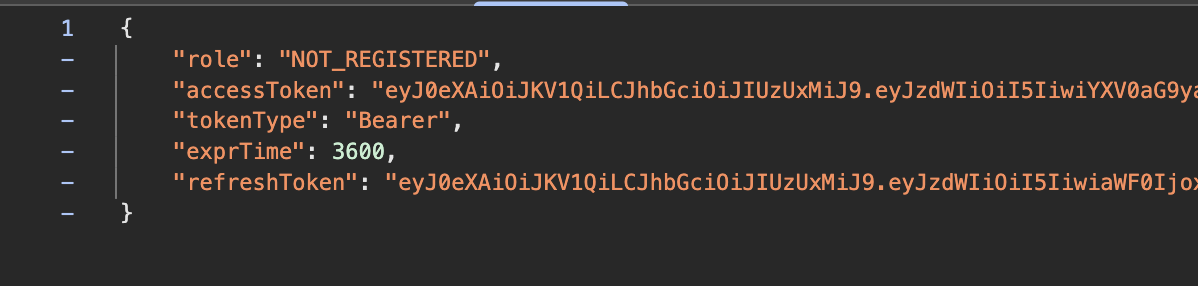
서버에서의 처리가 끝나고 JWT가 온 모습입니다.