Level 16
Level Goal
The credentials for the next level can be retrieved by submitting the password of the current level to a port on localhost in the range 31000 to 32000. First find out which of these ports have a server listening on them. Then find out which of those speak SSL and which don’t. There is only 1 server that will give the next credentials, the others will simply send back to you whatever you send to it.
→ 다음 레벨의 자격 증명은 현재 레벨의 비밀번호를 31000 ~ 32000 범위의 localhost 포트에 제출하여 검색할 수 있습니다. 먼저 이러한 포트 중 서버가 수신 대기하는 포트를 찾으십시오. 그런 다음 SSL을 사용하는 것과 그렇지 않은 것을 찾으십시오. 다음 자격 증명을 제공할 서버는 1개뿐이며 나머지 서버는 귀하가 보내는 모든 것을 다시 귀하에게 보냅니다.
먼저 현제 레벌 패스워드를 출력해보면
bandit16@bandit:~$ cat /etc/bandit_pass/bandit16
cluFn7wTiGryunymYOu4RcffSxQluehd
다음으로 31000~32000 범위의 포트를 스캔해보면
bandit16@bandit:~$ nmap -sT localhost -p 31000-32000

Starting Nmap 7.40 ( https://nmap.org ) at 2022-03-09 15:38 CET
Nmap scan report for localhost (127.0.0.1)
Host is up (0.00029s latency).
Not shown: 996 closed ports
PORT      STATE SERVICE
31046/tcp open  unknown
31518/tcp open  unknown
31691/tcp open  unknown
31790/tcp open  unknown
31960/tcp open  unknown
5개의 포트가 열려 있다고 나옵니다.
하나하나 접속을 시도해보면 4번째의 31970 포트에서
bandit16@bandit:~$ openssl s_client -connect localhost:31790
CONNECTED(00000003)
depth=0 CN = localhost
verify error:num=18:self signed certificate
verify return:1
depth=0 CN = localhost
verify return:1
---
Certificate chain
 0 s:/CN=localhost
   i:/CN=localhost
---
Server certificate
-----BEGIN CERTIFICATE-----
MIICBjCCAW+gAwIBAgIEUZgvXTANBgkqhkiG9w0BAQUFADAUMRIwEAYDVQQDDAls
b2NhbGhvc3QwHhcNMjIwMjA3MTc1MDAyWhcNMjMwMjA3MTc1MDAyWjAUMRIwEAYD
VQQDDAlsb2NhbGhvc3QwgZ8wDQYJKoZIhvcNAQEBBQADgY0AMIGJAoGBALEL2U4H
H7ZFM4QIMIX/E/RGL/5blcIyjSb+0rBHM455A+TknHIFfI38XHEBXZjxZlNeEdZE
POJmxCb85TLGDZGkf8DkwSldmTQn5wKFJ+4oT/NhZdXgKfOEn6PQ7pa/HqG7gzmq
lilyov9G1IG1xL/JUKMO7HVTqgZyu0zZu+kTAgMBAAGjZTBjMBQGA1UdEQQNMAuC
CWxvY2FsaG9zdDBLBglghkgBhvhCAQ0EPhY8QXV0b21hdGljYWxseSBnZW5lcmF0
ZWQgYnkgTmNhdC4gU2VlIGh0dHBzOi8vbm1hcC5vcmcvbmNhdC8uMA0GCSqGSIb3
DQEBBQUAA4GBAEL/Io/djIdtnBpc+JbrjPaV8xRnBqB1ZD4LtrPQObXXBdWe5i9j
v7k/p4e6YY0S0/qCqLhpAHKHUWmpTxsBGFebLenGHclpcmANG79Bf4gdWCeSOAYm
CqaCPR5NW4Inf5fHx0seQtRwzAJkUBbPxgHXPim5Dcgn+gYuY/Dl4zOw
-----END CERTIFICATE-----
subject=/CN=localhost
issuer=/CN=localhost
---
No client certificate CA names sent
Peer signing digest: SHA512
Server Temp Key: X25519, 253 bits
---
SSL handshake has read 1019 bytes and written 269 bytes
Verification error: self signed certificate
---
New, TLSv1.2, Cipher is ECDHE-RSA-AES256-GCM-SHA384
Server public key is 1024 bit
Secure Renegotiation IS supported
Compression: NONE
Expansion: NONE
No ALPN negotiated
SSL-Session:
    Protocol  : TLSv1.2
    Cipher    : ECDHE-RSA-AES256-GCM-SHA384
    Session-ID: 823A95880885EE5B076F766A2568FFAACC9674335ADFA1150A95CF22AA5120CD
    Session-ID-ctx:
    Master-Key: 260491772D33570D9A8612A55A3869BECEF0C10C9B766119DA2C3C86C64F573092A8BFE1F944F9245C35D8F9F9A22E01
    PSK identity: None
    PSK identity hint: None
    SRP username: None
    TLS session ticket lifetime hint: 7200 (seconds)
    TLS session ticket:
    0000 - cc 16 e1 c4 9e 72 74 8d-e3 d2 a1 30 e3 7a e2 a5   .....rt....0.z..
    0010 - 77 bc f2 21 c1 b4 23 27-6d c8 c0 2e 4b 49 19 53   w..!..#'m...KI.S
    0020 - 1d f6 7c 45 17 b0 67 4f-ec da fa 89 04 c6 26 32   ..|E..gO......&2
    0030 - 40 40 7b 94 24 3e ff 6c-35 35 26 64 40 02 a3 d8   @@{.$>.l55&d@...
    0040 - 48 14 42 86 a3 44 6f e3-3a 53 69 d7 e0 28 59 4a   H.B..Do.:Si..(YJ
    0050 - 3a ad 2a 55 56 3c 50 57-21 83 fe 5c 35 35 c5 49   :.*UV<PW!..\55.I
    0060 - 19 95 38 34 04 5a 43 64-32 64 85 89 b7 75 74 c7   ..84.ZCd2d...ut.
    0070 - 57 d0 c9 11 78 d4 06 4b-ab 2b 8c 3d d4 85 32 55   W...x..K.+.=..2U
    0080 - 45 28 56 4a a9 02 c2 5c-ef 90 c6 68 95 65 57 3b   E(VJ...\...h.eW;
    0090 - dd 96 1b a0 f7 3c 94 c2-b7 80 61 c4 f4 10 5e f3   .....<....a...^.

    Start Time: 1646837772
    Timeout   : 7200 (sec)
    Verify return code: 18 (self signed certificate)
    Extended master secret: yes
---
cluFn7wTiGryunymYOu4RcffSxQluehd
Correct!
-----BEGIN RSA PRIVATE KEY-----
MIIEogIBAAKCAQEAvmOkuifmMg6HL2YPIOjon6iWfbp7c3jx34YkYWqUH57SUdyJ
imZzeyGC0gtZPGujUSxiJSWI/oTqexh+cAMTSMlOJf7+BrJObArnxd9Y7YT2bRPQ
Ja6Lzb558YW3FZl87ORiO+rW4LCDCNd2lUvLE/GL2GWyuKN0K5iCd5TbtJzEkQTu
DSt2mcNn4rhAL+JFr56o4T6z8WWAW18BR6yGrMq7Q/kALHYW3OekePQAzL0VUYbW
JGTi65CxbCnzc/w4+mqQyvmzpWtMAzJTzAzQxNbkR2MBGySxDLrjg0LWN6sK7wNX
x0YVztz/zbIkPjfkU1jHS+9EbVNj+D1XFOJuaQIDAQABAoIBABagpxpM1aoLWfvD
KHcj10nqcoBc4oE11aFYQwik7xfW+24pRNuDE6SFthOar69jp5RlLwD1NhPx3iBl
J9nOM8OJ0VToum43UOS8YxF8WwhXriYGnc1sskbwpXOUDc9uX4+UESzH22P29ovd
d8WErY0gPxun8pbJLmxkAtWNhpMvfe0050vk9TL5wqbu9AlbssgTcCXkMQnPw9nC
YNN6DDP2lbcBrvgT9YCNL6C+ZKufD52yOQ9qOkwFTEQpjtF4uNtJom+asvlpmS8A
vLY9r60wYSvmZhNqBUrj7lyCtXMIu1kkd4w7F77k+DjHoAXyxcUp1DGL51sOmama
+TOWWgECgYEA8JtPxP0GRJ+IQkX262jM3dEIkza8ky5moIwUqYdsx0NxHgRRhORT
8c8hAuRBb2G82so8vUHk/fur85OEfc9TncnCY2crpoqsghifKLxrLgtT+qDpfZnx
SatLdt8GfQ85yA7hnWWJ2MxF3NaeSDm75Lsm+tBbAiyc9P2jGRNtMSkCgYEAypHd
HCctNi/FwjulhttFx/rHYKhLidZDFYeiE/v45bN4yFm8x7R/b0iE7KaszX+Exdvt
SghaTdcG0Knyw1bpJVyusavPzpaJMjdJ6tcFhVAbAjm7enCIvGCSx+X3l5SiWg0A
R57hJglezIiVjv3aGwHwvlZvtszK6zV6oXFAu0ECgYAbjo46T4hyP5tJi93V5HDi
Ttiek7xRVxUl+iU7rWkGAXFpMLFteQEsRr7PJ/lemmEY5eTDAFMLy9FL2m9oQWCg
R8VdwSk8r9FGLS+9aKcV5PI/WEKlwgXinB3OhYimtiG2Cg5JCqIZFHxD6MjEGOiu
L8ktHMPvodBwNsSBULpG0QKBgBAplTfC1HOnWiMGOU3KPwYWt0O6CdTkmJOmL8Ni
blh9elyZ9FsGxsgtRBXRsqXuz7wtsQAgLHxbdLq/ZJQ7YfzOKU4ZxEnabvXnvWkU
YOdjHdSOoKvDQNWu6ucyLRAWFuISeXw9a/9p7ftpxm0TSgyvmfLF2MIAEwyzRqaM
77pBAoGAMmjmIJdjp+Ez8duyn3ieo36yrttF5NSsJLAbxFpdlc1gvtGCWW+9Cq0b
dxviW8+TFVEBl1O4f7HVm6EpTscdDxU+bCXWkfjuRb7Dy9GOtt9JPsX8MBTakzh3
vBgsyi/sN3RqRBcGU40fOoZyfAMT8s1m/uYv52O6IgeuZ/ujbjY=
-----END RSA PRIVATE KEY-----

closed
패스워드를 입력하니 RSA PRIVATE KEY가 출력되었습니다. Level13에서 처럼 RSA 키를 이용해서 로그인을 하면 될 거 같습니다.
bandit16@bandit:~$ ls -al
total 24
drwxr-xr-x  2 root     root     4096 May  7  2020 .
drwxr-xr-x 41 root     root     4096 May  7  2020 ..
-rw-r-----  1 bandit16 bandit16   33 May  7  2020 .bandit15.password
-rw-r--r--  1 root     root      220 May 15  2017 .bash_logout
-rw-r--r--  1 root     root     3526 May 15  2017 .bashrc
-rw-r--r--  1 root     root      675 May 15  2017 .profile
bandit16@bandit:~$ cd /tmp
bandit16@bandit:/tmp$ mkdir key
bandit16@bandit:/tmp$ cd key
현재 디렉터리가 쓰기 권한이 없기 때문에, tmp 디렉터리로 이동을 하고 디렉터리를 만들어주겠습니다.
bandit16@bandit:/tmp/key$ vi sshkey.private
bandit16@bandit:/tmp/key$ cat sshkey.private
-----BEGIN RSA PRIVATE KEY-----
MIIEogIBAAKCAQEAvmOkuifmMg6HL2YPIOjon6iWfbp7c3jx34YkYWqUH57SUdyJ
imZzeyGC0gtZPGujUSxiJSWI/oTqexh+cAMTSMlOJf7+BrJObArnxd9Y7YT2bRPQ
Ja6Lzb558YW3FZl87ORiO+rW4LCDCNd2lUvLE/GL2GWyuKN0K5iCd5TbtJzEkQTu
DSt2mcNn4rhAL+JFr56o4T6z8WWAW18BR6yGrMq7Q/kALHYW3OekePQAzL0VUYbW
JGTi65CxbCnzc/w4+mqQyvmzpWtMAzJTzAzQxNbkR2MBGySxDLrjg0LWN6sK7wNX
x0YVztz/zbIkPjfkU1jHS+9EbVNj+D1XFOJuaQIDAQABAoIBABagpxpM1aoLWfvD
KHcj10nqcoBc4oE11aFYQwik7xfW+24pRNuDE6SFthOar69jp5RlLwD1NhPx3iBl
J9nOM8OJ0VToum43UOS8YxF8WwhXriYGnc1sskbwpXOUDc9uX4+UESzH22P29ovd
d8WErY0gPxun8pbJLmxkAtWNhpMvfe0050vk9TL5wqbu9AlbssgTcCXkMQnPw9nC
YNN6DDP2lbcBrvgT9YCNL6C+ZKufD52yOQ9qOkwFTEQpjtF4uNtJom+asvlpmS8A
vLY9r60wYSvmZhNqBUrj7lyCtXMIu1kkd4w7F77k+DjHoAXyxcUp1DGL51sOmama
+TOWWgECgYEA8JtPxP0GRJ+IQkX262jM3dEIkza8ky5moIwUqYdsx0NxHgRRhORT
8c8hAuRBb2G82so8vUHk/fur85OEfc9TncnCY2crpoqsghifKLxrLgtT+qDpfZnx
SatLdt8GfQ85yA7hnWWJ2MxF3NaeSDm75Lsm+tBbAiyc9P2jGRNtMSkCgYEAypHd
HCctNi/FwjulhttFx/rHYKhLidZDFYeiE/v45bN4yFm8x7R/b0iE7KaszX+Exdvt
SghaTdcG0Knyw1bpJVyusavPzpaJMjdJ6tcFhVAbAjm7enCIvGCSx+X3l5SiWg0A
R57hJglezIiVjv3aGwHwvlZvtszK6zV6oXFAu0ECgYAbjo46T4hyP5tJi93V5HDi
Ttiek7xRVxUl+iU7rWkGAXFpMLFteQEsRr7PJ/lemmEY5eTDAFMLy9FL2m9oQWCg
R8VdwSk8r9FGLS+9aKcV5PI/WEKlwgXinB3OhYimtiG2Cg5JCqIZFHxD6MjEGOiu
L8ktHMPvodBwNsSBULpG0QKBgBAplTfC1HOnWiMGOU3KPwYWt0O6CdTkmJOmL8Ni
blh9elyZ9FsGxsgtRBXRsqXuz7wtsQAgLHxbdLq/ZJQ7YfzOKU4ZxEnabvXnvWkU
YOdjHdSOoKvDQNWu6ucyLRAWFuISeXw9a/9p7ftpxm0TSgyvmfLF2MIAEwyzRqaM
77pBAoGAMmjmIJdjp+Ez8duyn3ieo36yrttF5NSsJLAbxFpdlc1gvtGCWW+9Cq0b
dxviW8+TFVEBl1O4f7HVm6EpTscdDxU+bCXWkfjuRb7Dy9GOtt9JPsX8MBTakzh3
vBgsyi/sN3RqRBcGU40fOoZyfAMT8s1m/uYv52O6IgeuZ/ujbjY=
-----END RSA PRIVATE KEY-----
RSA 키를 저장하고
로그인을 시도해보면
bandit16@bandit:/tmp/key$ ssh -i sshkey.private bandit17@localhost
Could not create directory '/home/bandit16/.ssh'.
The authenticity of host 'localhost (127.0.0.1)' can't be established.
ECDSA key fingerprint is SHA256:98UL0ZWr85496EtCRkKlo20X3OPnyPSB5tB5RPbhczc.
Are you sure you want to continue connecting (yes/no)? yes
Failed to add the host to the list of known hosts (/home/bandit16/.ssh/known_hosts).
This is a OverTheWire game server. More information on http://www.overthewire.org/wargames

@@@@@@@@@@@@@@@@@@@@@@@@@@@@@@@@@@@@@@@@@@@@@@@@@@@@@@@@@@@
@         WARNING: UNPROTECTED PRIVATE KEY FILE!          @
@@@@@@@@@@@@@@@@@@@@@@@@@@@@@@@@@@@@@@@@@@@@@@@@@@@@@@@@@@@
Permissions 0644 for 'sshkey.private' are too open.
It is required that your private key files are NOT accessible by others.
This private key will be ignored.
Load key "sshkey.private": bad permissions
bandit17@localhost's password:
private key file은 다른 사람이 접근할 수 없어야 한다는 오류 메세지가 출력됩니다.
bandit16@bandit:/tmp/key$ ls -l
total 4
-rw-r--r-- 1 bandit16 root 1676 Mar  9 16:11 sshkey.private
bandit16@bandit:/tmp/key$ chmod 600 sshkey.private
bandit16@bandit:/tmp/key$ ls -l
total 4
-rw------- 1 bandit16 root 1676 Mar  9 16:11 sshkey.private
bandit16만 읽고 쓸 수 있게 권한을 수정하고
로그인을 시도해보면
bandit16@bandit:/tmp/key$ ssh -i sshkey.private bandit17@localhost
Could not create directory '/home/bandit16/.ssh'.
The authenticity of host 'localhost (127.0.0.1)' can't be established.
ECDSA key fingerprint is SHA256:98UL0ZWr85496EtCRkKlo20X3OPnyPSB5tB5RPbhczc.
Are you sure you want to continue connecting (yes/no)? yes
Failed to add the host to the list of known hosts (/home/bandit16/.ssh/known_hosts).
This is a OverTheWire game server. More information on http://www.overthewire.org/wargames

Linux bandit.otw.local 5.4.8 x86_64 GNU/Linux

      ,----..            ,----,          .---.
     /   /   \         ,/   .`|         /. ./|
    /   .     :      ,`   .'  :     .--'.  ' ;
   .   /   ;.  \   ;    ;     /    /__./ \ : |
  .   ;   /  ` ; .'___,/    ,' .--'.  '   \' .
  ;   |  ; \ ; | |    :     | /___/ \ |    ' '
  |   :  | ; | ' ;    |.';  ; ;   \  \;      :
  .   |  ' ' ' : `----'  |  |  \   ;  `      |
  '   ;  \; /  |     '   :  ;   .   \    .\  ;
   \   \  ',  /      |   |  '    \   \   ' \ |
    ;   :    /       '   :  |     :   '  |--"
     \   \ .'        ;   |.'       \   \ ;
  www. `---` ver     '---' he       '---" ire.org


Welcome to OverTheWire!
.
.
.
bandit17@bandit:~$
bandit17로 로그인 되었습니다.
bandit17의 패스워드를 확인해보면
bandit17@bandit:~$ cat /etc/bandit_pass/bandit17
xLYVMN9WE5zQ5vHacb0sZEVqbrp7nBTn
Password : xLYVMN9WE5zQ5vHacb0sZEVqbrp7nBTn
Level 17
Level Goal
There are 2 files in the homedirectory: passwords.old and passwords.new. The password for the next level is in passwords.new and is the only line that has been changed between passwords.old and passwords.new
→ 홈 디렉터리에는 2개의 파일이 있습니다: passwords.old 및 passwords.new. 다음 레벨의 비밀번호는 passwords.new에 있으며 password.old와 passwords.new 사이에서 변경된 유일한 행입니다.
bandit17@bandit:~$ ls -l
total 8
-rw-r----- 1 bandit18 bandit17 3300 May  7  2020 passwords.new
-rw-r----- 1 bandit18 bandit17 3300 May  7  2020 passwords.old
ls -l 명령어로 파일을 출력해보면 passwords.new와 passwords.old 파일이 있습니다.
Level Goal에 다음 레벨 비밀번호는 두 파일 사이의 다른 유일한 행이라고 했으니 diff 명령어를 이용해서 다른 행을 출력해보면
bandit17@bandit:~$ diff -d passwords.old passwords.new
42c42
< w0Yfolrc5bwjS4qw5mq1nnQi6mF03bii
---
> kfBf3eYk5BPBRzwjqutbbfE887SVc5Yd
kfBf3eYk5BPBRzwjqutbbfE887SVc5Yd가 다음 레벨 비밀번호입니다.
Level 18
Level Goal
The password for the next level is stored in a file readme in the homedirectory. Unfortunately, someone has modified .bashrc to log you out when you log in with SSH.
→ 다음 레벨의 비밀번호는 홈 디렉터리의 readme 파일에 저장됩니다. 불행히도 누군가 SSH로 로그인할 때 로그아웃하도록 .bashrc를 수정했습니다.
bandit18로 로그인을 해보면
Host 'bandit.labs.overthewire.org' resolved to 176.9.9.172.
Connecting to 176.9.9.172:2220...
Connection established.
To escape to local shell, press Ctrl+Alt+].
This is a OverTheWire game server. More information on http://www.overthewire.org/wargames


Linux bandit.otw.local 5.4.8 x86_64 GNU/Linux

      ,----..            ,----,          .---.
     /   /   \         ,/   .`|         /. ./|
    /   .     :      ,`   .'  :     .--'.  ' ;
   .   /   ;.  \   ;    ;     /    /__./ \ : |
  .   ;   /  ` ; .'___,/    ,' .--'.  '   \' .
  ;   |  ; \ ; | |    :     | /___/ \ |    ' '
  |   :  | ; | ' ;    |.';  ; ;   \  \;      :
  .   |  ' ' ' : `----'  |  |  \   ;  `      |
  '   ;  \; /  |     '   :  ;   .   \    .\  ;
   \   \  ',  /      |   |  '    \   \   ' \ |
    ;   :    /       '   :  |     :   '  |--"
     \   \ .'        ;   |.'       \   \ ;
  www. `---` ver     '---' he       '---" ire.org


Welcome to OverTheWire!
.
.
.
.
  Enjoy your stay!

Byebye !

Connection closed.

Disconnected from remote host(Bandit) at 00:35:20.
Byebye ! 하면서 바로 연결이 종료되어 버립니다.
Level Goal을 보면 로그아웃이 되어 연결이 끊기기 전에 readme 파일을 읽어서 패스워드를 획득해야 할 거 같습니다.
ubuntu@GalaxyBook-Ion:~$ ssh bandit18@bandit.labs.overthewire.org -p2220 "cat readme"
The authenticity of host '[bandit.labs.overthewire.org]:2220 ([176.9.9.172]:2220)' can't be established.
ECDSA key fingerprint is SHA256:98UL0ZWr85496EtCRkKlo20X3OPnyPSB5tB5RPbhczc.
Are you sure you want to continue connecting (yes/no/[fingerprint])? yes
Warning: Permanently added '[bandit.labs.overthewire.org]:2220,[176.9.9.172]:2220' (ECDSA) to the list of known hosts.
This is a OverTheWire game server. More information on http://www.overthewire.org/wargames

bandit18@bandit.labs.overthewire.org's password:
IueksS7Ubh8G3DCwVzrTd8rAVOwq3M5x
ssh 연결과 동시에 cat readme 명령어를 ""로 묶어서 같이 보내니 로그인 후 cat readme 명령어가 실행되어 다음 레벨 패스워드가 출력되었습니다.
Level 19
Level Goal
To gain access to the next level, you should use the setuid binary in the homedirectory. Execute it without arguments to find out how to use it. The password for this level can be found in the usual place (/etc/bandit_pass), after you have used the setuid binary.
→ 다음 레벨에 액세스 하려면 홈 디렉터리에서 setuid 바이너리를 사용해야 합니다. 인수 없이 실행하여 사용법을 알아보세요. 이 레벨의 비밀번호는 setuid 바이너리를 사용한 후 일반적인 위치(/etc/bandit_pass)에서 찾을 수 있습니다.
bandit19@bandit:~$ ls -l
total 8
-rwsr-x--- 1 bandit20 bandit19 7296 May  7  2020 bandit20-do
ls -l 명령어로 파일을 출력해보면 bandit20-do 파일이 있습니다.
bandit19@bandit:~$ ./bandit20-do
Run a command as another user.
  Example: ./bandit20-do id
bandit19@bandit:~$ ./bandit20-do id
uid=11019(bandit19) gid=11019(bandit19) euid=11020(bandit20) groups=11019(bandit19)
bandit20-do 파일을 실행해보니 인자를 추가해서 실행해보라고 합니다.
그래서 id를 추가해서 실행해보니 euid가 bandit20으로 바뀌어있습니다.
bandit20-do 프로그램을 실행 하자 euid가 bandit20으로 변경되었기 때문에 cat /etc/bandit_pass/bandit20을 인자로 주면 유저가 bandit20이 아니어도 해당 명령어가 실행될 거 같습니다.
cat /etc/bandit_pass/bandit20을 인자로 프로그램을 실행을 시켜보면
bandit19@bandit:~$ ./bandit20-do cat /etc/bandit_pass/bandit20
GbKksEFF4yrVs6il55v6gwY5aVje5f0j
다음 레벨 패스워드가 출력되었습니다.
Level 20
Level Goal
There is a setuid binary in the homedirectory that does the following: it makes a connection to localhost on the port you specify as a commandline argument. It then reads a line of text from the connection and compares it to the password in the previous level (bandit20). If the password is correct, it will transmit the password for the next level (bandit21).
→ 홈 디렉터리에 다음을 수행하는 setuid 바이너리가 있습니다. 명령줄 인수로 지정한 포트에서 localhost에 연결합니다. 그런 다음 연결에서 텍스트 줄을 읽고 이전 수준(bandit20)의 암호와 비교합니다. 암호가 정확하면 다음 레벨(bandit21)의 암호를 전송합니다.
bandit20@bandit:~$ ls -l
total 12
-rwsr-x--- 1 bandit21 bandit20 12088 May  7  2020 suconnect
ls -l 명령어로 파일을 출력해보면 suconnect 파일이 있습니다.
bandit20@bandit:~$ ./suconnect
Usage: ./suconnect <portnumber>
This program will connect to the given port on localhost using TCP. If it receives the correct password from the other side, the next password is transmitted back.
실행해보면 프로그램에 대한 설명이 나옵니다.
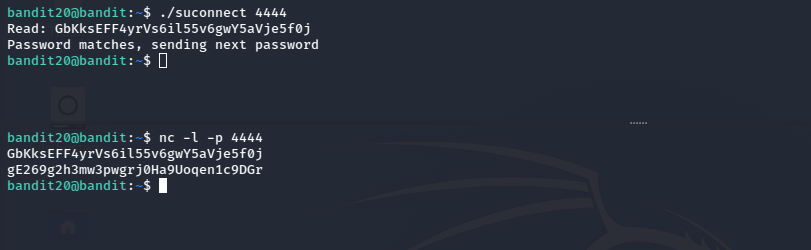
프로그램 설명대로 4444 포트를 띄우고 현재 bandit20의 패스워드를 입력하니 다음 레벨 패스워드가 출력되었습니다.