Level 11
Level Goal
The password for the next level is stored in the file data.txt, where all lowercase (a-z) and uppercase (A-Z) letters have been rotated by 13 positions
→ 다음 레벨의 비밀번호는 data.txt 파일에 저장됩니다. 여기서 모든 소문자(a-z) 및 대문자(A-Z)가 13자리 회전되었습니다.
Helpful Read Material에 Rot13이 나와있고 읽어보면 알파벳을 옆으로 13번 미는 암호화 기법이라고 합니다.
bandit11@bandit:~$ ls -l
total 4
-rw-r----- 1 bandit12 bandit11 49 May  7  2020 data.txt
ls -l 명령어로 파일을 출력해보면 data.txt 파일이 있습니다.
bandit11@bandit:~$ cat data.txt
Gur cnffjbeq vf 5Gr8L4qetPEsPk8htqjhRK8XSP6x2RHh
data.txt 파일을 출력해보면 알파벳 문자열이 출력되었습니다.
이 문자열을 Rot13 복호화 사이트에 입력해보면
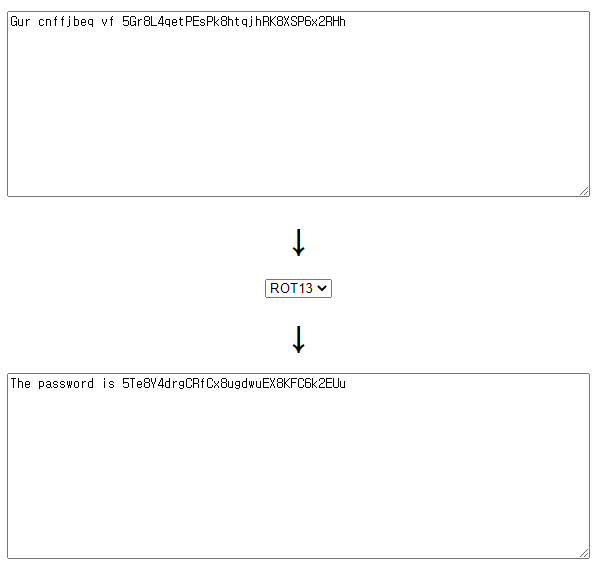
패스워드로 5Te8Y4drgCRfCx8ugdwuEX8KFC6k2EUu가 나왔습니다.
Level 12
Level Goal
The password for the next level is stored in the file data.txt, which is a hexdump of a file that has been repeatedly compressed. For this level it may be useful to create a directory under /tmp in which you can work using mkdir. For example: mkdir /tmp/myname123. Then copy the datafile using cp, and rename it using mv (read the manpages!)
→ 다음 레벨의 비밀번호는 반복적으로 압축된 파일의 16진 덤프인 data.txt 파일에 저장됩니다. 이 수준의 경우 mkdir을 사용하여 작업할 수 있는 /tmp 아래에 디렉터리를 만드는 것이 유용할 수 있습니다. 예: mkdir /tmp/myname123. 그런 다음 cp를 사용하여 데이터 파일을 복사하고 mv를 사용하여 이름을 바꿉니다(맨 페이지 읽기!)
bandit12@bandit:~$ ls
data.txt
ls 명령어로 파일을 출력해보면 data.txt 파일이 있습니다.
bandit12@bandit:~$ cat data.txt
00000000: 1f8b 0808 0650 b45e 0203 6461 7461 322e  .....P.^..data2.
00000010: 6269 6e00 013d 02c2 fd42 5a68 3931 4159  bin..=...BZh91AY
00000020: 2653 598e 4f1c c800 001e 7fff fbf9 7fda  &SY.O...........
00000030: 9e7f 4f76 9fcf fe7d 3fff f67d abde 5e9f  ..Ov...}?..}..^.
00000040: f3fe 9fbf f6f1 feee bfdf a3ff b001 3b1b  ..............;.
00000050: 5481 a1a0 1ea0 1a34 d0d0 001a 68d3 4683  T......4....h.F.
00000060: 4680 0680 0034 1918 4c4d 190c 4000 0001  F....4..LM..@...
00000070: a000 c87a 81a3 464d a8d3 43c5 1068 0346  ...z..FM..C..h.F
00000080: 8343 40d0 3400 0340 66a6 8068 0cd4 f500  .C@.4..@f..h....
00000090: 69ea 6800 0f50 68f2 4d00 680d 06ca 0190  i.h..Ph.M.h.....
000000a0: 0000 69a1 a1a0 1ea0 194d 340d 1ea1 b280  ..i......M4.....
000000b0: f500 3406 2340 034d 3400 0000 3403 d400  ..4.#@.M4...4...
000000c0: 1a07 a832 3400 f51a 0003 43d4 0068 0d34  ...24.....C..h.4
000000d0: 6868 f51a 3d43 2580 3e58 061a 2c89 6bf3  hh..=C%.>X..,.k.
000000e0: 0163 08ab dc31 91cd 1747 599b e401 0b06  .c...1...GY.....
000000f0: a8b1 7255 a3b2 9cf9 75cc f106 941b 347a  ..rU....u.....4z
00000100: d616 55cc 2ef2 9d46 e7d1 3050 b5fb 76eb  ..U....F..0P..v.
00000110: 01f8 60c1 2201 33f0 0de0 4aa6 ec8c 914f  ..`.".3...J....O
00000120: cf8a aed5 7b52 4270 8d51 6978 c159 8b5a  ....{RBp.Qix.Y.Z
00000130: 2164 fb1f c26a 8d28 b414 e690 bfdd b3e1  !d...j.(........
00000140: f414 2f9e d041 c523 b641 ac08 0c0b 06f5  ../..A.#.A......
00000150: dd64 b862 1158 3f9e 897a 8cae 32b0 1fb7  .d.b.X?..z..2...
00000160: 3c82 af41 20fd 6e7d 0a35 2833 41bd de0c  <..A .n}.5(3A...
00000170: 774f ae52 a1ac 0fb2 8c36 ef58 537b f30a  wO.R.....6.XS{..
00000180: 1510 cab5 cb51 4231 95a4 d045 b95c ea09  .....QB1...E.\..
00000190: 9fa0 4d33 ba43 22c9 b5be d0ea eeb7 ec85  ..M3.C".........
000001a0: 59fc 8bf1 97a0 87a5 0df0 7acd d555 fc11  Y.........z..U..
000001b0: 223f fdc6 2be3 e809 c974 271a 920e acbc  "?..+....t'.....
000001c0: 0de1 f1a6 393f 4cf5 50eb 7942 86c3 3d7a  ....9?L.P.yB..=z
000001d0: fe6d 173f a84c bb4e 742a fc37 7b71 508a  .m.?.L.Nt*.7{qP.
000001e0: a2cc 9cf1 2522 8a77 39f2 716d 34f9 8620  ....%".w9.qm4..
000001f0: 4e33 ca36 eec0 cd4b b3e8 48e4 8b91 5bea  N3.6...K..H...[.
00000200: 01bf 7d21 0b64 82c0 3341 3424 e98b 4d7e  ..}!.d..3A4$..M~
00000210: c95c 1b1f cac9 a04a 1988 43b2 6b55 c6a6  .\.....J..C.kU..
00000220: 075c 1eb4 8ecf 5cdf 4653 064e 84da 263d  .\....\.FS.N..&=
00000230: b15b bcea 7109 5c29 c524 3afc d715 4894  .[..q.\).$:...H.
00000240: 7426 072f fc28 ab05 9603 b3fc 5dc9 14e1  t&./.(......]...
00000250: 4242 393c 7320 98f7 681d 3d02 0000       BB9<s ..h.=...
data.txt 파일을 출력해보면 16진수 파일이 출력되었습니다.
bandit12@bandit:~$ mkdir /tmp/KEC
bandit12@bandit:~$ cp data.txt /tmp/KEC
일단 문제 목표대로 /tmp 디렉터리에 KEC 디렉터리를 만들고 data.txt 파일을 복사하겠습니다.
bandit12@bandit:~$ cd /tmp/KEC
bandit12@bandit:/tmp/KEC$ ls
data.txt
해당 디렉터리로 이동해서 잘 복사되었는지 확인해보면 data.txt 파일이 잘 복사되었습니다.
bandit12@bandit:~$ file data.txt
data.txt: ASCII text
파일 타입을 출력해보면 문제에서는 압축파일이라고 했는데, ASCII text라고 합니다.
16진수 파일이라 그런거 같습니다.
*file 명령어*

파일의 타입을 확인하는 명령어입니다.

file 파일명

Ex) file data.txt
bandit12@bandit:/tmp/KEC$ xxd -r data.txt > bandit
bandit12@bandit:/tmp/KEC$ file bandit
bandit: gzip compressed data, was "data2.bin", last modified: Thu May 7 18:14:30 2020, max compression, from Unix바이너리 파일로 변경하고 다시 파일 타입을 확인해 보면 gzip 타입 파일로 나옵니다.
*xxd 명령어*

바이너리 데이터를 16진수로, 또는 16진수 데이터를 바이너리 데이터로 변환해주는 명령어입니다.

xxd -r [16진수 파일명] > [바이너리 파일명]

Ex) xxd -r data.txt > bandit
bandit12@bandit:/tmp/KEC$ mv bandit bandit.gz
bandit12@bandit:/tmp/KEC$ ls
bandit.gz data.txt압축해제를 위해 bandit 파일명을 bandit.gz로 변경하고
bandit12@bandit:/tmp/KEC$ gunzip bandit.gz
bandit12@bandit:/tmp/KEC$ ls
bandit data.txt압축을 풀면 bandit 파일이 나옵니다.
bandit12@bandit:/tmp/KEC$ file bandit
bandit: bzip2 compressed data, block size = 900kfile 명령어로 다시 한번 타입을 확인해보면 bzip2 타입 파일로 나옵니다.
bandit12@bandit:/tmp/KEC$ mv bandit bandit.bz2
bandit12@bandit:/tmp/KEC$ ls
bandit.bz2 data.txt다시 한번 압축해제를 위해 파일명을 bandit.bz2로 변경하고
bandit12@bandit:/tmp/KEC$ bunzip2 bandit.bz2
bandit12@bandit:/tmp/KEC$ ls
bandit data.txt압축을 해제 해보면 bandit 파일이 나옵니다.
bandit12@bandit:/tmp/KEC$ file bandit
bandit: gzip compressed data, was "data4.bin", last modified: Thu May 7 18:14:30 2020, max compression, from Unix다시 bandit 파일 타입을 확인해보면 gzip 타입으로 나옵니다.
bandit12@bandit:/tmp/KEC$ mv bandit bandit.gz
bandit12@bandit:/tmp/KEC$ ls
bandit.gz data.txtbandit 파일명을 bandit.gzip으로 변경하고
bandit12@bandit:/tmp/KEC$ gunzip bandit.gz
bandit12@bandit:/tmp/KEC$ ls
bandit  data.txt
압축을 풀고
bandit12@bandit:/tmp/KEC$ file bandit
bandit: POSIX tar archive (GNU)
파일 타입을 확인해보면 tar 타입으로 나옵니다.
bandit12@bandit:/tmp/KEC$ mv bandit bandit.tar
bandit12@bandit:/tmp/KEC$ ls
bandit.tar  data.txt
bandit 파일명을 bandit.tar로 변경하고
bandit12@bandit:/tmp/KEC$ tar -xvf bandit.tar
data5.bin
bandit12@bandit:/tmp/KEC$ ls
bandit.tar  data5.bin  data.txt
압축을 해제하면 data5.bin가 나왔습니다.
bandit12@bandit:/tmp/KEC$ file data5.bin
data5.bin: POSIX tar archive (GNU)
파일 타입을 봐보면 또 tar 타입입니다.
bandit12@bandit:/tmp/KEC$ mv data5.bin data5.tar
bandit12@bandit:/tmp/KEC$ ls
bandit.tar  data5.tar  data.txt
파일명을 data.tar로 변경하고
bandit12@bandit:/tmp/KEC$ tar -xvf data5.tar
data6.bin
bandit12@bandit:/tmp/KEC$ ls
bandit.tar  data5.tar  data6.bin  data.txt
압축을 풀어보면 data6.bin가 나왔습니다.
bandit12@bandit:/tmp/KEC$ file data6.bin
data6.bin: bzip2 compressed data, block size = 900k
파일 타입을 보면 또 bzip2 타입입니다.
bandit12@bandit:/tmp/KEC$ mv data6.bin data6.bz2
bandit12@bandit:/tmp/KEC$ bunzip2 data6.bz2
bandit12@bandit:/tmp/KEC$ ls
bandit.tar  data5.tar  data6  data.txt
bandit12@bandit:/tmp/KEC$ file data6
data6: POSIX tar archive (GNU)
bandit12@bandit:/tmp/KEC$ mv data6 data6.tar
bandit12@bandit:/tmp/KEC$ tar -xvf data6.tar
data8.bin
bandit12@bandit:/tmp/KEC$ file data8.bin
data8.bin: gzip compressed data, was "data9.bin", last modified: Thu May  7 18:14:30 2020, max compression, from Unix
bandit12@bandit:/tmp/KEC$ mv data8.bin data8.gz
bandit12@bandit:/tmp/KEC$ gunzip data8.gz
bandit12@bandit:/tmp/KEC$ ls
bandit.tar  data5.tar  data6.tar  data8  data.txt
bandit12@bandit:/tmp/KEC$ file data8
data8: ASCII text
그 후로 쭉 노가다를 하다 보니 드디어 ASCII text가 나왔습니다.
bandit12@bandit:/tmp/KEC$ cat data8
The password is 8ZjyCRiBWFYkneahHwxCv3wb2a1ORpYL
data8을 출력해보면 드디어 패스워드가 나왔습니다.
*tar 확장자 압축 해제*

tar -xvf test.tar

*gzip 확장자 압축 해제*

gunzip test.gz

*bzip2 확장자 압축 해제*

bunzip2 test.bz
Level 13
Level Goal
The password for the next level is stored in /etc/bandit_pass/bandit14 and can only be read by user bandit14. For this level, you don’t get the next password, but you get a private SSH key that can be used to log into the next level. Note: localhost is a hostname that refers to the machine you are working on
→ 다음 레벨의 비밀번호는 /etc/bandit_pass/bandit14에 저장되어 있으며 bandit14 사용자만 읽을 수 있습니다. 이 레벨의 경우 다음 암호를 얻지 못하지만 다음 레벨에 로그인하는 데 사용할 수 있는 개인 SSH 키를 얻을 수 있습니다. 참고: localhost는 네가 사용 중인 머신을 나타내는 호스트 이름입니다.
bandit13@bandit:~$ ls -l
total 4
-rw-r----- 1 bandit14 bandit13 1679 May  7  2020 sshkey.private
ls -l로 파일을 출력해보면 sshkey.private가 출력되었습니다.
bandit13@bandit:~$ cat sshkey.private
-----BEGIN RSA PRIVATE KEY-----
MIIEpAIBAAKCAQEAxkkOE83W2cOT7IWhFc9aPaaQmQDdgzuXCv+ppZHa++buSkN+
gg0tcr7Fw8NLGa5+Uzec2rEg0WmeevB13AIoYp0MZyETq46t+jk9puNwZwIt9XgB
ZufGtZEwWbFWw/vVLNwOXBe4UWStGRWzgPpEeSv5Tb1VjLZIBdGphTIK22Amz6Zb
ThMsiMnyJafEwJ/T8PQO3myS91vUHEuoOMAzoUID4kN0MEZ3+XahyK0HJVq68KsV
ObefXG1vvA3GAJ29kxJaqvRfgYnqZryWN7w3CHjNU4c/2Jkp+n8L0SnxaNA+WYA7
jiPyTF0is8uzMlYQ4l1Lzh/8/MpvhCQF8r22dwIDAQABAoIBAQC6dWBjhyEOzjeA
J3j/RWmap9M5zfJ/wb2bfidNpwbB8rsJ4sZIDZQ7XuIh4LfygoAQSS+bBw3RXvzE
pvJt3SmU8hIDuLsCjL1VnBY5pY7Bju8g8aR/3FyjyNAqx/TLfzlLYfOu7i9Jet67
xAh0tONG/u8FB5I3LAI2Vp6OviwvdWeC4nOxCthldpuPKNLA8rmMMVRTKQ+7T2VS
nXmwYckKUcUgzoVSpiNZaS0zUDypdpy2+tRH3MQa5kqN1YKjvF8RC47woOYCktsD
o3FFpGNFec9Taa3Msy+DfQQhHKZFKIL3bJDONtmrVvtYK40/yeU4aZ/HA2DQzwhe
ol1AfiEhAoGBAOnVjosBkm7sblK+n4IEwPxs8sOmhPnTDUy5WGrpSCrXOmsVIBUf
laL3ZGLx3xCIwtCnEucB9DvN2HZkupc/h6hTKUYLqXuyLD8njTrbRhLgbC9QrKrS
M1F2fSTxVqPtZDlDMwjNR04xHA/fKh8bXXyTMqOHNJTHHNhbh3McdURjAoGBANkU
1hqfnw7+aXncJ9bjysr1ZWbqOE5Nd8AFgfwaKuGTTVX2NsUQnCMWdOp+wFak40JH
PKWkJNdBG+ex0H9JNQsTK3X5PBMAS8AfX0GrKeuwKWA6erytVTqjOfLYcdp5+z9s
8DtVCxDuVsM+i4X8UqIGOlvGbtKEVokHPFXP1q/dAoGAcHg5YX7WEehCgCYTzpO+
xysX8ScM2qS6xuZ3MqUWAxUWkh7NGZvhe0sGy9iOdANzwKw7mUUFViaCMR/t54W1
GC83sOs3D7n5Mj8x3NdO8xFit7dT9a245TvaoYQ7KgmqpSg/ScKCw4c3eiLava+J
3btnJeSIU+8ZXq9XjPRpKwUCgYA7z6LiOQKxNeXH3qHXcnHok855maUj5fJNpPbY
iDkyZ8ySF8GlcFsky8Yw6fWCqfG3zDrohJ5l9JmEsBh7SadkwsZhvecQcS9t4vby
9/8X4jS0P8ibfcKS4nBP+dT81kkkg5Z5MohXBORA7VWx+ACohcDEkprsQ+w32xeD
qT1EvQKBgQDKm8ws2ByvSUVs9GjTilCajFqLJ0eVYzRPaY6f++Gv/UVfAPV4c+S0
kAWpXbv5tbkkzbS0eaLPTKgLzavXtQoTtKwrjpolHKIHUz6Wu+n4abfAIRFubOdN
/+aLoRQ0yBDRbdXMsZN/jvY44eM+xRLdRVyMmdPtP8belRi2E2aEzA==
-----END RSA PRIVATE KEY-----
sshkey.private 파일을 출력해보면 이 파일은 RSA 개인키인 거 같습니다.
이 개인키로 다음 레벨로 로그인 할 수 있다고 하니 ssh 명령어 옵션을 찾아보면
ssh -i 옵션이 공개키 인증(주로 RSA 인증)을 위한 ID가 읽히는 파일 선택 옵션이라고 합니다.
*ssh 명령어*

SSH란 Secure Shell의 줄임말로, 원격 호스트에 접속하기 위해 사용되는 보안 프로토콜입니다.

# 호스트에 접속

ssh <host 주소>         Ex) ssh overthewire.org

# 해당 사용자 ID로 호스트에 접속

ssh <id>@<host 주소>        Ex) ssh bandit15@localhost

# 포트 설정하기 (-p)

ssh bandit15@localhost -p 30001

# 키 파일 사용하기 (-i)

ssh -i keyfile bandit15@localhost

# 기타 옵션

-V : 버전 정보 출력하기

-C : 전송 데이터 압축하기

-4 : IPv4 주소 사용

-6 : IPv6 주소 사용

-1 : 프로토콜 버전 1 사용

-2 : 프로토콜 버전 2 사용
bandit13@bandit:~$ ssh -i sshkey.private bandit14@localhost
Could not create directory '/home/bandit13/.ssh'.
The authenticity of host 'localhost (127.0.0.1)' can't be established.
ECDSA key fingerprint is SHA256:98UL0ZWr85496EtCRkKlo20X3OPnyPSB5tB5RPbhczc.
Are you sure you want to continue connecting (yes/no)? yes
Failed to add the host to the list of known hosts (/home/bandit13/.ssh/known_hosts).
This is a OverTheWire game server. More information on http://www.overthewire.org/wargames
Linux bandit.otw.local 5.4.8 x86_64 GNU/Linux
,----.. ,----, .---.
/ / \ ,/ .`| /. ./|
/ . : ,` .' : .--'. ' ;
. / ;. \ ; ; / /__./ \ : |
. ; / ` ; .'___,/ ,' .--'. ' \' .
; | ; \ ; | | : | /___/ \ | ' '
| : | ; | ' ; |.'; ; ; \ \; :
. | ' ' ' : `----' | | \ ; ` |
' ; \; / | ' : ; . \ .\ ;
\ \ ', / | | ' \ \ ' \ |
; : / ' : | : ' |--"
\ \ .' ; |.' \ \ ;
www. `---` ver '---' he '---" ire.org
Welcome to OverTheWire!
If you find any problems, please report them to Steven or morla on
irc.overthewire.org.
.
.
.
bandit14@bandit:~$ssh 명령어를 이용해서 옵션은 -i로 하고 키 파일은 sshkey.private, 유저는 bandit14, 서버는 현재 bandit 주소인 localhost로 해서 로그인 시도를 해보면 bandit14로 로그인에 성공했습니다.
Level 14
Level Goal
The password for the next level can be retrieved by submitting the password of the current level to port 30000 on localhost.
→ 다음 레벨의 암호는 현재 레벨의 암호를 localhost의 포트 30000에 제출해야 회수할 수 있습니다.
bandit14@bandit:~$ cat /etc/bandit_pass/bandit14
4wcYUJFw0k0XLShlDzztnTBHiqxU3b3e
bandit14의 패스워드를 모르니 먼저 출력하게 하고
bandit14@bandit:~$ nc localhost 30000
4wcYUJFw0k0XLShlDzztnTBHiqxU3b3e
Correct!
BfMYroe26WYalil77FoDi9qh59eK5xNr
nc 명령어로 host는 localhost 포트는 30000으로 원격 서버에 연결하고 bandit14의 패스워드를 입력하니 다음 레벨의 패스워드가 출력되었습니다.
nc 명령어
nc(netcat) 명령어는 TCP나 UDP 프로토콜을 사용하여 네트워크 연결을 통해 데이터를 읽고 쓰는 간단한 유틸리티입니다.
nc [options] [target host] [ports]
| 옵션 | 설명 |
|---|---|
| -u | UDP 연결 |
| -p | 소스 포트 지정 |
| -l | LISTEN 모드로 포트를 띄움 |
| -z | 단순 포트 스캔만 진행 |
| -v | 더 많은 정보 확인 |
Ex 1) 네트워크 연결 (host: 192.168.27.130,    port: 30000)
nc 192.168.27.130 30000

Ex 2) 4000 포트 Listen 모드로 설정
nc -l 4000

Ex 3) 포트 검색 (해당 호스트에서 50~100 범위는 열린 포트 검색), UDP 포트는 -u 옵션 추가
nc -z -v 192.168.27.130 50-100

Ex 4) 파일 전송
[Receiver] nc -l 5555 > /tmp/example
[Sender] nc [Receiver] host 5555 < /tmp/example
Level 15
Level Goal
The password for the next level can be retrieved by submitting the password of the current level to port 30001 on localhost using SSL encryption.
→ SSL 암호화를 사용하여 localhost의 포트 30001에 현재 레벨의 암호를 제출하여 다음 레벨의 암호를 회수할 수 있습니다.
bandit15@bandit:~$ cat /etc/bandit_pass/bandit15
BfMYroe26WYalil77FoDi9qh59eK5xNr
먼저 현재 레벨의 패스워드를 출력하고
ssl 암호화로 로그인을 할 수 있는 방법을 찾아보면
If you want to be a client use openssl's s_client:

openssl s_client -connect host:port
openssl 명령어를 사용하면 된다고 합니다.
bandit15@bandit:~$ openssl s_client -connect localhost:30001
CONNECTED(00000003)
depth=0 CN = localhost
verify error:num=18:self signed certificate
verify return:1
depth=0 CN = localhost
verify return:1
---
Certificate chain
 0 s:/CN=localhost
   i:/CN=localhost
---
Server certificate
-----BEGIN CERTIFICATE-----
MIICBjCCAW+gAwIBAgIEZOzuVDANBgkqhkiG9w0BAQUFADAUMRIwEAYDVQQDDAls
b2NhbGhvc3QwHhcNMjEwOTMwMDQ0NTU0WhcNMjIwOTMwMDQ0NTU0WjAUMRIwEAYD
VQQDDAlsb2NhbGhvc3QwgZ8wDQYJKoZIhvcNAQEBBQADgY0AMIGJAoGBAM9En7CC
uPr6cVPATLAVhWMU1hggfIJEp5sZN9RPUbK0zKBv802yD54ObHYmIge6lqqkgXOz
2AuI4UfCG4iMb0UYUCA/wISwNqUQrjcja0OnqzCTRscXzzoIsHbC8lGFzMDRz3Jw
8nBD6/2jvFt1rnBtZ4ghibNn5rFHRi5EC+K/AgMBAAGjZTBjMBQGA1UdEQQNMAuC
CWxvY2FsaG9zdDBLBglghkgBhvhCAQ0EPhY8QXV0b21hdGljYWxseSBnZW5lcmF0
ZWQgYnkgTmNhdC4gU2VlIGh0dHBzOi8vbm1hcC5vcmcvbmNhdC8uMA0GCSqGSIb3
DQEBBQUAA4GBAD7/moj14DUI6/D6imJ8pQlAy/8lZlsrbyRnqpzjWaATShDYr7k3
umdRg+36MciNFAglE7nGYZroTSDCm650D81+797owSXLPAdp1Q6JfQH5LOni2kbw
UHcO9hwQ+rJzEgIlfGOic7dC5lj8DBU5tugY87RZGKiZ2GG77WXas9Iz
-----END CERTIFICATE-----
subject=/CN=localhost
issuer=/CN=localhost
---
No client certificate CA names sent
Peer signing digest: SHA512
Server Temp Key: X25519, 253 bits
---
SSL handshake has read 1019 bytes and written 269 bytes
Verification error: self signed certificate
---
New, TLSv1.2, Cipher is ECDHE-RSA-AES256-GCM-SHA384
Server public key is 1024 bit
Secure Renegotiation IS supported
Compression: NONE
Expansion: NONE
No ALPN negotiated
SSL-Session:
    Protocol  : TLSv1.2
    Cipher    : ECDHE-RSA-AES256-GCM-SHA384
    Session-ID: 532BD1E3C8AA7FD9BF6A934B74108C8FD914ACD24694A9EB7DAA48962216F57E
    Session-ID-ctx:
    Master-Key: CB046A36237EF3CC5E5B5BBB4B747A427F1E8F312C5D6E565B3A7550A587980F60600FFE26F6BBF672324521D78178AF
    PSK identity: None
    PSK identity hint: None
    SRP username: None
    TLS session ticket lifetime hint: 7200 (seconds)
    TLS session ticket:
    0000 - 8a eb e8 f5 31 15 46 ad-b2 a8 10 c1 51 b9 66 14   ....1.F.....Q.f.
    0010 - db 55 9b 44 19 99 4c 07-ae 4c a9 b9 e2 b9 55 36   .U.D..L..L....U6
    0020 - ad 8e 4c 43 63 c9 ec f4-da c4 49 3d 67 ce 44 fb   ..LCc.....I=g.D.
    0030 - a1 5b ef de 4e 5a f1 f4-3d d1 57 ee 1d 51 4e 5e   .[..NZ..=.W..QN^
    0040 - d5 0a 04 6f 01 92 a7 53-3d dc a3 67 9a 4c 14 73   ...o...S=..g.L.s
    0050 - a7 60 10 5a 78 57 26 8f-0c 3c 7b a9 ec 78 08 5c   .`.ZxW&..<{..x.\
    0060 - d9 8e 45 01 da fc ca 91-bd 1e 25 bf a7 b9 32 ad   ..E.......%...2.
    0070 - cd 26 09 ce 33 82 f0 4a-6b 42 0c 8f f9 ac 4f 84   .&..3..JkB....O.
    0080 - ff e9 1b 92 e8 7b 16 1e-8f 13 46 22 8c b1 77 42   .....{....F"..wB
    0090 - e8 a6 0b 89 1e d2 93 fc-b4 1a 14 b1 c0 de 26 5f   ..............&_

    Start Time: 1646815763
    Timeout   : 7200 (sec)
    Verify return code: 18 (self signed certificate)
    Extended master secret: yes
---
openssl 명령어를 host는 localhost, port는 30001로 해서 입력을 하면 긴 문자열이 출력되고
BfMYroe26WYalil77FoDi9qh59eK5xNr
Correct!
cluFn7wTiGryunymYOu4RcffSxQluehd

closed
현재 패스워드를 입력하면 Correct!와 함께 다음 레벨 패스워드가 출력되고 연결이 종료되었습니다.