
타코클라우드 애플리케이션의 식자재, 타코, 주문에 관한 정보를 유지, 관리할 수 있도록 DB를 활용해보자!
1. JDBC 사용하기
JdbcTemplate는 데이터를 저장하기 위해 도와주는 SQL Mapper이다. jdbcTemplate를 사용하는 실습을 해보도록하자!
1.1. 식별 속성 추가
Taco.java
...
public class Taco {
    private Long id;
    private Date createAt;

}
Order.java
...
public class Order {

    private Long id;
    private Date placedAt;

}
1.2. JDBC 리포지토리 정의
IngredientRepository.java
package tacos.data;

import tacos.Ingredient;

public interface IngredientRepository {
    Iterable<Ingredient>findAll();
    Ingredient findById(String id);
    Ingredient save(Ingredient ingredient);
}
1.3. JDBC를 사용하는 식자재 리포지토리 정의
JdbcIngredientRepository.java
package tacos.data;

import org.springframework.beans.factory.annotation.Autowired;
import org.springframework.jdbc.core.JdbcTemplate;
import org.springframework.stereotype.Repository;
import org.springframework.jdbc.core.RowMapper;
import tacos.Ingredient;
import java.sql.ResultSet;
import java.sql.SQLException;

@Repository
public class JdbcIngredientRepository implements IngredientRepository{

    private JdbcTemplate jdbc;

    @Autowired
    public JdbcIngredientRepository(JdbcTemplate jdbc){
        this.jdbc = jdbc;
    }

    @Override
    public Iterable<Ingredient> findAll(){
        return jdbc.query("select id, name, type from Ingredient", this::mapRowToIngredient);
        //객체가 저장된 컬렉션을 반환
    }

    @Override
    public Ingredient findById(String id){
        return jdbc.queryForObject("select id, name, type from Ingredient where id=?", this::mapRowToIngredient, id);
        // 하나의 Ingredient 객체만 반환
    }

    private Ingredient mapRowToIngredient(ResultSet rs, int rowNum)
        throws SQLException{
            return new Ingredient(
                    rs.getString("id"),
                    rs.getString("name"),
                    Ingredient.Type.valueOf(rs.getString("type")));
    }

    @Override
    public Ingredient save(Ingredient ingredient) {
        jdbc.update(
                "insert into Ingredient (id, name, type) values (?, ?, ?)",
                ingredient.getId(),
                ingredient.getName(),
                ingredient.getType().toString());
        return ingredient;
        //id, name, type을 받는 ingredient 객체 생성
    }
}
1.4. 스키마 정의
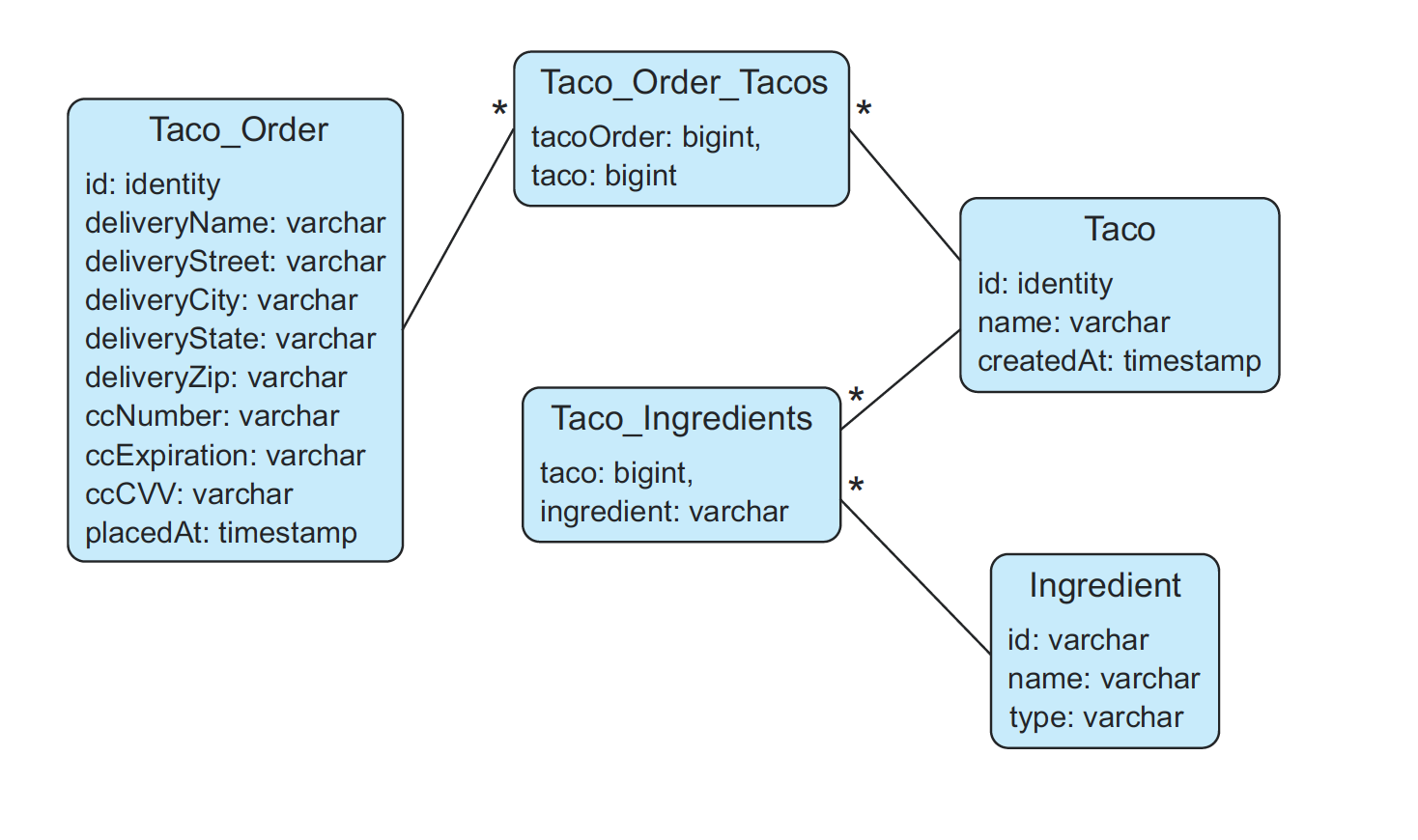
schema.sql
create table if not exists Ingredient (
  id varchar(4) not null,
  name varchar(25) not null,
  type varchar(10) not null
);

create table if not exists Taco (
  id identity,
  name varchar(50) not null,
  createdAt timestamp not null
);

create table if not exists Taco_Ingredients (
  taco bigint not null,
  ingredient varchar(4) not null
);

alter table Taco_Ingredients
    add foreign key (taco) references Taco(id);
alter table Taco_Ingredients
    add foreign key (ingredient) references Ingredient(id);

create table if not exists Taco_Order (
	id identity,
	deliveryName varchar(50) not null,
	deliveryStreet varchar(50) not null,
	deliveryCity varchar(50) not null,
	deliveryState varchar(2) not null,
	deliveryZip varchar(10) not null,
	ccNumber varchar(16) not null,
	ccExpiration varchar(5) not null,
	ccCVV varchar(3) not null,
    placedAt timestamp not null
);

create table if not exists Taco_Order_Tacos (
	tacoOrder bigint not null,
	taco bigint not null
);

alter table Taco_Order_Tacos
    add foreign key (tacoOrder) references Taco_Order(id);
alter table Taco_Order_Tacos
    add foreign key (taco) references Taco(id);
1.5. 식자재 데이터 저장
💡 스프링 부트는 애플리케이션이 시작될 때 classpath의 루트경로에 있는 *.sql 파일을 자동으로 실행한다.
data.sql
delete from Taco_Order_Tacos;
delete from Taco_Ingredients;
delete from Taco;
delete from Taco_Order;

delete from Ingredient;
insert into Ingredient (id, name, type)
                values ('FLTO', 'Flour Tortilla', 'WRAP');
insert into Ingredient (id, name, type)
                values ('COTO', 'Corn Tortilla', 'WRAP');
insert into Ingredient (id, name, type)
                values ('GRBF', 'Ground Beef', 'PROTEIN');
insert into Ingredient (id, name, type)
                values ('CARN', 'Carnitas', 'PROTEIN');
insert into Ingredient (id, name, type)
                values ('TMTO', 'Diced Tomatoes', 'VEGGIES');
insert into Ingredient (id, name, type)
                values ('LETC', 'Lettuce', 'VEGGIES');
insert into Ingredient (id, name, type)
                values ('CHED', 'Cheddar', 'CHEESE');
insert into Ingredient (id, name, type)
                values ('JACK', 'Monterrey Jack', 'CHEESE');
insert into Ingredient (id, name, type)
                values ('SLSA', 'Salsa', 'SAUCE');
insert into Ingredient (id, name, type)
                values ('SRCR', 'Sour Cream', 'SAUCE');
2. 타코와 주문데이터를 추가하는 두가지 방법 실습
jdbcTemplate를 사용하여 데이터를 저장하는 방법은 아래의 두가지 방법이 있다.
- 직접 update()메소드를 사용
- SimpleJdbcInsert wrapper클래스를 사용
2.1. JdbcTemplate를 사용해서 update() 메소드 사용하기
지금까지는 JdbcIngredientRepository의
update()메소드의 사용하여 데이터를 저장하는 방법을 간단하게 알아보았는데,
우선 첫 번째 방법인update()메소드를 퍼시스턴스처리가 더 복잡해지는 경우에는 어떻게 사용하는지 알아보자!
2.1.1. 타코와 주문 데이터 추가
OrderRepository.java
package tacos.data;

import tacos.Order;

public interface OrderRepository {

    Order save(Order order);

}
TacoRepository.java
package tacos.data;

import tacos.Taco;

public interface TacoRepository  {

    Taco save(Taco design);

}
2.1.2. 타코 리포지토리 생성
JdbcTacoRepository.java
package tacos.data;

import java.sql.Timestamp;
import java.sql.Types;
import java.util.Arrays;
import java.util.Date;
import org.springframework.jdbc.core.JdbcTemplate;
import org.springframework.jdbc.core.PreparedStatementCreator;

import org.springframework.jdbc.core.PreparedStatementCreatorFactory;
import org.springframework.jdbc.support.GeneratedKeyHolder;
import org.springframework.jdbc.support.KeyHolder;
import org.springframework.stereotype.Repository;
import tacos.Ingredient;
import tacos.Taco;

@Repository
public class JdbcTacoRepository implements TacoRepository {
	private JdbcTemplate jdbc;
	public JdbcTacoRepository(JdbcTemplate jdbc) {
		this.jdbc = jdbc;
	}

	@Override
	public Taco save(Taco taco) {
		long tacoId = saveTacoInfo(taco);
		taco.setId(tacoId);
		for (Ingredient ingredient : taco.getIngredients()) {
			saveIngredientToTaco(ingredient, tacoId);
		}
		return taco;
	}

	private long saveTacoInfo(Taco taco) {
		taco.setCreatedAt(new Date());
		PreparedStatementCreator psc =
				new PreparedStatementCreatorFactory(
						"insert into Taco (name, createdAt) values (?, ?)",
						Types.VARCHAR, Types.TIMESTAMP
						).newPreparedStatementCreator(
								Arrays.asList(
										taco.getName(),
										new Timestamp(taco.getCreatedAt().getTime())));

		KeyHolder keyHolder = new GeneratedKeyHolder();
		jdbc.update(psc, keyHolder);
		return keyHolder.getKey().longValue();
	}

	private void saveIngredientToTaco(
			Ingredient ingredient, long tacoId) {
		jdbc.update(
				"insert into Taco_Ingredients (taco, ingredient) " +
						"values (?, ?)",
						tacoId, ingredient.getId());
	}
}
이때 ingredients의 속성 타입을 맞추기위해 Ingredient객체로 저장하는 List로 변경
Taco.java
package tacos;
import java.util.List;

...
	@Size(min=1, message="You must choose at least 1 ingredient")
	private List<Ingredient> ingredients;
}
또한 TacoRepostory를 DesignTacoController에 주입하기위해 다음과같이 수정
DesignTacoController.java
package tacos.web;
...
import tacos.data.TacoRepository;

@Slf4j
@Controller
@RequestMapping("/design")
@SessionAttributes("order")
public class DesignTacoController {
	private final IngredientRepository ingredientRepo;

	private TacoRepository tacoRepo;

	@Autowired
	public DesignTacoController(IngredientRepository ingredientRepo, TacoRepository tacoRepo) {
		this.ingredientRepo = ingredientRepo;
		this.tacoRepo = tacoRepo;
	}

	@ModelAttribute(name = "order")
	public Order order() {
		return new Order();
	}

	@ModelAttribute(name = "taco")
	public Taco taco() {
		return new Taco();
	}

	@PostMapping
	public String processDesign(@Valid Taco design, Errors errors, @ModelAttribute Order order) {
		if (errors.hasErrors()) {
			return "design";
		}

		Taco saved = tacoRepo.save(design);
		order.addDesign(saved);

		return "redirect:/orders/current";
	}
...
마지막으로 Order클래스를 수정하면 된다.
Order.java
package tacos;

...
import java.util.ArrayList;
import java.util.List;
...
@Data
public class Order {
	private Long id;
	private Date placedAt;

	...

	private List<Taco> tacos = new ArrayList<>();
	public void addDesign(Taco design) {
		this.tacos.add(design);
	}
}
2.2 SimpleJdbcInsert를 사용해서 데이터 추가하기
위와같은 방법에서는
JdbcTacoRepository의saveTacoInfo()와saveIngrientTotaco()를 통해 사용자의 주문을 저장받고OrderRepository도 이와 흡사하게 처리했다. 문제는 저장할 때 쓰이는KeyHolder와PreparedStatementCreator를 쓰다보니 복잡해진다는거다. 때문에 이번에는 간단하게SimpleJdbcInsert을 활용해보자!
2.2.1 SimpleJdbcInsert 생성
JdbcOrderRepository.java
package tacos.data;

import java.util.Date;
import java.util.HashMap;
import java.util.List;
import java.util.Map;
import org.springframework.beans.factory.annotation.Autowired;
import org.springframework.jdbc.core.JdbcTemplate;
import org.springframework.jdbc.core.simple.SimpleJdbcInsert;
import org.springframework.stereotype.Repository;
import com.fasterxml.jackson.databind.ObjectMapper;
import tacos.Taco;
import tacos.Order;

@Repository
public class JdbcOrderRepository implements OrderRepository {
	private SimpleJdbcInsert orderInserter;
	private SimpleJdbcInsert orderTacoInserter;
	private ObjectMapper objectMapper;

	@Autowired
	public JdbcOrderRepository(JdbcTemplate jdbc) {
		this.orderInserter = new SimpleJdbcInsert(jdbc)
				.withTableName("Taco_Order")
				.usingGeneratedKeyColumns("id");

		this.orderTacoInserter = new SimpleJdbcInsert(jdbc)
				.withTableName("Taco_Order_Tacos");

		this.objectMapper = new ObjectMapper();
	}

	@Override
	public Order save(Order order) {
		order.setPlacedAt(new Date());
		long orderId = saveOrderDetails(order);
		order.setId(orderId);
		List<Taco> tacos = order.getTacos();
		for (Taco taco : tacos) {
			saveTacoToOrder(taco, orderId);
		}

		return order;
	}

	private long saveOrderDetails(Order order) {
		@SuppressWarnings("unchecked")
		Map<String, Object> values =
		objectMapper.convertValue(order, Map.class);
		values.put("placedAt", order.getPlacedAt());
		long orderId =
				orderInserter
				.executeAndReturnKey(values)
				.longValue();
		return orderId;
	}

	private void saveTacoToOrder(Taco taco, long orderId) {
		Map<String, Object> values = new HashMap<>();
		values.put("tacoOrder", orderId);
		values.put("taco", taco.getId());
		orderTacoInserter.execute(values);
	}
}
2.2.2. OrderRepository를 OrderController에 주입
OrderController.java
package tacos.web;

import org.springframework.stereotype.Controller;
import org.springframework.ui.Model;
import org.springframework.web.bind.annotation.GetMapping;
import org.springframework.web.bind.annotation.PostMapping;
import org.springframework.web.bind.annotation.RequestMapping;
import org.springframework.web.bind.annotation.SessionAttributes;
import org.springframework.web.bind.support.SessionStatus;

import lombok.extern.slf4j.Slf4j;
import tacos.Order;
import tacos.data.OrderRepository;
import javax.validation.Valid;
import org.springframework.validation.Errors;

@Slf4j
@Controller
@RequestMapping("/orders")
@SessionAttributes("order")
public class OrderController {

	private OrderRepository orderRepo;

	public OrderController(OrderRepository orderRepo) {
		this.orderRepo = orderRepo;
	}

	@GetMapping("/current")
	public String orderForm() {
		return "orderForm";
	}

	@PostMapping
	public String processOrder(@Valid Order order, Errors errors, SessionStatus sessionStatus) {
		if (errors.hasErrors()) {
			return "orderForm";
		}

		orderRepo.save(order);
		sessionStatus.setComplete();

		return "redirect:/";
	}
}
생성한 타코내역을 폼에서 보여주기위해 템플릿도 조금 수정해준다.
orderForm.html
...
	<form method="POST" th:action="@{/orders}" th:object="${order}">
		<h1>Order your taco creations!</h1>

		<img th:src="@{/images/TacoCloud.png}" /> <a th:href="@{/design}"
			id="another">Design another taco</a><br />

		<ul>
			<li th:each="taco : ${order.tacos}">
			<span th:text="${taco.name}">taco name</span></li>
		</ul>
...
2.2.3 식자재 데이터를 Ingredient 객체로 변환
package tacos.web;

import org.springframework.beans.factory.annotation.Autowired;
import org.springframework.core.convert.converter.Converter;
import org.springframework.stereotype.Component;

import tacos.Ingredient;
import tacos.data.IngredientRepository;

@Component
public class IngredientByIdConverter
		implements Converter<String, Ingredient> {
	private IngredientRepository ingredientRepo;

	@Autowired
	public IngredientByIdConverter(IngredientRepository ingredientRepo) {
		this.ingredientRepo = ingredientRepo;
	}

	@Override
	public Ingredient convert(String id) {
		return ingredientRepo.findById(id);
	}
}
실습 결과
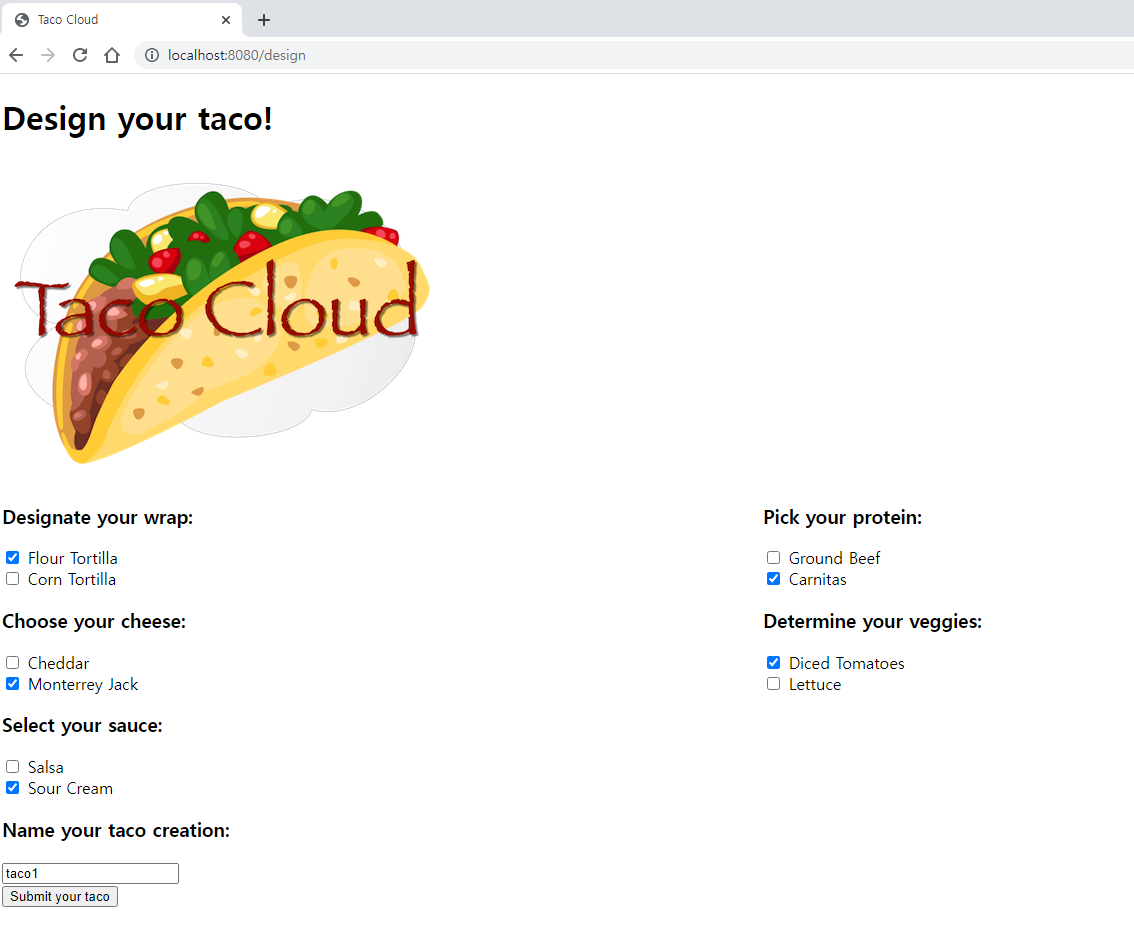 taco1을 입력하면
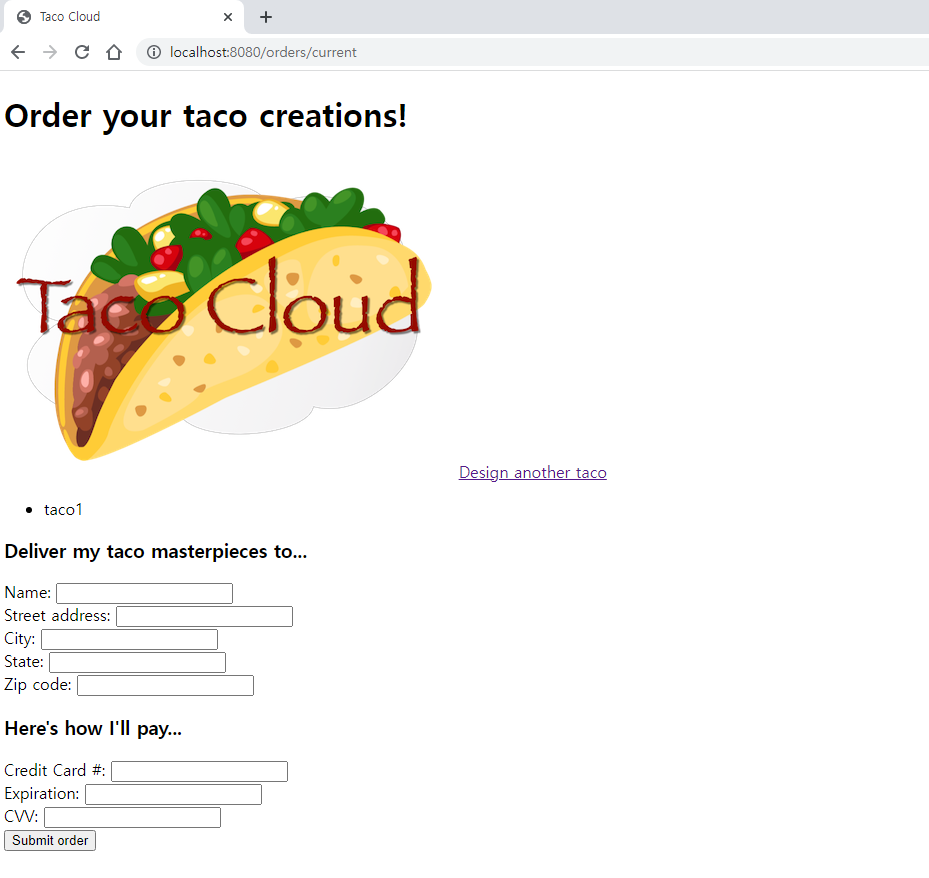
정상적으로 작동된다.
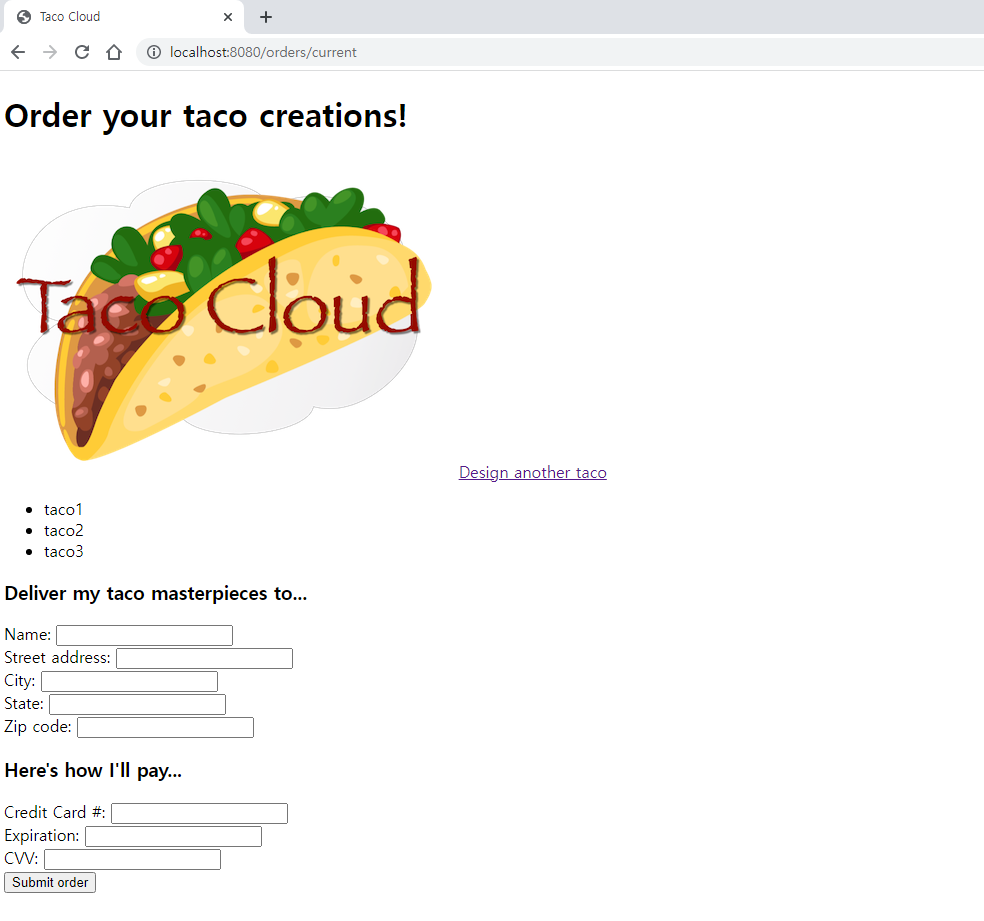
Design another taco 링크를 눌러 주문을 여러개 해본 모습
📝 후기
이런 단편적인 실습에서도 오류가 다수 발생해서 고치기 힘들었는데 와.. jdbctemplate 이전의 고대의 개발자들은 도대체... 어떤 삶을 살아왔을까 😅그저 경외심만이 들뿐이다 👍 스프링을 틈틈이 공부하지만 여전하게 갈피를 못잡는다는 생각이 든다. 공부해야할것은 산더미인데 어디부터 헤치워야할지 못정한 느낌.. 그래도 정진하자! 어느새 설날이 코앞까지 와버렸다. 그말은 곧 개강이 한달남았다는 사실이다.. 개강전까지 힘내보자! 🔥