This contains some overlapping concepts from the Basics of JPA series.
Dependencies
- implementation: explicit dependenciy declaration, needed duing compiling but no need to be public.
- runtimeOnly: runs only during runtime (excluding compile time)
- testImplementation: runs during testing
Making a database (H2)
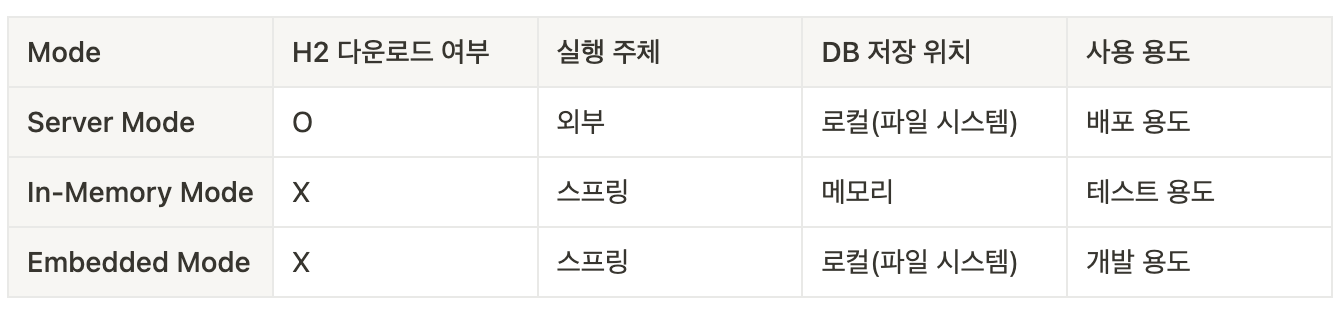
Server Mode
- A method where the engine is installed and used directly.
- The DB engine operates externally, independent of the application.
- Since the data is stored outside the application, it does not disappear even when the application is terminated.
- Download the H2 DBMS in the Official Website
In-memory Mode
- A method that uses the engine within the application without installing it.
- It can be executed through configurations in
build.gradleandapplication.properties. - When the application runs, the DB engine runs along with it, and when the application is terminated, the DB engine also shuts down.
- Since the data is stored in the application's memory, it disappears when the application is closed
application.yml
spring:
    datasource:
        driver-class-name:{DB_name}
        url: jdbc:h2:mem:{DB_location}
        username: {user_name}
        password: {password}
application.properties
spring.datasource.driver-class-name= {DB_name}
spring.datasource.url=jdbc:h2:mem:{DB_location}
spring.datasource.username={user_name}
spring.datasource.password={password}
Embedded Mode
- A method that uses the engine within the application without installing it.
- It can be executed through configurations in
build.gradleandapplication.properties. - When the application runs, the DB engine runs along with it, and when the application is terminated, the DB engine also shuts down.
- Since the data is stored externally to the application, it does not disappear even when the application is terminated.
application.yml
spring:
    datasource:
        driver-class-name:{DB_name}
        url: jdbc:h2:{DB_location}
        username: {user_name}
        password: {password}
application.properties
spring.datasource.driver-class-name={DB_name}
spring.datasource.url=jdbc:h2:{DB_location}
spring.datasource.username={user_name}
spring.datasource.password={password}
How to access your H2 console
First, run your program and copy the path H2 console written in your application.yml file.
application.yml
spring:
  application.name: jdbc
  # H2 Database 설정
  datasource:
    driver-class-name: org.h2.Driver
    url: 'jdbc:h2:mem:test;DB_CLOSE_DELAY=-1;DB_CLOSE_ON_EXIT=FALSE' # H2 DB 연결 주소 (In-Memory Mode)
    #url: 'jdbc:h2:~/test'  # H2 DB 연결 주소 (Embedded Mode)
    username: sa      # H2 DB 접속 ID (사용자 지정)
    password:      # H2 DB 접속 PW (사용자 지정)

  # H2 Console 설정
  h2:
    console: # H2 DB를 웹에서 관리할 수 있는 기능
      enabled: true           # H2 Console 사용 여부
      path: /h2-console       # H2 Console 접속 주소
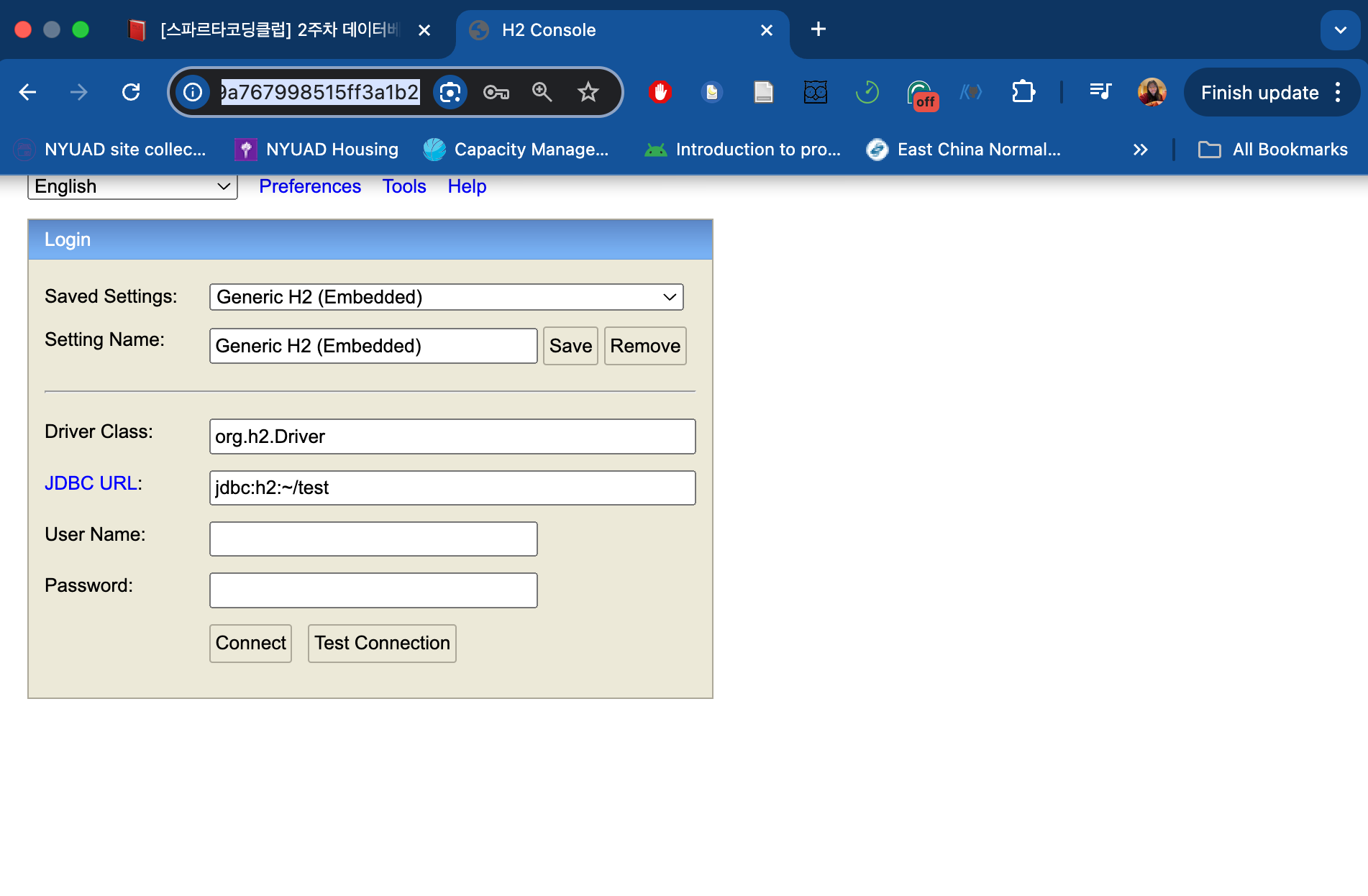
In a web-browser type: http://localhost:8080/{h2-console path} which in this case is http://localhost:8080/h2-console
Then, the following will appear:
MyBatis
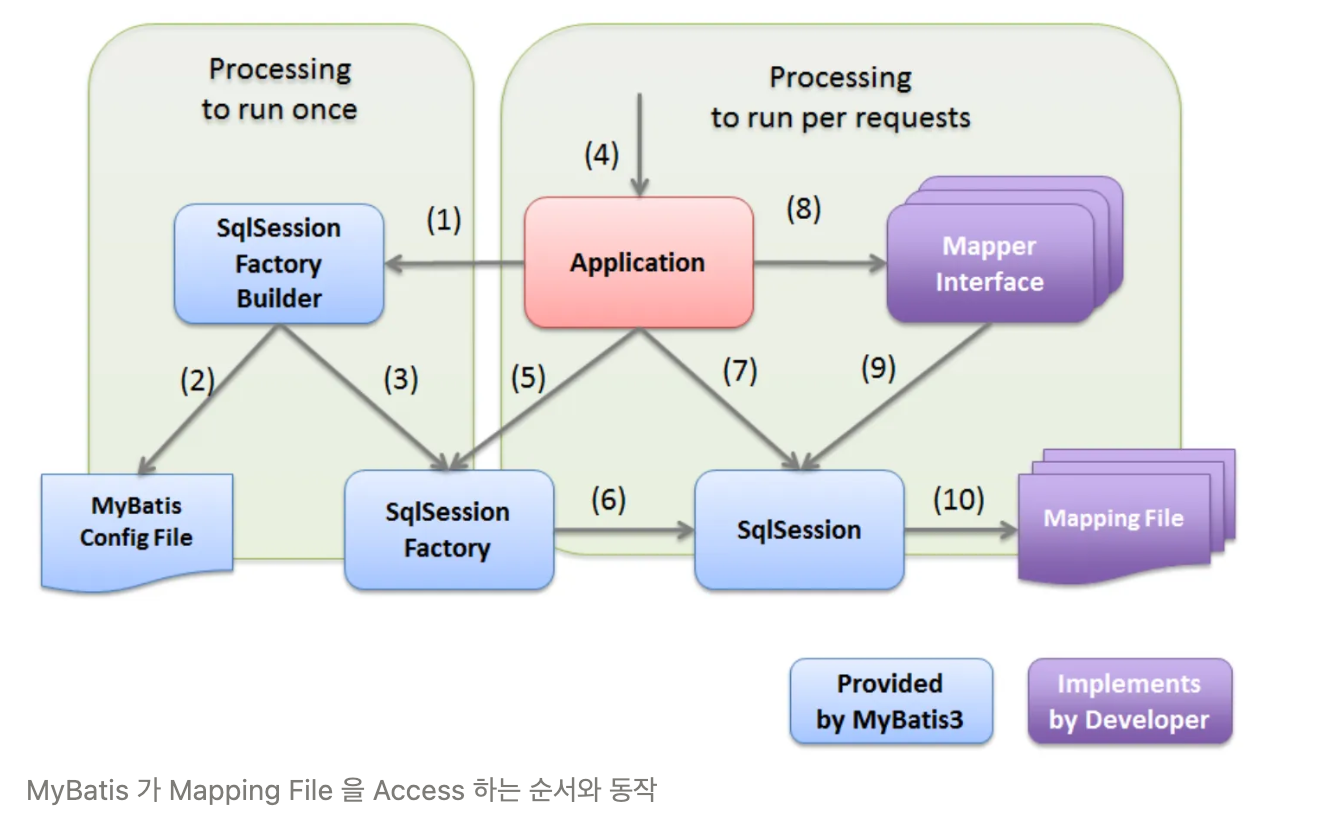
MyBatis is a Java framework that helps developers interact with databases more easily. It simplifies the process of sending SQL queries to the database and retrieving data by allowing you to map database records directly to Java objects.

Fully ✨committed✨ developer, always eager to learn!