Auto generating key
💡 When the key generation strategy is set to
generationType.IDENTITY, the insert query cannot be delayed (쓰기지연 사용불가). This is becausegenerationType.IDENTITY's functioning mechanism is to generate query to the database as soon as it is called to prevents duplicate key generation from to external transactions. Therefore, you cannot keep it on hold before theem.flush()ortransaction.commit.
@Enumerated annotation
@Enumerated- Enum 매핑용도로 쓰이며 실무에서는
@Enumerated(EnumType.*STRING*)으로 사용권장 - Default 타입인
ORDINAL은 0,1,2.. 값으로 들어가기 때문에 추후 순서가 바뀔 가능성있다.
- Enum 매핑용도로 쓰이며 실무에서는
Structure of JPA Repository
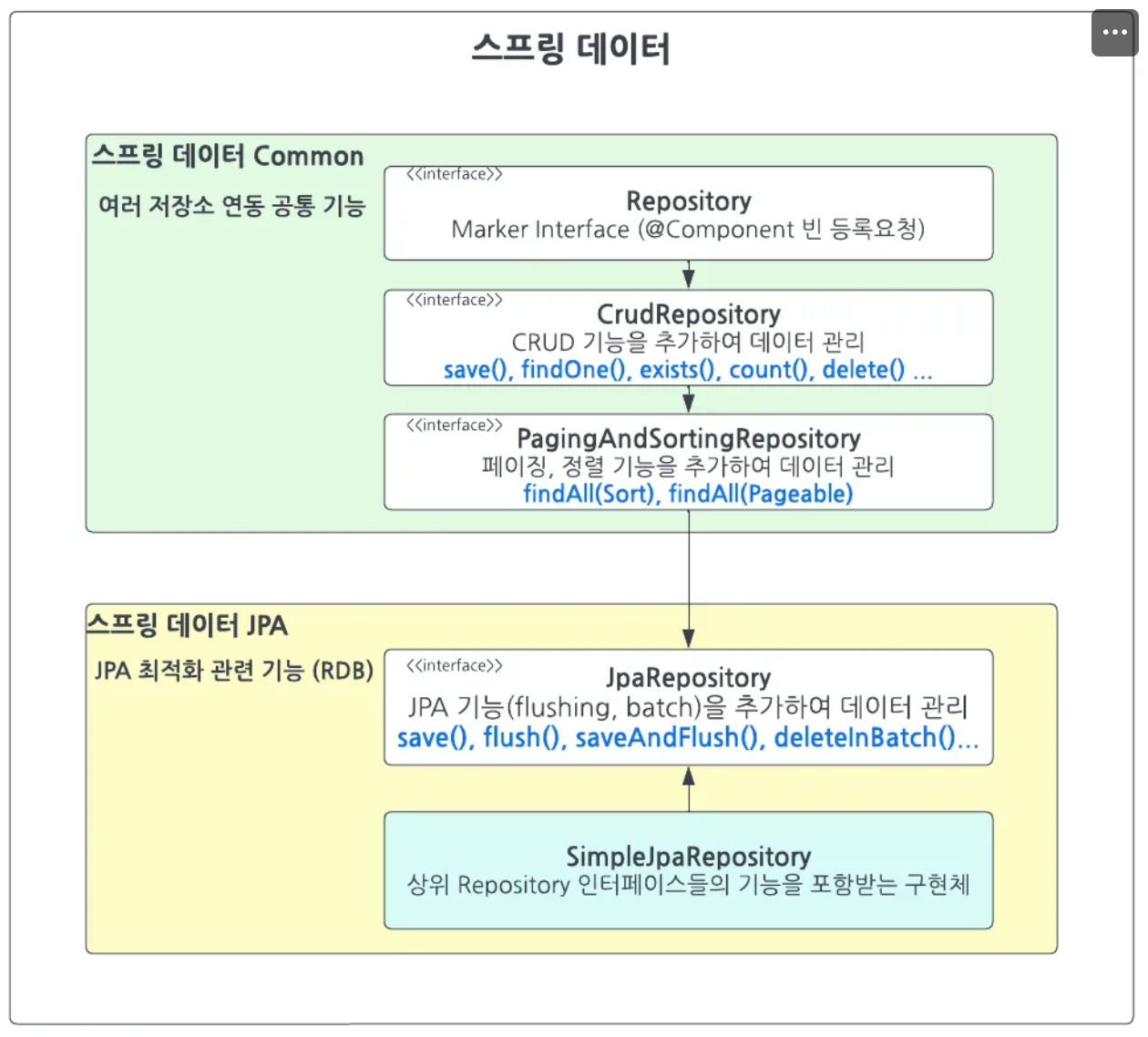
Examples of JPA Repository query
// Basic
List<User> findByNameAndPassword(String name, String password);

// distinct
List<User> findDistinctUserByNameOrPassword(String name, String password);
List<User> findUserDistinctByNameOrPassword(String name, String password);

// ignoring case
List<User> findByNameIgnoreCase(String name);
List<User> findByNameAndPasswordAllIgnoreCase(String name, String password);

// Order
List<Person> findByNameOrderByNameAsc(String name);
List<Person> findByNameOrderByNameDesc(String name);

// Paging
Page<User> findByName(String name, Pageable pageable);  // Page 는 카운트쿼리 수행됨
Slice<User> findByName(String name, Pageable pageable); // Slice 는 카운트쿼리 수행안됨
List<User> findByName(String name, Sort sort);
List<User> findByName(String name, Pageable pageable);

// Stream (stream 다쓴후 자원 해제 해줘야하므로 try with resource 사용추천)
Stream<User> readAllByNameNotNull();
More on Paging
// 첫 페이지 (페이지 사이즈 = 2)
Pageable firstPageWithTwoElements = PageRequest.of(0, 2);
// 두번째 페이지 (페이지 사이즈 = 5)
Pageable secondPageWithFiveElements = PageRequest.of(1, 5);
// 페이지 사용
List<Product> allTenDollarProducts =
productRepository.findAllByPrice(10, secondPageWithFiveElements);- Sorting
Page<Product> allProductsSortedByName = productRepository.findAll(Sort.by("name").accending());- Paging + Sorting
Pageable sortedByName = PageRequest.of(0, 3, Sort.by("name"));

Pageable sortedByPriceDesc = PageRequest.of(0, 3, Sort.by("price").descending());

// 이중정렬
Pageable sortedByPriceDescNameAsc = PageRequest.of(0, 5, Sort.by("price").descending().and(Sort.by("name")));- Methods of Paging
pageable.getTotalPages() : total number of pages
pageable.getTotalElements() : total number of elements
pageable.getNumber() : current page number
pageable.getSize() : number of data per page
pageable.hasnext() : whether there is a next page or not
pageable.isFirst() : if the current page is the first page
pageable.getContent(), PageRequest.get() : returns content on the page
getContext will return List<Entity>, get() will return Stream<Entity>
How to avoid using 'Optinal'
public interface UserRepository extends JpaRepository<User, Long> {
// Default 메소드를 사용하여 findById의 Optional을 내부적으로 처리
default User findUserById(Long id) {
        return findById(id).orElseThrow(() -> new DataNotFoundException("User not found with id: " + id));
    }
}
ifPresent
public interface UserRepository extends JpaRepository<User, Long> {

// 사용자 ID로 사용자를 찾고, 존재할 경우 연락처 정보를 업데이트하는 메소드
default void updateUserContact(Long userId, String newContact) {
        findById(userId).ifPresent(user -> {
            user.setContact(newContact);
            save(user);
        });
    }
}
Slice<T>
- Used in "load more" type paging.
- Instead of the total number of elements, you can use the
offsetfield for querying.- As a result, a count query is not generated, and a
limit+1query is performed. (Offset is not efficient, so it is not commonly used in real-world applications.)
- As a result, a count query is not generated, and a
Sample return of Slice
{
	"content": [
	  { "id": 13, "username": "User 12", "address": "Korea", "age": 12 },
	  ...
	  { "id": 16, "username": "User 15", "address": "Korea", "age": 15 }
	],
	"pageable": {
	  "sort": { "sorted": false, "unsorted": true, "empty": true },
	  "pageNumber": 3,
	  "pageSize": 4,
	  "offset": 12,
	  "paged": true,
	  "unpaged": false
	},
	"number": 3,
	"numberOfElements": 4,
	"first": false,
	"last": false,
	"size": 4,
	"sort": { "sorted": false, "unsorted": true, "empty": true },
	"empty": false
}
JPQL
Examples
public interface UserRepository extends JpaRepository<User, Long> {

  @Query("SELECT u, u.password AS customField FROM User u WHERE u.username = ?1")
  List<User> findByUsernameWithCustomField(String username, Sort sort);


  @Query("SELECT u FROM User u WHERE u.username = ?1")
  List<User> findByUsername(String username, Sort sort);
}
public interface UserRepository extends JpaRepository<User, Long> {

  @Query("SELECT u, u.password AS customField FROM User u WHERE u.username = :username")
  List<User> findByUsernameWithCustomField(String username, Sort sort);


  @Query("SELECT u FROM User u WHERE u.username = :username")
  List<User> findByUsername(String username, Sort sort);
}
QueryDSL
Key Features
-
Type-Safe Queries:
- QueryDSL ensures that your queries are checked at compile-time, meaning you can catch errors earlier compared to string-based queries (like JPQL or HQL).
- If you refer to a field that doesn't exist or write an incorrect condition, the compiler will notify you, reducing runtime errors.
-
Fluent API:
- It provides a fluent API, which means you can chain methods together to create queries in a readable and intuitive way. For example:
QPerson person = QPerson.person;
queryFactory.selectFrom(person)
            .where(person.name.eq("John"))
            .fetch();
- It provides a fluent API, which means you can chain methods together to create queries in a readable and intuitive way. For example:
-
Supports Multiple Backends:
- QueryDSL works with JPA, SQL, MongoDB, Lucene, Hibernate, and other query languages.
- It integrates seamlessly with the ORM framework (like JPA or Hibernate) that you’re already using.
-
Dynamic Queries:
- QueryDSL makes it easier to create complex, dynamic queries based on user inputs or conditions, without having to build query strings manually.
- For example, you can build queries conditionally based on inputs:
if (name != null) {
    predicate = predicate.and(person.name.eq(name));
}
if (age != null) {
    predicate = predicate.and(person.age.eq(age));
}
-
Auto-generated Q Classes:
- QueryDSL generates classes that represent the structure of your entities, known as
Qclasses (e.g.,QPersonfor aPersonentity). - These classes provide direct access to fields and methods in a type-safe manner, replacing the need for string-based field names.
- QueryDSL generates classes that represent the structure of your entities, known as
Example Use Case
Imagine you have a Person entity:
@Entity
public class Person {
    @Id
    @GeneratedValue(strategy = GenerationType.IDENTITY)
    private Long id;
    private String name;
    private int age;
}
QueryDSL will generate a QPerson class that mirrors this entity:
public class QPerson extends EntityPathBase<Person> {
    public static final QPerson person = new QPerson("person");

    public final StringPath name = createString("name");
    public final NumberPath<Integer> age = createNumber("age", Integer.class);
    ...
}
This allows you to write type-safe queries using the QPerson class like this:
QPerson person = QPerson.person;
List<Person> result = queryFactory.selectFrom(person)
                                  .where(person.name.eq("John")
                                  .and(person.age.gt(25)))
                                  .fetch();
person.name.eq("John") ensures the name field is accessed safely and that any issues are caught at compile time.
Dependencies Required in build.gradle
// queryDSL
implementation 'com.querydsl:querydsl-jpa:5.0.0:jakarta'
annotationProcessor "com.querydsl:querydsl-apt:${dependencyManagement.importedProperties['querydsl.version']}:jakarta"
annotationProcessor "jakarta.annotation:jakarta.annotation-api"
annotationProcessor "jakarta.persistence:jakarta.persistence-api"JPA Auditing
Main Application File
Add the following annotations:
@EnableJpaAuditing
@SpringBootApplication
public class Application {
Entity Class
@Getter
@MappedSuperclass
@EntityListeners(AuditingEntityListener.class)
public class TimeStamp {
    @CreatedDate
    private LocalDateTime createdAt;

    @CreatedBy
    @ManyToOne
    private User createdBy;

    @LastModifiedDate
    private LocalDateTime modifiedAt;

}
@DynamicInsert
When performing the insert query to the database, if some fields of the class are not given/ they are set as null in the query.
@DynamicInsert
	public class User {
  ...
}
Before using @DynamicInsert
Hibernate:
    insert
    into
        users
        (password, username, id)
    values
        (?, ?, ?)  // 141ms
After using @DynamicInsert
Hibernate:
    insert
    into
        users
        (username, id)
    values
        (?, ?)  // 133ms