
HTML 태그
Basic HTML
-
br
- 줄 바꿈<p>To force<br> line breaks<br> in a text,<br> use the br<br> element.</p>To force
line breaks
in a text,
use the br
element. -
hr
- 수평선 그리기<p>Hello HTML</p> <hr> <p>Hello CSS</p>Hello HTML
Hello CSS
Forms and Input
-
form
- 사용자 입력을 위한 html 양식을 만드는데 사용됨
- input, textarea, button, select, option 등 하나 이상 포함 가능 -
input
- 사용자가 데이터를 입력할 수 있는 입력필드 지정
- 다양한 input type들이 있음<input type="button"> <input type="checkbox"> <input type="color"> <input type="date"> <input type="email"> <input type="file"> <input type="password"> <input type="radio"> <input type="submit"> <input type="text"> (기본) <input type="url"> -
textarea
- 여러줄 입력받을 때 사용
- name 속성은 폼이 제출된 후 해당 폼 데이터를 참조할 때 필요, id 속성은 label 이랑 연결할 때 필요함<textarea id="w3review" name="w3review" rows="4" cols="50"> At w3schools.com you will learn how to make a website. They offer free tutorials in all web development technologies. </textarea> -
select, optgroup, option
- select: drop-down list 정의
- optgroup: drop-down list에서 연관된 option들의 그룹 정의
- option: drop-down list에 있는 옵션들 정의<select name="cars" id="cars"> <optgroup label="Swedish Cars"> <option value="volvo">Volvo</option> <option value="saab">Saab</option> </optgroup> <optgroup label="German Cars"> <option value="mercedes">Mercedes</option> <option value="audi">Audi</option> </optgroup> </select> -
fieldset, legend
- fieldset: 폼 안에서 연관된 요소들을 그룹화함
- legend: fieldset에 대한 캡션을 정의<fieldset> <legend>Personalia:</legend> <label for="fname">First name:</label> <input type="text" id="fname" name="fname"><br><br> <label for="lname">Last name:</label> <input type="text" id="lname" name="lname"><br><br> <label for="email">Email:</label> <input type="email" id="email" name="email"><br><br> <label for="birthday">Birthday:</label> <input type="date" id="birthday" name="birthday"><br><br> <input type="submit" value="Submit"> </fieldset>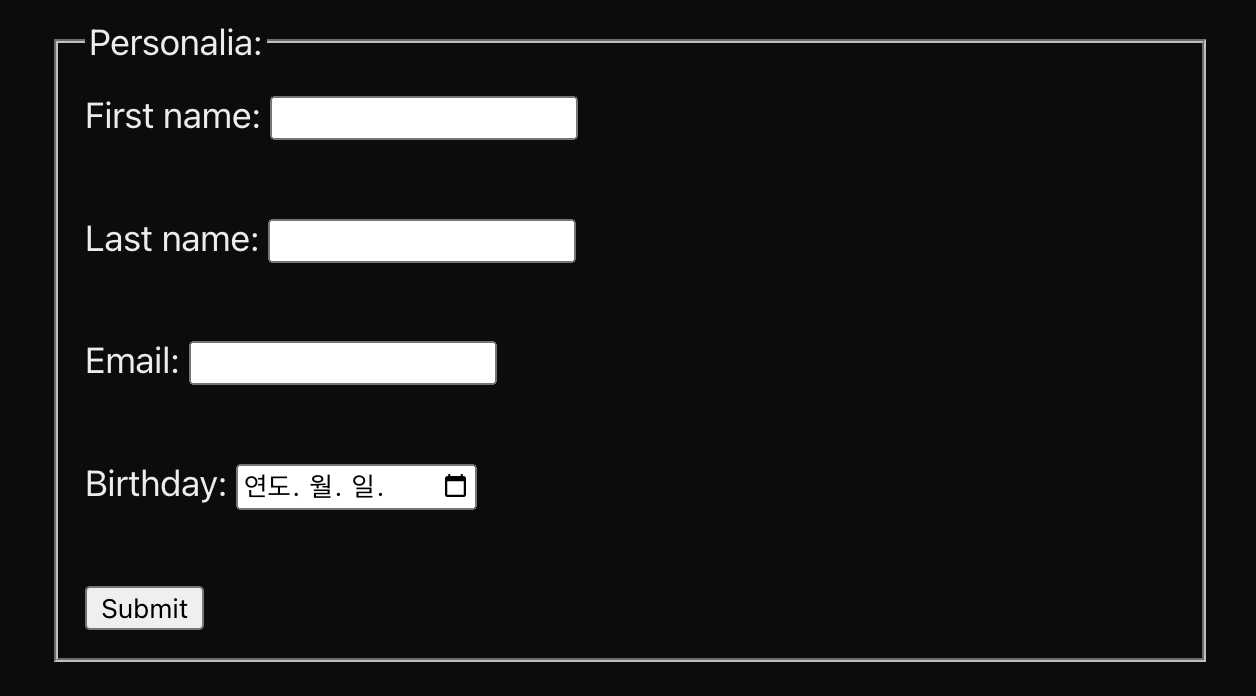
Links
-
a
- 하이퍼링크 정의
- href 속성에 링크 주소 작성<a href="https://www.w3schools.com">Visit W3Schools.com!</a> -
link
- 현재 문서와 외부 리소스간의 관계 정의
- 외부 스타일시트 연결할 때 주로 사용됨<head> <link rel="stylesheet" href="styles.css"> </head>
Programming
-
script
- 자바스크립트 작성<p id="demo"></p> <script> document.getElementById("demo").innerHTML = "Hello JavaScript!"; </script>

👩🏻💻🤍