
CSS 태그
CSS란?
- Cascading Style Sheets 의 약자
- Html 요소들이 화면에 어떻게 보여질지 지정
- 외부 stylesheets는 css 파일에 저장
CSS Syntax
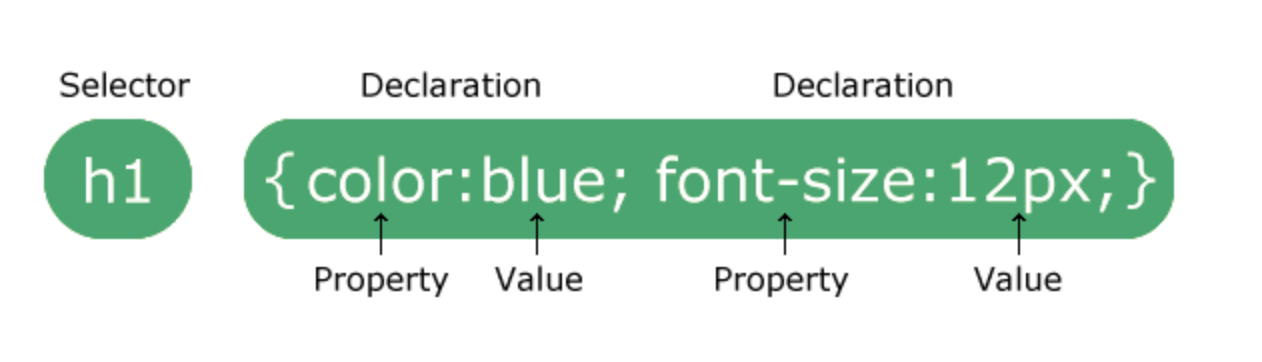
- selector에 스타일 적용할 html 요소 지정
CSS Selectors
-
element selector
- 스타일 적용할 html element 선택p { text-align: center; color: red; } -
id selector
- html 요소의 id 속성을 사용하여 하나의 고유한 element 선택#para1 { text-align: center; color: red; } -
class selector
- 특정한 class 속성을 가진 html elements 선택.center { text-align: center; color: red; } -
universal selector
- 페이지 안에 있는 모든 elements 선택* { text-align: center; color: blue; }
CSS 색상
-
배경색
- background-color<h1 style="background-color:DodgerBlue;">Hello World</h1> -
글자색
- color<h1 style="color:Tomato;">Hello World</h1> -
테두리색
- border<h1 style="border:2px solid Tomato;">Hello World</h1>
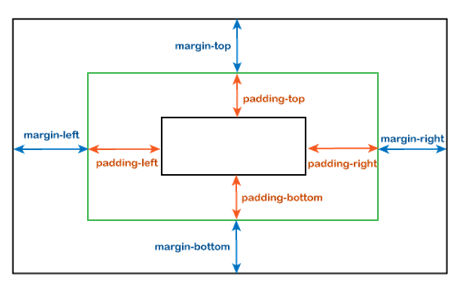
CSS 여백
-
Padding
- 안쪽 여백div { padding-top: 50px; padding-right: 30px; padding-bottom: 50px; padding-left: 80px; } -
Margin
- 바깥쪽 여백p { margin: 25px 50px 75px 100px; //top, right, bottom, left }
Text
-
정렬
- text-alginh1 { text-align: center; } h2 { text-align: left; } h3 { text-align: right; }
Link
-
상태
- a:link - 기본 미방문 링크
- a:visited - 방문한 링크
- a:hover - 사용자가 마우스 올려놓았을 때
- a:active - 클릭하는 순간 -
밑줄 여부
- text-decorationa:link { text-decoration: none; } a:hover { text-decoration: underline; }
Position
-
위치 속성
1. position: static
- 기본값
- top, right, left, bottom 속성 영향 안받음
- 페이지의 정상적인 흐름에 따라 배치됨2. position: relative
- top, right, left, bottom 속성을 주면 정상 위치를 기준으로 상대적으로 배치됨3. position: fix
- viewport 기준으로 배치됨
- 페이지가 스크롤 되더라도 항상 같은 위치에 고정div.fixed { position: fixed; bottom: 0; right: 0; width: 300px; border: 3px solid #73AD21; } // 오른쪽 하단에 고정4. position: absolute
- 가장 가까이에 있는 조상을 기준으로 위치 지정
- 조상이 없으면 문서 body를 기준으로 위치가 지정되고 스크롤 되면서 같이 이동함4. position: sticky
- 사용자의 스크롤 위치를 기준으로 배치div.sticky { position: -webkit-sticky; /* Safari */ position: sticky; top: 0; background-color: green; border: 2px solid #4CAF50; } // 스크롤 위치에 도달하면 상단에 고정
레이아웃
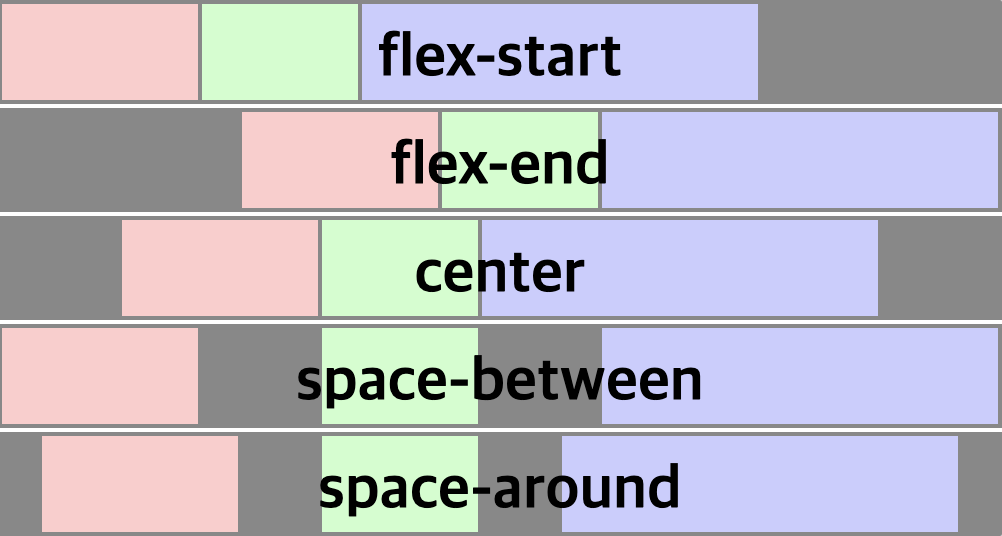
Flexible box Layout
- justify-content

👩🏻💻🤍