import React from "react";
import { StateProps, StoreProduct } from "../../type";
import { useSelector } from "react-redux";
import CartProduct from "@/components/CartProduct";
import ResetCart from "@/components/ResetCart";
import Link from "next/link";
import CartPayment from "@/components/CartPayment";

const CartPage = () => {
  const { productData } = useSelector((state: StateProps) => state.next);
  return (
    <div className="max-w-screen-2xl mx-auto px-6 grid grid-cols-5 gap-10 py-4">
      {productData.length > 0 ? (
        <>
          <div className="bg-white col-span-4 p-4 rounded-lg">
            <div className="flex items-center justify-between border-b-[1px] border-b-gray-400 pb-1">
              <p className="text-2xl font-semibold text-amazon_blue">
                Shopping Cart
              </p>
              <p className="text-lg font-semibold text-amazon_blue">Subtitle</p>
            </div>
            <div className="pt-2 flex flex-col gap-2">
              {productData.map((item: StoreProduct) => (
                <div key={item._id}>
                  <CartProduct item={item} />
                </div>
              ))}
              <ResetCart />
            </div>
          </div>
          <div className="bg-white h-64 col-span-1 p-4 rounded-lg flex items-center justify-center">
            <CartPayment />
          </div>
        </>
      ) : (
        <div className="bg-white h-64 col-span-5 flex flex-col items-center justify-center py-5 rounded-lg shadow-lg">
          <h1 className="text-lg font-medium">Your cart is empty!</h1>
          <Link href={"/"}>
            <button className="w-52 h-10 bg-amazon_blue text-white rounded-lg text-sm font-semibold hover:bg-amazon_yellow hover:text-black">
              go to shopping
            </button>
          </Link>
        </div>
      )}
    </div>
  );
};

export default CartPage;
component에는 따로 CartPayment, ResetCart, CartProduct 파일을 만든 후 위와 같이 cart page를 구현하면
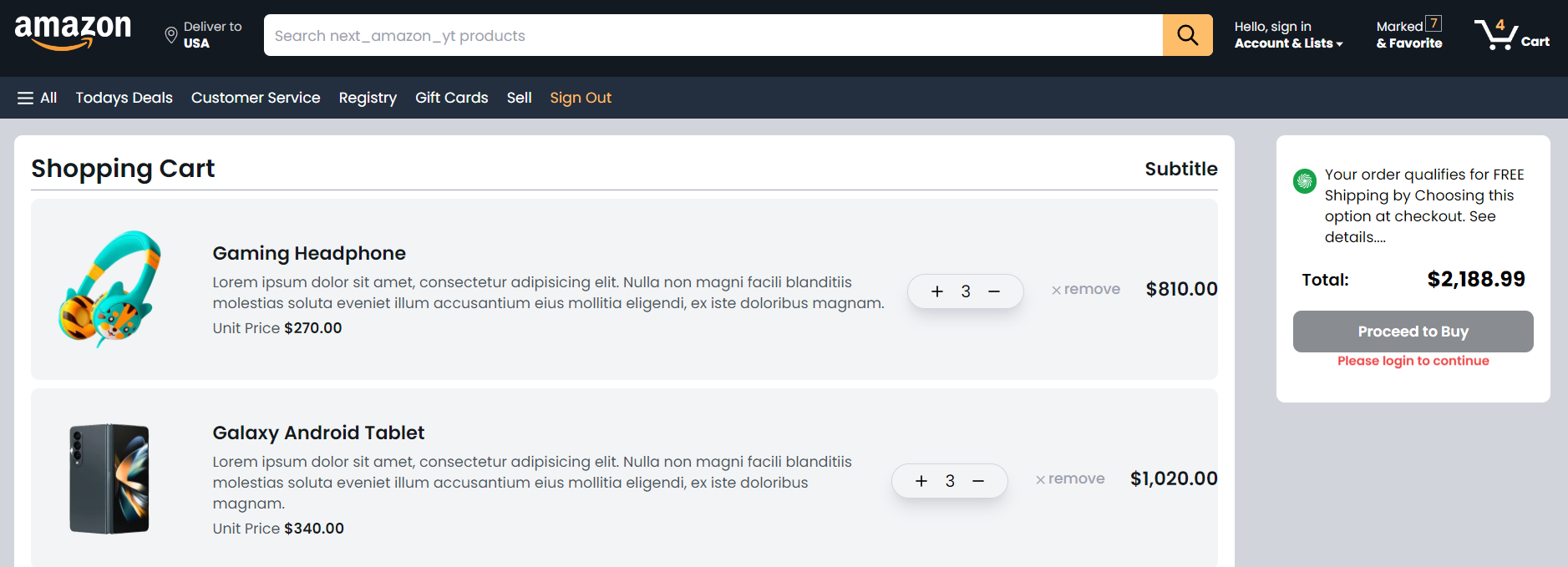
이렇게 완성된다

개발자