component에 price와 product를 만들고 위와 같이 코드를 만든다.
interface Props {
    amount: number;
  }

  const FormattedPrice = ({ amount }: Props) => {
    const formattedAmount = new Number(amount).toLocaleString("en-US", {
      style: "currency",
      currency: "USD",
      minimumFractionDigits: 2,
    });
    return <span>{formattedAmount}</span>;
  };

  export default FormattedPrice;
import React from 'react'
import Image from "next/image";
import { ProductProps } from "../../type";
import { HiShoppingCart } from "react-icons/hi";
import { FaHeart } from "react-icons/fa";
import FormattedPrice from "./FormattedPrice";
const Products = ({ productData }: any) => {
return (
<div className="w-full px-6 grid grid-cols-1 md:grid-cols-2 xl:grid-cols-4 gap-6">
{productData.map(
({
_id,
title,
brand,
category,
description,
image,
isNew,
oldPrice,
price,
}: ProductProps) => (
<div key={_id} className="w-full bg-white text-black p-4 border border-gray-300 rounded-lg group overflow-hidden">
<div className="w-full h-[260px] relative">
<Image
className="w-full h-full object-cover scale-90 hover:scale-100 transition-transform duration-300"
width={300}
height={300}
src={image}
alt="productImage"
/>
<div className="w-12 h-24 absolute bottom-10 right-0 border-[1px] border-gray-400 bg-white rounded-md flex flex-col translate-x-20 group-hover:translate-x-0 transition-transform duration-300">
<span
className="w-full h-full border-b-[1px] border-b-gray-400 flex items-center justify-center text-xl bg-transparent hover:bg-amazon_yellow cursor-pointer duration-300"
>
<HiShoppingCart />
</span>
<span
className="w-full h-full border-b-[1px] border-b-gray-400 flex items-center justify-center text-xl bg-transparent hover:bg-amazon_yellow cursor-pointer duration-300"
>
<FaHeart />
</span>
</div>
{isNew && (
<p className="absolute top-0 right-0 text-amazon_blue font-medium text-xs tracking-wide animate-bounce">
!save <FormattedPrice amount={oldPrice - price} />
</p>
)}
</div>
<hr />
<div className="px-4 py-3 flex flex-col gap-1">
<p className="text-xs text-gray-500 tracking-wide">{category}</p>
<p className="text-base font-medium">{title}</p>
<p className="flex items-center gap-2">
<span className="text-sm line-through">
<FormattedPrice amount={oldPrice} />
</span>
<span className="text-amazon_blue font-semibold">
<FormattedPrice amount={price} />
</span>
</p>
<p className="text-xs text-gray-600 text-justify">
{description.substring(0, 120)}
</p>
<button
className="h-10 font-medium bg-amazon_blue text-white rounded-md hover:bg-amazon_yellow hover:text-black duration-300 mt-2"
>
add to cart
</button>
</div>
</div>
)
)}
</div>
)
}
export default Products그리고 나서 api를 호출하고 데이터를 부른다.
import Banner from "@/components/Banner"
import Products from "@/components/Products"
import { ProductProps } from "../../type";

interface Props {
  productData: ProductProps;
}

export default function Home({ productData }: Props) {
  console.log(productData);
  return (
    <main>
      <div className="max-w-screen-2x1 mx-auto">
        <Banner />
        <div className="relative md:-mt020 lgl:-mt-32 xl:-mt-6- z-20 mb-10">
          <Products productData={productData} />
        </div>
      </div>
    </main>
  )
}

// SSR for data fetching
export const getServerSideProps = async () => {
  const res = await fetch("https://fakestoreapiserver.reactbd.com/tech");
  const productData = await res.json();
  return { props: { productData } };
};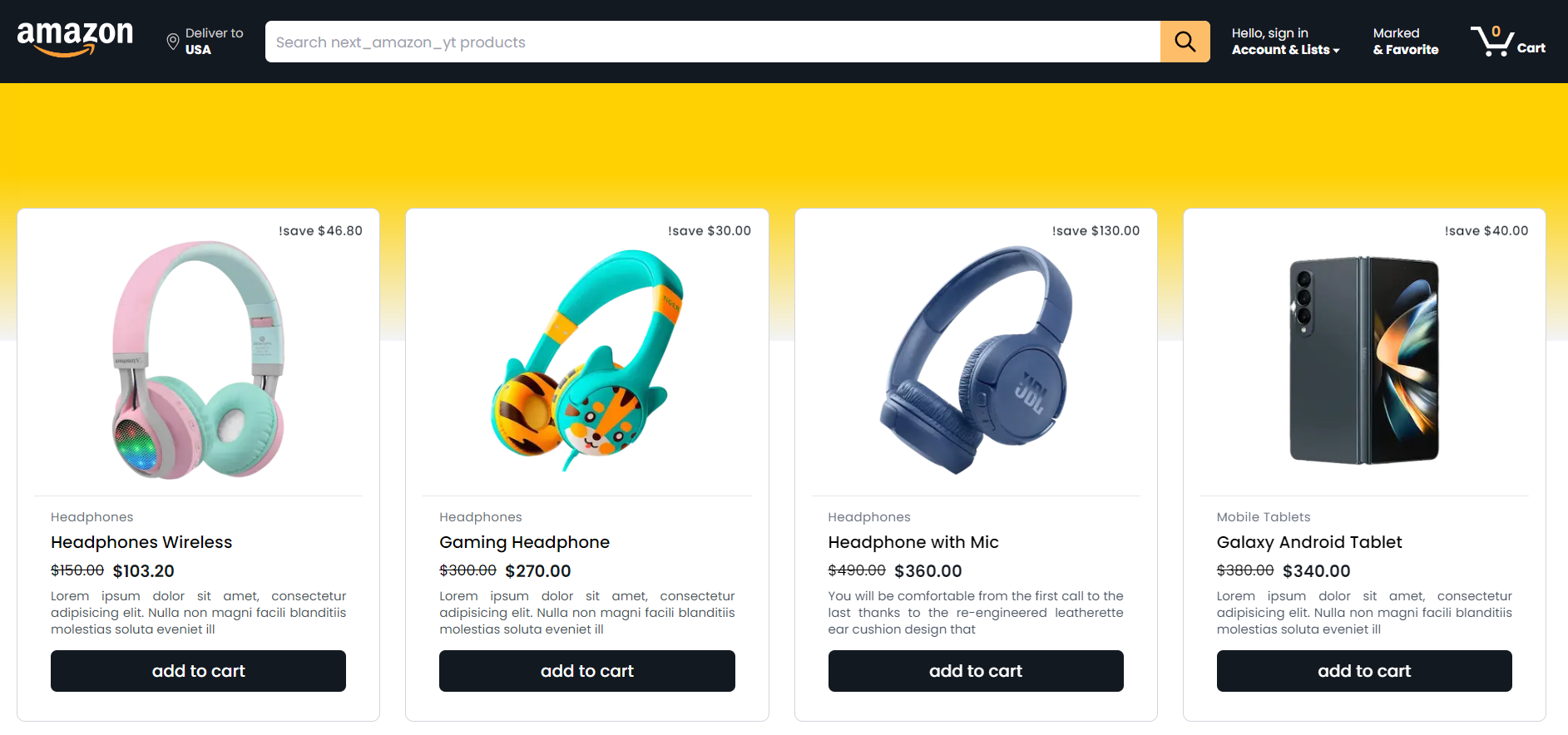
타입스크립트에서 좋은 점은 interface 등 객체 선언을 미리 할수 있고 데이터를 불러내는데 시간을 절약할 수 있는 장점이 있다.
아래 코드와 같이 productdata와 관련된 정보를 호출하기 전에 미리 객체 선언을 해 놓은 다음 위 그림과 같이 프론트할수 있다.
export interface ProductProps {
    brand: string;
    category: string;
    description: string;
    image: string;
    isNew: boolean;
    oldPrice: number;
    price: number;
    title: string;
    _id: number;
  }
개발자