조명(Lighting) 이론 및 구현
1. 이론
조명의 종류
- 점 강원 360도 방향으로 균등하게 빛을 발산, 멀어질수록 옅어짐
ex.전구/가로등 - 방향성 라이트 : 멀리서 한 방향으로만 빛을 발산.
- 소프트 라이트 : 원뿔 모양으로 빛을 발산
ex. 손전등, 무대 스포트라이트, 땅을 비추는 가로등 - 면 광원 : 면적에 전반적으로 조명을 쏨 (반대쪽은 조명 x), 바닥과 벽이 닿는 공간/천장과 벽이 닿는 공간
ex. 인테리어
이 조명들의 공통점
- 속성값 : 위치, 방향, 강도(빛의 세기가 달라지고 부하가 심해짐), 색상, 범위, 각도
- 그림자 : 그림자 속성 조절, 강도에 따라 렌더링 연산이 높아짐
- 라이트는 렌더링 성능에 큰 영향을 미치기 때문에 최적화에 신경 써야 한다.
Lighting Intensity Multiplier: 실제 환경의 빛 조절Reflecting Intensity Multiplier: 반사광 조절
AnimationCurve
AnimationCurve는 Unity에서 애니메이션의 키프레임(Keyframe)을 사용하여 값을 보간(interpolate)하는데 사용되는 클래스
이 클래스로 시간에 따라 값을 부드럽게 변화시키는 커브를 정의하고, 이를 기반으로 애니메이션을 만들 수 있다.
AnimationCurve 클래스의 기본적인 구성 요소
키프레임(Keyframe): 시간에 따른 값을 정의하는 점. 키프레임은시간(t)과해당 시간에 대응하는 값(value)으로 이루어짐보간 방식(Interpolation Mode): 인접한 키프레임 사이의 값을 보간하는 방법을 지정한다. 기본적으로는 Cubic Bezier 보간이 사용됨. 선형, 스텝, 등 다양한 보간 방식이 있음
✅ AnimationCurve 예제
using UnityEngine;

public class ExampleScript : MonoBehaviour
{
    private AnimationCurve curve;

    private void Start()
    {
        // 새로운 AnimationCurve 생성
        curve = new AnimationCurve();

        // 키프레임 추가 (시간, 값)
        curve.AddKey(0f, 0f);
        curve.AddKey(1f, 1f);
    }

    private void Update()
    {
        // 시간에 따라 값을 보간하여 출력
        float time = Time.time;
        ※ float value = curve.Evaluate(time); ※
        Debug.Log("Time: " + time + ", Value: " + value);
    }
}
키값을 초기값, 중간값, 결괏값을 정해놓고 Evaluate함수를 호출해 점진적으로 변화하도록 함
2. 구현
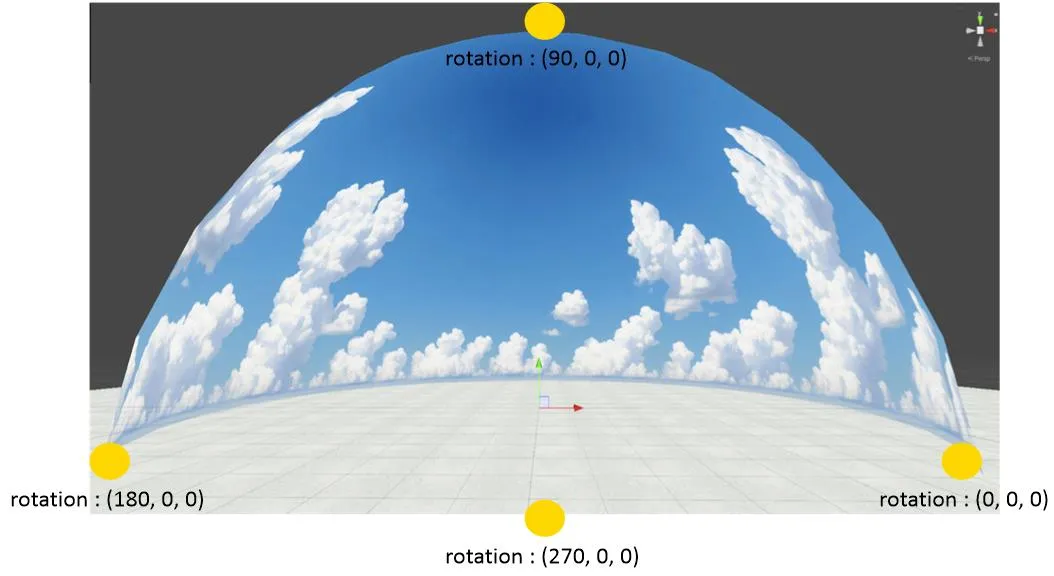
0도 : 동쪽
90도 : 북쪽 (정오)
180도 : 서쪽
270도 :
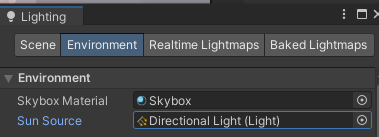
- Window > Rendering > Lightening
- sunsource에 다이렉트라이트가 있기 때문에 태양과 같은 효과가 난다.
1) 변수 설정
필요한 변수 : 시간, 하루의 길이, 시작시간, 시간 비율, 정오의 각도
범위를 0~1로 설정
[Range(0.0f, 1.0f)]
public float time;
public float fullDayLength; // 하루의 길이
public float startTime = 0.4f; // 시작시간, 0.5가 되어야 12시(정오)
private float timeRate;
public Vector3 noon; // (90도,0,0) 정오
낮 조명/밤 조명/기타 조명 변수 선언
// 해
[Header("Sun")]
public Light sun;
public Gradient sunColor;
public AnimationCurve sunIntensity; // 강도

// 달
[Header("Sun")]
public Light moon;
public Gradient moonColor;
public AnimationCurve moonIntensity; // 강도

// Other Lighting
// 애니메이션 커브로 진행
[Header("Other Lighting")]
public AnimationCurve lightingIntensityMultipiler; // 빛 세기
public AnimationCurve reflectionIntensityMultipiler; // 반사광 세기
2) Time 설정
start 함수에서 timeRate, time 정의
timeRate = 1.0f / fullDayLength; // 하루의 진행도 (현재 시간을 %로 나타냄)
time = startTime;
※ Update 함수에서 time 증가 시키기
time = (time + timeRate * Time.deltaTime) % 1.0f;해석) currentTime += timeRate * Time.deltaTime; 는 시간의 흐름을 누적하는 것이다.
현재 하루 진행도 += (초당 하루 진행도) × (실제 지난 시간) 라고 할 수 있다.
여기서 time = (time + timeRate * Time.deltaTime) % 1.0f;은
하루가 끝나면 (=하루 진행도가 1.0을 넘으면) 다시 0으로 돌아가게(반복되게) 하는 코드이다.
% 1.0f는 값을 0~1 범위로 유지하는 역할.
3) 조명 및 other liting 업데이트
강도, 해(lightSource)의 각도, 해의 컬러
void UpdateLighting(Light lightSource, Gradient gradient, AnimationCurve intensityCurve)
{
    float intensity = intensityCurve.Evaluate(time);
    lightSource.transform.eulerAngles = (time - (lightSource == sun ? 0.25f : 0.75f)) * noon * 4f;
    lightSource.color = gradient.Evaluate(time);
	lightSource.intensity = intensity;
해석) time = 0.25일 때 태양이 뜨기 시작
즉, 아침 (6시) 에 태양이 지평선 위로 떠오름
lightSource == moon이면 0.75f (달)
time = 0.75일 때 달이 뜨기 시작
즉, 저녁 (6시) 에 달이 지평선 위로 떠오름
* noon * 4f
noon은 태양의 최대 높이(90도), 4f는 하루가 360도 회전하도록 맞춰주는 값
즉, 90 * 4 = 360으로 변환하는 것
4) 껐다 키기 (해 넘어가면 필요 없으니까)
void UpdateLighting(Light lightSource, Gradient gradient, AnimationCurve intensityCurve)
{
 GameObject go = lightSource.gameObject;
 if (lightSource.intensity ==0 && go.activeInHierarchy) // 밝기는 없는데 계층에서 활성화 돼있다면
 {
     // 끄기
     go.SetActive(false);
 }
 else if (lightSource.intensity > 0 && !go.activeInHierarchy) // 밝기가 생겼는데, 계층에서 꺼져있다면
     { go.SetActive(true); }
}
void Update()
{
UpdateLighting(sun, sunColor, sunIntensity);
UpdateLighting(moon, moonColor, moonIntensity);
}5) LightingIntensityMultipiler/reflectionIntensityMultipiler 설정 바꿔주기
update.cs

// lightingIntensity
RenderSettings.ambientIntensity = lightingIntensityMultipiler.Evaluate(time);
//reflectionIntensity
RenderSettings.reflectionIntensity = reflectionIntensityMultipiler.Evaluate(time);
6) 인스펙터에서 할당
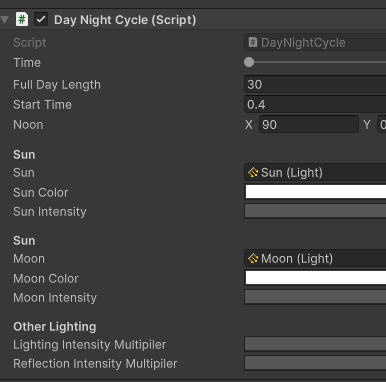
key 값 설정
-
Sun intensity
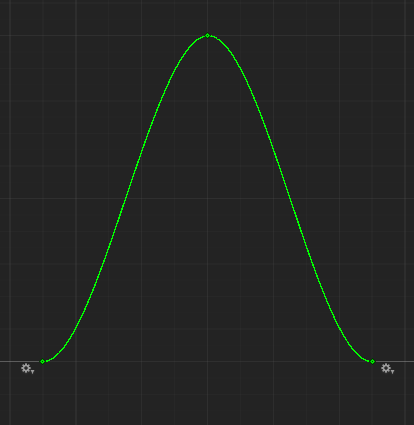
(0.25,0) / (0.5,1) / (0.75,0) -
moon intensity
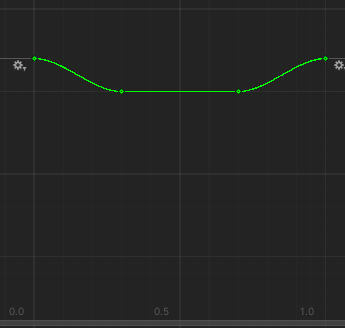
(0, 0.2) / (0.3, 0) / (0.7, 0) / (1, 0) -
Light/Reflect intensity Multiplier
(0, 0) / (0.4, 1) / (0.8, 1) / (1, 0)
색상 설정
중앙에 더블클릭
- 낮
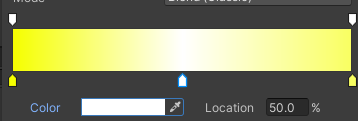
- 밤
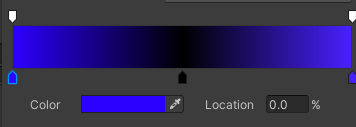
✅ 낮밤 바꾸기 전체CS
public class DayNightCycle : MonoBehaviour
{
    // 필요한 변수 : 시간, 하루의 길이, 시작시간, 시간 비율, 정오의 각도
    [Range(0.0f, 1.0f)]
    public float time;
    public float fullDayLength; // 하루의 길이
    public float startTime = 0.4f; // 시작시간, 0.5가 되어야 12시(정오)
    private float timeRate;
    public Vector3 noon; // (90도,0,0) 정오


    // 해
    [Header("Sun")]
    public Light sun;
    public Gradient sunColor;
    public AnimationCurve sunIntensity; // 강도

    // 달
    [Header("Sun")]
    public Light moon;
    public Gradient moonColor;
    public AnimationCurve moonIntensity; // 강도

    // Other Lighting
    // 애니메이션 커브로 진행
    [Header("Other Lighting")]
    public AnimationCurve lightingIntensityMultipiler; // 빛 세기
    public AnimationCurve reflectionIntensityMultipiler; // 반사광 세기

    void Start()
    {
        timeRate = 1.0f / fullDayLength; // 하루의 진행도
        time = startTime;
    }
    void Update()
    {
        time = (time + timeRate * Time.deltaTime) % 1.0f;
        UpdateLighting(sun, sunColor, sunIntensity);
        UpdateLighting(moon, moonColor, moonIntensity);

        RenderSettings.ambientIntensity = lightingIntensityMultipiler.Evaluate(time); // lightingIntensity
        RenderSettings.reflectionIntensity = reflectionIntensityMultipiler.Evaluate(time); //reflectionIntensity
    }
    void UpdateLighting(Light lightSource, Gradient gradient, AnimationCurve intensityCurve)
    {
        float intensity = intensityCurve.Evaluate(time);
        lightSource.transform.eulerAngles = (time - (lightSource == sun ? 0.25f : 0.75f)) * noon * 4f; // 90도에다가 0.25혹은 0.75를 곱하고 , 90도/270도로 만들어주기 위해 4를 다시 곱해줌
        lightSource.color = gradient.Evaluate(time);
        lightSource.intensity = intensity;

        // lightsource 껐다 키기
        GameObject go = lightSource.gameObject;
        if (lightSource.intensity ==0 && go.activeInHierarchy) // 밝기는 없는데 계층에서 활성화 돼있다면
        {
            // 끄기
            go.SetActive(false);
        }
        else if (lightSource.intensity > 0 && !go.activeInHierarchy) // 밝기가 생겼는데, 계층에서 꺼져있다면
            { go.SetActive(true); }
    }
}