후 ... 1주동안 같은 에러 지옥에 갇혔다 ...
사실 이걸 쓰는 중에도 해결 못해서 걍 내 기록을 쫙 적을 겸 겸사겸사 HW 관련 지식도 조금 적어볼까 한다.
우선 나는 지금 DDPM을 COCO데이터셋으로 Customize해서 학습시키려고 한다.
코드는 아래의 git을 가져와서 사용하고 있다.
https://github.com/lucidrains/denoising-diffusion-pytorch/tree/main
사실 코드 자체는 아~주 단순하다!
하지만 Diffusion Model이다 보니 메모리가 엄첨나게 요구된다,,, 내 개인 컴퓨터는 RTX4090 1대인데 이게 빠르긴한데 메모리가 적어서 OOM(Out of Memory)에러가 났다.
결국 A6000 4대로 돌리려고 시도했으나 계속해서 보이는 아래의 에러 ..
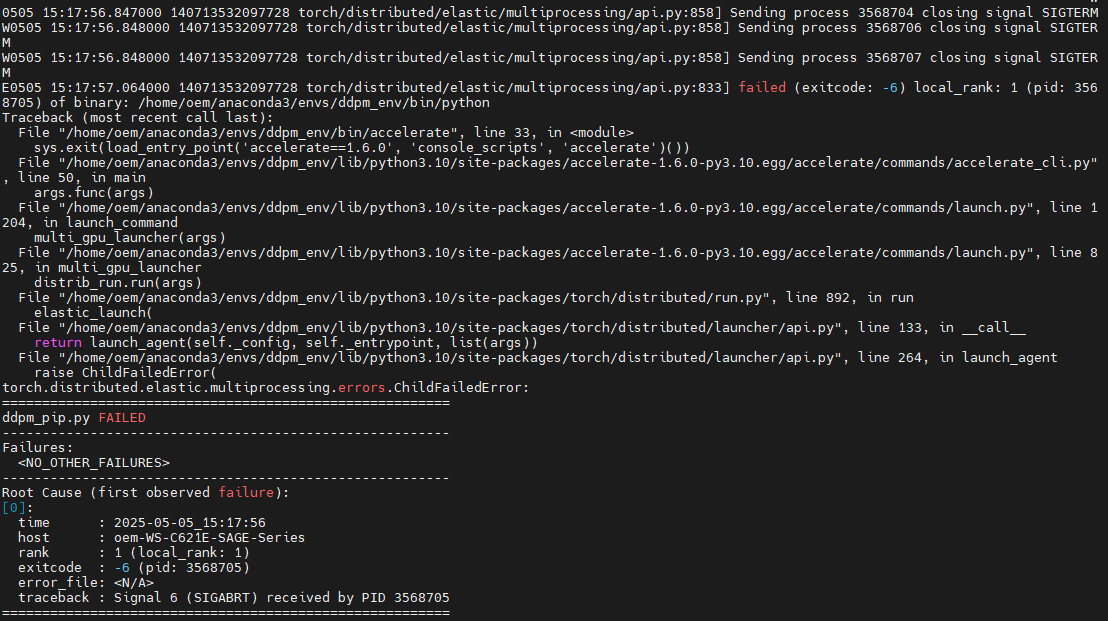
나한테 왜그래 ...? 😊
자 그럼 여러 과정을 거쳐 지금 내가 하고 있는 것
1. NUMA 구조 분석
nvidia-smi topo -m 을 통해 NUMA 구조를 출력해보니 아래와 같았다.
(base) oem@oem-WS-C621E-SAGE-Series:~/users$ nvidia-smi topo -m
        GPU0    GPU1    GPU2    GPU3    CPU Affinity    NUMA Affinity   GPU NUMA ID
GPU0     X      SYS     SYS     SYS     0-19,40-59      0               N/A
GPU1    SYS      X      SYS     SYS     0-19,40-59      0               N/A
GPU2    SYS     SYS      X      SYS     20-39,60-79     1               N/A
GPU3    SYS     SYS     SYS      X      20-39,60-79     1               N/A
우선 NUMA는 CPU마다 연결된 전용 메모리 뱅크가 있는 시스템 구조라고 한다.
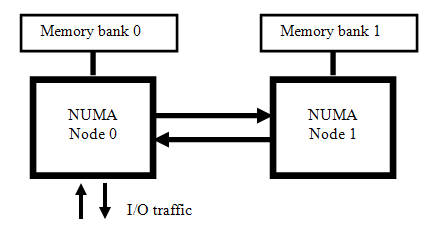
이 말이 잘 이해가 안될텐데 일단! 무시하고 넘어가자.
이 로그를 통해 알 수 있는 점은 아래와 같았다.
- 모든 GPU간의 연결이 SYS로 되어있는데, 이는 연결이 CPU간 NUMA 인터페이스를 통해 전달된다는 뜻
- NVLink간 고속 GPU간 직접 연결은 없으며, 모든 GPU간 통신이 느림 경로를 사용하고 있음
- GPU 0, 1번은 NUMA Node 0번 소켓, GPU 2, 3번은 NUMA Node 1번의 소켓 메모리를 주로 사용하고 있음.⭐
- 이 경우 Multi GPU 학습 시 NUMA-aware하게 0-1 또는 2-3 조합으로 구성하는 것을 권장
이 내용의 핵심은 서로 다른 소켓 메모리 간의 이동이 느리고 에러 발생 확률을 높인다는 것이다.
서로 다른 cpu간의 메모리 이동이 느리다는 것은 학부생 수업때 배웠는데 이게 NUMA라는 것이랑 관련이 있는지는 잘 모르겠다,,,우선 그래서 4개의 GPU를 모두 사용하지 않고 앞의 2개의 GPU만 사용하기로!!
Accelerator config 재설정 시작
02. Accelerator 재설정
아래와 같이 해줬다
(ddpm_env) oem@oem-WS-C621E-SAGE-Series:~/users/gyuli/denoising-diffusion-pytorch$ accelerate config
-----------------------------------------------------------------------------------------------------------------------------------------In which compute environment are you running?
This machine
-----------------------------------------------------------------------------------------------------------------------------------------Which type of machine are you using?
multi-GPU
How many different machines will you use (use more than 1 for multi-node training)? [1]: 1
Should distributed operations be checked while running for errors? This can avoid timeout issues but will be slower. [yes/NO]: yes
Do you wish to optimize your script with torch dynamo?[yes/NO]:no
Do you want to use DeepSpeed? [yes/NO]: no
Do you want to use FullyShardedDataParallel? [yes/NO]: no
Do you want to use TensorParallel? [yes/NO]: no
Do you want to use Megatron-LM ? [yes/NO]: no
How many GPU(s) should be used for distributed training? [1]:2
What GPU(s) (by id) should be used for training on this machine as a comma-seperated list? [all]:0,1
Would you like to enable numa efficiency? (Currently only supported on NVIDIA hardware). [yes/NO]: yes
Please enter yes or no.
Would you like to enable numa efficiency? (Currently only supported on NVIDIA hardware). [yes/NO]: yes
-----------------------------------------------------------------------------------------------------------------------------------------Do you wish to use mixed precision?
fp16
accelerate configuration saved at /home/oem/.cache/huggingface/accelerate/default_config.yaml
그러나 또 에러 발생 ...
또 같은 에러다
다시 분석해보면 아래의 코드가 뜨고 나서 timeout제한 시간(TORCH_NCCL_HEARTBEAT_TIMEOUT_SEC)이 지난 후에 프로세스가 종료된다.
[rank1]:[E505 16:43:38.902536065 ProcessGroupNCCL.cpp:1375] [PG 0 (default_pg) Rank 1] First PG on this rank that detected no heartbeat of its watchdog.time step:  54%|███████████████████████████████████████▏                                 | 134/250 [00:10<00:08, 13.11it/s]
[rank1]:[E505 16:43:38.902885944 ProcessGroupNCCL.cpp:1413] [PG 0 (default_pg) Rank 1] Heartbeat monitor timed out! Process will be terminated after dumping debug info. workMetaList_.size()=7
03. 새출발^_^
DDPM Pytorch issue에서 보니까 Torch 버전 문제라는 말이 있었다!
그래서 새롭게 가상환경 설치를 해주었다!
우선 python 3.8으로 만들어주고
torch version 2.1.2을 설치하라해서
pip install torch==2.1.2 torchvision==0.16.2 torchaudio==2.1.2 --index-url https://download.pytorch.org/whl/cu118 이렇게 실행시켜주었다
그리고 다시 GPU 4개로 바꾸고
CUDA_VISIBLE_DEVICES=0,1,2,3까지 실행하고 다시 스타트

또 멈췄다...
30분(time out 제한 시간)뒤에 또 꺼지겠지
04. 코드로 디버깅 후 일부 주석처리 (성공)
아래는 Train 부분 코드(denoising_diffusion_pytorch.py)이다.
# trainer class

class Trainer:
    def __init__(
        self,
        diffusion_model,
        folder,
        *,
        train_batch_size = 16,
        gradient_accumulate_every = 1,
        augment_horizontal_flip = True,
        train_lr = 1e-4,
        train_num_steps = 100000,
        ema_update_every = 10,
        ema_decay = 0.995,
        adam_betas = (0.9, 0.99),
        save_and_sample_every = 1000,
        num_samples = 25,
        results_folder = './results',
        amp = False,
        mixed_precision_type = 'fp16',
        split_batches = True,
        convert_image_to = None,
        calculate_fid = False,
        inception_block_idx = 2048,
        max_grad_norm = 1.,
        num_fid_samples = 50000,
        save_best_and_latest_only = False
    ):
        super().__init__()

        ... (생략) ...

                pbar.set_description(f'loss: {total_loss:.4f}')

                accelerator.wait_for_everyone()
                accelerator.clip_grad_norm_(self.model.parameters(), self.max_grad_norm)

                self.opt.step()
                self.opt.zero_grad()
                print("     1    ")
                accelerator.wait_for_everyone()
                print("     2    ")
                self.step += 1

                if accelerator.is_main_process:
                    self.ema.update()
                    print("     3      ")

                    if self.step != 0 and divisible_by(self.step, self.save_and_sample_every):
                        print("i am here ~~~~~~~~")
                        self.ema.ema_model.eval()

                        with torch.inference_mode():
                            milestone = self.step // self.save_and_sample_every
                            batches = num_to_groups(self.num_samples, self.batch_size)
                            all_images_list = list(map(lambda n: self.ema.ema_model.sample(batch_size=n), batches))

                        all_images = torch.cat(all_images_list, dim = 0)

                        utils.save_image(all_images, str(self.results_folder / f'sample-{milestone}.png'), nrow = int(math.sqrt(self.num_samples)))

                        # whether to calculate fid

                        if self.calculate_fid:
                            print("calculating fid")
                            fid_score = self.fid_scorer.fid_score()
                            accelerator.print(f'fid_score: {fid_score}')

                        if self.save_best_and_latest_only:
                            print("save best")
                            if self.best_fid > fid_score:
                                self.best_fid = fid_score
                                self.save("best")
                            self.save("latest")
                        else:
                            self.save(milestone)

                pbar.update(1)

        accelerator.print('training complete')
대충 이런식으로 print문 찍고 디버깅 시작
앞의 두 print문은 4번씩 출력되고, 뒤의 main process 내의 출력문은 한번 된다.
main process문은 하나의 gpu에서만 실행하나보다.
그래서 에러가 발생하는 부분을 살펴보니 다음과 같았다.
loss: 0.0478:   1%|▋                                                                        | 999/100000 [29:41<50:53     1
     1
     1
     1
     2         2         2


     2
     3
i am here ~~~~~~~~
sampling loop time step: 100%|████████████████████████████████████████████████████████████████████| 250/250 [00:10<00
sampling loop time step: 100%|████████████████████████████████████████████████████████████████████| 250/250 [00:06<00
sampling loop time step: 100%|████████████████████████████████████████████████████████████████████| 250/250 [00:06<00
sampling loop time step: 100%|████████████████████████████████████████████████████████████████████| 250/250 [00:06<00
sampling loop time step: 100%|████████████████████████████████████████████████████████████████████| 250/250 [00:06<00
sampling loop time step: 100%|████████████████████████████████████████████████████████████████████| 250/250 [00:06<00
sampling loop time step: 100%|████████████████████████████████████████████████████████████████████| 250/250 [00:03<00
calculating fidime step:  98%|██████████████████████████████████████████████████████████████████▉ | 246/250 [00:03<00
Stacking Inception features for 50000 samples from the real dataset.
보니까 png파일까지는 저장이 됐기 때문에 main process에 들어가서 fid 계산하는 부분에서 에러가 나는거같았다.
검색해보니까 fid 계산하는게 복잡도가 높다고 한다.
그래서 나는 사실 성능 측정이 아니라 DDPM을 COCO데이터셋으로 훈련시키는게 목적이었기 때문에 FID 계산 부분 코드를 주석처리하고 실행하니까~
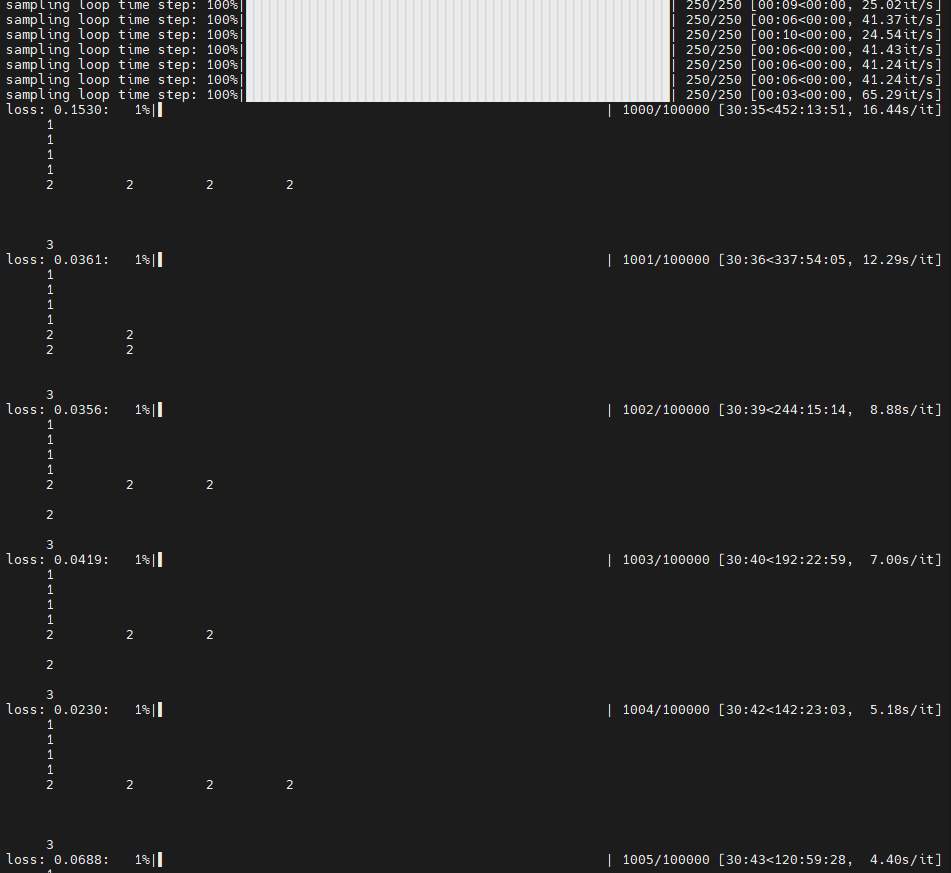
드디어 다음 루프로 넘어간...!🥹❤️✌️
만약 나처럼 중간에 멈추거나 time out 에러가 나는 사람이 있다면 불필요한 FID 계산 부분을 꼭 주석 처리 하고 학습시키시길~!
나중에 혹여나 필요해지면 그때 따로 FID 계산하면 되니까 ㅎㅎ
구럼 다들 화이팅😊~!~!~!~
